remote control Lexus GS450h 2009 Owner's Manual
[x] Cancel search | Manufacturer: LEXUS, Model Year: 2009, Model line: GS450h, Model: Lexus GS450h 2009Pages: 622
Page 3 of 622
TABLE OF CONTENTSIndex
2
GS_HV_U (OM30B44U)
April 27, 2009 10:09 am
1-1. Hybrid systemHybrid system................................... 24
1-2. Key information Keys ...................................................... 35
1-3. Opening, closing and locking the doors and trunk
Smart access system with push-button start................. 39
Wireless remote control ............... 51
Doors.................................................... 54
Trunk..................................................... 59
1-4. Adjustable components (seats, mirrors, steering wheel)
Front seats .......................................... 64
Driving position memory system ............................................... 66
Head restraints................................. 70
Seat belts ............................................ 74
Steering wheel................................... 81
Inside rear view mirror.................. 82
Outside rear view mirrors .......... 83 1-5. Opening and closing
the windows and moon roof
Power windows............................... 85
Moon roof ......................................... 88
1-6. Refueling Opening the fuel tank cap............ 91
1-7. Theft deterrent system Immobilizer system ........................ 96
Alarm.................................................... 98
Theft prevention labels (U.S.A.) ........................................... 100
1-8. Safety information Correct driving posture .............. 101
SRS airbags ..................................... 103
Front passenger occupant classification system .................... 115
Child restraint systems ................. 121
Installing child restraints ............. 125
1Before driving
GS450h_HV_U.book Page 2 Monday, April 27, 2009 10:10 AM
Page 16 of 622
15
GS_HV_U (OM30B44U)
April 27, 2009 10:09 am
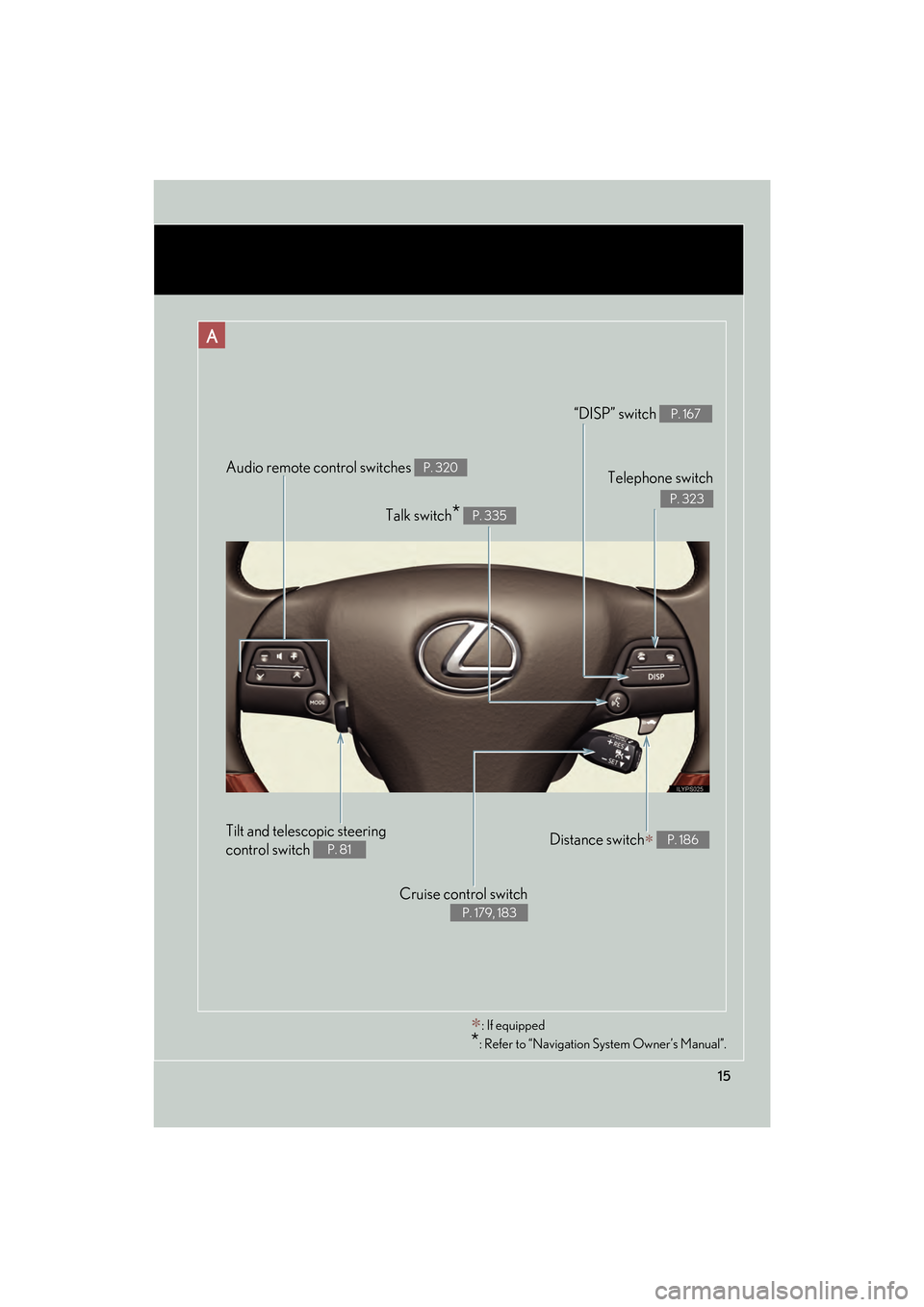
Audio remote control switches P. 320
Cruise control switch
P. 179, 183
Telephone switch
P. 323
“DISP” switch P. 167
Distance switch∗ P. 186
Talk switch* P. 335
∗: If equipped
*: Refer to “Navigation System Owner’s Manual”.
A
Tilt and telescopic steering
control switch
P. 81
GS450h_HV_U.book Page 15 Monday, April 27, 2009 10:10 AM
Page 20 of 622
19
GS_HV_U (OM30B44U)
April 27, 2009 10:09 am
Installation of a mobile two-way radio system
As the installation of a mobile two-way radio system in your vehicle could affect
electronic systems such as the hybrid system, multiport fuel injection system/
sequential multiport fuel injection system, dynamic radar cruise control system,
cruise control system, anti-lock brake system, vehicle dynamics integrated manage-
ment, SRS airbag system and seat belt pretensioner system, be sure to check with
your Lexus dealer for precautionary measures or special instructions regarding
installation.
High voltage parts and cables on the hybrid vehicles emit approximately the same
amount of electromagnetic waves as the conventional gasoline powered vehicles or
home electronic appliances despite of their electromagnetic shielding.
Unwanted noise may occur in the reception of the mobile two-way radio.
Scrapping of your Lexus
The SRS airbag and seat belt pretensioner devices in your Lexus contain explosive
chemicals. If the vehicle is scrapped with the airbags and seat belt pretensioners left
as they are, this may cause an accident such as fire. Be sure to have the systems of
the SRS airbag and seat belt pretensioner removed and disposed of by a qualified
service shop or by your Lexus dealer before you scrap your vehicle.
Perchlorate Material
Special handling may apply, See www.dtsc.ca.gov/hazardouswaste/perchlorate.
Your vehicle has components that may contain perchlorate. These components may
include airbag, seat belt pretensioners, and wireless remote control batteries.
GS450h_HV_U.book Page 19 Monday, April 27, 2009 10:10 AM
Page 24 of 622
Before driving1
23
GS_HV_U (OM30B44U)
April 27, 2009 10:09 am
1-1. Hybrid systemHybrid system ............................ 24
1-2. Key information Keys ............................................... 35
1-3. Opening, closing and locking the doors and trunk
Smart access system with push-button start ........... 39
Wireless remote control .......... 51
Doors ............................................ 54
Trunk ............................................. 59
1-4. Adjustable components (seats, mirrors,
steering wheel)
Front seats ................................... 64
Driving position memory system ........................................ 66
Head restraints .......................... 70
Seat belts ..................................... 74
Steering wheel ............................ 81
Inside rear view mirror ........... 82
Outside rear view mirrors ..... 83 1-5. Opening and closing
the windows and moon roof
Power windows .......................... 85
Moon roof ................................... 88
1-6. Refueling Opening the fuel tank cap ...... 91
1-7. Theft deterrent system Immobilizer system .................. 96
Alarm............................................ 98
Theft prevention labels (U.S.A.).................................... 100
1-8. Safety information Correct driving posture ........ 101
SRS airbags .............................. 103
Front passenger occupant classification system............. 115
Child restraint systems .......... 121
Installing child restraints....... 125
GS450h_HV_U.book Page 23 Monday, April 27, 2009 10:10 AM
Page 36 of 622

35
1
Before driving
GS_HV_U (OM30B44U)
April 27, 2009 10:09 am
1-2. Key information
Keys
The following keys are provided with the vehicle.
Electronic keys
• Operating the smart accesssystem with push-button start
(→ P. 3 9 )
• Operating the wireless remote control function
(→ P. 5 1 )
Mechanical keys
Key number plate
■ Card key (if equipped)
Electronic key
Operating the smart access sys-
tem with push-button start
(→ P. 3 9 )
Mechanical key
The card key comes with an information card that includes instructions
for use. Lexus recommends that you carry the information card with
the card key.
GS450h_HV_U.book Page 35 Monday, April 27, 2009 10:10 AM
Page 44 of 622
43
1-3. Opening, closing and locking the doors and trunk
1
Before driving
GS_HV_U (OM30B44U)
April 27, 2009 10:09 am
■Operation signals
●Doors: A buzzer sounds and the emergency flashers flash to indicate that the
doors have been locked/unlocked. (Locked: Once; Unlocked: Twice)
●Windows and moon roof: A buzzer sounds when the windows and moon roof
begin to close.
■Conditions affecting operation
The smart access system with push-button start uses weak radio waves. In the fol-
lowing situations, the communication between the electronic key and the vehicle
may be affected, preventing the smart access system with push-button start. Wire-
less remote control, and immobilizer system from operating properly:
(Way of coping: →P. 5 5 0 )
●When the electronic key battery is depleted
●Near a TV tower, electric power plant, gas station, radio station, large display,
airport or other facility that generates strong radio waves or electrical noise
●When carrying a portable radio, cellular phone, cordless phone or other wire-
less communication devices
●When the electronic key is in contact with, or is covered by the following metal-
lic objects
• Cards to which aluminum foil is attached
• Cigarette boxes that have aluminum foil inside
• Metallic wallets or bags
•Coins
• Hand warmers made of metal
• Media such as CDs and DVDs
●When multiple electronic keys are in the vicinity
●When other wireless keys (that emit radio waves) are being used nearby
●When carrying or using the electronic key together with the following devices
that emit radio waves
• Another vehicle’s electronic key or a wireless key that emits radio waves
• Personal computers or personal digital assistants (PDAs)
• Digital audio players
• Portable game systems
●If window tint with a metallic content or metallic objects are attached to the rear
window
GS450h_HV_U.book Page 43 Monday, April 27, 2009 10:10 AM
Page 45 of 622

44
1-3. Opening, closing and locking the doors and trunk
GS_HV_U (OM30B44U)
April 27, 2009 10:09 am
■Switching the door unlock function
It is possible to set which doors the entry function unlocks using the wireless remote
control. Turn the “POWER” switch OFF.
When the indicator light on the key surface is not on, press and
hold , , or for approximately 5 seconds while pressing and
holding .
The setting changes each time an operation is performed, as shown below. (When
changing the setting continuously, release the buttons, wait for at least 5 seconds,
and repeat step 2.)
STEP1
STEP2
Multi-information displayUnlocking doorsBeep
Hold the driver’s door handle
to unlock only the driver’s
door
Exterior: Beeps 3 times
Interior: Rings once
Hold a passenger’s door han-
dle to unlock all the doors
Hold the door handle to
unlock the front and rear
doors on your sideExterior: Beeps 4 times
Interior: Rings once
Hold the door handle to
unlock the doorExterior: Beeps once
Interior: Rings once
Hold a door handle to unlock
all doorsExterior: Beeps twice
Interior: Rings once
GS450h_HV_U.book Page 44 Monday, April 27, 2009 10:10 AM
Page 46 of 622

45
1-3. Opening, closing and locking the doors and trunk
1
Before driving
GS_HV_U (OM30B44U)
April 27, 2009 10:09 am
Unlock the doors using the wireless remote control and open one of the
doors.
If a door is not opened within 60 seconds after is pressed, the doors
will be locked again and the alarm will automatically be set.
In case that the alarm is triggered, immediately stop the alarm. (→P. 9 8 )
■Battery-saving function
In the following circumstances, the entry function is disabled in order to prevent the
vehicle and electronic key batteries from discharging.
●When the entry function has not been used for a month or more
●When the electronic key has been left within approximately 3 ft. (1 m) of the
vehicle for 10 minutes or more
The system will resume operation when...
●The vehicle is locked using the door handle lock switch
●The vehicle is locked/unlocked using the wireless remote control function
( → P. 51) or the mechanical key ( →P. 5 5 0 )
■Electronic key battery depletion
●The standard battery life is 1 to 2 years. (The card key battery life is about a year
and a half.)
●The battery becomes depleted even if the electronic key is not used because
the key always transmits radio waves. If the smart access system with push-but-
ton start or the wireless remote control does not operate, or the detection area
becomes smaller, the battery may be depleted. Replace the battery when nec-
essary.
( → P. 4 7 2 )
●To avoid serious deterioration, do not leave the electronic key within 3 ft. (1 m) of
the following electrical appliances that produce a magnetic field:
•TVs
• Personal computers
• Cellular phones, cordless phones and battery chargers
• Recharging cellular phones or cordless phones
• Glass top ranges
• Table lamps
STEP3
GS450h_HV_U.book Page 45 Monday, April 27, 2009 10:10 AM
Page 48 of 622

47
1-3. Opening, closing and locking the doors and trunk
1
Before driving
GS_HV_U (OM30B44U)
April 27, 2009 10:09 am
●Gripping the door handle when wearing a glove may not unlock the door.
●If the wireless remote control is used to lock the doors when the electronic key
is near the vehicle, there is a possibility that the door may not be unlocked by the
smart access system with push-button start. (Use the wireless remote control to
unlock the doors.)
●A sudden approach to the effective range or door handle operation may pre-
vent the doors from being unlocked. In this case, return the door handle to the
original position and check that the doors unlock before pulling the door handle
again.
■When the vehicle is not driven for extended periods
To prevent theft of the vehicle, do not leave the electronic key within 6 ft. (2 m) of
the vehicle.
■Security feature
If a door is not opened within approximately 60 seconds after the vehicle is
unlocked, the theft deterrent system au tomatically locks the vehicle again.
■Alarms and warning indicators
A combination of exterior and interior alarms as well as warnings displayed on the
multi-information display are used to prevent theft of the vehicle and unforeseeable
accidents resulting from erroneous operation. Take appropriate measures in
response to any warning indications on the multi-information display. ( →P. 5 3 2 )
The following table describes circumstances and correction procedures when only
alarms are sounded.
GS450h_HV_U.book Page 47 Monday, April 27, 2009 10:10 AM
Page 52 of 622
51
1
1-3. Opening, closing and locking the doors and trunk
Before driving
GS_HV_U (OM30B44U)
April 27, 2009 10:09 am
Wireless remote control
■Operation signals
●Doors: A buzzer sounds and the emergency flashers flash to indicate that the
doors have been locked/unlocked. (Locked: Once; Unlocked: Twice)
●Trunk: A buzzer sounds to indicate that the trunk has been unlocked.
●Windows and moon roof: A buzzer sounds to indicate that the windows and
moon roof are opening.
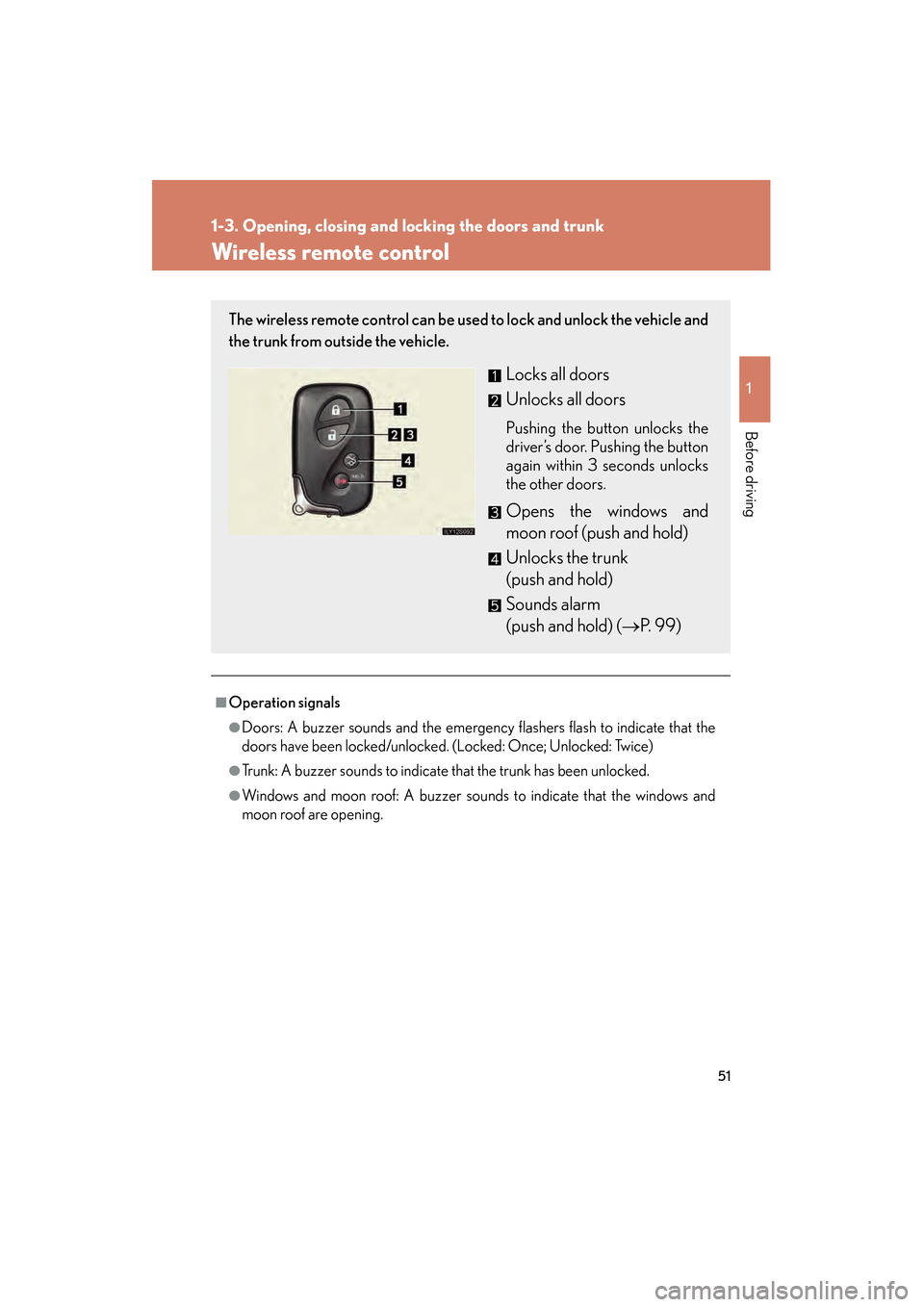
The wireless remote control can be used to lock and unlock the vehicle and
the trunk from outside the vehicle.
Locks all doors
Unlocks all doors
Pushing the button unlocks the
driver’s door. Pushing the button
again within 3 seconds unlocks
the other doors.
Opens the windows and
moon roof (push and hold)
Unlocks the trunk
(push and hold)
Sounds alarm
(push and hold) (→P. 99)
GS450h_HV_U.book Page 51 Monday, April 27, 2009 10:10 AM