fuel Lexus GS450h 2013 Navigation Manual
[x] Cancel search | Manufacturer: LEXUS, Model Year: 2013, Model line: GS450h, Model: Lexus GS450h 2013Pages: 100, PDF Size: 4.99 MB
Page 2 of 100
1
GS450h_QG_U (OM30D12U)
The Quick Guide is not intended as a substitute for your Owner’s
Manual. We strongly encourage you to review the Owner’s
Manual and supplementary manuals so you will have a better
understanding of your vehicle’ s capabilities and limitations.
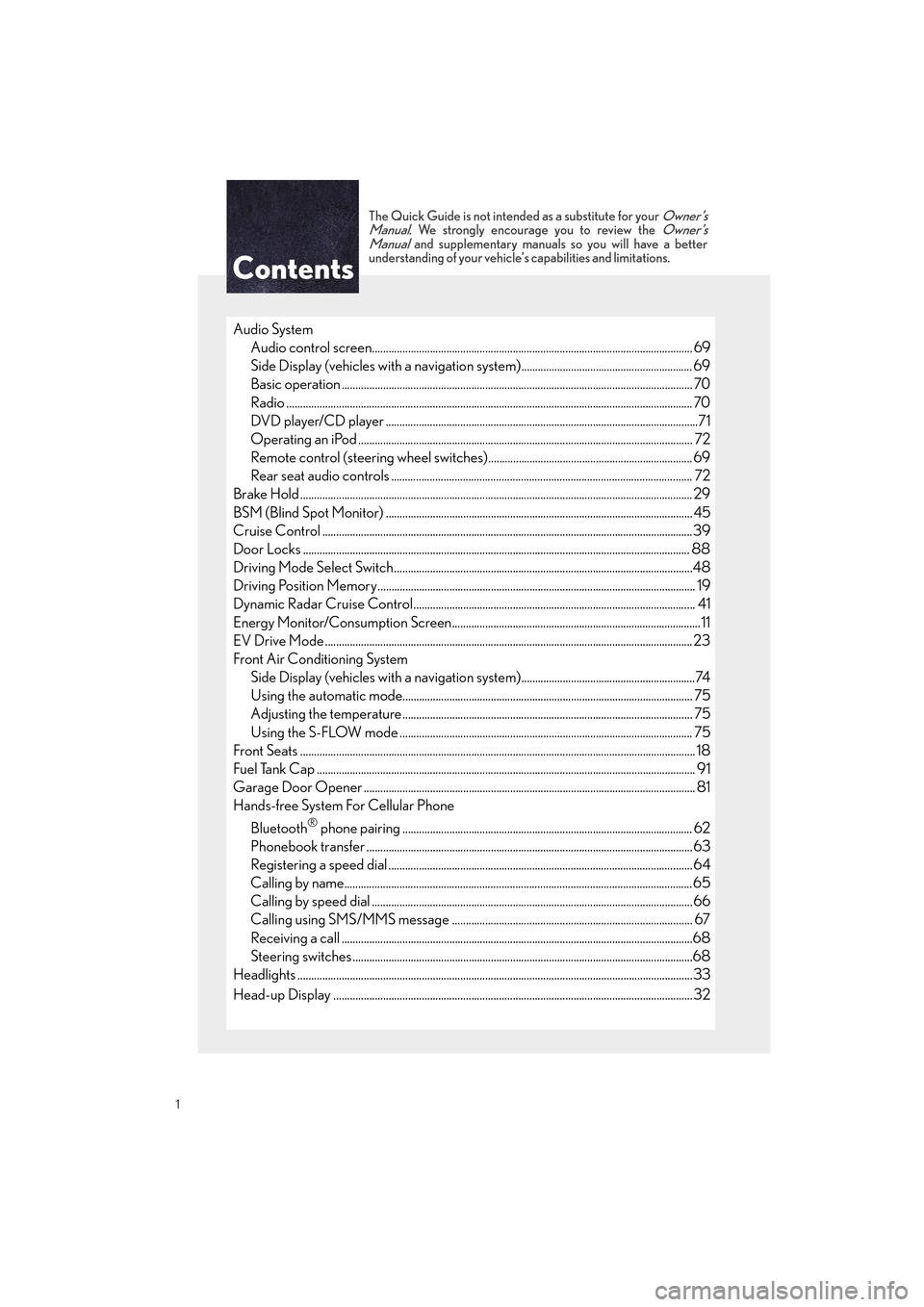
Audio System
Audio control screen........................................................................................................... ......... 69
Side Display (vehicles with a navigation system).............................................................. 69
Basic operation ................................................................................................................ ............... 70
Radio ................................................................................................................................................... 70
DVD player/CD player ........................................................................................................... ......71
Operating an iPod .............................................................................................................. ........... 72
Remote control (steering wheel switches).......................................................................... 69
Rear seat audio controls ....................................................................................................... ...... 72
Brake Hold .............................................................................................................................................. 29
BSM (Blind Spot Monitor) ....................................................................................................... ........ 45
Cruise Control ................................................................................................................. .....................39
Door Locks ............................................................................................................................................ 88
Driving Mode Select Switch..................................................................................................... .......48
Driving Position Memory........................................................................................................ ........... 19
Dynamic Radar Cruise Control................................................................................................... ... 41
Energy Monitor/Consumption Screen..........................................................................................11
EV Drive Mode ..................................................................................................................................... 23
Front Air Conditioning System Side Display (vehicles with a navigation system)...............................................................74
Using the automatic mode....................................................................................................... .. 75
Adjusting the temperature...................................................................................................... ... 75
Using the S-FLOW mode .......................................................................................................... 75
Front Seats .................................................................................................................... ........................... 18
Fuel Tank Cap .................................................................................................................. ....................... 91
Garage Door Opener ............................................................................................................. ........... 81
Hands-free System For Cellular Phone
Bluetooth
® phone pairing ......................................................................................................... 62
Phonebook transfer ............................................................................................................. .........63
Registering a speed dial ....................................................................................................... ....... 64
Calling by name.............................................................................................................................. 65
Calling by speed dial .......................................................................................................... .......... 66
Calling using SMS/MMS message ....................................................................................... 67
Receiving a call ............................................................................................................... ................68
Steering switches .............................................................................................................. .............68
Headlights ..................................................................................................................... ..........................33
Head-up Display ................................................................................................................ .................. 32
GS450h_QG_U.book Page 1 Friday, January 20, 2012 5:54 PM
Page 10 of 100
9
GS450h_QG_U (OM30D12U)
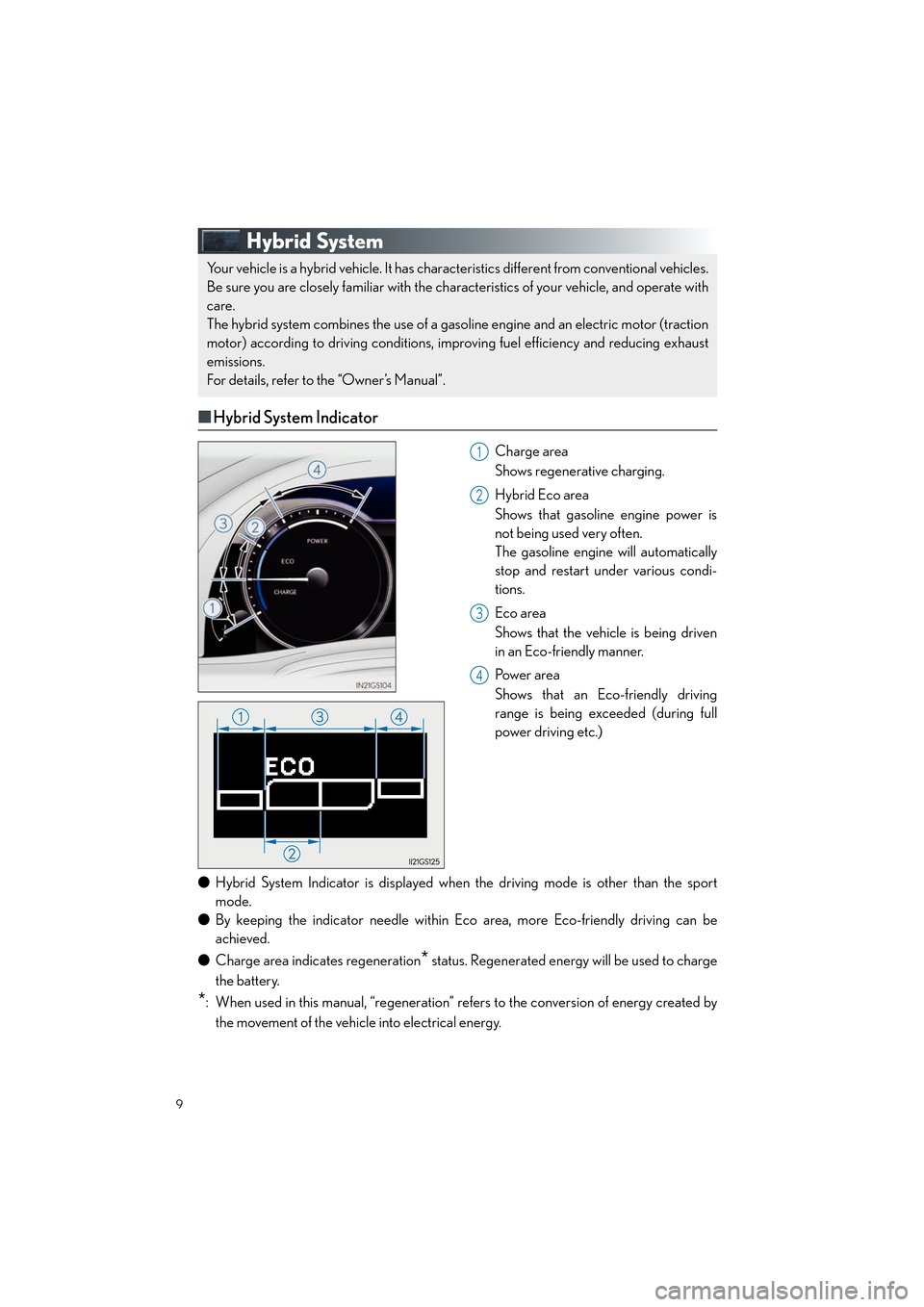
Hybrid System
■Hybrid System Indicator
Charge area
Shows regenerative charging.
Hybrid Eco area
Shows that gasoline engine power is
not being used very often.
The gasoline engine will automatically
stop and restart under various condi-
tions.
Eco area
Shows that the vehicle is being driven
in an Eco-friendly manner.
Pow e r a r e a
Shows that an Eco-friendly driving
range is being exceeded (during full
power driving etc.)
● Hybrid System Indicator is displayed when the driving mode is other than the sport
mode.
● By keeping the indicator need le within Eco area, more Eco-friendly driving can be
achieved.
● Charge area indicates regeneration
* status. Regenerated energy will be used to charge
the battery.
*: When used in this manual, “regeneration” refers to the conversion of energy created by the movement of the vehicle into electrical energy.
Your vehicle is a hybrid vehicle. It has characteristics different from conventional vehicles.
Be sure you are closely familiar with the char acteristics of your vehicle, and operate with
care.
The hybrid system combines the use of a gasoline engine and an electric motor (traction
motor) according to driving conditions, improving fuel efficiency and reducing exhaust
emissions.
For details, refer to the “Owner’s Manual”.
1
2
3
4
GS450h_QG_U.book Page 9 Friday, January 20, 2012 5:54 PM
Page 11 of 100

10
GS450h_QG_U (OM30D12U)
■Charging the hybrid battery (traction battery)
If the shift lever is in N, the hybrid battery (traction battery) will not be charged. Always put
the shift lever in P when the vehicle is stoppe d. When driving in heavy traffic, operate the
vehicle with the shift lever in D or S to avoid discharging the battery.
■ Regenerative braking
In the following situations, kinetic energy is converted to electric energy and deceleration
force can be obtained in conjunction with the recharging of the hybrid battery (traction bat-
tery).
● The accelerator pedal is released while driving with the shift position in D or S.
● The brake pedal is depressed while driving with the shift position in D or S.
■Sounds and vibrations specific to a hybrid vehicle
There may be no engine sounds or vibration even though the vehicle is able to move. For
safety, apply the parking brake and make sure to shift the shift position to P when parked.
The following sounds or vibrations may occur when the hybrid system is operating and are
not a malfunction:
● Motor sounds may be heard from the engine compartment.
● Sounds may be heard from the hybrid battery (traction battery) behind the rear seats
when the hybrid system starts or stops.
● Sounds from the hybrid system may be heard when the trunk lid is open.
● Sounds may be heard from the hybrid transmission when the hybrid system starts or
stops.
● Engine sounds may be heard when accelerating sharply.
● Sounds may be heard due to regenerative braking when the brake pedal is depressed.
● Vibration may be felt when the gasoline engine starts or stops.
● Cooling fan sounds may be heard from the air intake vents on the both sides of the rear
seatback.
■Running out of fuel
When the vehicle has run out of fuel and the hybrid system cannot be started, refuel the
vehicle with at least enough gasoline to make the low fuel level warning light go off. If there is
only a small amount of fuel, the hybrid system may not be able to start. (The minimum
amount of fuel to add to make the low fuel level warning light go out is about 2.6 gal. [10.0 L,
2.2 Imp.gal.], when the vehicle is on a level surface. This value may vary when the vehicle is
on a slope.)
GS450h_QG_U.book Page 10 Friday, January 20, 2012 5:54 PM
Page 12 of 100

11
GS450h_QG_U (OM30D12U)
Energy Monitor/Consumption Screen
■Energy monitor
● How to display on the Remote Touch screen
Vehicles without a navigation system
Press the “MENU” button on the Remote Touch.
Select “Info” on the “Menu” screen.
If the “Trip Information” or “Past Record” screen is displayed, select “Energy”.
Vehicles with a navigation system
Press the “MENU” button on the Remote Touch.
Select “Info/Apps” on the “Menu” screen.
Select “Fuel Consumption” on the “Information” screen.
If the “Trip Information” or “Past Record” screen is displayed, select “Energy”.
The “Energy Monitor” screen can be displayed on the “Side Display”. For details, refer
to the “Navigation System Owner’s Manual”.
● How to display on the multi-information display
Press the “DISP” button on the steering wheel several times to select the energy monitor
display.
You can view the status of your hybrid system on the multi-information display and the
Remote Touch screen.
1
2
1
2
3
The flow of energy is displayed on the Remote Touch screen.
Amber: gasoline energy
Yellow: electrical energy
Light blue: energy recovery
A light blue arrow appears when regenerative braking
occurs.
The flow of energy is indicated by the movement of the arrows
on the multi-information display.
The displayed energy flow, battery level, etc. will change in response to the current driving
conditions.
Topic01_U.fm Page 11 Tuesday, January 24, 2012 9:59 AM
Page 13 of 100

12
GS450h_QG_U (OM30D12U)
■Consumption
Vehicles with a navigation system: The consumption screen can be displayed on the “Side
Display”. For details, refer to the “Navigation System Owner’s Manual”.
Vehicles without a navigation system
Press the “MENU” button on the Remote Touch, then select “Info” on the “Menu”
screen.
If the “Energy Monitor” screen is displayed, select “Fuel Consumption”.
Vehicles with a navigation system
Press the “MENU” button on the Remote Touch, then select “Info/Apps” on the “Menu”
screen.
Select “Fuel Consumption” on the “Information” screen.
If the “Energy Monitor” screen is displayed, select “Fuel Consumption”.
● Trip information
If the “Past Record” screen is displayed, select “Trip Information”.
Resetting the consumption data
Fuel consumption in the past 15 min-
utes
Regenerated energy in the past 15
minutes
Displays the average vehicle speed
since the hybrid system was started.
Displays the elapsed time since the
hybrid system was started.
Cruising range
● Pa s t re c o r d
If the “Trip Information” screen is displayed, select “Past Record”.
Updating the average fuel consump-
tion data
Resetting the past record data
Best recorded fuel consumption
Average fuel consumption
Previous fuel consumption record
1
2
1
2
3
1
2
3
4
5
6
1
2
3
4
5
GS450h_QG_U.book Page 12 Friday, January 20, 2012 5:54 PM
Page 26 of 100

25
GS450h_QG_U (OM30D12U)
■Shift position purpose
*1: To improve fuel efficiency and reduce noises, set the shift lever in the D position for nor-
mal driving.
*2: By selecting shift ranges using S mode, yo u can control accelerating forces and engine
braking forces.
■ Selecting shift ranges in the D position
To drive using temporary shift range selection, operate the “-” paddle shift switch. The shift
range can then be selected by operatin g the “-” and “+” paddle shift switches.
Upshifting
Downshifting
The selected shift range, from D1 to
D5, will be displayed in the meter.
To return to normal D position driving,
the “+” paddle shift switch must be held
down for a period of time.
Shift positionObjective or function
PParking the vehicle/starting the hybrid system
RReversing
NNeutral
DNormal driving*1
SS mode driving*2
1
2
Topic02_U.fm Page 25 Tuesday, January 24, 2012 10:01 AM
Page 31 of 100

30
GS450h_QG_U (OM30D12U)
Multi-information Display
■Display contents
● Trip information
• Energy monitor
• Outside temperature
• Current fuel consumption
• Average fuel consumption after refuel-
ing
• Average fuel consumption
• Average vehicle speed
• Driving range
• Tire inflation pressure (if equipped) (→ P. 5 1 )
● Drive monitor
• Outside temperature
• Average fuel consumption after refuel-
ing
• Driving range
● Intuitive parking assist display
* (if
equipped)
● Dynamic radar cruise control display
* (if
equipped)
● LKA (Lane-Keeping Assist) display
* (if
equipped)
● Wa r n i n g m e s s a g e s
*: Automatically displayed when the sys-
tem is used. Display can be switched by
pressing the “DISP” button.
The multi-information display presents the dr iver with a variety of driving-related data
including the current outside air temperature.
GS450h_QG_U.book Page 30 Friday, January 20, 2012 5:54 PM
Page 49 of 100
48
GS450h_QG_U (OM30D12U)
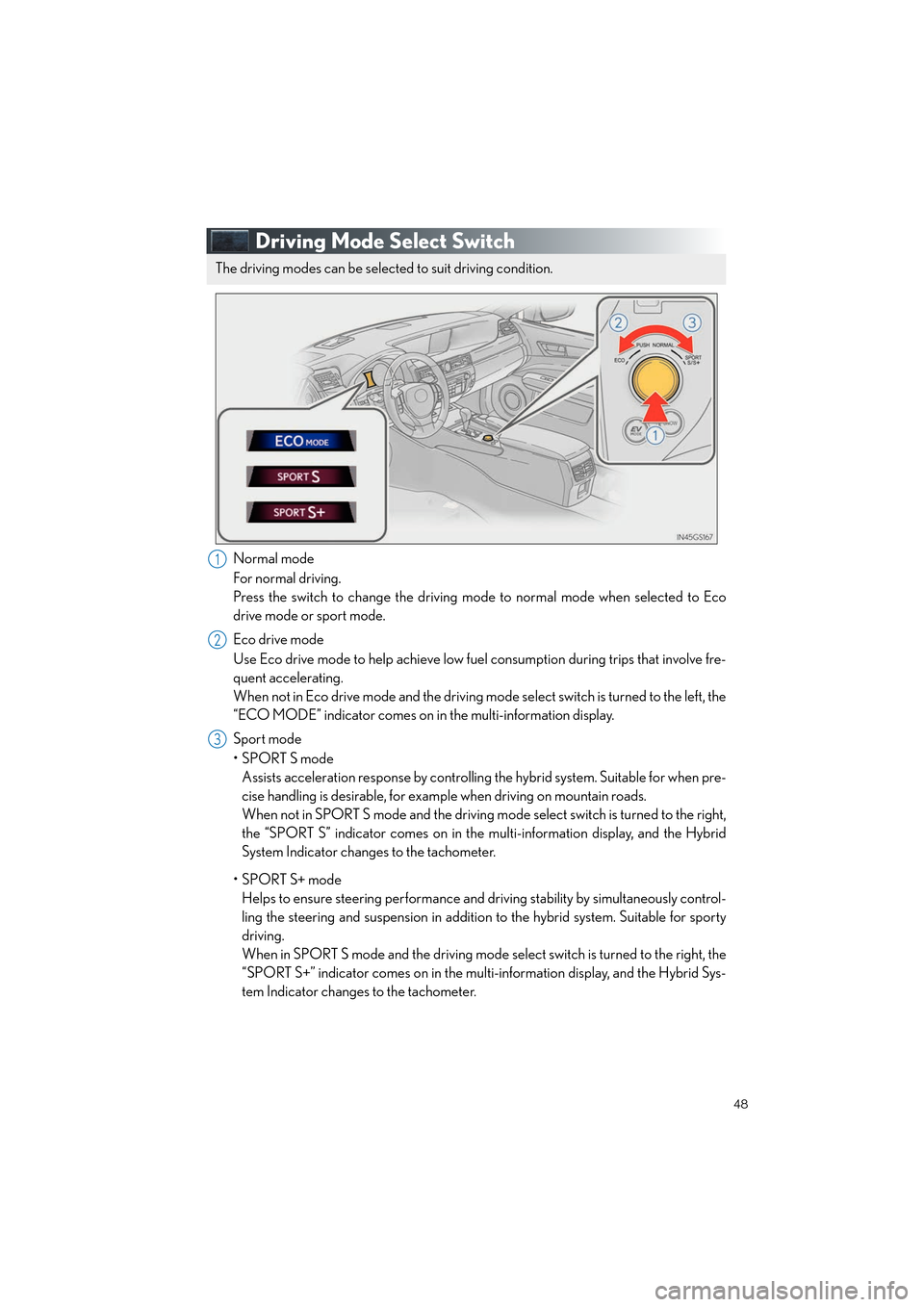
Driving Mode Select Switch
Normal mode
For normal driving.
Press the switch to change the driving mode to normal mode when selected to Eco
drive mode or sport mode.
Eco drive mode
Use Eco drive mode to help achieve low fuel consumption during trips that involve fre-
quent accelerating.
When not in Eco drive mode and the driving mode select switch is turned to the left, the
“ECO MODE” indicator comes on in the multi-information display.
Sport mode
•SPORT S mode Assists acceleration response by controllin g the hybrid system. Suitable for when pre-
cise handling is desirable, for exam ple when driving on mountain roads.
When not in SPORT S mode and the driving mode select switch is turned to the right,
the “SPORT S” indicator comes on in the multi-information display, and the Hybrid
System Indicator changes to the tachometer.
•SPORT S+ mode Helps to ensure steering performance and dr iving stability by simultaneously control-
ling the steering and suspension in addition to the hybrid system. Suitable for sporty
driving.
When in SPORT S mode and the driving mode se lect switch is turned to the right, the
“SPORT S+” indicator comes on in the mult i-information display, and the Hybrid Sys-
tem Indicator changes to the tachometer.
The driving modes can be select ed to suit driving condition.
1
2
3
Topic02_U.fm Page 48 Monday, January 30, 2012 1:27 PM
Page 81 of 100

80
GS450h_QG_U (OM30D12U)
Get Information (vehicles with a navigation system)
Select audio mode
*: Bluetooth is a registered trademark of Bluetooth SIG, Inc.
Climate/air conditioning system command
CommandAction
“Traffic”Displays the traffic incident list.
“Weather”Displays weather information.
“Sports Scores”Displays the sports list.
“Stock Quotes”Displays the stocks list.
“Fuel Prices”Displays the fuel prices list.
“Lexus Insider”Displays the Lexus insider list.
CommandAction
“Radio”, “AM”, “FM”, “Satellite
radio”, “Disc”, “Auxiliary”,
“Bluetooth
* audio”, “iPod”,
“USB audio”Change the audio mode.
“A u d i o o n ”Turns the audio system on.
“Audio off”Turns the audio system off.
CommandAction
“Automatic climate control”Turns air conditioning system on and off.
“Warmer”Turns temperature up.
“Cooler ”Tu r n s t e m p e r a t u r e d o w n .
“Select audio mode” and “Climate/air conditioning system command” are enable when
expanded voice commands are turned “On”. Refer to the “Owner’s Manual” and “Naviga-
tion System Owner’s Manual”.
GS450h_QG_U.book Page 80 Friday, January 20, 2012 5:54 PM
Page 85 of 100

84
GS450h_QG_U (OM30D12U)
■Services
Subscribers have the following Safety Connect services available:
● Automatic Collision Notification
*
In case of either airbag deployment or severe rear-end collision, the system is designed
to automatically call the response center. The responding agent receives the vehicle’s
location and attempts to speak with the vehicle occupants to assess the level of emer-
gency. If the occupants are unable to communicate, the agent automatically treats the
call as an emergency, contacts the nearest emergency services provider to describe the
situation, and requests that assistance be sent to the location.
*: U.S. Patent No. 7,508,298 B2
● Stolen Vehicle Location
If your vehicle is stolen, Safety Connect can work with local authorities to assist them in
locating and recovering the vehicle. After filing a police report, call the Safety Connect
response center at 1-800-25-LEXUS (1-800-255-3987) and follow the prompts for
Safety Connect to initiate this service.
In addition to assisting law enforcement with recovery of a stolen vehicle, Safety-Con-
nect-equipped vehicle location data may, under certain circumstances, be shared with
third parties to locate your vehicle. Further information is available at Lexus.com.
● Emergency Assistance Button (SOS)
In the event of an emergency on the road, push the “SOS” button to reach the Safety
Connect response center. The answering agent will determine your vehicle’s location,
assess the emergency, and dispatch the necessary assistance required. If you accidentally press the “SOS” button, tell the response-center agent that you are
not experiencing an emergency.
● Enhanced Roadside Assistance
Enhanced Roadside Assistance adds GPS data to the already included warranty-based
Lexus roadside service.
Subscribers can press the “SOS” button to reach a Safety Connect response-center
agent, who can help with a wide range of needs, such as: towing, flat tire, fuel delivery, etc.
For a description of the Roadside Assistance services and their limitations, please see the
Safety Connect Terms and Conditions, which are available at Lexus.com.
■ Subscription
After you have signed the Telematics Subscription Service Agreement and are enrolled,
you can begin receiving services.
A variety of subscription terms is available for purchase. Contact your Lexus dealer, call 1-
800-25-LEXUS (1-800-255-3987) or push the “SOS” button in your vehicle for further
subscription details.
GS450h_QG_U.book Page 84 Friday, January 20, 2012 5:54 PM