phone Lexus GS450h 2013 Navigation Manual
[x] Cancel search | Manufacturer: LEXUS, Model Year: 2013, Model line: GS450h, Model: Lexus GS450h 2013Pages: 100, PDF Size: 4.99 MB
Page 2 of 100
1
GS450h_QG_U (OM30D12U)
The Quick Guide is not intended as a substitute for your Owner’s
Manual. We strongly encourage you to review the Owner’s
Manual and supplementary manuals so you will have a better
understanding of your vehicle’ s capabilities and limitations.
Audio System
Audio control screen........................................................................................................... ......... 69
Side Display (vehicles with a navigation system).............................................................. 69
Basic operation ................................................................................................................ ............... 70
Radio ................................................................................................................................................... 70
DVD player/CD player ........................................................................................................... ......71
Operating an iPod .............................................................................................................. ........... 72
Remote control (steering wheel switches).......................................................................... 69
Rear seat audio controls ....................................................................................................... ...... 72
Brake Hold .............................................................................................................................................. 29
BSM (Blind Spot Monitor) ....................................................................................................... ........ 45
Cruise Control ................................................................................................................. .....................39
Door Locks ............................................................................................................................................ 88
Driving Mode Select Switch..................................................................................................... .......48
Driving Position Memory........................................................................................................ ........... 19
Dynamic Radar Cruise Control................................................................................................... ... 41
Energy Monitor/Consumption Screen..........................................................................................11
EV Drive Mode ..................................................................................................................................... 23
Front Air Conditioning System Side Display (vehicles with a navigation system)...............................................................74
Using the automatic mode....................................................................................................... .. 75
Adjusting the temperature...................................................................................................... ... 75
Using the S-FLOW mode .......................................................................................................... 75
Front Seats .................................................................................................................... ........................... 18
Fuel Tank Cap .................................................................................................................. ....................... 91
Garage Door Opener ............................................................................................................. ........... 81
Hands-free System For Cellular Phone
Bluetooth
® phone pairing ......................................................................................................... 62
Phonebook transfer ............................................................................................................. .........63
Registering a speed dial ....................................................................................................... ....... 64
Calling by name.............................................................................................................................. 65
Calling by speed dial .......................................................................................................... .......... 66
Calling using SMS/MMS message ....................................................................................... 67
Receiving a call ............................................................................................................... ................68
Steering switches .............................................................................................................. .............68
Headlights ..................................................................................................................... ..........................33
Head-up Display ................................................................................................................ .................. 32
GS450h_QG_U.book Page 1 Friday, January 20, 2012 5:54 PM
Page 3 of 100
2
GS450h_QG_U (OM30D12U)
Hybrid System .......................................................................................................................................... 9
Hybrid Transmission ............................................................................................................ ................ 24
Intuitive Parking Assist ....................................................................................................... ................ 44
Keys............................................................................................................................................................. 14
Lexus Enform with Safety Connect ............................................................................................. 85
Lexus Night View ............................................................................................................... .................. 49
LKA (Lane-Keeping Assist)...................................................................................................... ....... 46
Moon Roof ...................................................................................................................... ....................... 90
Multi-information Display ...................................................................................................... .......... 30
Navigation System
Register home .................................................................................................................. ...............56
Destination input - Search by address .................................................................................. 57
Destination input - Search points of interest by name....................................................59
Destination input - Search points of in terest by category.............................................60
Destination input - Search points of in terest by telephone number .......................... 61
Parking Brake.................................................................................................................. .......................28
Portable Audio Device Ports.................................................................................................... ........ 81
Power (Ignition) Switch ........................................................................................................ ..............20
Power Windows ................................................................................................................................... 89
Rear Air Conditioning System
Front controller ............................................................................................................... .................76
Remote Touch ................................................................................................................... ..................... 52
Safety Connect ................................................................................................................. ................... 83
Seat Heaters/Seat Ventilators .................................................................................................. ...... 77
Smart Access System with Push-butto n Start........................................................................... 15
Theft Deterrent System ......................................................................................................... ............. 17
Tire Pressure Warning System ................................................................................................... ...... 51
Trunk .......................................................................................................................................................... 92
Turn Signal Lever .............................................................................................................. .................... 27
Voice Command System
Basic operation ................................................................................................................ ............... 78
Command list ................................................................................................................... ............... 79
Windshield Wipers and Washer ................................................................................................... .35
XM Services.................................................................................................................... ....................... 87
GS450h_QG_U.book Page 2 Friday, January 20, 2012 5:54 PM
Page 7 of 100
6
GS450h_QG_U (OM30D12U)
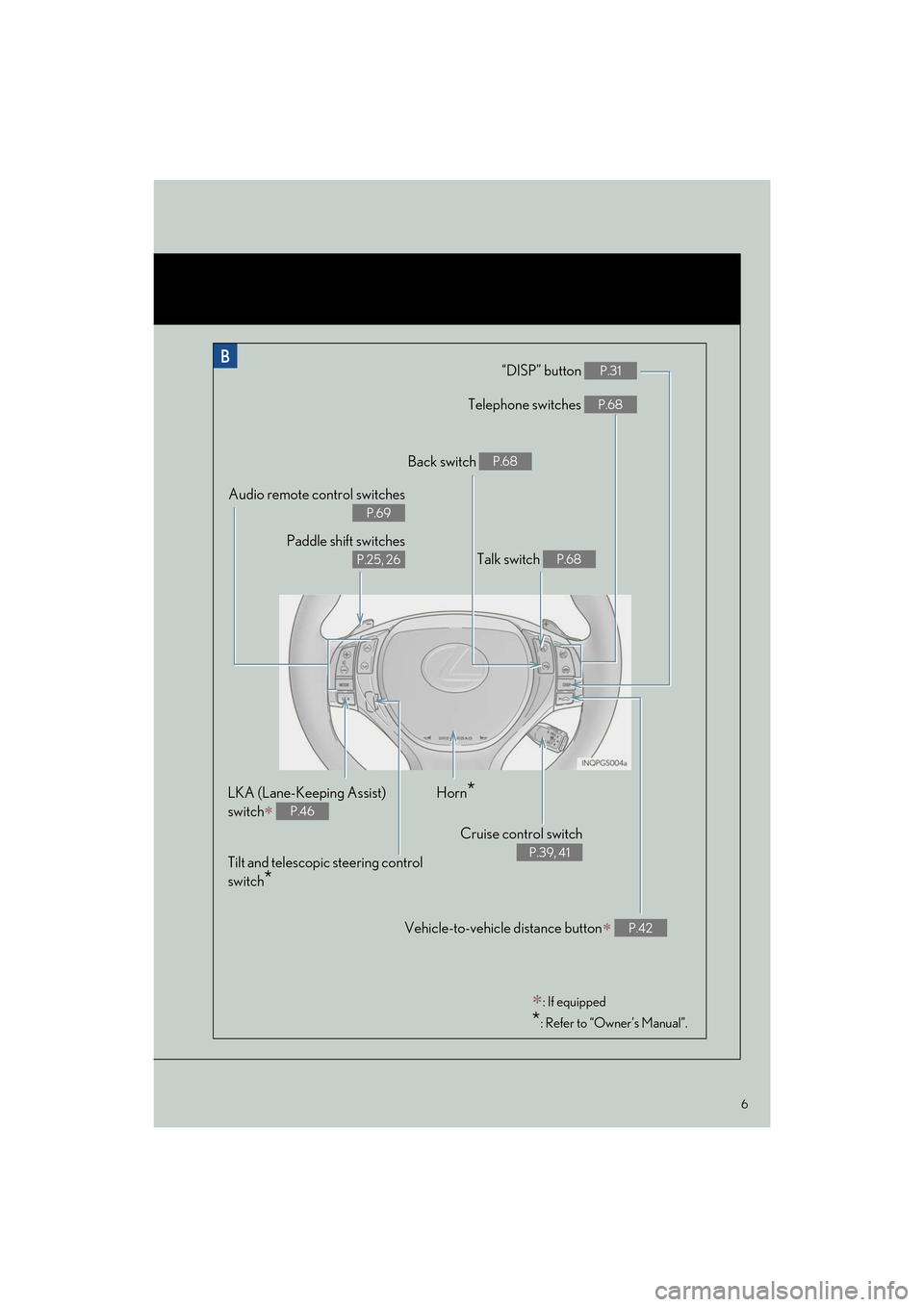
“DISP” button P.31
Telephone switches P.68
Vehicle-to-vehicle distance button∗ P.42
Back switch P.68
Talk switch P.68
Audio remote control switches
P.69
Paddle shift switches
P.25, 26
LKA (Lane-Keeping Assist)
switch
∗ P.46
Cruise control switch
P.39, 41
Horn*
Tilt and telescopic steering control
switch
*
∗: If equipped
*: Refer to “Owner’s Manual”.
Illust TOC_U.fm Page 6 Monday, January 30, 2012 1:18 PM
Page 54 of 100
53
GS450h_QG_U (OM30D12U)
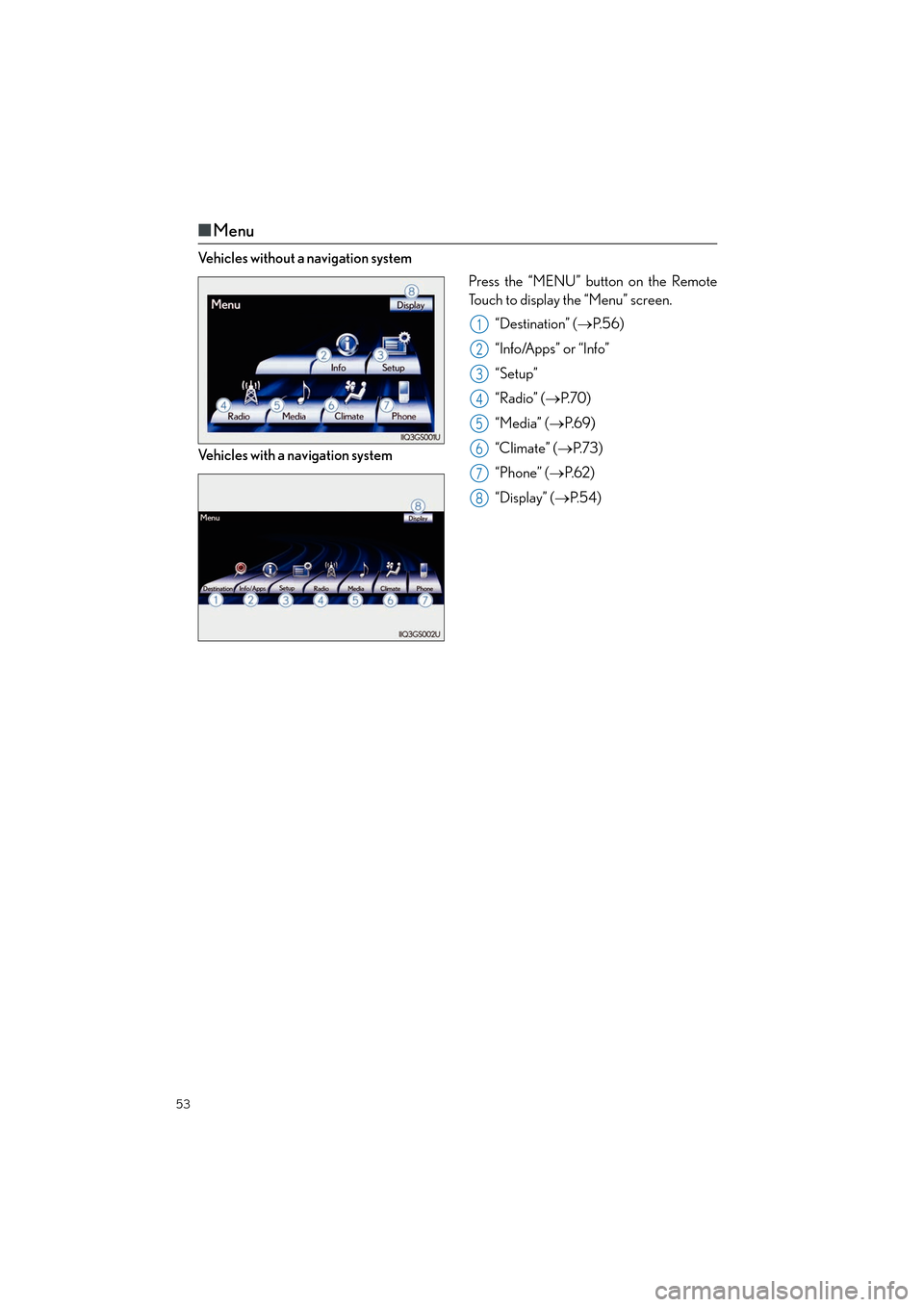
■Menu
Vehicles without a navigation system
Press the “MENU” button on the Remote
Touch to display the “Menu” screen.
“Destination” ( →P. 5 6 )
“Info/Apps” or “Info”
“Setup”
“Radio” ( →P. 7 0 )
“Media” ( →P. 6 9 )
“Climate” ( →P. 7 3 )
“Phone” ( →P. 6 2 )
“Display” ( →P. 5 4 )
Vehicles with a navigation system
1
2
3
4
5
6
7
8
Topic03_U.fm Page 53 Monday, January 30, 2012 1:28 PM
Page 62 of 100

61
GS450h_QG_U (OM30D12U)
■Destination input Search points of interest by telephone number
Press the “MENU” button on the
Remote Touch.
Please refer to page 52 for the Remote
To u c h o p e r a t i o n .
Select “Destination”.
Select “Point of Interest”.
Select “Phone #”.
Input a telephone number and select
“OK”.
Select “Go to”.
Select “OK”.21
2
3
4
5
6
7
3
4
5
GS450h_QG_U.book Page 61 Friday, January 20, 2012 5:54 PM
Page 63 of 100

62
GS450h_QG_U (OM30D12U)
Hands-free System For Cellular Phone
■Bluetooth® phone pairing
Compatible Bluetooth®-equipped phones can be connected to the vehicle, enabling
hands-free operation. Please refer to the cell ular phone manufacturer’s user guide for pair-
ing procedures, or go to “www.lexus.com/bluetooth
” for more phone information.
To use a Bluetooth
® phone, it is necessary
to first register it in the system.
Press the “MENU” button on the
Remote Touch.
Please refer to page 52 for the Remote
To u c h o p e r a t i o n .
Select “Phone”.
Select “Yes”.
Enter the passcode displayed on the
screen into the phone.
Refer to the cellular phone user’s man-
ual for cellular phone operation.
If a completion message is displayed,
registration is complete.2
1
2
3
4
5
3
4
GS450h_QG_U.book Page 62 Friday, January 20, 2012 5:54 PM
Page 64 of 100

63
GS450h_QG_U (OM30D12U)
■Phonebook transfer
Press the “MENU” button on the
Remote Touch.
Please refer to page 52 for the Remote
To u c h o p e r a t i o n .
Select “Setup”.
Select “Phone”.
Select “Phonebook”.
Select “Manage Contacts”.
Select “Transfer Contacts”.
Select “Update Contacts”.
Transfer the phonebook data to the
system using the cellular phone.
Refer to the cellular phone user’s man-
ual for cellular phone operation.21
2
3
4
5
6
7
8
3
6
8
Phonebook transfer may not be possible depending on phone model.
GS450h_QG_U.book Page 63 Friday, January 20, 2012 5:54 PM
Page 65 of 100

64
GS450h_QG_U (OM30D12U)
■Registering a speed dial
Press the “MENU” button on the
Remote Touch.
Please refer to page 52 for the Remote
To u c h o p e r a t i o n .
Select “Setup”.
Select “Phone”.
Select “Phonebook”.
Select “Manage Speed Dials”.
Select “New”.
Select the data you want to register.
Select the desired phone number.
Select the button you want to register
in.21
2
3
4
5
6
7
8
9
3
6
7
GS450h_QG_U.book Page 64 Friday, January 20, 2012 5:54 PM
Page 66 of 100

65
GS450h_QG_U (OM30D12U)
■Calling by name
You can call by saying a name registered in the phonebook. For setting the voice recogni-
tion, refer to the “Owner’s Manual” and “Navigation System Owner’s Manual”. Only when
English is selected as the system language ca n you call by saying a name registered in the
phonebook without registering any voice tags beforehand. (Names in the phonebook work
as voice tags.)
Press .
Follow the voice guidance and say
“Call
Follow the voice guidance and say a
contact name.
Follow the voice guidance and say
“Dial”.
11
2
3
4
3
: Pressing this switch turns the voice command system on. Say a command after thebeep.
GS450h_QG_U.book Page 65 Friday, January 20, 2012 5:54 PM
Page 67 of 100

66
GS450h_QG_U (OM30D12U)
■Calling by speed dial
Press the “MENU” button on the
Remote Touch.
Please refer to P.52 for the Remote
To u c h o p e r a t i o n .
Select “Phone”.
Select “Speed Dials”.
Select the desired number to call.21
2
3
4
3
4
GS450h_QG_U.book Page 66 Friday, January 20, 2012 5:54 PM