light Lexus GS450h 2013 Owner's Manual
[x] Cancel search | Manufacturer: LEXUS, Model Year: 2013, Model line: GS450h, Model: Lexus GS450h 2013Pages: 862, PDF Size: 19.06 MB
Page 465 of 862
464
GS450h_U (OM30D01U)
5-3. Using the audio system
NOTICE
■Player precautions
Failure to follow the precautions below may result in damage to the discs or the
player itself.
●Do not insert anything other than discs into the disc slot.
●Do not apply oil to the player.
●Store discs away from direct sunlight.
●Never try to disassemble any part of the player.
GS450h_U.book Page 464 Monday, January 23, 2012 10:20 AM
Page 474 of 862
GS450h_U (OM30D01U)
4735-3. Using the audio system
5
Interior features
■When using the Bluetooth® audio system
●In the following conditions, the system may not function.
• The portable player is turned off
• The portable player is not connected
• The portable player battery is low
●There may be a delay if phone connection is carried out during Bluetooth® audio
play.
●Depending on the type of portable player that is connected to the system, opera-
tion may differ slightly and certain functions may not be available.
■Bluetooth® antenna
The antenna is built into the instrument panel. If the portable player is behind the seat
or in the glove box or console box, or is touching or covered by metal objects, con-
nection status may deteriorate.
■Battery charge/signal status
This display may not correspond exactly with the portable player, and this system
does not have a charging function.
■About Bluetooth®
Bluetooth is a registered trademark of
Bluetooth SIG. Inc.
GS450h_U.book Page 473 Monday, January 23, 2012 10:20 AM
Page 507 of 862
506
GS450h_U (OM30D01U)
5-4. Using the hands-free phone system (for cellular phone)
Hands-free system (for cellular phone)
The hands-free system is a function that allows you to use your cellular
phone without touching it.
This system supports Bluetooth
® cellular phones. Bluetooth® is a wire-
less data system that allows a cellular phone to wirelessly connect to
the hands-free system and outgoing/incoming calls.
The illustrations of the hands-fr ee system screens shown here may
slightly vary depending on the type of the system.
Vehicles with a navigation system: The hands-free system function can
be displayed and operated on the “S ide Display”. For details, refer to
the “Navigation System Owner’s Manual”.
GS450h_U.book Page 506 Monday, January 23, 2012 10:20 AM
Page 572 of 862
571
GS450h_U (OM30D01U)5-5. Using the interior lights
5
Interior features
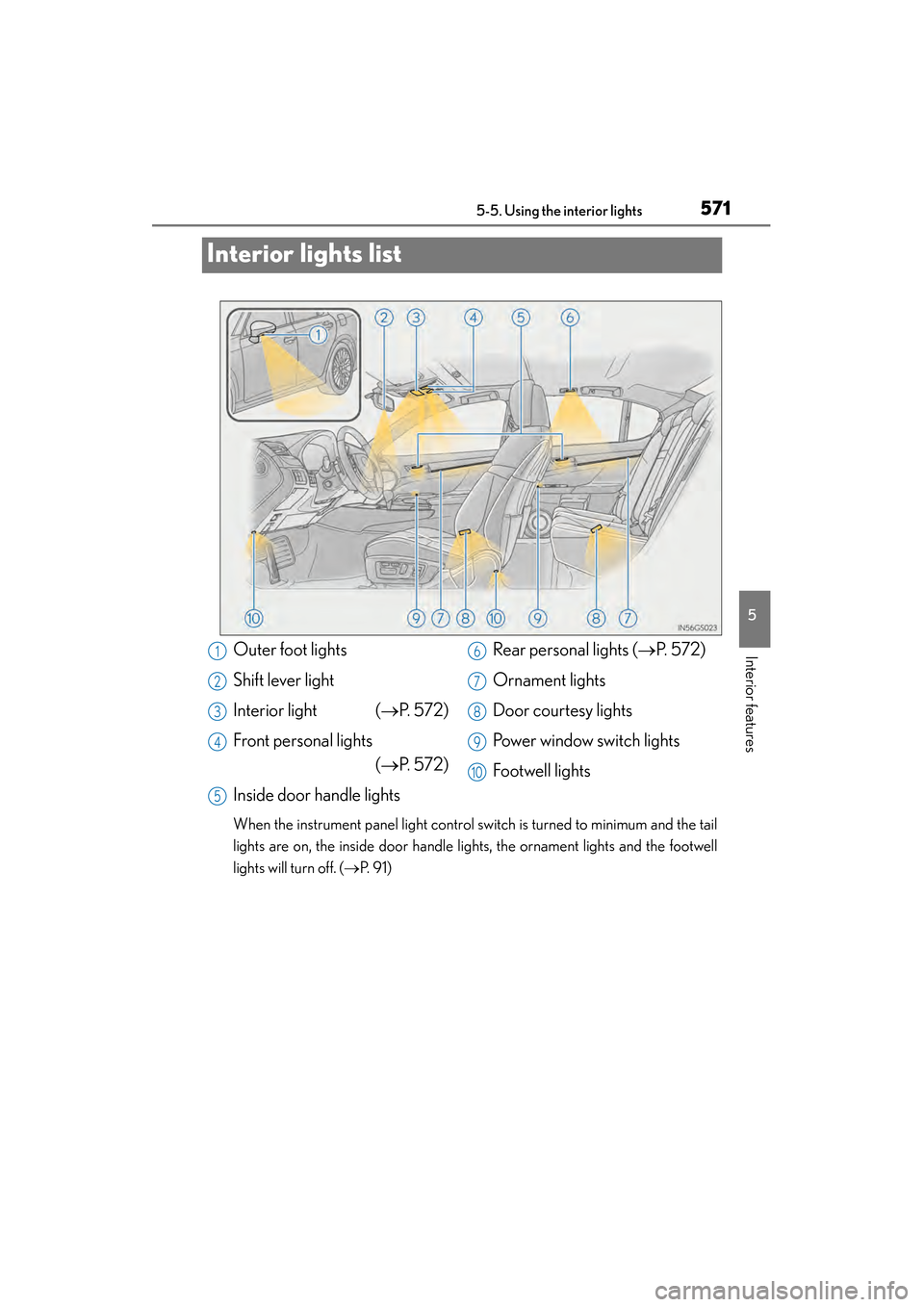
Interior lights list
When the instrument panel light control switch is turned to minimum and the tail
lights are on, the inside door handle lights, the ornament lights and the footwell
lights will turn off. ( →P. 9 1 )
Outer foot lights
Shift lever light
Interior light ( →P. 5 7 2 )
Front personal lights (→P. 5 7 2 )
Inside door handle lights Rear personal lights (
→P. 5 7 2 )
Ornament lights
Door courtesy lights
Power window switch lights
Footwell lights1
2
3
4
5
6
7
8
9
10
GS450h_U.book Page 571 Monday, January 23, 2012 10:20 AM
Page 573 of 862
572
GS450h_U (OM30D01U)
5-5. Using the interior lights
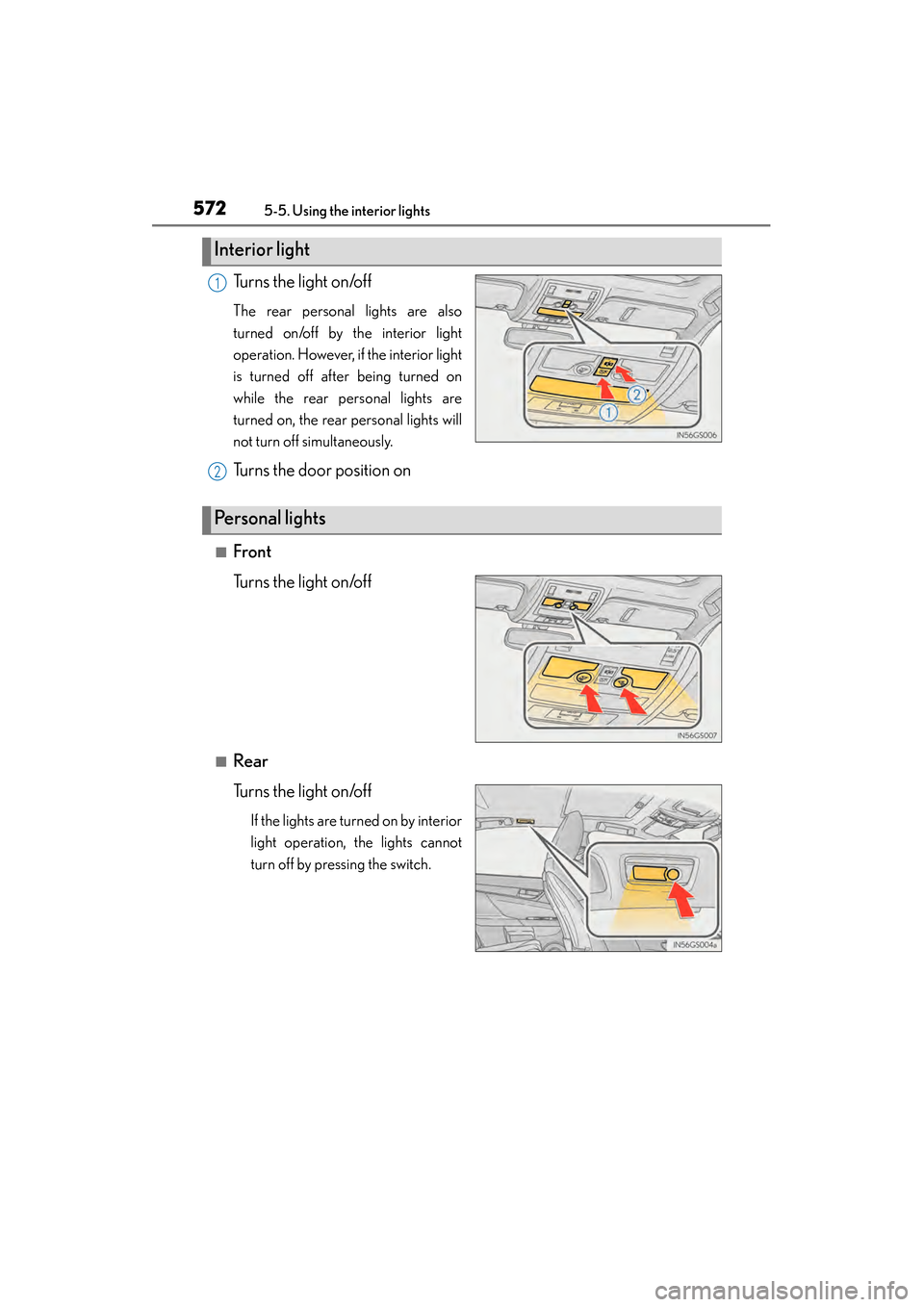
Turns the light on/off
The rear personal lights are also
turned on/off by the interior light
operation. However, if the interior light
is turned off after being turned on
while the rear personal lights are
turned on, the rear personal lights will
not turn off simultaneously.
Turns the door position on
■Front
Turns the light on/off
■Rear
Turns the light on/off
If the lights are turned on by interior
light operation, the lights cannot
turn off by pressing the switch.
Interior light
1
2
Personal lights
GS450h_U.book Page 572 Monday, January 23, 2012 10:20 AM
Page 574 of 862
GS450h_U (OM30D01U)
5735-5. Using the interior lights
5
Interior features
■Illuminated entry system
The lights automatically turn on/off according to power switch mode, the presence
of the electronic key, whether the doors are locked/unlocked, and whether the doors
are opened/closed.
■To prevent 12-volt battery discharge
If the interior lights remain on when the power switch is turned off, the lights will go
off automatically after 20 minutes.
■Customization
Setting (e.g. the time elapsed before lights turn off) can be changed.
(Customizable features: →P. 807)
NOTICE
■To prevent 12-volt battery discharge
Do not leave the lights on longer than necessary when the hybrid system is off.
GS450h_U.book Page 573 Monday, January 23, 2012 10:20 AM
Page 576 of 862
GS450h_U (OM30D01U)
5755-6. Using the storage features
5
Interior features
CAUTION
■Items that should not be left in the storage spaces
Do not leave glasses, lighters or spray cans in the storage spaces, as this may cause
the following when cabin temperature becomes high:
●Glasses may be deformed by heat or cracked if they come into contact with
other stored items.
●Lighters or spray cans may explode. If they come into contact with other stored
items, the lighter may catch fire or the spray can may release gas, causing a fire
hazard.
■When driving or when the storage compartments are not in use
Keep the lids closed.
In the event of sudden braking or sudden swerving, an accident may occur due to
an occupant being struck by an open lid or the items stored inside.
GS450h_U.book Page 575 Monday, January 23, 2012 10:20 AM
Page 577 of 862
576
GS450h_U (OM30D01U)
5-6. Using the storage features
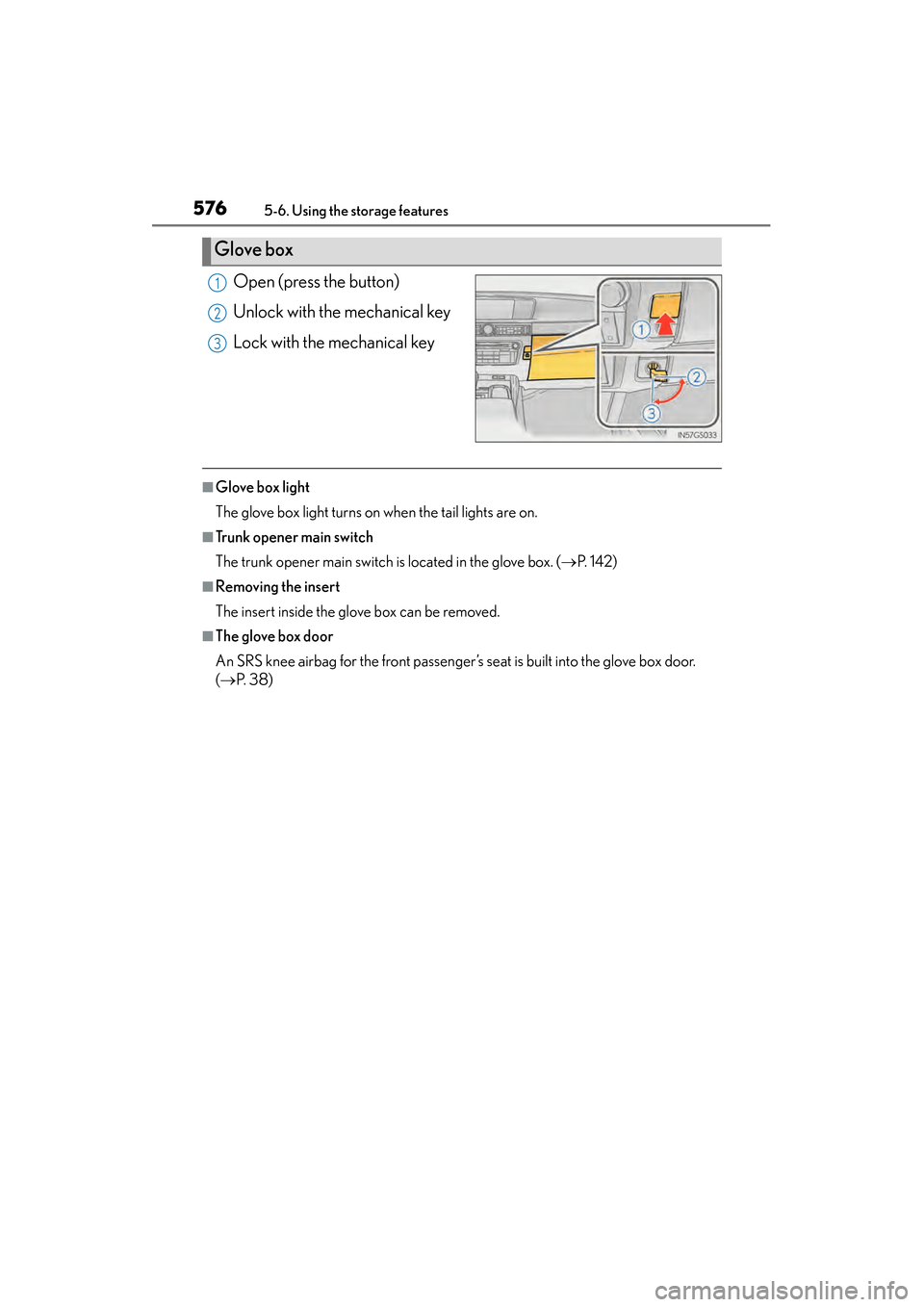
Open (press the button)
Unlock with the mechanical key
Lock with the mechanical key
■Glove box light
The glove box light turns on when the tail lights are on.
■Trunk opener main switch
The trunk opener main switch is located in the glove box. (→P. 1 4 2 )
■Removing the insert
The insert inside the glove box can be removed.
■The glove box door
An SRS knee airbag for the front passenger’s seat is built into the glove box door.
(→ P. 3 8 )
Glove box
1
2
3
GS450h_U.book Page 576 Monday, January 23, 2012 10:20 AM
Page 578 of 862
GS450h_U (OM30D01U)
5775-6. Using the storage features
5
Interior features
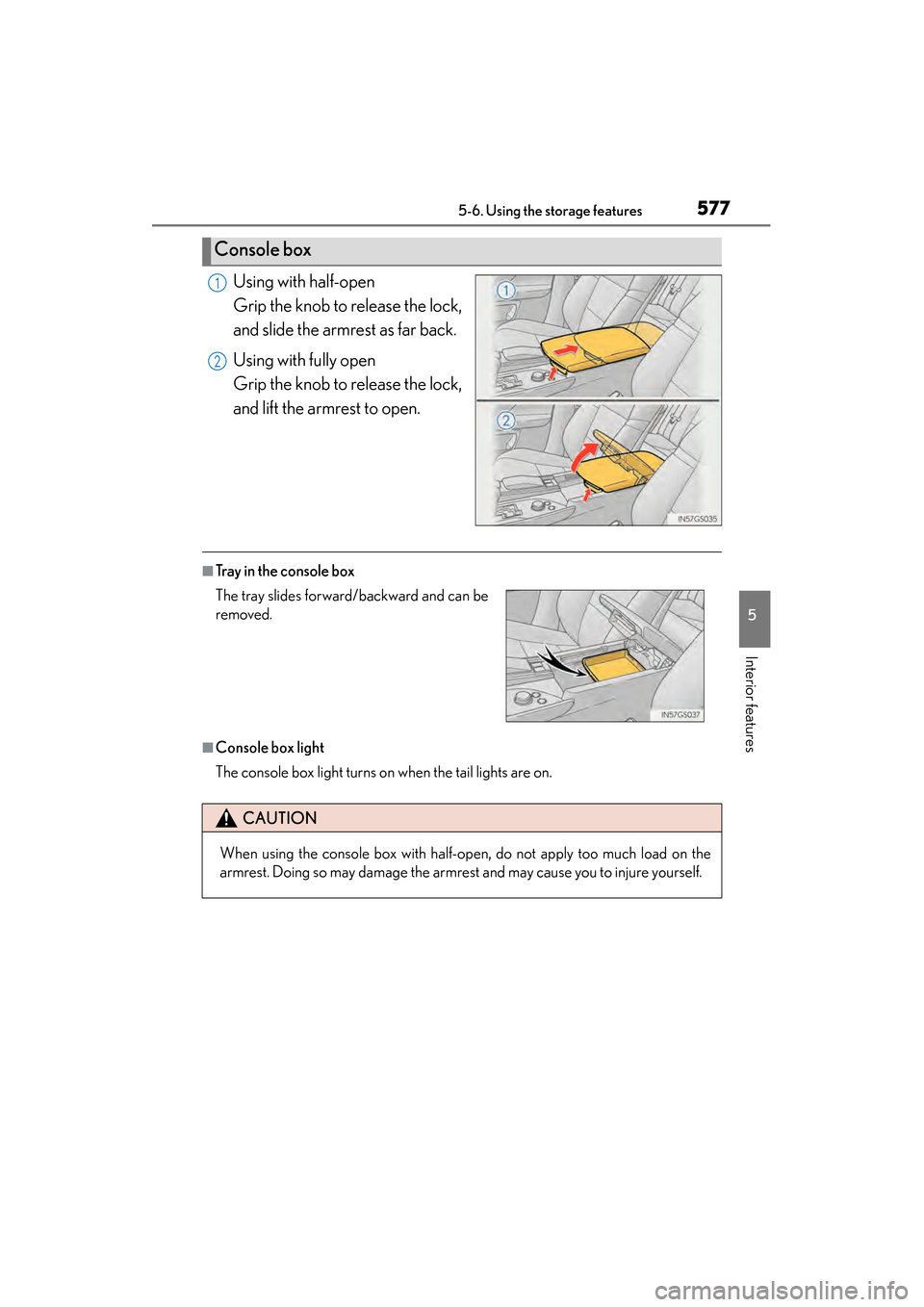
Using with half-open
Grip the knob to release the lock,
and slide the armrest as far back.
Using with fully open
Grip the knob to release the lock,
and lift the armrest to open.
■Tray in the console box
■Console box light
The console box light turns on when the tail lights are on.
Console box
1
2
The tray slides forward/backward and can be
removed.
CAUTION
When using the console box with half-open, do not apply too much load on the
armrest. Doing so may damage the armrest and may cause you to injure yourself.
GS450h_U.book Page 577 Monday, January 23, 2012 10:20 AM
Page 584 of 862
583
GS450h_U (OM30D01U)5-7. Other interior features
5
Interior features
Sun visors and vanity mirrors
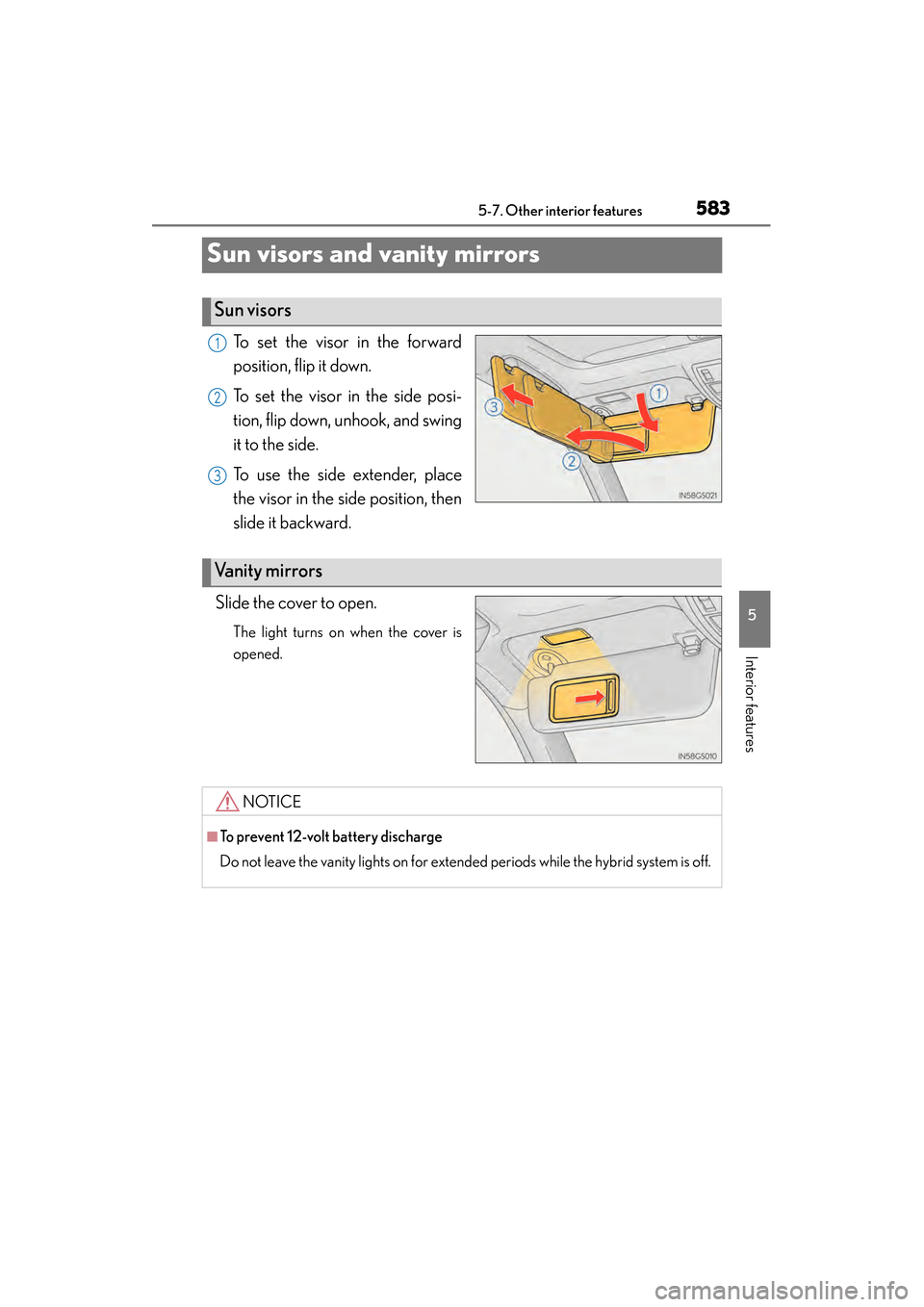
To set the visor in the forward
position, flip it down.
To set the visor in the side posi-
tion, flip down, unhook, and swing
it to the side.
To use the side extender, place
the visor in the side position, then
slide it backward.
Slide the cover to open.
The light turns on when the cover is
opened.
Sun visors
1
2
3
Va n i t y m i r r o r s
NOTICE
■To prevent 12-volt battery discharge
Do not leave the vanity lights on for extended periods while the hybrid system is off.
GS450h_U.book Page 583 Monday, January 23, 2012 10:20 AM