esp Lexus GS450h 2013 User Guide
[x] Cancel search | Manufacturer: LEXUS, Model Year: 2013, Model line: GS450h, Model: Lexus GS450h 2013Pages: 862, PDF Size: 19.06 MB
Page 102 of 862
GS450h_U (OM30D01U)
1012. Instrument cluster
2
Instrument cluster
CAUTION
■The information display at low temperatures
Allow the interior of the vehicle to warm up before using the liquid crystal informa-
tion display. At extremely low temperatures, the information display monitor may
respond slowly, and display changes may be delayed.
For example, there is a lag between the driver’s shifting and the new gear number
appearing on the display. This lag could cause the driver to downshift again, caus-
ing rapid and excessive engine braking and possibly an accident resulting in death
or injury.
■Cautions during setting up the display
As the hybrid system needs to be operating during setting up the display, ensure
that the vehicle is parked in a place with adequate ventilation. In a closed area such
as a garage, exhaust gases including harmful carbon monoxide (CO) may collect
and enter the vehicle. This may lead to death or a serious health hazard.
NOTICE
■During setting up the display
To prevent 12-volt battery discharge, ensure that the hybrid system is operating
while setting up the display features.
GS450h_U.book Page 101 Monday, January 23, 2012 10:20 AM
Page 109 of 862
108
GS450h_U (OM30D01U)
2. Instrument cluster
■Head-up display
●The head-up display may seem dark and hard to see when viewed through sun-
glasses, especially polarized sunglasses.
Adjust the brightness of the head-up display or remove your sunglasses.
●When the head-up display is turned off, it will remain off even if the power switch is
turned to ON mode after the power switch has been turned off.
■When the 12-volt battery is disconnected
The customize settings of the head-up display will be reset.
CAUTION
■Before using the head-up display
Check that the position and brightness of the head-up display image does not
interfere with safe driving. Incorrect adjustment of the image’s position or bright-
ness may obstruct the driver’s view and lead to an accident, resulting in death or
serious injury.
NOTICE
■To prevent damage to components
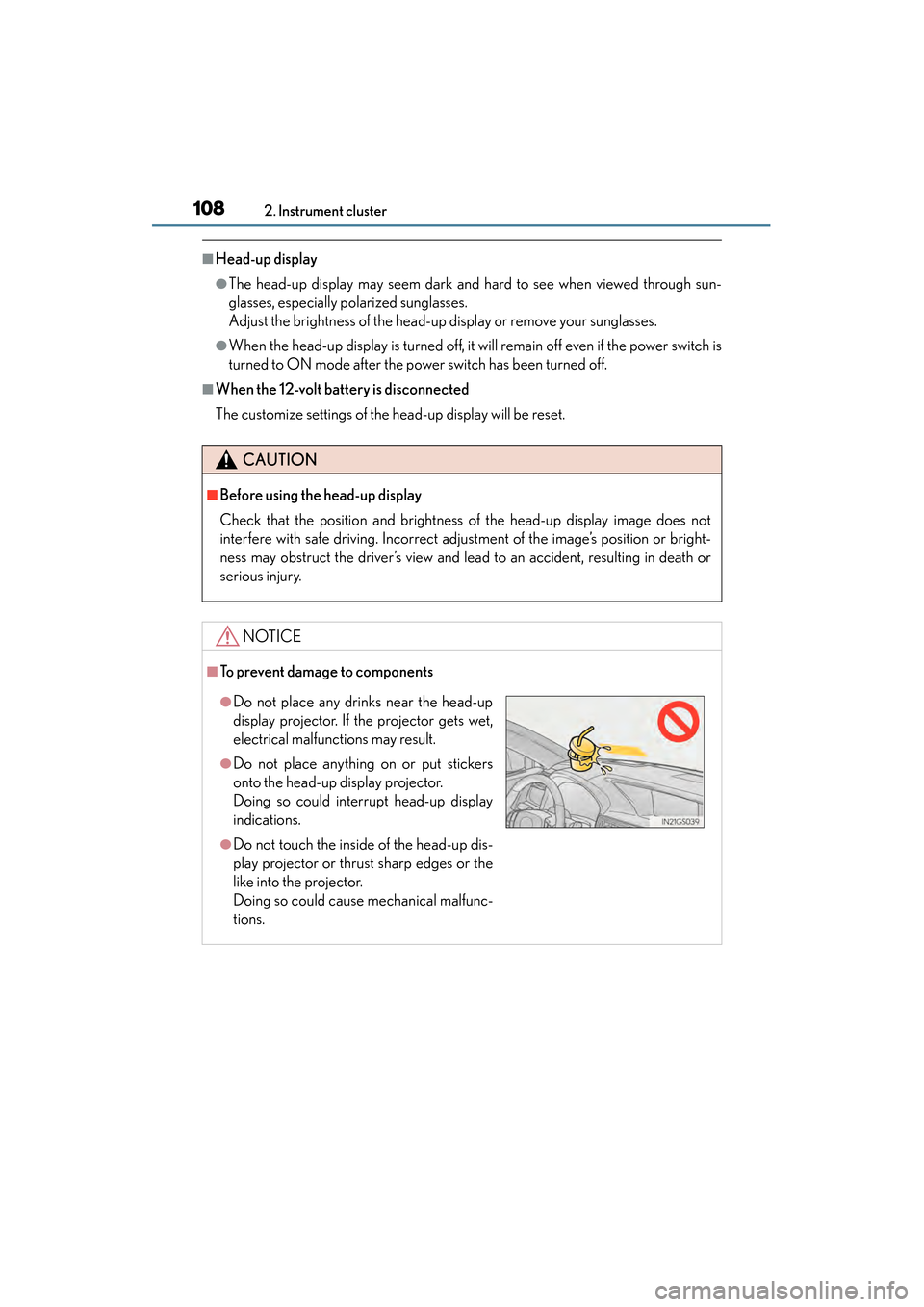
●Do not place any drinks near the head-up
display projector. If the projector gets wet,
electrical malfunctions may result.
●Do not place anything on or put stickers
onto the head-up display projector.
Doing so could interrupt head-up display
indications.
●Do not touch the inside of the head-up dis-
play projector or thrust sharp edges or the
like into the projector.
Doing so could cause mechanical malfunc-
tions.
GS450h_U.book Page 108 Monday, January 23, 2012 10:20 AM
Page 134 of 862
GS450h_U (OM30D01U)
1333-2. Opening, closing and locking the doors and trunk
3
Operation of each component
■Certification for the smart access system with push-button start
XFor vehicles sold in the U.S.A.
FCC ID: HYQ23AAB FCC ID: HYQ14FBA
FCC ID: HYQ14CBA
FCC ID: NI4TMLF10-3
NOTE:
This device complies with part 15 of the FCC Rules. Operation is subject to the fol-
lowing two conditions: (1) This device may not cause harmful interference, and (2)
this device must accept any interference received, including interference that may
cause undesired operation.
FCC WARNING:
Changes or modifications not expressly approved by the party responsible for com-
pliance could void the user’s authority to operate the equipment.
XFor vehicles sold in Canada
NOTE:
Operation is subject to the following two conditions: (1) this device may not cause
interference, and (2) this device must accept any interference, including interfer-
ence that may cause undesired operation of the device.
CAUTION
■Caution regarding interference with electronic devices
●People with implanted pacemakers or cardiac defibrillators should keep away
from the smart access system with push-button start antennas. ( →P. 1 2 3 )
The radio waves may affect the operation of such devices. If necessary, the entry
function can be disabled. Ask your Lexus dealer for details, such as the frequency
of radio waves and timing of emitting the radio waves. Then, consult your doctor
to see if you should disable the entry function.
●Users of any electrical medical device other than implanted pacemakers and
implanted cardiac defibrillators should consult the manufacturer of the device for
information about its operation under the influence of radio waves.
Radio waves could have unexpected effects on the operation of such medical
devices.
Ask your Lexus dealer for details on disabling the entry function.
GS450h_U.book Page 133 Monday, January 23, 2012 10:20 AM
Page 137 of 862
136
GS450h_U (OM30D01U)
3-2. Opening, closing and locking the doors and trunk
■If the wireless remote control does not operate properly
Locking and unlocking the doors and opening the trunk: Use the mechanical key.
(→ P. 76 7 )
■Electronic key battery depletion
→P. 1 3 2
■When the electronic key battery is fully depleted
→P. 668
■Confirmation of the registered key number
The number of keys already registered to the vehicle can be confirmed. Ask your
Lexus dealer for details.
■Customization
Settings (e.g. wireless remote control system) can be changed.
(Customizable features: → P. 807)
■Certification for wireless remote control
XFor vehicles sold in the U.S.A.
FCC ID: HYQ23AAB FCC ID: HYQ14FBA
FCC ID: HYQ14CBA
FCC ID: NI4TMLF10-3
NOTE:
This device complies with part 15 of the FCC Rules. Operation is subject to the fol-
lowing two conditions: (1) This device may not cause harmful interference, and (2)
this device must accept any interference received, including interference that may
cause undesired operation.
FCC WARNING:
Changes or modifications not expressly approved by the party responsible for com-
pliance could void the user’s authority to operate the equipment.
XFor vehicles sold in Canada
NOTE:
Operation is subject to the following two conditions: (1) this device may not cause
interference, and (2) this device must accept any interference, including interfer-
ence that may cause undesired operation of the device.
GS450h_U.book Page 136 Monday, January 23, 2012 10:20 AM
Page 141 of 862
140
GS450h_U (OM30D01U)
3-2. Opening, closing and locking the doors and trunk
CAUTION
■To prevent an accident
Observe the following precautions while driving the vehicle.
Failure to do so may result in a door opening and an occupant throwing out of the
vehicle, resulting in death or serious injury.
●Ensure that all doors are properly closed and locked.
●Do not pull the inside handle of the doors while driving.
Be especially careful for the front doors, as the doors may be opened even if the
inside lock buttons are in locked position.
●Set the rear door child-protector locks when children are seated in the rear seats.
GS450h_U.book Page 140 Monday, January 23, 2012 10:20 AM
Page 158 of 862
GS450h_U (OM30D01U)
1573-3. Adjusting the seats
3
Operation of each component
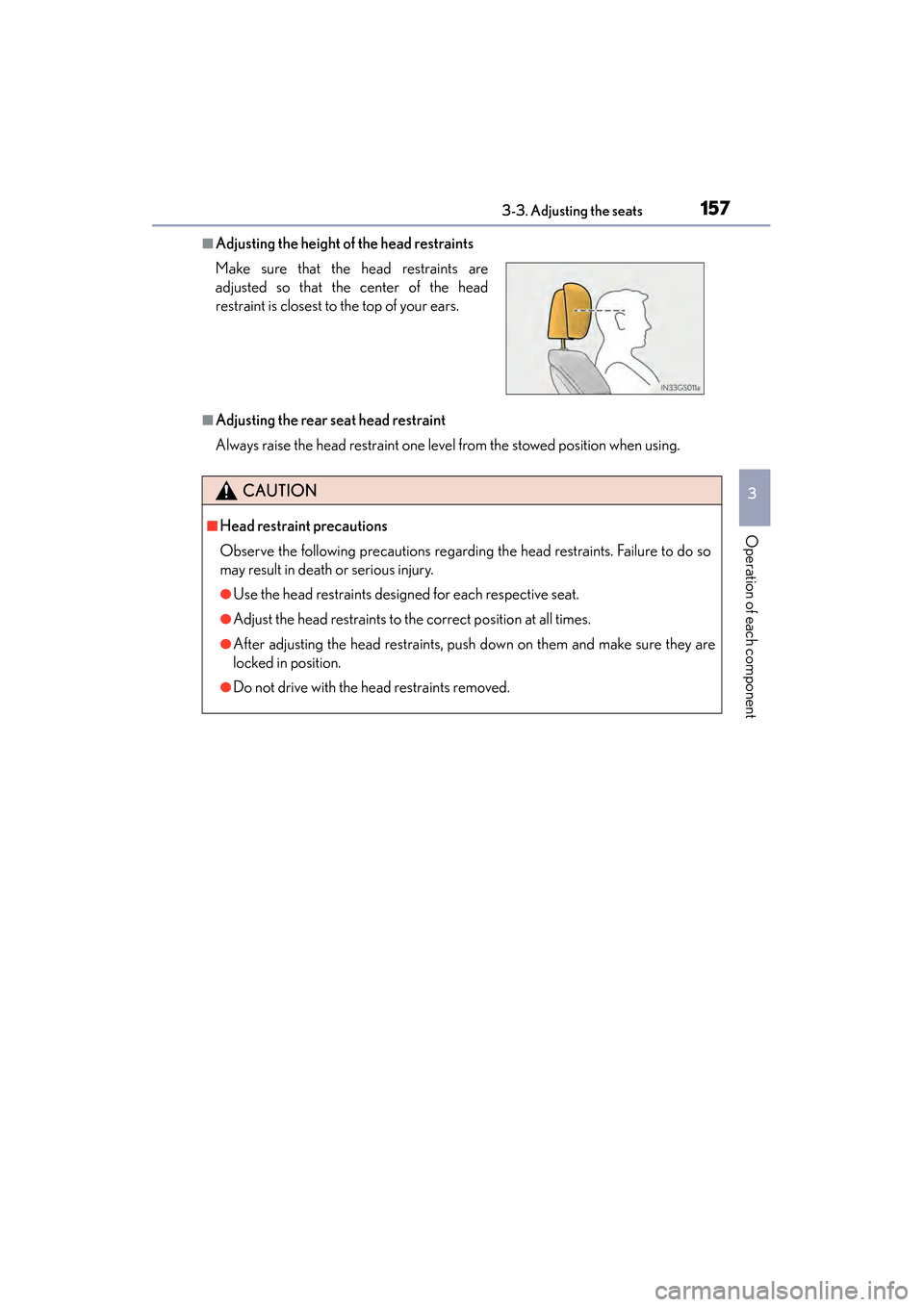
■Adjusting the height of the head restraints
■Adjusting the rear seat head restraint
Always raise the head restraint one level from the stowed position when using. Make sure that the head restraints are
adjusted so that the center of the head
restraint is closest to the top of your ears.
CAUTION
■Head restraint precautions
Observe the following precautions regarding the head restraints. Failure to do so
may result in death or serious injury.
●Use the head restraints designed for each respective seat.
●Adjust the head restraints to the correct position at all times.
●After adjusting the head restraints, push down on them and make sure they are
locked in position.
●Do not drive with the head restraints removed.
GS450h_U.book Page 157 Monday, January 23, 2012 10:20 AM
Page 160 of 862
1593-4. Adjusting the steering wheel and mirrors
3
Operation of each component
GS450h_U (OM30D01U)
Inside rear view mirror
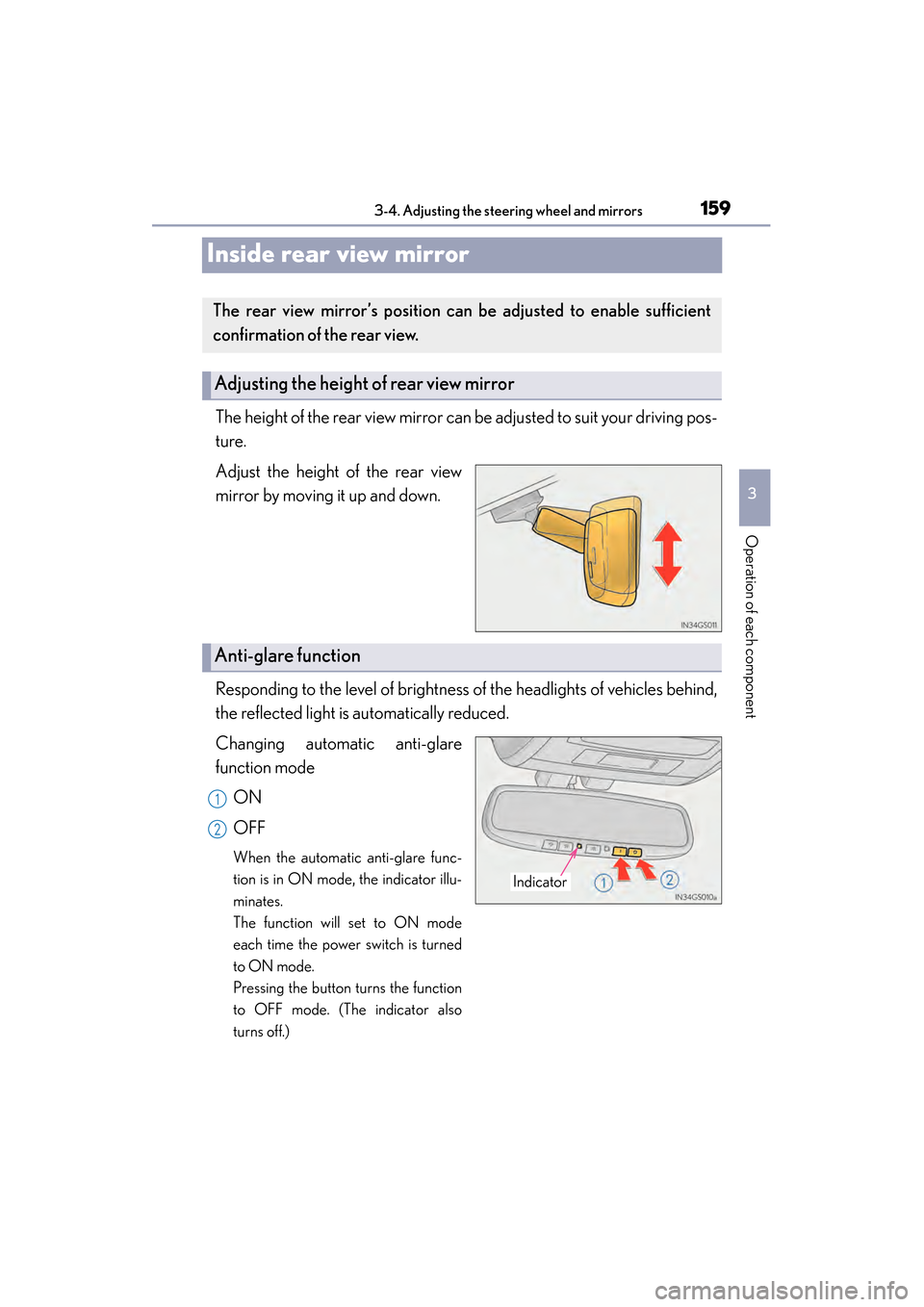
The height of the rear view mirror can be adjusted to suit your driving pos-
ture.
Adjust the height of the rear view
mirror by moving it up and down.
Responding to the level of brightness of the headlights of vehicles behind,
the reflected light is automatically reduced.
Changing automatic anti-glare
function modeON
OFF
When the automatic anti-glare func-
tion is in ON mode, the indicator illu-
minates.
The function will set to ON mode
each time the power switch is turned
to ON mode.
Pressing the button turns the function
to OFF mode. (The indicator also
turns off.)
The rear view mirror’s position ca n be adjusted to enable sufficient
confirmation of the rear view.
Adjusting the height of rear view mirror
Anti-glare function
Indicator
1
2
GS450h_U.book Page 159 Monday, January 23, 2012 10:20 AM
Page 174 of 862
GS450h_U (OM30D01U)
1734-1. Before driving
4
Driving
Make sure that the parking brake is set and shift the shift lever to D.
Gently depress the accelerator pedal.
Release the parking brake.
■When starting off on a uphill
The brake hold is available. (→P. 2 1 0 )
■Driving in the rain
●Drive carefully when it is raining, because visibility will be reduced, the windows
may become fogged-up, and the road will be slippery.
●Drive carefully when it starts to rain, because the road surface will be especially
slippery.
●Refrain from high speeds when driving on an expressway in the rain, because there
may be a layer of water between the tires and the road surface, preventing the
steering and brakes from operating properly.
■Breaking in your new Lexus
To extend the life of the vehicle, observing the following precautions is recom-
mended:
●For the first 186 miles (300 km):
Avoid sudden stops.
●For the first 621 miles (1000 km):
• Do not drive at extremely high speeds.
• Avoid sudden acceleration.
• Do not drive continuously in low gears.
• Do not drive at a constant speed for extended periods.
Starting off on a steep uphill
1
2
3
GS450h_U.book Page 173 Monday, January 23, 2012 10:20 AM
Page 176 of 862
GS450h_U (OM30D01U)
1754-1. Before driving
4
Driving
CAUTION
Observe the following precautions.
Failure to do so may result in death or serious injury.
■When starting the vehicle
Always keep your foot on the brake pedal while stopped with the hybrid system
operating. This prevents the vehicle from creeping.
■When driving the vehicle
●Do not drive if you are unfamiliar with the location of the brake and accelerator
pedals to avoid depressing the wrong pedal.
• Accidentally depressing the accelerator pedal instead of the brake pedal willresult in sudden acceleration that may lead to an accident.
• When backing up, you may twist your body around, leading to a difficulty in operating the pedals. Make sure to operate the pedals properly.
• Make sure to keep a correct driving posture even when moving the vehicle only slightly. This allows you to depress the brake and accelerator pedals prop-
erly.
• Depress the brake pedal using your right foot. Depressing the brake pedal using your left foot may delay response in an emergency, resulting in an acci-
dent.
●The driver should pay extra attention to pedestrians when the vehicle is powered
only by the electric motor (traction motor). Because there is no engine noise, the
pedestrians may misjudge the vehicle’s movement.
●Do not drive the vehicle over or stop the vehicle near flammable materials.
The exhaust system and exhaust gases can be extremely hot. These hot parts may
cause a fire if there is any flammable material nearby.
GS450h_U.book Page 175 Monday, January 23, 2012 10:20 AM
Page 240 of 862
GS450h_U (OM30D01U)
2394-5. Using the driving support systems
4
Driving
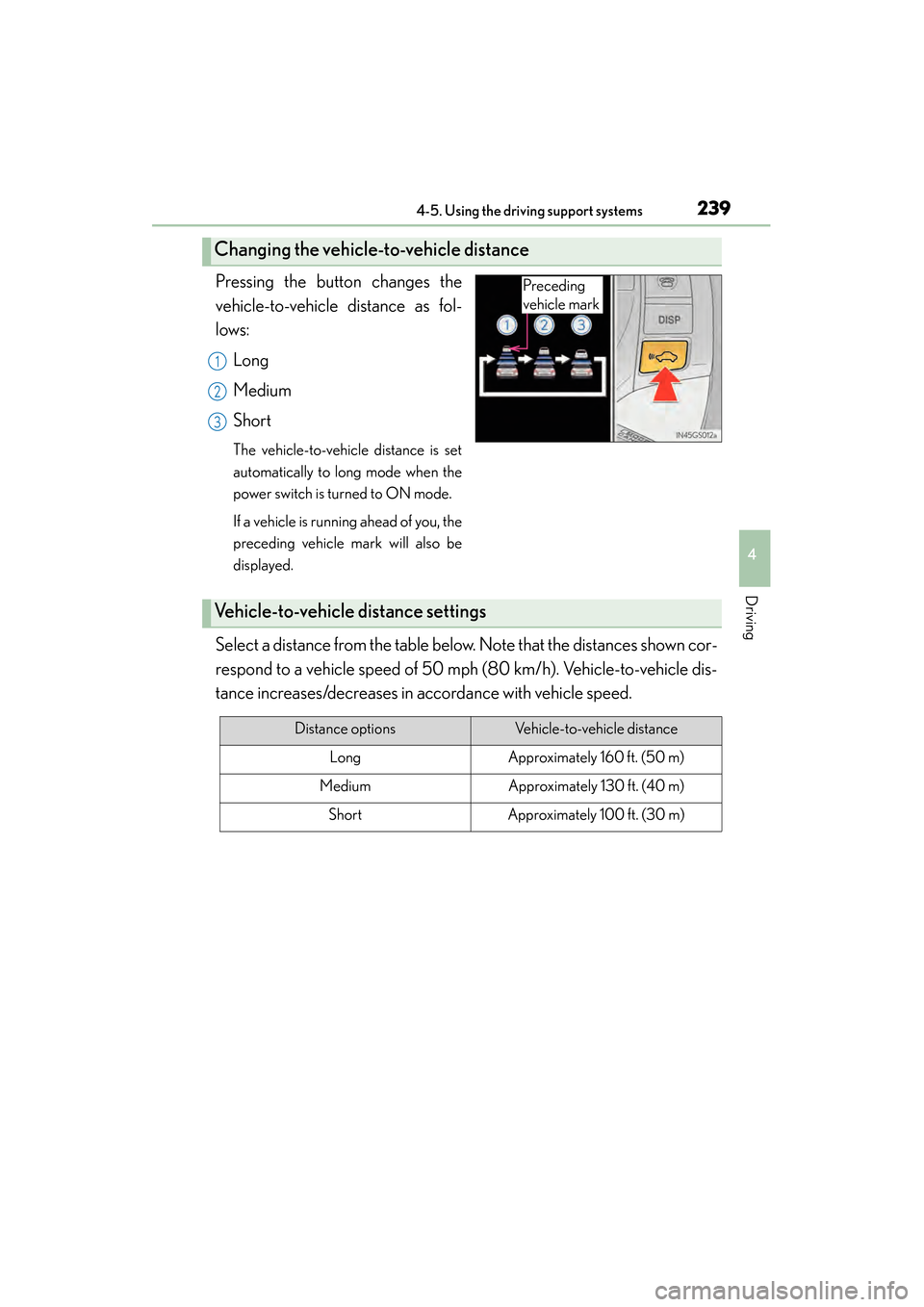
Pressing the button changes the
vehicle-to-vehicle distance as fol-
lows:Long
Medium
Short
The vehicle-to-vehicle distance is set
automatically to long mode when the
power switch is turned to ON mode.
If a vehicle is running ahead of you, the
preceding vehicle mark will also be
displayed.
Select a distance from the table below. Note that the distances shown cor-
respond to a vehicle speed of 50 mph (80 km/h). Vehicle-to-vehicle dis-
tance increases/decreases in accordance with vehicle speed.
Changing the vehicle-to-vehicle distance
Preceding
vehicle mark
1
2
3
Vehicle-to-vehicle distance settings
Distance optionsVehicle-to-vehicle distance
LongApproximately 160 ft. (50 m)
MediumApproximately 130 ft. (40 m)
ShortApproximately 100 ft. (30 m)
GS450h_U.book Page 239 Monday, January 23, 2012 10:20 AM