mirror Lexus GS450h 2013 Owner's Guide
[x] Cancel search | Manufacturer: LEXUS, Model Year: 2013, Model line: GS450h, Model: Lexus GS450h 2013Pages: 862, PDF Size: 19.06 MB
Page 285 of 862
284
GS450h_U (OM30D01U)
4-5. Using the driving support systems
CAUTION
■When using the rear view monitor system screen
●The position of the fixation guide lines displayed on the screen may change in
accordance with the number of passengers, the amount of cargo etc. Be sure to
check behind and all around the vehicle direct visually and with mirror before
proceeding.
●The vehicle width extension guide lines are wider than the actual width of the
vehicle. When backing up, be sure to check behind and all around the vehicle
direct visually and with mirror before proceeding.
GS450h_U.book Page 284 Monday, January 23, 2012 10:20 AM
Page 306 of 862
305
GS450h_U (OM30D01U)4-5. Using the driving support systems
4
Driving
BSM (Blind Spot Monitor)∗
∗: If equipped
The Blind Spot Monitor is a system that assists the driver to confirm
safety when changing lanes.
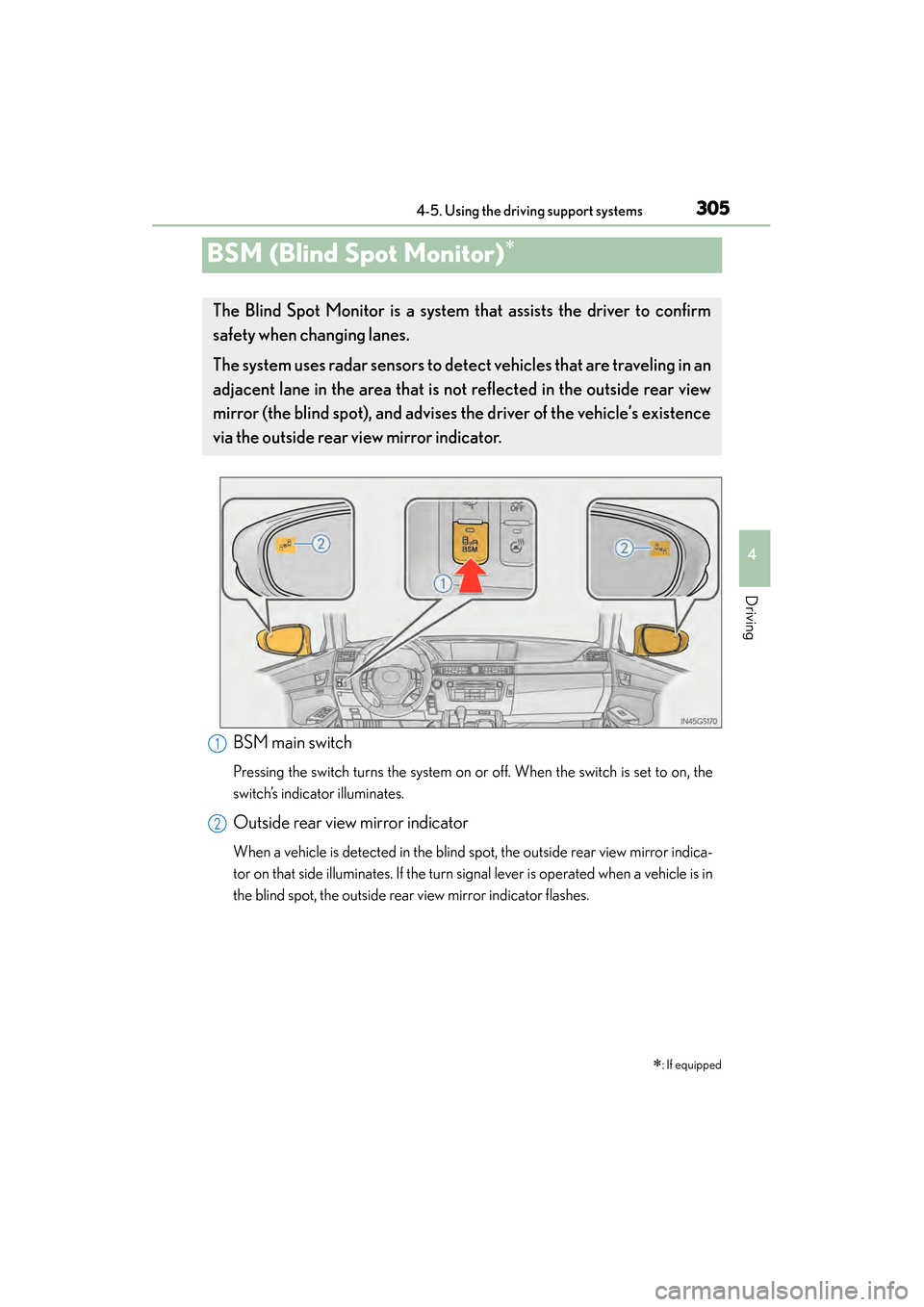
The system uses radar sensors to d etect vehicles that are traveling in an
adjacent lane in the area that is not reflected in the outside rear view
mirror (the blind spot), and advises the driver of the vehicle’s existence
via the outside rear vi ew mirror indicator.
BSM main switch
Pressing the switch turns the system on or off. When the switch is set to on, the
switch’s indicator illuminates.
Outside rear view mirror indicator
When a vehicle is detected in the blind spot, the outside rear view mirror indica-
tor on that side illuminates. If the turn signal lever is operated when a vehicle is in
the blind spot, the outside rear view mirror indicator flashes.
1
2
GS450h_U.book Page 305 Monday, January 23, 2012 10:20 AM
Page 309 of 862
308
GS450h_U (OM30D01U)
4-5. Using the driving support systems
■Conditions under which the Blind Spot Monitor system may not function correctly
●The Blind Spot Monitor system may not detect vehicles correctly in the following
conditions:
• During bad weather such as heavy rain, fog, snow etc.
• When ice or mud etc. is attached to the rear bumper
• When driving on a road surface that is wet due to rain, standing water etc.
• When there is a significant difference in speed between your vehicle and thevehicle that enters the detection area
• When a vehicle is in the detection area from a stop and remains in the detection area as your vehicle accelerates
• When driving up or down consecutive steep inclines, such as hills, a dip in the road etc.
• When multiple vehicles approach with only a small gap between each vehicle
• When vehicle lanes are wide, and the vehicle in the next lane is too far away from your vehicle
• When the vehicle that enters the detection area is traveling at about the same speed as your vehicle
• When there is a significant difference in height between your vehicle and the vehicle that enters the detection area
• Directly after the BSM switch is set to on
●Instances of the Blind Spot Monitor unnecessarily detecting a vehicle and/or object
may increase under the following conditions:
• When there is only a short distance between your vehicle and a guardrail, wall etc.
• When there is only a short distance between your vehicle and a following vehi- cle
• When vehicle lanes are narrow and a vehicle driving 2 lanes across from your vehicle enters the detection area
■The outside rear view mirror indicators visibility
When under strong sunlight, the outside rear view mirror indicator may be difficult to
see.
GS450h_U.book Page 308 Monday, January 23, 2012 10:20 AM
Page 327 of 862
326
GS450h_U (OM30D01U)
5-1. Remote Touch screen Remote Touch..............................328
Remote Touch screen.............. 330
Set up screen ...............................336
Voice command system ..........353
5-2. Using the air conditioning system and defogger
Front automatic air conditioning system .........364
Rear air conditioning system .......................................... 379
Rear window and outside rear view mirror defoggers.......... 384
Windshield wiper de-icer ...... 385 5-3. Using the audio system
Audio system type .....................386
Using the radio............................409
Using the CD/DVD player.... 433
Playing an audio CD and MP3/WMA discs ......... 435
Playing DVD video......................441
CD/DVD player and DVD video disc information........... 453
Listening to Bluetooth
® audio ................... 465
Listening to a USB memory ........................ 475
Listening to an iPod ...................485
Optimal use of the audio/video system......... 495
Using the AUX port ..................497
Using the rear seat audio controls........................... 498
Using the steering wheel audio switches ..........................503
GS450h_U.book Page 326 Monday, January 23, 2012 10:20 AM
Page 328 of 862
327
GS450h_U (OM30D01U)
5Interior features
5-4. Using the hands-free phone system (for cellular phone)
Hands-free system (for cellular phone) ................ 506
Using a Bluetooth
® phone ..... 515
Setting the hands-free system (for cellular phone) ................ 534
Setting the Bluetooth
®........... 558
5-5. Using the interior lights Interior lights list........................... 571• Interior light ............................ 572
• Personal lights........................ 572
5-6. Using the storage features List of storage features..............574• Glove box.................................576
• Console box ........................... 577
• Cup holders............................ 578
• Auxiliary boxes..................... 580
Trunk features ...............................581 5-7. Other interior features
Sun visors and vanity mirrors ...................583
Clock...............................................584
Ashtrays ........................................ 585
Power outlets ...............................586
Heated steering wheel ........... 588
Seat heaters/ seat ventilators .........................590
Armrest .......................................... 593
Rear sunshade/ rear door sunshades .............. 594
Coat hooks ................................... 597
Assist grips....................................598
Utility hook.................................... 599
Garage door opener............... 600
Safety Connect ........................... 607
GS450h_U.book Page 327 Monday, January 23, 2012 10:20 AM
Page 385 of 862
384
GS450h_U (OM30D01U)
5-2. Using the air conditioning system and defogger
Rear window and outside rear view mirror
defoggers
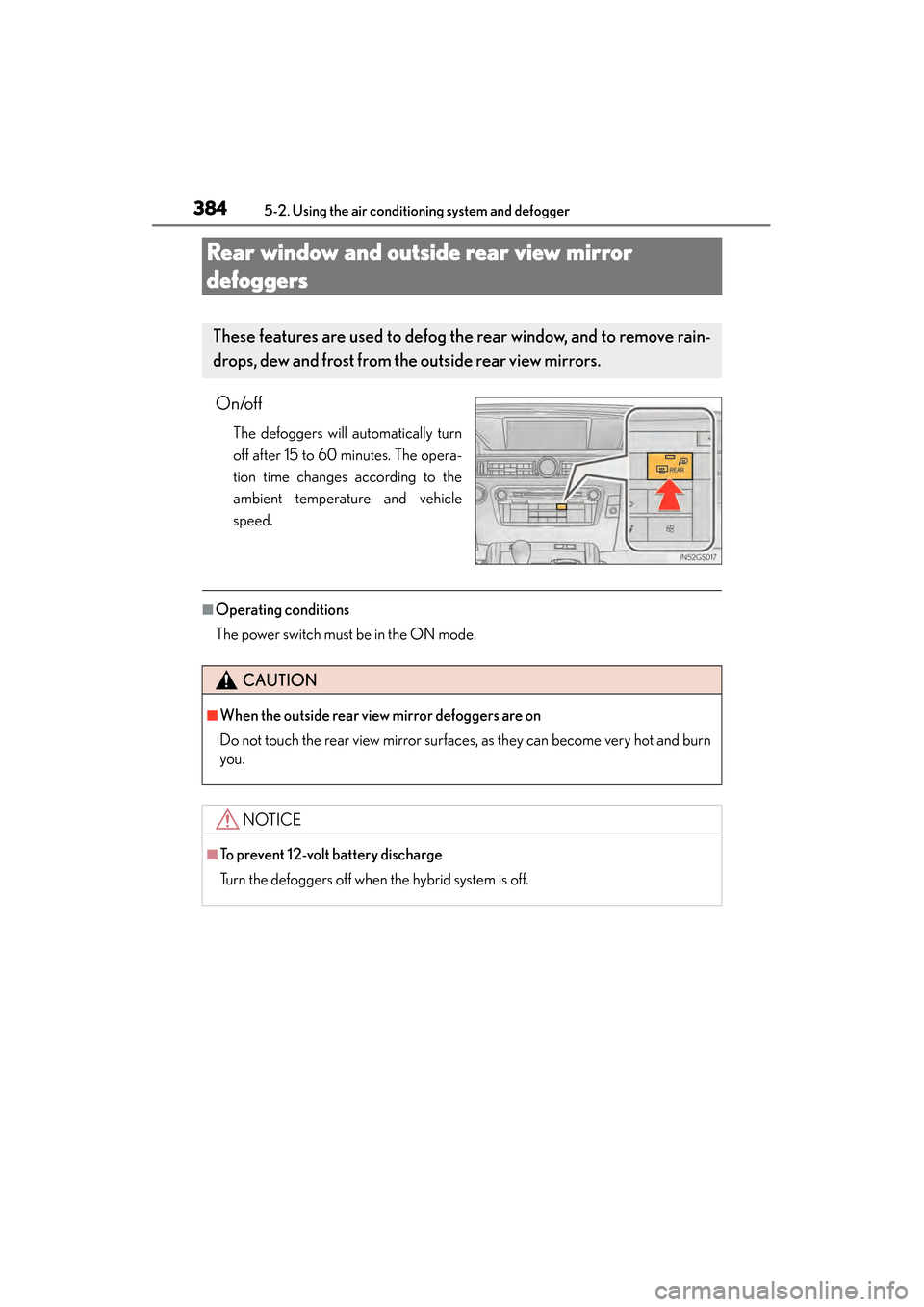
On/off
The defoggers will automatically turn
off after 15 to 60 minutes. The opera-
tion time changes according to the
ambient temperature and vehicle
speed.
■Operating conditions
The power switch must be in the ON mode.
These features are used to defog the rear window, and to remove rain-
drops, dew and frost from the outside rear view mirrors.
CAUTION
■When the outside rear view mirror defoggers are on
Do not touch the rear view mirror surfaces, as they can become very hot and burn
you.
NOTICE
■To prevent 12-volt battery discharge
Turn the defoggers off when the hybrid system is off.
GS450h_U.book Page 384 Monday, January 23, 2012 10:20 AM
Page 584 of 862
583
GS450h_U (OM30D01U)5-7. Other interior features
5
Interior features
Sun visors and vanity mirrors
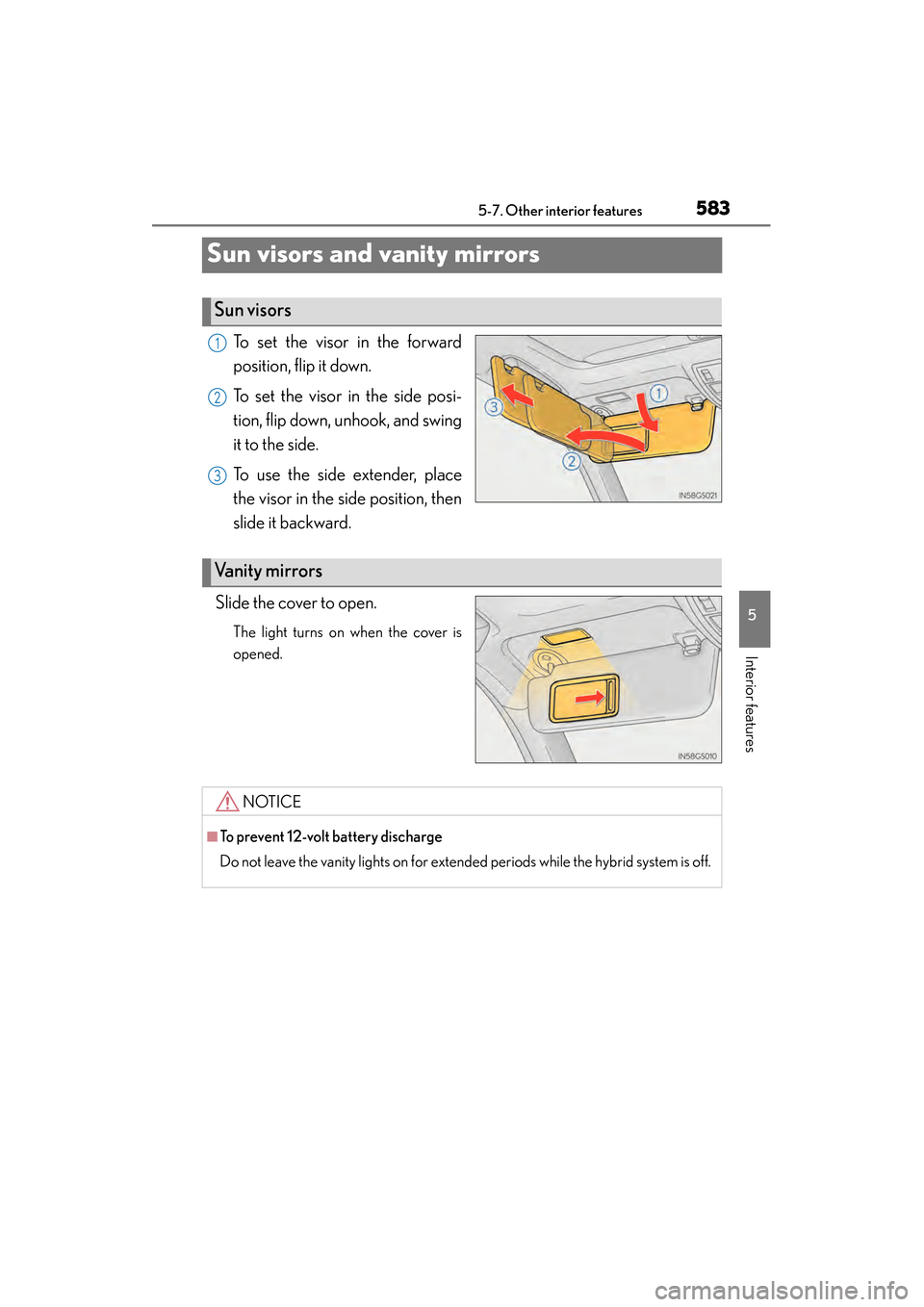
To set the visor in the forward
position, flip it down.
To set the visor in the side posi-
tion, flip down, unhook, and swing
it to the side.
To use the side extender, place
the visor in the side position, then
slide it backward.
Slide the cover to open.
The light turns on when the cover is
opened.
Sun visors
1
2
3
Va n i t y m i r r o r s
NOTICE
■To prevent 12-volt battery discharge
Do not leave the vanity lights on for extended periods while the hybrid system is off.
GS450h_U.book Page 583 Monday, January 23, 2012 10:20 AM
Page 617 of 862
616
GS450h_U (OM30D01U)
6-1. Maintenance and care
Cleaning and protecting the vehicle exterior
●Working from top to bottom, liberally apply water to the vehicle body,
wheel wells and underside of the vehicle to remove any dirt and dust.
●Wash the vehicle body using a sponge or soft cloth, such as a chamois.
●For hard-to-remove marks, use car wash soap and rinse thoroughly
with water.
●Wipe away any water.
●Wax the vehicle when the waterproof coating deteriorates.
If water does not bead on a clean surface, apply wax when the vehicle body is
cool.
■Automatic car washes
●Fold the mirrors before washing the vehicle. Start washing from the front of the
vehicle. Make sure to extend the mirrors before driving.
●Brushes used in automatic car washes may scratch the vehicle surface and harm
your vehicle’s paint.
■High pressure car washes
●Do not allow the nozzles of the car wash to come within close proximity of the win-
dows.
●Before using the car wash, check that the fuel filler door on your vehicle is closed
properly.
■When using a car wash
If the door handle becomes wet while the electronic key is within the effective range,
the door may lock and unlock repeatedly. In that case, follow the following correc-
tion procedures to wash the vehicle:
●Place the key in a position 6 ft. (2 m) or more separate from the vehicle while the
vehicle is being washed. (Take care to ensure that the key is not stolen.)
●Set the electronic key to battery-saving mode to disable the smart access system
with push-button start. (→P. 1 2 7 )
Perform the following to protect the vehicle and mainta in it in prime
condition:
GS450h_U.book Page 616 Monday, January 23, 2012 10:20 AM
Page 679 of 862

678
GS450h_U (OM30D01U)
6-3. Do-it-yourself maintenance
■Driver’s side instrument panel
FuseAmpereCircuit
1STOP7. 5Stop lights, high mounted stoplight
2P/ W- B5Power window master switch
3P/ S E AT 1 F/ L30Po w e r s e a t s
4D/L NO.125Po w e r d o o r l o c k s y s t e m
5NV-IR10Lexus night view
6FL S/HTR10Seat heaters/ventilators
7WIPER30Windshield wipers
8WIPER-IG5Windshield wipers
9LH-IG10
Seat belts, body ECU, AFS, overhead mod-
ule, raindrop sensor, inside rear view mirror,
lane camera sensor (LKA), head-up display,
shift lock system, intuitive parking assist, front
left-hand door ECU, driver monitor system,
Remote Touch screen, electric tilt and tele-
scopic steering column, power seats, moon
roof, windshield wiper de-icer, intuitive park-
ing assist switch, PTC heater, headlight
cleaner
10LH ECU-IG10
VDIM, ECB, D-SW MODULE (Blind Spot
Monitor, heated steering wheel), driver sup-
port system, AFS, EPB, air conditioning sys-
tem
GS450h_U.book Page 678 Monday, January 23, 2012 10:20 AM
Page 680 of 862
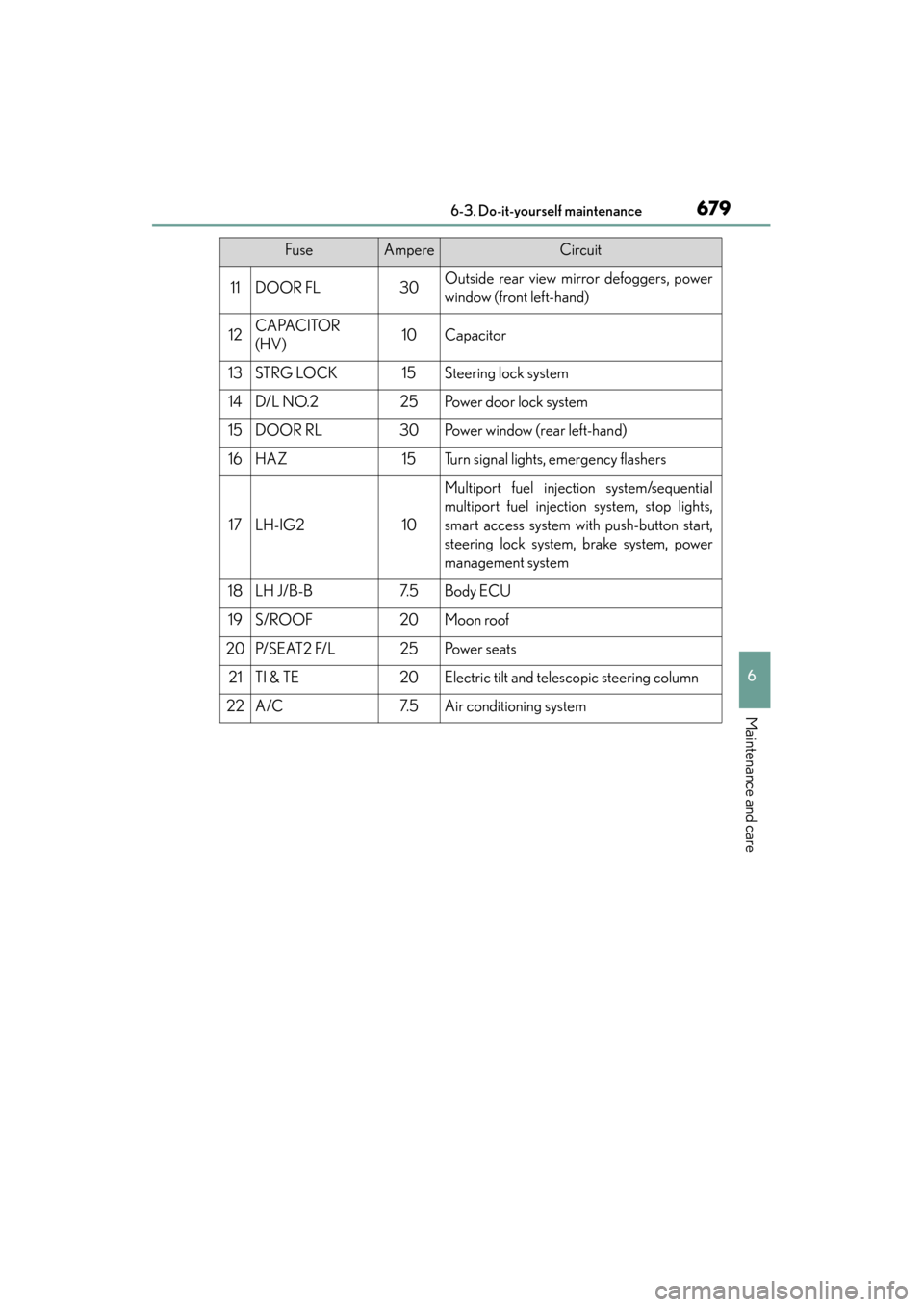
GS450h_U (OM30D01U)
6796-3. Do-it-yourself maintenance
6
Maintenance and care
11DOOR FL30Outside rear view mirror defoggers, power
window (front left-hand)
12CAPACITOR
(HV)10Capacitor
13STRG LOCK15Steering lock system
14D/L NO.225Po w e r d o o r l o c k s y s t e m
15DOOR RL30Power window (rear left-hand)
16HAZ15Turn signal lights, emergency flashers
17LH-IG210
Multiport fuel injection system/sequential
multiport fuel injection system, stop lights,
smart access system with push-button start,
steering lock system, brake system, power
management system
18LH J/B-B7. 5Body ECU
19S/ROOF20Moon roof
20P/ S E AT 2 F/ L25Po w e r s e a t s
21TI & TE20Electric tilt and telescopic steering column
22A/C7. 5Air conditioning system
FuseAmpereCircuit
GS450h_U.book Page 679 Monday, January 23, 2012 10:20 AM