phone Lexus GS450h 2013 Owner's Guide
[x] Cancel search | Manufacturer: LEXUS, Model Year: 2013, Model line: GS450h, Model: Lexus GS450h 2013Pages: 862, PDF Size: 19.06 MB
Page 432 of 862
GS450h_U (OM30D01U)
4315-3. Using the audio system
5
Interior features
■About internet radio (vehicles with the navigation system)
●Other applications can be activated while listening to internet radio.
●An iPhone cannot be connected via Bluetooth® and USB connection at the same
time. However, it is possible to recharge an iPhone while using Apps by connecting
via USB. The system uses the connection method that was used last. Therefore, if
connected via USB after Bluetooth
® connection, it is necessary to reconnect the
iPhone via Bluetooth®.
●Services requiring a separate contract can also be used. For details, refer to
http://www.lexus.com/enform/
or call 1-800-255-3987.
●If internet radio has never been listened to by activating “Apps” from the “Informa-
tion” screen, the “Apps” tab will be dimmed.
GS450h_U.book Page 431 Monday, January 23, 2012 10:20 AM
Page 473 of 862
472
GS450h_U (OM30D01U)
5-3. Using the audio system
■Playing the tracks on the album in random order
Select “RAND” on the screen.
Each time “RAND” is selected, the mode changes as follows:
album random → all track random → off
■Playing tracks from all th e albums in random order
Select “RAND” repeatedly until “ALB.RAND” appears on the screen.
To cancel, select “RAND” again.
■Repeating a track
Select “RPT” on the screen.
Each time “RPT” is selected, the mode changes as follows:
track repeat → album repeat → off
■Repeating an album
Select “RPT” repeatedly until “ALB.RPT” appears on the screen.
To cancel, select “RPT” again.
■If you select
The display returns to the previous screen.
■Connecting Bluetooth® audio player
●Selecting “Connect Portable Player” on the “Bluetooth*” screen also connects a
Bluetooth® audio player. ( →P. 566)
●When none of the selectable portable players have been registered, a screen con-
firming registration is displayed. The registration method is the same as phone reg-
istration. ( →P. 559)
●When the currently connected portable player is selected, a screen confirming the
selected player’s disconnection is displayed. ( →P. 559)
●If connection fails once, a changing connection method confirmation screen is dis-
played. If connection fails 2 or more times, a message will be displayed. When this
message is displayed, try again.
*: Bluetooth is a registered trademark of Bluetooth SIG. Inc.
Random playback
Repeat play
GS450h_U.book Page 472 Monday, January 23, 2012 10:20 AM
Page 474 of 862
GS450h_U (OM30D01U)
4735-3. Using the audio system
5
Interior features
■When using the Bluetooth® audio system
●In the following conditions, the system may not function.
• The portable player is turned off
• The portable player is not connected
• The portable player battery is low
●There may be a delay if phone connection is carried out during Bluetooth® audio
play.
●Depending on the type of portable player that is connected to the system, opera-
tion may differ slightly and certain functions may not be available.
■Bluetooth® antenna
The antenna is built into the instrument panel. If the portable player is behind the seat
or in the glove box or console box, or is touching or covered by metal objects, con-
nection status may deteriorate.
■Battery charge/signal status
This display may not correspond exactly with the portable player, and this system
does not have a charging function.
■About Bluetooth®
Bluetooth is a registered trademark of
Bluetooth SIG. Inc.
GS450h_U.book Page 473 Monday, January 23, 2012 10:20 AM
Page 492 of 862
GS450h_U (OM30D01U)
4915-3. Using the audio system
5
Interior features
■Playing tracks in random order
Select “RAND” on the screen.
Each time “RAND” is selected, the mode changes as follows:
track shuffle → album shuffle → off
■Playing the albums in random order
Select “RAND” repeatedly until “ALB.RAND” appears on the screen.
To cancel, select “RAND” again.
Select “RPT” on the screen.
“RPT” appears on the screen.
To cancel, select “RPT” again.
■If you select
The display returns to the previous screen.
■About iPod
●“Made for iPod” and “Made for iPhone” mean that an electronic accessory has
been designed to connect specifically to iPod, or iPhone, respectively, and has
been certified by the developer to meet Apple performance standards.
●Apple is not responsible for the operation of this device or its compliance with
safety and regulatory standards. Please note that the use of this accessory with
iPod or iPhone may affect wireless performance.
●iPhone, iPod, iPod classic, iPod nano and iPod touch are trademarks of Apple Inc.,
registered in the U.S. and other countries.
Random playback
Repeat play
GS450h_U.book Page 491 Monday, January 23, 2012 10:20 AM
Page 494 of 862
GS450h_U (OM30D01U)
4935-3. Using the audio system
5
Interior features
■Compatible models
The following iPod
®, iPod nano®, iPod classic®, iPod touch® and iPhone® devices
can be used with this system.
■Made for
• iPod touch (4th generation)
• iPod touch (3rd generation)
• iPod touch (2nd generation)
• iPod touch (1st generation)
• iPod classic
• iPod with video
• iPod nano (6th generation)
• iPod nano (5th generation)
• iPod nano (4th generation)
• iPod nano (3rd generation)
• iPod nano (2nd generation)
• iPod nano (1st generation)
• iPhone 4
• iPhone 3GS
• iPhone 3G
• iPhone
Depending on differences between models or software versions etc., some models
might be incompatible with this system.
GS450h_U.book Page 493 Monday, January 23, 2012 10:20 AM
Page 507 of 862
506
GS450h_U (OM30D01U)
5-4. Using the hands-free phone system (for cellular phone)
Hands-free system (for cellular phone)
The hands-free system is a function that allows you to use your cellular
phone without touching it.
This system supports Bluetooth
® cellular phones. Bluetooth® is a wire-
less data system that allows a cellular phone to wirelessly connect to
the hands-free system and outgoing/incoming calls.
The illustrations of the hands-fr ee system screens shown here may
slightly vary depending on the type of the system.
Vehicles with a navigation system: The hands-free system function can
be displayed and operated on the “S ide Display”. For details, refer to
the “Navigation System Owner’s Manual”.
GS450h_U.book Page 506 Monday, January 23, 2012 10:20 AM
Page 508 of 862
GS450h_U (OM30D01U)
5075-4. Using the hands-free phone system (for cellular phone)
5
Interior features
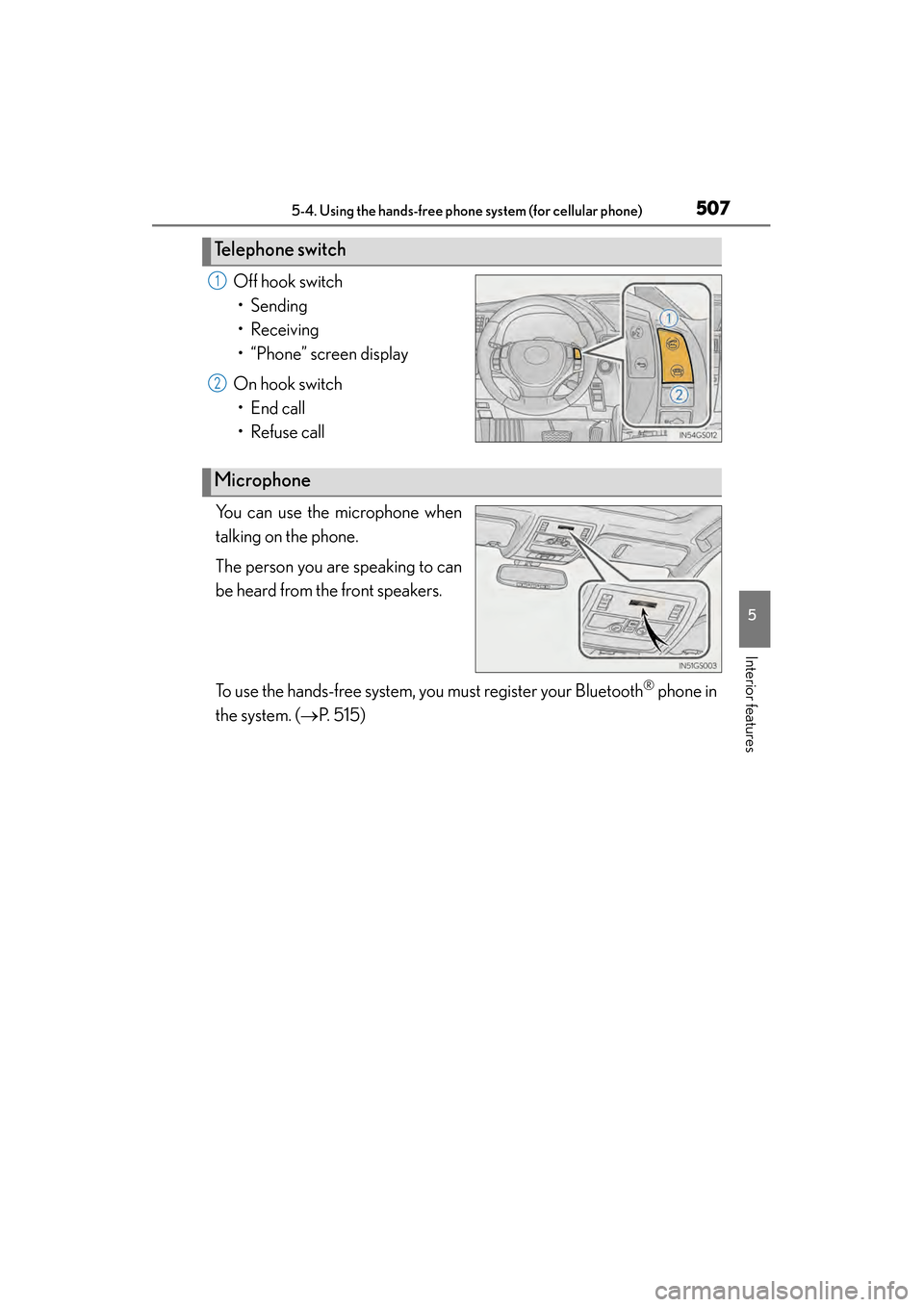
Off hook switch• Sending
• Receiving
• “Phone” screen display
On hook switch • End call
• Refuse call
You can use the microphone when
talking on the phone.
The person you are speaking to can
be heard from the front speakers.
To use the hands-free system, you must register your Bluetooth
® phone in
the system. ( →P. 515)
Te l e p h o n e s w i t c h
1
2
Microphone
GS450h_U.book Page 507 Monday, January 23, 2012 10:20 AM
Page 509 of 862
508
GS450h_U (OM30D01U)
5-4. Using the hands-free phone system (for cellular phone)
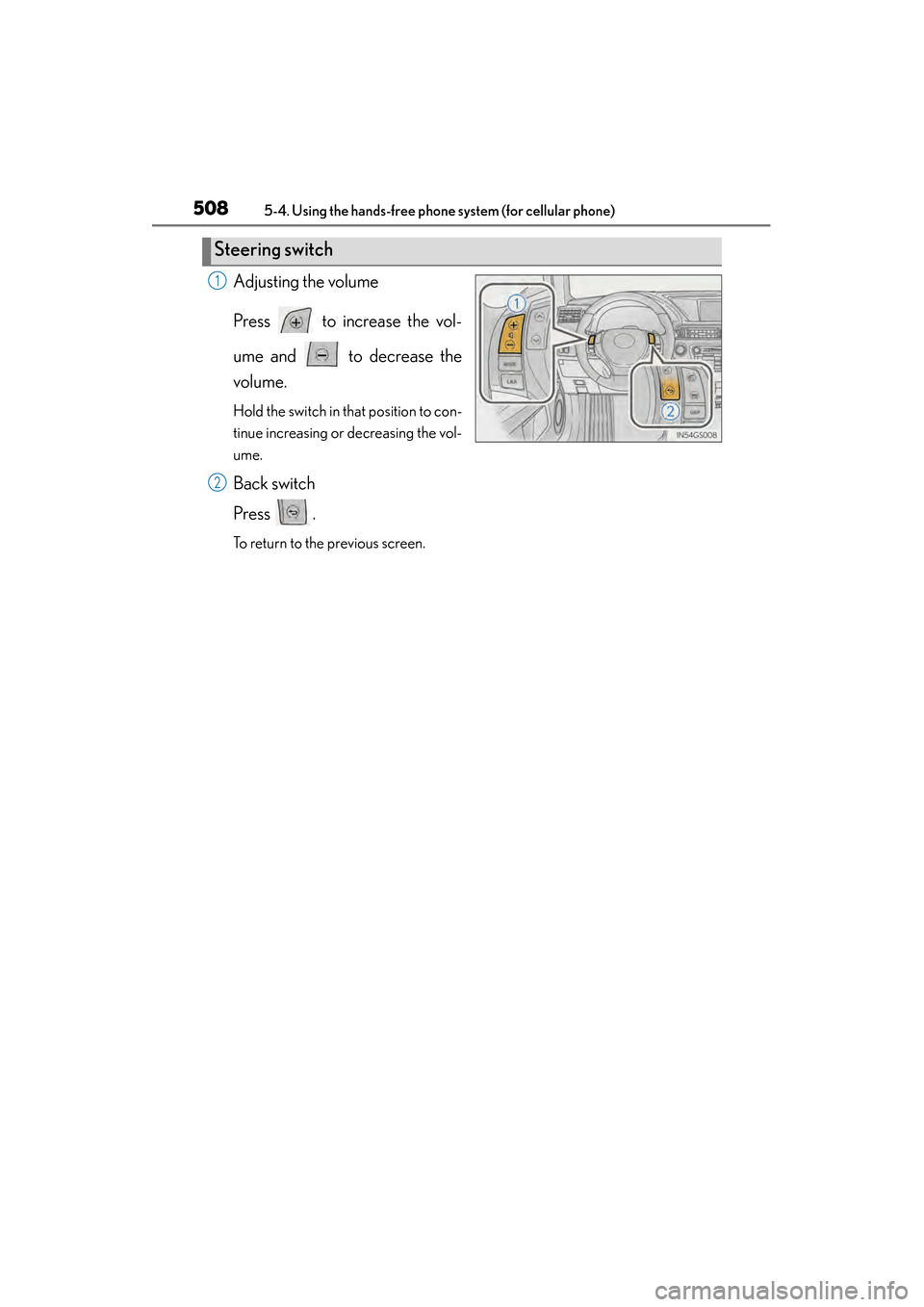
Adjusting the volume
Press to increase the vol-
ume and to decrease the
volume.
Hold the switch in that position to con-
tinue increasing or decreasing the vol-
ume.
Back switch
Press .
To return to the previous screen.
Steering switch
1
2
GS450h_U.book Page 508 Monday, January 23, 2012 10:20 AM
Page 510 of 862
GS450h_U (OM30D01U)
5095-4. Using the hands-free phone system (for cellular phone)
5
Interior features
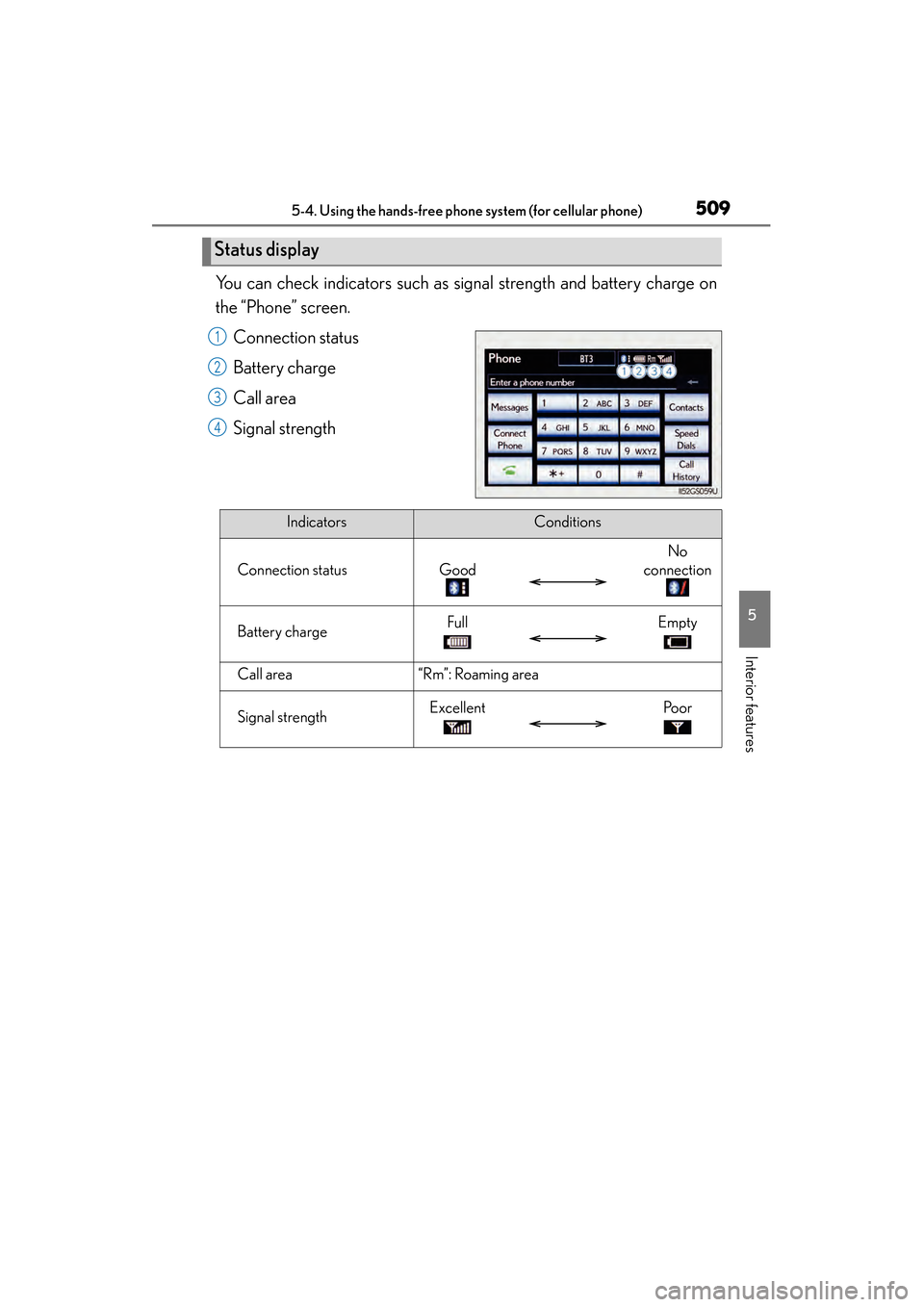
You can check indicators such as signal strength and battery charge on
the “Phone” screen.Connection status
Battery charge
Call area
Signal strength
Status display
1
2
3
4
IndicatorsConditions
Connection statusGood
No
connection
Battery chargeFullEmpty
Call area“Rm”: Roaming area
Signal strengthExcellentPo o r
GS450h_U.book Page 509 Monday, January 23, 2012 10:20 AM
Page 511 of 862
510
GS450h_U (OM30D01U)
5-4. Using the hands-free phone system (for cellular phone)
■When using the hands-free system
●The audio system is muted when making a call.
●If both parties speak at the same time, it may be difficult to hear.
●If the incoming call volume is overly loud, an echo may be heard.
●Try to face toward the microphone as much as possible when speaking.
●In the following circumstances, it may be difficult to hear the other party:
• When driving on unpaved roads
• When driving at high speeds
• If a window is open
• If the air conditioning is blowing directly on the microphone
• If the air conditioning is set to high
• There is an effect from the network of the cellular phone
■Conditions under which the system will not operate
●If using a cellular phone that does not support Bluetooth®
●If the cellular phone is turned off
●If you are outside service range
●If the cellular phone is not connected
●If the cellular phone’s battery is low
●When the cellular phone is not connected, “No connect” is displayed.
■Bluetooth® antenna
The antenna is built into the instrument panel. If the cellular phone is behind the seat
or in the console box, or touching or covered by metal objects, connection status
may deteriorate.
■Battery charge/Signal status
●This display may not correspond exactly with the cellular phone itself.
●When the cellular phone is out of the service area or in a place inaccessible by
radio waves, “No Service” is displayed.
■When using Bluetooth® audio and hands-free system at the same time
The following problems may occur.
●The Bluetooth® connection may be cut.
●Noise may be heard on the Bluetooth® audio playback.
GS450h_U.book Page 510 Monday, January 23, 2012 10:20 AM