ESP Lexus GS450h 2013 Owner's Guide
[x] Cancel search | Manufacturer: LEXUS, Model Year: 2013, Model line: GS450h, Model: Lexus GS450h 2013Pages: 862, PDF Size: 19.06 MB
Page 311 of 862
310
GS450h_U (OM30D01U)
4-5. Using the driving support systems
CAUTION
■Cautions regarding the use of the system
The driver is solely responsible for safe driving. Always drive safely, taking care to
observe your surroundings.
The Blind Spot Monitor is a supplementary system which alerts the driver that a
vehicle is present in the blind spot. Do not overly rely on the Blind Spot Monitor
system. The system cannot judge if it is safe to change lanes, therefore over reli-
ance could cause an accident resulting in death or serious injury. According to
conditions, the system may not function correctly. Therefore the driver’s own visual
confirmation of safety is necessary.
■Handling the radar sensor
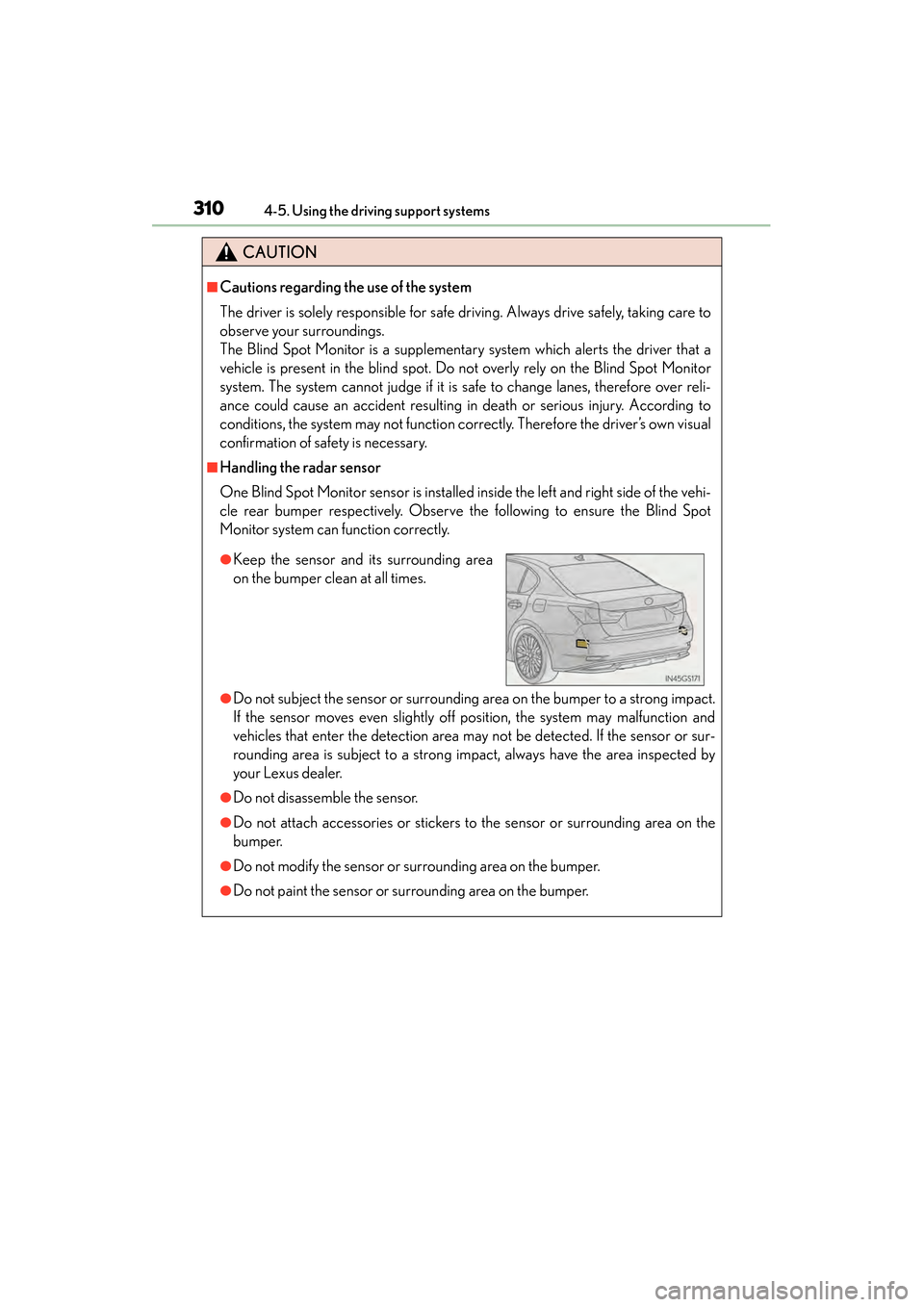
One Blind Spot Monitor sensor is installed inside the left and right side of the vehi-
cle rear bumper respectively. Observe the following to ensure the Blind Spot
Monitor system can function correctly.
●Do not subject the sensor or surrounding area on the bumper to a strong impact.
If the sensor moves even slightly off position, the system may malfunction and
vehicles that enter the detection area may not be detected. If the sensor or sur-
rounding area is subject to a strong impact, always have the area inspected by
your Lexus dealer.
●Do not disassemble the sensor.
●Do not attach accessories or stickers to the sensor or surrounding area on the
bumper.
●Do not modify the sensor or surrounding area on the bumper.
●Do not paint the sensor or surrounding area on the bumper.
●Keep the sensor and its surrounding area
on the bumper clean at all times.
GS450h_U.book Page 310 Monday, January 23, 2012 10:20 AM
Page 318 of 862
317
GS450h_U (OM30D01U)4-6. Driving tips
4
Driving
Hybrid vehicle driving tips
■Using Eco drive mode
When using Eco drive mode, the torque corresponding to the acceler-
ator pedal depression amount can be generated more smoothly than it
is in normal conditions. In addition, the operation of the air conditioning
system (heating/cooling) will be minimized, improving the fuel econ-
omy. ( →P. 2 8 6 )
■Use of Hybrid System Indicator
The Eco-friendly driving is possible by keeping the indicate of Hybrid
System Indicator within Eco area. ( →P. 9 2 )
■When braking the vehicle
Make sure to operate the brakes gently and in good time. A greater
amount of electrical energy can be retained when slowing down.
■Delays
Repeated acceleration and deceleration, as well as long waits at traffic
lights, will lead to bad fuel consumption. Check traffic reports before
leaving and avoid delays as much as possible. When encountering a
delay, gently release the brake pedal to allow the vehicle to move for-
ward slightly while avoiding overuse of the accelerator pedal. Doing so
can help control excessive gasoline consumption.
■Highway driving
Control your speed and keep at a constant speed. Also, before stop-
ping at a toll booth or similar, allow plenty of time to release the acceler-
ator and gently apply the brakes. A greater amount of electrical energy
can be retained when slowing down.
For economical and ecological drivin g, pay attention to the following
points:
GS450h_U.book Page 317 Monday, January 23, 2012 10:20 AM
Page 362 of 862
GS450h_U (OM30D01U)
3615-1. Remote Touch screen
5
Interior features
■Voice command system
●Commands that are not displayed in the “Shortcut Menu” screen can be operated
from the “Main Menu” screen.
●If the system does not respond or the confirmation screen does not disappear,
press and try again.
●Voice guidance can be canceled by setting voice prompts to off. Use this setting
when it is desirable to say a command immediately after pressing and hearing
a beep.
■If a voice command cannot be recognized
●If a voice command cannot be recognized within 6 seconds, voice guidance will
say “Pardon?” (“Command not recognized.” will be displayed on the screen) and
voice command reception will restart.
●If a voice command cannot be recognized 2 consecutive times, the voice com-
mand guidance system will say “Paused. To restart voice recognition, push the talk
switch. To cancel voice recognition, push and hold the talk switch.” Voice recogni-
tion will then be suspended. Select “Cancel” or “Go Back”, or press .
■When selecting “Voice Prompts”
●The voice recognition prompt can be set to on or off. This setting can also be
changed on the “Voice Settings” screen. (→P. 3 4 9 )
●Voice recognition will be temporarily suspended. Press again.
GS450h_U.book Page 361 Monday, January 23, 2012 10:20 AM
Page 389 of 862
388
GS450h_U (OM30D01U)
5-3. Using the audio system
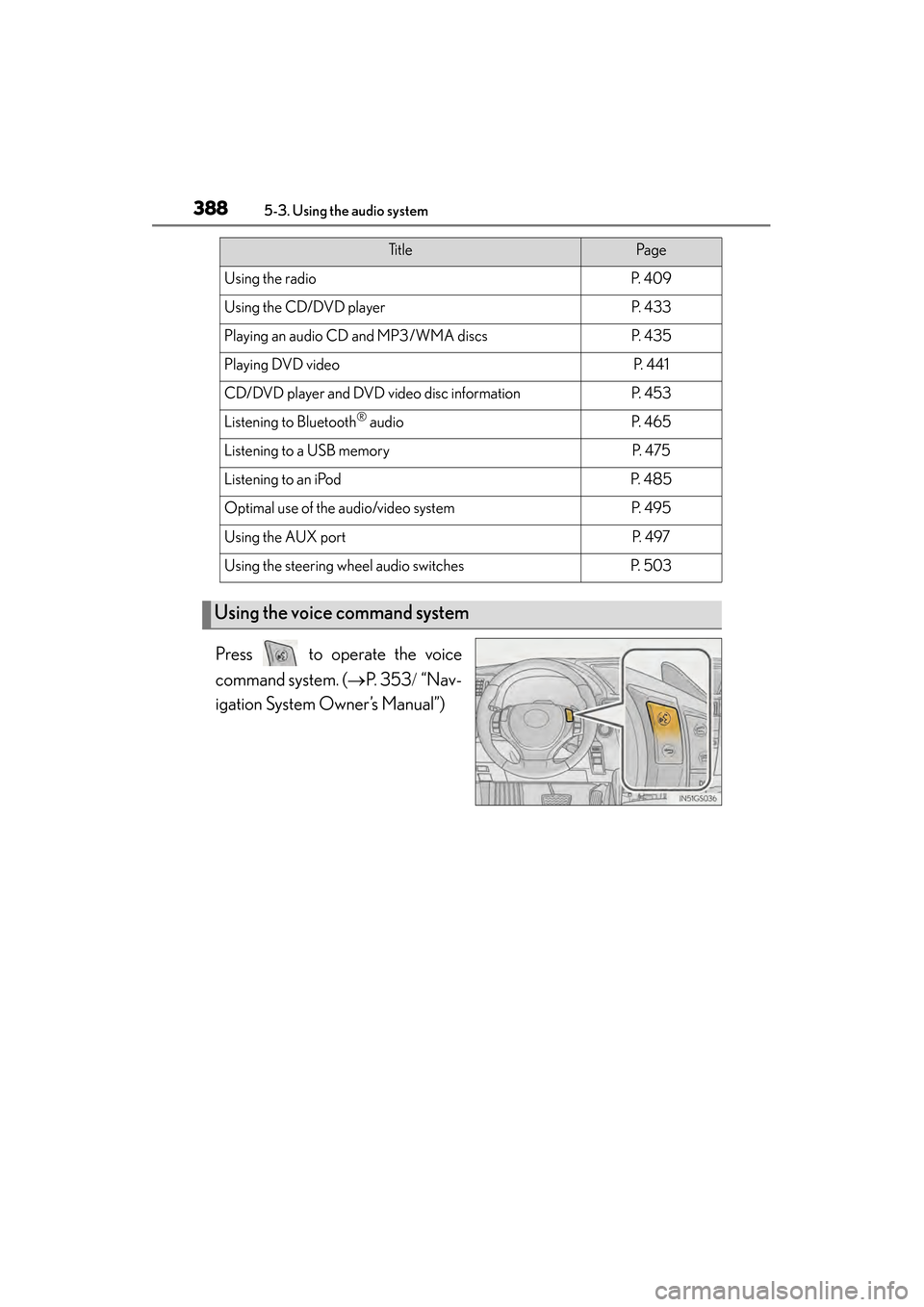
Press to operate the voice
command system. (→P. 353 / “Nav-
igation System Owner’s Manual”)
Ti t l ePa g e
Using the radioP. 4 0 9
Using the CD/DVD playerP. 4 3 3
Playing an audio CD and MP3/WMA discsP. 4 3 5
Playing DVD videoP. 441
CD/DVD player and DVD video disc informationP. 4 5 3
Listening to Bluetooth® audioP. 4 6 5
Listening to a USB memoryP. 4 7 5
Listening to an iPodP. 4 8 5
Optimal use of the audio/video systemP. 4 9 5
Using the AUX portP. 4 9 7
Using the steering wheel audio switchesP. 5 0 3
Using the voice command system
GS450h_U.book Page 388 Monday, January 23, 2012 10:20 AM
Page 390 of 862
GS450h_U (OM30D01U)
3895-3. Using the audio system
5
Interior features
■Using cellular phones
Interference may be heard through the audio system’s speakers if a cellular phone is
being used inside or close to the vehicle while the audio system is operating.
■When using the Remote Touch screen
Dimmed screen buttons cannot be operated.
■Ta b
Select or , located either side of the screen tabs, to display tabs from the pre-
vious or next page.
■About Dolby
Manufactured under license from Dolby Laboratories. Dolby and the double-D sym-
bol are trademarks of Dolby Laboratories.
CAUTION
■For vehicles sold in the U.S.A. and Canada
●Part 15 of the FCC Rules
FCC Warning:
Changes or modifications not expressly approved by the party responsible for
compliance could void the user’s authority to operate the equipment.
●Laser products
• USE OF CONTROL OR ADJUSTMENT OR PERFORMANCE OF PRO- CEDURES OTHER THAN THOSE SPECIFIED HEREIN MAY RESULT IN
HAZARDOUS RADIATION EXPOSURE.
• THE USE OF OPTICAL INSTRUMENTS WITH THIS PRODUCT WILL INCREASE EYE HAZARD.
NOTICE
■To prevent 12-volt battery discharge
Do not leave the audio system on longer than necessary when the hybrid system is
off.
■To avoid damaging the audio system
Take care not to spill drinks or other fluids on the audio system.
GS450h_U.book Page 389 Monday, January 23, 2012 10:20 AM
Page 406 of 862
GS450h_U (OM30D01U)
4055-3. Using the audio system
5
Interior features
Redistribution and use in source and binary forms are permitted provided that the
above copyright notice and this paragraph are duplicated in all such forms and that
any documentation and other materials related to such distribution and use
acknowledge that the software was developed by the University of California,
Berkeley. The name of the University may not be used to endorse or promote
products derived from this software without specific prior written permission.
THIS SOFTWARE IS PROVIDED ““AS IS”” AND WITHOUT ANY EXPRESS OR
IMPLIED WARRANTIES, INCLUDING, WITHOUT LIMITATION, THE IMPLIED
WARRANTIES OF MERCHANTIBILITY AND FITNESS FOR A PARTICULAR
PURPOSE.
Rights, responsibilities and use of this software are controlled by the agreement
found in the ““LICENSE.H”” file distributed with this source code. ““LICENSE.H””
may not be removed from this distribution, modified, enhanced nor references to it
omitted.
Copyright 1983 by the Massachusetts Institute of Technology
Copyright 1984 by the Massachusetts Institute of Technology
Copyright 1984, 1985 by the Massachusetts Institute of Technology
Copyright 1990 by NetPort Software
Copyright 1990-1993 by NetPort Software.
Copyright 1990-1994 by NetPort Software.
Copyright 1990-1996 by NetPort Software.
Copyright 1990-1997 by NetPort Software.
Copyright 1993 by NetPort Software
Copyright 1986 by Carnegie Mellon
All Rights Reserved
Permission to use, copy, modify, and distribute this software and its documentation
for any purpose and without fee is hereby granted, provided that the above
copyright notice appear in all copies and that both that copyright notice and this
permission notice appear in supporting documentation, and that the name of CMU
not be used in advertising or publicity pertaining to distribution of the software
without specific, written prior permission.
GS450h_U.book Page 405 Monday, January 23, 2012 10:20 AM
Page 423 of 862
422
GS450h_U (OM30D01U)
5-3. Using the audio system
■If you select
The display returns to the previous screen.
■When the 12-volt battery is disconnected
All preset stations are erased.
■Reception sensitivity
●Cargo loaded on the roof luggage carrier, especially metal objects, may adversely
affect the reception of XM® Satellite Radio.
●Maintaining perfect radio reception at all times is difficult due to the continually
changing position of the antenna, differences in signal strength and surrounding
objects, such as trains, transmitters, etc.
●The radio antenna is mounted inside the rear window. To maintain clear radio
reception, do not attach metallic window tinting or other metallic objects to the
antenna wire mounted inside the rear window.
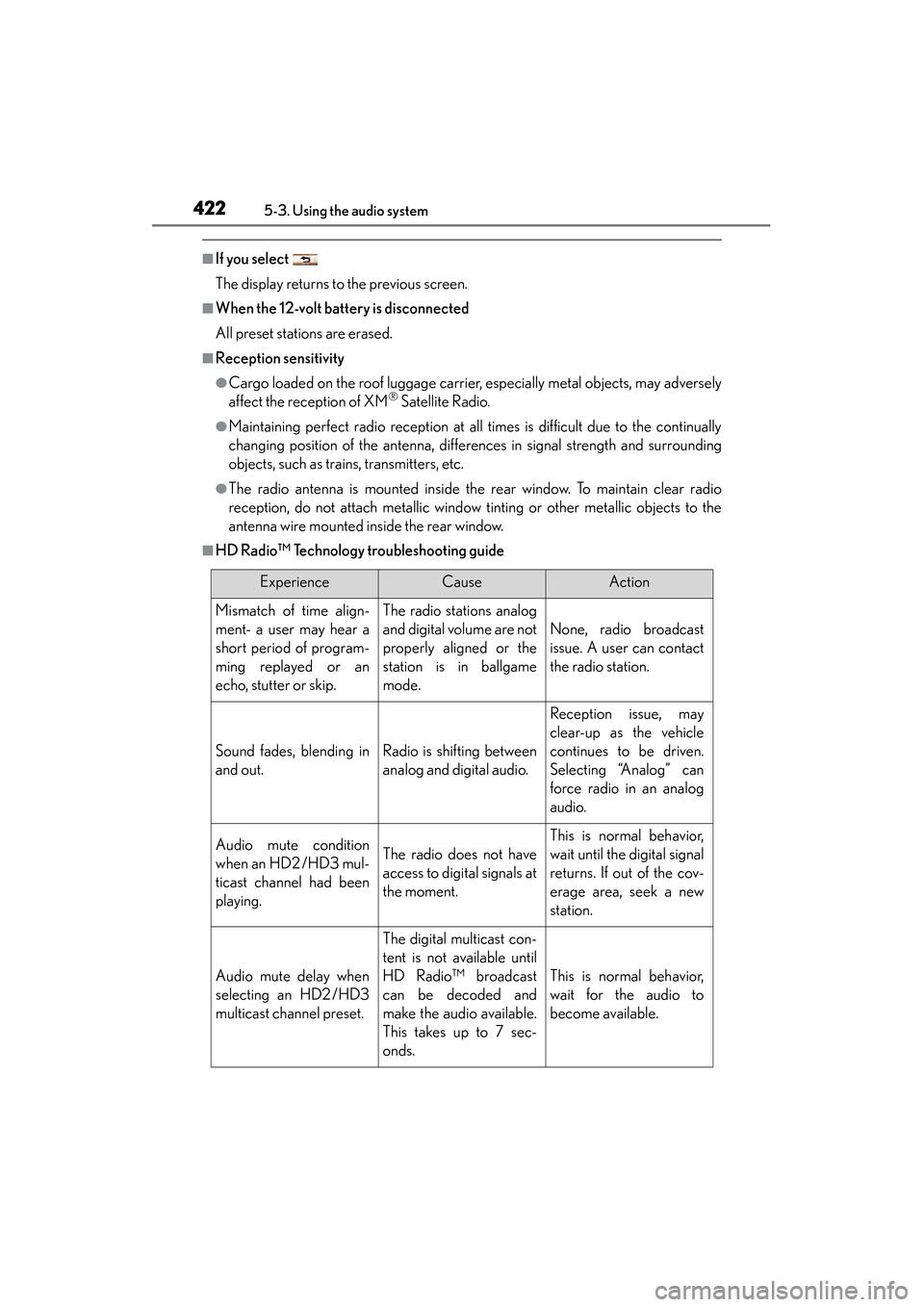
■HD Radio™ Technology troubleshooting guide
ExperienceCauseAction
Mismatch of time align-
ment- a user may hear a
short period of program-
ming replayed or an
echo, stutter or skip.The radio stations analog
and digital volume are not
properly aligned or the
station is in ballgame
mode.
None, radio broadcast
issue. A user can contact
the radio station.
Sound fades, blending in
and out.Radio is shifting between
analog and digital audio.
Reception issue, may
clear-up as the vehicle
continues to be driven.
Selecting “Analog” can
force radio in an analog
audio.
Audio mute condition
when an HD2 /HD3 mul-
ticast channel had been
playing.The radio does not have
access to digital signals at
the moment.
This is normal behavior,
wait until the digital signal
returns. If out of the cov-
erage area, seek a new
station.
Audio mute delay when
selecting an HD2 /HD3
multicast channel preset.
The digital multicast con-
tent is not available until
HD Radio™ broadcast
can be decoded and
make the audio available.
This takes up to 7 sec-
onds.
This is normal behavior,
wait for the audio to
become available.
GS450h_U.book Page 422 Monday, January 23, 2012 10:20 AM
Page 425 of 862
424
GS450h_U (OM30D01U)
5-3. Using the audio system
■XM Radio Services — Descriptions (vehicles without a navigation system for
U.S.A.)
●Radio and Entertainment
XM offers more than 170 satellite radio channels of commercial-free music and
premier sports, news, talk, and entertainment. XM is broadcast via satellites to mil-
lions of listeners across the continental United States. XM subscribers listen to
XM on satellite radio receivers for the car, home, and portable use. More informa-
tion about XM is available online at www.siriusxm.com.
●Satellite tuner
The tuner supports only Audio Services (Music and Talk) and the accompanying
Te x t I n f o r m a t i o n o f X M
® Satellite Radio.
■XM Radio Services — Subscription Instructions (vehicles without a navigation sys-
tem for U.S.A.)For XM Services requiring a subscription (such as XM Radio), the following para-
graph shall be included.
Required XM Radio monthly subscriptions sold separately after trial period. Sub-
scription fee is consumer only. All fees and programming subject to change. Sub-
scriptions are subject to the Customer Agreement available at www.siriusxm.com.
XM service only available in the 48 contiguous United States. © 2011 Sirius XM
Radio Inc. Sirius, XM and all related marks and logos are trademarks of Sirius XM
Radio Inc. All other marks, channel names and logos are the property of their
respective owners.
For more information, program schedules, and to subscribe or extend subscrip-
tion after complimentary trial period; more information is available at:
U.S.A. Customers:
Visit www.siriusxm.com
or call 1-877-515-3987
●Radio ID
You will need the radio ID when activating XM® service or reporting a problem. If
“CH 000” is selected using the “TUNE/SCROLL” knob, the ID code, which is 8
alphanumeric characters, will be displayed. If another channel is selected, the ID
code will no longer be displayed. The channel (000) alternates between displaying
the radio ID and the specific radio code.
GS450h_U.book Page 424 Monday, January 23, 2012 10:20 AM
Page 427 of 862
426
GS450h_U (OM30D01U)
5-3. Using the audio system
■XM Radio Services — Descriptions (vehicles without a navigation system
for Canada)
●Radio and Entertainment
XM offers more than 170 satellite radio channels of commercial-free music and
premier sports, news, talk, and entertainment. XM is broadcast via satellites to mil-
lions of listeners across the continental United States. XM subscribers listen to
XM on satellite radio receivers for the car, home, and portable use. More informa-
tion about XM is available online at www.xmradio.ca.
●Satellite tuner
The tuner supports only Audio Services (Music and Talk) and the accompanying
Te x t I n f o r m a t i o n o f X M
® Satellite Radio.
■XM Radio Services — Subscription Instructions (vehicles without a navigation sys-
tem for Canada)For XM Services requiring a subscription (such as XM Radio), the following para-
graph shall be included.
Required XM Radio monthly subscriptions sold separately after trial period. Sub-
scription fee is consumer only. All fees and programming subject to change. Sub-
scriptions are subject to the Customer Agreement available at www.xmradio.ca.
XM service only available in 10 Canadian provinces. © 2011 Sirius XM Radio Inc.
Sirius, XM and all related marks and logos are trademarks of Sirius XM Radio Inc.
All other marks, channel names and logos are the property of their respective
owners.
For more information, program schedules, and to subscribe or extend subscrip-
tion after complimentary trial period; more information is available at:
Canadian Customers:
Visit w ww.xmradio.ca
or call 1-877-515-3987
●Radio ID
You will need the radio ID when activating XM® service or reporting a problem. If
“CH 000” is selected using the “TUNE/SCROLL” knob, the ID code, which is 8
alphanumeric characters, will be displayed. If another channel is selected, the ID
code will no longer be displayed. The channel (000) alternates between displaying
the radio ID and the specific radio code.
GS450h_U.book Page 426 Monday, January 23, 2012 10:20 AM
Page 429 of 862
428
GS450h_U (OM30D01U)
5-3. Using the audio system
■XM Radio Services — Descriptions (vehicles with a navigation system)
●Radio and Entertainment
XM offers more than 170 satellite radio channels of commercial-free music and
premier sports, news, talk, and entertainment. XM is broadcast via satellites to mil-
lions of listeners across the continental United States. XM subscribers listen to
XM on satellite radio receivers for the car, home, and portable use. More informa-
tion about XM is available online at www.siriusxm.com
. (U.S.A.)
or www.xmradio.ca
(Canada)
●Infotainment and Data services
XM offers a variety of advanced Infotainment and data services.
■XM Radio Services — Subscription Instructions (vehicles with a navigation system)
For XM Services requiring a subscription (such as XM Radio, and some Infotain-
ment & data services), the following paragraph shall be included.
Required XM Radio and some Infotainment & data services monthly subscriptions
sold separately after trial period. Subscription fee is consumer only. All fees and
programming subject to change. Subscriptions are subject to the Customer
Agreement available at www.siriusxm.com
. (U.S.A.) or www.xmradio.ca (Canada)
XM service only available in the 48 contiguous United States and 10 Canadian
provinces. © 2011 Sirius XM Radio Inc. Sirius, XM and all related marks and logos
are trademarks of Sirius XM Radio Inc. All other marks, channel names and logos
are the property of their respective owners.
For more information, program schedules, and to subscribe or extend subscrip-
tion after complimentary trial period; more information is available at:
XU.S.A. Customers:
Visit www.siriusxm.com
or call 1-877-515-3987
XCanadian Customers:
Visit ww w.xmradio.ca
or call 1-877-515-3987
●Radio ID
You will need the radio ID when activating XM® service or reporting a problem. If
“CH 000” is selected using the “TUNE/SCROLL” knob, the ID code, which is 8
alphanumeric characters, will be displayed. If another channel is selected, the ID
code will no longer be displayed. The channel (000) alternates between displaying
the radio ID and the specific radio code.
GS450h_U.book Page 428 Monday, January 23, 2012 10:20 AM