battery Lexus GS450h 2013 Service Manual
[x] Cancel search | Manufacturer: LEXUS, Model Year: 2013, Model line: GS450h, Model: Lexus GS450h 2013Pages: 862, PDF Size: 19.06 MB
Page 493 of 862
492
GS450h_U (OM30D01U)
5-3. Using the audio system
■iPod cover art
●Depending on the iPod and the songs in the iPod, iPod cover art may be displayed.
This function can be changed to “On” or “Off”. (→P. 4 8 8 )
●It may take time to display iPod cover art, and the iPod may not be operated while
the cover art display is in process.
●Only iPod cover art that is saved in JPEG format can be displayed.
■iPod functions
●When the iPod connected to the system includes iPod video, the system can only
output the sound by selecting “Video” on the “iPod” screen.
●Depending on the iPod, the video sound may not be able to be heard.
●When an iPod is connected and the audio source is changed to iPod mode, the
iPod will resume play from the same point in which it was last used.
●Depending on the iPod that is connected to the system, certain functions may not
be available. If a function is unavailable due to a malfunction (as opposed to a sys-
tem specification), disconnecting the device and reconnecting it once again may
resolve the problem.
■When using an iPod
You maybe unable to use the instrument panel power outlet if the iPod is connected
to the USB port at the same time.
■Battery charge
When an iPod is connected using a genuine iPod cable, the iPod starts charging its
battery.
■Error messages for iPod
“iPod Error”:
This indicates a problem in the iPod or its connection.
“No music files found.”:
This indicates that there is no music data in the iPod.
“Please check the iPod firmware version.”:
This indicates that the software version is not compatible. Perform the iPod firmware
updates and try again.
“iPod authorization failed.”:
This indicates that it failed to authorize the iPod. Please check your iPod.
sec_05-03.fm Page 492 Monday, January 30, 2012 10:30 AM
Page 510 of 862
GS450h_U (OM30D01U)
5095-4. Using the hands-free phone system (for cellular phone)
5
Interior features
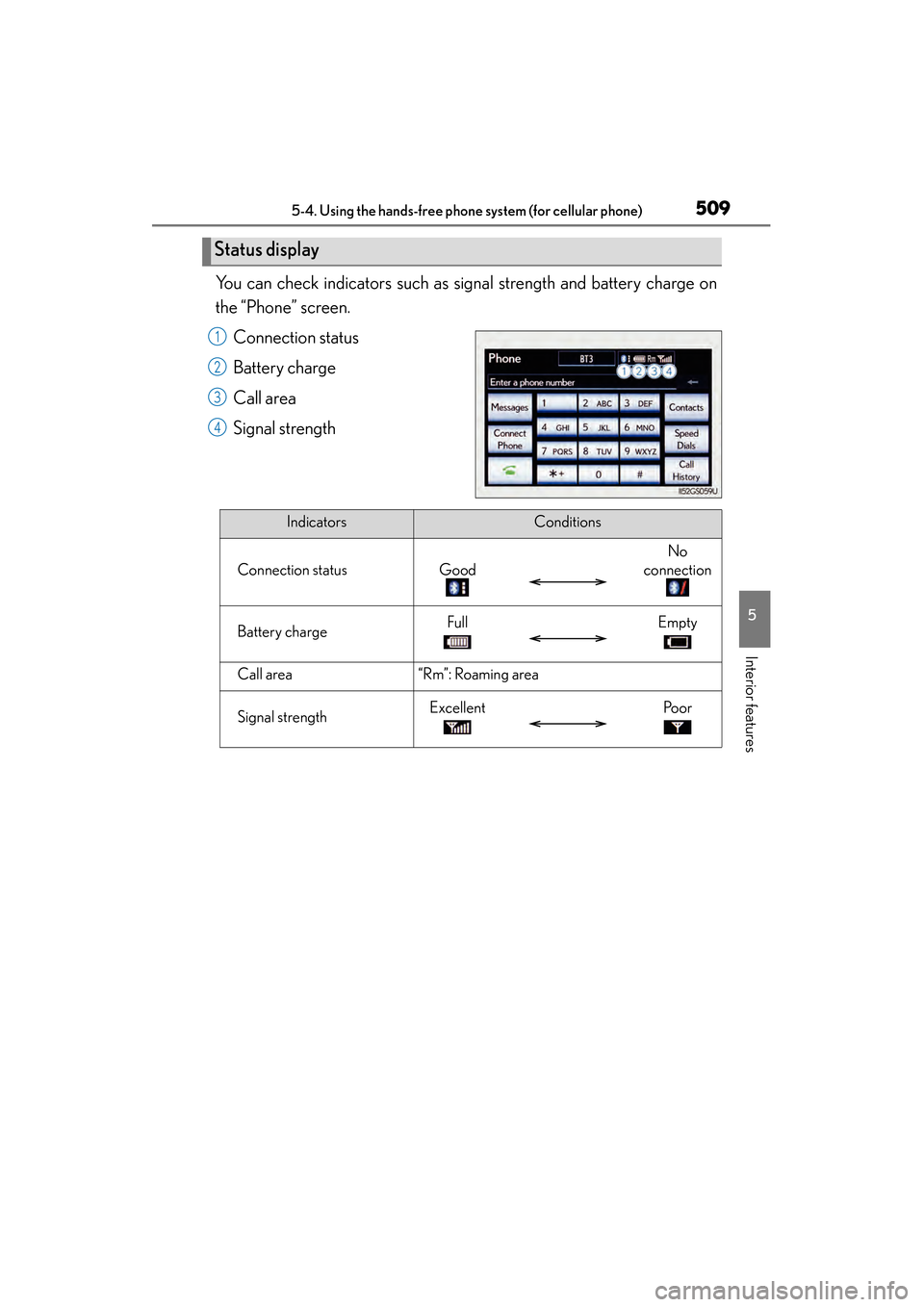
You can check indicators such as signal strength and battery charge on
the “Phone” screen.Connection status
Battery charge
Call area
Signal strength
Status display
1
2
3
4
IndicatorsConditions
Connection statusGood
No
connection
Battery chargeFullEmpty
Call area“Rm”: Roaming area
Signal strengthExcellentPo o r
GS450h_U.book Page 509 Monday, January 23, 2012 10:20 AM
Page 511 of 862
510
GS450h_U (OM30D01U)
5-4. Using the hands-free phone system (for cellular phone)
■When using the hands-free system
●The audio system is muted when making a call.
●If both parties speak at the same time, it may be difficult to hear.
●If the incoming call volume is overly loud, an echo may be heard.
●Try to face toward the microphone as much as possible when speaking.
●In the following circumstances, it may be difficult to hear the other party:
• When driving on unpaved roads
• When driving at high speeds
• If a window is open
• If the air conditioning is blowing directly on the microphone
• If the air conditioning is set to high
• There is an effect from the network of the cellular phone
■Conditions under which the system will not operate
●If using a cellular phone that does not support Bluetooth®
●If the cellular phone is turned off
●If you are outside service range
●If the cellular phone is not connected
●If the cellular phone’s battery is low
●When the cellular phone is not connected, “No connect” is displayed.
■Bluetooth® antenna
The antenna is built into the instrument panel. If the cellular phone is behind the seat
or in the console box, or touching or covered by metal objects, connection status
may deteriorate.
■Battery charge/Signal status
●This display may not correspond exactly with the cellular phone itself.
●When the cellular phone is out of the service area or in a place inaccessible by
radio waves, “No Service” is displayed.
■When using Bluetooth® audio and hands-free system at the same time
The following problems may occur.
●The Bluetooth® connection may be cut.
●Noise may be heard on the Bluetooth® audio playback.
GS450h_U.book Page 510 Monday, January 23, 2012 10:20 AM
Page 574 of 862
GS450h_U (OM30D01U)
5735-5. Using the interior lights
5
Interior features
■Illuminated entry system
The lights automatically turn on/off according to power switch mode, the presence
of the electronic key, whether the doors are locked/unlocked, and whether the doors
are opened/closed.
■To prevent 12-volt battery discharge
If the interior lights remain on when the power switch is turned off, the lights will go
off automatically after 20 minutes.
■Customization
Setting (e.g. the time elapsed before lights turn off) can be changed.
(Customizable features: →P. 807)
NOTICE
■To prevent 12-volt battery discharge
Do not leave the lights on longer than necessary when the hybrid system is off.
GS450h_U.book Page 573 Monday, January 23, 2012 10:20 AM
Page 584 of 862
583
GS450h_U (OM30D01U)5-7. Other interior features
5
Interior features
Sun visors and vanity mirrors
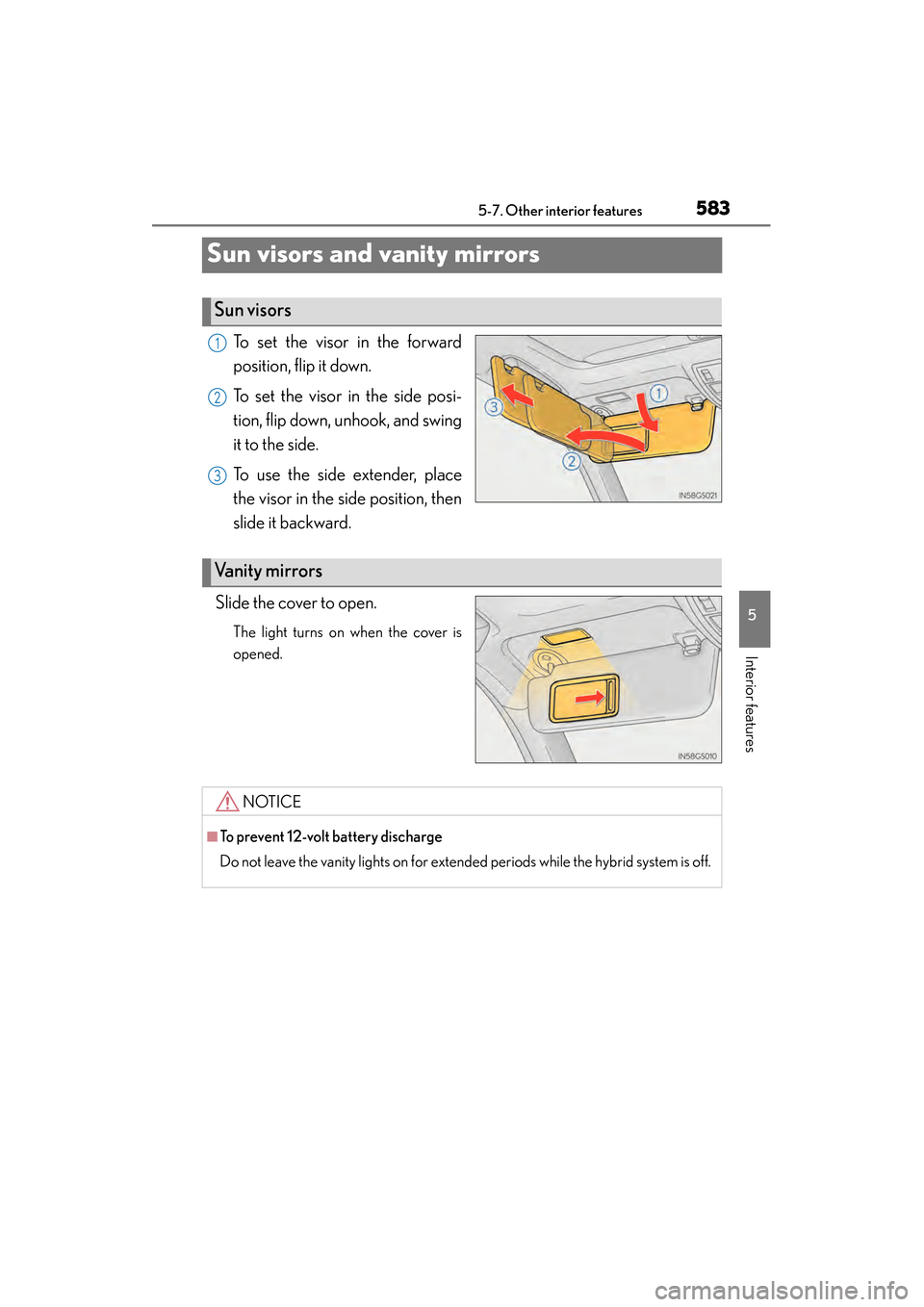
To set the visor in the forward
position, flip it down.
To set the visor in the side posi-
tion, flip down, unhook, and swing
it to the side.
To use the side extender, place
the visor in the side position, then
slide it backward.
Slide the cover to open.
The light turns on when the cover is
opened.
Sun visors
1
2
3
Va n i t y m i r r o r s
NOTICE
■To prevent 12-volt battery discharge
Do not leave the vanity lights on for extended periods while the hybrid system is off.
GS450h_U.book Page 583 Monday, January 23, 2012 10:20 AM
Page 588 of 862
GS450h_U (OM30D01U)
5875-7. Other interior features
5
Interior features
■The power outlets can be used when
12 V: The power switch is in ACCESSORY or ON mode.
120 V AC: The power switch is in ON mode.
NOTICE
■To avoid damaging the power outlets
Close the power outlet lids when the power outlets are not in use.
Foreign objects or liquids that enter the power outlets may cause a short circuit.
■To prevent the fuse from being blown
12 V:
Do not use an accessory that uses more than 12 V 10 A.
120 V AC:
Do not use a 120 V AC appliance that requires more than 100W. If a 120 V AC
appliance that consumes more than 100 W is used, the protection circuit will cut
the power supply.
■To prevent 12-volt battery discharge
Do not use the power outlets longer than necessary when the hybrid system is off.
■Appliances that may not operate properly (120 V AC)
The following 120 V AC appliances may not operate properly even if their power
consumption is under 100 W:
●Appliances with high initial peak wattage
●Measuring devices that process precise data
●Other appliances that require an extremely stable power supply
GS450h_U.book Page 587 Monday, January 23, 2012 10:20 AM
Page 590 of 862
GS450h_U (OM30D01U)
5895-7. Other interior features
5
Interior features
CAUTION
■Burns
Care should be taken to prevent injury if anyone in the following categories comes
in contact with the steering wheel when the heated steering wheel is on:
●Babies, small children, the elderly, the sick and the physically challenged
●Persons with sensitive skin
●Persons who are fatigued
●Persons who have taken alcohol or drugs that induce sleep (sleeping drugs, cold
remedies, etc.)
NOTICE
■To prevent the 12-volt battery from being discharged
Turn the switch off when the hybrid system is off.
GS450h_U.book Page 589 Monday, January 23, 2012 10:20 AM
Page 593 of 862
592
GS450h_U (OM30D01U)
5-7. Other interior features
CAUTION
■Burns
●Use caution when seating the following persons in a seat with the seat heater on
to avoid the possibility of burns:
• Babies, small children, the elderly, the sick and the physically challenged
• Persons with sensitive skin
• Persons who are fatigued
• Persons who have taken alcohol or drugs that induce sleep (sleeping drugs,cold remedies, etc.)
●Do not cover the seat with anything when using the seat heater.
Using the seat heater with a blanket or cushion increases the temperature of the
seat and may lead to overheating.
●Do not use seat heater more than necessary. Doing so may cause minor burns or
overheating.
NOTICE
■To prevent damage to the seat heaters/seat ventilators
Do not put heavy objects that have an uneven surface on the seat and do not stick
sharp objects (needles, nails, etc.) into the seat.
■To prevent 12-volt battery discharge
Turn the seat heaters/seat ventilators off when the hybrid system is off.
GS450h_U.book Page 592 Monday, January 23, 2012 10:20 AM
Page 597 of 862
596
GS450h_U (OM30D01U)
5-7. Other interior features
■Button lock function (vehicles with rear control panel)
To prevent inadvertent operation, some buttons on the rear armrest can be locked.
(→ P. 383)
■Rear control panel illumination off function (vehicles with rear control panel)
Control panel illumination on the rear armrest can be turned off. ( →P. 3 8 3 )
■Customization
Time elapsed before the reverse operation feature activates can be changed.
(Customizable features: → P. 807)
CAUTION
■When the rear sunshade is being operated
Do not place fingers or other objects in the fastener section or in the opening.
They may get caught, causing injury.
NOTICE
■To prevent 12-volt battery discharge
Do not operate the rear sunshade when the hybrid system is off.
■To ensure normal operation of the re ar sunshade and rear door sunshades
Observe the following precautions.
●Do not place excessive load on the motor or other components of the rear sun-
shade.
●Do not place objects where they may hinder opening and closing operations.
●Do not attach items to the rear sunshade and rear door sunshades.
●Keep the opening clean and clear of obstructions.
●Do not operate the rear sunshade cont inuously for long periods of time.
GS450h_U.book Page 596 Monday, January 23, 2012 10:20 AM
Page 606 of 862
GS450h_U (OM30D01U)
6055-7. Other interior features
5
Interior features
■Before programming
●Install a new battery in the remote control transmitter.
●The battery side of the remote control transmitter must be pointed away from the
HomeLink
® button.
■Certification for the garage door opener
XFor vehicles sold in the U.S.A.
FCC ID: NZLOBIHL4
NOTE:
This device complies with Part 15 of the FCC Rules. Operation is subject to the fol-
lowing two conditions: (1) this device may not cause harmful interference, and (2)
this device must accept any interference received, including interference that may
cause undesired operation.
FCC WARNING:
Changes or modifications not expressly approved by the party responsible for com-
pliance could void the user’s authority to operate the equipment.
XFor vehicles sold in Canada
NOTE:
Operation is subject to the following two conditions:
(1) this device may not cause interference, and
(2) this device must accept any interference, including interference that may cause
undesired operation.
■When support is necessary
Visit on the web at www.homelink.com
or call 1-800-355-3515.
GS450h_U.book Page 605 Monday, January 23, 2012 10:20 AM