belt Lexus GS450h 2013 Service Manual
[x] Cancel search | Manufacturer: LEXUS, Model Year: 2013, Model line: GS450h, Model: Lexus GS450h 2013Pages: 862, PDF Size: 19.06 MB
Page 154 of 862
GS450h_U (OM30D01U)
1533-3. Adjusting the seats
3
Operation of each component
■Cancelation procedure
Carry only the key for which you want to cancel the linked door unlock
operation.
If 2 or more keys are in the vehicle, the driving position cannot be can-
celed properly.Turn the power switch to ON mode.
While pressing the “SET” button, press the driver’s door lock switch
(either lock or unlock) until the signal beeps.
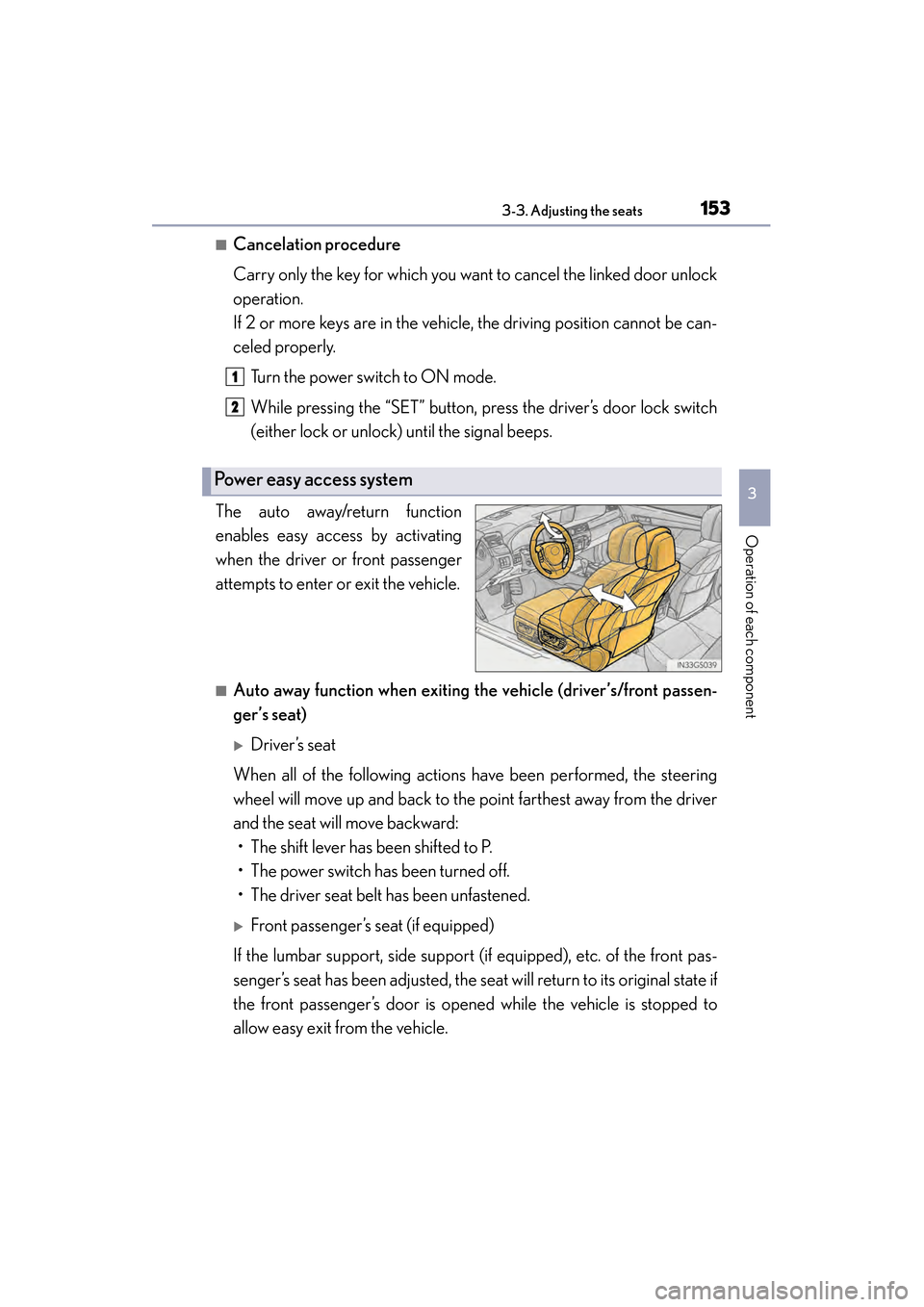
The auto away/return function
enables easy access by activating
when the driver or front passenger
attempts to enter or exit the vehicle.
■Auto away function when exiting the vehicle (driver’s/front passen-
ger’s seat)
XDriver’s seat
When all of the following actions have been performed, the steering
wheel will move up and back to the point farthest away from the driver
and the seat will move backward: • The shift lever has been shifted to P.
• The power switch has been turned off.
• The driver seat belt has been unfastened.
XFront passenger’s seat (if equipped)
If the lumbar support, side support (if equipped), etc. of the front pas-
senger’s seat has been adjusted, the seat will return to its original state if
the front passenger’s door is opened while the vehicle is stopped to
allow easy exit from the vehicle.
Power easy access system
1
2
GS450h_U.book Page 153 Monday, January 23, 2012 10:20 AM
Page 155 of 862
154
GS450h_U (OM30D01U)
3-3. Adjusting the seats
■Auto return function when entering the vehicle (driver’s seat only)
When either of the following actions has been performed, the steering
wheel will move toward the driver and seat will move forward: • The power switch has been turned to ACCESSORY mode.
• The driver’s seat belt has been fastened.
■When driving position memory is linked with door unlock operation
If the driver’s door is opened, the driver’s seat will move toward the memorized posi-
tion but stop slightly beforehand to allow easy access to the vehicle.
Turning the power switch to ACCESSORY or ON mode, or fastening the driver’s
seat belt moves the seat fully into the memorized position.
■Operating the driving position memory after turning the power switch off
Driver’s seat:
Memorized seat positions can be activated up to 180 seconds after the driver’s door
is opened and another 60 seconds after it is closed again. Memorized steering
wheel position can be activated by pressing the power switch.
Front passenger’s seat:
Memorized positions can be activated up to 180 seconds after the front passenger’s
door is opened by pressing button “1”, “2” or “3”.
■Correct seat position
When the seat is in the most forward or most backward position, and the seat is
being moved in those directions, the system may not correctly recognize the current
position and the memorized positi on will not be correctly recalled.
■The auto away function for exiting the driver’s seat
If the seat is already close to the rearmost position, the auto away function may not
operate when the driver exits the vehicle.
■Customization
The distance that the driver’s seat moves backward during the auto away function
can be changed. (Customizable features: →P. 807)
CAUTION
■Seat adjustment caution
Take care during seat adjustment so that the seat does not strike the rear passen-
ger or squeeze your body against the steering wheel.
GS450h_U.book Page 154 Monday, January 23, 2012 10:20 AM
Page 159 of 862
1583-4. Adjusting the steering wheel and mirrors
GS450h_U (OM30D01U)
Steering wheel
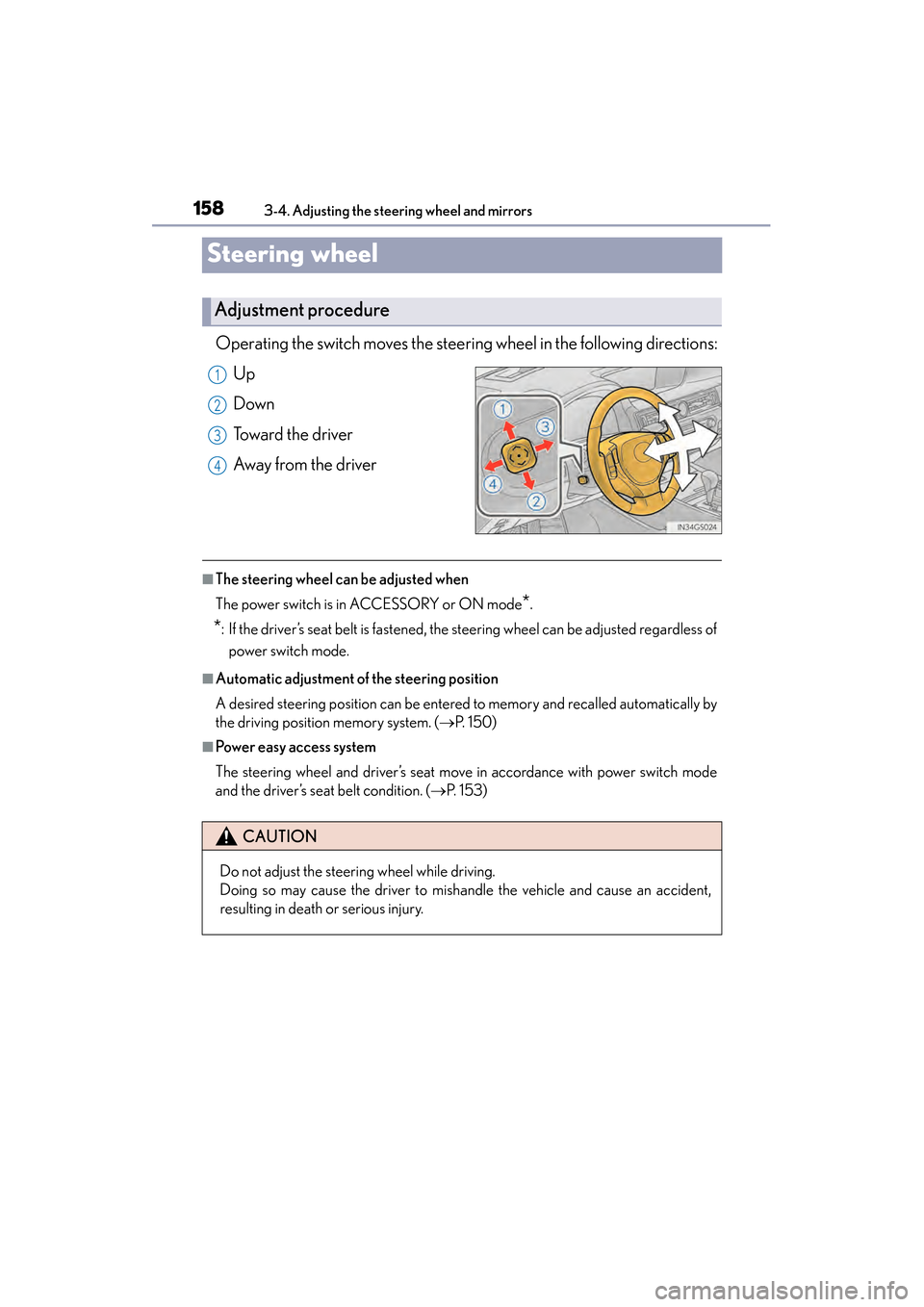
Operating the switch moves the steering wheel in the following directions:
Up
Down
Toward the driver
Away from the driver
■The steering wheel can be adjusted when
The power switch is in ACCESSORY or ON mode
*.
*: If the driver’s seat belt is fastened, the steering wheel can be adjusted regardless of power switch mode.
■Automatic adjustment of the steering position
A desired steering position can be entered to memory and recalled automatically by
the driving position memory system. ( →P. 1 5 0 )
■Power easy access system
The steering wheel and driver’s seat move in accordance with power switch mode
and the driver’s seat belt condition. ( →P. 1 5 3 )
Adjustment procedure
1
2
3
4
CAUTION
Do not adjust the steering wheel while driving.
Doing so may cause the driver to mishandle the vehicle and cause an accident,
resulting in death or serious injury.
GS450h_U.book Page 158 Monday, January 23, 2012 10:20 AM
Page 211 of 862
210
GS450h_U (OM30D01U)
4-2. Driving procedures
Brake Hold
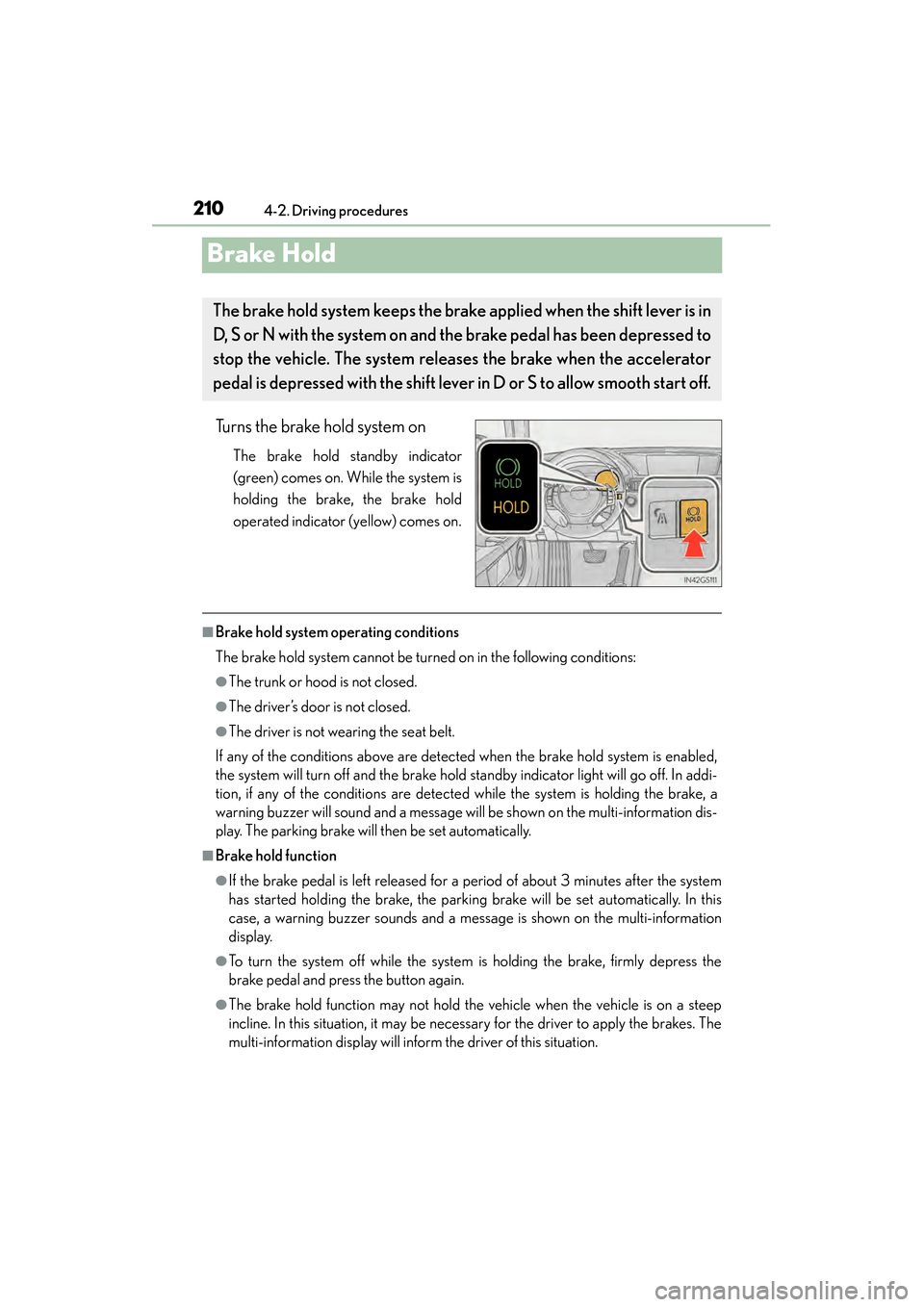
Turns the brake hold system on
The brake hold standby indicator
(green) comes on. While the system is
holding the brake, the brake hold
operated indicator (yellow) comes on.
■Brake hold system operating conditions
The brake hold system cannot be turned on in the following conditions:
●The trunk or hood is not closed.
●The driver’s door is not closed.
●The driver is not wearing the seat belt.
If any of the conditions above are detected when the brake hold system is enabled,
the system will turn off and the brake hold standby indicator light will go off. In addi-
tion, if any of the conditions are detected while the system is holding the brake, a
warning buzzer will sound and a message will be shown on the multi-information dis-
play. The parking brake will then be set automatically.
■Brake hold function
●If the brake pedal is left released for a period of about 3 minutes after the system
has started holding the brake, the parking brake will be set automatically. In this
case, a warning buzzer sounds and a message is shown on the multi-information
display.
●To turn the system off while the system is holding the brake, firmly depress the
brake pedal and press the button again.
●The brake hold function may not hold the vehicle when the vehicle is on a steep
incline. In this situation, it may be necessary for the driver to apply the brakes. The
multi-information display will inform the driver of this situation.
The brake hold system keeps the brak e applied when the shift lever is in
D, S or N with the system on and the brake pedal has been depressed to
stop the vehicle. The system releases the brake when the accelerator
pedal is depressed with the shift lever in D or S to allow smooth start off.
GS450h_U.book Page 210 Monday, January 23, 2012 10:20 AM
Page 297 of 862
296
GS450h_U (OM30D01U)
4-5. Using the driving support systems
PCS (Pre-Collision System)∗
◆Pre-collision seat belts (front seat only)
If the pre-collision sensor detects that a collision is unavoidable, the
pre-collision system will retract the seat belt before the collision occurs.
The same will happen if the driver makes an emergency braking or
loses control of the vehicle. (→P. 3 4 )
◆Pre-collision brake assist
When there is a high possibility of a frontal collision, the system applies
greater braking force in relation to how strongly the brake pedal is
depressed.
◆Pre-collision braking
When there is a high possibility of a frontal collision, the system warns
the driver using a warning light, warning display and buzzer. If the sys-
tem determines that a collision is unavoidable, the brakes are automati-
cally applied to reduce the collision speed.
∗
: If equipped
When the radar sensor detects that a frontal collision is highly likely or
even unavoidable, safety systems such as the brakes and seat belts are
automatically engaged to lessen impact as well as vehicle damage.
The pre-collision system can be turned on and off as necessary by oper-
ating the switch. ( →P. 2 9 7 )
GS450h_U.book Page 296 Monday, January 23, 2012 10:20 AM
Page 300 of 862
GS450h_U (OM30D01U)
2994-5. Using the driving support systems
4
Driving
■The pre-collision system is operational when
The pre-collision system off button is not pressed and the following conditions are
met:
●Pre-collision warning:
• Vehicle speed is greater than about 10 mph (15 km/h).
• The speed at which your vehicle is approaching the obstacle or oncoming vehi- cle is greater than about 10 mph (15 km/h).
●Pre-collision seat belts (operating conditions A):
• Vehicle speed is greater than about 19 mph (30 km/h).
• The system detects sudden braking or skidding.
• The front occupants are wearing a seat belt.
●Pre-collision seat belts (operating conditions B):
• Vehicle speed is greater than about 4 mph (5 km/h).
• The speed at which your vehicle is approaching the obstacle or oncoming vehi-cle is greater than about 19 mph (30 km/h).
• The front occupants are wearing a seat belt.
●Pre-collision brake assist:
• Vehicle speed is greater than about 19 mph (30 km/h).
• The speed at which your vehicle is approaching the obstacle or the vehicle run- ning ahead of you is greater than about 19 mph (30 km/h).
• The brake pedal is depressed.
●Pre-collision braking:
• Vehicle speed is greater than about 10 mph (15 km/h).
• The speed at which your vehicle is approaching the obstacle or the vehicle run- ning ahead of you is greater than about 10 mph (15 km/h).
●Suspension control:
• Vehicle speed is greater than about 4 mph (5 km/h).
• The speed at which your vehicle is approaching the obstacle or the vehicle run-ning ahead of you is greater than about 19 mph (30 km/h).
●Pre-collision alert braking:
• The system determines that the driver is not facing forward, or that the driver’seyes are closed.
• Vehicle speed is greater than about 25 mph (40 km/h).
• The speed at which your vehicle is approaching the vehicle running ahead of you is greater than about 25 mph (40 km/h).
• The steering is not being turned.
GS450h_U.book Page 299 Monday, January 23, 2012 10:20 AM
Page 301 of 862

300
GS450h_U (OM30D01U)
4-5. Using the driving support systems
■Conditions that may trigger the system even if there is no danger of a collision
●When there is an object by the roadside at the entrance to a curve
●When passing an oncoming vehicle on a curve
●When driving over a narrow iron bridge
●When there is a metal object on the road surface
●When driving on an uneven road surface
●When passing an oncoming vehicle on a left-turn
●When your vehicle rapidly closes on the vehicle in front
●When a grade separation/interchange, sign, billboard, or other structure appears
to be directly in the vehicle’s line of travel
●When climbing a steep hill causes an overhead billboard or other metallic structure
to appear directly in the vehicle’s line of travel
When the system is activated in the situations described above, there is also a possi-
bility that the seat belts will retract quickly and the brakes will be applied with a force
greater than normal. When the seat belt is locked in the retracted position, stop the
vehicle in a safe place, release the seat belt and refasten it.
■Obstacles not detected
The sensor cannot detect plastic obstacles such as traffic cones. There may also be
occasions when the sensor cannot detect pedestrians, animals, bicycles, motorcy-
cles, trees, or snowdrifts.
■Situations in which the pre-collision system does not function properly
The system may not function effectively in situations such as the following:
●On roads with sharp bends or uneven surfaces
●If a vehicle suddenly moves in front of your vehicle, such as at an intersection
●If a vehicle suddenly cuts in front of your vehicle, such as when overtaking
●In inclement weather such as heavy rain, fog, snow or sand storms
●When your vehicle is skidding such as the VSC system off
●When your vehicle is steeply inclined
GS450h_U.book Page 300 Monday, January 23, 2012 10:20 AM
Page 583 of 862
582
GS450h_U (OM30D01U)
5-6. Using the storage features
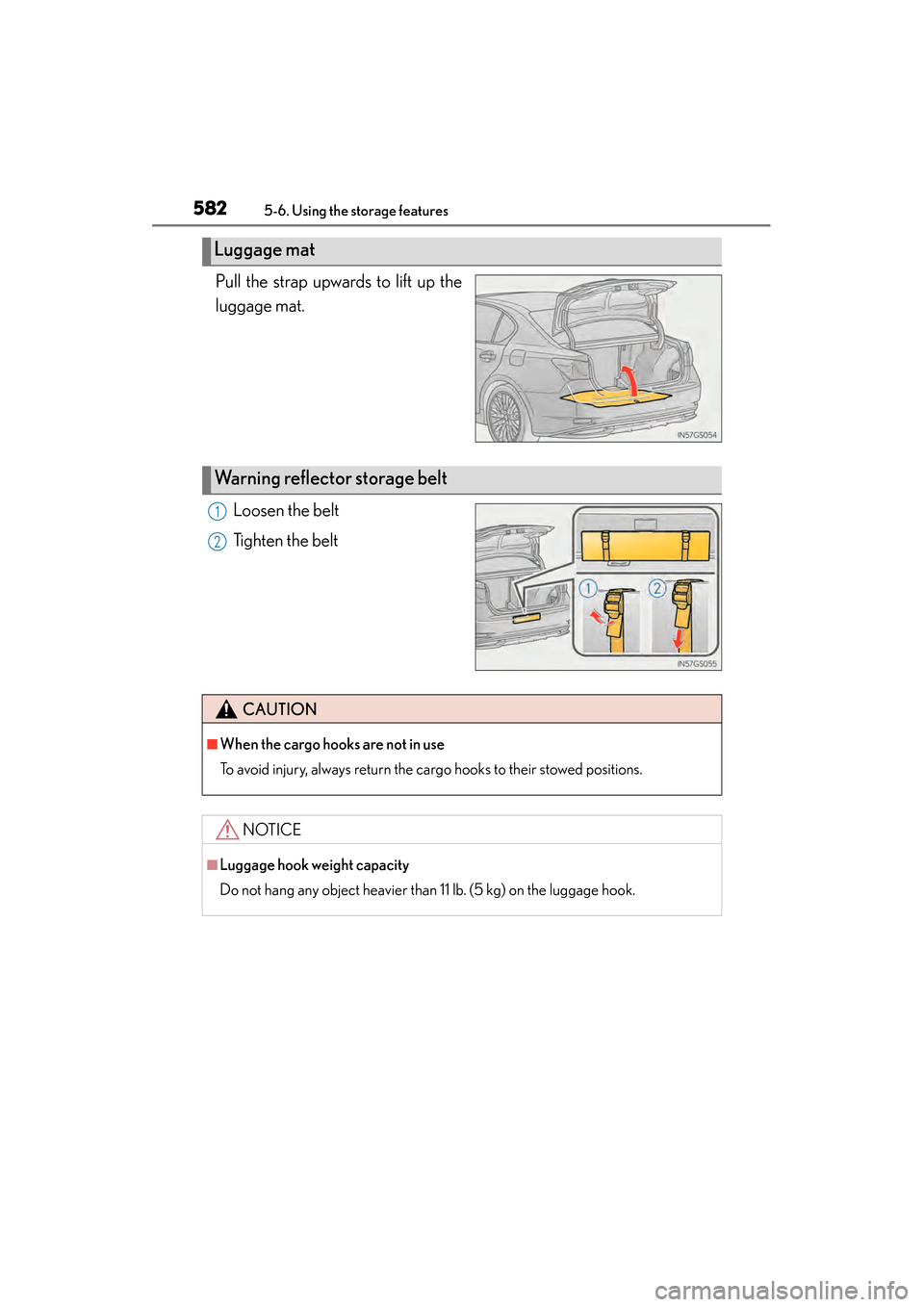
Pull the strap upwards to lift up the
luggage mat.Loosen the belt
Tighten the belt
Luggage mat
Warning reflector storage belt
1
2
CAUTION
■When the cargo hooks are not in use
To avoid injury, always return the cargo hooks to their stowed positions.
NOTICE
■Luggage hook weight capacity
Do not hang any object heavier than 11 lb. (5 kg) on the luggage hook.
GS450h_U.book Page 582 Monday, January 23, 2012 10:20 AM
Page 622 of 862
GS450h_U (OM30D01U)
6216-1. Maintenance and care
6
Maintenance and care
■Caring for leather areas
Lexus recommends cleaning the interior of the vehicle at least twice a year to main-
tain the quality of the vehicle’s interior.
■Shampooing the carpets
There are several commercial foaming-type cleaners available. Use a sponge or
brush to apply the foam. Rub in overlapping circles. Do not use water. Wipe dirty sur-
faces and let them dry. Excellent results are obtained by keeping the carpet as dry as
possible.
■Seat belts
Clean with mild soap and lukewarm water using a cloth or sponge. Also check the
belts periodically for excessive wear, fraying or cuts.
■When cleaning the carpeted portions of the glove box, console box, etc.
If a strong adhesive tape is used, there is a possibility that the surface of the carpet
could be damaged.
CAUTION
■Wa t e r i n t h e v e h i c l e
●Do not splash or spill liquid in the vehicle, such as on the floor, in the hybrid bat-
tery (traction battery) air vents, and in the trunk.
Doing so may cause the hybrid battery, electrical components, etc. to malfunc-
tion or catch fire.
●Do not get any of the SRS components or wiring in the vehicle interior wet.
(→ P. 4 0 )
An electrical malfunction may cause the airbags to deploy or not function prop-
erly, resulting in death or serious injury.
■Cleaning the interior (especially instrument panel)
Do not use polish wax or polish cleaner. The instrument panel may reflect off the
windshield, obstructing the driver’s view and leading to an accident, resulting in
death or serious injury.
GS450h_U.book Page 621 Monday, January 23, 2012 10:20 AM
Page 629 of 862
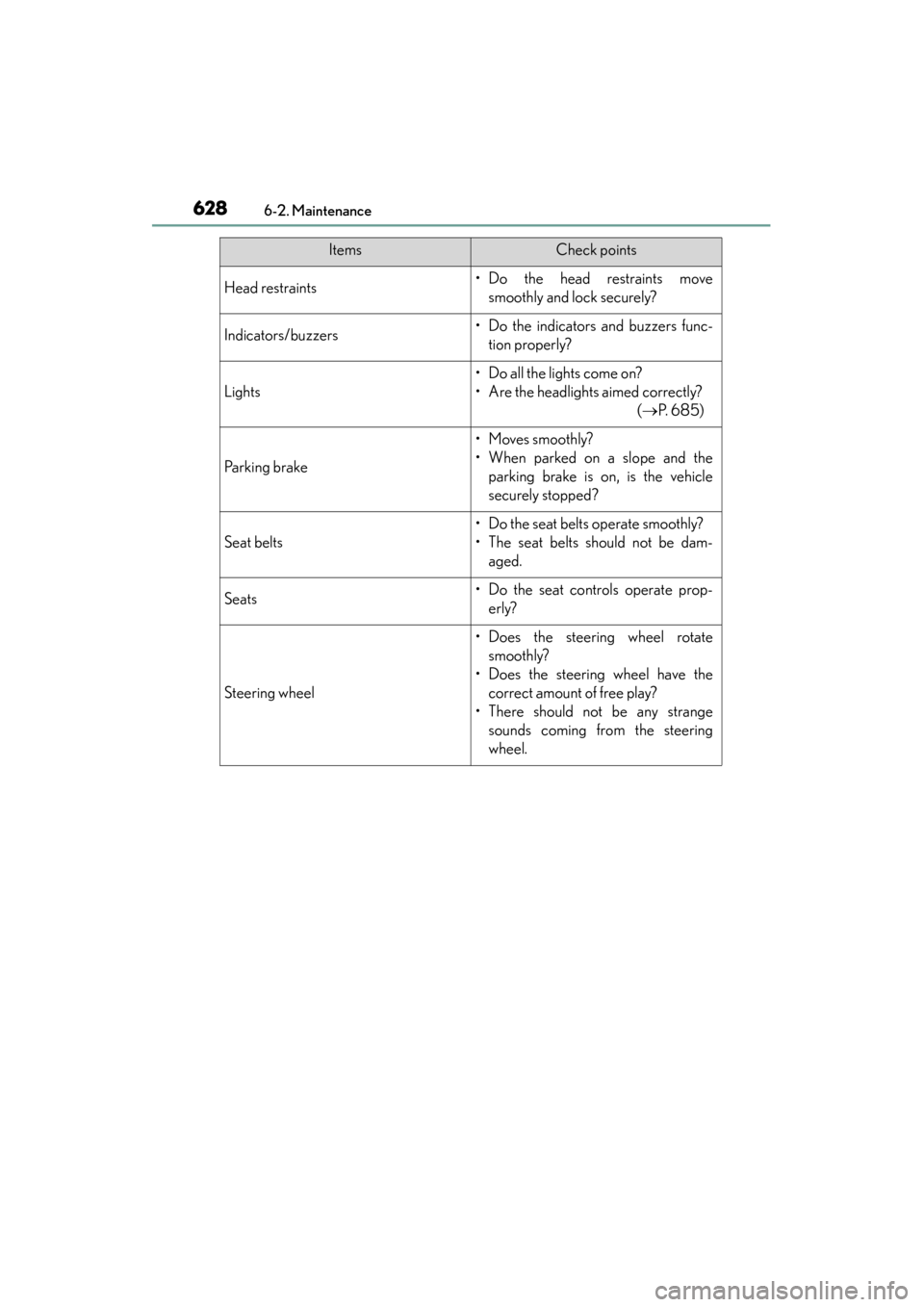
628
GS450h_U (OM30D01U)
6-2. Maintenance
Head restraints• Do the head restraints movesmoothly and lock securely?
Indicators/buzzers• Do the indicators and buzzers func-tion properly?
Lights
• Do all the lights come on?
• Are the headlights aimed correctly? ( →P. 6 8 5 )
Parking brake
• Moves smoothly?
• When parked on a slope and the
parking brake is on, is the vehicle
securely stopped?
Seat belts
• Do the seat belts operate smoothly?
• The seat belts should not be dam-aged.
Seats• Do the seat controls operate prop-erly?
Steering wheel
• Does the steering wheel rotatesmoothly?
• Does the steering wheel have the correct amount of free play?
• There should not be any strange sounds coming from the steering
wheel.
ItemsCheck points
GS450h_U.book Page 628 Monday, January 23, 2012 10:20 AM