lights Lexus GS450h 2013 Service Manual
[x] Cancel search | Manufacturer: LEXUS, Model Year: 2013, Model line: GS450h, Model: Lexus GS450h 2013Pages: 862, PDF Size: 19.06 MB
Page 258 of 862
GS450h_U (OM30D01U)
2574-5. Using the driving support systems
4
Driving
■If there are lane markers on only one side of the vehicle
The lane keeping assist function will not operate. Also, the lane departure warning
will not operate for the side on which lane markers could not be recognized.
■Conditions in which the function may not operate correctly
In the following conditions, the LKA system functions may not operate, or it may not
be possible to ensure adequate performance. Also, the camera sensor may be
unable to recognize lane lines causing the lane departure warning function to oper-
ate incorrectly, or the lane keeping assist function may not operate properly. How-
ever, this does not indicate a malfunction.
●When driving through an area with no lane markers, such as a tollbooth, a crossing
or before a ticket checkpoint
●When driving on a sharp curve
●When lanes are extremely narrow or extremely wide
●When the vehicle leans to one side an unusual amount due to a heavy load or
improper tire inflation pressure
●When the following distance between your vehicle and the vehicle ahead is
extremely short
●When the lane markers are yellow (These may be more difficult for the system to
recognize compared to white markers.)
●When the lane markers are broken, “Botts’ dots”, “Raised pavement marker” or
stones
●When lane markers are obscured or partially obscured by sand, dirt, etc.
●When there are shadows on the road running parallel with lane markers, or if a
shadow covers the lane markers
●When driving on a particularly bright road surface, such as concrete
●When driving on a road surface that is bright due to reflected light
●When driving in a location where the light level changes rapidly, such as the
entrance to or exit from a tunnel
●When sunlight or the headlights of oncoming vehicles are shining directly into the
camera lens
●When driving on roads that are branching or merging
●When driving on a road surface that is wet due to rain, previous rainfall, standing
water, etc.
●When the vehicle experiences strong up-and-down motion such as when driving
on an extremely rough road or on a seam in the pavement
●When headlight brightness at nighttime is reduced due to dirt on the lenses, or
when the headlights are misaligned
●When driving with a strong crosswind
GS450h_U.book Page 257 Monday, January 23, 2012 10:20 AM
Page 260 of 862
GS450h_U (OM30D01U)
2594-5. Using the driving support systems
4
Driving
NOTICE
■To prevent damage to or incorrect operation of the LKA system
●Do not modify the headlights or attach stickers to the surface of the lights.
●Do not modify the suspension or sun visor, or replace them with non-genuine
parts.
●Do not install or place anything on the hood or the grille. Also, do not install a
grille guard (bull bars, kangaroo bar etc.).
●Do not modify the sun visor or replace it with anything other than a genuine
Lexus product.
●If your windshield needs repairs, contact your Lexus dealer.
■Camera sensor (→P. 2 5 1 )
Observe the following to ensure that the LKA system functions correctly.
●Keep the windshield clean at all times.
Performance could be affected if the windshield is dirty, or if raindrops, conden-
sation or ice are adhering to the windshield.
●When adjusting the rear view mirror, make sure that it does not block the camera
lens.
●Do not attach window tinting to the windshield.
●Do not install an antenna in front of the camera lens.
●If the windshield is fogged up, use the windshield defogger to remove fog from
the windshield.
When it is cold, using the heater with air blowing to the feet may allow the upper
part of the windshield to fog up. This will have a negative effect on the images.
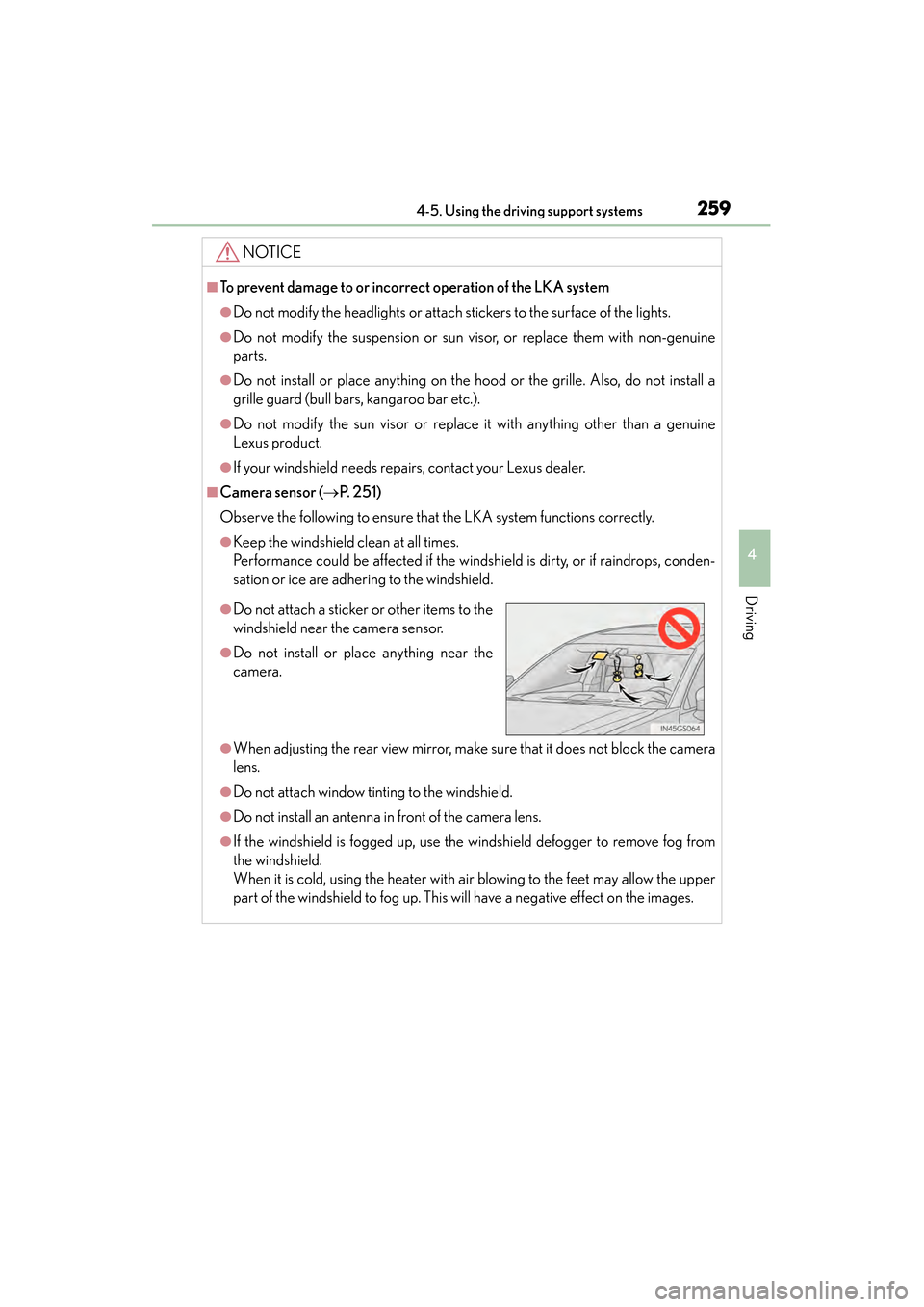
●Do not attach a sticker or other items to the
windshield near the camera sensor.
●Do not install or place anything near the
camera.
GS450h_U.book Page 259 Monday, January 23, 2012 10:20 AM
Page 282 of 862
GS450h_U (OM30D01U)
2814-5. Using the driving support systems
4
Driving
■If you think something is wrong
If you notice any of the following symptoms, refer to the likely cause and
the solution, and re-check.
If the symptom is not resolved by the solution, have the vehicle
inspected by your Lexus dealer.
Things you should know
SymptomLikely causeSolution
The image is difficult to
see
• The vehicle is in a darkarea
• The temperature around the lens is
either high or low
• The outside tempera- ture is low
• There are water drop- lets on the camera
• It is raining or humid
• Foreign matter (mud etc.) is adhering to the
camera
• There are scratches on the camera
• Sunlight or headlights are shining directly into
the camera
• The vehicle is under flu- orescent lights, sodium
lights, mercury lights
etc.
If this happens due to
these causes, it does not
indicate a malfunction.
Back up while visually
checking the vehicle’s
surroundings. (Use the
monitor again once con-
ditions have been
improved.)
To adjust the image on
the rear view monitor sys-
tem screen. ( →P. 332)
The image is blurry
Dirt or foreign matter
(such as water droplets,
snow, mud etc.) is adher-
ing to the camera.Rinse the camera lens
with water and wipe it
clean with a soft cloth.
Wash with a mild soap if
the dirt is stubborn.
GS450h_U.book Page 281 Monday, January 23, 2012 10:20 AM
Page 286 of 862
GS450h_U (OM30D01U)
2854-5. Using the driving support systems
4
Driving
NOTICE
■How to use the camera
●The rear view monitor system may not operate properly in the following cases, or
if the precautions described below are not followed.
• If the back of the vehicle is hit, the position and mounting angle of the cameramay change.
• As the camera has a water proof construction, do not detach, disassemble or modify it. This may cause incorrect operation.
• Do not strongly rub the camera lens. If the camera lens is scratched, it cannot transmit a clear image.
• Do not allow organic solvent, car wax, window cleaner or glass coat to adhere to the camera. If this happens, wipe it off as soon as possible.
• If the temperature changes rapidly, such as when hot water is poured on the vehicle in cold weather, the system may not operate normally.
• When washing the vehicle, do not apply intensive bursts of water to the cam- era or camera area. Doing so may result in the camera malfunctioning.
• When the camera is used under fluorescent lights, sodium light or mercury light etc., the lights and the illuminated areas may appear to flicker.
●Do not expose the camera to strong impact as this could cause a malfunction. If
this happens, have the vehicle inspected by your Lexus dealer as soon as possi-
ble.
GS450h_U.book Page 285 Monday, January 23, 2012 10:20 AM
Page 312 of 862
311
GS450h_U (OM30D01U)4-5. Using the driving support systems
4
Driving
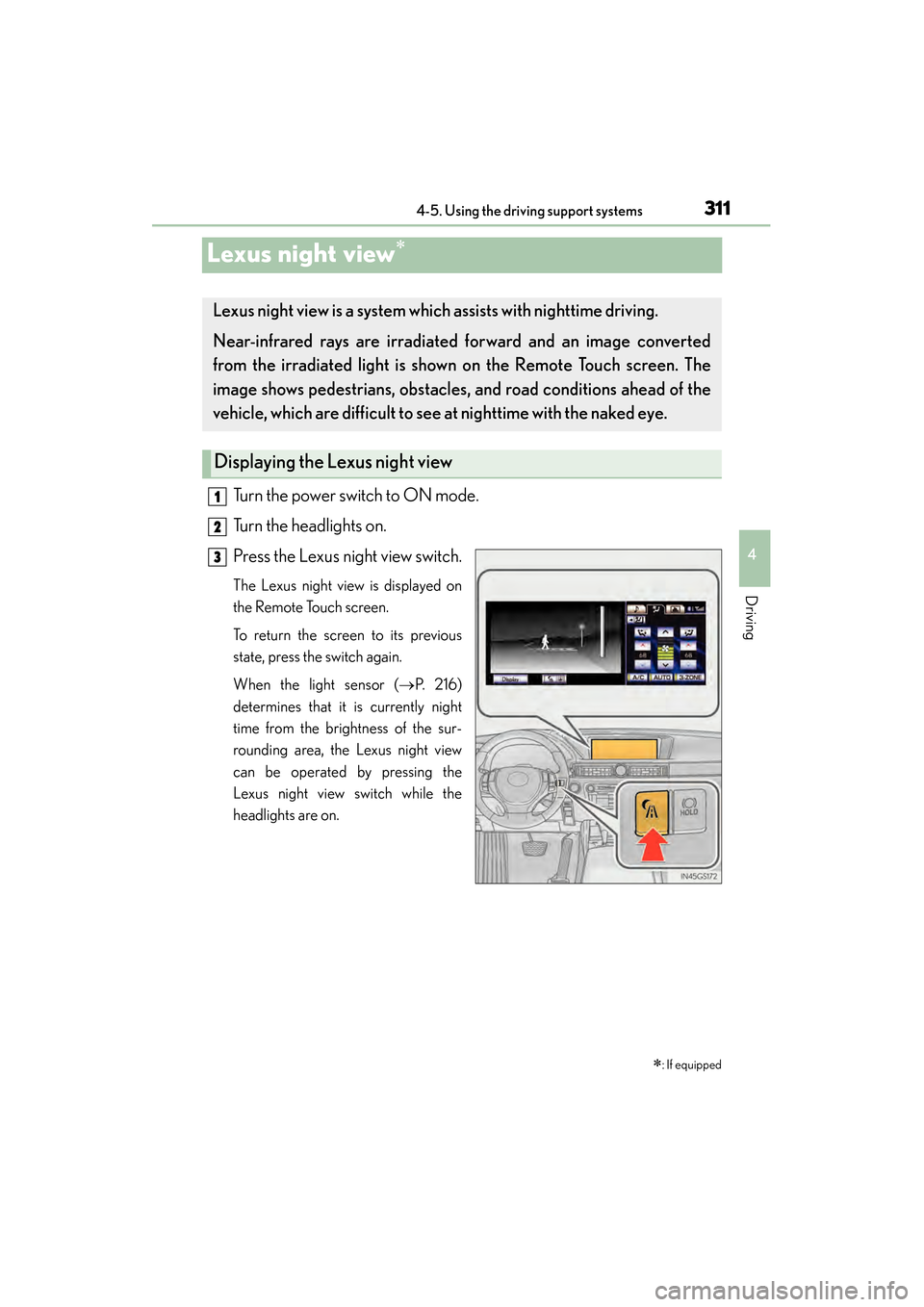
Lexus night view∗
Turn the power switch to ON mode.
Turn the headlights on.
Press the Lexus night view switch.
The Lexus night view is displayed on
the Remote Touch screen.
To return the screen to its previous
state, press the switch again.
When the light sensor ( →P. 2 1 6 )
determines that it is currently night
time from the brightness of the sur-
rounding area, the Lexus night view
can be operated by pressing the
Lexus night view switch while the
headlights are on.
∗: If equipped
Lexus night view is a system which assists with nighttime driving.
Near-infrared rays are irradiated forward and an image converted
from the irradiated light is show n on the Remote Touch screen. The
image shows pedestrians, obstacles, and road conditions ahead of the
vehicle, which ar e difficult to see at nigh ttime with the naked eye.
Displaying the Lexus night view
1
2
3
GS450h_U.book Page 311 Monday, January 23, 2012 10:20 AM
Page 315 of 862
314
GS450h_U (OM30D01U)
4-5. Using the driving support systems
CAUTION
■Before using the Lexus night view
Never depend on this system only.
Lexus night view is intended as a supplemental aid to help you see pedestrians and
road conditions ahead of the vehicle. As there are limits to the system, do not rely
solely on the system while in use, and drive safely while observing the following
precautions.
■When using the Lexus night view
Observe the following precautions.
Failure to do so may cause an accident resulting in death or serious injury.
●Never drive while looking at the Lexus night view screen only.
●Do not look continuously at the Lexus night view screen while driving. Pedestri-
ans, objects etc. ahead of the vehicle may be overlooked by the system. The sys-
tem should always be used as a supplemental aid only.
●Lexus night view is designed to help you see objects better when driving in dark-
ness on a road with few curves. Do not use the Lexus night view in well-lit areas or
on roads with many curves or slopes. There may be areas that cannot be dis-
played by the system due to the road conditions (curve size, gradient, etc.)
●Lexus night view may be unable to project some features at an appropriate level
of brightness. Some or all parts of certain features may be dark or difficult to see.
Do not rely solely on the Lexus night view, and drive carefully while checking the
surroundings for safety, as you would with a normal vehicle. Also, the following
features and conditions may not be displayed clearly.
Features that are difficult to display:
• Clothing of a pedestrian made of a certain kind of material (ex. leather jackets)
• The characters on signs and billboards
• The information on road signs
Conditions in which display is difficult:
• Unfavorable weather conditions such as rain, fog, snowfall, snow storms etc.
• There are large puddles of water on the road surface following rainfall
• The area of the front windshield in front of the camera is fogged up, dirty or icy
• The areas around the headlights are covered with ice, snow, mud etc.
• The 12-volt battery voltage is remarkably low
• There are bright lights ahead of the vehicle
GS450h_U.book Page 314 Monday, January 23, 2012 10:20 AM
Page 317 of 862
316
GS450h_U (OM30D01U)
4-5. Using the driving support systems
NOTICE
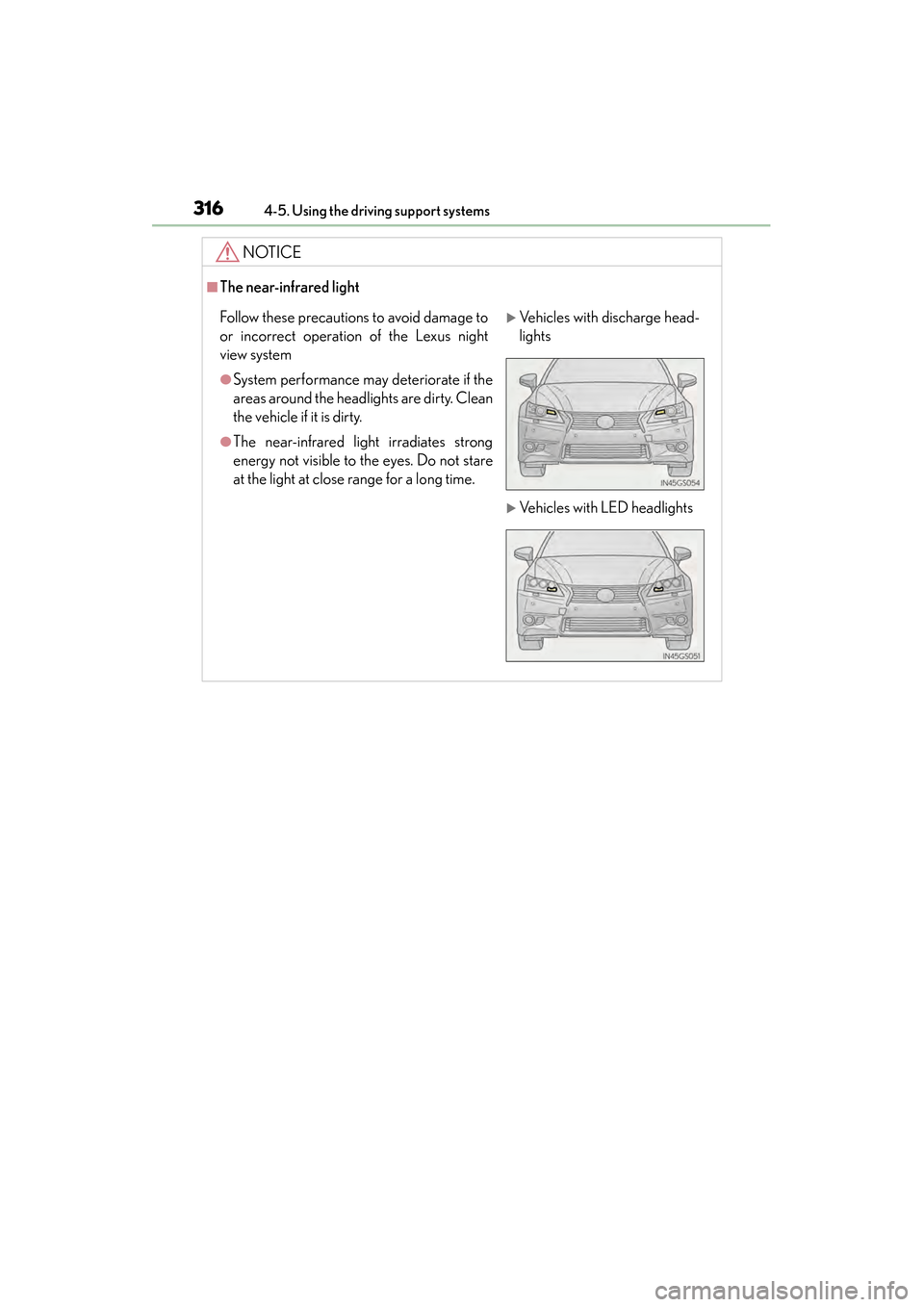
■The near-infrared light
Follow these precautions to avoid damage to
or incorrect operation of the Lexus night
view system
●System performance may deteriorate if the
areas around the headlights are dirty. Clean
the vehicle if it is dirty.
●The near-infrared light irradiates strong
energy not visible to the eyes. Do not stare
at the light at close range for a long time.
XVehicles with discharge head-
lights
XVehicles with LED headlights
GS450h_U.book Page 316 Monday, January 23, 2012 10:20 AM
Page 318 of 862
317
GS450h_U (OM30D01U)4-6. Driving tips
4
Driving
Hybrid vehicle driving tips
■Using Eco drive mode
When using Eco drive mode, the torque corresponding to the acceler-
ator pedal depression amount can be generated more smoothly than it
is in normal conditions. In addition, the operation of the air conditioning
system (heating/cooling) will be minimized, improving the fuel econ-
omy. ( →P. 2 8 6 )
■Use of Hybrid System Indicator
The Eco-friendly driving is possible by keeping the indicate of Hybrid
System Indicator within Eco area. ( →P. 9 2 )
■When braking the vehicle
Make sure to operate the brakes gently and in good time. A greater
amount of electrical energy can be retained when slowing down.
■Delays
Repeated acceleration and deceleration, as well as long waits at traffic
lights, will lead to bad fuel consumption. Check traffic reports before
leaving and avoid delays as much as possible. When encountering a
delay, gently release the brake pedal to allow the vehicle to move for-
ward slightly while avoiding overuse of the accelerator pedal. Doing so
can help control excessive gasoline consumption.
■Highway driving
Control your speed and keep at a constant speed. Also, before stop-
ping at a toll booth or similar, allow plenty of time to release the acceler-
ator and gently apply the brakes. A greater amount of electrical energy
can be retained when slowing down.
For economical and ecological drivin g, pay attention to the following
points:
GS450h_U.book Page 317 Monday, January 23, 2012 10:20 AM
Page 321 of 862
320
GS450h_U (OM30D01U)
4-6. Driving tips
Perform the following according to the driving conditions:
●Do not try to forcibly open a window or move a wiper that is frozen.
Pour warm water over the frozen area to melt the ice. Wipe away the
water immediately to prevent it from freezing.
●To ensure proper operation of the climate control system fan, remove
any snow that has accumulated on the air inlet vents in front of the wind-
shield.
●Check for and remove any excess ice or snow that may have accumu-
lated on the exterior lights, vehicle’s roof, chassis, around the tires or on
the brakes.
●Remove any snow or mud from the bottom of your shoes before getting
in the vehicle.
Accelerate the vehicle slowly, keep a safe distance between you and the
vehicle ahead, and drive at a reduced speed suitable to road conditions.
Park the vehicle and move the shift lever to P without setting the parking
brake. The parking brake may freeze up, preventing it from being
released. If necessary, block the wheels to prevent inadvertent sliding or
creeping.
Before driving the vehicle
When driving the vehicle
When parking the vehicle
GS450h_U.book Page 320 Monday, January 23, 2012 10:20 AM
Page 328 of 862
327
GS450h_U (OM30D01U)
5Interior features
5-4. Using the hands-free phone system (for cellular phone)
Hands-free system (for cellular phone) ................ 506
Using a Bluetooth
® phone ..... 515
Setting the hands-free system (for cellular phone) ................ 534
Setting the Bluetooth
®........... 558
5-5. Using the interior lights Interior lights list........................... 571• Interior light ............................ 572
• Personal lights........................ 572
5-6. Using the storage features List of storage features..............574• Glove box.................................576
• Console box ........................... 577
• Cup holders............................ 578
• Auxiliary boxes..................... 580
Trunk features ...............................581 5-7. Other interior features
Sun visors and vanity mirrors ...................583
Clock...............................................584
Ashtrays ........................................ 585
Power outlets ...............................586
Heated steering wheel ........... 588
Seat heaters/ seat ventilators .........................590
Armrest .......................................... 593
Rear sunshade/ rear door sunshades .............. 594
Coat hooks ................................... 597
Assist grips....................................598
Utility hook.................................... 599
Garage door opener............... 600
Safety Connect ........................... 607
GS450h_U.book Page 327 Monday, January 23, 2012 10:20 AM