door lock Lexus GS450h 2013 Workshop Manual
[x] Cancel search | Manufacturer: LEXUS, Model Year: 2013, Model line: GS450h, Model: Lexus GS450h 2013Pages: 862, PDF Size: 19.06 MB
Page 328 of 862
327
GS450h_U (OM30D01U)
5Interior features
5-4. Using the hands-free phone system (for cellular phone)
Hands-free system (for cellular phone) ................ 506
Using a Bluetooth
® phone ..... 515
Setting the hands-free system (for cellular phone) ................ 534
Setting the Bluetooth
®........... 558
5-5. Using the interior lights Interior lights list........................... 571• Interior light ............................ 572
• Personal lights........................ 572
5-6. Using the storage features List of storage features..............574• Glove box.................................576
• Console box ........................... 577
• Cup holders............................ 578
• Auxiliary boxes..................... 580
Trunk features ...............................581 5-7. Other interior features
Sun visors and vanity mirrors ...................583
Clock...............................................584
Ashtrays ........................................ 585
Power outlets ...............................586
Heated steering wheel ........... 588
Seat heaters/ seat ventilators .........................590
Armrest .......................................... 593
Rear sunshade/ rear door sunshades .............. 594
Coat hooks ................................... 597
Assist grips....................................598
Utility hook.................................... 599
Garage door opener............... 600
Safety Connect ........................... 607
GS450h_U.book Page 327 Monday, January 23, 2012 10:20 AM
Page 574 of 862
GS450h_U (OM30D01U)
5735-5. Using the interior lights
5
Interior features
■Illuminated entry system
The lights automatically turn on/off according to power switch mode, the presence
of the electronic key, whether the doors are locked/unlocked, and whether the doors
are opened/closed.
■To prevent 12-volt battery discharge
If the interior lights remain on when the power switch is turned off, the lights will go
off automatically after 20 minutes.
■Customization
Setting (e.g. the time elapsed before lights turn off) can be changed.
(Customizable features: →P. 807)
NOTICE
■To prevent 12-volt battery discharge
Do not leave the lights on longer than necessary when the hybrid system is off.
GS450h_U.book Page 573 Monday, January 23, 2012 10:20 AM
Page 577 of 862
576
GS450h_U (OM30D01U)
5-6. Using the storage features
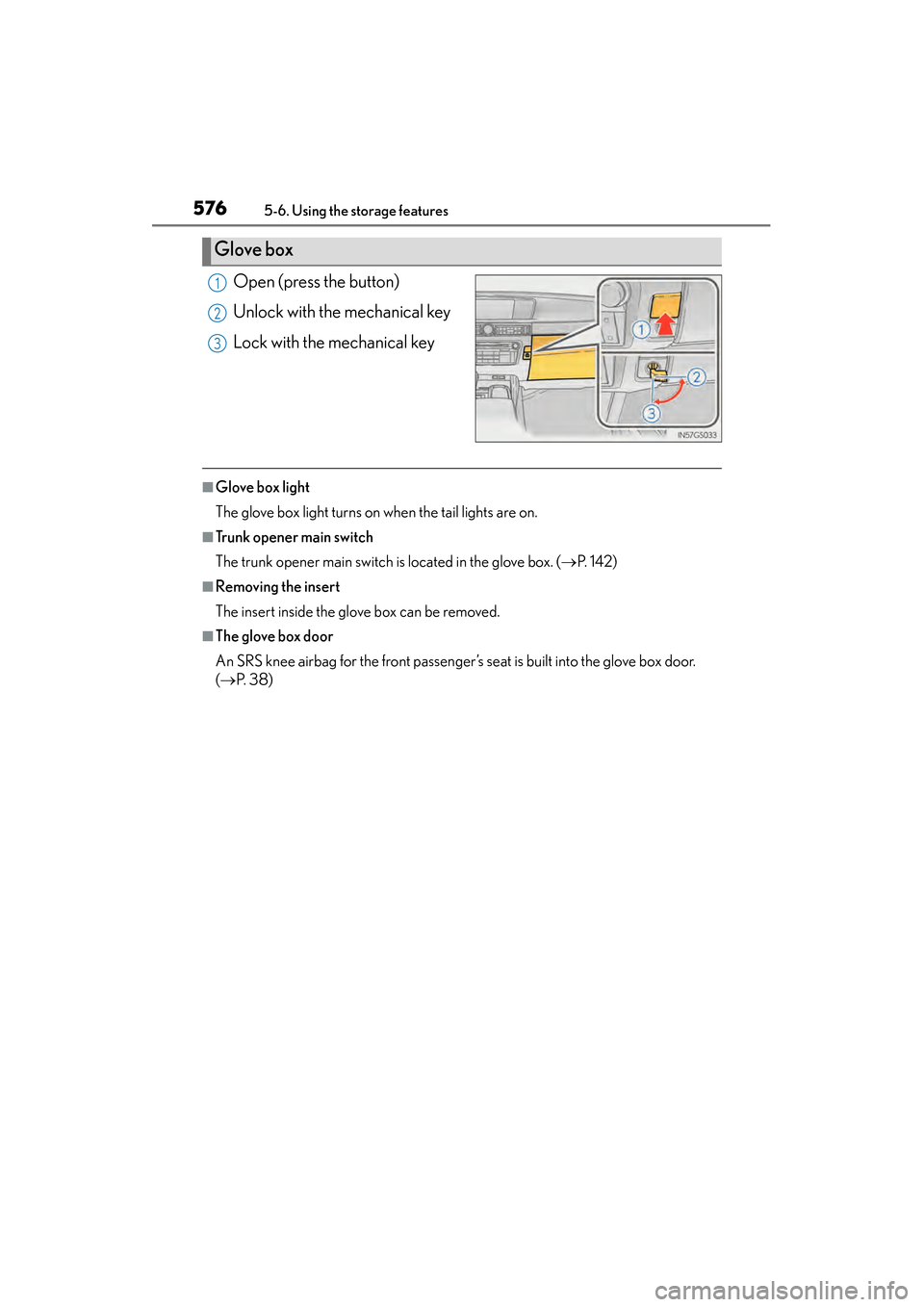
Open (press the button)
Unlock with the mechanical key
Lock with the mechanical key
■Glove box light
The glove box light turns on when the tail lights are on.
■Trunk opener main switch
The trunk opener main switch is located in the glove box. (→P. 1 4 2 )
■Removing the insert
The insert inside the glove box can be removed.
■The glove box door
An SRS knee airbag for the front passenger’s seat is built into the glove box door.
(→ P. 3 8 )
Glove box
1
2
3
GS450h_U.book Page 576 Monday, January 23, 2012 10:20 AM
Page 595 of 862
594
GS450h_U (OM30D01U)
5-7. Other interior features
Rear sunshade/rear door sunshades∗
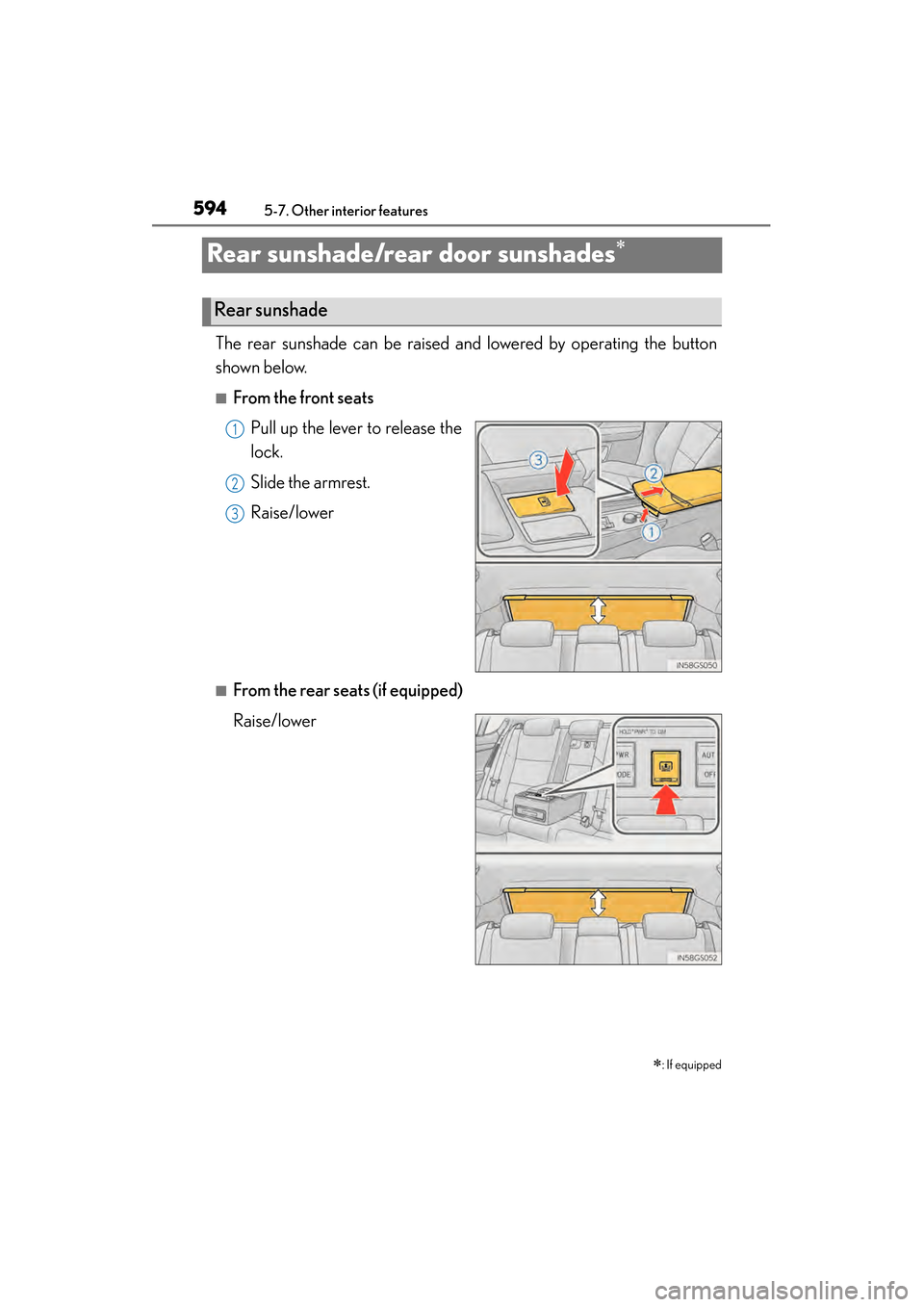
The rear sunshade can be raised and lowered by operating the button
shown below.
■From the front seatsPull up the lever to release the
lock.
Slide the armrest.
Raise/lower
■From the rear seats (if equipped)
Raise/lower
∗
: If equipped
Rear sunshade
1
2
13
GS450h_U.book Page 594 Monday, January 23, 2012 10:20 AM
Page 597 of 862
596
GS450h_U (OM30D01U)
5-7. Other interior features
■Button lock function (vehicles with rear control panel)
To prevent inadvertent operation, some buttons on the rear armrest can be locked.
(→ P. 383)
■Rear control panel illumination off function (vehicles with rear control panel)
Control panel illumination on the rear armrest can be turned off. ( →P. 3 8 3 )
■Customization
Time elapsed before the reverse operation feature activates can be changed.
(Customizable features: → P. 807)
CAUTION
■When the rear sunshade is being operated
Do not place fingers or other objects in the fastener section or in the opening.
They may get caught, causing injury.
NOTICE
■To prevent 12-volt battery discharge
Do not operate the rear sunshade when the hybrid system is off.
■To ensure normal operation of the re ar sunshade and rear door sunshades
Observe the following precautions.
●Do not place excessive load on the motor or other components of the rear sun-
shade.
●Do not place objects where they may hinder opening and closing operations.
●Do not attach items to the rear sunshade and rear door sunshades.
●Keep the opening clean and clear of obstructions.
●Do not operate the rear sunshade cont inuously for long periods of time.
GS450h_U.book Page 596 Monday, January 23, 2012 10:20 AM
Page 601 of 862
600
GS450h_U (OM30D01U)
5-7. Other interior features
Garage door opener
The garage door opener (HomeLink® Universal Transceiver) is manufac-
tured under license from HomeLink
®.
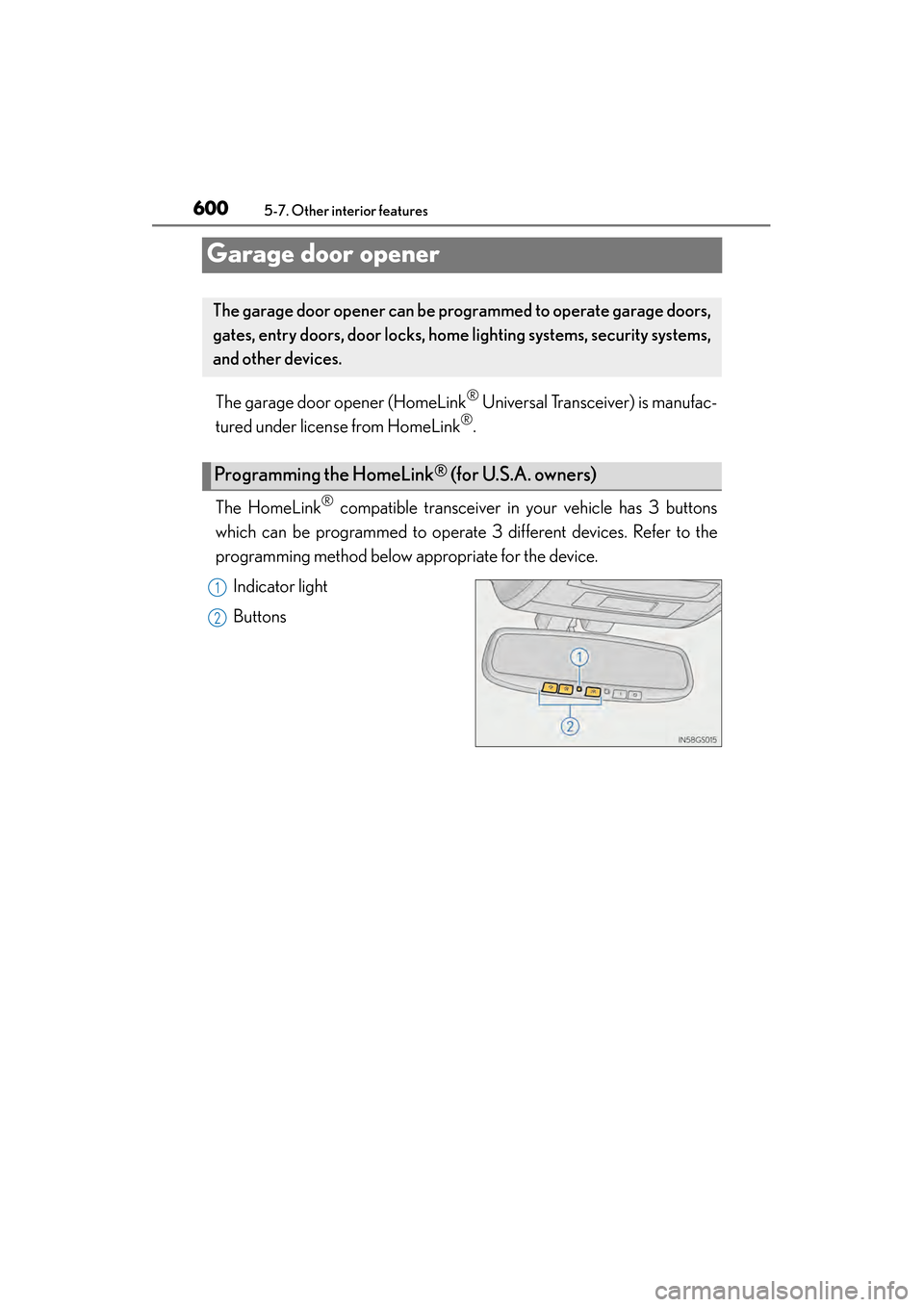
The HomeLink
® compatible transceiver in your vehicle has 3 buttons
which can be programmed to operate 3 different devices. Refer to the
programming method below appropriate for the device.
Indicator light
Buttons
The garage door opener can be pr ogrammed to operate garage doors,
gates, entry doors, door locks, home lighting systems, security systems,
and other devices.
Programming the HomeLink® (for U.S.A. owners)
1
2
GS450h_U.book Page 600 Monday, January 23, 2012 10:20 AM
Page 604 of 862
GS450h_U (OM30D01U)
6035-7. Other interior features
5
Interior features
Press and hold the vehicle’s programmed HomeLink® button for
2 seconds and release it. Repeat this step once again. The garage
door may open.
If the garage door opens, the programming process is complete. If the door
does not open, press and release the button a third time. This third press and
release will complete the programming process by opening the garage door.
The ceiling mounted garage door opener motor should now recognize the
HomeLink
® signal and operate the garage door.
Repeat the steps above to program another rolling code system for
any of the remaining HomeLink
® buttons.
■Programming an entry gate (for U.S.A. owners)/Programming a
devices in the Canadian market
Place the remote control transmit ter 1 to 3 in. (25 to 75 mm) away
from the HomeLink
® buttons.
Keep the HomeLink® indicator light in view while programming.
Press and hold the selected HomeLink® button.
Repeatedly press and release (cycle) the remote control transmitter
for 2 seconds each until step is completed.
When the HomeLink
® indicator light starts to flash rapidly, release
the buttons.
Test the HomeLink
® operation by pressing the newly programmed
button. Check to see if the gate/device operates correctly.
Repeat the steps above to program another device for any of the
remaining HomeLink
® buttons.
■Programming other devices
To program other devices such as home security systems, home door
locks and lighting, contact your Lexus dealer for assistance.
■Reprogramming a button
The individual HomeLink
® buttons cannot be erased but can be repro-
grammed. To reprogram a button, follow the “Reprogramming a
HomeLink
® button” instructions.
3
4
1
2
3
4
4
5
6
GS450h_U.book Page 603 Monday, January 23, 2012 10:20 AM
Page 617 of 862
616
GS450h_U (OM30D01U)
6-1. Maintenance and care
Cleaning and protecting the vehicle exterior
●Working from top to bottom, liberally apply water to the vehicle body,
wheel wells and underside of the vehicle to remove any dirt and dust.
●Wash the vehicle body using a sponge or soft cloth, such as a chamois.
●For hard-to-remove marks, use car wash soap and rinse thoroughly
with water.
●Wipe away any water.
●Wax the vehicle when the waterproof coating deteriorates.
If water does not bead on a clean surface, apply wax when the vehicle body is
cool.
■Automatic car washes
●Fold the mirrors before washing the vehicle. Start washing from the front of the
vehicle. Make sure to extend the mirrors before driving.
●Brushes used in automatic car washes may scratch the vehicle surface and harm
your vehicle’s paint.
■High pressure car washes
●Do not allow the nozzles of the car wash to come within close proximity of the win-
dows.
●Before using the car wash, check that the fuel filler door on your vehicle is closed
properly.
■When using a car wash
If the door handle becomes wet while the electronic key is within the effective range,
the door may lock and unlock repeatedly. In that case, follow the following correc-
tion procedures to wash the vehicle:
●Place the key in a position 6 ft. (2 m) or more separate from the vehicle while the
vehicle is being washed. (Take care to ensure that the key is not stolen.)
●Set the electronic key to battery-saving mode to disable the smart access system
with push-button start. (→P. 1 2 7 )
Perform the following to protect the vehicle and mainta in it in prime
condition:
GS450h_U.book Page 616 Monday, January 23, 2012 10:20 AM
Page 630 of 862
GS450h_U (OM30D01U)
6296-2. Maintenance
6
Maintenance and care
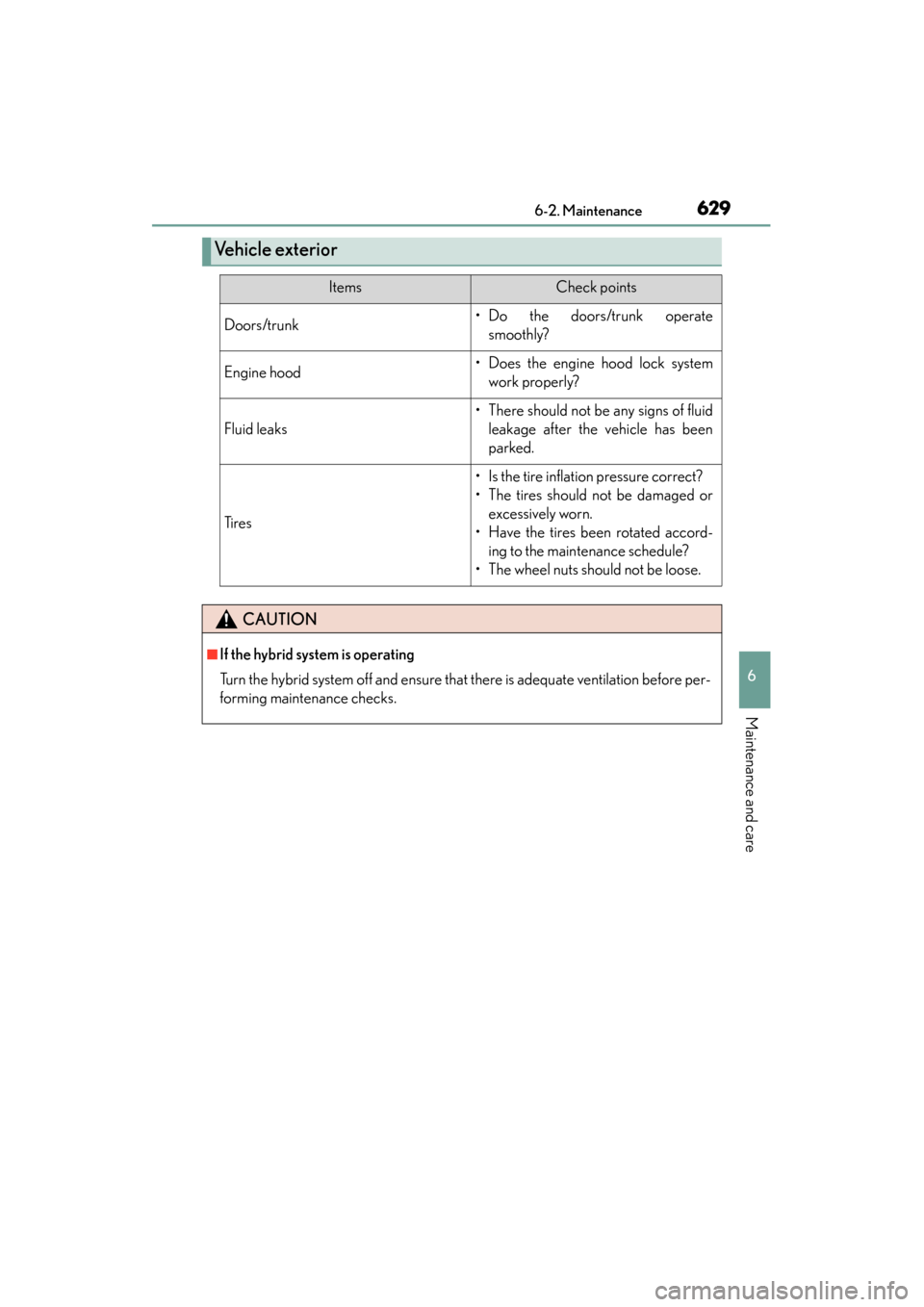
Ve h i c l e e x t e r i o r
ItemsCheck points
Doors/trunk• Do the doors/trunk operatesmoothly?
Engine hood• Does the engine hood lock systemwork properly?
Fluid leaks
• There should not be any signs of fluidleakage after the vehicle has been
parked.
Ti r e s
• Is the tire inflation pressure correct?
• The tires should not be damaged orexcessively worn.
• Have the tires been rotated accord- ing to the maintenance schedule?
• The wheel nuts should not be loose.
CAUTION
■If the hybrid system is operating
Turn the hybrid system off and ensure that there is adequate ventilation before per-
forming maintenance checks.
GS450h_U.book Page 629 Monday, January 23, 2012 10:20 AM
Page 649 of 862
648
GS450h_U (OM30D01U)
6-3. Do-it-yourself maintenance
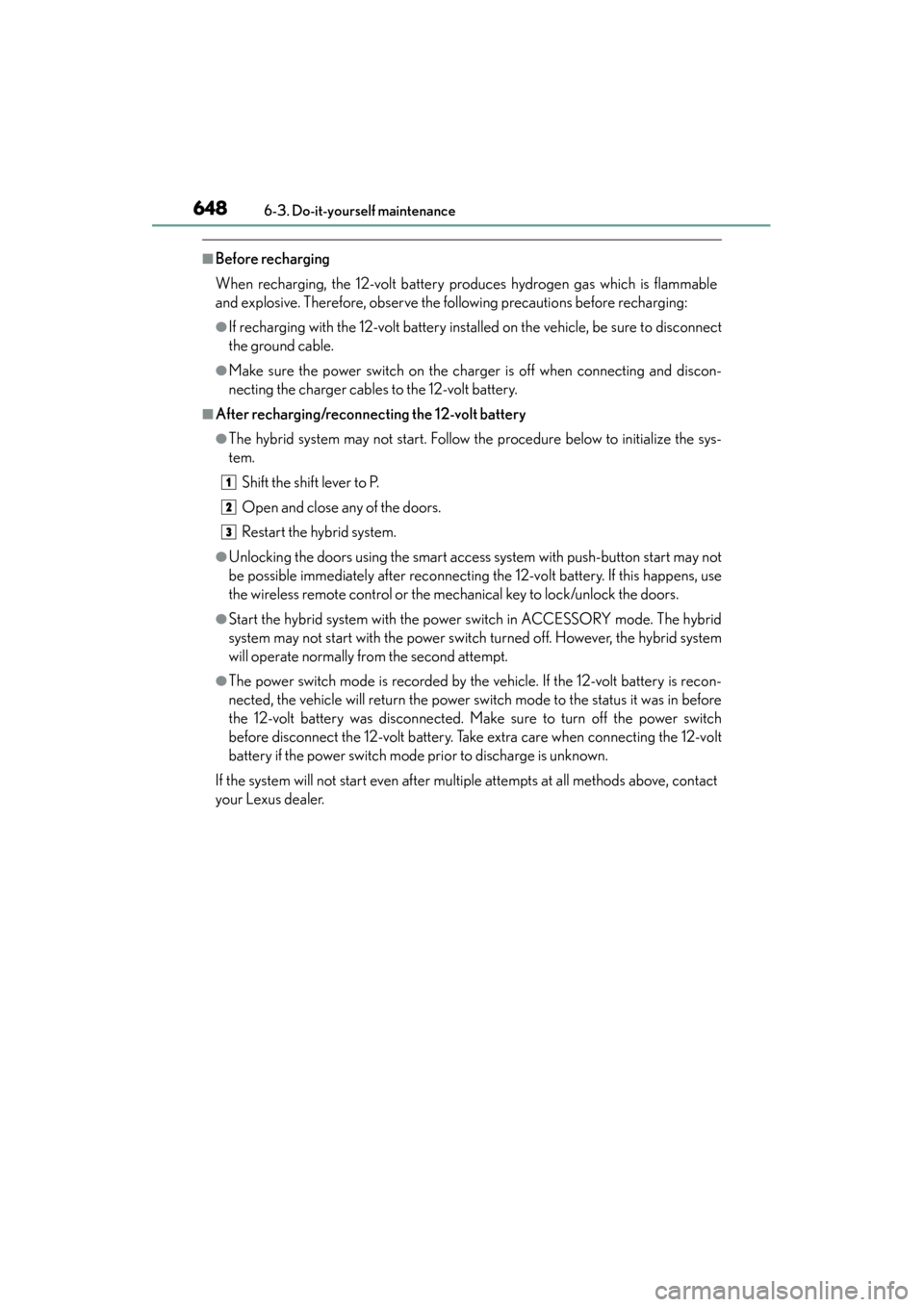
■Before recharging
When recharging, the 12-volt battery produces hydrogen gas which is flammable
and explosive. Therefore, observe the following precautions before recharging:
●If recharging with the 12-volt battery installed on the vehicle, be sure to disconnect
the ground cable.
●Make sure the power switch on the charger is off when connecting and discon-
necting the charger cables to the 12-volt battery.
■After recharging/reconnecting the 12-volt battery
●The hybrid system may not start. Follow the procedure below to initialize the sys-
tem.Shift the shift lever to P.
Open and close any of the doors.
Restart the hybrid system.
●Unlocking the doors using the smart access system with push-button start may not
be possible immediately after reconnecting the 12-volt battery. If this happens, use
the wireless remote control or the mechanical key to lock/unlock the doors.
●Start the hybrid system with the power switch in ACCESSORY mode. The hybrid
system may not start with the power switch turned off. However, the hybrid system
will operate normally from the second attempt.
●The power switch mode is recorded by the vehicle. If the 12-volt battery is recon-
nected, the vehicle will return the power switch mode to the status it was in before
the 12-volt battery was disconnected. Make sure to turn off the power switch
before disconnect the 12-volt battery. Take extra care when connecting the 12-volt
battery if the power switch mode prior to discharge is unknown.
If the system will not start even after multiple attempts at all methods above, contact
your Lexus dealer.
1
2
3
GS450h_U.book Page 648 Monday, January 23, 2012 10:20 AM