warning Lexus GS450h 2013 Repair Manual
[x] Cancel search | Manufacturer: LEXUS, Model Year: 2013, Model line: GS450h, Model: Lexus GS450h 2013Pages: 862, PDF Size: 19.06 MB
Page 430 of 862

GS450h_U (OM30D01U)
4295-3. Using the audio system
5
Interior features
■XM Radio Services — Legal Disclaimers and Warnings (vehicles with a navigation
system)
Fees and Taxes — Subscription fee, taxes, one time activation fee, and other fees
may apply. Subscription fee is consumer only. All fees and programming subject to
change. Subscriptions subject to Customer Agreement available
at www.siriusxm.com
. (U.S.A.) or www.xmradio.ca (Canada) XM service only
available in the 48 contiguous United States and Canada
*.
*Canada — some deterioration of service may occur in extreme northern lati-
tudes. This is beyond the control of XM Satellite Radio.
Explicit Language Notice — Channels with frequent explicit language are indi-
cated with an “XL” preceding the channel name. Channel blocking is available for
XM Satellite Radio receivers by notifying XM at;
XU.S.A. Customers:
Visit www.siriusxm.com
or calling 1-877-515-3987
XCanadian Customers:
Visit ww w.xmradio.ca
or calling 1-877-515-3987
It is prohibited to copy, decompile, disassemble, reverse engineer, hack, manipulate,
or otherwise make available any technology or software incorporated in receivers
compatible with the XM Satellite Radio System or that support the XM website, the
Online Service or any of its content. Furthermore, the AMBE
® voice compression
software included in this product is protected by intellectual property rights includ-
ing patent rights, copyrights, and trade secrets of Digital Voice Systems, Inc.
Note: this applies to XM receivers only and not XM Ready devices.
GS450h_U.book Page 429 Monday, January 23, 2012 10:20 AM
Page 453 of 862
452
GS450h_U (OM30D01U)
5-3. Using the audio system
■When a rear passenger selects set up menu
Follow the directions on the warning screen that is displayed.
Under the same condition, the rear passenger can cancel the set up operation from
the front seat.
■Error messages
If “Region Code Error” is displayed, check if the region code printed on the DVD
matches the player’s region code.
If a different message is displayed: →P. 4 5 3
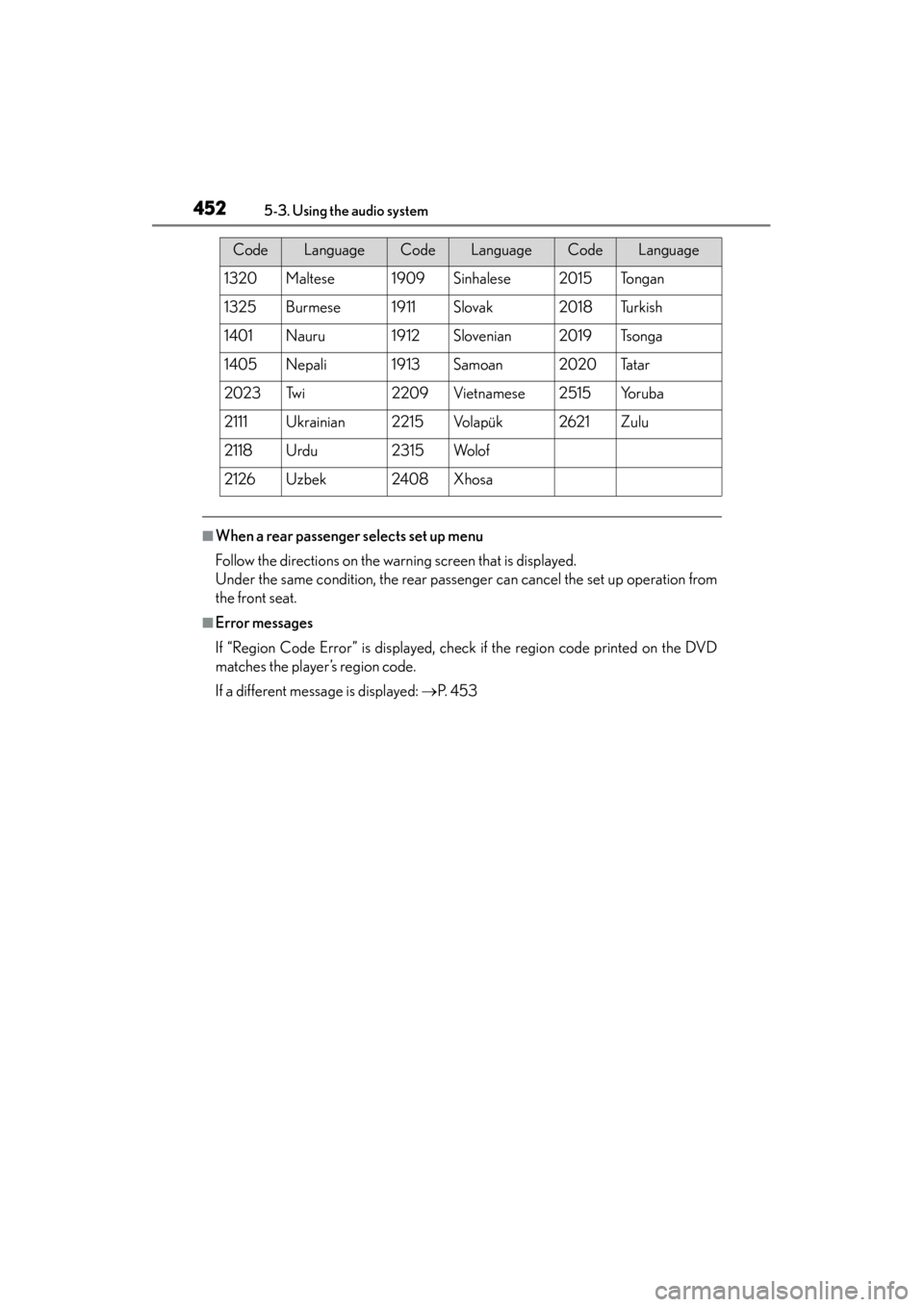
1320Maltese1909Sinhalese2015To n g a n
1325Burmese1911Slovak2018Tu r k i s h
1401Nauru1912Slovenian2019Ts o n g a
1405Nepali1913Samoan2020Ta t a r
2023Tw i2209Vietnamese2515Yo r u b a
2111Ukrainian2215Vo l a p ü k2621Zulu
2118Urdu2315Wo l o f
2126Uzbek2408Xhosa
CodeLanguageCodeLanguageCodeLanguage
GS450h_U.book Page 452 Monday, January 23, 2012 10:20 AM
Page 514 of 862
GS450h_U (OM30D01U)
5135-4. Using the hands-free phone system (for cellular phone)
5
Interior features
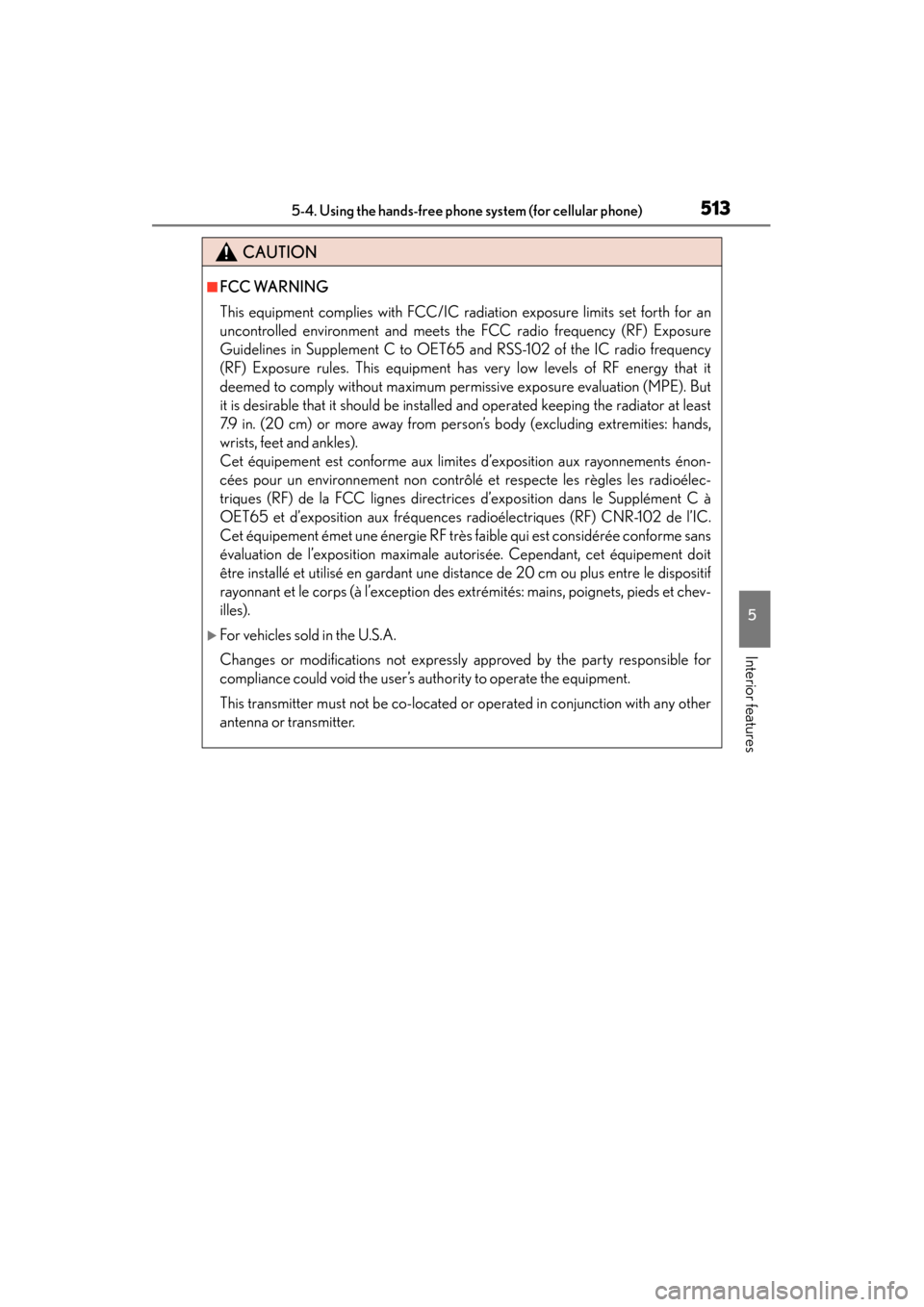
CAUTION
■FCC WARNING
This equipment complies with FCC/IC radiation exposure limits set forth for an
uncontrolled environment and meets the FCC radio frequency (RF) Exposure
Guidelines in Supplement C to OET65 and RSS-102 of the IC radio frequency
(RF) Exposure rules. This equipment has very low levels of RF energy that it
deemed to comply without maximum permissive exposure evaluation (MPE). But
it is desirable that it should be installed and operated keeping the radiator at least
7.9 in. (20 cm) or more away from person’s body (excluding extremities: hands,
wrists, feet and ankles).
Cet équipement est conforme aux limites d’exposition aux rayonnements énon-
cées pour un environnement non contrôlé et respecte les règles les radioélec-
triques (RF) de la FCC lignes directrices d’exposition dans le Supplément C à
OET65 et d’exposition aux fréquences radioélectriques (RF) CNR-102 de l’IC.
Cet équipement émet une énergie RF très faible qui est considérée conforme sans
évaluation de l’exposition maximale autorisée. Cependant, cet équipement doit
être installé et utilisé en gardant une distance de 20 cm ou plus entre le dispositif
rayonnant et le corps (à l’exception des extrémités: mains, poignets, pieds et chev-
illes).
XFor vehicles sold in the U.S.A.
Changes or modifications not expressly approved by the party responsible for
compliance could void the user’s authority to operate the equipment.
This transmitter must not be co-located or operated in conjunction with any other
antenna or transmitter.
GS450h_U.book Page 513 Monday, January 23, 2012 10:20 AM
Page 583 of 862
582
GS450h_U (OM30D01U)
5-6. Using the storage features
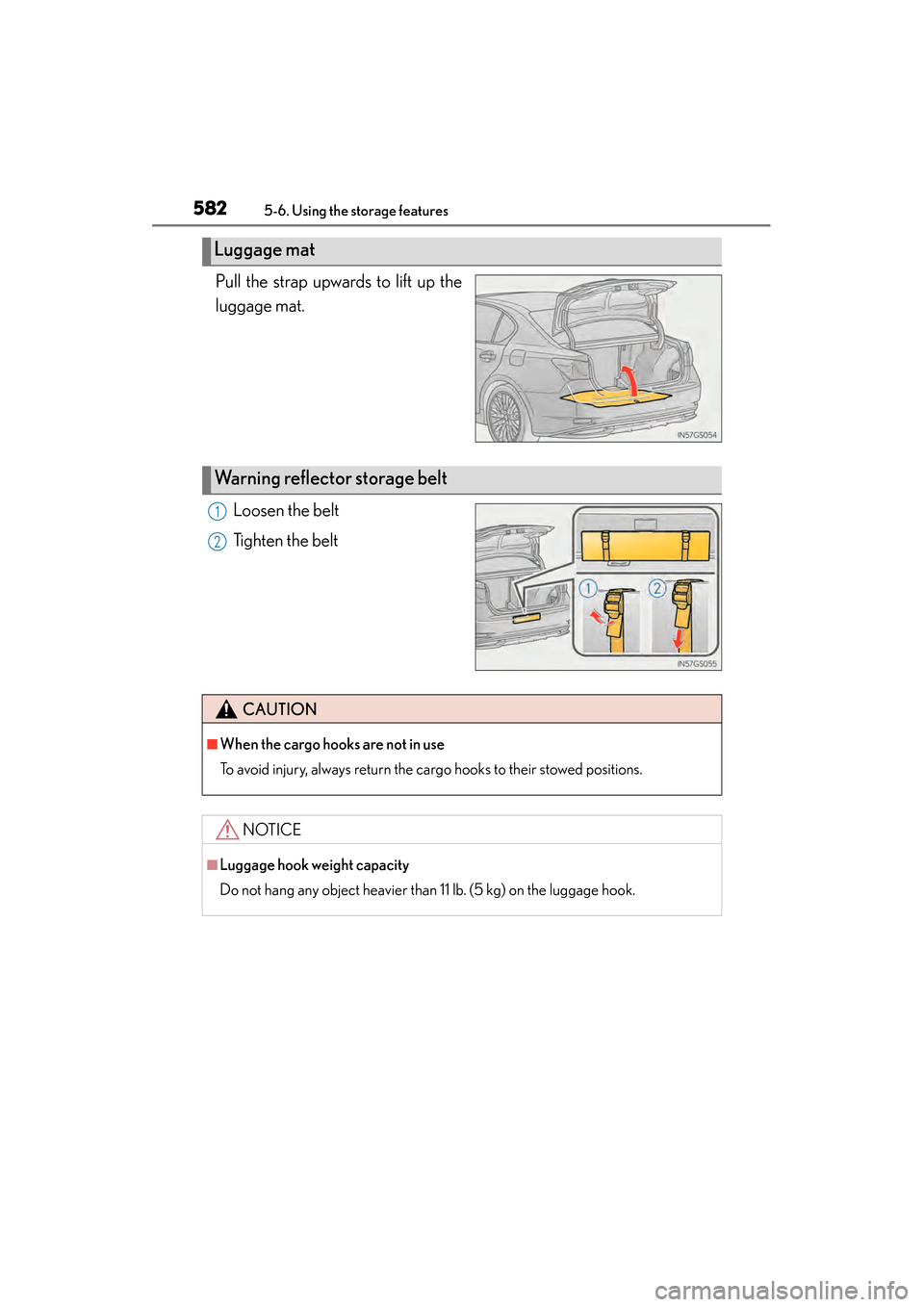
Pull the strap upwards to lift up the
luggage mat.Loosen the belt
Tighten the belt
Luggage mat
Warning reflector storage belt
1
2
CAUTION
■When the cargo hooks are not in use
To avoid injury, always return the cargo hooks to their stowed positions.
NOTICE
■Luggage hook weight capacity
Do not hang any object heavier than 11 lb. (5 kg) on the luggage hook.
GS450h_U.book Page 582 Monday, January 23, 2012 10:20 AM
Page 606 of 862
GS450h_U (OM30D01U)
6055-7. Other interior features
5
Interior features
■Before programming
●Install a new battery in the remote control transmitter.
●The battery side of the remote control transmitter must be pointed away from the
HomeLink
® button.
■Certification for the garage door opener
XFor vehicles sold in the U.S.A.
FCC ID: NZLOBIHL4
NOTE:
This device complies with Part 15 of the FCC Rules. Operation is subject to the fol-
lowing two conditions: (1) this device may not cause harmful interference, and (2)
this device must accept any interference received, including interference that may
cause undesired operation.
FCC WARNING:
Changes or modifications not expressly approved by the party responsible for com-
pliance could void the user’s authority to operate the equipment.
XFor vehicles sold in Canada
NOTE:
Operation is subject to the following two conditions:
(1) this device may not cause interference, and
(2) this device must accept any interference, including interference that may cause
undesired operation.
■When support is necessary
Visit on the web at www.homelink.com
or call 1-800-355-3515.
GS450h_U.book Page 605 Monday, January 23, 2012 10:20 AM
Page 614 of 862
GS450h_U (OM30D01U)
6135-7. Other interior features
5
Interior features
■Certification for Lexus Enform with Safety Connect
FCC ID: O9EGTM1
FCC ID: O6Y-CDMRF101
NOTE:
This device complies with Part 15 of the FCC Rules. Operation is subject to the fol-
lowing two conditions: (1) This device may not cause harmful interference, and (2)
this device must accept any interference received, including interference that may
cause undesired operation.
FCC WARNING:
Changes or modifications not expressly approved by the party responsible for com-
pliance could void the user’s authority to operate the equipment.
GS450h_U.book Page 613 Monday, January 23, 2012 10:20 AM
Page 647 of 862

646
GS450h_U (OM30D01U)
6-3. Do-it-yourself maintenance
If any washer does not work or the
warning message appears on the
multi-information display, the
washer tank may be empty. Add
washer fluid.
Wa s h e r f l u i d
CAUTION
■When adding washer fluid
Do not add washer fluid when the hybrid system is hot or operating as washer fluid
contains alcohol and may catch fire if spilled on the engine etc.
NOTICE
■Do not use any fluid other than washer fluid
Do not use soapy water or engine antifreeze instead of washer fluid.
Doing so may cause streaking on the vehicle’s painted surfaces.
■Diluting washer fluid
Dilute washer fluid with water as necessary.
Refer to the freezing temperatures listed on the label of the washer fluid bottle.
GS450h_U.book Page 646 Monday, January 23, 2012 10:20 AM
Page 653 of 862
652
GS450h_U (OM30D01U)
6-3. Do-it-yourself maintenance
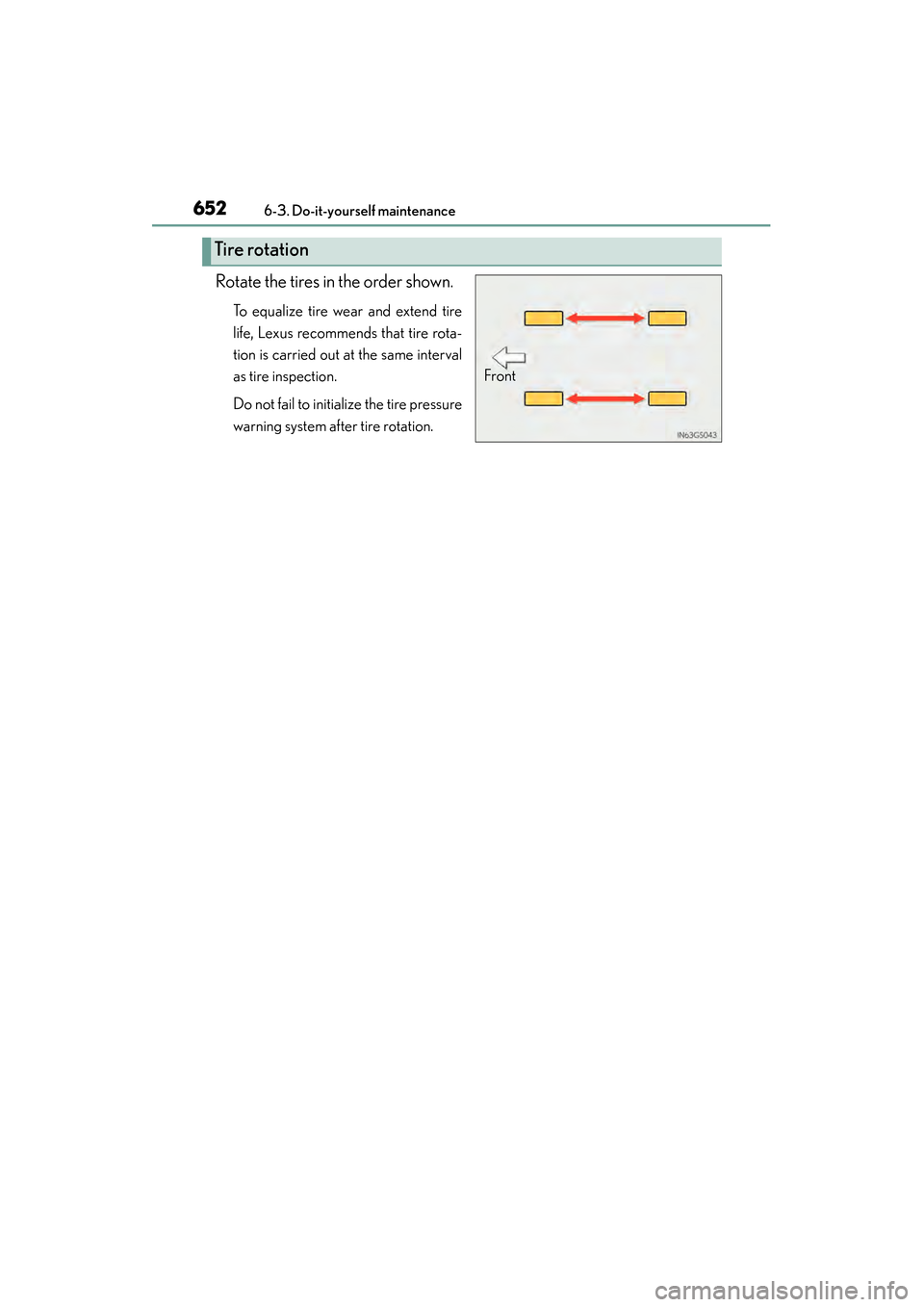
Rotate the tires in the order shown.
To equalize tire wear and extend tire
life, Lexus recommends that tire rota-
tion is carried out at the same interval
as tire inspection.
Do not fail to initialize the tire pressure
warning system after tire rotation.
Tire rotation
Front
GS450h_U.book Page 652 Monday, January 23, 2012 10:20 AM
Page 654 of 862
GS450h_U (OM30D01U)
6536-3. Do-it-yourself maintenance
6
Maintenance and care
Your vehicle is equipped with a tire pressure warning system that uses tire
pressure warning valves and transmitters to detect low tire inflation pres-
sure before serious problems arise.
XVehicles without the tire inflation pressure display function
If the tire pressure drops below a predetermined level, the driver is
warned by a warning light. ( →P. 715)
XVehicles with the tire inflation pressure display function
●If the tire pressure drops below a predetermined level, the driver is
warned by a screen display and a warning light. ( →P. 74 0 )
●The tire pressure detected by the tire pressure warning system can be
displayed on the multi-information display. ( →P. 9 7 )
◆Installing tire pressure wa rning valves and transmitters
When replacing tires or wheels, tire pressure warning valves and trans-
mitters must also be installed.
When new tire pressure warning valves and transmitters are installed,
new ID codes must be registered in the tire pressure warning computer
and the tire pressure warning system must be initialized. Have tire pres-
sure warning valve and transmitter ID codes registered by your Lexus
dealer. ( →P. 655)
◆Initializing the tire pressure warning system
■The tire pressure warning system must be initialized in the following
circumstances:
●When rotating the tires.
●When the tire inflation pressure is changed such as when changing
traveling speed or load weight.
When the tire pressure warning system is initialized, the current tire
inflation pressure is set as the benchmark pressure.
Tire pressure warning system
GS450h_U.book Page 653 Monday, January 23, 2012 10:20 AM
Page 655 of 862
654
GS450h_U (OM30D01U)
6-3. Do-it-yourself maintenance
■How to initialize the tire pressure warning system
Park the vehicle in a safe place and turn the power switch off.
Initialization cannot be performed while the vehicle is moving.
Adjust the tire inflation pressure to the specified cold tire inflation
pressure level. ( →P. 7 9 0 )
Make sure to adjust the tire pressure to the specified cold tire inflation pres-
sure level. The tire pressure warning system will operate based on this pressure
level.
Turn the power switch to ON mode.
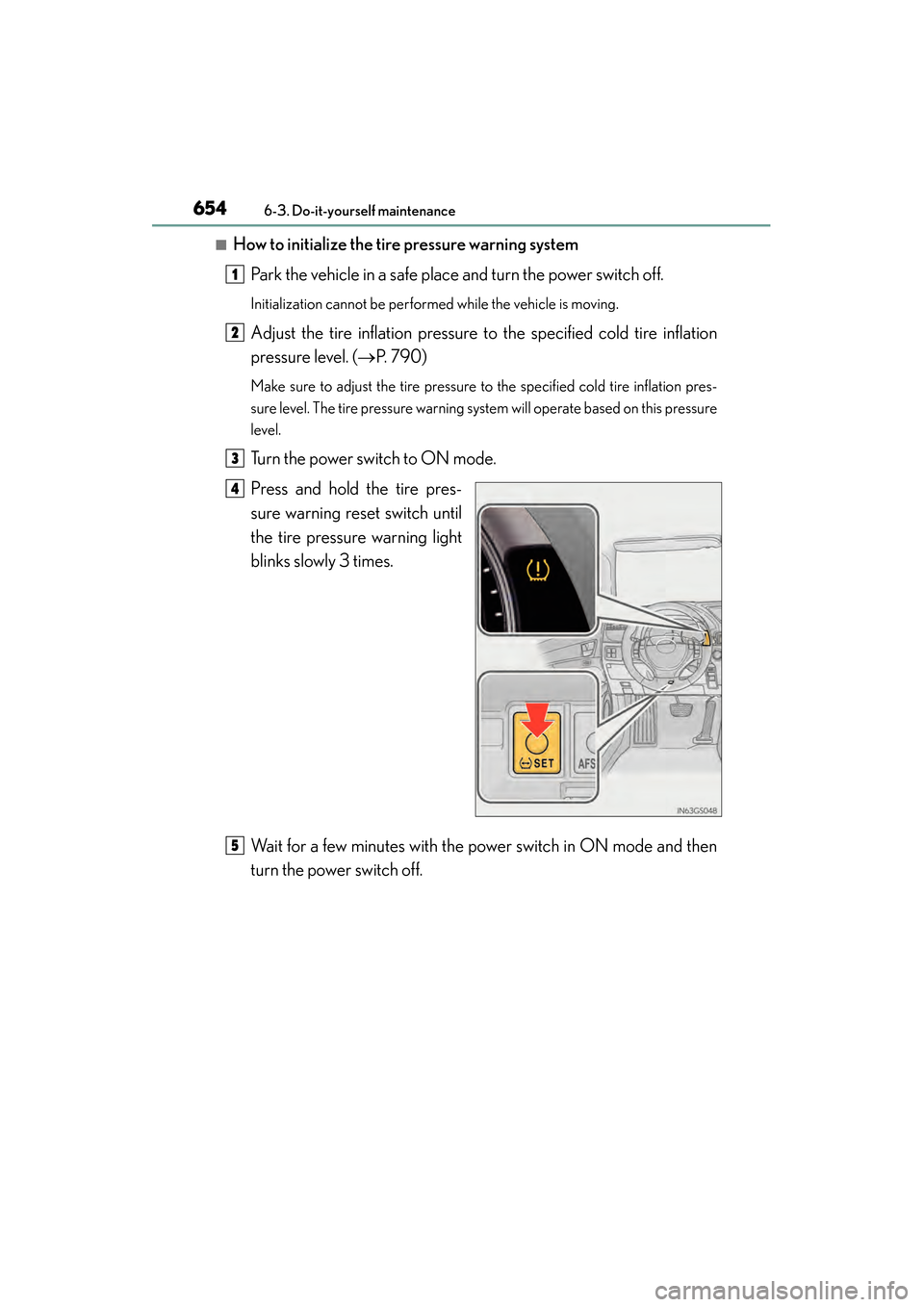
Press and hold the tire pres-
sure warning reset switch until
the tire pressure warning light
blinks slowly 3 times.
Wait for a few minutes with the power switch in ON mode and then
turn the power switch off.
1
2
3
4
5
GS450h_U.book Page 654 Monday, January 23, 2012 10:20 AM