power Lexus GS450h 2013 Using the audio system / LEXUS 2013 GS450H QUICK GUIDE OWNERS MANUAL (OM30D12U)
[x] Cancel search | Manufacturer: LEXUS, Model Year: 2013, Model line: GS450h, Model: Lexus GS450h 2013Pages: 98, PDF Size: 2.19 MB
Page 2 of 98
2
GS450h_QG_U (OM30D12U)
Hybrid System .......................................................................................................................................... 9
Hybrid Transmission ............................................................................................................................ 24
Intuitive Parking Assist ....................................................................................................... ................ 44
Keys............................................................................................................................................................. 14
Lexus Enform with Safety Connect ............................................................................................. 85
Lexus Night View ............................................................................................................... .................. 49
LKA (Lane-Keeping Assist)...................................................................................................... .......46
Moon Roof ...................................................................................................................... ....................... 90
Multi-information Display ...................................................................................................... .......... 30
Navigation System
Register home .................................................................................................................. ...............56
Destination input - Search by address .................................................................................. 57
Destination input - Search points of interest by name....................................................59
Destination input - Search points of interest by category.............................................60
Destination input - Search points of intere st by telephone number .......................... 61
Parking Brake.................................................................................................................. .......................28
Portable Audio Device Ports.................................................................................................... ........ 81
Power (Ignition) Switch ........................................................................................................ ..............20
Power Windows .................................................................................................................. ................. 89
Rear Air Conditioning System Front controller ................................................................................................................................76
Remote Touch ................................................................................................................... ..................... 52
Safety Connect ................................................................................................................. ................... 83
Seat Heaters/Seat Ventilators ........................... ............................................................................. 77
Smart Access System with Push-button Start........ ................................................................... 15
Theft Deterrent System ......................................................................................................... ............. 17
Tire Pressure Warning System ................................................................................................... ...... 51
Trunk .......................................................................................................................................................... 92
Turn Signal Lever .............................................................................................................. .................... 27
Voice Command System Basic operation ............................................................................................................................... 78
Command list ................................................................................................................... ............... 79
Windshield Wipers and Washer ................................................................................................... .35
XM Services.................................................................................................................... ....................... 87
Page 3 of 98

3
GS450h_QG_U (OM30D12U)
OverviewInstrument Panel
Windshield wiper and washer switch P.35
Multi-information display P.30
Headlight switch Turn signal lever
Fog light switch
*
P.33
P.27
Inside lock buttons P.88
Trunk opener P.92
Hood lock release lever*
Driving position memoryswitches
P.19
See P.6
See P.5
Window lock switch P.89
Outside rear view mirror switches
*
Power window switches
P.89
Door lock switches P.88
Pre-collision braking off switch*
Tire pressure warning reset switch P.51
AFS OFF switch P.34
Page 4 of 98
4
GS450h_QG_U (OM30D12U)
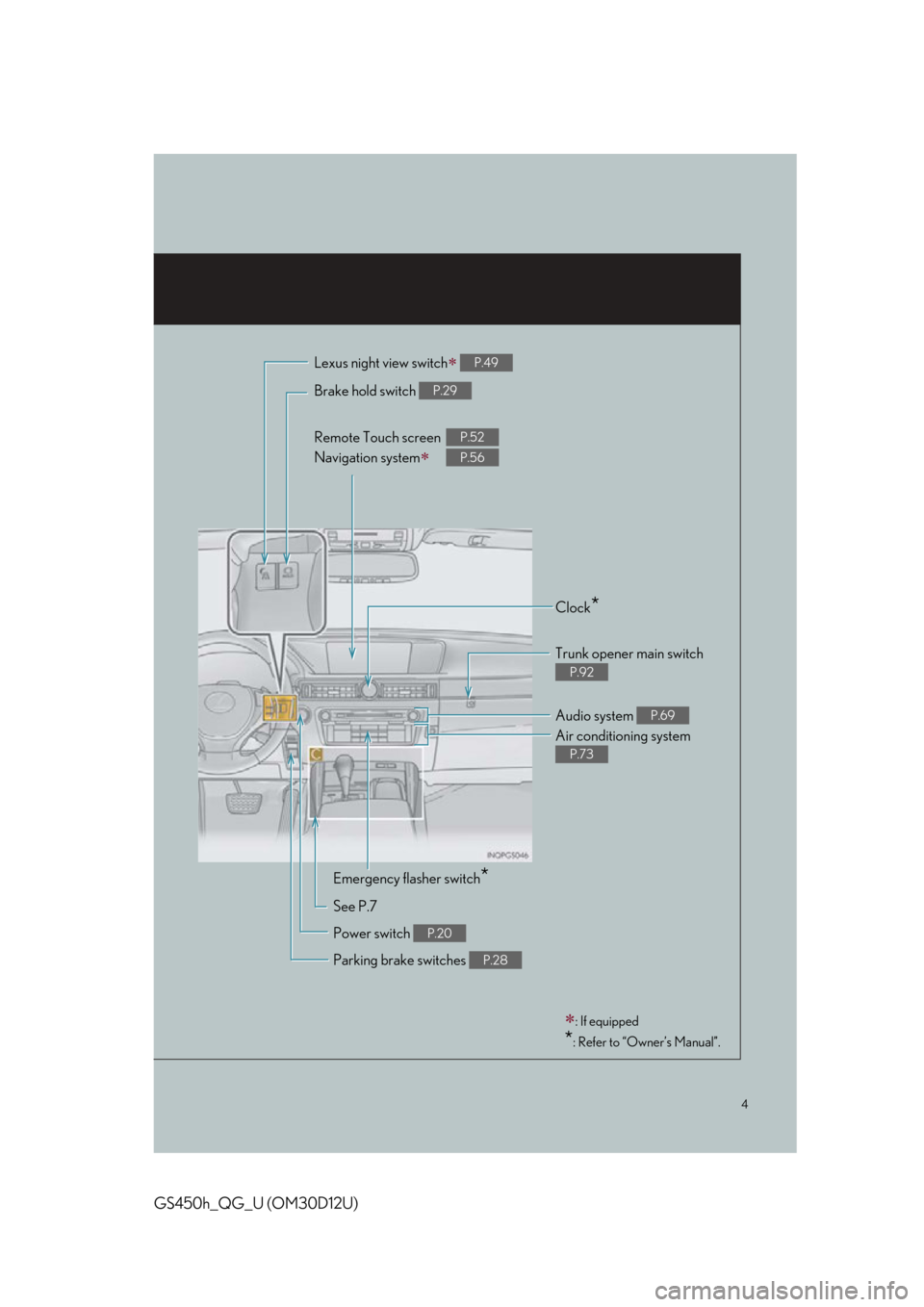
Brake hold switch P.29
Remote Touch screen
Navigation system
P.52
P.56
Clock*
Trunk opener main switch
P.92
Audio system P.69
Air conditioning system
P.73
Emergency flasher switch*
See P.7
Power switch
P.20
Parking brake switches P.28
: If equipped
*: Refer to “Owner’s Manual”.
Lexus night view switch P.49
Page 9 of 98
9
GS450h_QG_U (OM30D12U)
Hybrid System
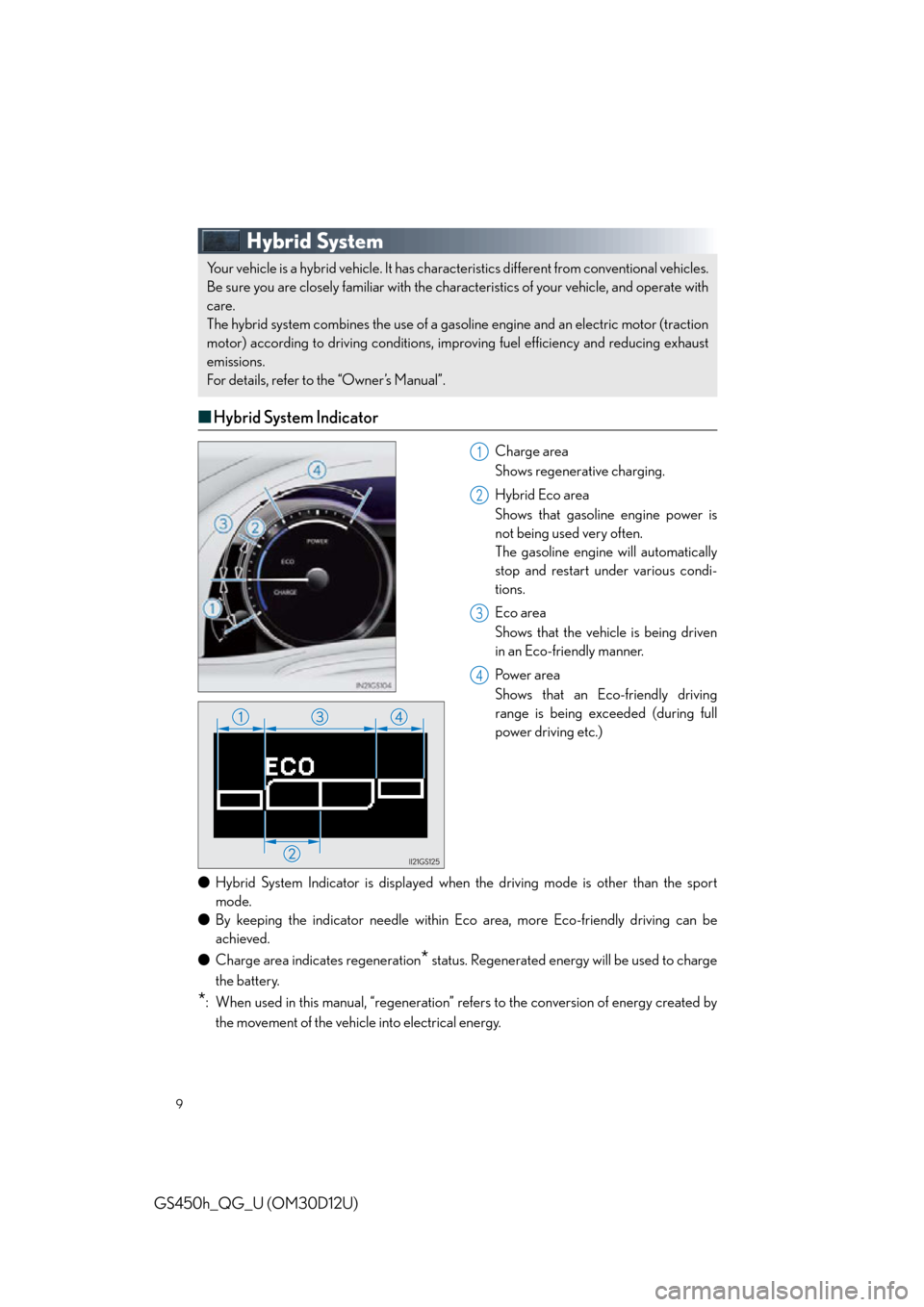
■Hybrid System Indicator
Charge area
Shows regenerative charging.
Hybrid Eco area
Shows that gasoline engine power is
not being used very often.
The gasoline engine will automatically
stop and restart under various condi-
tions.
Eco area
Shows that the vehicle is being driven
in an Eco-friendly manner.
Pow e r a r e a
Shows that an Eco-friendly driving
range is being exceeded (during full
power driving etc.)
● Hybrid System Indicator is displayed when the driving mode is other than the sport
mode.
● By keeping the indicator needle within Ec o area, more Eco-friendly driving can be
achieved.
● Charge area indicates regeneration
* status. Regenerated energy will be used to charge
the battery.
*: When used in this manual, “regeneration” re fers to the conversion of energy created by
the movement of the vehicle into electrical energy.
Your vehicle is a hybrid vehicle. It has characteristics different from conventional vehicles.
Be sure you are closely familiar with the char acteristics of your vehicle, and operate with
care.
The hybrid system combines the use of a gaso line engine and an electric motor (traction
motor) according to driving conditions, impr oving fuel efficiency and reducing exhaust
emissions.
For details, refer to the “Owner’s Manual”.
1
2
3
4
Page 15 of 98
15
GS450h_QG_U (OM30D12U)
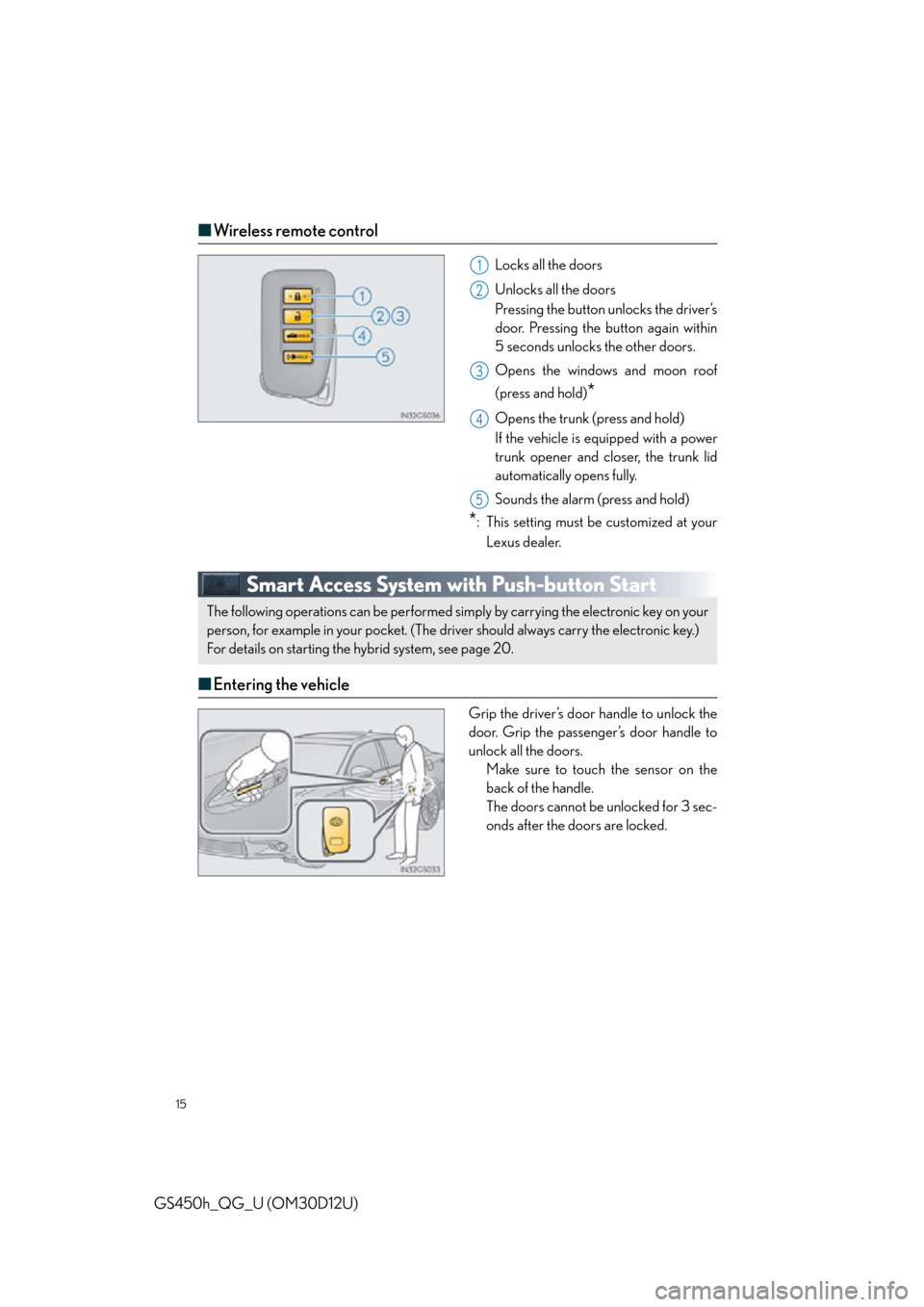
■Wireless remote control
Locks all the doors
Unlocks all the doors
Pressing the button unlocks the driver’s
door. Pressing the button again within
5 seconds unlocks the other doors.
Opens the windows and moon roof
(press and hold)
*
Opens the trunk (press and hold)
If the vehicle is equipped with a power
trunk opener and closer, the trunk lid
automatically opens fully.
Sounds the alarm (press and hold)
*: This setting must be customized at your
Lexus dealer.
Smart Access System with Push-button Start
■ Entering the vehicle
Grip the driver’s door handle to unlock the
door. Grip the passenger’s door handle to
unlock all the doors.
Make sure to touch the sensor on the
back of the handle.
The doors cannot be unlocked for 3 sec-
onds after the doors are locked.
1
2
3
4
5
The following operations can be performed simp ly by carrying the electronic key on your
person, for example in your pocket. (The driver should always carry the electronic key.)
For details on starting the hybrid system, see page 20.
Page 16 of 98

16
GS450h_QG_U (OM30D12U)
■Exiting the vehicle
Touch the lock sensor (the indentation on
the upper part of the door handle) to lock
all the doors.
■ Opening the trunk
Press the button.
If the vehicle is equipped with power
trunk opener and closer, the trunk lid
automatically opens fully.
For details on what to do when the electronic key does not operate properly, see page 96.
Page 17 of 98
17
GS450h_QG_U (OM30D12U)
Theft Deterrent System
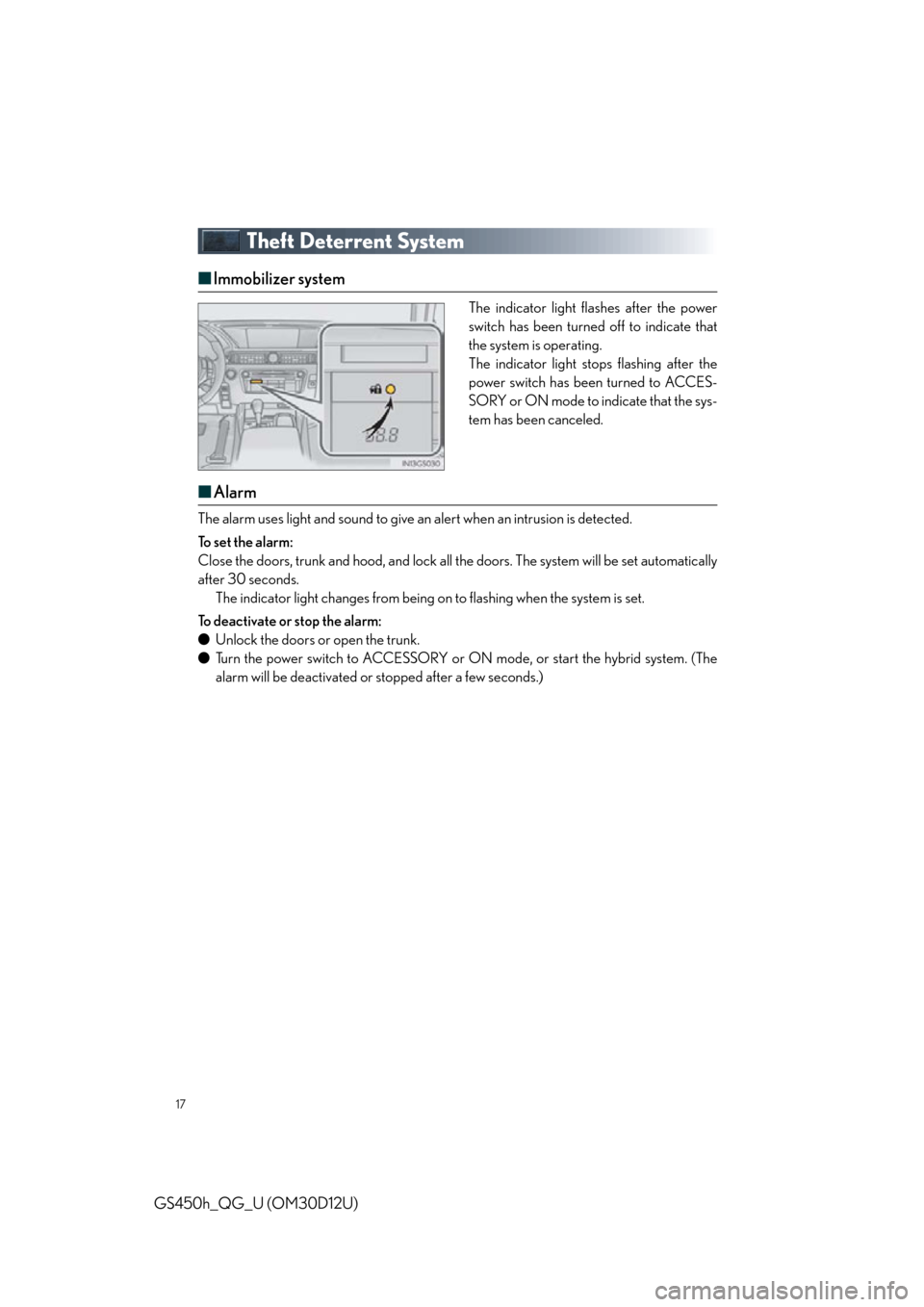
■Immobilizer system
The indicator light flashes after the power
switch has been turned off to indicate that
the system is operating.
The indicator light stops flashing after the
power switch has been turned to ACCES-
SORY or ON mode to indicate that the sys-
tem has been canceled.
■Alarm
The alarm uses light and sound to give an alert when an intrusion is detected.
To s e t t h e a l a r m :
Close the doors, trunk and hood, and lock all the doors. The system will be set automatically
after 30 seconds. The indicator light changes from being on to flashing when the system is set.
To deactivate or stop the alarm:
● Unlock the doors or open the trunk.
● Turn the power switch to ACCESSORY or ON mode, or start the hybrid system. (The
alarm will be deactivated or stopped after a few seconds.)
Page 20 of 98
20
GS450h_QG_U (OM30D12U)
Power (Ignition) Switch
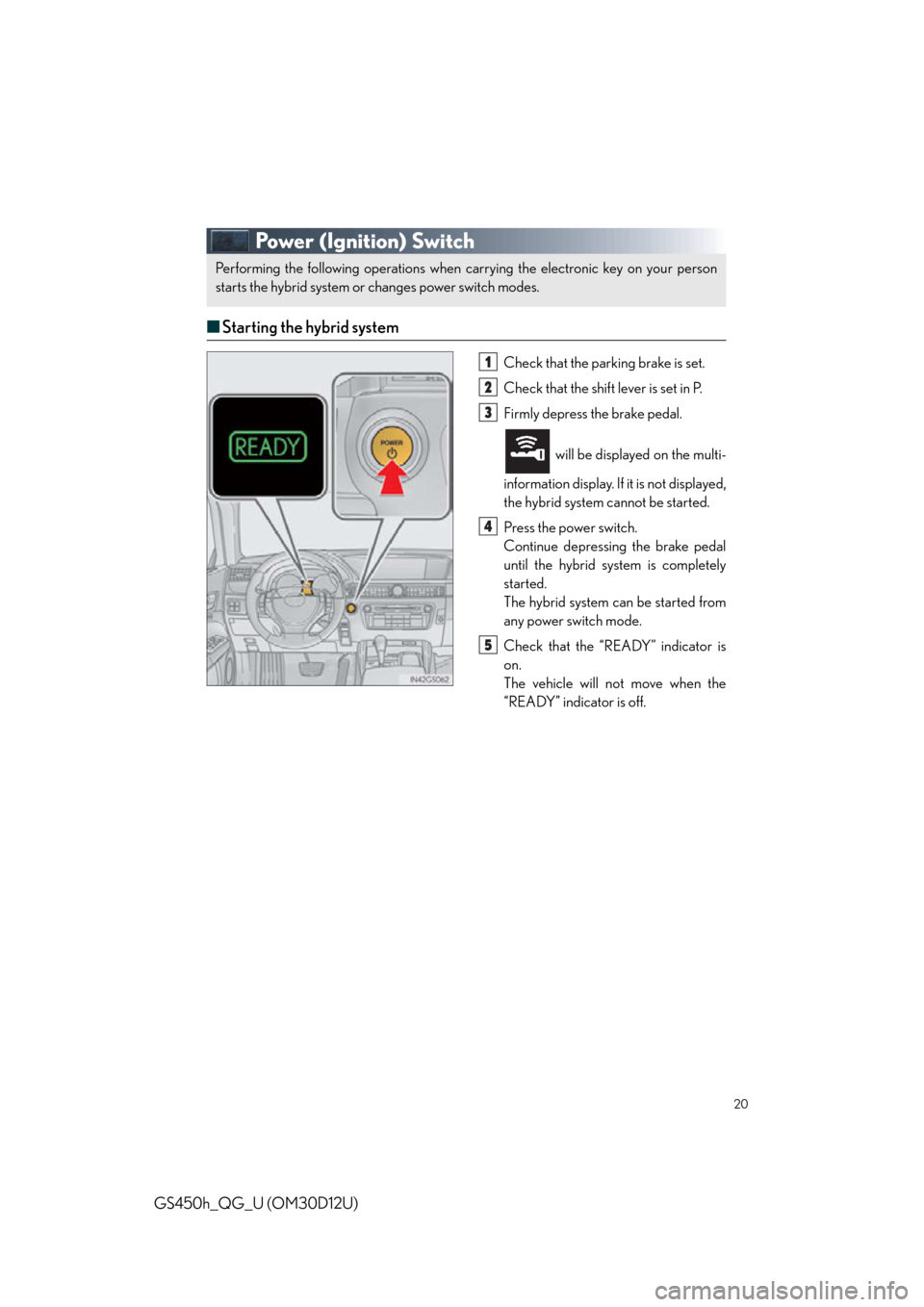
■Starting the hybrid system
Check that the par king brake is set.
Check that the shift lever is set in P.
Firmly depress the brake pedal.
will be displaye d on the multi-
information display. If it is not displayed,
the hybrid system cannot be started.
Press the power switch.
Continue depressing the brake pedal
until the hybrid system is completely
started.
The hybrid system can be started from
any power switch mode.
Check that the “READY” indicator is
on.
The vehicle will not move when the
“READY” indicator is off.
Performing the following operations when carrying the electronic key on your person
starts the hybrid system or changes power switch modes.
1
2
3
4
5
Page 21 of 98
21
GS450h_QG_U (OM30D12U)
■Stopping the hybrid system
Stop the vehicle.
Shift the shift lever to P.
Set the parking brake.
Press the power switch.
Release the brake pedal and check that “P OWER ON” on the multi-information dis-
play is off.
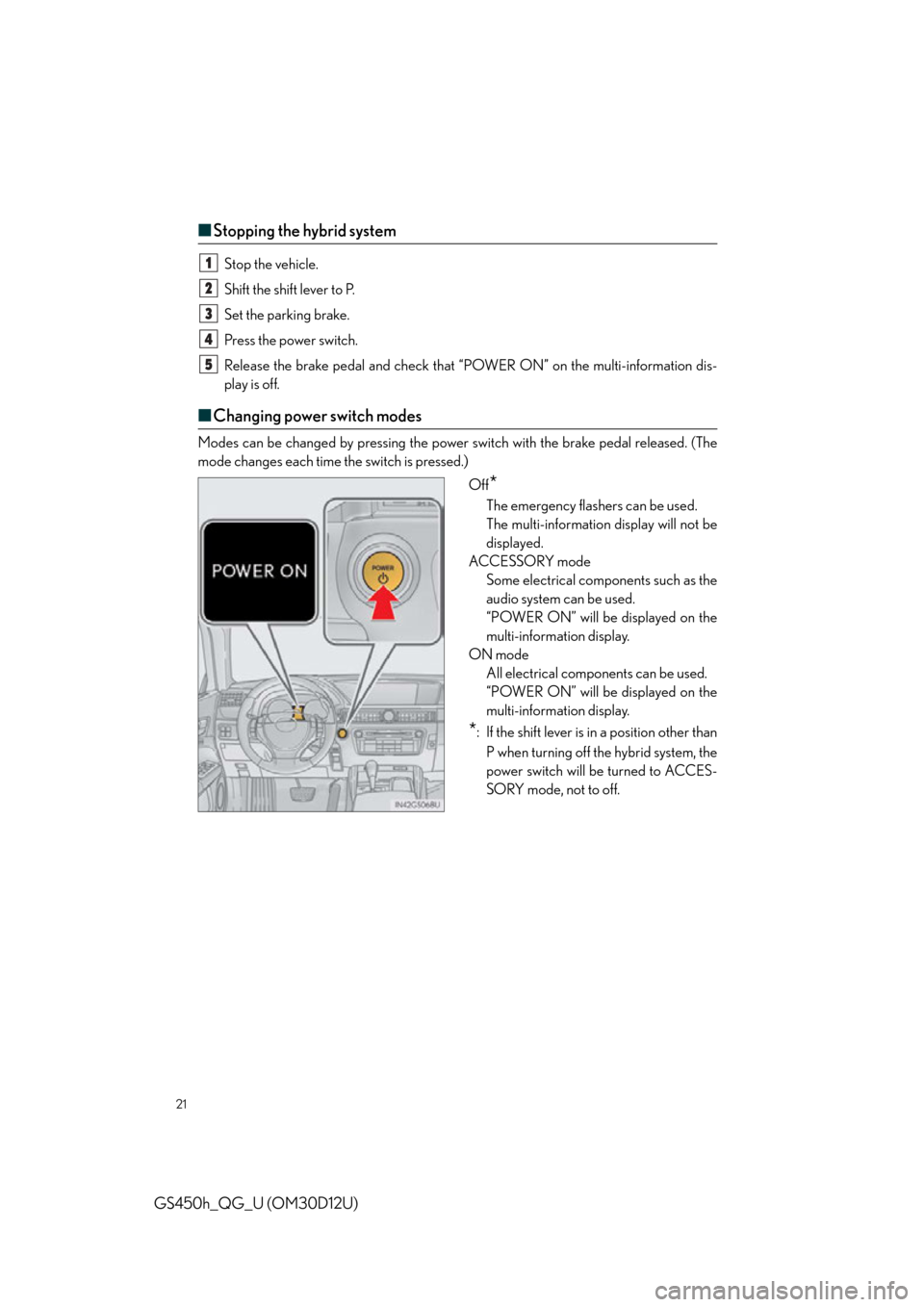
■ Changing power switch modes
Modes can be changed by pressing the power switch with the brake pedal released. (The
mode changes each time the switch is pressed.)
Off
*
The emergency flashers can be used.
The multi-information display will not be
displayed.
ACCESSORY mode Some electrical components such as the
audio system can be used.
“POWER ON” will be displayed on the
multi-information display.
ON mode All electrical components can be used.
“POWER ON” will be displayed on the
multi-information display.
*: If the shift lever is in a position other than
P when turning off the hybrid system, the
power switch will be turned to ACCES-
SORY mode, not to off.
1
2
3
4
5
Page 22 of 98

22
GS450h_QG_U (OM30D12U)
■If your vehicle has to be stopped in an emergency
Only in an emergency, such as if it becomes im possible to stop the vehicle in the normal way,
stop the vehicle using the following procedure:
Steadily step on the brake pedal with both feet and firmly depress it.
Do not pump the brake pedal repeatedly as this will increase the effort required to slow
the vehicle.
Shift the shift lever to N.
If the shift lever is shifted to N
After slowing down, stop the vehicl e in a safe place by the road.
Stop the hybrid system.
If the shift lever cannot be shifted to N
Keep depressing the brake pedal with both feet to reduce vehicle speed as much as
possible. To stop the hybrid system, press and hold
the power switch for 2 consecutive seconds
or more, or press it briefly 3 times or more
in succession.
Stop the vehicle in a safe place by the road.
1
2
3
4
3
Press and hold for 2 seconds or more
or press briefly 3 times or more
4
5