turn Lexus GS450h 2013 Using the audio system / LEXUS 2013 GS450H QUICK GUIDE OWNERS MANUAL (OM30D12U)
[x] Cancel search | Manufacturer: LEXUS, Model Year: 2013, Model line: GS450h, Model: Lexus GS450h 2013Pages: 98, PDF Size: 2.19 MB
Page 2 of 98
2
GS450h_QG_U (OM30D12U)
Hybrid System .......................................................................................................................................... 9
Hybrid Transmission ............................................................................................................................ 24
Intuitive Parking Assist ....................................................................................................... ................ 44
Keys............................................................................................................................................................. 14
Lexus Enform with Safety Connect ............................................................................................. 85
Lexus Night View ............................................................................................................... .................. 49
LKA (Lane-Keeping Assist)...................................................................................................... .......46
Moon Roof ...................................................................................................................... ....................... 90
Multi-information Display ...................................................................................................... .......... 30
Navigation System
Register home .................................................................................................................. ...............56
Destination input - Search by address .................................................................................. 57
Destination input - Search points of interest by name....................................................59
Destination input - Search points of interest by category.............................................60
Destination input - Search points of intere st by telephone number .......................... 61
Parking Brake.................................................................................................................. .......................28
Portable Audio Device Ports.................................................................................................... ........ 81
Power (Ignition) Switch ........................................................................................................ ..............20
Power Windows .................................................................................................................. ................. 89
Rear Air Conditioning System Front controller ................................................................................................................................76
Remote Touch ................................................................................................................... ..................... 52
Safety Connect ................................................................................................................. ................... 83
Seat Heaters/Seat Ventilators ........................... ............................................................................. 77
Smart Access System with Push-button Start........ ................................................................... 15
Theft Deterrent System ......................................................................................................... ............. 17
Tire Pressure Warning System ................................................................................................... ...... 51
Trunk .......................................................................................................................................................... 92
Turn Signal Lever .............................................................................................................. .................... 27
Voice Command System Basic operation ............................................................................................................................... 78
Command list ................................................................................................................... ............... 79
Windshield Wipers and Washer ................................................................................................... .35
XM Services.................................................................................................................... ....................... 87
Page 3 of 98

3
GS450h_QG_U (OM30D12U)
OverviewInstrument Panel
Windshield wiper and washer switch P.35
Multi-information display P.30
Headlight switch Turn signal lever
Fog light switch
*
P.33
P.27
Inside lock buttons P.88
Trunk opener P.92
Hood lock release lever*
Driving position memoryswitches
P.19
See P.6
See P.5
Window lock switch P.89
Outside rear view mirror switches
*
Power window switches
P.89
Door lock switches P.88
Pre-collision braking off switch*
Tire pressure warning reset switch P.51
AFS OFF switch P.34
Page 17 of 98
17
GS450h_QG_U (OM30D12U)
Theft Deterrent System
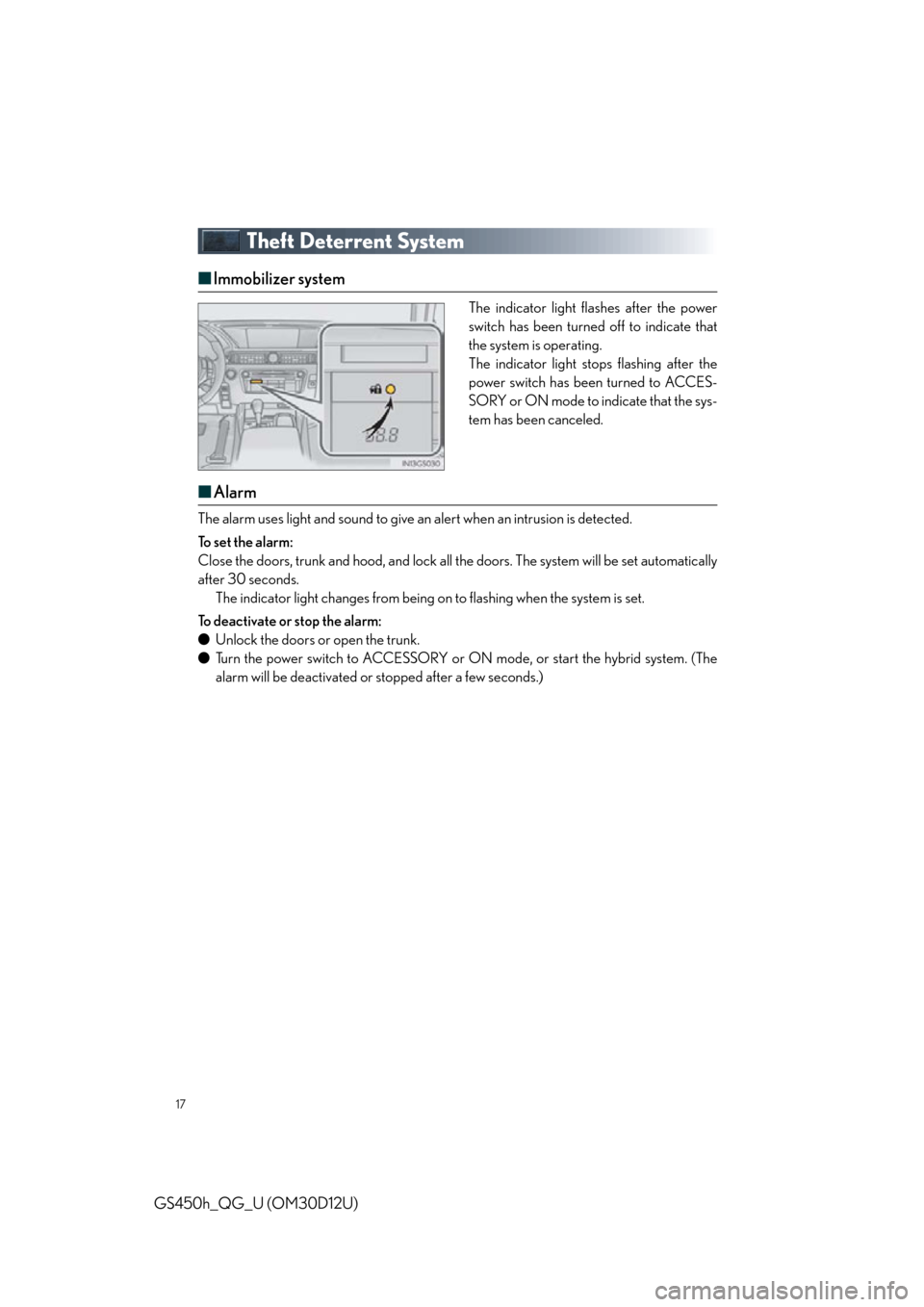
■Immobilizer system
The indicator light flashes after the power
switch has been turned off to indicate that
the system is operating.
The indicator light stops flashing after the
power switch has been turned to ACCES-
SORY or ON mode to indicate that the sys-
tem has been canceled.
■Alarm
The alarm uses light and sound to give an alert when an intrusion is detected.
To s e t t h e a l a r m :
Close the doors, trunk and hood, and lock all the doors. The system will be set automatically
after 30 seconds. The indicator light changes from being on to flashing when the system is set.
To deactivate or stop the alarm:
● Unlock the doors or open the trunk.
● Turn the power switch to ACCESSORY or ON mode, or start the hybrid system. (The
alarm will be deactivated or stopped after a few seconds.)
Page 21 of 98
21
GS450h_QG_U (OM30D12U)
■Stopping the hybrid system
Stop the vehicle.
Shift the shift lever to P.
Set the parking brake.
Press the power switch.
Release the brake pedal and check that “P OWER ON” on the multi-information dis-
play is off.
■ Changing power switch modes
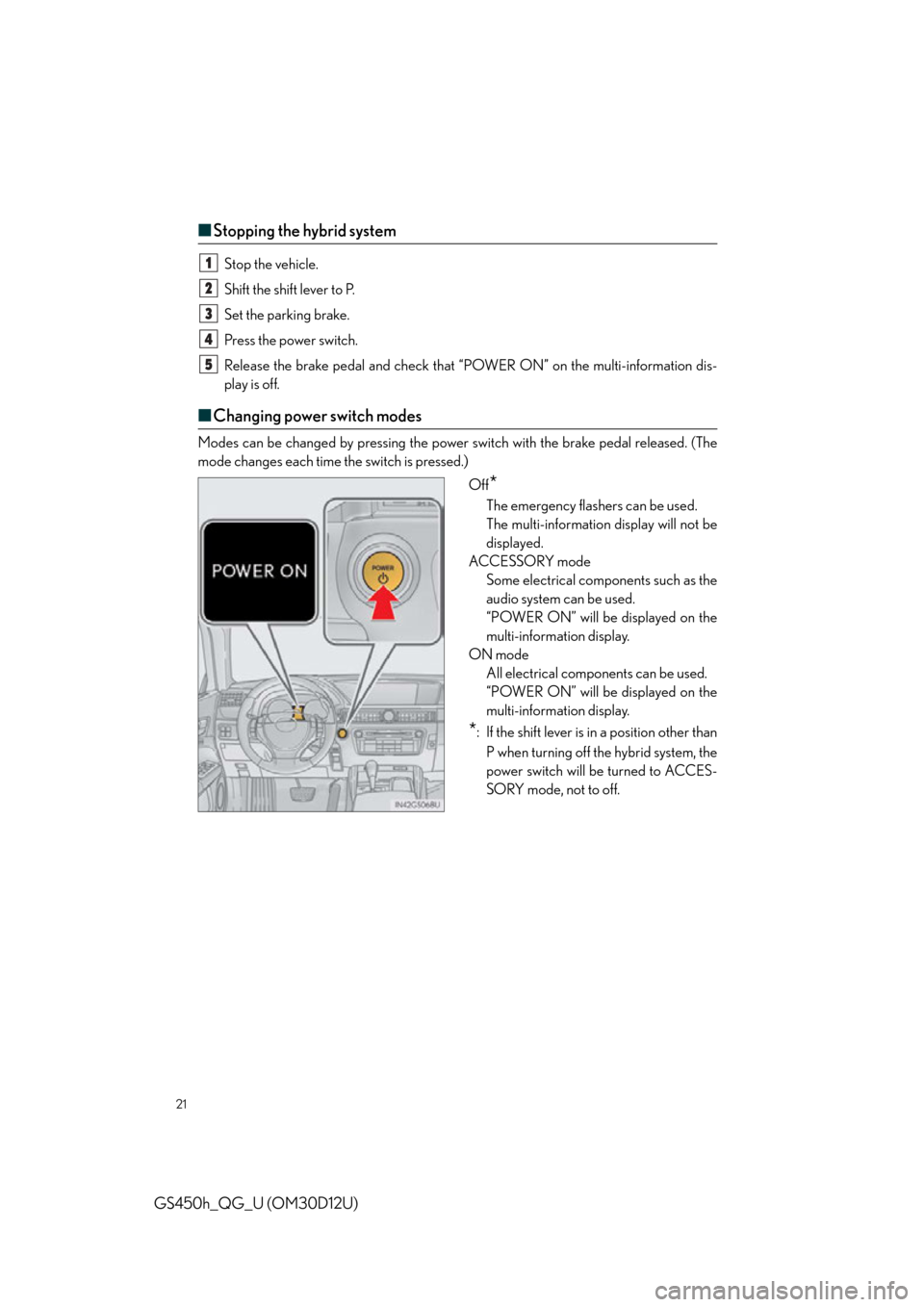
Modes can be changed by pressing the power switch with the brake pedal released. (The
mode changes each time the switch is pressed.)
Off
*
The emergency flashers can be used.
The multi-information display will not be
displayed.
ACCESSORY mode Some electrical components such as the
audio system can be used.
“POWER ON” will be displayed on the
multi-information display.
ON mode All electrical components can be used.
“POWER ON” will be displayed on the
multi-information display.
*: If the shift lever is in a position other than
P when turning off the hybrid system, the
power switch will be turned to ACCES-
SORY mode, not to off.
1
2
3
4
5
Page 23 of 98

23
GS450h_QG_U (OM30D12U)
EV Drive Mode
Tu r n s E V d r i v e m o d e o n /o f fWhen EV drive mode is turned on, “EV
MODE” will be displayed on the multi-
information display. Pressing the switch
when in EV drive mode will return the
vehicle to normal driving (using the gas-
oline engine and electric motor [traction
motor]).
In EV drive mode the electric motor (traction motor), powered by the hybrid battery
(traction battery), is used to drive the vehicle.
Page 25 of 98

25
GS450h_QG_U (OM30D12U)
■Shift position purpose
*1: To improve fuel efficiency and reduce noises, set the shift lever in the D position for nor-
mal driving.
*2: By selecting shift ranges using S mode, you can control accelerating forces and engine
braking forces.
■ Selecting shift ranges in the D position
To drive using temporary shift range selection, operate the “-” paddle shift switch. The shift
range can then be selected by operating the “-” and “+” paddle shift switches.
Upshifting
Downshifting
The selected shift range, from D1 to
D5, will be displayed in the meter.
To return to normal D position driving,
the “+” paddle shift switch must be held
down for a period of time.
Shift positionObjective or function
PParking the vehicle/starting the hybrid system
RReversing
NNeutral
DNormal driving*1
SS mode driving*2
1
2
Page 27 of 98

27
GS450h_QG_U (OM30D12U)
Tu r n S i g n a l L e v e r
Right turn
Lane change to the right (move the
lever partway and release it)
The right hand signals will flash 3 times.
Lane change to the left (move the lever
partway and release it)
The left hand signals will flash 3 times.
Left turn
■ If the turn signals do not stop flashing after turning left or right, or if you
want to stop them flashing
Operate the lever in the opposite direction to either position or . If you move the
lever to either position or , the selected turn signals will flash.
The lever will return to its original position immediately after operation.
1
2
3
4
■ Customization
The number of times the turn signals flas h during a lane change can be changed.
23
14
Page 29 of 98

29
GS450h_QG_U (OM30D12U)
Brake Hold
Turns the brake hold system onThe brake hold standby indicator
(green) comes on. While the system is
holding the brake, the brake hold oper-
ated indicator (yellow) comes on.
The brake hold system keeps the brake applied wh en the shift lever is in D, S or N with the
system on and the brake pedal has been de pressed to stop the vehicle. The system
releases the brake when the accelerator pedal is depressed with the shift lever in D or S to
allow smooth start off.
Page 33 of 98
33
GS450h_QG_U (OM30D12U)
Headlights
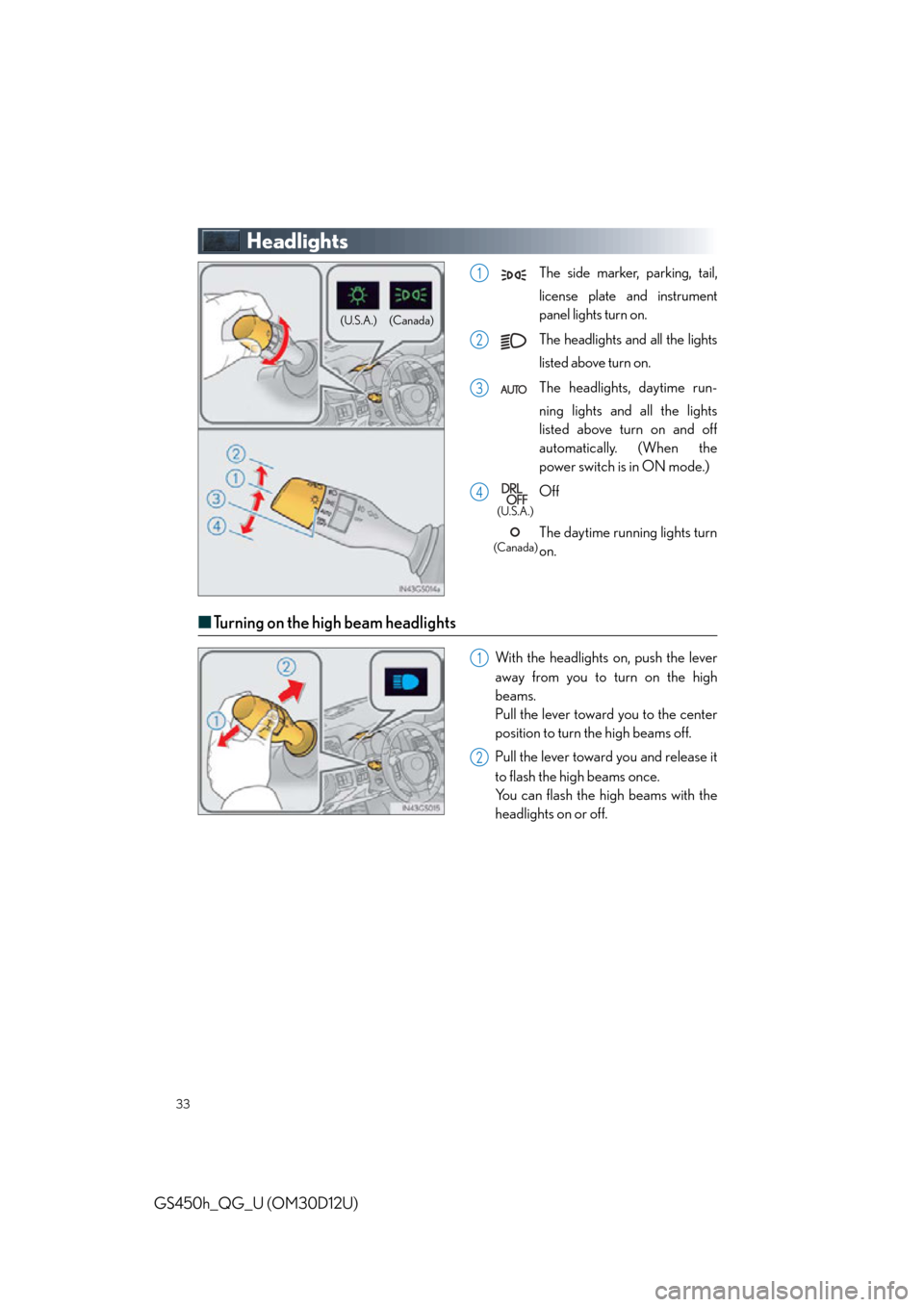
The side marker, parking, tail,
license plate and instrument
panel lights turn on.
The headlights and all the lights
listed above turn on.
The headlights, daytime run-
ning lights and all the lights
listed above turn on and off
automatically. (When the
power switch is in ON mode.)
Off
The daytime running lights turn
on.
■ Turning on the high beam headlights
With the headlights on, push the lever
away from you to turn on the high
beams.
Pull the lever toward you to the center
position to turn the high beams off.
Pull the lever toward you and release it
to flash the high beams once.
You can flash the high beams with the
headlights on or off.
(Canada)
(U.S.A.)
1
2
3
4
(U.S.A.)
(Canada)
1
2
Page 34 of 98
34
GS450h_QG_U (OM30D12U)
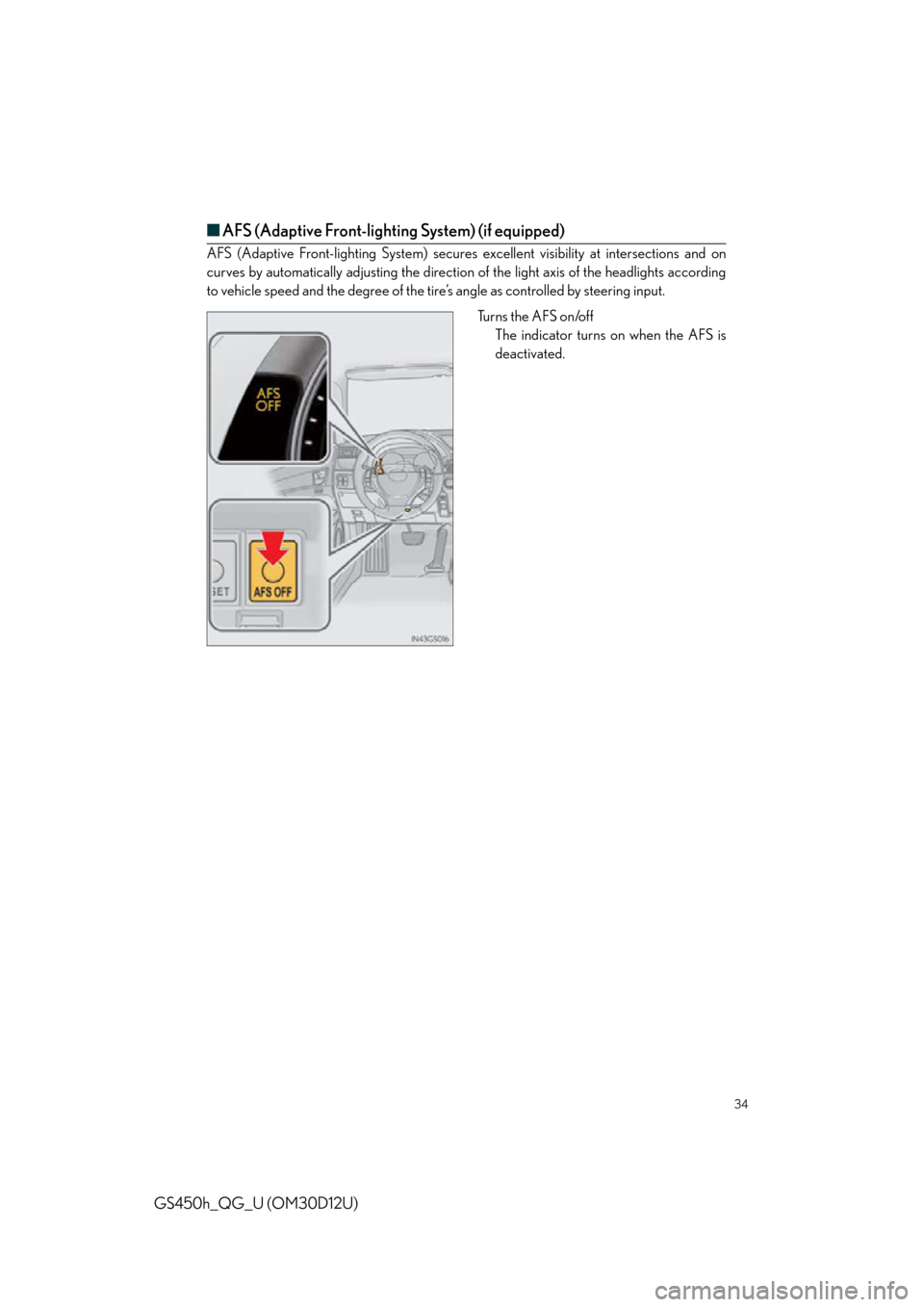
■AFS (Adaptive Front-lighting System) (if equipped)
AFS (Adaptive Front-lighting System) secures ex cellent visibility at intersections and on
curves by automatically adjusting the direction of the light axis of the headlights according
to vehicle speed and the degree of the tire’s angle as controlled by steering input.
Turns the AFS on/offThe indicator turns on when the AFS is
deactivated.