phone Lexus GS450h 2014 Owners Manual
[x] Cancel search | Manufacturer: LEXUS, Model Year: 2014, Model line: GS450h, Model: Lexus GS450h 2014Pages: 890, PDF Size: 40.62 MB
Page 594 of 890
GS450h_OM_OM30D52U_(U)
5935-4. Using the hands-free phone system (for cellular phone)
5
Interior features
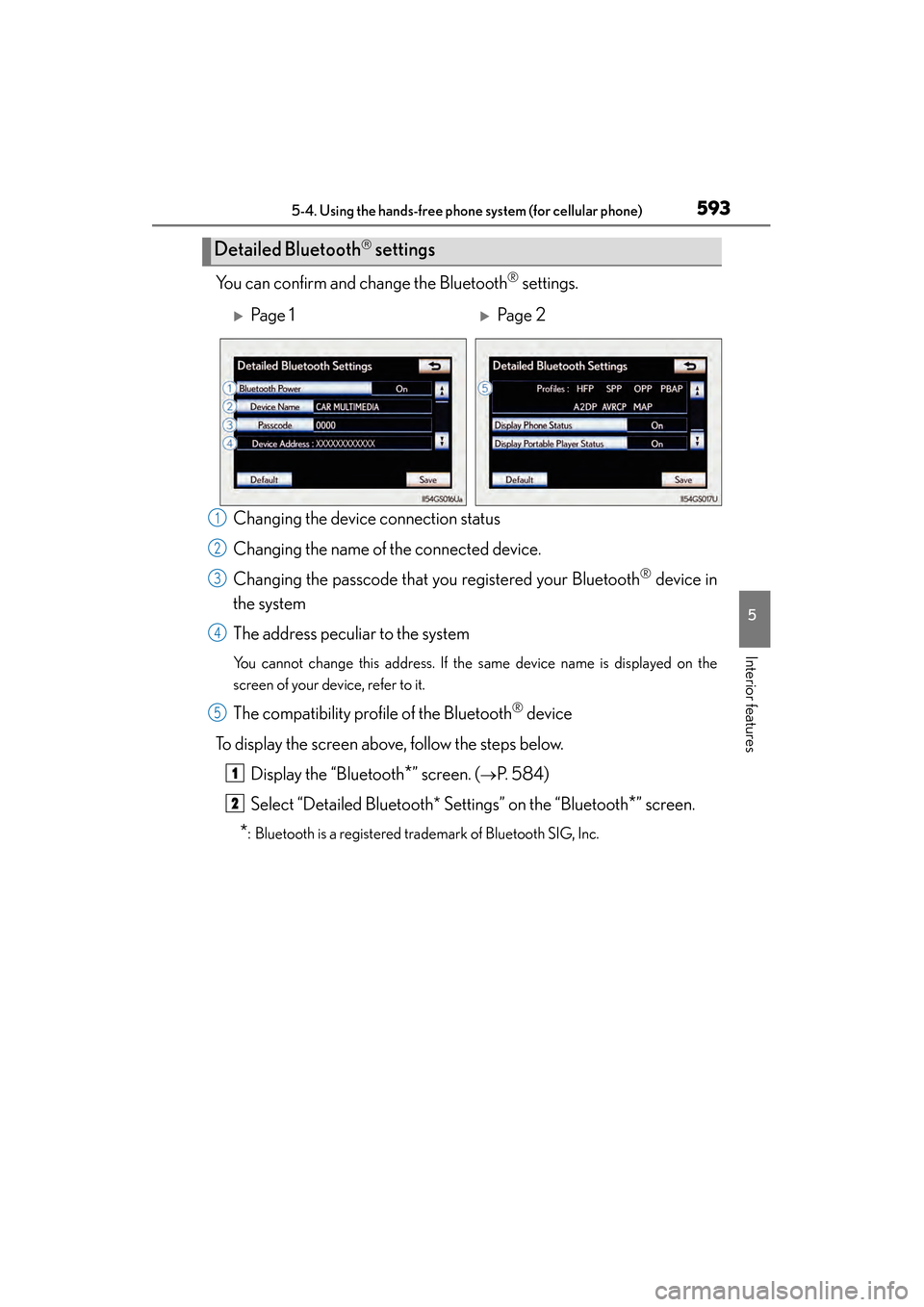
You can confirm and change the Bluetooth® settings.
Changing the device connection status
Changing the name of the connected device.
Changing the passcode that you registered your Bluetooth
® device in
the system
The address peculiar to the system
You cannot change this address. If the same device name is displayed on the
screen of your device, refer to it.
The compatibility profile of the Bluetooth® device
To display the screen above, follow the steps below. Display the “Bluetooth
*” screen. (→P. 584)
Select “Detailed Bluetooth* Settings” on the “Bluetooth
*” screen.
*: Bluetooth is a registered trademark of Bluetooth SIG, Inc.
Detailed Bluetooth settings
XPa g e 1XPa g e 2
1
2
3
4
5
1
2
GS450h_OM_OM30D52U_(U).book Page 593 Monday, July 29, 2013 12:07 PM
Page 595 of 890
594
GS450h_OM_OM30D52U_(U)
5-4. Using the hands-free phone system (for cellular phone)
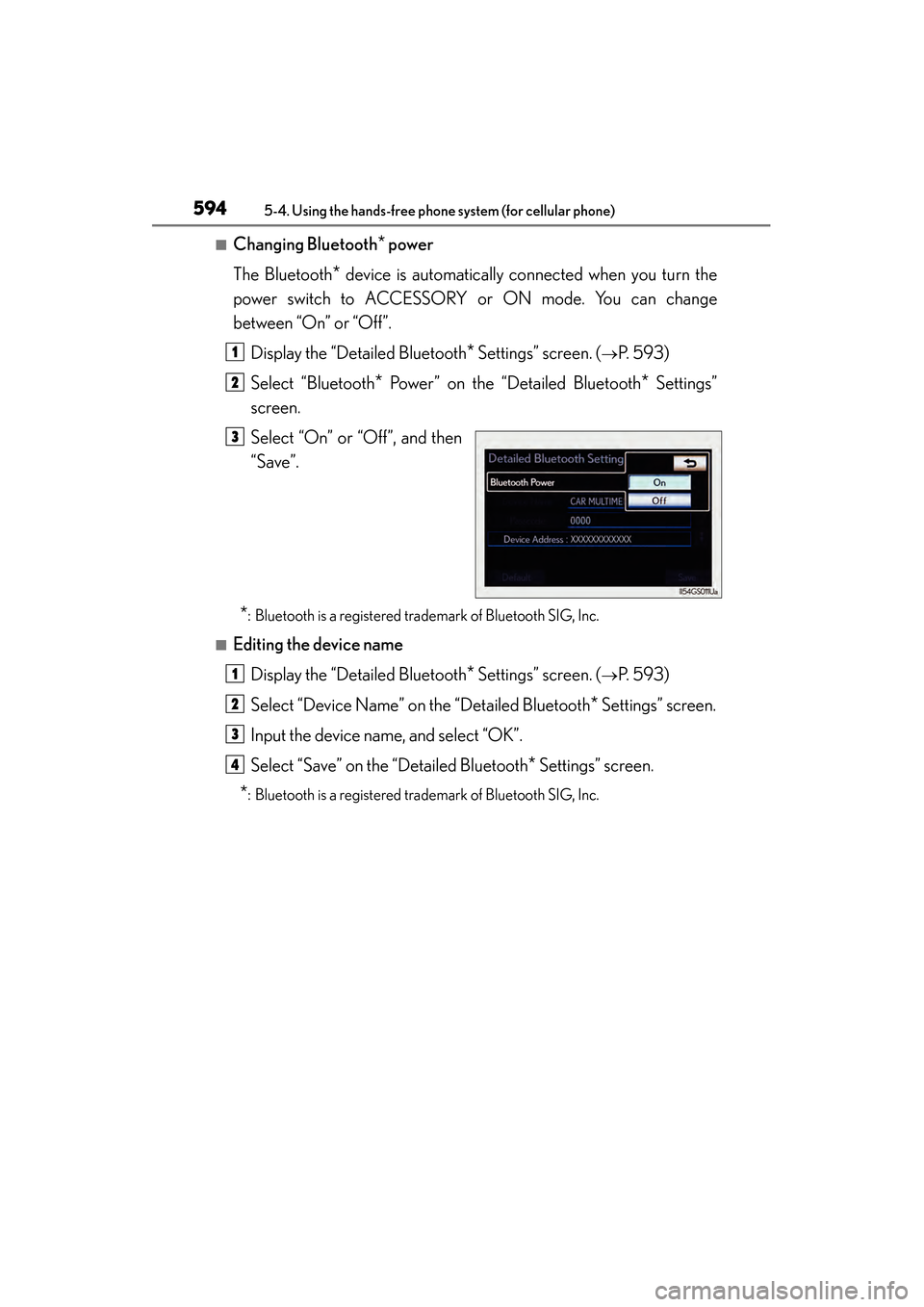
■Changing Bluetooth* power
The Bluetooth
* device is automatically connected when you turn the
power switch to ACCESSORY or ON mode. You can change
between “On” or “Off”.
Display the “Detailed Bluetooth
* Settings” screen. (→P. 593)
Select “Bluetooth
* Power” on the “Detailed Bluetooth* Settings”
screen.
Select “On” or “Off”, and then
“Save”.
*: Bluetooth is a registered trademark of Bluetooth SIG, Inc.
■Editing the device name
Display the “Detailed Bluetooth
* Settings” screen. (→P. 593)
Select “Device Name” on the “Detailed Bluetooth
* Settings” screen.
Input the device name, and select “OK”.
Select “Save” on the “Detailed Bluetooth
* Settings” screen.
*: Bluetooth is a registered trademark of Bluetooth SIG, Inc.
1
2
3
1
2
3
4
GS450h_OM_OM30D52U_(U).book Page 594 Monday, July 29, 2013 12:07 PM
Page 596 of 890
GS450h_OM_OM30D52U_(U)
5955-4. Using the hands-free phone system (for cellular phone)
5
Interior features
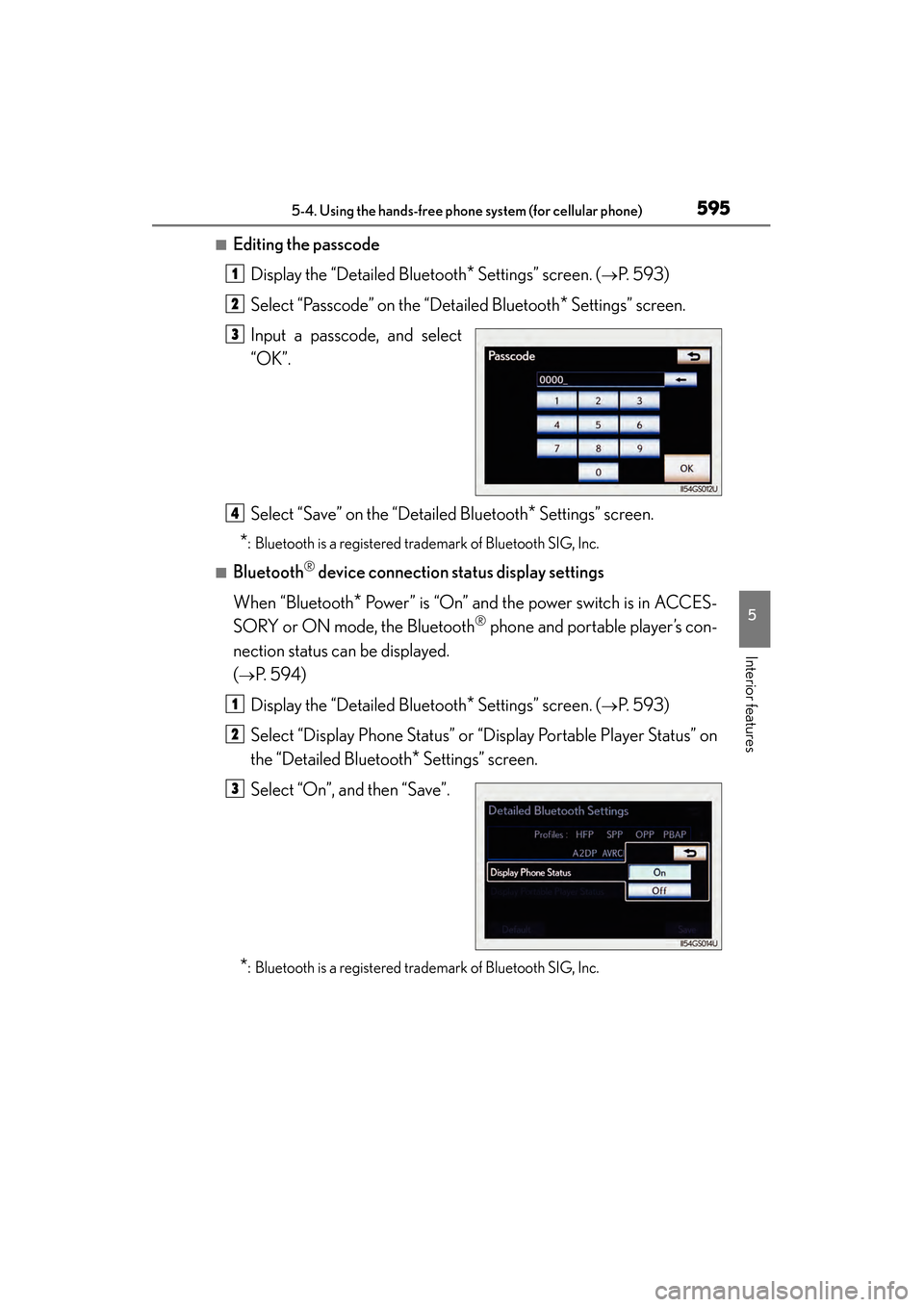
■Editing the passcodeDisplay the “Detailed Bluetooth
* Settings” screen. (→P. 593)
Select “Passcode” on the “Detailed Bluetooth
* Settings” screen.
Input a passcode, and select
“OK”.
Select “Save” on the “Detailed Bluetooth
* Settings” screen.
*: Bluetooth is a registered trademark of Bluetooth SIG, Inc.
■Bluetooth® device connection status display settings
When “Bluetooth
* Power” is “On” and the power switch is in ACCES-
SORY or ON mode, the Bluetooth
® phone and portable player’s con-
nection status can be displayed.
(
→P. 5 9 4 )
Display the “Detailed Bluetooth
* Settings” screen. (→P. 593)
Select “Display Phone Status” or “Display Portable Player Status” on
the “Detailed Bluetooth
* Settings” screen.
Select “On”, and then “Save”.
*: Bluetooth is a registered trademark of Bluetooth SIG, Inc.
1
2
3
4
1
2
3
GS450h_OM_OM30D52U_(U).book Page 595 Monday, July 29, 2013 12:07 PM
Page 597 of 890

596
GS450h_OM_OM30D52U_(U)
5-4. Using the hands-free phone system (for cellular phone)
■While driving
You cannot change the state of “Bluetooth
* Power ” from “On” to “Off” while driving,
but it can be changed from “Off” to “On”.
■To return to the default Bluetooth® settings
Select “Default”, and then “Yes”.
If the state of “Bluetooth
* Power” is changed from “Off” to “On”, Bluetooth® con-
nection will begin.
*: Bluetooth is a registered trademark of Bluetooth SIG, Inc.
GS450h_OM_OM30D52U_(U).book Page 596 Monday, July 29, 2013 12:07 PM
Page 635 of 890
634
GS450h_OM_OM30D52U_(U)
5-7. Other interior features
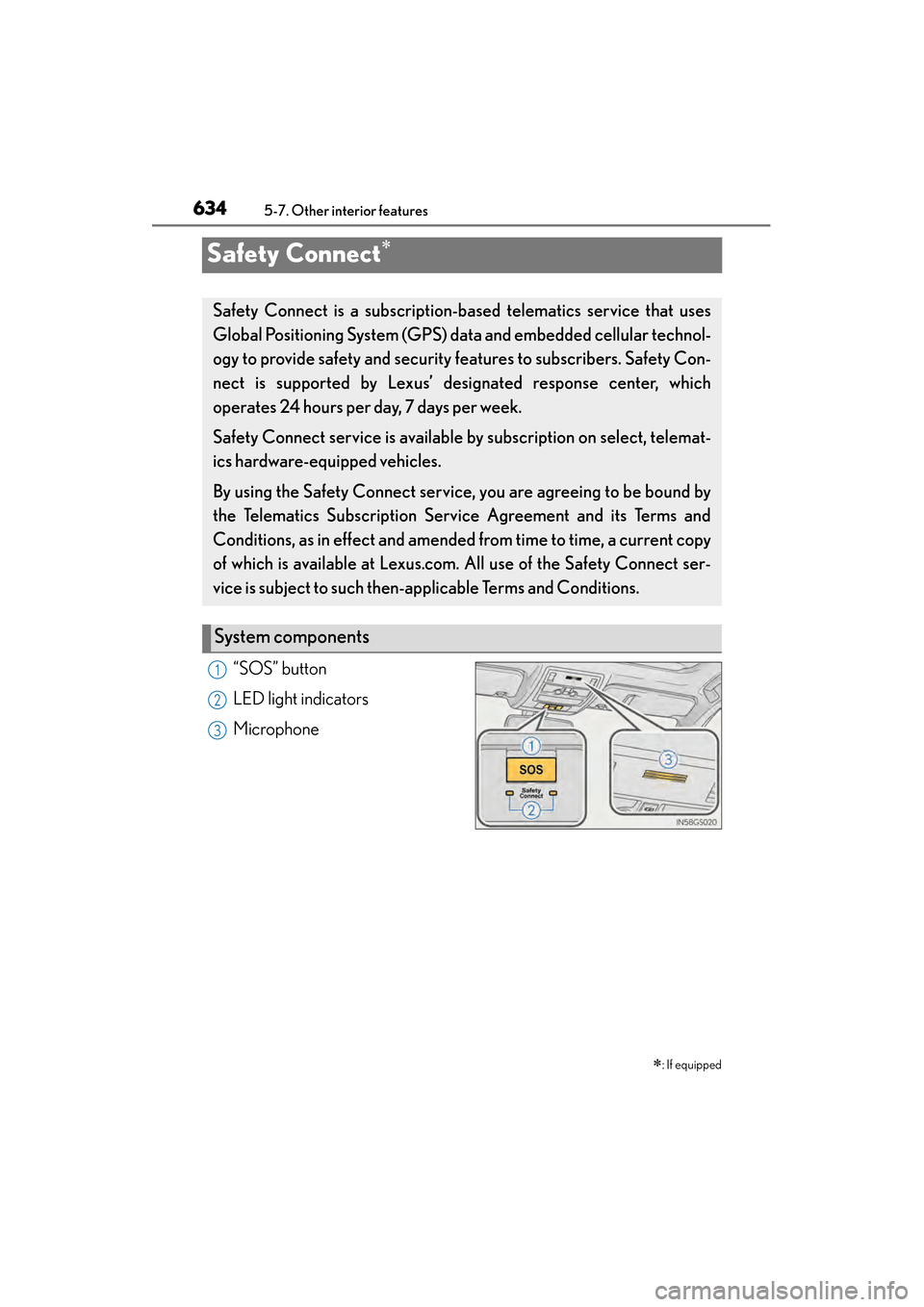
Safety Connect∗
“SOS” button
LED light indicators
Microphone∗
: If equipped
Safety Connect is a subscription-based telematics service that uses
Global Positioning System (GPS) data and embedded cellular technol-
ogy to provide safety and security features to subscribers. Safety Con-
nect is supported by Lexus’ de signated response center, which
operates 24 hours per day, 7 days per week.
Safety Connect service is available by subscription on select, telemat-
ics hardware-equipped vehicles.
By using the Safety Connect service, you are agreeing to be bound by
the Telematics Subscription Ser vice Agreement and its Terms and
Conditions, as in effect and amended from time to time, a current copy
of which is available at Lexus.com. All use of the Safety Connect ser-
vice is subject to such then-app licable Terms and Conditions.
System components
1
2
3
GS450h_OM_OM30D52U_(U).book Page 634 Monday, July 29, 2013 12:07 PM
Page 637 of 890
636
GS450h_OM_OM30D52U_(U)
5-7. Other interior features
■Safety Connect Services Information
●Phone calls using the vehicles Bluetooth® technology will not be possible during
Safety Connect.
●Safety Connect is available beginning Fall 2009 on select Lexus models. Contact
with the Safety Connect response center is dependent upon the telematics device
being in operative condition, cellular connection availability, and GPS satellite sig-
nal reception, which can limit the ability to reach the response center or receive
emergency service support. Enrollment and Telematics Subscription Service
Agreement required. A variety of subscription terms is available; charges vary by
subscription term selected.
●Automatic Collision Notification, Emergency Assistance and Stolen Vehicle Loca-
tion will function in the United States, including Hawaii and Alaska, and in Canada,
and Enhanced Roadside Assistance will function in the United States (except
Hawaii) and in Canada. No Safety Connect services will function outside of the
United States in countries other than Canada.
●Safety Connect services are not subject to section 255 of the Telecommunications
Act and the device is not TTY compatible.
■Languages
The Safety Connect response center will offer support in multiple languages. The
Safety Connect system will offer voice prompts in English and Spanish. Please indi-
cate your language of choice when enrolling.
■When contacting the response center
You may be unable to contact the response center if the network is busy.
GS450h_OM_OM30D52U_(U).book Page 636 Monday, July 29, 2013 12:07 PM
Page 640 of 890
GS450h_OM_OM30D52U_(U)
6395-7. Other interior features
5
Interior features
Important! Read this information before using Safety Connect.
■Exposure to radio frequency signals
The Safety Connect system installed in your vehicle is a low-power
radio transmitter and receiver. It receives and also sends out radio fre-
quency (RF) signals.
In August 1996, the Federal Communications Commission (FCC)
adopted RF exposure guidelines with safety levels for mobile wireless
phones. Those guidelines are consistent with the safety standards previ-
ously set by the following U.S. and international standards bodies.
●ANSI (American National Standards Institute) C95.1 [1992]
●NCRP (National Council on Radiation Protection and Measure-
ment) Report 86 [1986]
●ICNIRP (International Commission on Non-Ionizing Radiation Pro-
tection) [1996]
Those standards were based on comprehensive and periodic evalua-
tions of the relevant scientific literature. Over 120 scientists, engineers,
and physicians from universities, and government health agencies and
industries reviewed the available body of research to develop the ANSI
Standard (C95.1).
The design of Safety Connect complies with the FCC guidelines in
addition to those standards.
Safety information for Safety Connect
GS450h_OM_OM30D52U_(U).book Page 639 Monday, July 29, 2013 12:07 PM
Page 684 of 890
GS450h_OM_OM30D52U_(U)
6836-3. Do-it-yourself maintenance
6
Maintenance and care
■If the tread on snow tires wears down below 0.16 in. (4 mm)
The effectiveness of the tires as snow tires is lost.
■Situations in which the tire pressure warning system may not operate properly
●In the following cases, the tire pressure warning system may not operate properly.
• If non-genuine Lexus wheels are used.
• A tire has been replaced with a tire that is not an OE (Original Equipment) tire.
• A tire has been replaced with a tire that is not of the specified size.
• Tire chains etc. are equipped.
• Lock nuts are equipped.
• An auxiliary-supported run-flat tire is equipped.
• If a window tint that affects the radio wave signals is installed.
• If there is a lot of snow or ice on the vehicle, particularly around the wheels or wheel housings.
• If the tire inflation pressure is extremely higher than the specified level.
●Performance may be affected in the following situations.
• Near a TV tower, electric power plant, gas station, radio station, large display, airport or other facility that generates strong radio waves or electrical noise
• When carrying a portable radio, cellular phone, cordless phone or other wire- less communication device
Vehicles with the tire inflation pressure display function: If tire position information
is not correctly displayed due to the radio wave conditions, the display may be
corrected by driving and changing the radio wave conditions.
●When the vehicle is parked, the time taken for the warning to start or go off could
be extended.
●When tire inflation pressure declines rapidly for example when a tire has burst, the
warning may not function.
■The initialization operation
●Make sure to carry out initialization after adjusting the tire inflation pressure.
Also, make sure the tires are cold before carrying out initialization or tire inflation
pressure adjustment.
●If you have accidentally turned the power switch off during initialization, it is not
necessary to press the reset switch again as initialization will restart automatically
when the power switch has been turned to ON mode for the next time.
●If you accidentally press the reset switch when initialization is not necessary, adjust
the tire inflation pressure to the specified level when the tires are cold, and conduct
initialization again.
GS450h_OM_OM30D52U_(U).book Page 683 Monday, July 29, 2013 12:07 PM
Page 870 of 890
869Alphabetical index
GS450h_OM_OM30D52U_(U)
Approach warningDynamic radar cruise control......246
Dynamic radar cruise control with full-speed range .................... 262
Armrest .................................................... 620
Ashtrays....................................................... 611
Assist grips .............................................. 625
Audio input................................................521
Audio system............................................. 411 Audio input............................................. 521
AUX port/USB port...........................521, 501, 511
Bluetooth
® audio.............................. 489
CD/DVD player ................................ 457
CD/DVD player information ...... 477
DVD video ........................................... 465
iPod .......................................................... 509
MP3/WMA disc .............................. 459
Optimal use ........................................... 519
Portable music player ....................... 521
Radio ........................................................434
Rear seat audio controls ................523
Steering wheel audio switch ........ 527
USB memory ...................................... 499
Automatic headlight leveling system .................................................... 220
Automatic light control system......... 217
AUX port...................................................521
Auxiliary boxes ...................................... 606
AVS (Adaptive Variable Suspension system)..........................309 Back-up lights
Replacing light bulbs ........................722
Wattage ...................................................817
Battery (12-volt battery) .....................673 If the 12-volt battery is
discharged......................................... 796
Preparing and checking before
winter.................................................... 342
Warning light ....................................... 738
Battery (traction battery) ...................... 76
Blind Spot Monitor (BSM) ................324
Bluetooth®
Audio system .......................................489
Hands-free system (for cellular phone) .......................530
Brake Brake Hold ............................................. 214
Fluid ............................................................ 671
Parking brake ..........................................211
Regenerative braking ..........................74
Warning light ........................... 737, 740
Warning message..............................747
Brake assist ............................................. 308
Brake Hold................................................ 214
Break-in tips ............................................. 177
Brightness control Instrument panel light control ........ 93
BSM (Blind Spot Monitor) ................324 Blind Spot Monitor function......... 328
Rear Cross Traffic Alert function.................................................. 331
B
GS450h_OM_OM30D52U_(U).book Page 869 Monday, July 29, 2013 12:07 PM
Page 875 of 890
874Alphabetical index
GS450h_OM_OM30D52U_(U)
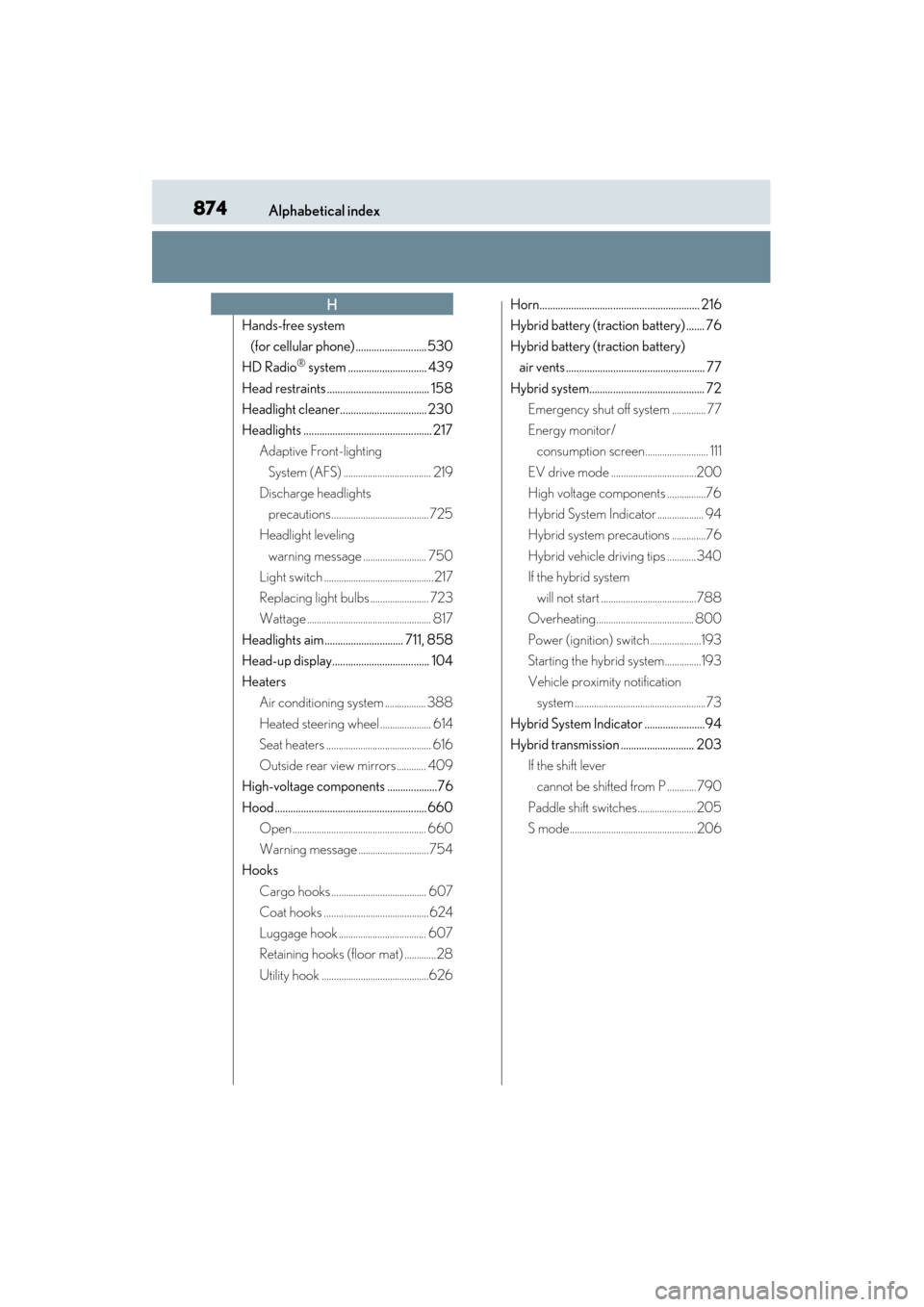
Hands-free system (for cellular phone) ...........................530
HD Radio
® system .............................. 439
Head restraints ....................................... 158
Headlight cleaner................................. 230
Headlights ................................................. 217 Adaptive Front-lighting
System (AFS) .................................... 219
Discharge headlights
precautions........................................ 725
Headlight leveling
warning message .......................... 750
Light switch ............................................. 217
Replacing light bulbs ........................ 723
Wattage ................................................... 817
Headlights aim.............................. 711, 858
Head-up display..................................... 104
Heaters Air conditioning system ................. 388
Heated steering wheel ..................... 614
Seat heaters ........................................... 616
Outside rear view mirrors ............ 409
High-voltage components ...................76
Hood .......................................................... 660 Open ....................................................... 660
Warning message ............................. 754
Hooks
Cargo hooks ....................................... 607
Coat hooks ...........................................624
Luggage hook .................................... 607
Retaining hooks (floor mat) .............28
Utility hook ............................................626 Horn............................................................. 216
Hybrid battery (traction battery) ....... 76
Hybrid battery (traction battery)
air vents ..................................................... 77
Hybrid system............................................ 72 Emergency shut off system .............. 77
Energy monitor/consumption screen.......................... 111
EV drive mode ...................................200
High voltage components ................76
Hybrid System Indicator ................... 94
Hybrid system precautions ..............76
Hybrid vehicle driving tips ............340
If the hybrid system will not start .......................................788
Overheating........................................ 800
Power (ignition) switch.....................193
Starting the hybrid system...............193
Vehicle proximity notification system ......................................................73
Hybrid System Indicator .......................94
Hybrid transmission ............................ 203 If the shift lever cannot be shifted from P ............790
Paddle shift switches........................ 205
S mode.................................................... 206
H
GS450h_OM_OM30D52U_(U).book Page 874 Monday, July 29, 2013 12:07 PM