light Lexus GS450h 2014 Owner's Manual
[x] Cancel search | Manufacturer: LEXUS, Model Year: 2014, Model line: GS450h, Model: Lexus GS450h 2014Pages: 890, PDF Size: 40.62 MB
Page 350 of 890
349
GS450h_OM_OM30D52U_(U)
5Interior features
5-4. Using the hands-free phone system (for cellular phone)
Hands-free system (for cellular phone) ................ 530
Using a Bluetooth
® phone ....539
Setting the hands-free system (for cellular phone) .................559
Setting the Bluetooth
®........... 584
5-5. Using the interior lights Interior lights list.......................... 597• Interior light ........................... 598
• Personal lights....................... 598
5-6. Using the storage features List of storage features............ 600• Glove box............................... 602
• Console box .......................... 603
• Cup holders........................... 604
• Auxiliary boxes..................... 606
Trunk features .............................. 607 5-7. Other interior features
Sun visors and vanity mirrors ...................609
Clock................................................ 610
Ashtrays ............................................ 611
Power outlets .................................612
Heated steering wheel ..............614
Seat heaters/ seat ventilators ...........................616
Armrest .......................................... 620
Rear sunshade/ rear door sunshades ................621
Coat hooks ................................... 624
Assist grips.................................... 625
Utility hook.................................... 626
Garage door opener.................627
Safety Connect ........................... 634
GS450h_OM_OM30D52U_(U).book Page 349 Monday, July 29, 2013 12:07 PM
Page 356 of 890
GS450h_OM_OM30D52U_(U)
3555-1. Remote Touch screen
5
Interior features
■When using the Remote Touch screen
●If the screen is cold, the display may be dark, or the system may seem to be operat-
ing slightly slower than normal.
●When the screen is viewed through polarized sunglasses, a rainbow pattern may
appear on the screen due to optical characteristics of the screen. If this is disturb-
ing, please operate the screen without polarized sunglasses.
●Dimmed screen buttons cannot be operated.
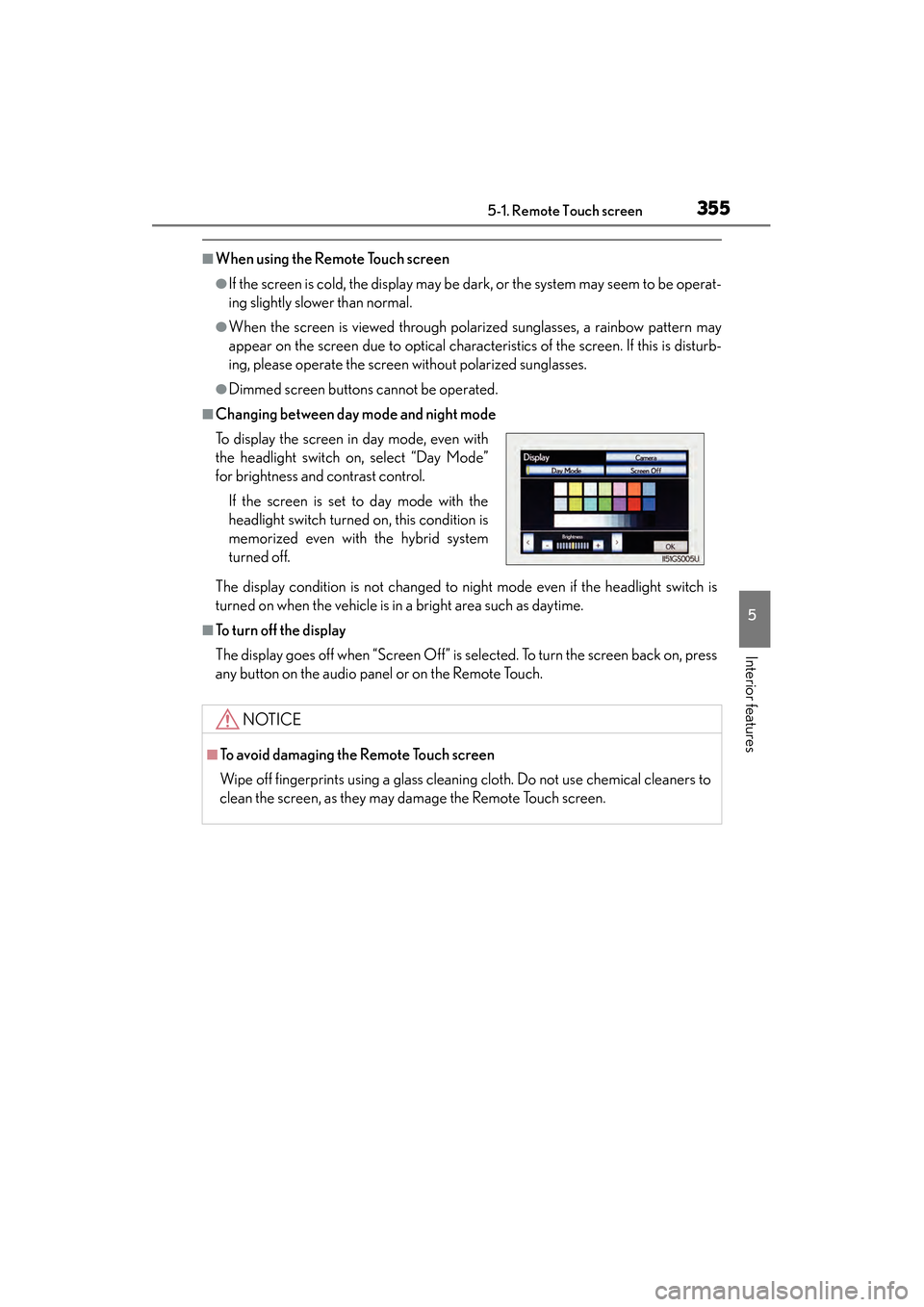
■Changing between day mode and night mode
The display condition is not changed to night mode even if the headlight switch is
turned on when the vehicle is in a bright area such as daytime.
■To t u r n o f f t h e d i s p l a y
The display goes off when “Screen Off” is selected. To turn the screen back on, press
any button on the audio panel or on the Remote Touch. To display the screen in day mode, even with
the headlight switch on, select “Day Mode”
for brightness and contrast control.
If the screen is set to day mode with the
headlight switch turned on, this condition is
memorized even with the hybrid system
turned off.
NOTICE
■To avoid damaging the Remote Touch screen
Wipe off fingerprints using a glass cleaning cloth. Do not use chemical cleaners to
clean the screen, as they may damage the Remote Touch screen.
GS450h_OM_OM30D52U_(U).book Page 355 Monday, July 29, 2013 12:07 PM
Page 361 of 890
3605-1. Remote Touch screen
GS450h_OM_OM30D52U_(U)
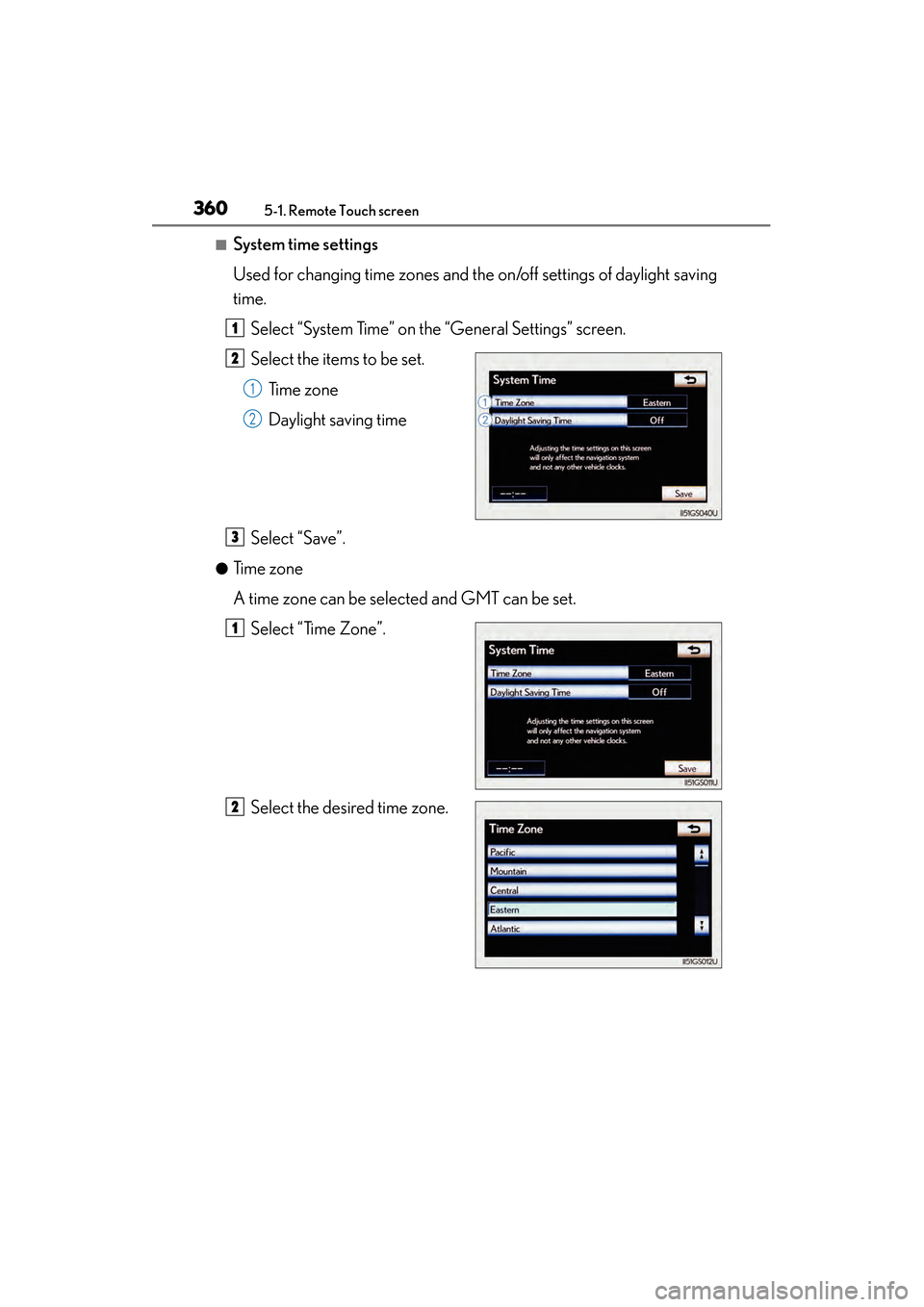
■System time settings
Used for changing time zones and the on/off settings of daylight saving
time.Select “System Time” on the “General Settings” screen.
Select the items to be set. Time zone
Daylight saving time
Select “Save”.
●Time zone
A time zone can be selected and GMT can be set. Select “Time Zone”.
Select the desired time zone.
1
2
1
2
3
1
2
GS450h_OM_OM30D52U_(U).book Page 360 Monday, July 29, 2013 12:07 PM
Page 362 of 890
GS450h_OM_OM30D52U_(U)
3615-1. Remote Touch screen
5
Interior features
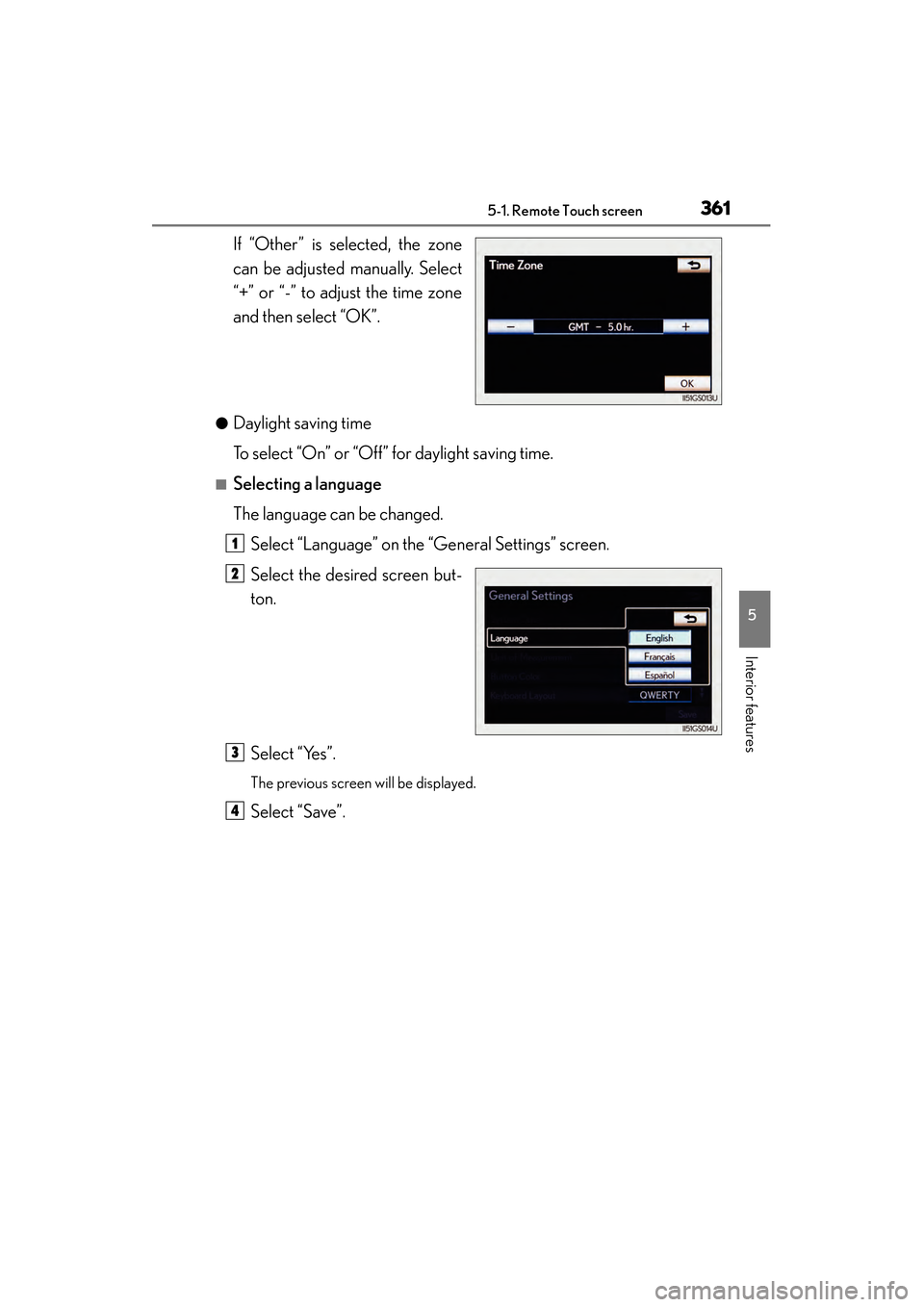
If “Other” is selected, the zone
can be adjusted manually. Select
“+” or “-” to adjust the time zone
and then select “OK”.
●Daylight saving time
To select “On” or “Off” for daylight saving time.
■Selecting a language
The language can be changed.Select “Language” on the “General Settings” screen.
Select the desired screen but-
ton.
Select “Yes”.
The previous screen will be displayed.
Select “Save”.
1
2
3
4
GS450h_OM_OM30D52U_(U).book Page 361 Monday, July 29, 2013 12:07 PM
Page 472 of 890
GS450h_OM_OM30D52U_(U)
4715-3. Using the audio system
5
Interior features
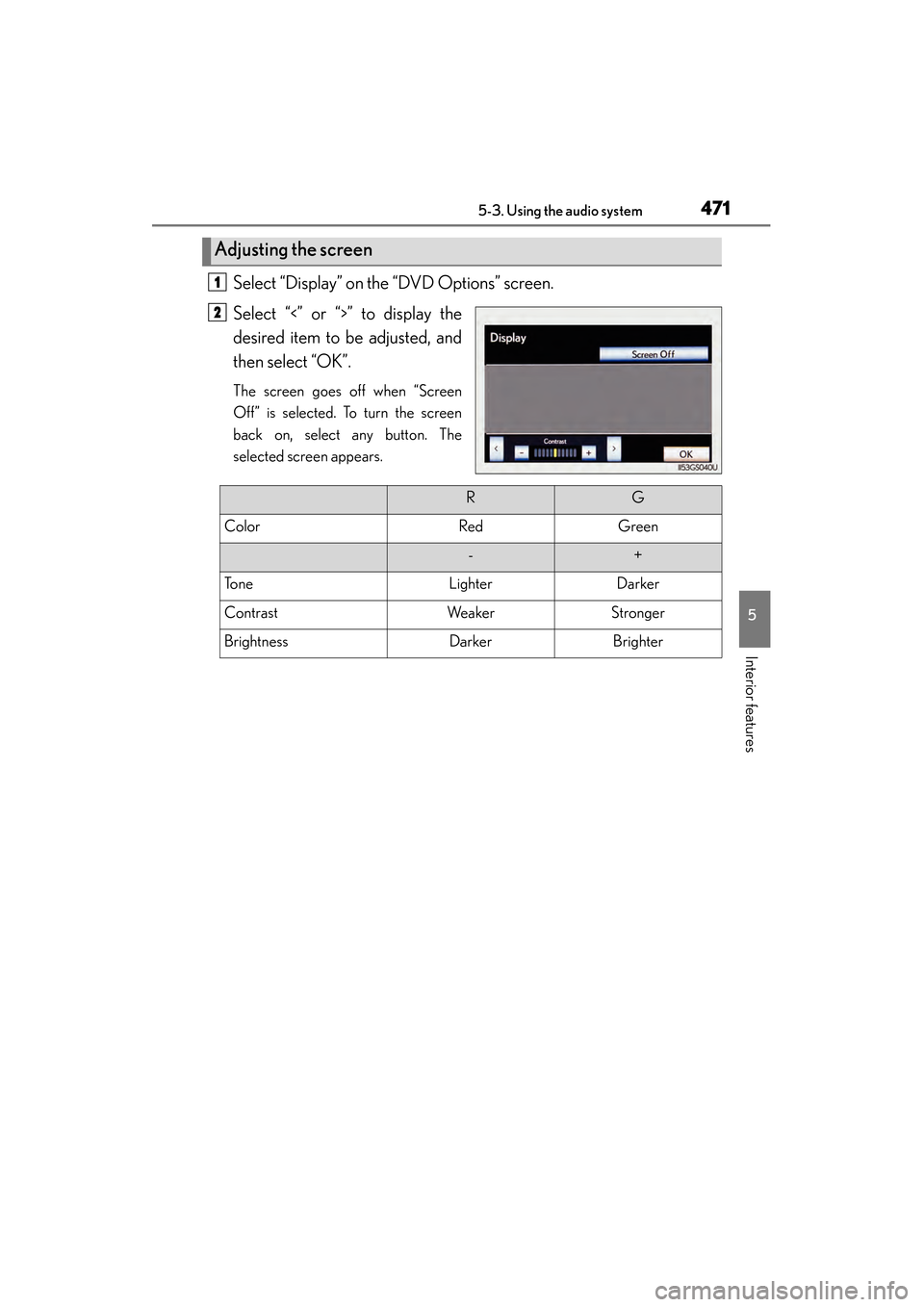
Select “Display” on the “DVD Options” screen.
Select “<” or “>” to display the
desired item to be adjusted, and
then select “OK”.
The screen goes off when “Screen
Off” is selected. To turn the screen
back on, select any button. The
selected screen appears.
Adjusting the screen
1
2
RG
ColorRedGreen
-+
To n eLighterDarker
ContrastWeakerStronger
BrightnessDarkerBrighter
GS450h_OM_OM30D52U_(U).book Page 471 Monday, July 29, 2013 12:07 PM
Page 489 of 890
488
GS450h_OM_OM30D52U_(U)
5-3. Using the audio system
NOTICE
■Player precautions
Failure to follow the precautions below may result in damage to the discs or the
player itself.
●Do not insert anything other than discs into the disc slot.
●Do not apply oil to the player.
●Store discs away from direct sunlight.
●Never try to disassemble any part of the player.
GS450h_OM_OM30D52U_(U).book Page 488 Monday, July 29, 2013 12:07 PM
Page 498 of 890
GS450h_OM_OM30D52U_(U)
4975-3. Using the audio system
5
Interior features
■When using the Bluetooth® audio system
●In the following conditions, the system may not function.
• The portable player is turned off
• The portable player is not connected
• The portable player battery is low
●There may be a delay if phone connection is carried out during Bluetooth® audio
play.
●Depending on the type of portable player that is connected to the system, opera-
tion may differ slightly and certain functions may not be available.
■Bluetooth® antenna
The antenna is built into the instrument panel. If the portable player is behind the seat
or in the glove box or console box, or is touching or covered by metal objects, con-
nection status may deteriorate.
■Battery charge/signal status
This display may not correspond exactly with the portable player, and this system
does not have a charging function.
■About Bluetooth®
■Compatible models
Portable players must correspond to the following specifications:
●Bluetooth® specification
Ver. 1.1 or higher
(Recommended: Ver. 2.1+EDR or higher)
●Profile
• A2DP (Advanced Audio Distribution Profile) Ver. 1.0 or higher
• AVRCP (Audio/Video Remote Control Profile) Ver. 1.0 or higher (Recommended: Ver. 1.4 or higher)
However, please note that some functions may be limited depending on the type of
portable player. Also, the different screen is displayed depending on which portable
player is connecting.
Please go to the website at http://www.lexus.com/MobileLink
to find approved por-
table players for this system. Bluetooth is a registered trademark of
Bluetooth SIG, Inc.
GS450h_OM_OM30D52U_(U).book Page 497 Monday, July 29, 2013 12:07 PM
Page 531 of 890
530
GS450h_OM_OM30D52U_(U)
5-4. Using the hands-free phone system (for cellular phone)
Hands-free system (for cellular phone)
The hands-free system is a function that allows you to use your cellular
phone without touching it.
This system supports Bluetooth
® cellular phones. Bluetooth® is a wire-
less data system that allows a cellular phone to wirelessly connect to
the hands-free system and outgoing/incoming calls.
The illustrations of the hands-fr ee system screens shown here may
slightly vary depending on the type of the system.
Vehicles with a navigation system: The hands-free system function can
be displayed and operated on the “S ide Display”. For details, refer to
the “Navigation System Owner’s Manual”.
GS450h_OM_OM30D52U_(U).book Page 530 Monday, July 29, 2013 12:07 PM
Page 598 of 890
597
GS450h_OM_OM30D52U_(U)5-5. Using the interior lights
5
Interior features
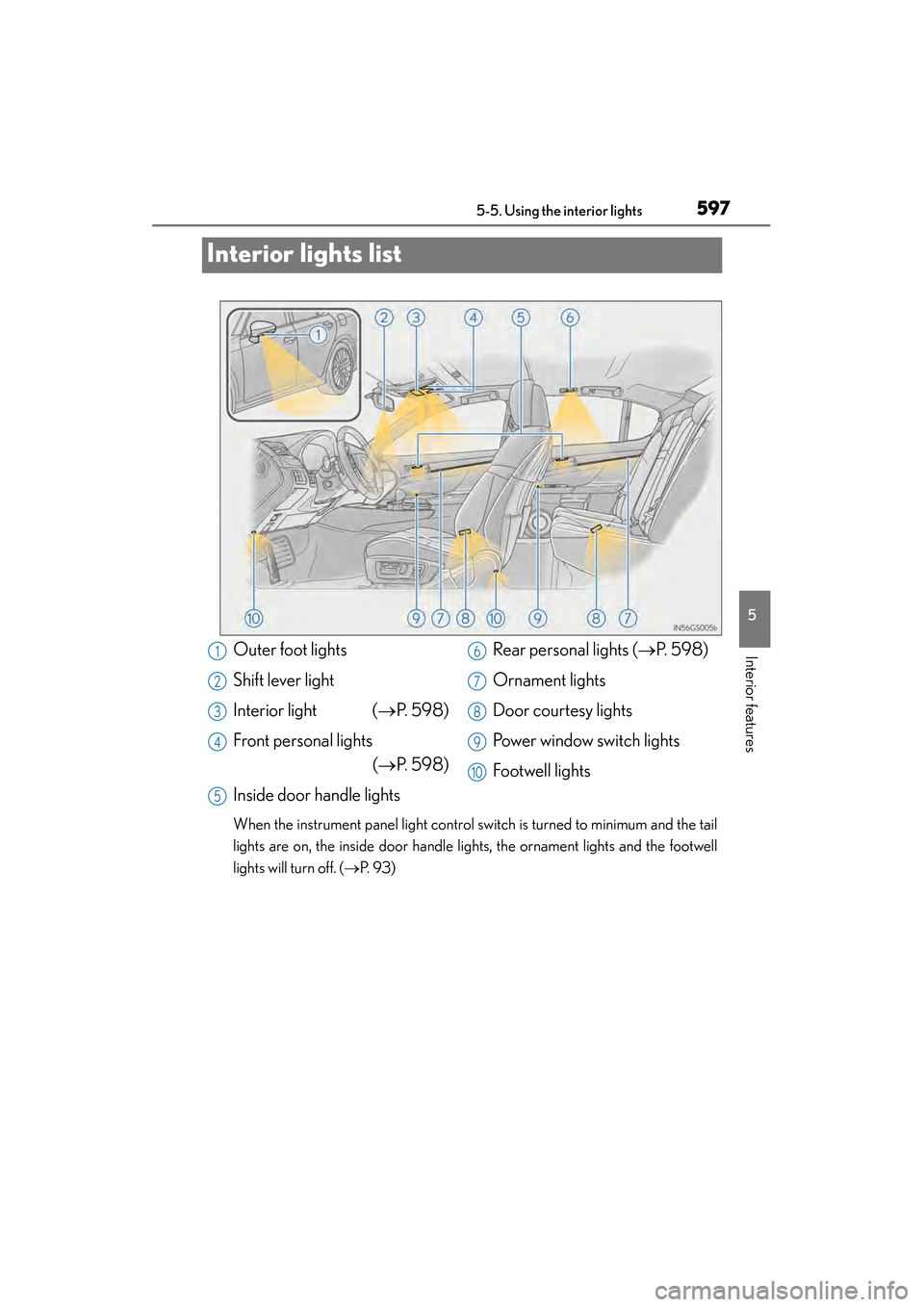
Interior lights list
When the instrument panel light control switch is turned to minimum and the tail
lights are on, the inside door handle lights, the ornament lights and the footwell
lights will turn off. ( →P. 9 3 )
Outer foot lights
Shift lever light
Interior light ( →P. 5 9 8 )
Front personal lights (→P. 5 9 8 )
Inside door handle lights Rear personal lights (
→P. 5 9 8 )
Ornament lights
Door courtesy lights
Power window switch lights
Footwell lights1
2
3
4
5
6
7
8
9
10
GS450h_OM_OM30D52U_(U).book Page 597 Monday, July 29, 2013 12:07 PM
Page 599 of 890
598
GS450h_OM_OM30D52U_(U)
5-5. Using the interior lights
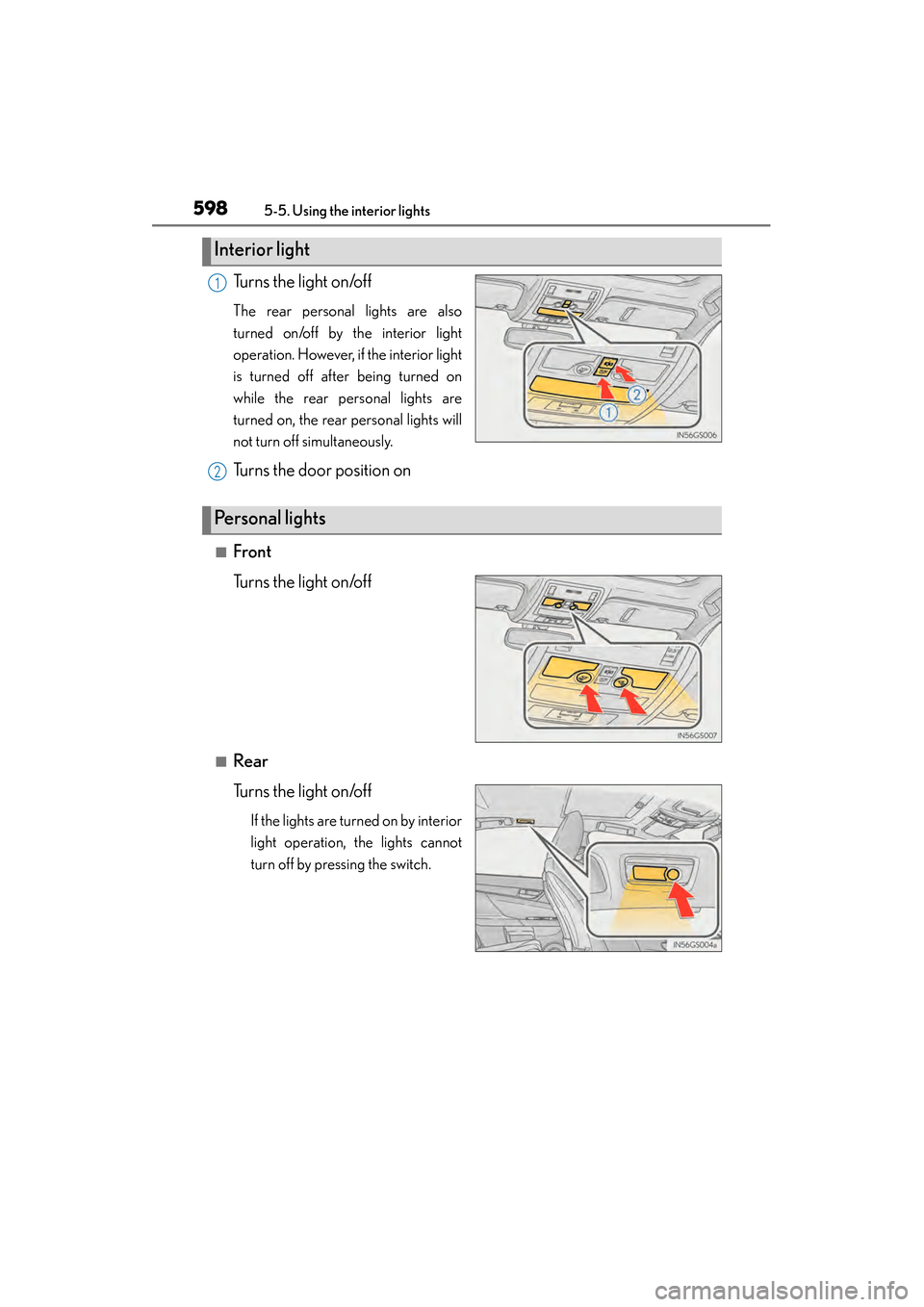
Turns the light on/off
The rear personal lights are also
turned on/off by the interior light
operation. However, if the interior light
is turned off after being turned on
while the rear personal lights are
turned on, the rear personal lights will
not turn off simultaneously.
Turns the door position on
■Front
Turns the light on/off
■Rear
Turns the light on/off
If the lights are turned on by interior
light operation, the lights cannot
turn off by pressing the switch.
Interior light
1
2
Personal lights
GS450h_OM_OM30D52U_(U).book Page 598 Monday, July 29, 2013 12:07 PM