power steering Lexus GS450h 2014 User Guide
[x] Cancel search | Manufacturer: LEXUS, Model Year: 2014, Model line: GS450h, Model: Lexus GS450h 2014Pages: 890, PDF Size: 40.62 MB
Page 163 of 890
1623-4. Adjusting the steering wheel and mirrors
GS450h_OM_OM30D52U_(U)
Inside rear view mirror
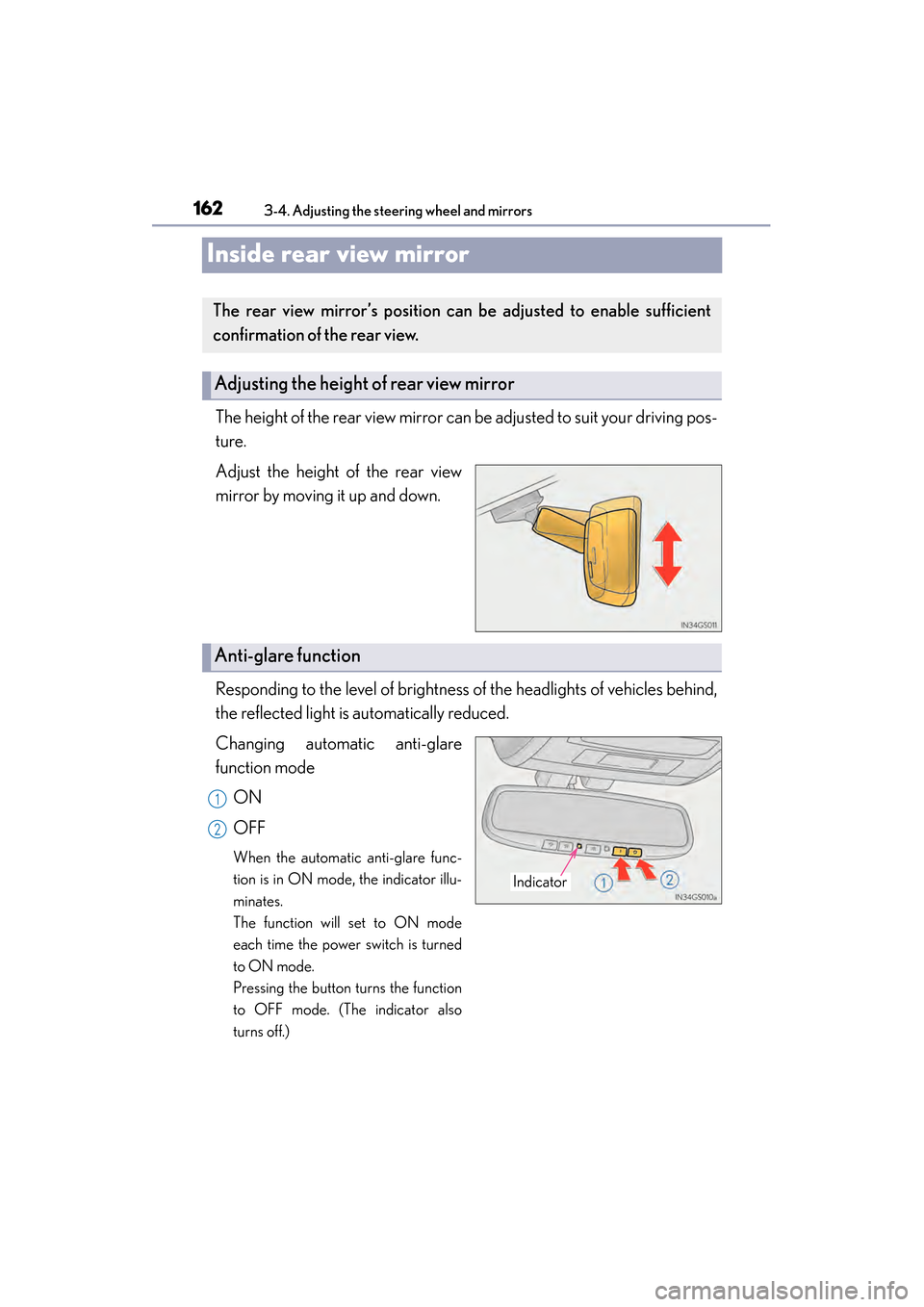
The height of the rear view mirror can be adjusted to suit your driving pos-
ture.
Adjust the height of the rear view
mirror by moving it up and down.
Responding to the level of brightness of the headlights of vehicles behind,
the reflected light is automatically reduced.
Changing automatic anti-glare
function modeON
OFF
When the automatic anti-glare func-
tion is in ON mode, the indicator illu-
minates.
The function will set to ON mode
each time the power switch is turned
to ON mode.
Pressing the button turns the function
to OFF mode. (The indicator also
turns off.)
The rear view mirror’s position ca n be adjusted to enable sufficient
confirmation of the rear view.
Adjusting the height of rear view mirror
Anti-glare function
Indicator
1
2
GS450h_OM_OM30D52U_(U).book Page 162 Monday, July 29, 2013 12:07 PM
Page 166 of 890
1653-4. Adjusting the steering wheel and mirrors
3
Operation of each component
GS450h_OM_OM30D52U_(U)
■Mirror angle can be adjusted when
The power switch is in ACCESSORY or ON mode.
■Linked mirror function when reversing
●When either “L” or “R” of the mirror select switch is selected, the outside rear view
mirrors will automatically angle downwards when the vehicle is reversing in order
to give a better view of the ground. To disable this function, select neither “L” nor
“R”.
●If the mirror angle adjustment switch is operated while the linked mirror function is
in operation, the angle and position of the mirrors can be remembered, and the
mirrors will operate at the angle adjusted to the last time the linked mirror function
was operated.
However, because the mirrors move based on the angle they are in when the linked
mirror function is not operating, the mirror angle when the linked mirror function is
operating will also be changed if the mirrors are adjusted while the function is not
operating.
■When the mirrors are fogged up
The outside rear view mirrors can be cleared using the mirror defoggers. Turn on the
rear window defogger to turn on the outside rear view mirror defoggers. (→P. 4 0 9 )
■Automatic adjustment of the mirror angle
A desired mirror face angle can be entered to memory and recalled automatically
by the driving position memory. ( →P. 1 5 2 )
■Auto anti-glare function
When the anti-glare inside rear view mirror is set to automatic mode, the outside
rear view mirrors will activate in conjunction with the anti-glare inside rear view mir-
ror to reduce reflected light. ( →P. 1 6 2 )
GS450h_OM_OM30D52U_(U).book Page 165 Monday, July 29, 2013 12:07 PM
Page 181 of 890

180
GS450h_OM_OM30D52U_(U)
4-1. Before driving
CAUTION
Observe the following precautions.
Failure to do so may result in death or serious injury.
■When driving the vehicle
●During normal driving, do not turn off the hybrid system. Turning the hybrid sys-
tem off while driving will not cause loss of steering or braking control, however,
power assist to the steering will be lost. This will make it more difficult to steer
smoothly, so you should pull over and stop the vehicle as soon as it is safe to do so.
In the event of an emergency, such as if it becomes impossible to stop the vehicle
in the normal way: →P. 7 2 9
●Use engine braking (downshift) to maintain a safe speed when driving down a
steep hill.
Using the brakes continuously may cause the brakes to overheat and lose effec-
tiveness. ( →P. 2 0 3 )
●Do not adjust the positions of the steering wheel, the seat, or the inside or outside
rear view mirrors while driving.
Doing so may result in a loss of vehicle control.
●Always check that all passengers’ arms, heads or other parts of their body are not
outside the vehicle.
●Do not drive in excess of the speed limit. Even if the legal speed limit permits it, do
not drive over 85 mph (140 km/h) unless your vehicle has high-speed capability
tires. Driving over 85 mph (140 km/h) may result in tire failure, loss of control and
possible injury. Be sure to consult a tire dealer to determine whether the tires on
your vehicle are high-speed capability tires or not before driving at such speeds.
GS450h_OM_OM30D52U_(U).book Page 180 Monday, July 29, 2013 12:07 PM
Page 186 of 890
GS450h_OM_OM30D52U_(U)
1854-1. Before driving
4
Driving
NOTICE
■When driving the vehicle
●Do not depress the accelerator and brake pedals at the same time during driving,
as this may restrain driving torque.
●Do not use the accelerator pedal or depress the accelerator and brake pedals at
the same time to hold the vehicle on a hill.
■When parking the vehicle
Always shift the shift lever to P. Failure to do so may cause the vehicle to move or
the vehicle may accelerate suddenly if the accelerator pedal is accidentally
depressed.
■Avoiding damage to vehicle parts
●Do not turn the steering wheel fully in either direction and hold it there for an
extended period of time.
Doing so may damage the power steering motor.
●When driving over bumps in the road, drive as slowly as possible to avoid damag-
ing the wheels, underside of the vehicle, etc.
■If you get a flat tire while driving
A flat or damaged tire may cause the following situations. Hold the steering wheel
firmly and gradually depress the brake pedal to slow down the vehicle.
●It may be difficult to control your vehicle.
●The vehicle will make abnormal sounds or vibrations.
●The vehicle will lean abnormally.
Information on what to do in case of a flat tire ( →P. 7 7 5 )
GS450h_OM_OM30D52U_(U).book Page 185 Monday, July 29, 2013 12:07 PM
Page 197 of 890
196
GS450h_OM_OM30D52U_(U)
4-2. Driving procedures
■Auto power off function
If the vehicle is left in ACCESSORY mode for more than 20 minutes or ON mode
(the hybrid system is not operating) for more than an hour with the shift lever in P, the
power switch will automatically turn off. However, this function cannot entirely pre-
vent 12-volt battery discharge. Do not le ave the vehicle with the power switch in
ACCESSORY or ON mode for long periods of time when the hybrid system is not
operating.
■Sounds and vibrations specific to a hybrid vehicle
→ P. 7 5
■Electronic key battery depletion
→P. 1 3 4
■When the ambient temperature is low, such as during winter driving conditions
It may take time until the “READY” indicator comes on.
■Conditions affecting operation
→P. 1 3 0
■Notes for the entry function
→P. 1 3 1
■If the hybrid system does not start
●The immobilizer system may not have been deactivated. (→ P. 8 1 )
Contact your Lexus dealer.
●Check that the shift lever is securely set in P. The hybrid system may not start if the
shift lever is displaced out of P. “Shift to P position when Starting” will be displayed
on the multi-information display.
■Steering lock
After turning the power switch off and opening and closing the doors, the steering
wheel will be locked due to the steering lock function. Operating the power switch
again automatically cancels the steering lock.
GS450h_OM_OM30D52U_(U).book Page 196 Monday, July 29, 2013 12:07 PM
Page 198 of 890
GS450h_OM_OM30D52U_(U)
1974-2. Driving procedures
4
Driving
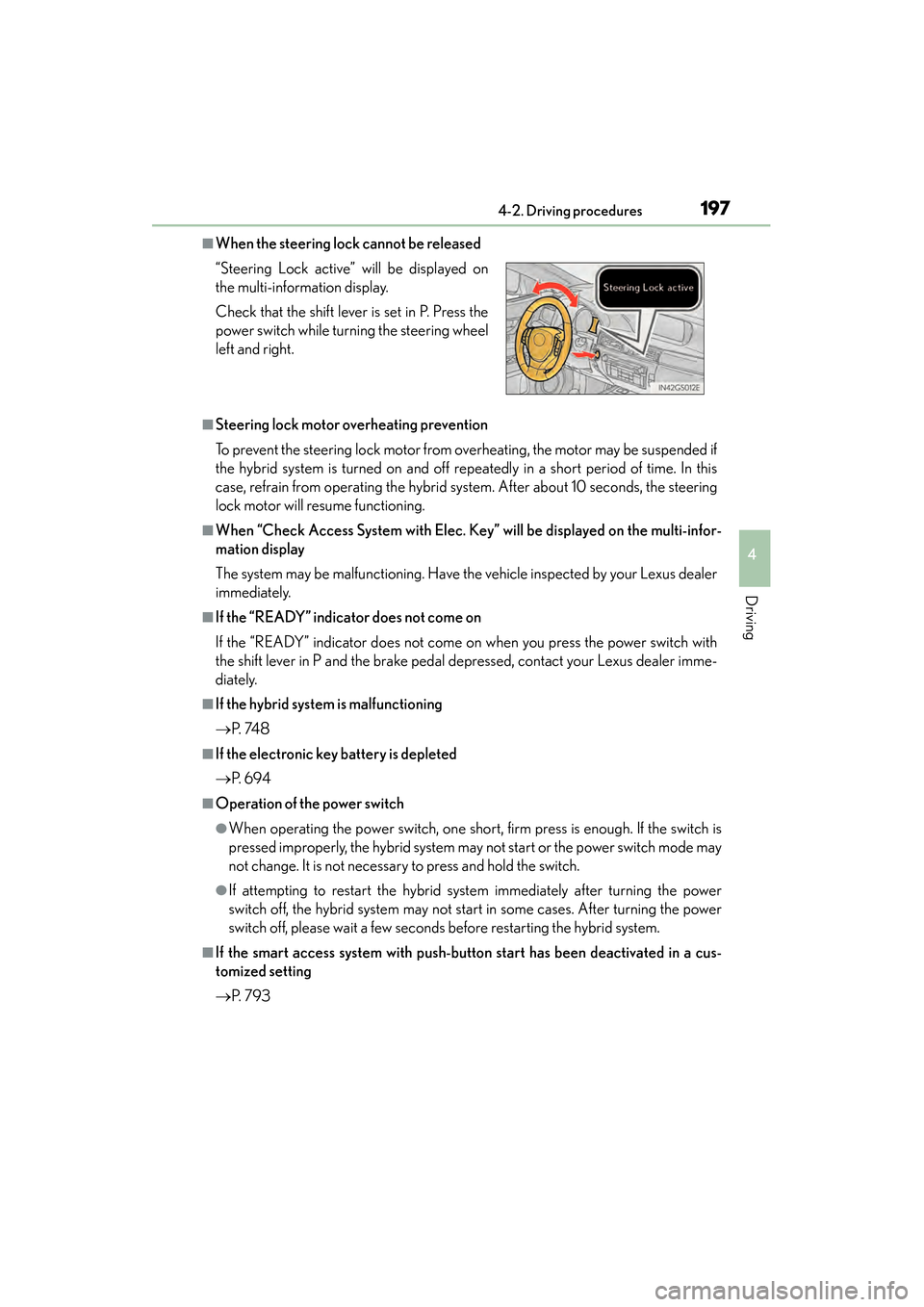
■When the steering lock cannot be released
■Steering lock motor overheating prevention
To prevent the steering lock motor from overheating, the motor may be suspended if
the hybrid system is turned on and off repeatedly in a short period of time. In this
case, refrain from operating the hybrid system. After about 10 seconds, the steering
lock motor will resume functioning.
■When “Check Access System with Elec. Key” will be displayed on the multi-infor-
mation display
The system may be malfunctioning. Have the vehicle inspected by your Lexus dealer
immediately.
■If the “READY” indicator does not come on
If the “READY” indicator does not come on when you press the power switch with
the shift lever in P and the brake pedal depressed, contact your Lexus dealer imme-
diately.
■If the hybrid system is malfunctioning
→P. 74 8
■If the electronic key battery is depleted
→P. 6 9 4
■Operation of the power switch
●When operating the power switch, one short, firm press is enough. If the switch is
pressed improperly, the hybrid system may not start or the power switch mode may
not change. It is not necessary to press and hold the switch.
●If attempting to restart the hybrid system immediately after turning the power
switch off, the hybrid system may not start in some cases. After turning the power
switch off, please wait a few seconds before restarting the hybrid system.
■If the smart access system with push-button start has been deactivated in a cus-
tomized setting
→P. 7 9 3
“Steering Lock active” will be displayed on
the multi-information display.
Check that the shift lever is set in P. Press the
power switch while turning the steering wheel
left and right.
GS450h_OM_OM30D52U_(U).book Page 197 Monday, July 29, 2013 12:07 PM
Page 199 of 890
198
GS450h_OM_OM30D52U_(U)
4-2. Driving procedures
CAUTION
■When starting the hybrid system
Always start the hybrid system while sitting in the driver’s seat. Do not depress the
accelerator pedal while starting the hybrid system under any circumstances.
Doing so may cause an accident resulting in death or serious injury.
■Caution while driving
If hybrid system failure occurs while the vehicle is moving, do not lock or open the
doors until the vehicle reaches a safe and complete stop. Activation of the steering
lock in this circumstance may lead to an accident, resulting in death or serious
injury.
■Stopping the hybrid system in an emergency
If you want to stop the hybrid system in an emergency while driving the vehicle,
press and hold the power switch for more than 2 seconds, or press it briefly 3 times
or more in succession. (→P. 7 2 9 )
However, do not touch the power switch while driving except in an emergency.
Turning the hybrid system off while driving will not cause loss of steering or braking
control, however, power assist to the steering will be lost. This will make it more dif-
ficult to steer smoothly, so you should pull over and stop the vehicle as soon as it is
safe to do so.
GS450h_OM_OM30D52U_(U).book Page 198 Monday, July 29, 2013 12:07 PM
Page 309 of 890
308
GS450h_OM_OM30D52U_(U)
4-5. Using the driving support systems
Driving assist systems
◆ABS (Anti-lock Brake System)
Helps to prevent wheel lock when the brakes are applied suddenly, or if
the brakes are applied while driving on a slippery road surface
◆Brake assist
Generates an increased level of braking force after the brake pedal is
depressed when the system detects a panic stop situation
◆VSC (Vehicle Stability Control)
Helps the driver to control skidding when swerving suddenly or turning
on slippery road surfaces
◆TRAC (Traction Control)
Helps to maintain drive power and prevent the drive wheels from spin-
ning when starting the vehicle or accelerating on slippery roads
◆EPS (Electric Power Steering)
Employs an electric motor to reduce the amount of effort needed to
turn the steering wheel
To help enhance driving safety and performance, the following systems
operate automatically in response to various driving situations. Be
aware, however, that these systems are supplementary and should not
be relied upon too heavily when operating the vehicle.
GS450h_OM_OM30D52U_(U).book Page 308 Monday, July 29, 2013 12:07 PM
Page 350 of 890
349
GS450h_OM_OM30D52U_(U)
5Interior features
5-4. Using the hands-free phone system (for cellular phone)
Hands-free system (for cellular phone) ................ 530
Using a Bluetooth
® phone ....539
Setting the hands-free system (for cellular phone) .................559
Setting the Bluetooth
®........... 584
5-5. Using the interior lights Interior lights list.......................... 597• Interior light ........................... 598
• Personal lights....................... 598
5-6. Using the storage features List of storage features............ 600• Glove box............................... 602
• Console box .......................... 603
• Cup holders........................... 604
• Auxiliary boxes..................... 606
Trunk features .............................. 607 5-7. Other interior features
Sun visors and vanity mirrors ...................609
Clock................................................ 610
Ashtrays ............................................ 611
Power outlets .................................612
Heated steering wheel ..............614
Seat heaters/ seat ventilators ...........................616
Armrest .......................................... 620
Rear sunshade/ rear door sunshades ................621
Coat hooks ................................... 624
Assist grips.................................... 625
Utility hook.................................... 626
Garage door opener.................627
Safety Connect ........................... 634
GS450h_OM_OM30D52U_(U).book Page 349 Monday, July 29, 2013 12:07 PM
Page 528 of 890
527
GS450h_OM_OM30D52U_(U)5-3. Using the audio system
5
Interior features
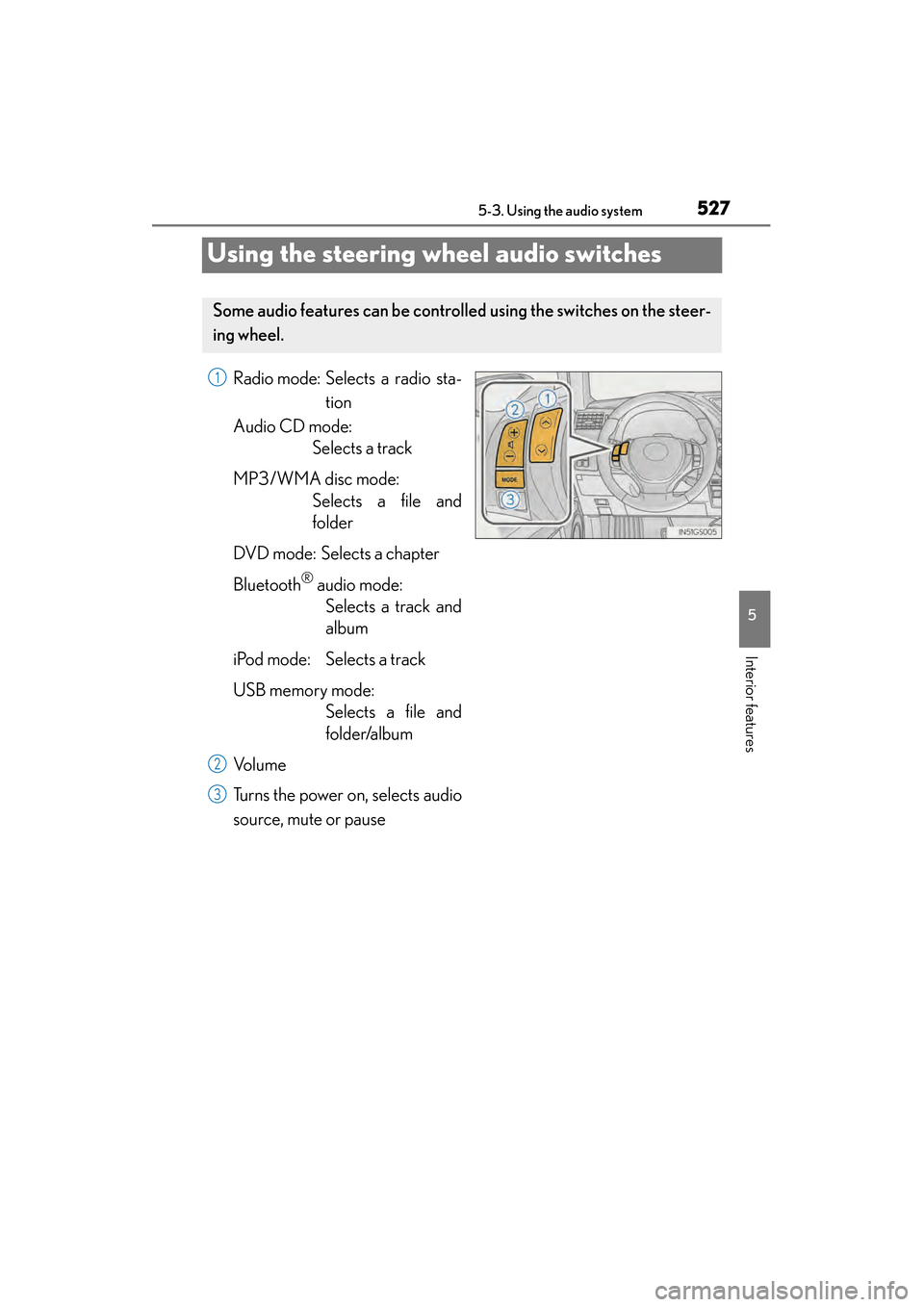
Using the steering wheel audio switches
Radio mode: Selects a radio sta- tion
Audio CD mode: Selects a track
MP3/WMA disc mode: Selects a file and
folder
DVD mode: Selects a chapter
Bluetooth
® audio mode: Selects a track and
album
iPod mode: Selects a track
USB memory mode: Selects a file and
folder/album
Vo l u m e
Turns the power on, selects audio
source, mute or pause
Some audio features can be controll ed using the switches on the steer-
ing wheel.
1
2
3
GS450h_OM_OM30D52U_(U).book Page 527 Monday, July 29, 2013 12:07 PM