remote start Lexus GS450h 2014 User Guide
[x] Cancel search | Manufacturer: LEXUS, Model Year: 2014, Model line: GS450h, Model: Lexus GS450h 2014Pages: 890, PDF Size: 40.62 MB
Page 157 of 890
156
GS450h_OM_OM30D52U_(U)
3-3. Adjusting the seats
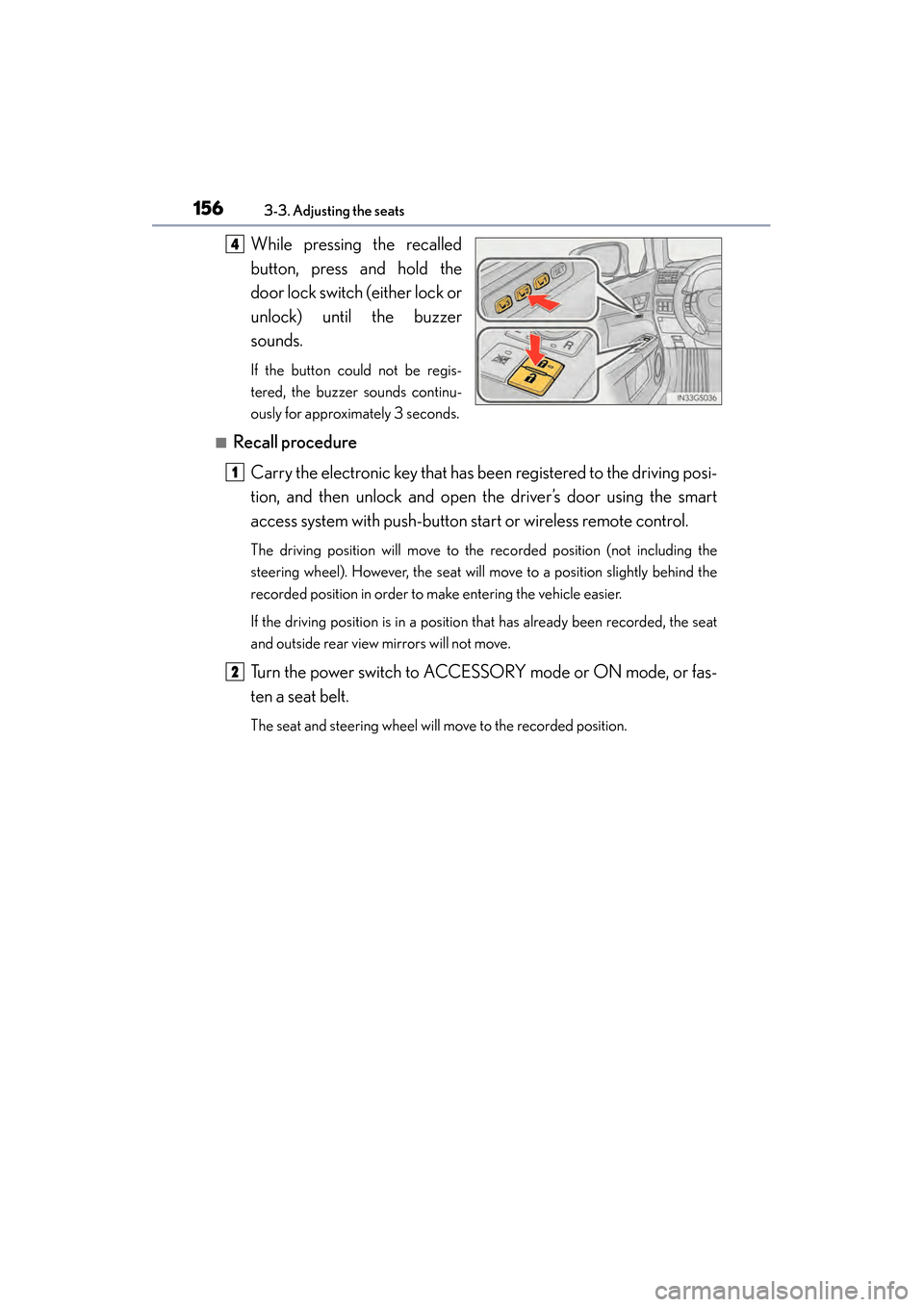
While pressing the recalled
button, press and hold the
door lock switch (either lock or
unlock) until the buzzer
sounds.
If the button could not be regis-
tered, the buzzer sounds continu-
ously for approximately 3 seconds.
■Recall procedureCarry the electronic key that has been registered to the driving posi-
tion, and then unlock and open the driver’s door using the smart
access system with push-button start or wireless remote control.
The driving position will move to the recorded position (not including the
steering wheel). However, the seat will move to a position slightly behind the
recorded position in order to make entering the vehicle easier.
If the driving position is in a position that has already been recorded, the seat
and outside rear view mirrors will not move.
Turn the power switch to ACCESSORY mode or ON mode, or fas-
ten a seat belt.
The seat and steering wheel will move to the recorded position.
4
1
2
GS450h_OM_OM30D52U_(U).book Page 156 Monday, July 29, 2013 12:07 PM
Page 354 of 890
GS450h_OM_OM30D52U_(U)
3535-1. Remote Touch screen
5
Interior features
When the power switch is turned to
ACCESSORY or ON mode, the
initial screen will be displayed for a
few seconds as the system starts up.
Images shown on the initial screen can
be changed to suit individual prefer-
ences. (→P. 363)
SwitchPa g e
“Destination”Navigation System Owner’s Manual
“Info/Apps” or “Info”P. 111/
Navigation System Owner’s Manual
“Setup”P. 3 5 8
“Radio”P. 411, 434
“Media”P. 4 1 1 , 4 5 9
“Climate”P. 3 8 8
“Phone”P. 5 3 0
“Display”P. 3 5 4
Initial screen
GS450h_OM_OM30D52U_(U).book Page 353 Monday, July 29, 2013 12:07 PM
Page 360 of 890
GS450h_OM_OM30D52U_(U)
3595-1. Remote Touch screen
5
Interior features
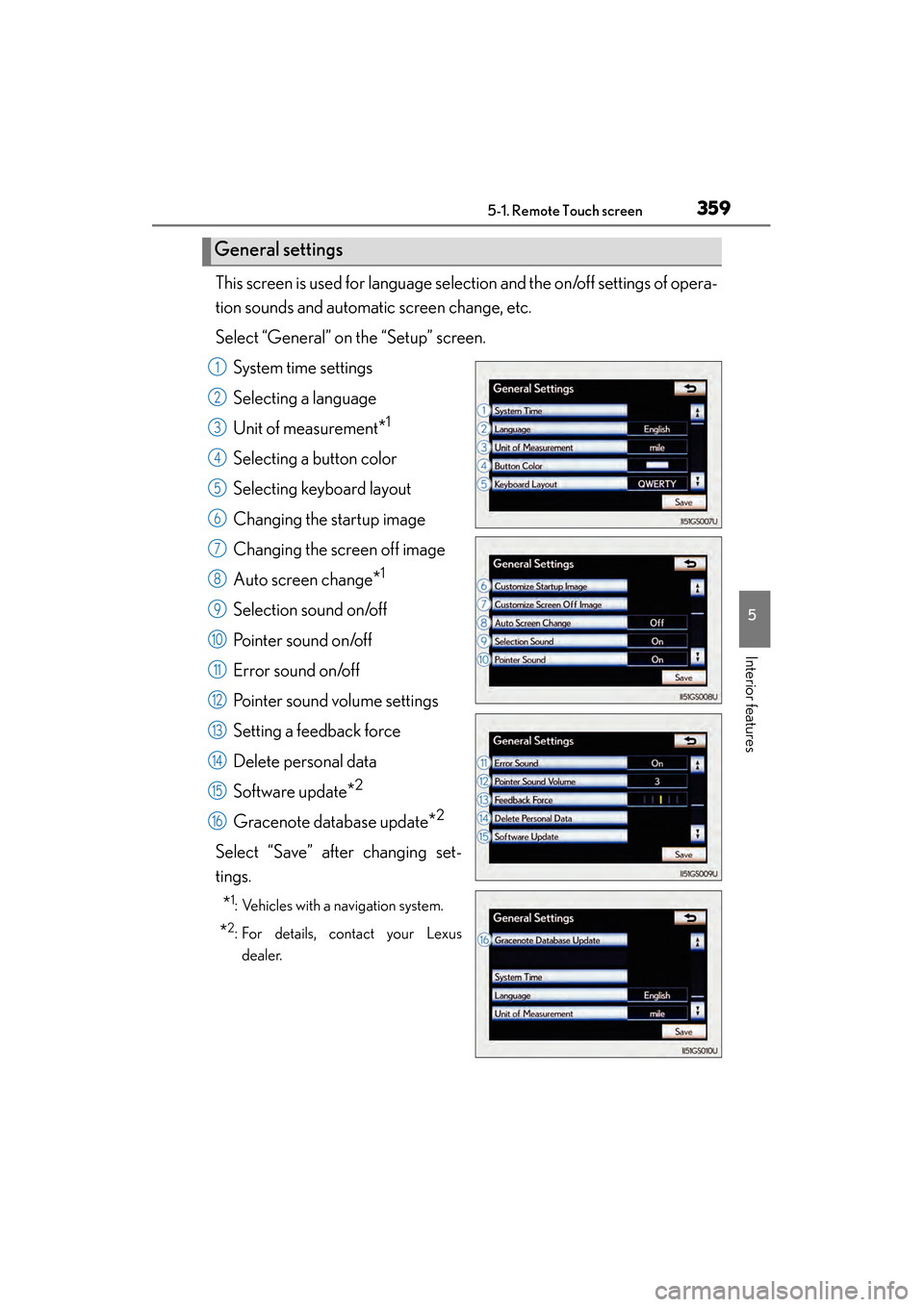
This screen is used for language selection and the on/off settings of opera-
tion sounds and automatic screen change, etc.
Select “General” on the “Setup” screen.System time settings
Selecting a language
Unit of measurement
*1
Selecting a button color
Selecting keyboard layout
Changing the startup image
Changing the screen off image
Auto screen change
*1
Selection sound on/off
Pointer sound on/off
Error sound on/off
Pointer sound volume settings
Setting a feedback force
Delete personal data
Software update
*2
Gracenote database update*2
Select “Save” after changing set-
tings.
*1: Vehicles with a navigation system.
*2: For details, contact your Lexusdealer.
General settings
1
2
3
4
5
6
7
8
9
10
11
12
13
14
15
16
GS450h_OM_OM30D52U_(U).book Page 359 Monday, July 29, 2013 12:07 PM
Page 364 of 890
GS450h_OM_OM30D52U_(U)
3635-1. Remote Touch screen
5
Interior features
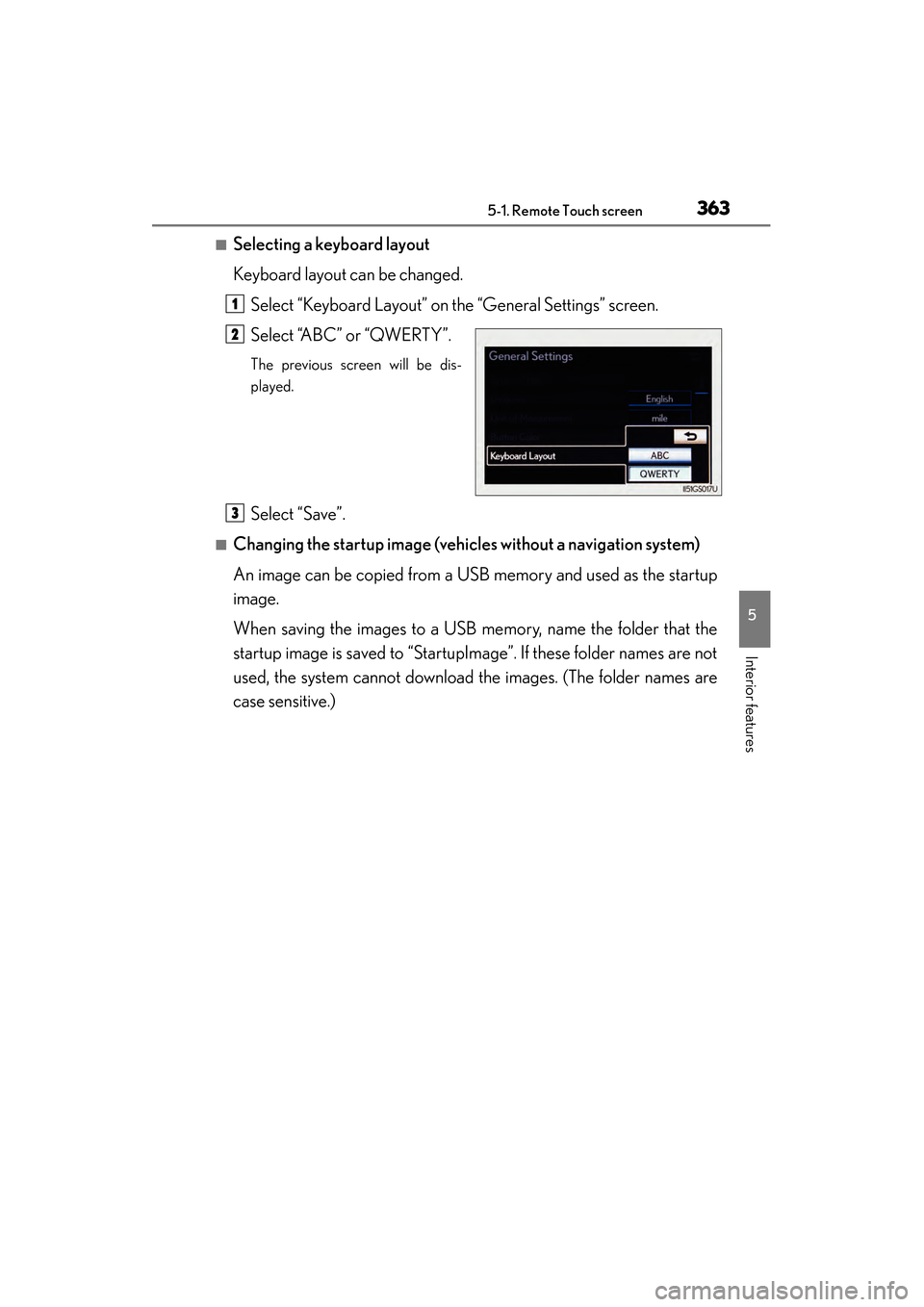
■Selecting a keyboard layout
Keyboard layout can be changed.Select “Keyboard Layout” on the “General Settings” screen.
Select “ABC” or “QWERTY”.
The previous screen will be dis-
played.
Select “Save”.
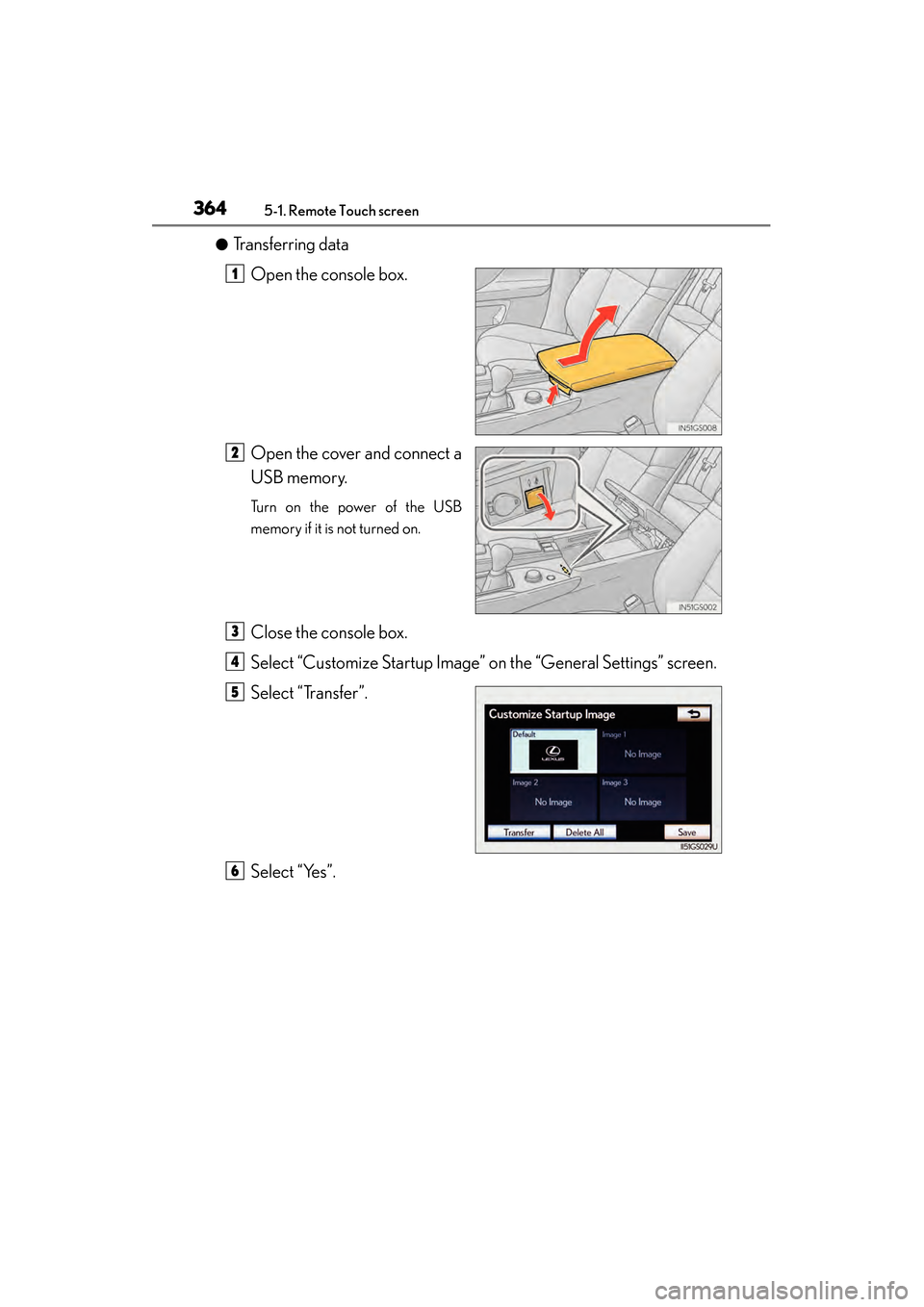
■Changing the startup image (vehic les without a navigation system)
An image can be copied from a USB memory and used as the startup
image.
When saving the images to a USB memory, name the folder that the
startup image is saved to “StartupImage”. If these folder names are not
used, the system cannot download the images. (The folder names are
case sensitive.)
1
2
3
GS450h_OM_OM30D52U_(U).book Page 363 Monday, July 29, 2013 12:07 PM
Page 365 of 890
3645-1. Remote Touch screen
GS450h_OM_OM30D52U_(U)
●Transferring dataOpen the console box.
Open the cover and connect a
USB memory.
Turn on the power of the USB
memory if it is not turned on.
Close the console box.
Select “Customize Startup Image” on the “General Settings” screen.
Select “Transfer”.
Select “Yes”.
1
2
3
4
5
6
GS450h_OM_OM30D52U_(U).book Page 364 Monday, July 29, 2013 12:07 PM
Page 366 of 890
GS450h_OM_OM30D52U_(U)
3655-1. Remote Touch screen
5
Interior features
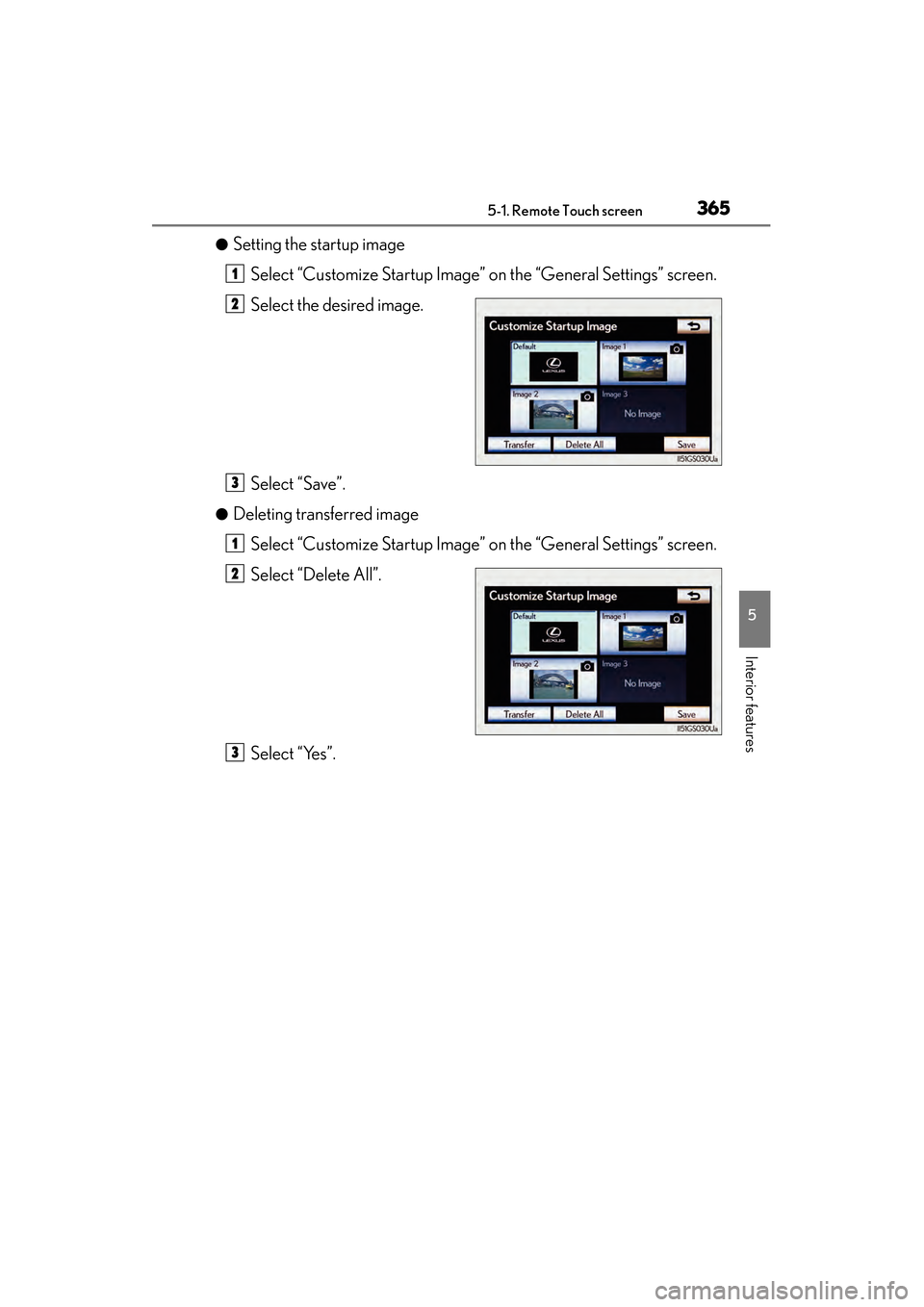
●Setting the startup imageSelect “Customize Startup Image” on the “General Settings” screen.
Select the desired image.
Select “Save”.
●Deleting transferred image
Select “Customize Startup Image” on the “General Settings” screen.
Select “Delete All”.
Select “Yes”.
1
2
3
1
2
3
GS450h_OM_OM30D52U_(U).book Page 365 Monday, July 29, 2013 12:07 PM
Page 370 of 890
GS450h_OM_OM30D52U_(U)
3695-1. Remote Touch screen
5
Interior features
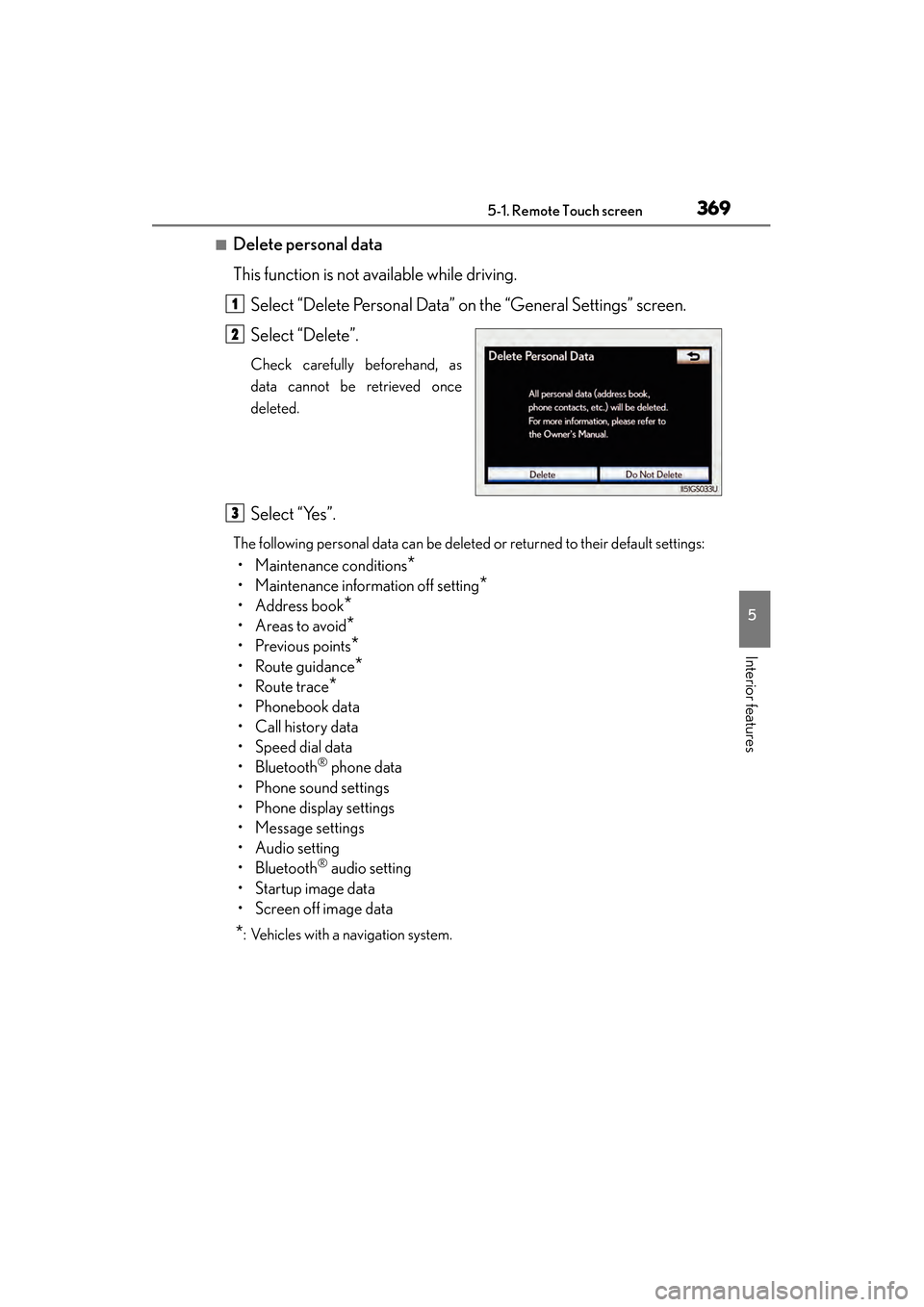
■Delete personal data
This function is not available while driving.Select “Delete Personal Data” on the “General Settings” screen.
Select “Delete”.
Check carefully beforehand, as
data cannot be retrieved once
deleted.
Select “Yes”.
The following personal data can be deleted or returned to their default settings:
• Maintenance conditions*
• Maintenance information off setting*
• Address book*
•Areas to avoid*
•Previous points*
• Route guidance*
•Route trace*
• Phonebook data
•Call history data
• Speed dial data
•Bluetooth
® phone data
• Phone sound settings
• Phone display settings
• Message settings
• Audio setting
•Bluetooth
® audio setting
•Startup image data
• Screen off image data
*: Vehicles with a navigation system.
1
2
3
GS450h_OM_OM30D52U_(U).book Page 369 Monday, July 29, 2013 12:07 PM
Page 371 of 890

3705-1. Remote Touch screen
GS450h_OM_OM30D52U_(U)
■About startup or screen off images
●The images file extension is JPG or JPEG.
●The images file name, including the file extension, can be up to 32 characters.
●Image files of 10 MB or less can be saved.
●Up to 3 images can be downloaded.
GS450h_OM_OM30D52U_(U).book Page 370 Monday, July 29, 2013 12:07 PM
Page 384 of 890
GS450h_OM_OM30D52U_(U)
3835-1. Remote Touch screen
5
Interior features
■Voice command system
●Commands that are not displayed in the “Shortcut Menu” screen can be operated
from the “Main Menu” screen.
●If the system does not respond or the confirmation screen does not disappear,
press and try again.
●Voice guidance can be canceled by setting voice prompts to off. Use this setting
when it is desirable to say a command immediately after pressing and hearing
a beep.
■If a voice command cannot be recognized
●If a voice command cannot be recognized within 6 seconds, voice guidance will
say “Pardon?” (“Command not recognized.” will be displayed on the screen) and
voice command reception will restart.
●If a voice command cannot be recognized 2 consecutive times, the voice com-
mand guidance system will say “Paused. To restart voice recognition, push the talk
switch. To cancel voice recognition, push and hold the talk switch.” Then voice rec-
ognition will be suspended.
■When selecting “Voice Prompts”
●The voice recognition prompt can be set to on or off. This setting can also be
changed on the “Voice Settings” screen. (→P. 3 7 1 )
●Voice recognition will be temporarily suspended. Press again.
GS450h_OM_OM30D52U_(U).book Page 383 Monday, July 29, 2013 12:07 PM
Page 387 of 890
386
GS450h_OM_OM30D52U_(U)
5-1. Remote Touch screen
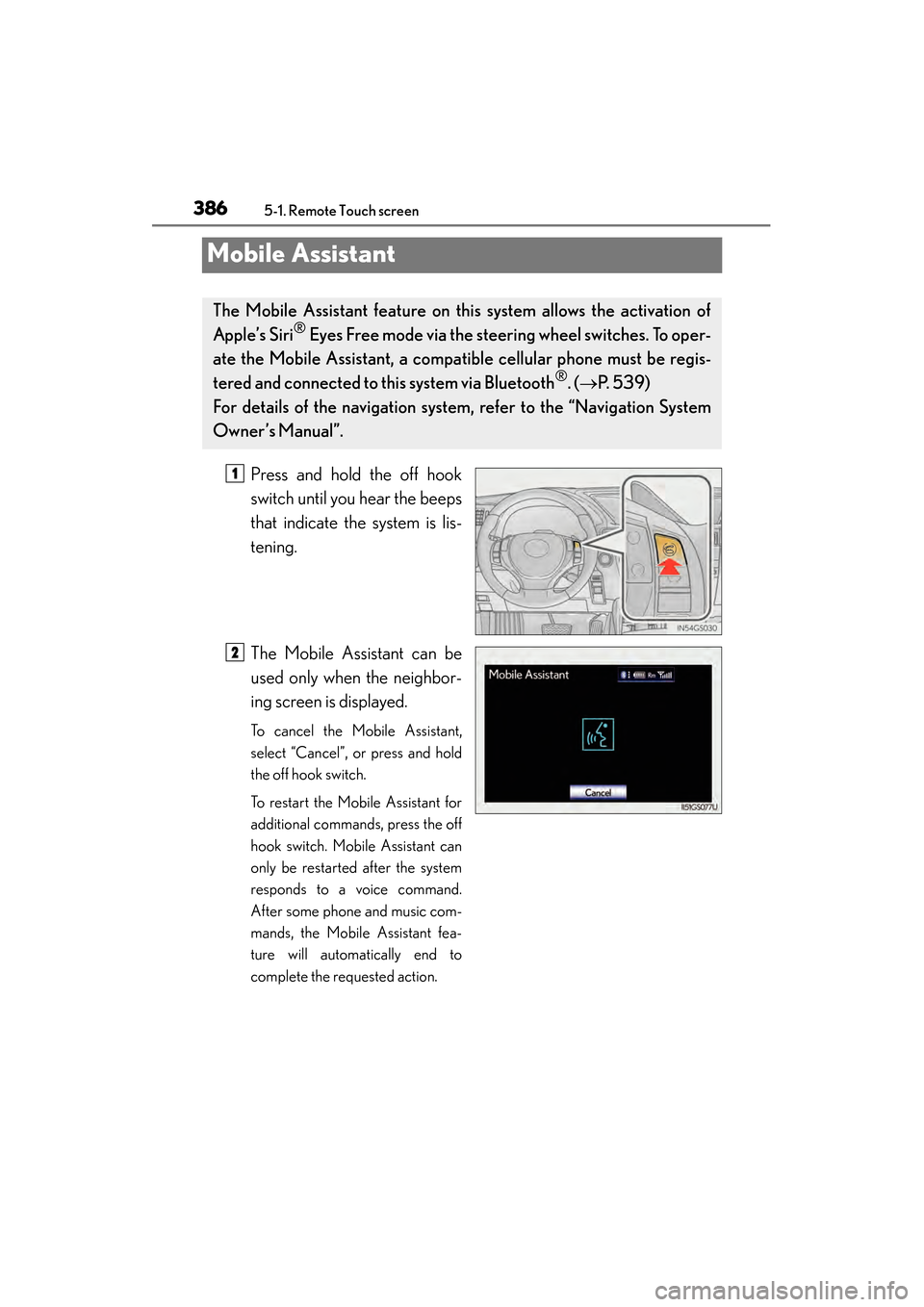
Mobile Assistant
Press and hold the off hook
switch until you hear the beeps
that indicate the system is lis-
tening.
The Mobile Assistant can be
used only when the neighbor-
ing screen is displayed.
To cancel the Mobile Assistant,
select “Cancel”, or press and hold
the off hook switch.
To restart the Mobile Assistant for
additional commands, press the off
hook switch. Mobile Assistant can
only be restarted after the system
responds to a voice command.
After some phone and music com-
mands, the Mobile Assistant fea-
ture will automatically end to
complete the requested action.
The Mobile Assistant feature on this system allows the activation of
Apple’s Siri
® Eyes Free mode via the steering wheel switches. To oper-
ate the Mobile Assistant, a compat ible cellular phone must be regis-
tered and connected to this system via Bluetooth
®. ( → P. 5 3 9 )
For details of the navigation system , refer to the “Navigation System
Owner’s Manual”.
1
2
GS450h_OM_OM30D52U_(U).book Page 386 Monday, July 29, 2013 12:07 PM