lights Lexus GS450h 2014 Owner's Guide
[x] Cancel search | Manufacturer: LEXUS, Model Year: 2014, Model line: GS450h, Model: Lexus GS450h 2014Pages: 890, PDF Size: 40.62 MB
Page 124 of 890
123
GS450h_OM_OM30D52U_(U)3-2. Opening, closing and locking the doors and trunk
3
Operation of each component
Smart access system with push-button start
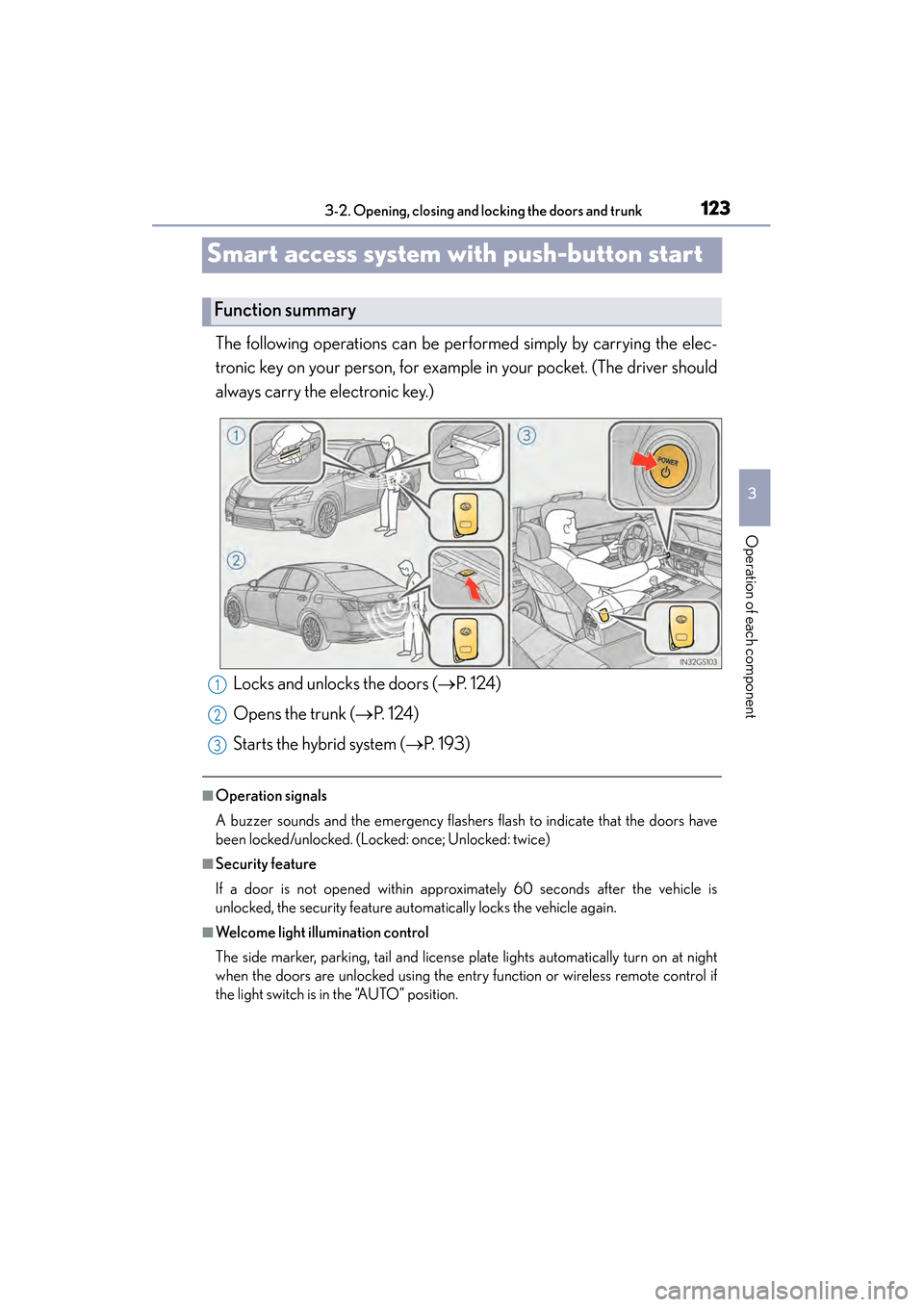
The following operations can be performed simply by carrying the elec-
tronic key on your person, for example in your pocket. (The driver should
always carry the electronic key.)
■Operation signals
A buzzer sounds and the emergency flashers flash to indicate that the doors have
been locked/unlocked. (Locked: once; Unlocked: twice)
■Security feature
If a door is not opened within approximately 60 seconds after the vehicle is
unlocked, the security feature automatically locks the vehicle again.
■Welcome light illumination control
The side marker, parking, tail and license plate lights automatically turn on at night
when the doors are unlocked using the entry function or wireless remote control if
the light switch is in the “AUTO” position.
Function summary
Locks and unlocks the doors ( →P. 1 2 4 )
Opens the trunk ( →P. 1 2 4 )
Starts the hybrid system ( →P. 193)1
2
3
GS450h_OM_OM30D52U_(U).book Page 123 Monday, July 29, 2013 12:07 PM
Page 138 of 890
GS450h_OM_OM30D52U_(U)
1373-2. Opening, closing and locking the doors and trunk
3
Operation of each component
■Operation signals
Doors:
A buzzer sounds and the emergency flashers flash to indicate that the doors have
been locked/unlocked. (Locked: once; Unlocked: twice)
Tr u n k :
A buzzer sounds to indicate that the trunk has been opened.
Windows and moon roof:
A buzzer sounds to indicate that the windows and moon roof are operating.
■Welcome light illumination control
→P. 1 2 3
■Door lock buzzer
If an attempt to lock the doors is made when a door is not fully closed, a buzzer
sounds continuously for 5 seconds. Fully cl ose the door to stop the buzzer, and lock
the vehicle once more.
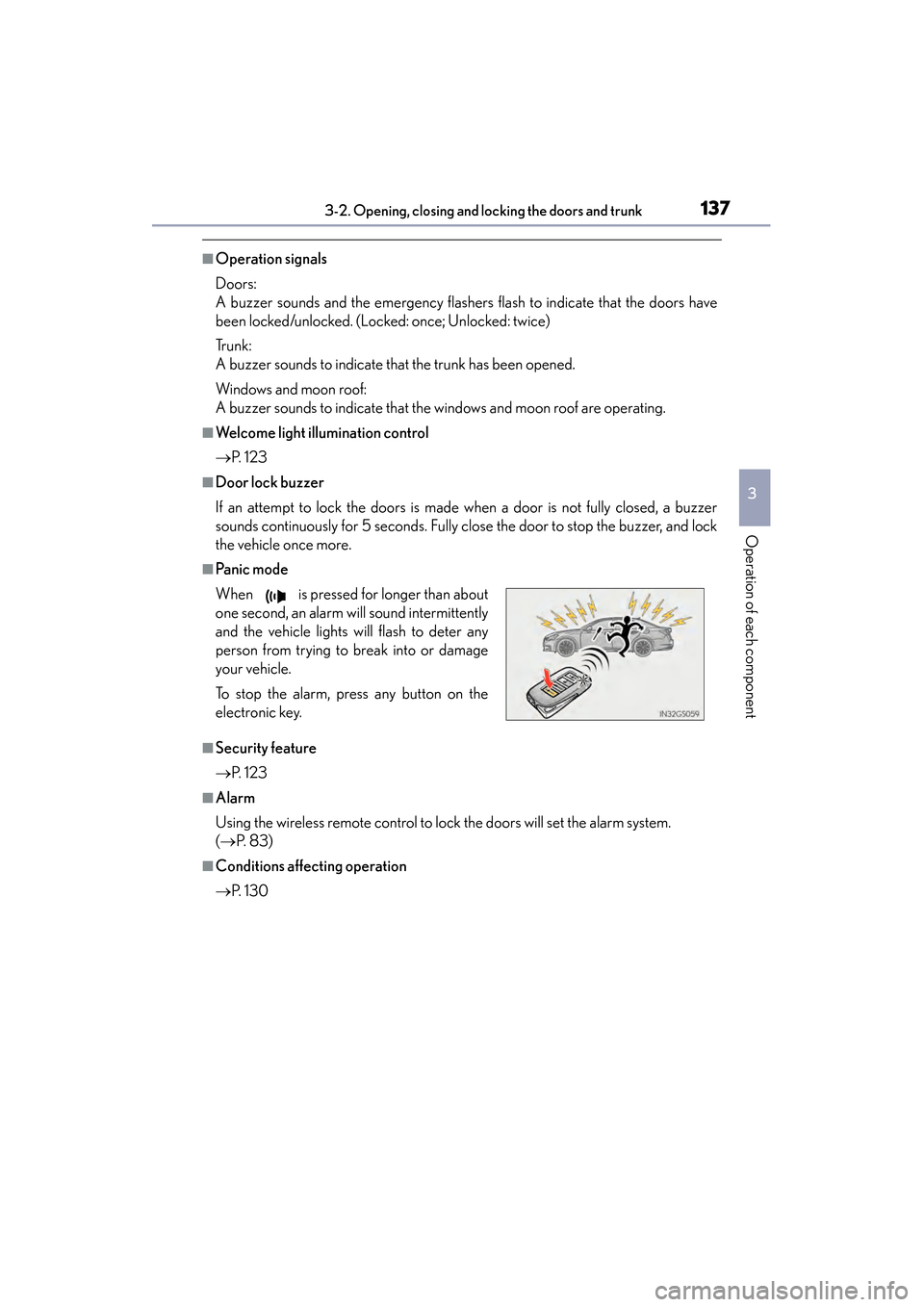
■Pa ni c m o d e
■Security feature
→ P. 1 2 3
■Alarm
Using the wireless remote control to lock the doors will set the alarm system.
(→ P. 8 3 )
■Conditions affecting operation
→P. 1 3 0
When is pressed for longer than about
one second, an alarm will sound intermittently
and the vehicle lights will flash to deter any
person from trying to break into or damage
your vehicle.
To stop the alarm, press any button on the
electronic key.
GS450h_OM_OM30D52U_(U).book Page 137 Monday, July 29, 2013 12:07 PM
Page 163 of 890
1623-4. Adjusting the steering wheel and mirrors
GS450h_OM_OM30D52U_(U)
Inside rear view mirror
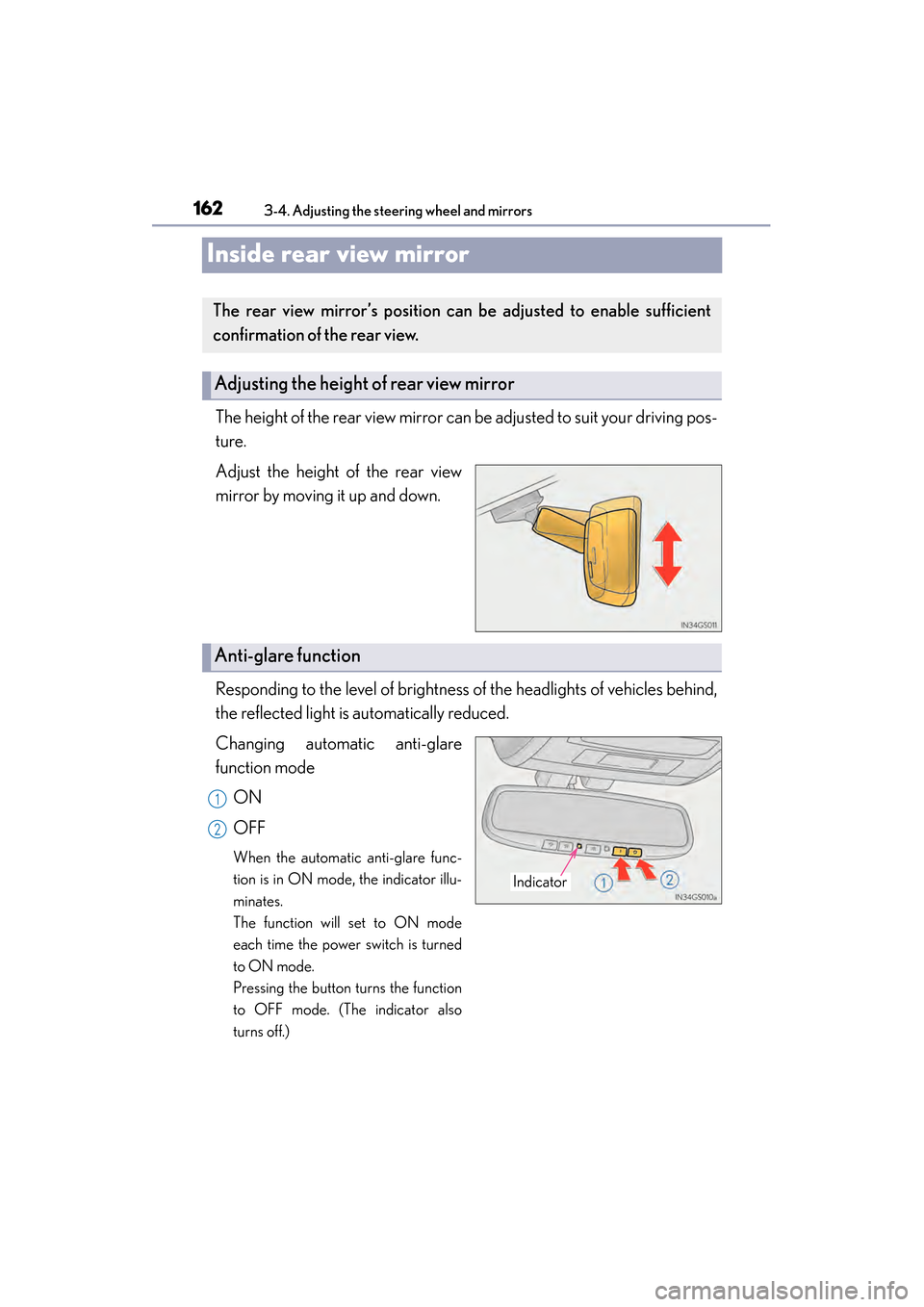
The height of the rear view mirror can be adjusted to suit your driving pos-
ture.
Adjust the height of the rear view
mirror by moving it up and down.
Responding to the level of brightness of the headlights of vehicles behind,
the reflected light is automatically reduced.
Changing automatic anti-glare
function modeON
OFF
When the automatic anti-glare func-
tion is in ON mode, the indicator illu-
minates.
The function will set to ON mode
each time the power switch is turned
to ON mode.
Pressing the button turns the function
to OFF mode. (The indicator also
turns off.)
The rear view mirror’s position ca n be adjusted to enable sufficient
confirmation of the rear view.
Adjusting the height of rear view mirror
Anti-glare function
Indicator
1
2
GS450h_OM_OM30D52U_(U).book Page 162 Monday, July 29, 2013 12:07 PM
Page 176 of 890
175
GS450h_OM_OM30D52U_(U)
4Driving
4-1. Before driving Driving the vehicle ....................... 176
Cargo and luggage .................... 187
Vehicle load limits .......................190
Trailer towing .................................. 191
Dinghy towing............................... 192
4-2. Driving procedures Power (ignition) switch.............. 193
EV drive mode ........................... 200
Hybrid transmission ..................203
Turn signal lever ......................... 209
Parking brake ..................................211
Brake Hold ..................................... 214
Horn.................................................. 216
4-3. Operating the lights and wipers
Headlight switch .......................... 217
Fog light switch............................ 222
Windshield wipers and washer.................................223
Headlight cleaner switch ....... 230
4-4. Refueling Opening the fuel tank cap ....... 231 4-5. Using the driving support
systems
Cruise control ............................. 236
Dynamic radar cruise control ............................ 240
Dynamic radar cruise control with full-speed range ............. 255
LKA (Lane-Keeping Assist) ............ 271
Intuitive parking assist ............... 281
Rear view monitor system ...... 294
Driving mode select switch ...305
Driving assist systems.............. 308
PCS (Pre-Collision System)........... 315
BSM (Blind Spot Monitor).............. 324
• The Blind Spot Monitor function .................................... 328
• The Rear Cross Traffic Alert function.......................... 331
Lexus night view ......................... 334
4-6. Driving tips Hybrid vehicle driving tips......340
Winter driving tips ..................... 342
GS450h_OM_OM30D52U_(U).book Page 175 Monday, July 29, 2013 12:07 PM
Page 211 of 890
210
GS450h_OM_OM30D52U_(U)
4-2. Driving procedures
■Turn signals can be operated when
The power switch is in ON mode.
■If the indicator flashes faster than usual
Check that a light bulb in the front or rear turn signal lights has not burned out.
■If the turn signals stop flashing before a lane change has been performed
Operate the lever again.
■Customization
The number of times the turn signals flash during a lane change can be changed.
(Customizable feature →P. 8 3 3 )
GS450h_OM_OM30D52U_(U).book Page 210 Monday, July 29, 2013 12:07 PM
Page 214 of 890
GS450h_OM_OM30D52U_(U)
2134-2. Driving procedures
4
Driving
■When there is a malfunction in the system
Warning lights and/or warning message will turn on or flash. (→P. 739, 752)
Depending on the condition, the parking brake indicator light may flash.
■Usage in winter time
→ P. 3 4 3
NOTICE
■When parking the vehicle
Before you leave the vehicle, set the parking brake, shift the shift lever to P and
make sure that the vehicle does not move.
■When the system malfunctions
Stop the vehicle in a safe place and check the warning messages.
■When the parking brake cannot be released due to a malfunction
Use the parking brake release tool to manually release the parking brake.
(→ P. 7 9 1 )
Driving the vehicle with the parking brake set will lead to brake components over-
heating, which may affect braking performance and increase brake wear.
GS450h_OM_OM30D52U_(U).book Page 213 Monday, July 29, 2013 12:07 PM
Page 216 of 890
GS450h_OM_OM30D52U_(U)
2154-2. Driving procedures
4
Driving
■When the parking brake is set automatically while the system is holding the brakes
The parking brake will not be released automatically. Release the parking brake by
operating the parking brake switch, making sure that the parking brake indicator
light goes off. (→P. 2 1 1 )
■When there is a malfunction in the system
Warning lights and/or warning messages will turn on or flash. ( →P. 7 3 9 , 7 5 1 )
CAUTION
■When the vehicle is on a steep incline
When using the brake hold system on a steep incline exercise caution. The brake
hold function may not hold the vehicle in such a situation.
■When stopped on a slippery road
The system cannot stop the vehicle when the gripping ability of the tires has been
exceeded. Do not use the system when stopped on a slippery road.
NOTICE
■When parking the vehicle
The brake hold system is not designed for use when parking the vehicle for a long
period of time. Turning the power switch off while the system is holding the brake
may release the brake, which would cause the vehicle to move. When operating
the power switch, depress the brake pedal, set the parking brake and shift the shift
lever to P.
GS450h_OM_OM30D52U_(U).book Page 215 Monday, July 29, 2013 12:07 PM
Page 218 of 890
217
GS450h_OM_OM30D52U_(U)4-3. Operating the lights and wipers
4
Driving
Headlight switch
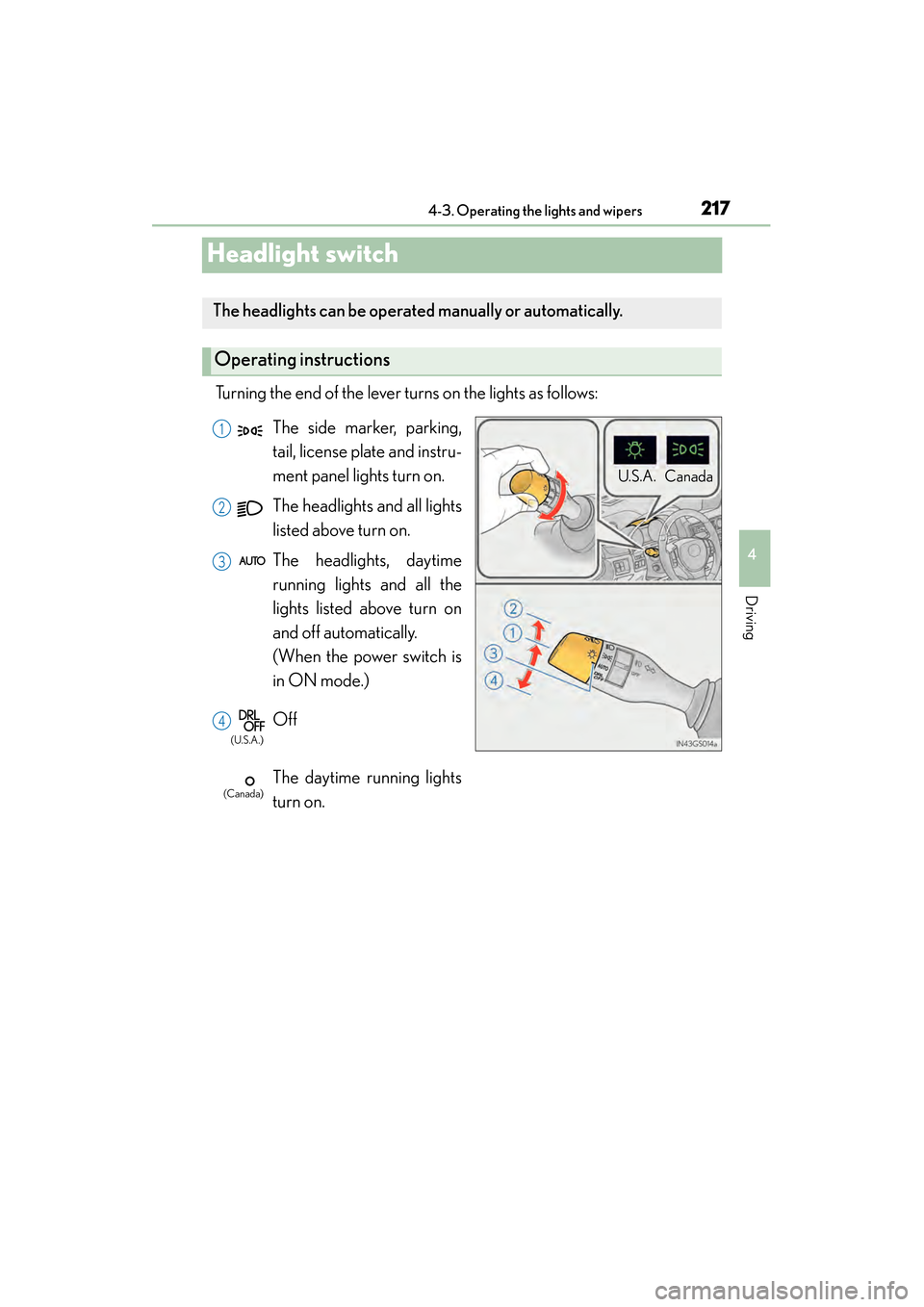
Turning the end of the lever turns on the lights as follows:
The headlights can be operated manually or automatically.
Operating instructions
U. S .A . Can ad a
The side marker, parking,
tail, license plate and instru-
ment panel lights turn on.
The headlights and all lights
listed above turn on.
The headlights, daytime
running lights and all the
lights listed above turn on
and off automatically.
(When the power switch is
in ON mode.)
Off
The daytime running lights
turn on.1
2
3
4
(U.S.A.)
(Canada)
GS450h_OM_OM30D52U_(U).book Page 217 Monday, July 29, 2013 12:07 PM
Page 219 of 890
218
GS450h_OM_OM30D52U_(U)
4-3. Operating the lights and wipers
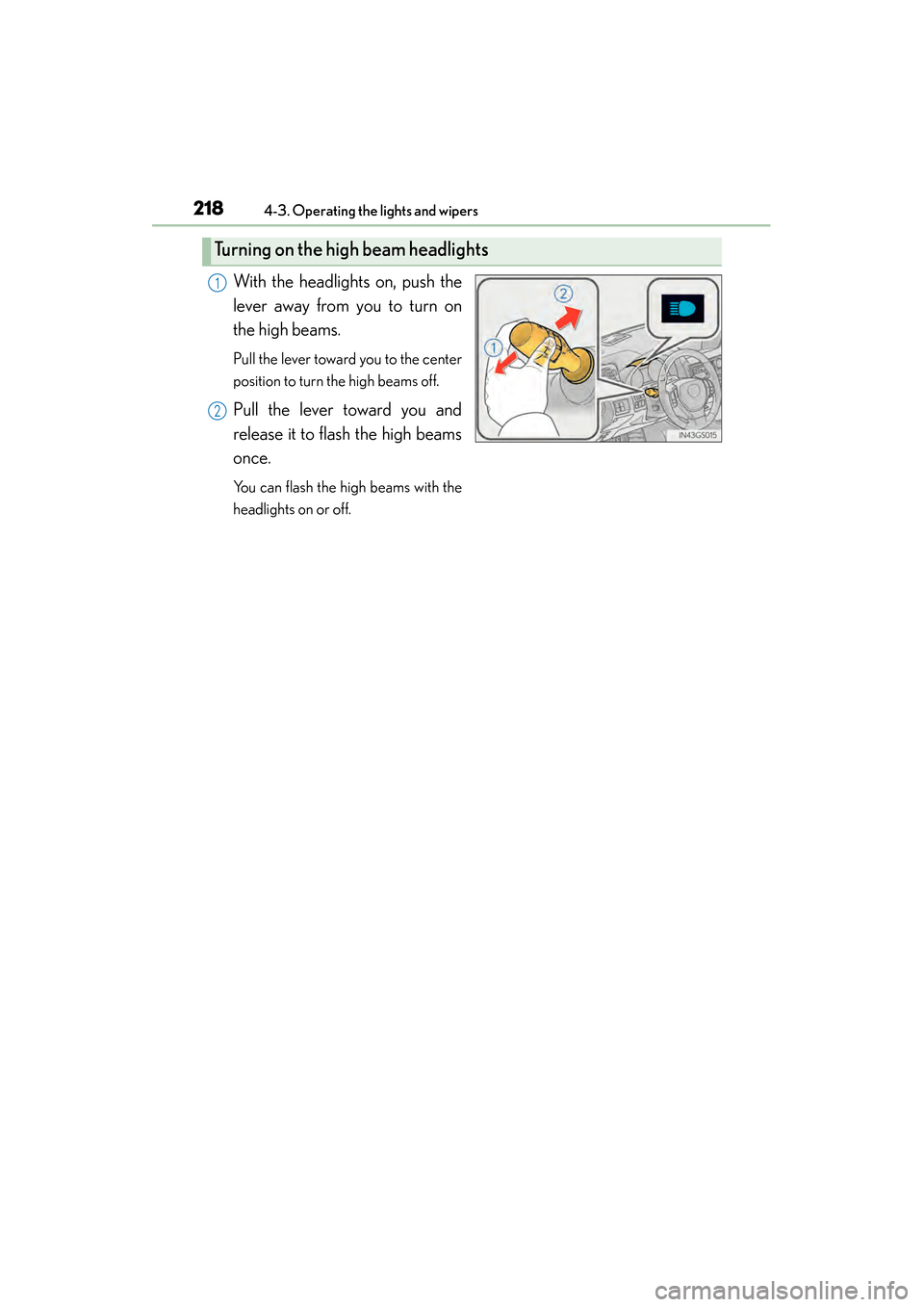
With the headlights on, push the
lever away from you to turn on
the high beams.
Pull the lever toward you to the center
position to turn the high beams off.
Pull the lever toward you and
release it to flash the high beams
once.
You can flash the high beams with the
headlights on or off.
Turning on the high beam headlights
1
2
GS450h_OM_OM30D52U_(U).book Page 218 Monday, July 29, 2013 12:07 PM
Page 220 of 890
GS450h_OM_OM30D52U_(U)
2194-3. Operating the lights and wipers
4
Driving
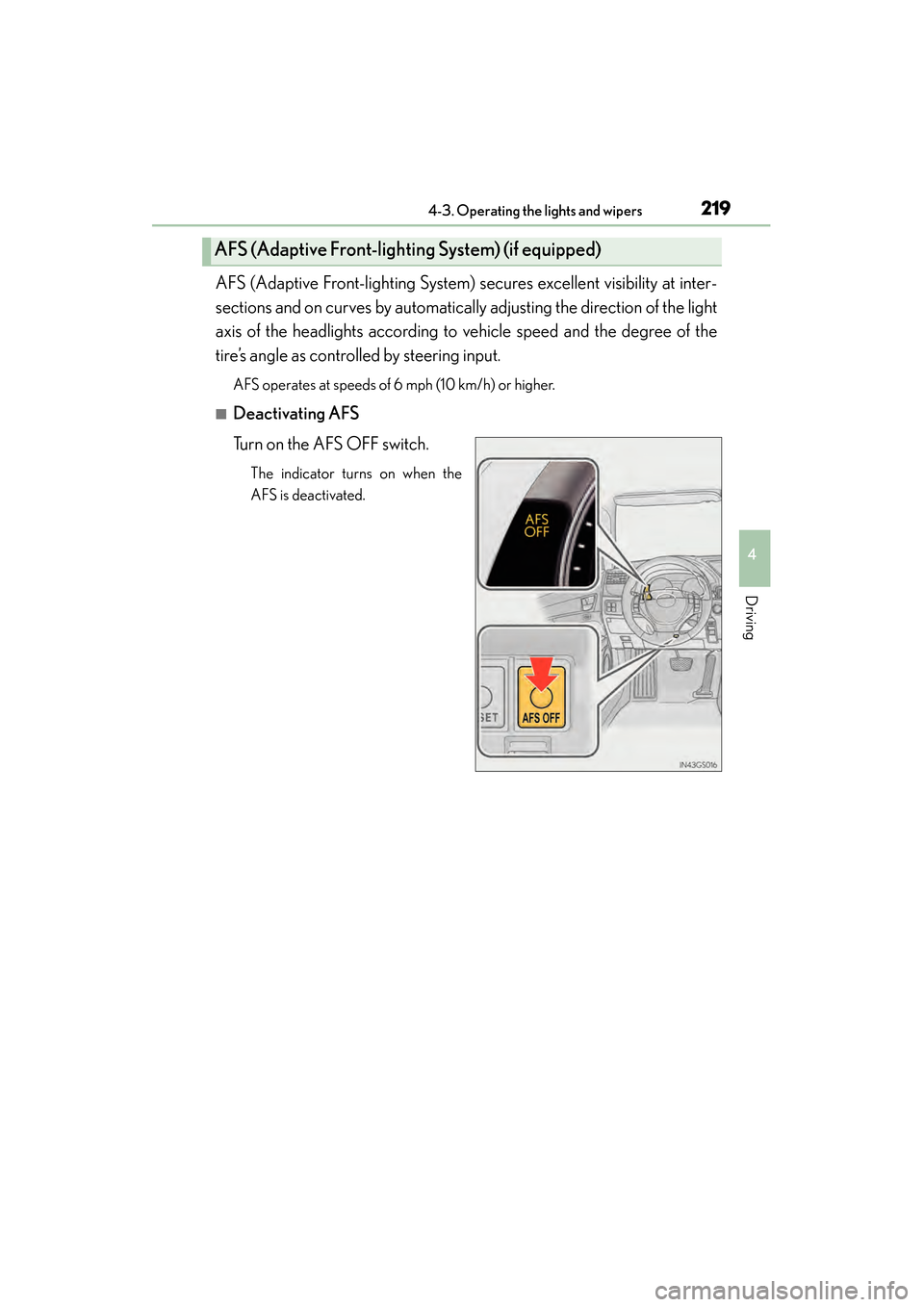
AFS (Adaptive Front-lighting System) secures excellent visibility at inter-
sections and on curves by automatically adjusting the direction of the light
axis of the headlights according to vehicle speed and the degree of the
tire’s angle as controlled by steering input.
AFS operates at speeds of 6 mph (10 km/h) or higher.
■Deactivating AFS
Turn on the AFS OFF switch.
The indicator turns on when the
AFS is deactivated.
AFS (Adaptive Front-lighting System) (if equipped)
GS450h_OM_OM30D52U_(U).book Page 219 Monday, July 29, 2013 12:07 PM