mirror Lexus GS450h 2014 Owner's Guide
[x] Cancel search | Manufacturer: LEXUS, Model Year: 2014, Model line: GS450h, Model: Lexus GS450h 2014Pages: 890, PDF Size: 40.62 MB
Page 167 of 890
1663-4. Adjusting the steering wheel and mirrors
GS450h_OM_OM30D52U_(U)
CAUTION
■Important points while driving
Observe the following precautions while driving.
Failure to do so may result in loss of control of the vehicle and cause an accident,
resulting in death or serious injury.
●Do not adjust the mirrors while driving.
●Do not drive with the mirrors folded.
●Both the driver and passenger side mirrors must be extended and properly
adjusted before driving.
■When a mirror is moving
To avoid personal injury and mirror malfunction, be careful not to get your hand
caught by the moving mirror.
■When the mirror defoggers are operating
Do not touch the rear view mirror surfaces, as they can become very hot and burn
you.
GS450h_OM_OM30D52U_(U).book Page 166 Monday, July 29, 2013 12:07 PM
Page 181 of 890

180
GS450h_OM_OM30D52U_(U)
4-1. Before driving
CAUTION
Observe the following precautions.
Failure to do so may result in death or serious injury.
■When driving the vehicle
●During normal driving, do not turn off the hybrid system. Turning the hybrid sys-
tem off while driving will not cause loss of steering or braking control, however,
power assist to the steering will be lost. This will make it more difficult to steer
smoothly, so you should pull over and stop the vehicle as soon as it is safe to do so.
In the event of an emergency, such as if it becomes impossible to stop the vehicle
in the normal way: →P. 7 2 9
●Use engine braking (downshift) to maintain a safe speed when driving down a
steep hill.
Using the brakes continuously may cause the brakes to overheat and lose effec-
tiveness. ( →P. 2 0 3 )
●Do not adjust the positions of the steering wheel, the seat, or the inside or outside
rear view mirrors while driving.
Doing so may result in a loss of vehicle control.
●Always check that all passengers’ arms, heads or other parts of their body are not
outside the vehicle.
●Do not drive in excess of the speed limit. Even if the legal speed limit permits it, do
not drive over 85 mph (140 km/h) unless your vehicle has high-speed capability
tires. Driving over 85 mph (140 km/h) may result in tire failure, loss of control and
possible injury. Be sure to consult a tire dealer to determine whether the tires on
your vehicle are high-speed capability tires or not before driving at such speeds.
GS450h_OM_OM30D52U_(U).book Page 180 Monday, July 29, 2013 12:07 PM
Page 272 of 890
271
GS450h_OM_OM30D52U_(U)4-5. Using the driving support systems
4
Driving
LKA (Lane-Keeping Assist)∗
While driving on a freeway or motor highway that has lane markers and
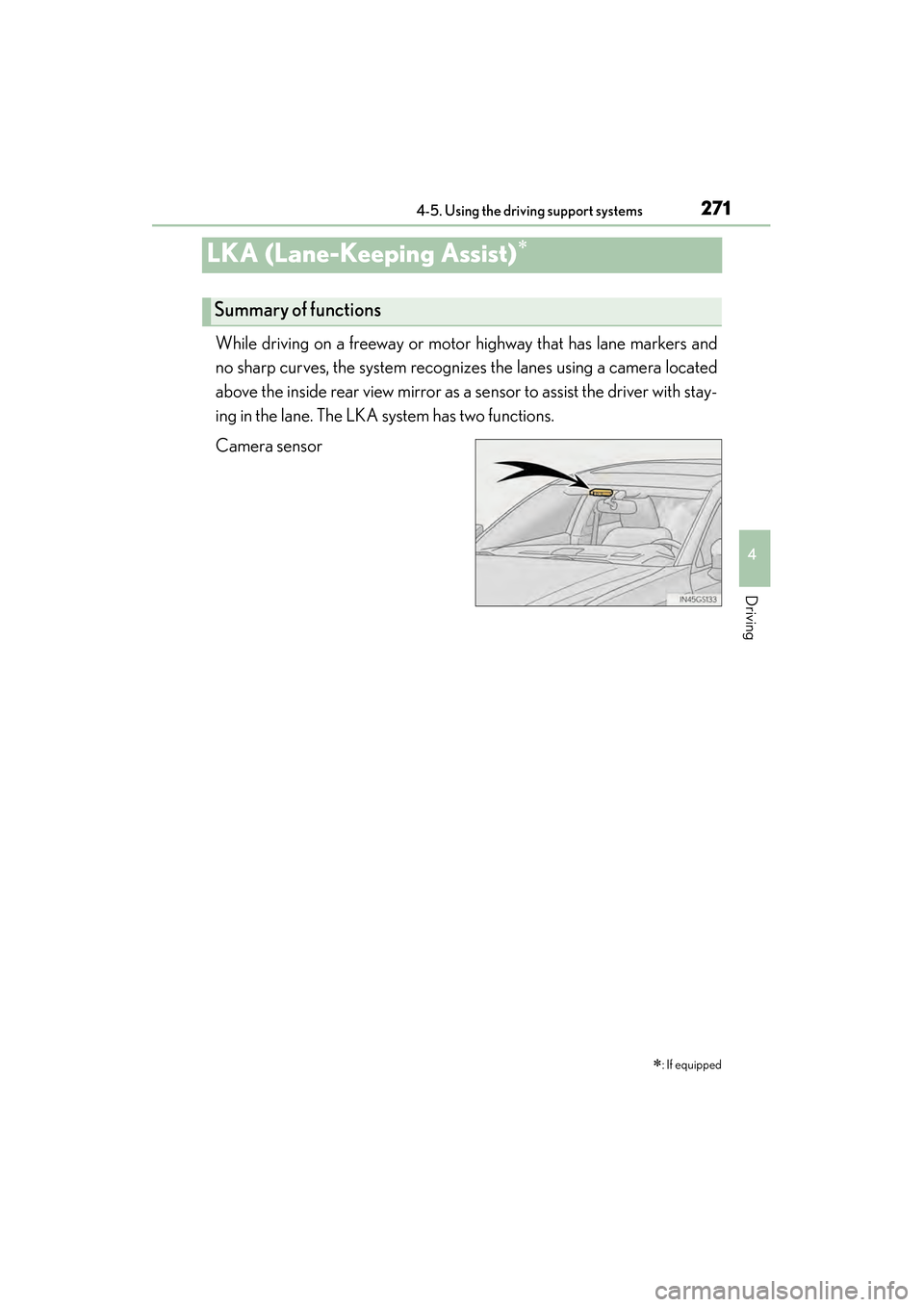
no sharp curves, the system recognizes the lanes using a camera located
above the inside rear view mirror as a sensor to assist the driver with stay-
ing in the lane. The LKA system has two functions.
Camera sensor ∗
: If equipped
Summary of functions
GS450h_OM_OM30D52U_(U).book Page 271 Monday, July 29, 2013 12:07 PM
Page 281 of 890
280
GS450h_OM_OM30D52U_(U)
4-5. Using the driving support systems
NOTICE
■Camera sensor (→P. 2 7 1 )
Observe the following to ensure that the LKA system functions correctly.
●Keep the windshield clean at all times.
Performance could be affected if the windshield is dirty, or if raindrops, conden-
sation or ice are adhering to the windshield.
●When adjusting the rear view mirror, make sure that it does not block the camera
lens.
●Do not attach window tinting to the windshield.
●Do not install an antenna in front of the camera lens.
●If the windshield is fogged up, use the windshield defogger to remove fog from
the windshield.
When it is cold, using the heater with air blowing to the feet may allow the upper
part of the windshield to fog up. This will have a negative effect on the images.
●Do not place anything on the dashboard.
The camera sensor may recognize the image reflected on the windshield as lane
markers by mistake.
●Do not scratch the camera lens, or let it get dirty.
When cleaning the inside of the windshield, be careful not to get any glass
cleaner etc. on the lens. Also, do not touch the lens.
For lens repair, contact your Lexus dealer.
●Do not change the installation position or direction of the camera sensor or
remove it. The direction of the camera sensor is precisely adjusted.
●Do not subject the camera sensor to strong impact or force, and do not disas-
semble the camera sensor.
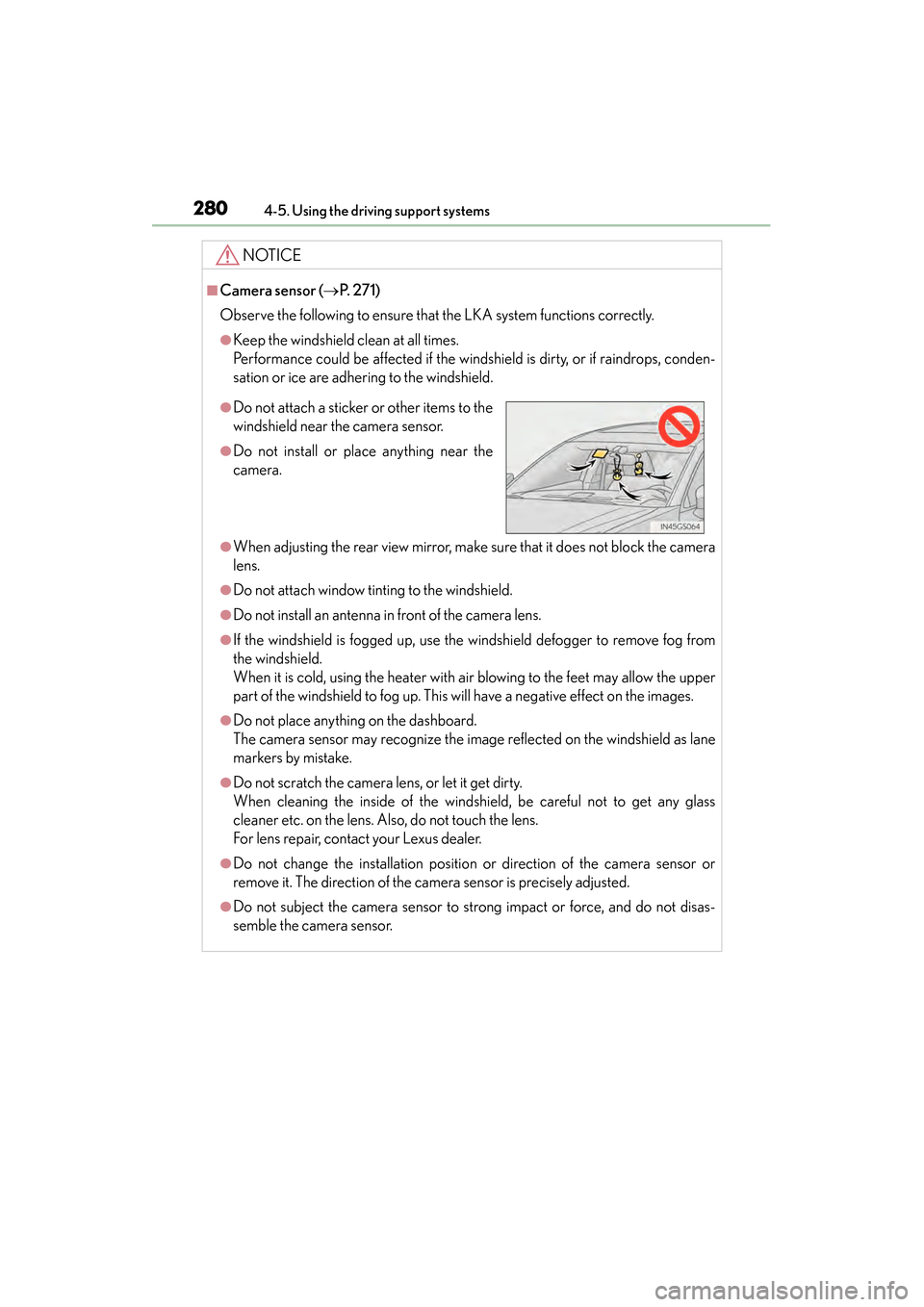
●Do not attach a sticker or other items to the
windshield near the camera sensor.
●Do not install or place anything near the
camera.
GS450h_OM_OM30D52U_(U).book Page 280 Monday, July 29, 2013 12:07 PM
Page 304 of 890
GS450h_OM_OM30D52U_(U)
3034-5. Using the driving support systems
4
Driving
CAUTION
■When using the rear view monitor system
The rear view monitor system is a supplemental device intended to assist the driver
when backing up. When backing up, be sure to check visually behind and all
around the vehicle before proceeding.
Observe the following precautions to avoid an accident that could result in death
or serious injuries.
●Never depend on the rear view monitor system entirely when backing up. The
image and the position of the guide lines displayed on the screen may differ from
the actual state.
Use caution, just as you would when backing up any vehicle.
●Be sure to back up slowly, depressing the brake pedal to control vehicle speed.
●The instructions given are only guidelines.
When and how much to turn the steering wheel will vary according to traffic con-
ditions, road surface conditions, vehicle condition, etc. when parking. It is neces-
sary to be fully aware of this before using the rear view monitor system.
●When parking, be sure to check that the parking space will accommodate your
vehicle before maneuvering into it.
●Do not use the rear view monitor system in the following cases:
• On icy or slick road surfaces, or in snow
• When using tire chains or the compact spare tire
• When the trunk lid is not closed completely
• On roads that are not flat or straight, such as curves or slopes.
●In low temperatures, the screen may darken or the image may become faint. The
image could distort when the vehicle is moving, or you may become unable to
see the image on the screen. Be sure to check direct visually and with the mirrors
all around the vehicle before proceeding.
●If the tire sizes are changed, the position of the fixation guide lines displayed on
the screen may change.
●The camera uses a special lens. The distances between objects and pedestrians
that appear in the image displayed on the screen will differ from the actual dis-
tances. (→P. 2 9 7 )
GS450h_OM_OM30D52U_(U).book Page 303 Monday, July 29, 2013 12:07 PM
Page 326 of 890
GS450h_OM_OM30D52U_(U)
3254-5. Using the driving support systems
4
Driving
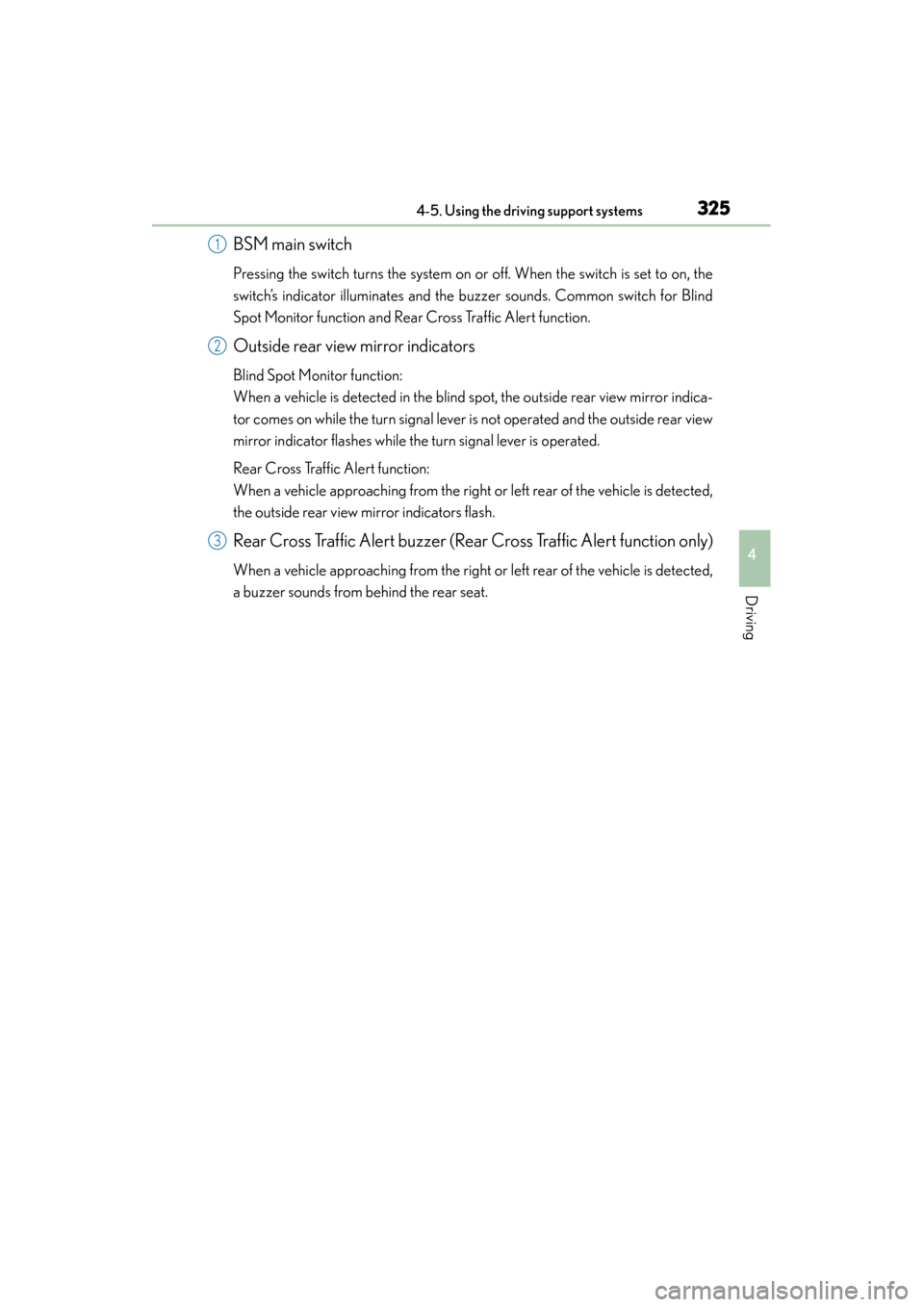
BSM main switch
Pressing the switch turns the system on or off. When the switch is set to on, the
switch’s indicator illuminates and the buzzer sounds. Common switch for Blind
Spot Monitor function and Rear Cross Traffic Alert function.
Outside rear view mirror indicators
Blind Spot Monitor function:
When a vehicle is detected in the blind spot, the outside rear view mirror indica-
tor comes on while the turn signal lever is not operated and the outside rear view
mirror indicator flashes while the turn signal lever is operated.
Rear Cross Traffic Alert function:
When a vehicle approaching from the right or left rear of the vehicle is detected,
the outside rear view mirror indicators flash.
Rear Cross Traffic Alert buzzer (Rear Cross Traffic Alert function only)
When a vehicle approaching from the right or left rear of the vehicle is detected,
a buzzer sounds from behind the rear seat.
1
2
3
GS450h_OM_OM30D52U_(U).book Page 325 Monday, July 29, 2013 12:07 PM
Page 327 of 890
326
GS450h_OM_OM30D52U_(U)
4-5. Using the driving support systems
■The outside rear view mirror indicators visibility
When under strong sunlight, the outside rear view mirror indicator may be difficult to
see.
■Rear Cross Traffic Alert buzzer hearing
Rear Cross Traffic Alert function may be difficult to hear over loud noises such as
high audio volume.
■When there is a malfunction in the Blind Spot Monitor
If a system malfunction is detected due to any of the following reasons, warning mes-
sages will be displayed: (→P. 7 5 3 , 76 2 )
●There is a malfunction with the sensors
●The sensors have become dirty
●The outside temperature is extremely high or low
●The sensor voltage has become abnormal
■Certification for the Blind Spot Monitor
XFor vehicles sold in the U.S.A.
FCC ID : OAYSRR2A
This device complies with part 15 of the FCC Rules. Operation is subject to the fol-
lowing two conditions:
(1) This device may not cause harmful interference, and
(2) this device must accept any interference received, including interference that may cause undesired operation.
FCC Warning
Changes or modifications not expressly approved by the party responsible for com-
pliance could void the user’s authority to operate the equipment.
XFor vehicles sold in Canada
Applicable law : Canada 310
This device complies with Industry Canada licence-exempt RSS standard(s). Oper-
ation is subject to the following two condit ions: (1) this device may not cause interfer-
ence, and (2) this device must accept any interference, including interference that
may cause undesired operation of the device.
Frequency bands : 24.05 - 24.25GHz
Output power : less than 20 milliwatts
GS450h_OM_OM30D52U_(U).book Page 326 Monday, July 29, 2013 12:07 PM
Page 329 of 890
328
GS450h_OM_OM30D52U_(U)
4-5. Using the driving support systems
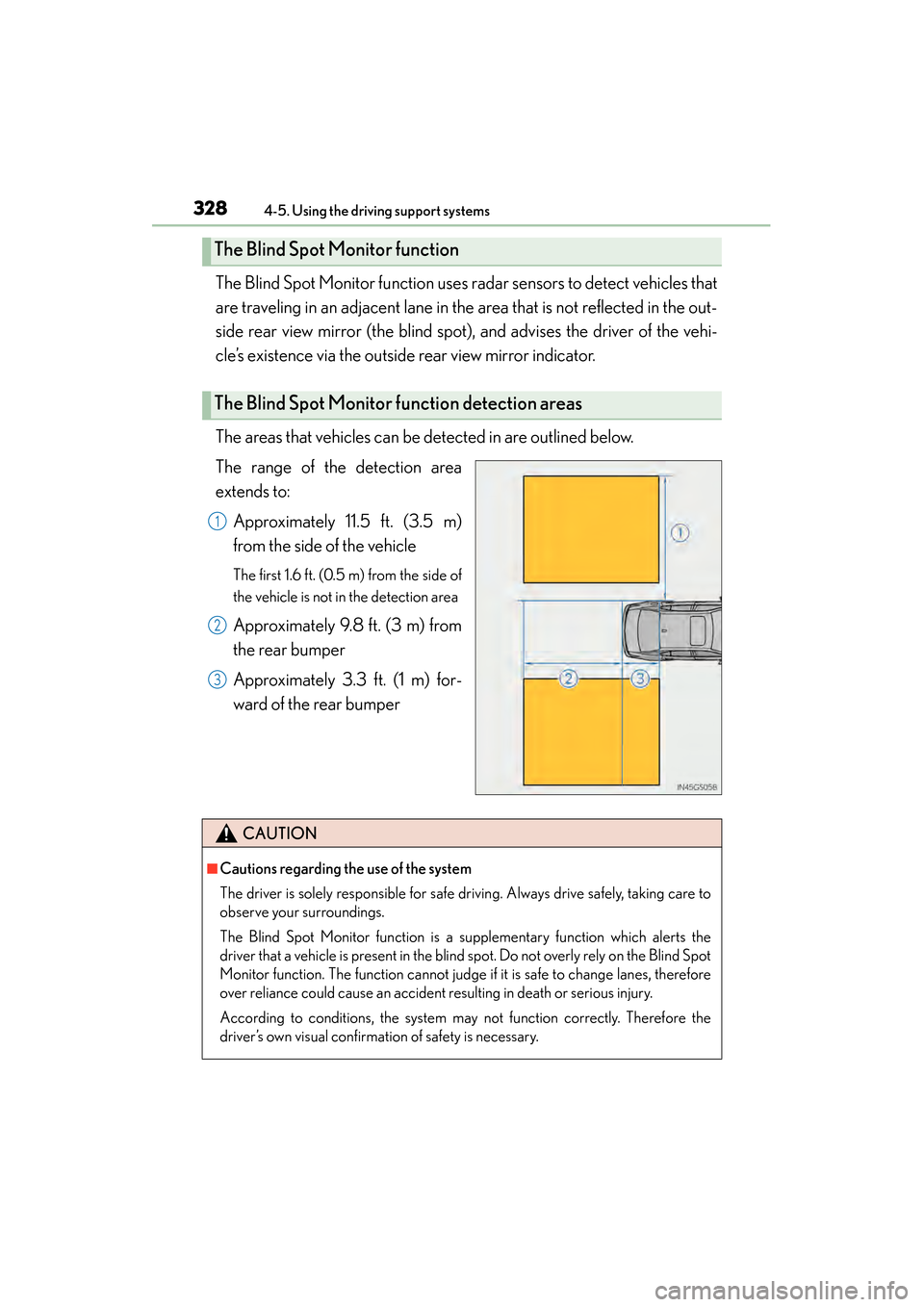
The Blind Spot Monitor function uses radar sensors to detect vehicles that
are traveling in an adjacent lane in the area that is not reflected in the out-
side rear view mirror (the blind spot), and advises the driver of the vehi-
cle’s existence via the outside rear view mirror indicator.
The areas that vehicles can be detected in are outlined below.
The range of the detection area
extends to:
Approximately 11.5 ft. (3.5 m)
from the side of the vehicle
The first 1.6 ft. (0.5 m) from the side of
the vehicle is not in the detection area
Approximately 9.8 ft. (3 m) from
the rear bumper
Approximately 3.3 ft. (1 m) for-
ward of the rear bumper
The Blind Spot Monitor function
The Blind Spot Monitor function detection areas
1
2
3
CAUTION
■Cautions regarding the use of the system
The driver is solely responsible for safe driving. Always drive safely, taking care to
observe your surroundings.
The Blind Spot Monitor function is a supplementary function which alerts the
driver that a vehicle is present in the blind spot. Do not overly rely on the Blind Spot
Monitor function. The function cannot judge if it is safe to change lanes, therefore
over reliance could cause an accident resulting in death or serious injury.
According to conditions, the system may not function correctly. Therefore the
driver’s own visual confirmation of safety is necessary.
GS450h_OM_OM30D52U_(U).book Page 328 Monday, July 29, 2013 12:07 PM
Page 332 of 890
GS450h_OM_OM30D52U_(U)
3314-5. Using the driving support systems
4
Driving
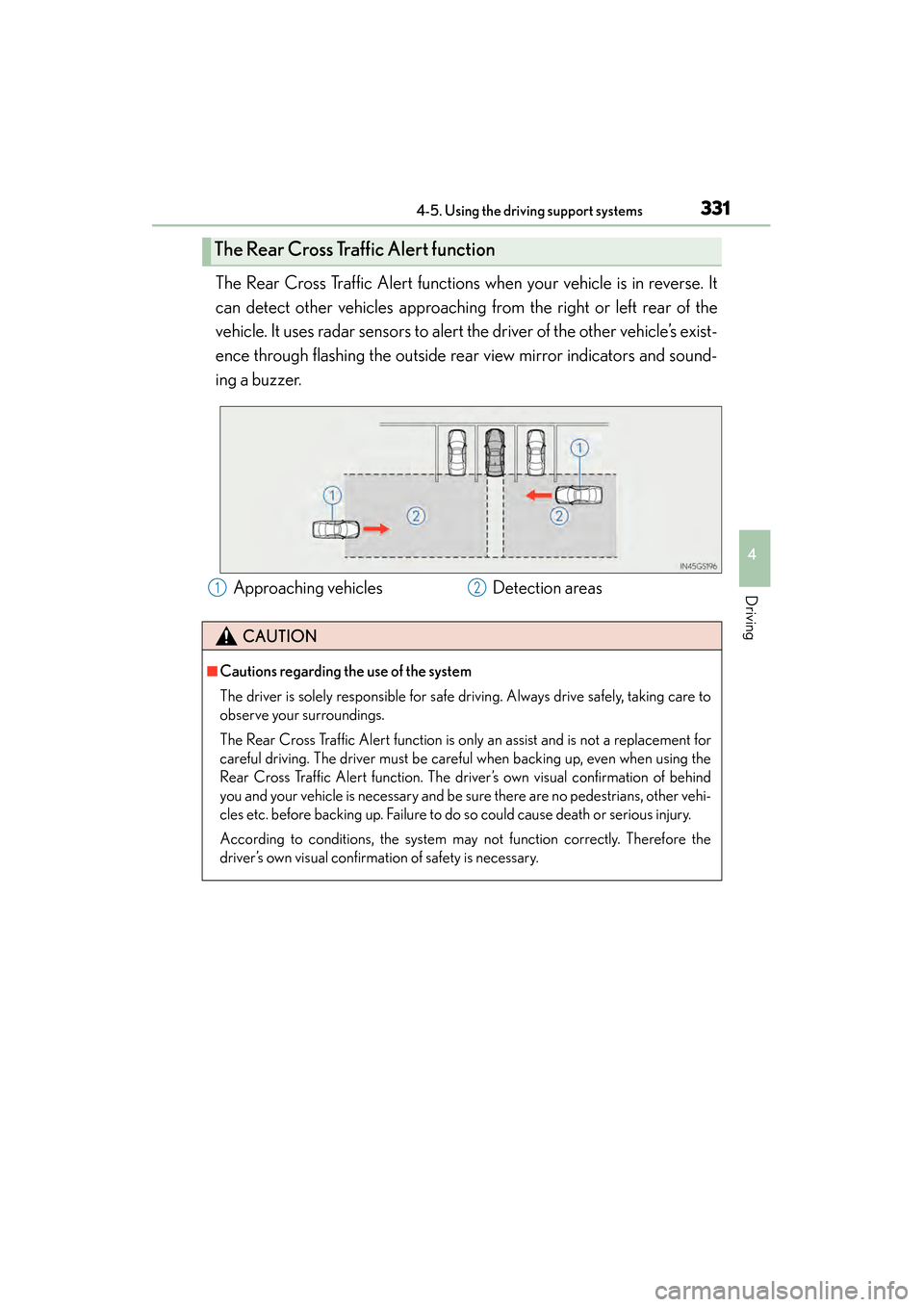
The Rear Cross Traffic Alert functions when your vehicle is in reverse. It
can detect other vehicles approaching from the right or left rear of the
vehicle. It uses radar sensors to alert the driver of the other vehicle’s exist-
ence through flashing the outside rear view mirror indicators and sound-
ing a buzzer.
The Rear Cross Traffic Alert function
Approaching vehiclesDetection areas
CAUTION
■Cautions regarding the use of the system
The driver is solely responsible for safe driving. Always drive safely, taking care to
observe your surroundings.
The Rear Cross Traffic Alert function is only an assist and is not a replacement for
careful driving. The driver must be careful when backing up, even when using the
Rear Cross Traffic Alert function. The driver’s own visual confirmation of behind
you and your vehicle is necessary and be sure there are no pedestrians, other vehi-
cles etc. before backing up. Failure to do so could cause death or serious injury.
According to conditions, the system may not function correctly. Therefore the
driver’s own visual confirmation of safety is necessary.
12
GS450h_OM_OM30D52U_(U).book Page 331 Monday, July 29, 2013 12:07 PM
Page 349 of 890
348
GS450h_OM_OM30D52U_(U)
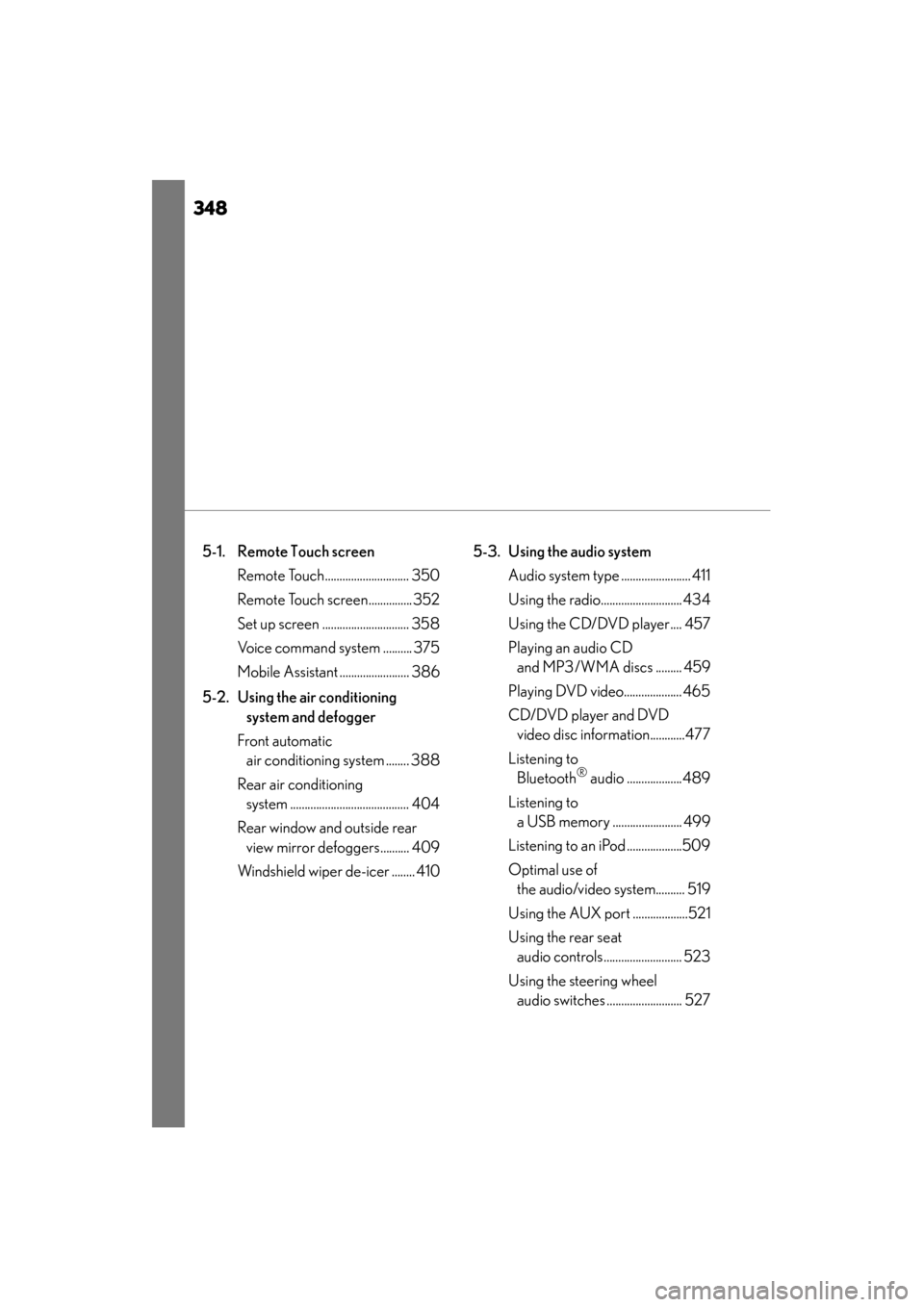
5-1. Remote Touch screen Remote Touch............................. 350
Remote Touch screen............... 352
Set up screen .............................. 358
Voice command system .......... 375
Mobile Assistant ........................ 386
5-2. Using the air conditioning system and defogger
Front automatic air conditioning system ........ 388
Rear air conditioning system ......................................... 404
Rear window and outside rear view mirror defoggers.......... 409
Windshield wiper de-icer ........ 410 5-3. Using the audio system
Audio system type ........................ 411
Using the radio............................ 434
Using the CD/DVD player.... 457
Playing an audio CD and MP3/WMA discs ......... 459
Playing DVD video.................... 465
CD/DVD player and DVD video disc information............477
Listening to Bluetooth
® audio ...................489
Listening to a USB memory ........................ 499
Listening to an iPod ...................509
Optimal use of the audio/video system.......... 519
Using the AUX port ...................521
Using the rear seat audio controls........................... 523
Using the steering wheel audio switches .......................... 527
GS450h_OM_OM30D52U_(U).book Page 348 Monday, July 29, 2013 12:07 PM