remote control Lexus GS450h 2014 Owner's Guide
[x] Cancel search | Manufacturer: LEXUS, Model Year: 2014, Model line: GS450h, Model: Lexus GS450h 2014Pages: 890, PDF Size: 40.62 MB
Page 170 of 890
GS450h_OM_OM30D52U_(U)
1693-5. Opening, closing the windows and moon roof
3
Operation of each component
■Door lock linked window operation
●The power windows can be opened and closed using the mechanical key.*
(→ P. 7 9 3 )
●The power windows can be opened using the wireless remote control.* (→ P. 1 3 6 )
*: These settings must be customized at your Lexus dealer.
■When the 12-volt battery is disconnected
The window lock switch is disabled. If necessary, press the window lock switch after
reconnecting the 12-volt battery.
■Power windows open warning buzzer
The buzzer sounds and a message is shown on the multi-information display in the
instrument cluster when the power switch is turned off and the driver’s door is
opened with the power windows open.
■Customization
Settings (e.g. linked door lock operation) can be changed.
(Customizable features: →P. 8 3 3 )
CAUTION
Observe the following precautions.
Failure to do so may result in death or serious injury.
■Closing the windows
●Check to make sure that all passengers do not have any part of their body in a
position where it could be caught when a window is being operated.
●Do not allow children to operate the power windows.
Closing a power window on someone can cause serious injury, and in some
instances, even death.
■Jam protection function
●Never use any part of your body to intentionally activate the jam protection func-
tion.
●The jam protection function may not work if something gets caught just before
the window fully closes.
GS450h_OM_OM30D52U_(U).book Page 169 Monday, July 29, 2013 12:07 PM
Page 172 of 890
GS450h_OM_OM30D52U_(U)
1713-5. Opening, closing the windows and moon roof
3
Operation of each component
■The moon roof can be operated when
The power switch is in ON mode.
■Operating the moon roof after turning the hybrid system off
The moon roof can be operated for approximately 45 seconds after the power
switch is turned to ACCESSORY mode or turned off. It cannot, however, be oper-
ated once either front door is opened.
■Jam protection function
If an object is detected between the moon roof and the frame while the moon roof is
closing or tilting down, travel is stopped and the moon roof opens slightly.
■Sunshade
The sunshade can be opened and closed manually. However, the sunshade will open
automatically when the moon roof is opened.
■Door lock linked moon roof operation
●The moon roof can be opened and closed using the mechanical key.* (→ P. 7 9 3 )
●The moon roof can be opened using the wireless remote control.* (→ P. 1 3 6 )
*: These settings must be customized at your Lexus dealer.
GS450h_OM_OM30D52U_(U).book Page 171 Monday, July 29, 2013 12:07 PM
Page 190 of 890
GS450h_OM_OM30D52U_(U)
1894-1. Before driving
4
Driving
CAUTION
■Things that must not be carried in the trunk
The following things may cause a fire if loaded in the trunk:
●Receptacles containing gasoline
●Aerosol cans
■Storage precautions
Observe the following precautions.
Failure to do so may prevent the pedals from being depressed properly, may block
the driver’s vision, or may result in items hitting the driver or passengers, possibly
causing an accident.
●Stow cargo and luggage in the trunk whenever possible.
●Do not place cargo or luggage in or on the following locations.
• At the feet of the driver
• On the front passenger or rear seats (when stacking items)
• On the package tray
• On the instrument panel
• On the dashboard
• In front of the Remote Touch screen
●Secure all items in the occupant compartment.
■Capacity and distribution
●Do not exceed the maximum axle weight rating or the total vehicle weight rating.
●Even if the total load of occupant’s weight and the cargo load is less than the total
load capacity, do not apply the load unevenly. Improper loading may cause dete-
rioration of steering or braking control which may cause death or serious injury.
GS450h_OM_OM30D52U_(U).book Page 189 Monday, July 29, 2013 12:07 PM
Page 349 of 890
348
GS450h_OM_OM30D52U_(U)
5-1. Remote Touch screen Remote Touch............................. 350
Remote Touch screen............... 352
Set up screen .............................. 358
Voice command system .......... 375
Mobile Assistant ........................ 386
5-2. Using the air conditioning system and defogger
Front automatic air conditioning system ........ 388
Rear air conditioning system ......................................... 404
Rear window and outside rear view mirror defoggers.......... 409
Windshield wiper de-icer ........ 410 5-3. Using the audio system
Audio system type ........................ 411
Using the radio............................ 434
Using the CD/DVD player.... 457
Playing an audio CD and MP3/WMA discs ......... 459
Playing DVD video.................... 465
CD/DVD player and DVD video disc information............477
Listening to Bluetooth
® audio ...................489
Listening to a USB memory ........................ 499
Listening to an iPod ...................509
Optimal use of the audio/video system.......... 519
Using the AUX port ...................521
Using the rear seat audio controls........................... 523
Using the steering wheel audio switches .......................... 527
GS450h_OM_OM30D52U_(U).book Page 348 Monday, July 29, 2013 12:07 PM
Page 353 of 890
352
GS450h_OM_OM30D52U_(U)
5-1. Remote Touch screen
Remote Touch screen
By using the Remote Touch, you can control the audio system and air
conditioning system, and adjust the screen display etc.
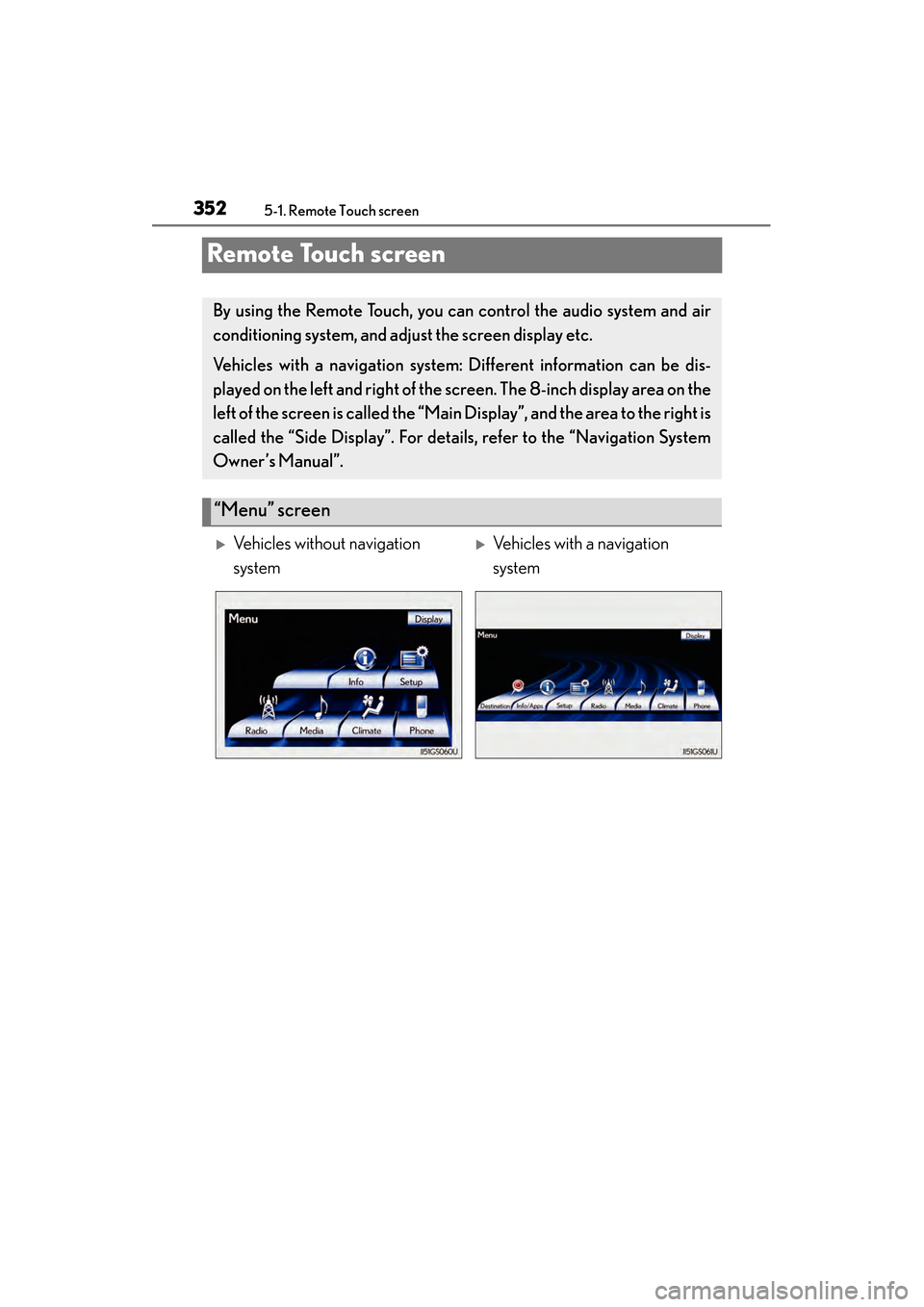
Vehicles with a navigation system: Different information can be dis-
played on the left and right of the screen. The 8-inch display area on the
left of the screen is called the “Mai n Display”, and the area to the right is
called the “Side Display”. For detail s, refer to the “Navigation System
Owner’s Manual”.
“Menu” screen
XVehicles without navigation
systemXVehicles with a navigation
system
GS450h_OM_OM30D52U_(U).book Page 352 Monday, July 29, 2013 12:07 PM
Page 356 of 890
GS450h_OM_OM30D52U_(U)
3555-1. Remote Touch screen
5
Interior features
■When using the Remote Touch screen
●If the screen is cold, the display may be dark, or the system may seem to be operat-
ing slightly slower than normal.
●When the screen is viewed through polarized sunglasses, a rainbow pattern may
appear on the screen due to optical characteristics of the screen. If this is disturb-
ing, please operate the screen without polarized sunglasses.
●Dimmed screen buttons cannot be operated.
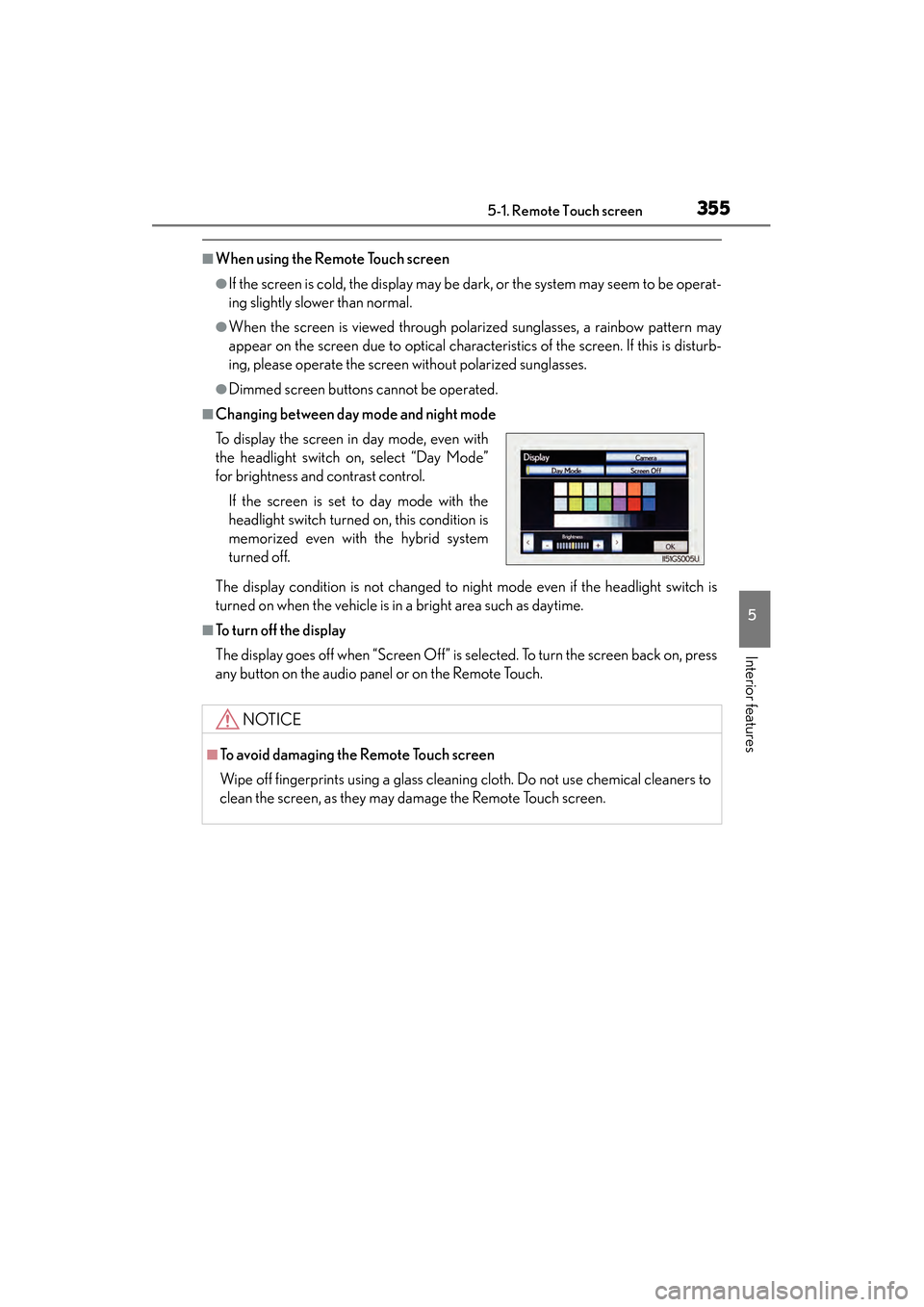
■Changing between day mode and night mode
The display condition is not changed to night mode even if the headlight switch is
turned on when the vehicle is in a bright area such as daytime.
■To t u r n o f f t h e d i s p l a y
The display goes off when “Screen Off” is selected. To turn the screen back on, press
any button on the audio panel or on the Remote Touch. To display the screen in day mode, even with
the headlight switch on, select “Day Mode”
for brightness and contrast control.
If the screen is set to day mode with the
headlight switch turned on, this condition is
memorized even with the hybrid system
turned off.
NOTICE
■To avoid damaging the Remote Touch screen
Wipe off fingerprints using a glass cleaning cloth. Do not use chemical cleaners to
clean the screen, as they may damage the Remote Touch screen.
GS450h_OM_OM30D52U_(U).book Page 355 Monday, July 29, 2013 12:07 PM
Page 380 of 890
GS450h_OM_OM30D52U_(U)
3795-1. Remote Touch screen
5
Interior features
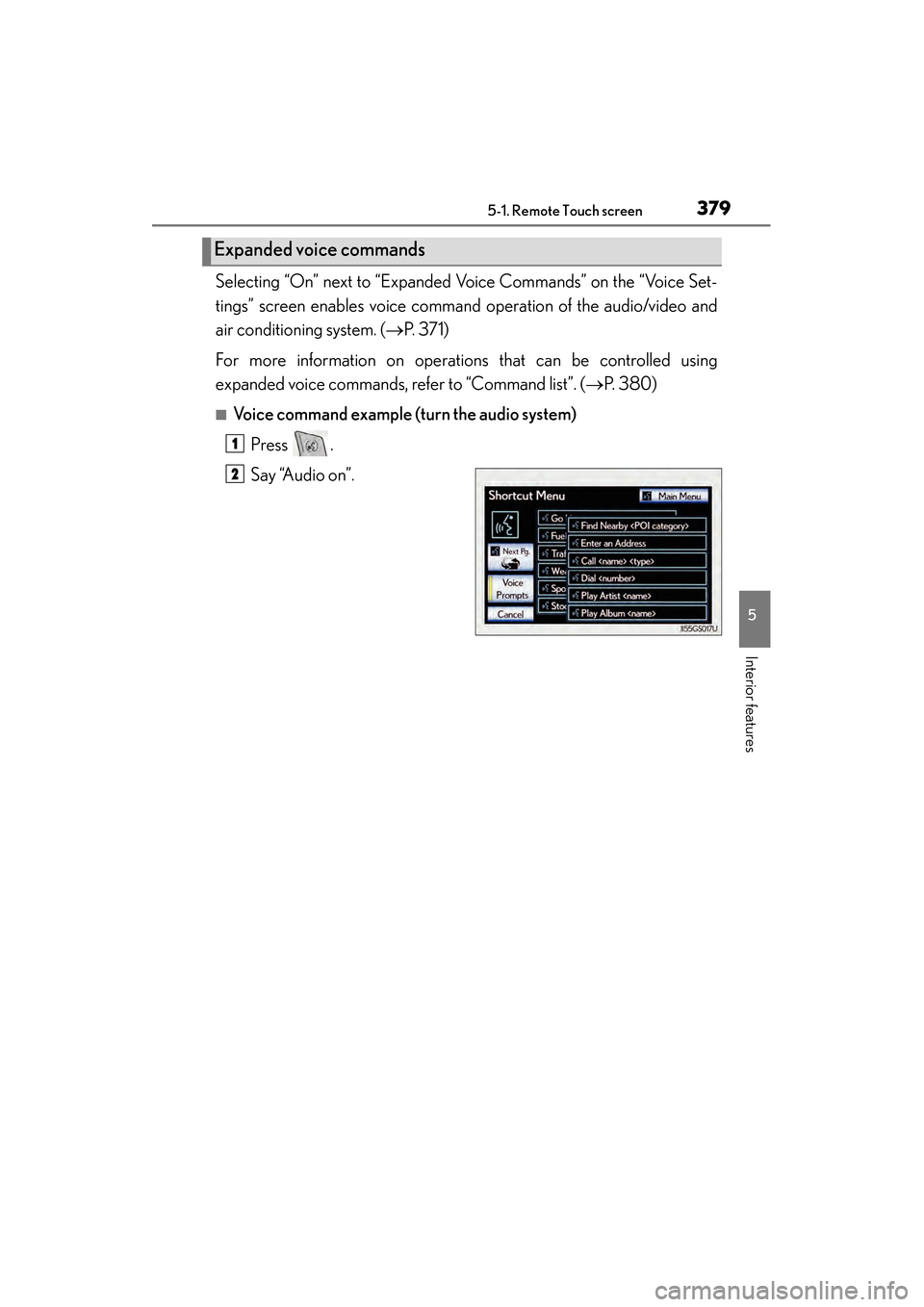
Selecting “On” next to “Expanded Voice Commands” on the “Voice Set-
tings” screen enables voice command operation of the audio/video and
air conditioning system. ( →P. 3 7 1 )
For more information on operations that can be controlled using
expanded voice commands, refer to “Command list”. ( →P. 380)
■Voice command example (t urn the audio system)
Press .
Say “Audio on”.
Expanded voice commands
1
2
GS450h_OM_OM30D52U_(U).book Page 379 Monday, July 29, 2013 12:07 PM
Page 383 of 890
3825-1. Remote Touch screen
GS450h_OM_OM30D52U_(U)
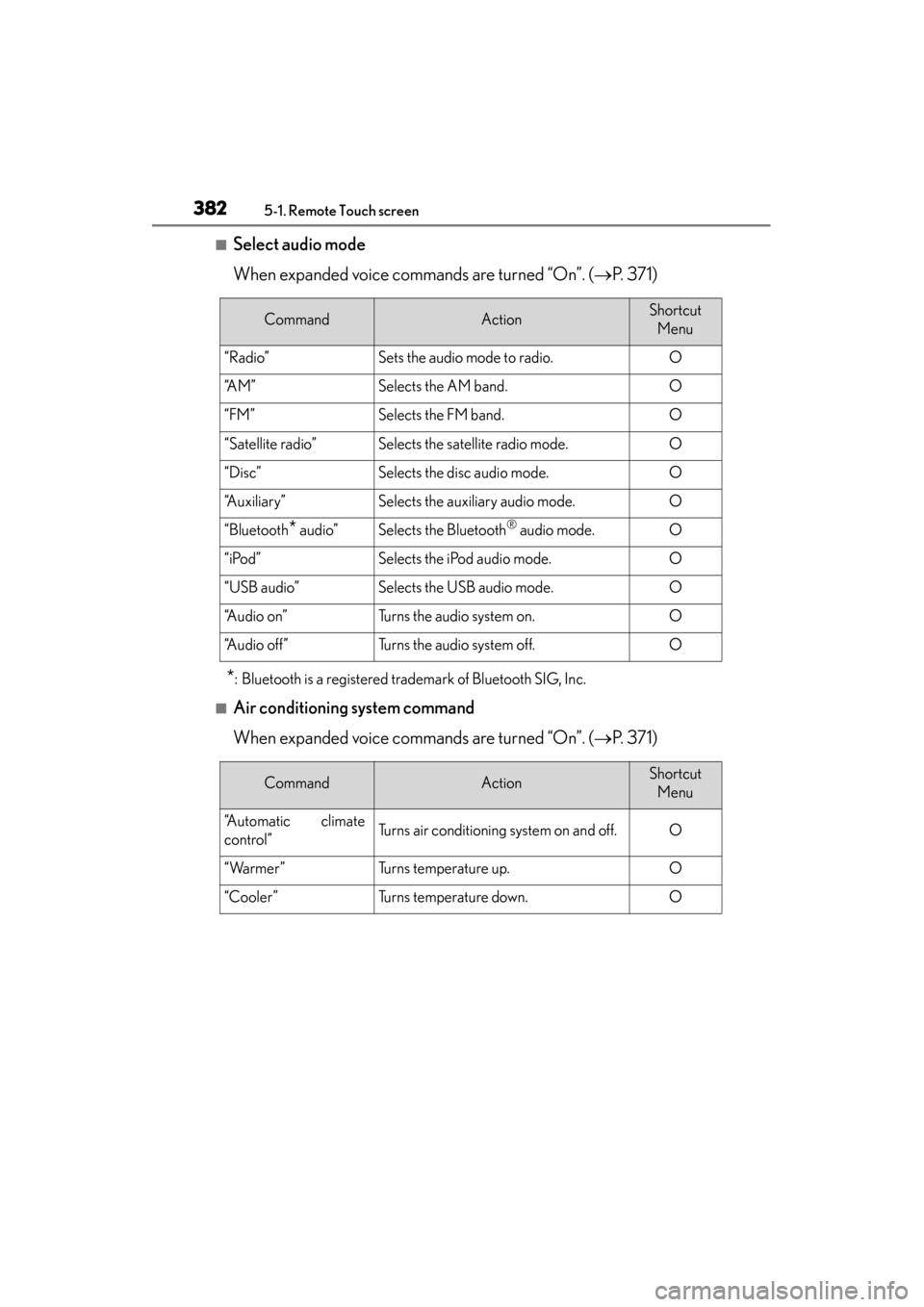
■Select audio mode
When expanded voice commands are turned “On”. (→P. 3 7 1 )
*: Bluetooth is a registered trademark of Bluetooth SIG, Inc.
■Air conditioning system command
When expanded voice commands are turned “On”. ( →P. 3 7 1 )
CommandActionShortcut
Menu
“Radio”Sets the audio mode to radio.O
“A M ”Selects the AM band.O
“FM”Selects the FM band.O
“Satellite radio”Selects the satellite radio mode.O
“Disc”Selects the disc audio mode.O
“Auxiliary”Selects the auxiliary audio mode.O
“Bluetooth* audio”Selects the Bluetooth® audio mode.O
“iPod”Selects the iPod audio mode.O
“USB audio”Selects the USB audio mode.O
“A u d i o o n ”Turns the audio system on.O
“Audio off”Turns the audio system off.O
CommandActionShortcut Menu
“Automatic climate
control”Turns air conditioning system on and off.O
“Warmer”Turns temperature up.O
“Cooler”Turns temperature down.O
GS450h_OM_OM30D52U_(U).book Page 382 Monday, July 29, 2013 12:07 PM
Page 412 of 890
411
GS450h_OM_OM30D52U_(U)5-3. Using the audio system
5
Interior features
Audio system type
CD and DVD player with AM/FM radio
Vehicles with a navigati on system: The audio fun ctions can be displayed
and operated on the “Side Display”. For details, refer to the “Navigation
System Owner’s Manual”.
XUsing the instrument panel
Press the “RADIO” or “MEDIA” button to display the audio control
screen.
XUsing the Remote Touch
Press the “MENU” button on the Remote Touch, select “Radio” or
“Media” and select each tab to display the audio control screen.
GS450h_OM_OM30D52U_(U).book Page 411 Monday, July 29, 2013 12:07 PM
Page 415 of 890
414
GS450h_OM_OM30D52U_(U)
5-3. Using the audio system
■Using cellular phones
Interference may be heard through the audio system’s speakers if a cellular phone is
being used inside or close to the vehicle while the audio system is operating.
■When using the Remote Touch screen
Dimmed screen buttons cannot be operated.
■Ta b
Select or , located either side of the screen tabs, to display tabs from the pre-
vious or next page.
■About Dolby
Manufactured under license from Dolby Laboratories. Dolby and the double-D sym-
bol are trademarks of Dolby Laboratories.
CAUTION
■For vehicles sold in the U.S.A. and Canada
●Part 15 of the FCC Rules
FCC Warning:
Changes or modifications not expressly approved by the party responsible for
compliance could void the user’s authority to operate the equipment.
●Laser products
• USE OF CONTROL OR ADJUSTMENT OR PERFORMANCE OF PRO- CEDURES OTHER THAN THOSE SPECIFIED HEREIN MAY RESULT IN
HAZARDOUS RADIATION EXPOSURE.
• THE USE OF OPTICAL INSTRUMENTS WITH THIS PRODUCT WILL INCREASE EYE HAZARD.
NOTICE
■To prevent 12-volt battery discharge
Do not leave the audio system on longer than necessary when the hybrid system is
off.
■To avoid damaging the audio system
Take care not to spill drinks or other fluids on the audio system.
GS450h_OM_OM30D52U_(U).book Page 414 Monday, July 29, 2013 12:07 PM