light Lexus GS450h 2014 Service Manual
[x] Cancel search | Manufacturer: LEXUS, Model Year: 2014, Model line: GS450h, Model: Lexus GS450h 2014Pages: 890, PDF Size: 40.62 MB
Page 103 of 890
102
GS450h_OM_OM30D52U_(U)
2. Instrument cluster
■System check display
After turning the power switch to ON mode, “SYSTEM CHECK” is displayed while
system operation is checked.
■Outside temperature display
In the following situations, the correct outside temperature may not be displayed, or
the display may take longer than normal to change.
●When stopped, or driving at low speeds (less than 12 mph [20 km/h])
●When the outside temperature has changed suddenly (at the entrance/exit of a
garage, tunnel, etc.)
■Setting display automatic cancelation
In the following situations, setting display in which the settings can be changed
through the “DISP” button will automatically be turned off.
●When a warning message appears while the setting display is displayed
●When the vehicle begins to move while the setting display is displayed
■Tire inflation pressure (if equipped)
●It may take a few minutes to display the tire inflation pressure after the power switch
is turned to ON mode. It may also take a few minutes to display the tire inflation
pressure after inflation pressure has been adjusted.
●“---” may be displayed if the tire information cannot be determined due to unfavor-
able radio wave conditions.
●Tire inflation pressure changes with temperature. The displayed values may also be
different from the values measured using a tire pressure gauge.
■Liquid crystal display
Small spots or light spots may appear on the display. This phenomenon is character-
istic of liquid crystal displays, and there is no problem continuing to use the display.
■Customization
Setting of available languages can be changed. (Customizable features: →P. 8 3 3 )
GS450h_OM_OM30D52U_(U).book Page 102 Monday, July 29, 2013 12:07 PM
Page 115 of 890
114
GS450h_OM_OM30D52U_(U)
2. Instrument cluster
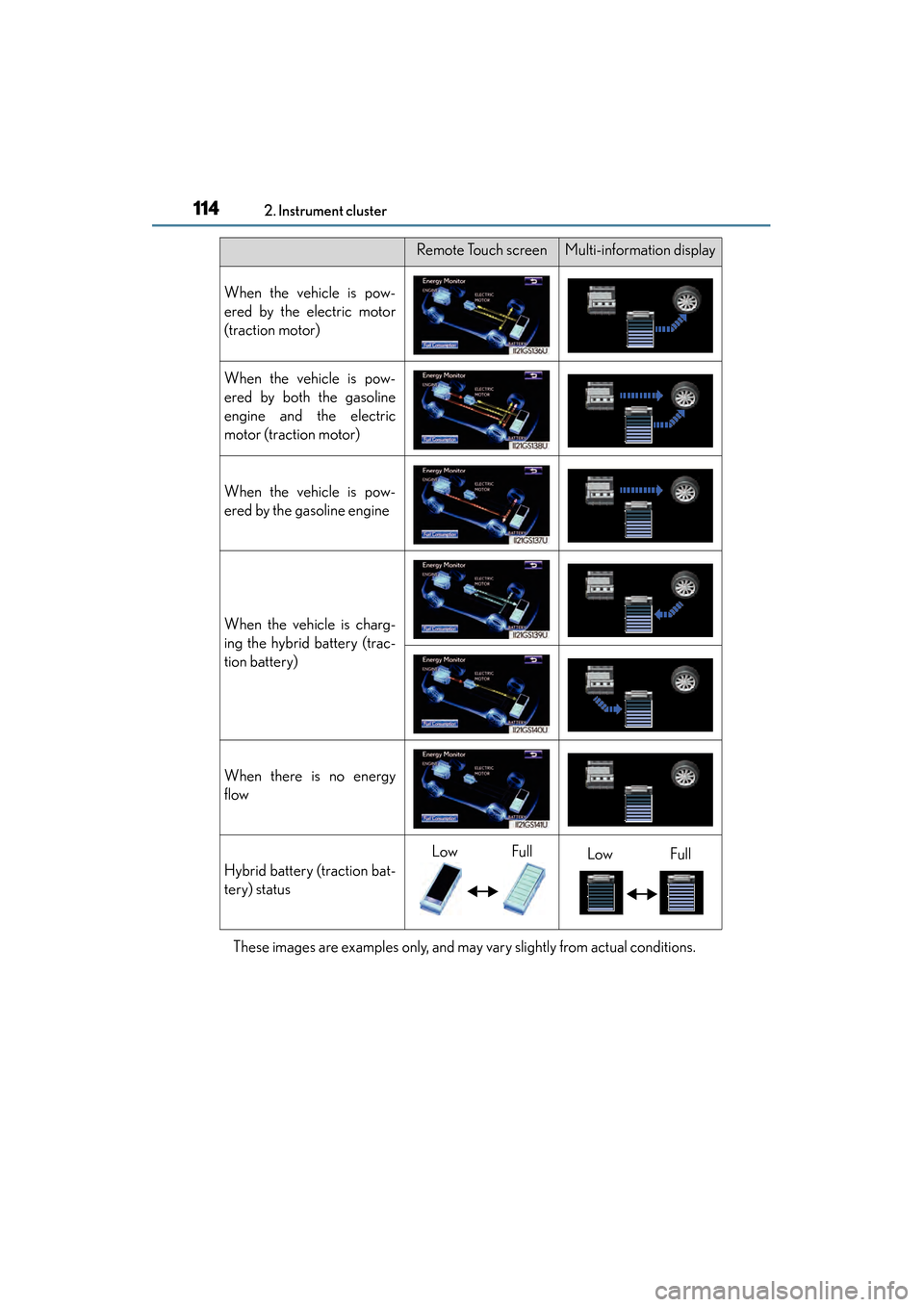
These images are examples only, and may vary slightly from actual conditions.
Remote Touch screenMulti-information display
When the vehicle is pow-
ered by the electric motor
(traction motor)
When the vehicle is pow-
ered by both the gasoline
engine and the electric
motor (traction motor)
When the vehicle is pow-
ered by the gasoline engine
When the vehicle is charg-
ing the hybrid battery (trac-
tion battery)
When there is no energy
flow
Hybrid battery (traction bat-
tery) status
LowFullLowFull
GS450h_OM_OM30D52U_(U).book Page 114 Monday, July 29, 2013 12:07 PM
Page 117 of 890
116
GS450h_OM_OM30D52U_(U)
2. Instrument cluster
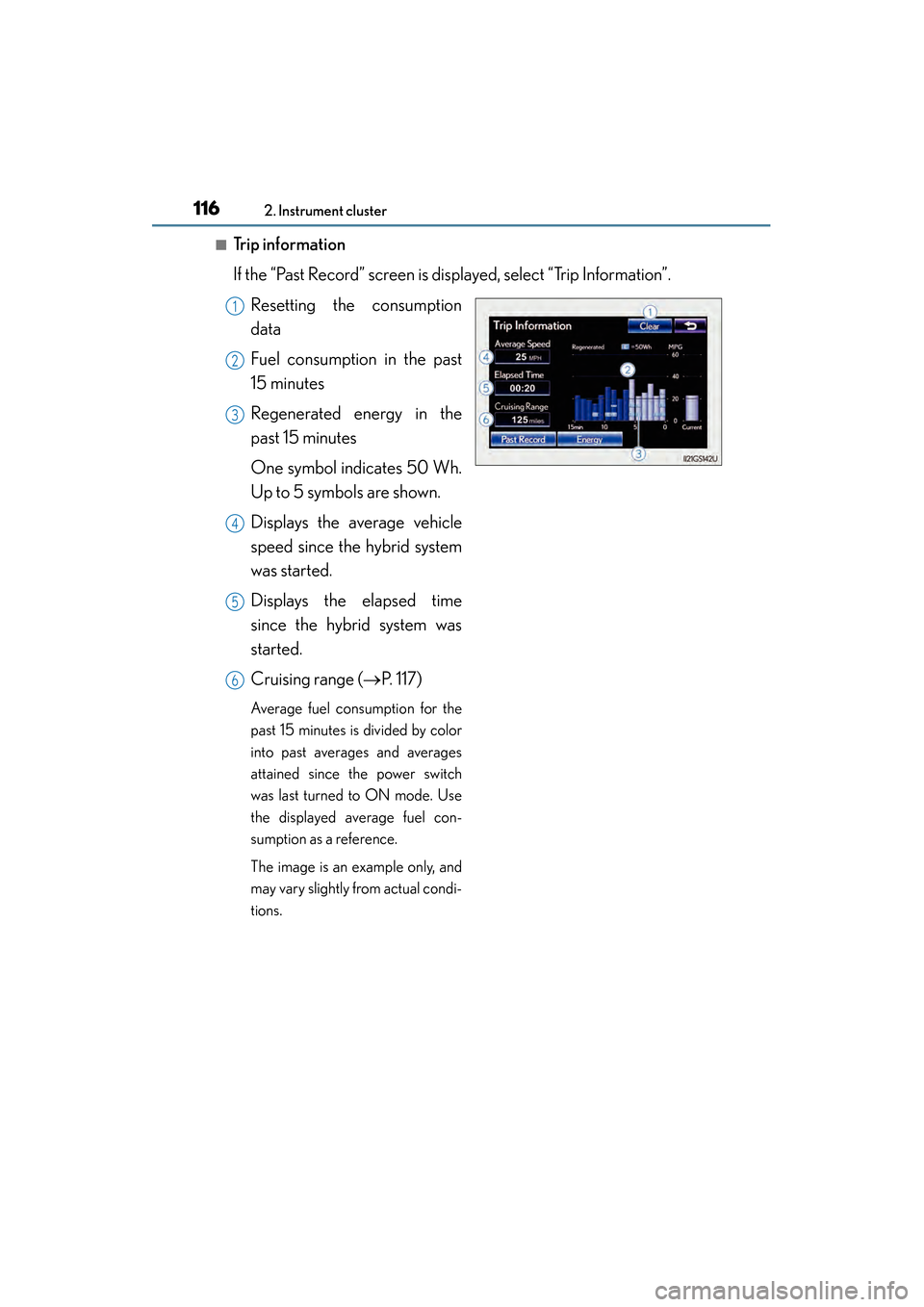
■Trip information
If the “Past Record” screen is displayed, select “Trip Information”.Resetting the consumption
data
Fuel consumption in the past
15 minutes
Regenerated energy in the
past 15 minutes
One symbol indicates 50 Wh.
Up to 5 symbols are shown.
Displays the average vehicle
speed since the hybrid system
was started.
Displays the elapsed time
since the hybrid system was
started.
Cruising range ( →P. 117)
Average fuel consumption for the
past 15 minutes is divided by color
into past averages and averages
attained since the power switch
was last turned to ON mode. Use
the displayed average fuel con-
sumption as a reference.
The image is an example only, and
may vary slightly from actual condi-
tions.
1
2
3
4
5
6
GS450h_OM_OM30D52U_(U).book Page 116 Monday, July 29, 2013 12:07 PM
Page 118 of 890
GS450h_OM_OM30D52U_(U)
1172. Instrument cluster
2
Instrument cluster
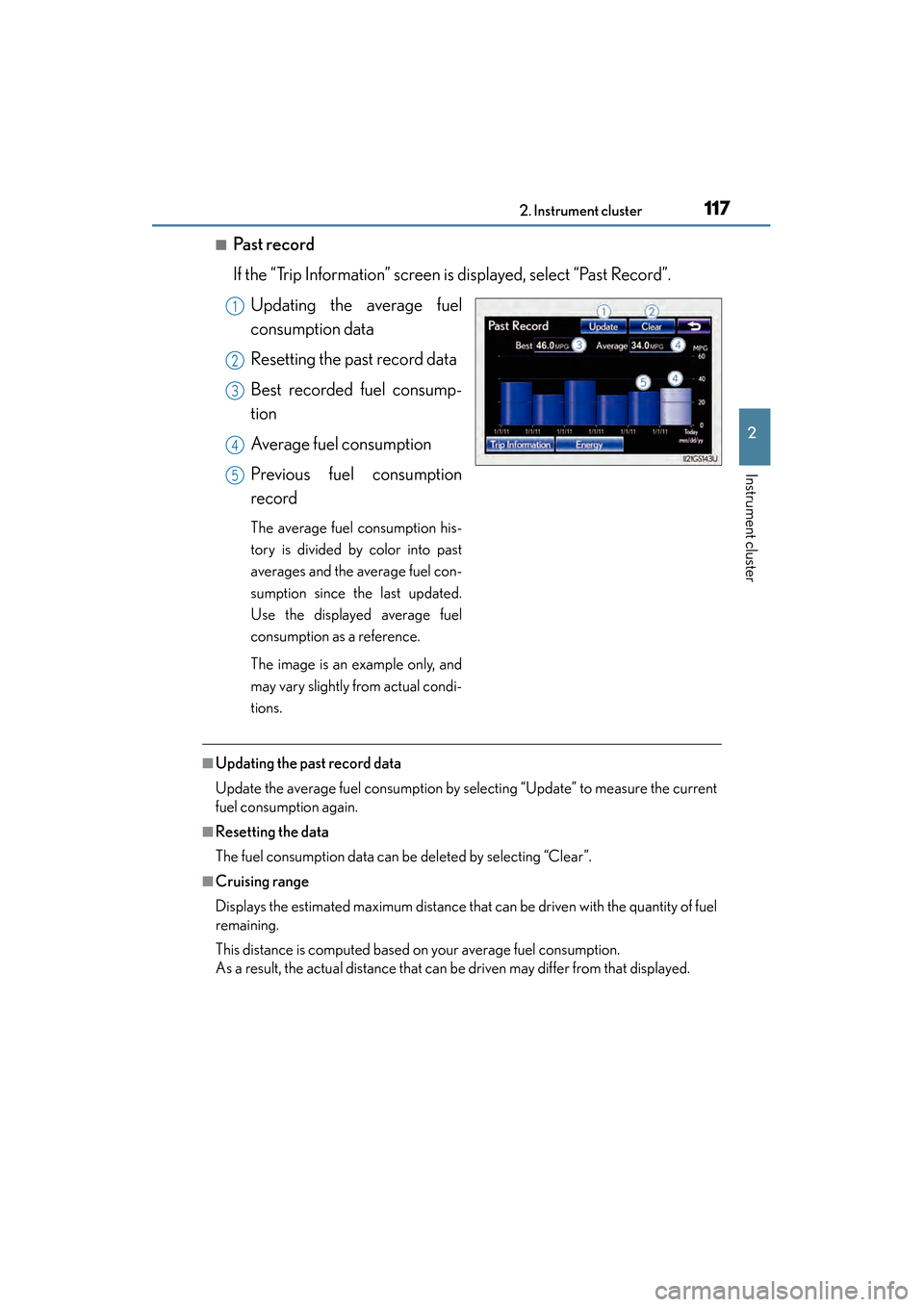
■Past record
If the “Trip Information” screen is displayed, select “Past Record”.Updating the average fuel
consumption data
Resetting the past record data
Best recorded fuel consump-
tion
Average fuel consumption
Previous fuel consumption
record
The average fuel consumption his-
tory is divided by color into past
averages and the average fuel con-
sumption since the last updated.
Use the displayed average fuel
consumption as a reference.
The image is an example only, and
may vary slightly from actual condi-
tions.
■Updating the past record data
Update the average fuel consumption by selecting “Update” to measure the current
fuel consumption again.
■Resetting the data
The fuel consumption data can be deleted by selecting “Clear”.
■Cruising range
Displays the estimated maximum distance that can be driven with the quantity of fuel
remaining.
This distance is computed based on your average fuel consumption.
As a result, the actual distance that can be driven may differ from that displayed.
1
2
3
4
5
GS450h_OM_OM30D52U_(U).book Page 117 Monday, July 29, 2013 12:07 PM
Page 124 of 890
123
GS450h_OM_OM30D52U_(U)3-2. Opening, closing and locking the doors and trunk
3
Operation of each component
Smart access system with push-button start
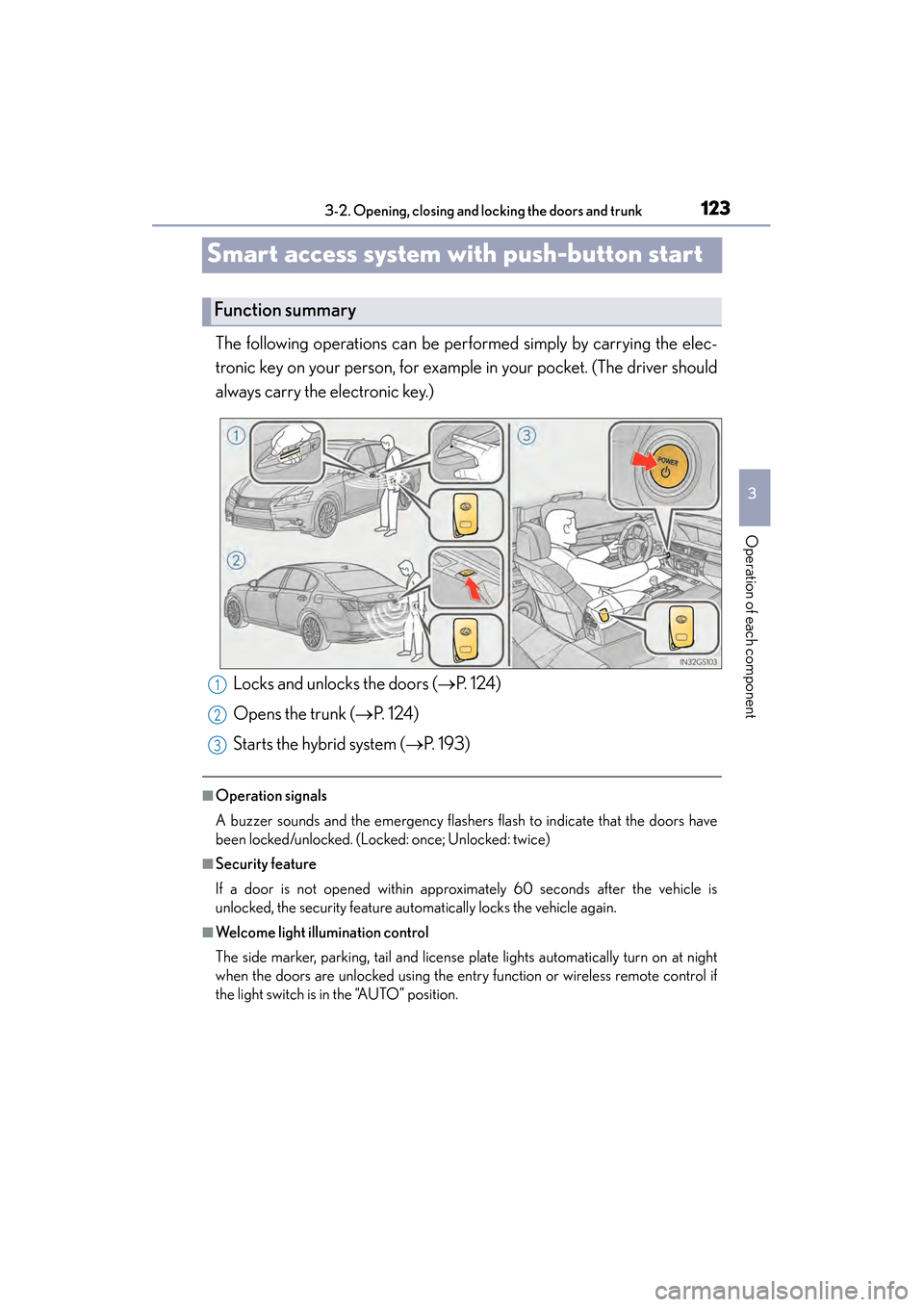
The following operations can be performed simply by carrying the elec-
tronic key on your person, for example in your pocket. (The driver should
always carry the electronic key.)
■Operation signals
A buzzer sounds and the emergency flashers flash to indicate that the doors have
been locked/unlocked. (Locked: once; Unlocked: twice)
■Security feature
If a door is not opened within approximately 60 seconds after the vehicle is
unlocked, the security feature automatically locks the vehicle again.
■Welcome light illumination control
The side marker, parking, tail and license plate lights automatically turn on at night
when the doors are unlocked using the entry function or wireless remote control if
the light switch is in the “AUTO” position.
Function summary
Locks and unlocks the doors ( →P. 1 2 4 )
Opens the trunk ( →P. 1 2 4 )
Starts the hybrid system ( →P. 193)1
2
3
GS450h_OM_OM30D52U_(U).book Page 123 Monday, July 29, 2013 12:07 PM
Page 129 of 890
128
GS450h_OM_OM30D52U_(U)
3-2. Opening, closing and locking the doors and trunk
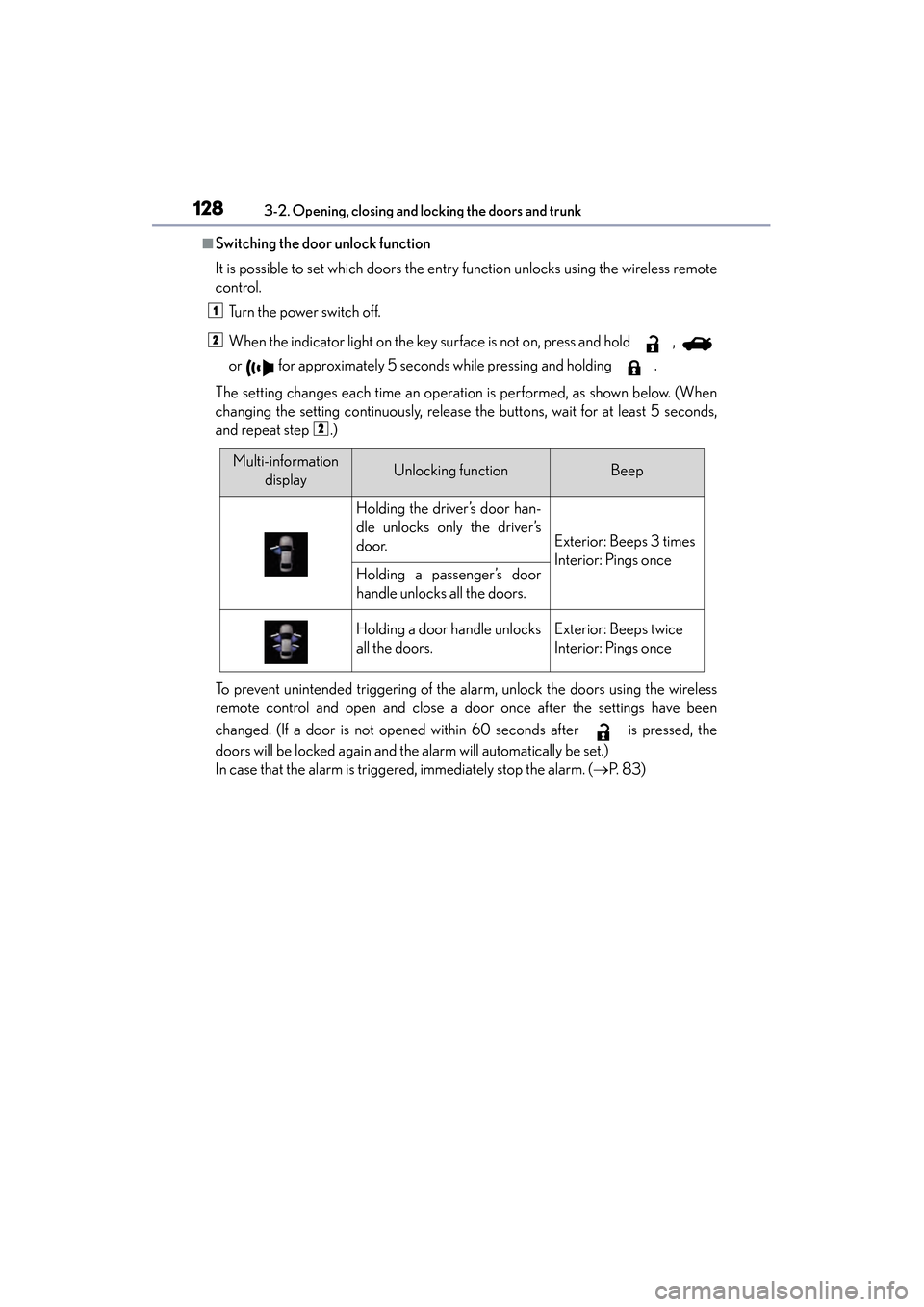
■Switching the door unlock function
It is possible to set which doors the entry function unlocks using the wireless remote
control. Turn the power switch off.
When the indicator light on the key surface is not on, press and hold ,
or for approximately 5 seconds while pressing and holding .
The setting changes each time an operation is performed, as shown below. (When
changing the setting continuously, release the buttons, wait for at least 5 seconds,
and repeat step .)
To prevent unintended triggering of the alarm, unlock the doors using the wireless
remote control and open and close a door once after the settings have been
changed. (If a door is not opened within 60 seconds after is pressed, the
doors will be locked again and the alarm will automatically be set.)
In case that the alarm is triggered, immediately stop the alarm. ( →P. 8 3 )
1
2
2
Multi-information
displayUnlocking functionBeep
Holding the driver’s door han-
dle unlocks only the driver’s
door.
Exterior: Beeps 3 times
Interior: Pings once
Holding a passenger’s door
handle unlocks all the doors.
Holding a door handle unlocks
all the doors.Exterior: Beeps twice
Interior: Pings once
GS450h_OM_OM30D52U_(U).book Page 128 Monday, July 29, 2013 12:07 PM
Page 133 of 890
132
GS450h_OM_OM30D52U_(U)
3-2. Opening, closing and locking the doors and trunk
■Note for locking the doors
●Touching the door lock sensor while wearing gloves may delay or prevent lock
operation. Remove the gloves and touch the lock sensor again.
●If the door handle becomes wet while the electronic key is within the effective
range, the door may lock and unlock repeatedly. In that case, follow the following
correction procedures to wash the vehicle:
• Place the electronic key in a location 6 ft. (2 m) or more away from the vehicle.(Take care to ensure that the key is not stolen.)
• Set the electronic key to battery-saving mode to disable the smart access sys- tem with push-button start. (→ P. 1 2 9 )
●If the electronic key is inside the vehicle and a door handle becomes wet during a
car wash, a message may be shown on the multi-information display and a buzzer
will sound outside the vehicle. To turn off the alarm, lock all the doors.
●The lock sensor may not work properly if it comes into contact with ice, snow, mud,
etc. Clean the lock sensor and attempt to operate it again, or use the lock sensor
on the lower part of the door handle.
●Fingernails may scrape against the door during operation of the door handle. Be
careful not to injure fingernails or damage the surface of the door.
■Note for the unlocking function
●A sudden approach to the effective range or door handle may prevent the doors
from being unlocked. In this case, return the door handle to the original position
and check that the doors unlock before pulling the door handle again.
●Gripping the door handle when wearing a glove may not unlock the door.
●If the door handle becomes wet while the electronic key is within the effective
range, the door may lock and unlock repeatedly. In that case, follow the following
correction procedures to wash the vehicle:
• Place the electronic key in a location 6 ft. (2 m) or more away from the vehicle. (Take care to ensure that the key is not stolen.)
• Set the electronic key to battery-saving mode to disable the smart access sys- tem with push-button start. (→ P. 1 2 9 )
●If there is another electronic key in the detection area, it may take slightly longer to
unlock the doors after the door handle is gripped.
●Fingernails may scrape against the door during operation of the door handle. Be
careful not to injure fingernails or damage the surface of the door.
GS450h_OM_OM30D52U_(U).book Page 132 Monday, July 29, 2013 12:07 PM
Page 138 of 890
GS450h_OM_OM30D52U_(U)
1373-2. Opening, closing and locking the doors and trunk
3
Operation of each component
■Operation signals
Doors:
A buzzer sounds and the emergency flashers flash to indicate that the doors have
been locked/unlocked. (Locked: once; Unlocked: twice)
Tr u n k :
A buzzer sounds to indicate that the trunk has been opened.
Windows and moon roof:
A buzzer sounds to indicate that the windows and moon roof are operating.
■Welcome light illumination control
→P. 1 2 3
■Door lock buzzer
If an attempt to lock the doors is made when a door is not fully closed, a buzzer
sounds continuously for 5 seconds. Fully cl ose the door to stop the buzzer, and lock
the vehicle once more.
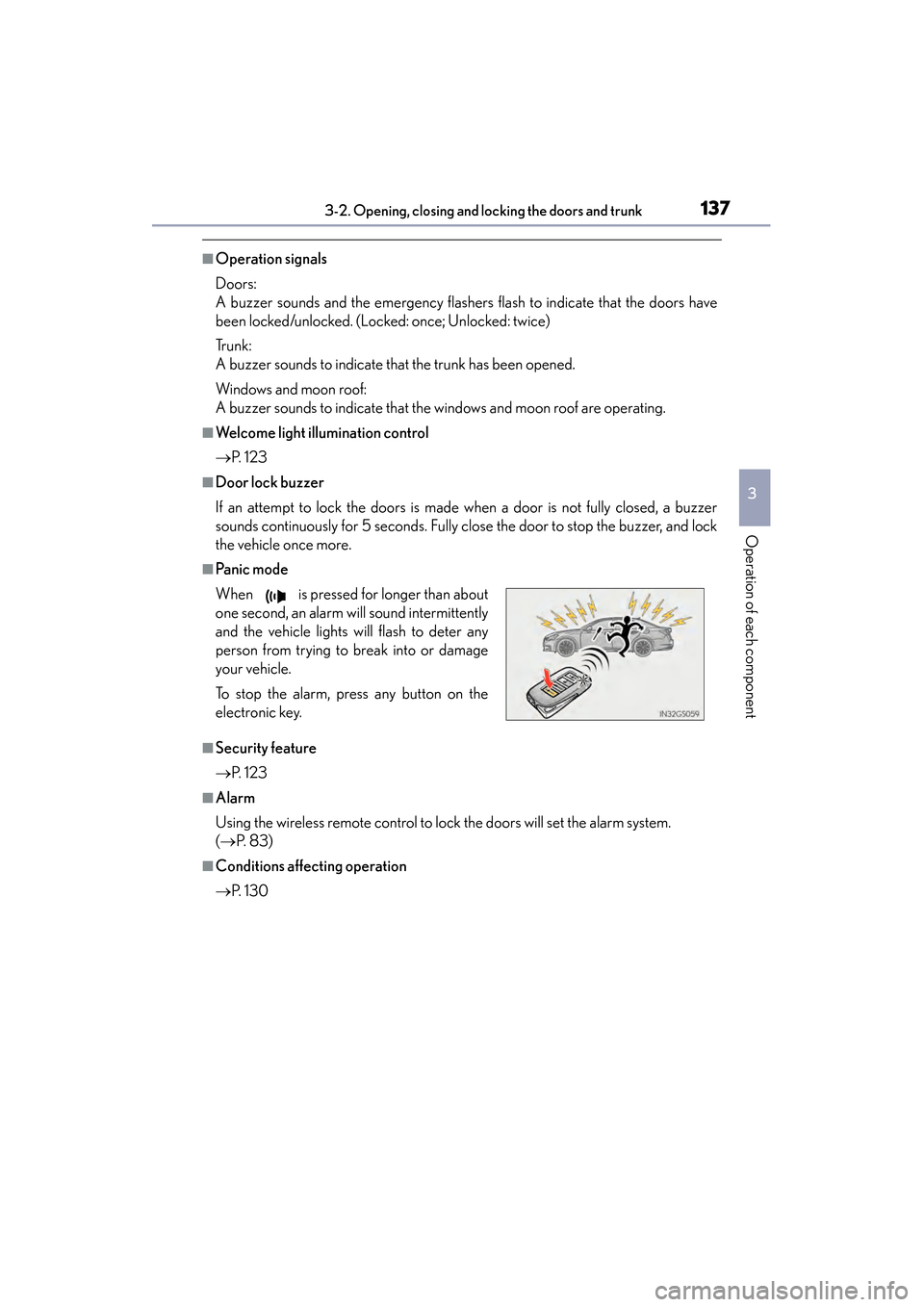
■Pa ni c m o d e
■Security feature
→ P. 1 2 3
■Alarm
Using the wireless remote control to lock the doors will set the alarm system.
(→ P. 8 3 )
■Conditions affecting operation
→P. 1 3 0
When is pressed for longer than about
one second, an alarm will sound intermittently
and the vehicle lights will flash to deter any
person from trying to break into or damage
your vehicle.
To stop the alarm, press any button on the
electronic key.
GS450h_OM_OM30D52U_(U).book Page 137 Monday, July 29, 2013 12:07 PM
Page 146 of 890
GS450h_OM_OM30D52U_(U)
1453-2. Opening, closing and locking the doors and trunk
3
Operation of each component
■Trunk light
The trunk light turns on when the trunk is opened.
■Trunk easy closer (vehicles with power trunk opener and closer)
In the event that the trunk lid is left slightly open, the trunk easy closer will automati-
cally close it to the fully closed position.
■Function to prevent the trunk being locked with the electronic key inside
●When all doors are being locked, closing the trunk lid with the electronic key left
inside the trunk will sound an alarm.
In this case, the trunk lid can be opened pressing the trunk release button on the
trunk lid.
●Even when the spare electronic key is put in the trunk with all the doors locked, the
key confinement prevention function can be activated so the trunk can be opened.
In order to prevent theft, take all electronic keys with you when leaving the vehicle.
●Even when the electronic key is put in the trunk with all the doors are locked, the
key may not be detected depending on the places and the surrounding radio wave
conditions. In this case, the key confinement prevention function cannot be acti-
vated, causing the doors to lock when the trunk is closed. Make sure to check
where the key is before closing the trunk.
●The key confinement prevention function cannot be activated if any one of the
doors is unlocked. In this case, open the trunk using the trunk opener.
■Overload protection function (vehicles with power trunk opener and closer)
The trunk lid will not operate when excessive load is present on the top of the trunk
lid.
■Fall-down protection function (vehicles with power trunk opener and closer)
While the trunk lid is opening automatically, applying excessive force to it will stop
the opening operation to prevent the trunk lid from rapidly falling down.
■Jam protection function (vehicles with power trunk opener and closer)
While the trunk lid is closing automatically, the trunk lid will stop closing and open if
something gets caught.
GS450h_OM_OM30D52U_(U).book Page 145 Monday, July 29, 2013 12:07 PM
Page 148 of 890
GS450h_OM_OM30D52U_(U)
1473-2. Opening, closing and locking the doors and trunk
3
Operation of each component
CAUTION
■Using the trunk
Observe the following precautions.
Failure to do so may cause parts of the body to be caught, resulting in serious
injury.
●Remove any heavy loads, such as snow and ice, from the trunk lid before opening
it. Failure to do so may cause the trunk lid to suddenly shut again after it is opened.
●When opening or closing the trunk lid, thoroughly check to make sure the sur-
rounding area is safe.
●If anyone is in the vicinity, make sure they are safe and let them know that the
trunk is about to open or close.
●Use caution when opening or closing the trunk lid in windy weather as it may
move abruptly in strong wind.
●Do not attach any accessories other than genuine Lexus parts to the trunk lid.
Such additional weight on the trunk lid may cause the lid to suddenly shut again
after it is opened.
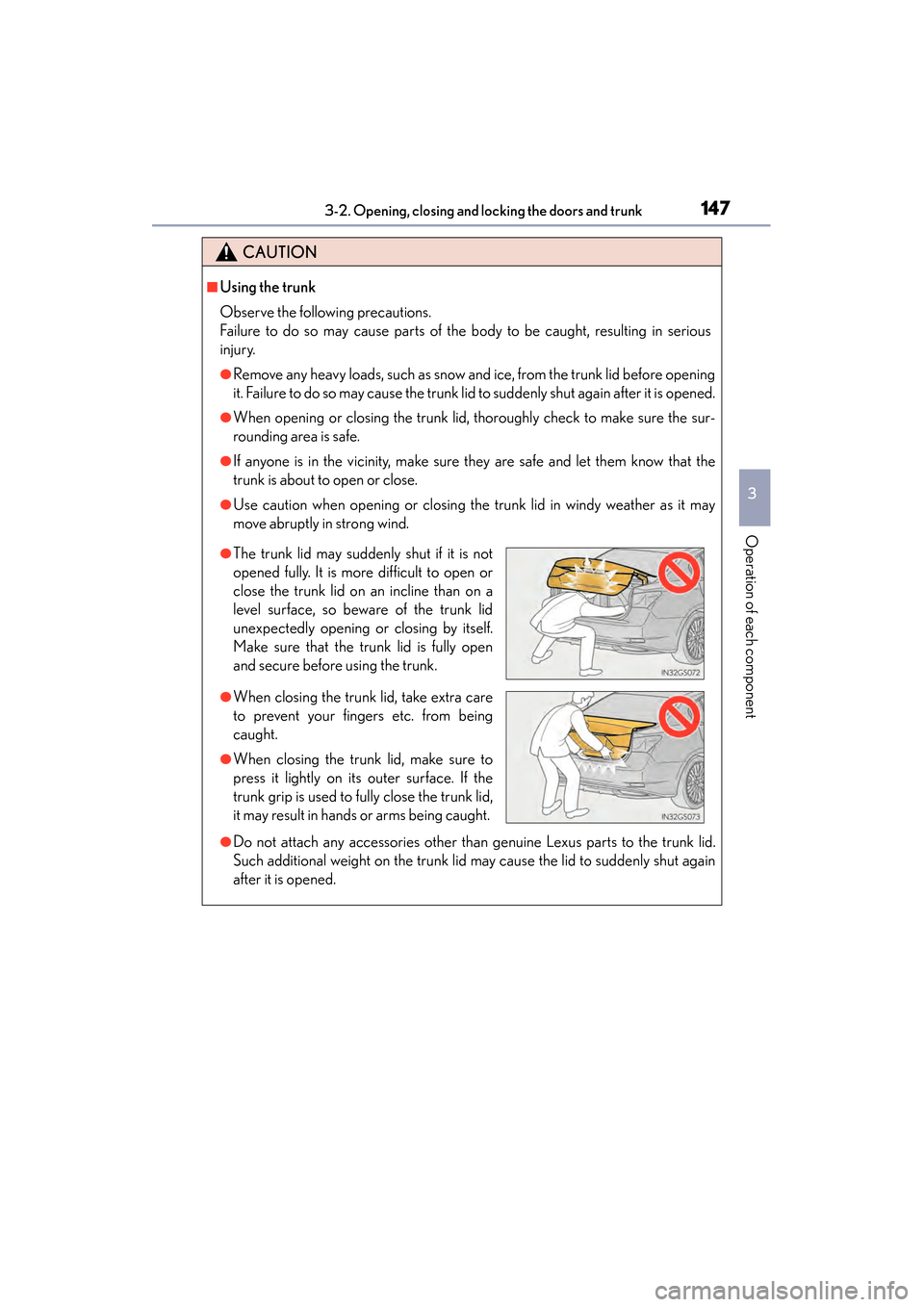
●The trunk lid may suddenly shut if it is not
opened fully. It is more difficult to open or
close the trunk lid on an incline than on a
level surface, so beware of the trunk lid
unexpectedly opening or closing by itself.
Make sure that the trunk lid is fully open
and secure before using the trunk.
●When closing the trunk lid, take extra care
to prevent your fingers etc. from being
caught.
●When closing the trunk lid, make sure to
press it lightly on its outer surface. If the
trunk grip is used to fully close the trunk lid,
it may result in hands or arms being caught.
GS450h_OM_OM30D52U_(U).book Page 147 Monday, July 29, 2013 12:07 PM