ESP Lexus GS450h 2014 Workshop Manual
[x] Cancel search | Manufacturer: LEXUS, Model Year: 2014, Model line: GS450h, Model: Lexus GS450h 2014Pages: 890, PDF Size: 40.62 MB
Page 475 of 890
474
GS450h_OM_OM30D52U_(U)
5-3. Using the audio system
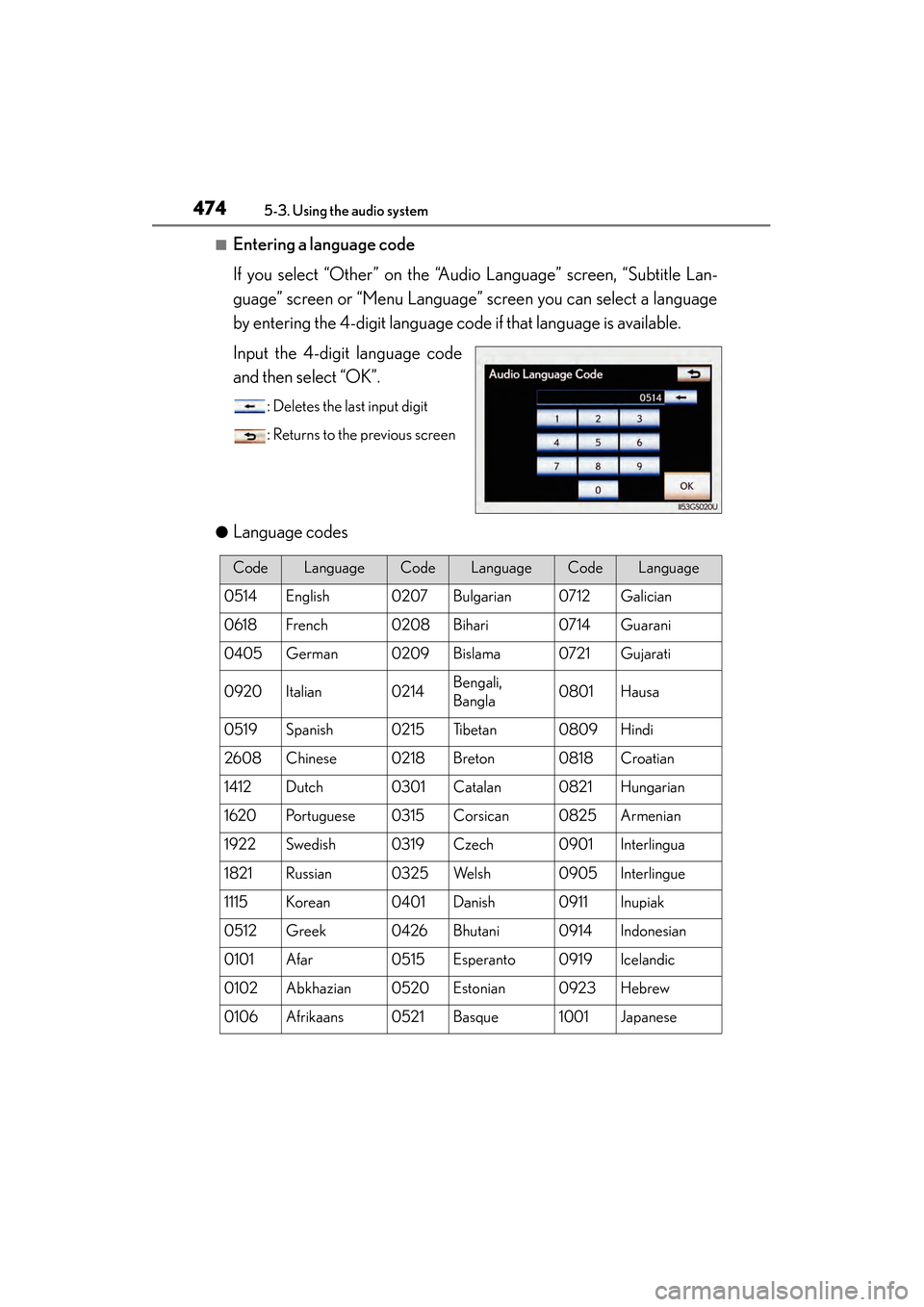
■Entering a language code
If you select “Other” on the “Audio Language” screen, “Subtitle Lan-
guage” screen or “Menu Language” screen you can select a language
by entering the 4-digit language code if that language is available.
Input the 4-digit language code
and then select “OK”.
: Deletes the last input digit
: Returns to the previous screen
●
Language codes
CodeLanguageCodeLanguageCodeLanguage
0514English0207Bulgarian0712Galician
0618French0208Bihari0714Guarani
0405German0209Bislama0721Gujarati
0920Italian0214Bengali,
Bangla0801Hausa
0519Spanish0215Ti b e t a n0809Hindi
2608Chinese0218Breton0818Croatian
1412Dutch0301Catalan0821Hungarian
1620Portuguese0315Corsican0825Armenian
1922Swedish0319Czech0901Interlingua
1821Russian0325We l s h0905Interlingue
1115Korean0401Danish0911Inupiak
0512Greek0426Bhutani0914Indonesian
0101Afar0515Esperanto0919Icelandic
0102Abkhazian0520Estonian0923Hebrew
0106Afrikaans0521Basque1001Japanese
GS450h_OM_OM30D52U_(U).book Page 474 Monday, July 29, 2013 12:07 PM
Page 498 of 890
GS450h_OM_OM30D52U_(U)
4975-3. Using the audio system
5
Interior features
■When using the Bluetooth® audio system
●In the following conditions, the system may not function.
• The portable player is turned off
• The portable player is not connected
• The portable player battery is low
●There may be a delay if phone connection is carried out during Bluetooth® audio
play.
●Depending on the type of portable player that is connected to the system, opera-
tion may differ slightly and certain functions may not be available.
■Bluetooth® antenna
The antenna is built into the instrument panel. If the portable player is behind the seat
or in the glove box or console box, or is touching or covered by metal objects, con-
nection status may deteriorate.
■Battery charge/signal status
This display may not correspond exactly with the portable player, and this system
does not have a charging function.
■About Bluetooth®
■Compatible models
Portable players must correspond to the following specifications:
●Bluetooth® specification
Ver. 1.1 or higher
(Recommended: Ver. 2.1+EDR or higher)
●Profile
• A2DP (Advanced Audio Distribution Profile) Ver. 1.0 or higher
• AVRCP (Audio/Video Remote Control Profile) Ver. 1.0 or higher (Recommended: Ver. 1.4 or higher)
However, please note that some functions may be limited depending on the type of
portable player. Also, the different screen is displayed depending on which portable
player is connecting.
Please go to the website at http://www.lexus.com/MobileLink
to find approved por-
table players for this system. Bluetooth is a registered trademark of
Bluetooth SIG, Inc.
GS450h_OM_OM30D52U_(U).book Page 497 Monday, July 29, 2013 12:07 PM
Page 506 of 890
GS450h_OM_OM30D52U_(U)
5055-3. Using the audio system
5
Interior features
■If you select
The display returns to the previous screen.
■USB memory functions
●When the USB memory is connected and the audio source is changed to USB
memory mode, the USB memory will start playing the first file in the first folder. If
the same device is removed and reinserted (and the contents have not been
changed), the USB memory will resume playing from the same point it was last
used.
●Depending on the USB memory that is connected to the system, certain functions
may not be available. Disconnecting the device and reconnecting it once again
may resolve some malfunctions.
■When using a USB memory
You may be unable to use the instrument panel power outlet if the USB memory is
connected to the USB port at the same time.
■Error messages for USB memory
“USB Error”: This indicates a problem in the USB memory or its connection.
“No music files found.”: This indicates that no MP3/WMA files are included in theUSB memory.
■USB memory
●Compatible devices
USB memory that can be used for MP3 and WMA playback.
●Compatible device formats
The following device formats can be used:
• USB communication formats: USB2.0 HS (480 Mbps) and FS (12 Mbps)
• File formats: FAT16/32 (Windows)
• Correspondence class: Mass storage class
MP3 and WMA files written in any format other than those listed above may not play
correctly, and their file names and folder names may not be displayed correctly.
Items related to standards and limitations are as follows:
• Maximum directory hierarchy: 8 levels
• Maximum number of folders in a device: 3000 (including the root)
• Maximum number of files in a device: 9999
• Maximum number of files per folder: 255
GS450h_OM_OM30D52U_(U).book Page 505 Monday, July 29, 2013 12:07 PM
Page 516 of 890
GS450h_OM_OM30D52U_(U)
5155-3. Using the audio system
5
Interior features
■Playing tracks in random order
Select “RAND” on the screen.
Each time “RAND” is selected, the mode changes as follows:
track shuffle → album shuffle → off
■Playing the albums in random order
Select “RAND” repeatedly until “ALB.RAND” appears on the screen.
To cancel, select “RAND” again.
Select “RPT” on the screen.
“RPT” appears on the screen.
To cancel, select “RPT” again.
■If you select
The display returns to the previous screen.
■About iPod
●“Made for iPod” and “Made for iPhone” mean that an electronic accessory has
been designed to connect specifically to iPod, or iPhone, respectively, and has
been certified by the developer to meet Apple performance standards.
●Apple is not responsible for the operation of this device or its compliance with
safety and regulatory standards. Please note that the use of this accessory with
iPod or iPhone may affect wireless performance.
●iPhone, iPod, iPod classic, iPod nano and iPod touch are trademarks of Apple Inc.,
registered in the U.S. and other countries.
Random playback
Repeat play
GS450h_OM_OM30D52U_(U).book Page 515 Monday, July 29, 2013 12:07 PM
Page 535 of 890
534
GS450h_OM_OM30D52U_(U)
5-4. Using the hands-free phone system (for cellular phone)
■When using the hands-free system
●The audio system is muted when making a call.
●If both parties speak at the same time, it may be difficult to hear.
●If the incoming call volume is overly loud, an echo may be heard.
●Try to face toward the microphone as much as possible when speaking.
●In the following circumstances, it may be difficult to hear the other party:
• When driving on unpaved roads
• When driving at high speeds
• If a window is open
• If the air conditioning is blowing directly on the microphone
• If the air conditioning is set to high
• There is an effect from the network of the cellular phone
■Conditions under which the system will not operate
●If using a cellular phone that does not support Bluetooth®
●If the cellular phone is turned off
●If you are outside service range
●If the cellular phone is not connected
●If the cellular phone’s battery is low
■Bluetooth® antenna
The antenna is built into the instrument panel. If the cellular phone is behind the seat
or in the console box, or touching or covered by metal objects, connection status
may deteriorate.
■Battery charge/Signal status
●This display may not correspond exactly with the cellular phone itself.
●When the cellular phone is not connected, “No connect” is displayed.
●When the cellular phone is out of the service area or in a place inaccessible by
radio waves, “No Service” is displayed.
■When using Bluetooth® audio and hands-free system at the same time
The following problems may occur.
●The Bluetooth® connection may be cut.
●Noise may be heard on the Bluetooth® audio playback.
GS450h_OM_OM30D52U_(U).book Page 534 Monday, July 29, 2013 12:07 PM
Page 538 of 890
GS450h_OM_OM30D52U_(U)
5375-4. Using the hands-free phone system (for cellular phone)
5
Interior features
CAUTION
■FCC WARNING
This equipment complies with FCC/IC radiation exposure limits set forth for an
uncontrolled environment and meets the FCC radio frequency (RF) Exposure
Guidelines in Supplement C to OET65 and RSS-102 of the IC radio frequency
(RF) Exposure rules. This equipment has very low levels of RF energy that it
deemed to comply without maximum permissive exposure evaluation (MPE). But
it is desirable that it should be installed and operated keeping the radiator at least
7.9 in. (20 cm) or more away from person’s body (excluding extremities: hands,
wrists, feet and ankles).
Cet équipement est conforme aux limites d’exposition aux rayonnements énon-
cées pour un environnement non contrôlé et respecte les règles les radioélec-
triques (RF) de la FCC lignes directrices d’exposition dans le Supplément C à
OET65 et d’exposition aux fréquences radioélectriques (RF) CNR-102 de l’IC.
Cet équipement émet une énergie RF très faible qui est considérée conforme sans
évaluation de l’exposition maximale autorisée. Cependant, cet équipement doit
être installé et utilisé en gardant une distance de 20 cm ou plus entre le dispositif
rayonnant et le corps (à l’exception des extrémités: mains, poignets, pieds et chev-
illes).
XFor vehicles sold in the U.S.A.
Changes or modifications not expressly approved by the party responsible for
compliance could void the user’s authority to operate the equipment.
This transmitter must not be co-located or operated in conjunction with any other
antenna or transmitter.
GS450h_OM_OM30D52U_(U).book Page 537 Monday, July 29, 2013 12:07 PM
Page 539 of 890
538
GS450h_OM_OM30D52U_(U)
5-4. Using the hands-free phone system (for cellular phone)
CAUTION
XFor vehicles sold in Canada
Tout changement ou toute modification de la construction non approuvé expres-
sément par l’abonné responsable de la conformité risque d’annuler l’autorité de
l’utilisateur d’exploiter l’équipement.
Cet émetteur ne doit pas être co-implanté ou actionné en même temps qu’aucune
autre antenne ou émetteur.
Under Industry Canada regulations, this radio transmitter may only operate using
an antenna of a type and maximum (or lesser) gain approved for the transmitter by
Industry Canada. To reduce potential radio interference to other users, the
antenna type and its gain should be so chosen that the equivalent isotropically radi-
ated power (e.i.r.p.) is not more than that necessary for successful communication.
Conformément à la réglementation d’Industrie Canada, le présent émetteur radio
peut fonctionner avec une antenne d’un type et d’un gain maximal (ou inférieur)
approuvé pour l’émetteur par Industrie Canada. Dans le but de réduire les risques
de brouillage radioélectrique à l’intention des autres utilisateurs, il faut choisir le
type d’antenne et son gain de sorte que la puissance isotrope rayonnée équiva-
lente (p.i.r.e.) ne dépasse pas l’intensité nécessaire à l’établissement d’une commu-
nication satisfaisante.
■Caution while driving
Do not use the cellular phone or connect the Bluetooth
® system.
■Caution regarding interference with electronic devices
●Your audio unit is fitted with Bluetooth® antennas. People with implantable car-
diac pacemakers, cardiac resynchronization therapy-pacemakers or implantable
cardioverter defibrillators should maintain a reasonable distance between them-
selves and the Bluetooth
® antennas. The radio waves may affect the operation of
such devices.
●Before using Bluetooth® devices, users of any electrical medical device other
than implantable cardiac pacemakers, cardiac resynchronization therapy-pace-
makers or implantable cardioverter defibrillators should consult the manufac-
turer of the device for information about its operation under the influence of radio
waves. Radio waves could have unexpected effects on the operation of such
medical devices.
NOTICE
■When leaving the vehicle
Do not leave your cellular phone in the vehicle. The inside of the vehicle may
become hot, causing damage to the phone.
GS450h_OM_OM30D52U_(U).book Page 538 Monday, July 29, 2013 12:07 PM
Page 541 of 890
540
GS450h_OM_OM30D52U_(U)
5-4. Using the hands-free phone system (for cellular phone)
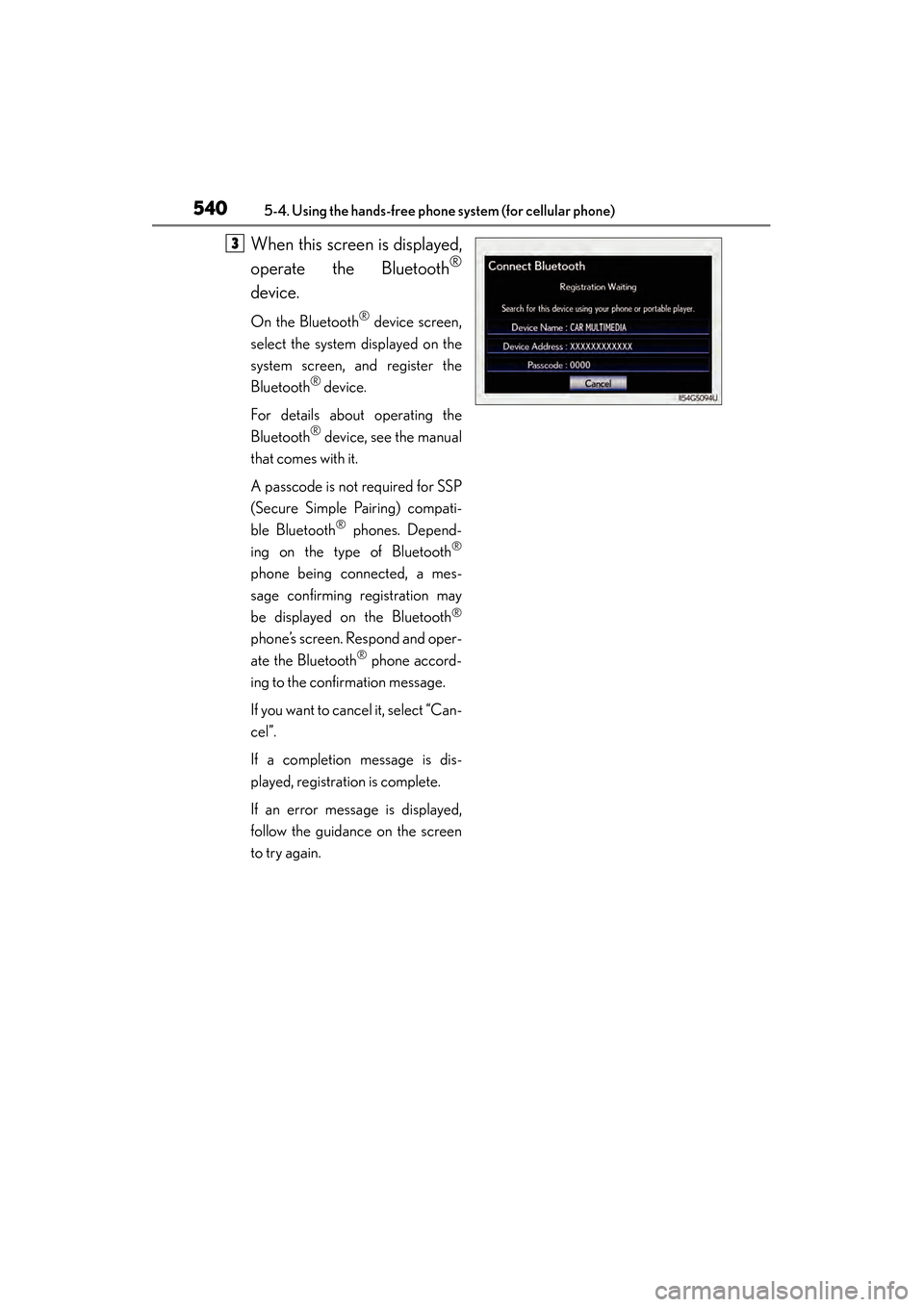
When this screen is displayed,
operate the Bluetooth
®
device.
On the Bluetooth® device screen,
select the system displayed on the
system screen, and register the
Bluetooth
® device.
For details about operating the
Bluetooth
® device, see the manual
that comes with it.
A passcode is not required for SSP
(Secure Simple Pairing) compati-
ble Bluetooth
® phones. Depend-
ing on the type of Bluetooth®
phone being connected, a mes-
sage confirming registration may
be displayed on the Bluetooth
®
phone’s screen. Respond and oper-
ate the Bluetooth
® phone accord-
ing to the confirmation message.
If you want to cancel it, select “Can-
cel”.
If a completion message is dis-
played, registration is complete.
If an error message is displayed,
follow the guidance on the screen
to try again.
3
GS450h_OM_OM30D52U_(U).book Page 540 Monday, July 29, 2013 12:07 PM
Page 543 of 890
542
GS450h_OM_OM30D52U_(U)
5-4. Using the hands-free phone system (for cellular phone)
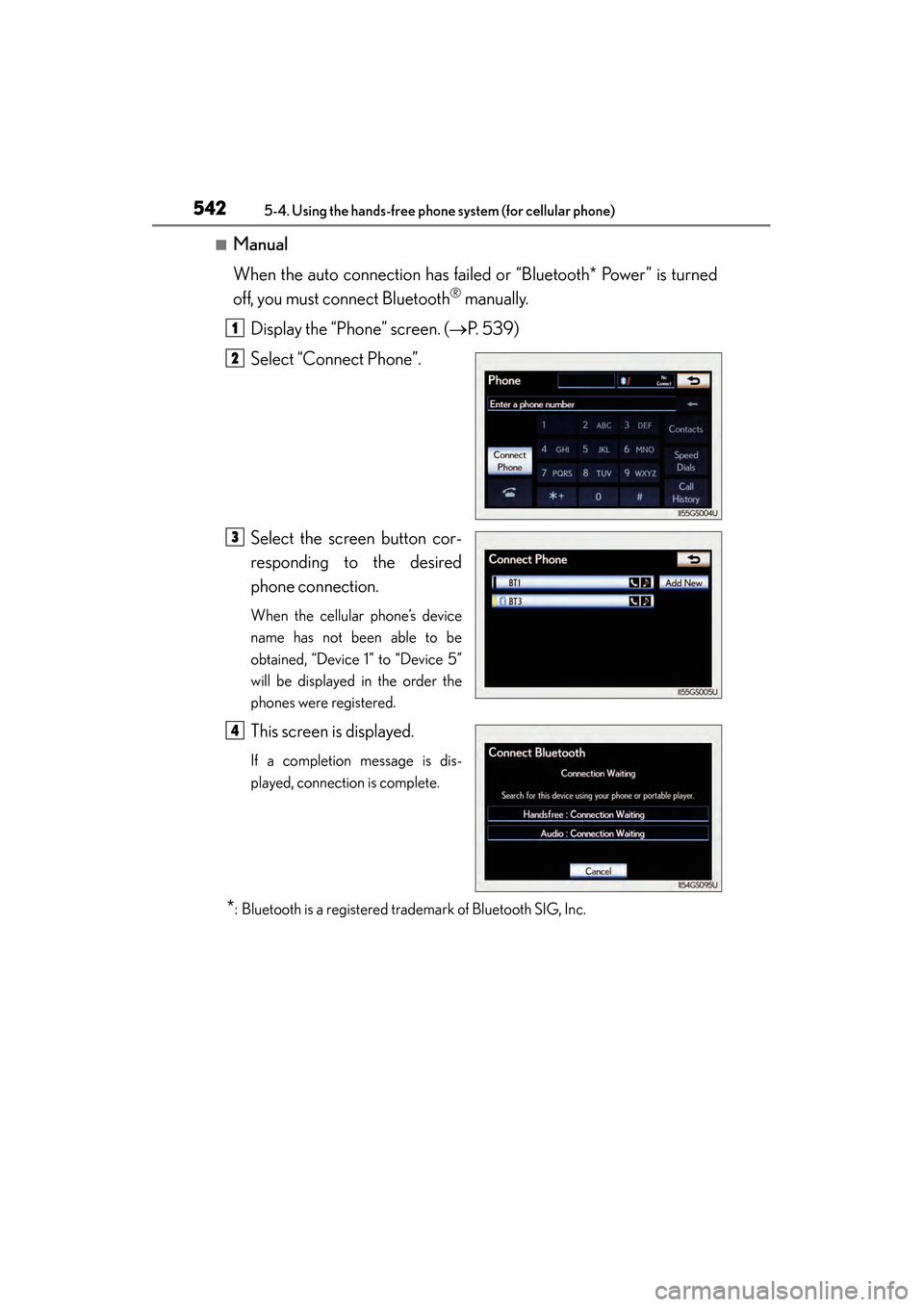
■Manual
When the auto connection has failed or “Bluetooth* Power” is turned
off, you must connect Bluetooth
® manually.
Display the “Phone” screen. ( →P. 5 3 9 )
Select “Connect Phone”.
Select the screen button cor-
responding to the desired
phone connection.
When the cellular phone’s device
name has not been able to be
obtained, “Device 1” to “Device 5”
will be displayed in the order the
phones were registered.
This screen is displayed.
If a completion message is dis-
played, connection is complete.
*: Bluetooth is a registered trademark of Bluetooth SIG, Inc.
1
2
3
4
GS450h_OM_OM30D52U_(U).book Page 542 Monday, July 29, 2013 12:07 PM
Page 562 of 890
GS450h_OM_OM30D52U_(U)
5615-4. Using the hands-free phone system (for cellular phone)
5
Interior features
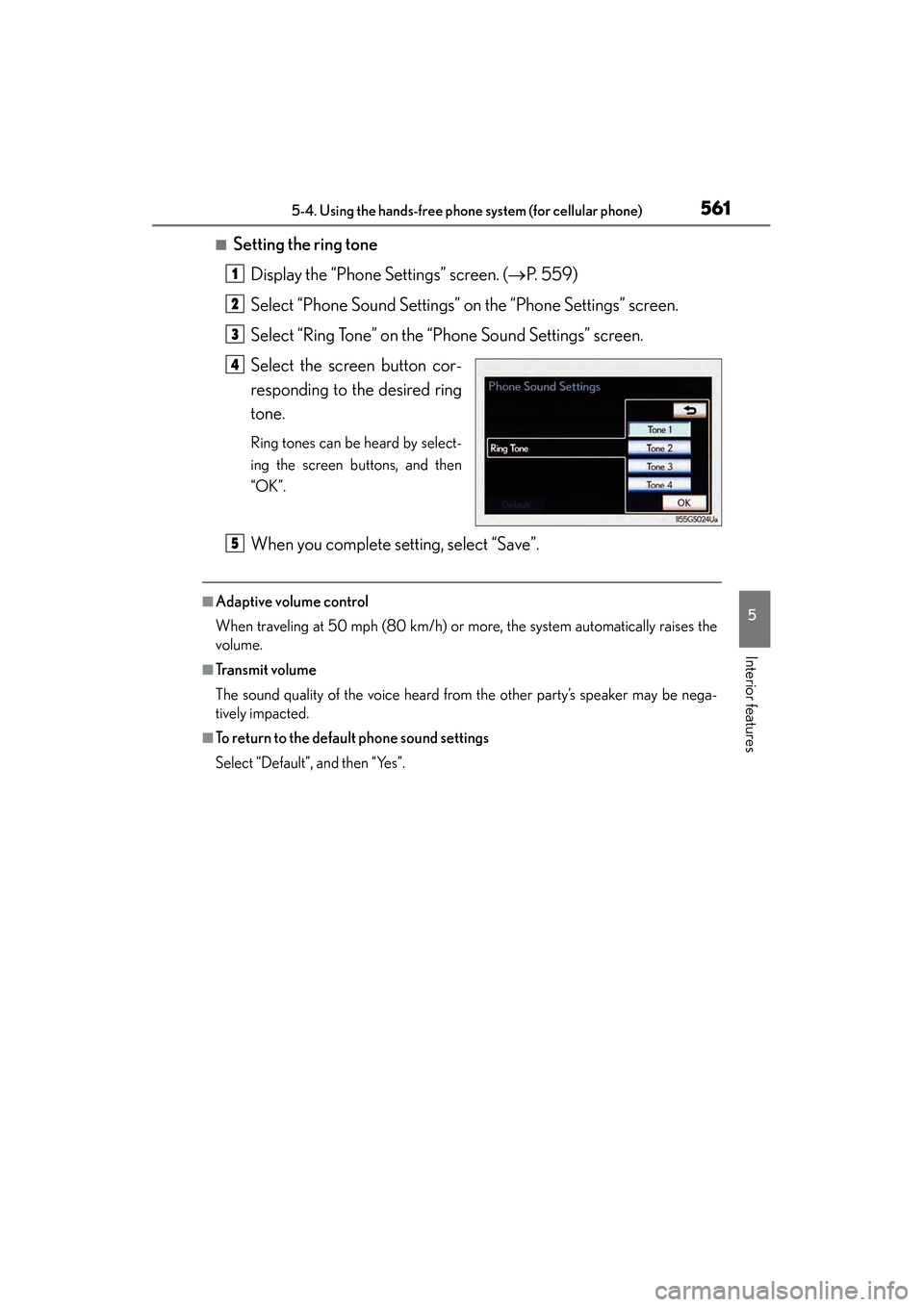
■Setting the ring toneDisplay the “Phone Settings” screen. ( →P. 559)
Select “Phone Sound Settings” on the “Phone Settings” screen.
Select “Ring Tone” on the “Phone Sound Settings” screen.
Select the screen button cor-
responding to the desired ring
tone.
Ring tones can be heard by select-
ing the screen buttons, and then
“OK”.
When you complete setting, select “Save”.
■Adaptive volume control
When traveling at 50 mph (80 km/h) or more, the system automatically raises the
volume.
■Tr a n s m i t v o l u m e
The sound quality of the voice heard from the other party’s speaker may be nega-
tively impacted.
■To return to the default phone sound settings
Select “Default”, and then “Yes”.
1
2
3
4
5
GS450h_OM_OM30D52U_(U).book Page 561 Monday, July 29, 2013 12:07 PM