lock Lexus GS450h 2014 Manual PDF
[x] Cancel search | Manufacturer: LEXUS, Model Year: 2014, Model line: GS450h, Model: Lexus GS450h 2014Pages: 890, PDF Size: 40.62 MB
Page 236 of 890
GS450h_OM_OM30D52U_(U)
2354-4. Refueling
4
Driving
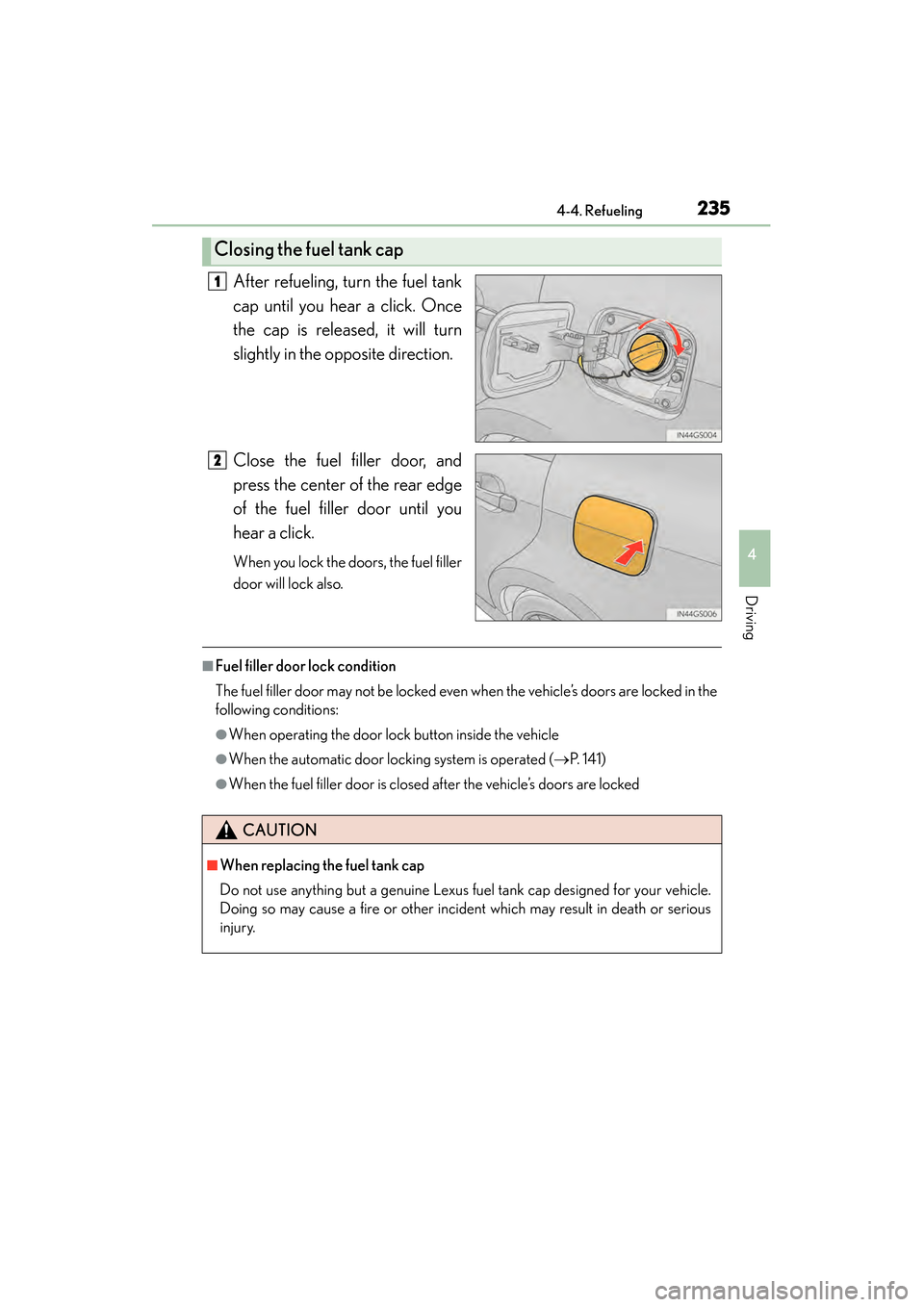
After refueling, turn the fuel tank
cap until you hear a click. Once
the cap is released, it will turn
slightly in the opposite direction.
Close the fuel filler door, and
press the center of the rear edge
of the fuel filler door until you
hear a click.
When you lock the doors, the fuel filler
door will lock also.
■Fuel filler door lock condition
The fuel filler door may not be locked even when the vehicle’s doors are locked in the
following conditions:
●When operating the door lock button inside the vehicle
●When the automatic door locking system is operated (→P. 141)
●When the fuel filler door is closed after the vehicle’s doors are locked
Closing the fuel tank cap
1
2
CAUTION
■When replacing the fuel tank cap
Do not use anything but a genuine Lexus fuel tank cap designed for your vehicle.
Doing so may cause a fire or other incident which may result in death or serious
injury.
GS450h_OM_OM30D52U_(U).book Page 235 Monday, July 29, 2013 12:07 PM
Page 281 of 890
280
GS450h_OM_OM30D52U_(U)
4-5. Using the driving support systems
NOTICE
■Camera sensor (→P. 2 7 1 )
Observe the following to ensure that the LKA system functions correctly.
●Keep the windshield clean at all times.
Performance could be affected if the windshield is dirty, or if raindrops, conden-
sation or ice are adhering to the windshield.
●When adjusting the rear view mirror, make sure that it does not block the camera
lens.
●Do not attach window tinting to the windshield.
●Do not install an antenna in front of the camera lens.
●If the windshield is fogged up, use the windshield defogger to remove fog from
the windshield.
When it is cold, using the heater with air blowing to the feet may allow the upper
part of the windshield to fog up. This will have a negative effect on the images.
●Do not place anything on the dashboard.
The camera sensor may recognize the image reflected on the windshield as lane
markers by mistake.
●Do not scratch the camera lens, or let it get dirty.
When cleaning the inside of the windshield, be careful not to get any glass
cleaner etc. on the lens. Also, do not touch the lens.
For lens repair, contact your Lexus dealer.
●Do not change the installation position or direction of the camera sensor or
remove it. The direction of the camera sensor is precisely adjusted.
●Do not subject the camera sensor to strong impact or force, and do not disas-
semble the camera sensor.
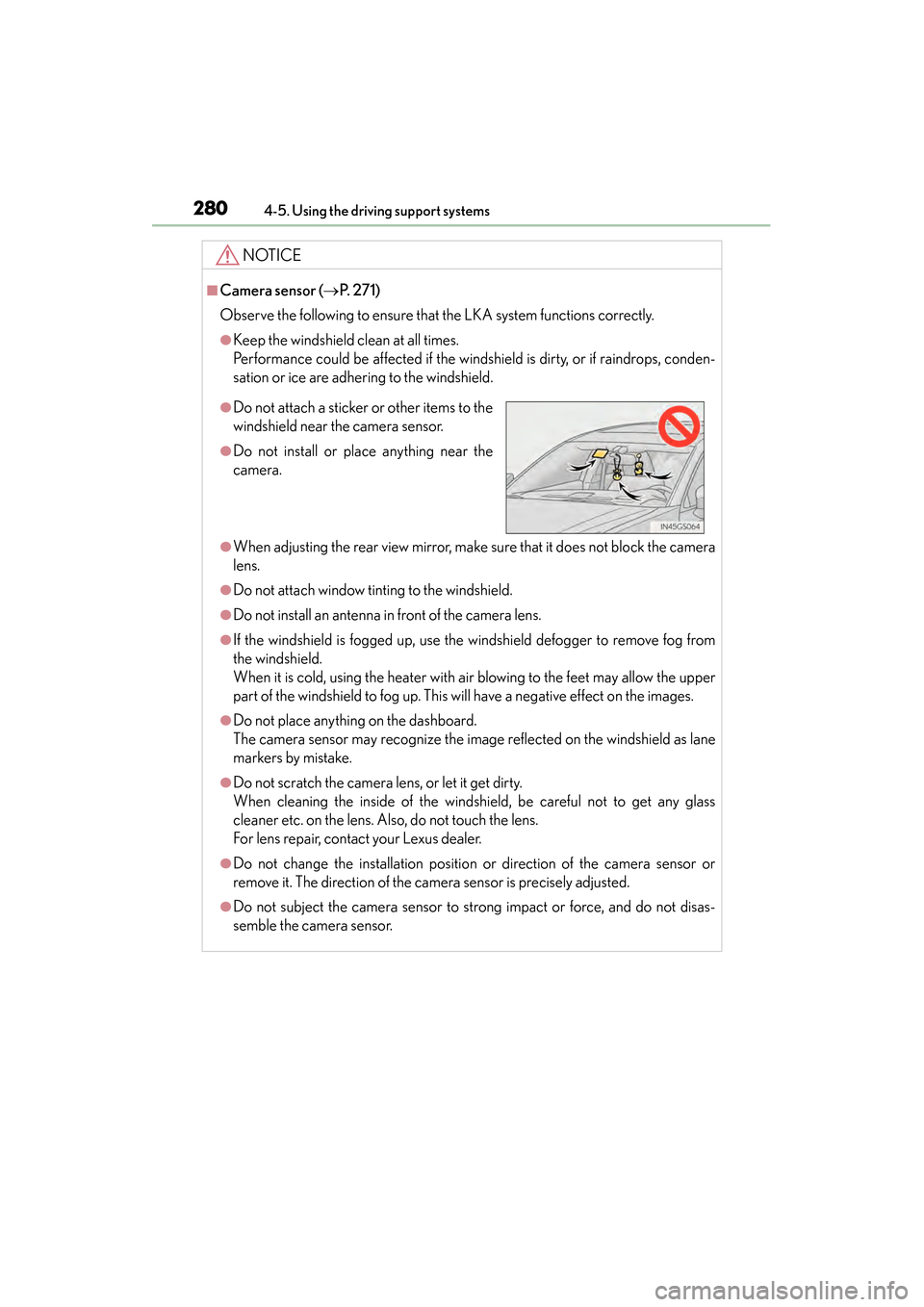
●Do not attach a sticker or other items to the
windshield near the camera sensor.
●Do not install or place anything near the
camera.
GS450h_OM_OM30D52U_(U).book Page 280 Monday, July 29, 2013 12:07 PM
Page 309 of 890
308
GS450h_OM_OM30D52U_(U)
4-5. Using the driving support systems
Driving assist systems
◆ABS (Anti-lock Brake System)
Helps to prevent wheel lock when the brakes are applied suddenly, or if
the brakes are applied while driving on a slippery road surface
◆Brake assist
Generates an increased level of braking force after the brake pedal is
depressed when the system detects a panic stop situation
◆VSC (Vehicle Stability Control)
Helps the driver to control skidding when swerving suddenly or turning
on slippery road surfaces
◆TRAC (Traction Control)
Helps to maintain drive power and prevent the drive wheels from spin-
ning when starting the vehicle or accelerating on slippery roads
◆EPS (Electric Power Steering)
Employs an electric motor to reduce the amount of effort needed to
turn the steering wheel
To help enhance driving safety and performance, the following systems
operate automatically in response to various driving situations. Be
aware, however, that these systems are supplementary and should not
be relied upon too heavily when operating the vehicle.
GS450h_OM_OM30D52U_(U).book Page 308 Monday, July 29, 2013 12:07 PM
Page 320 of 890
GS450h_OM_OM30D52U_(U)
3194-5. Using the driving support systems
4
Driving
■Conditions that may trigger the system even if there is no danger of a collision
●When there is an object by the roadside at the entrance to a curve
●When passing an oncoming vehicle on a curve
●When driving over a narrow iron bridge
●When there is a metal object on the road surface
●When driving on an uneven road surface
●When passing an oncoming vehicle on a left-turn
●When your vehicle rapidly closes on the vehicle in front
●When a grade separation/interchange, sign, billboard, or other structure appears
to be directly in the vehicle’s line of travel
●When climbing a steep hill causes an overhead billboard or other metallic structure
to appear directly in the vehicle’s line of travel
When the system is activated in the situations described above, there is also a possi-
bility that the seat belts will retract quickly and the brakes will be applied with a force
greater than normal. When the seat belt is locked in the retracted position, stop the
vehicle in a safe place, release the seat belt and refasten it.
■Obstacles not detected
The sensor cannot detect plastic obstacles such as traffic cones. There may also be
occasions when the sensor cannot detect pedestrians, animals, bicycles, motorcy-
cles, trees, or snowdrifts.
■Situations in which the pre-collision system does not function properly
The system may not function effectively in situations such as the following:
●On roads with sharp bends or uneven surfaces
●If a vehicle suddenly moves in front of your vehicle, such as at an intersection
●If a vehicle suddenly cuts in front of your vehicle, such as when overtaking
●In inclement weather such as heavy rain, fog, snow or sand storms
●When your vehicle is skidding
●When your vehicle is steeply inclined
●When the radar sensor moves off position due to its surrounding area being sub-
jected to a strong impact
GS450h_OM_OM30D52U_(U).book Page 319 Monday, July 29, 2013 12:07 PM
Page 322 of 890
GS450h_OM_OM30D52U_(U)
3214-5. Using the driving support systems
4
Driving
CAUTION
■Limitations of the pre-collision system
Do not overly rely on the pre-collision system. Always drive safely, taking care to
observe your surroundings and checking for any obstacles or other road hazards.
Failure to do so may cause an accident resulting in death or serious injury.
■Handling the radar sensor
Observe the following to ensure the pre-collision system can function effectively.
Otherwise, the system may not function correctly and could result in an accident.
●Keep the sensor and grille cover clean at all times.
Clean the sensor and grille cover with a soft cloth so you do not mark or damage
them.
●Do not subject the sensor or surrounding area to a strong impact.
If the sensor moves even slightly off position, the system may become inaccurate
or malfunction. If the sensor or surrounding area is subject to a strong impact,
always have the area inspected and adjusted by your Lexus dealer.
●Do not disassemble the sensor.
●Do not attach accessories or stickers to the sensor, grille cover or surrounding
area.
●Do not modify or paint the sensor and grille cover.
●Do not replace them with non-genuine parts.
■Determining the direction the driver is fa cing and whether the driver’s eyes are
open or closed
The direction the driver is facing and whether the driver’s eyes are open or closed
may not be determined correctly if the following conditions exist:
●There is an object between the driver monitor sensor and the driver’s face, such
as when the sensor is blocked.
●A part of the driver’s face is covered.
●The sensor or the driver’s face is exposed to intense light such as sunlight.
●The driving posture is improper.
GS450h_OM_OM30D52U_(U).book Page 321 Monday, July 29, 2013 12:07 PM
Page 339 of 890
338
GS450h_OM_OM30D52U_(U)
4-5. Using the driving support systems
NOTICE
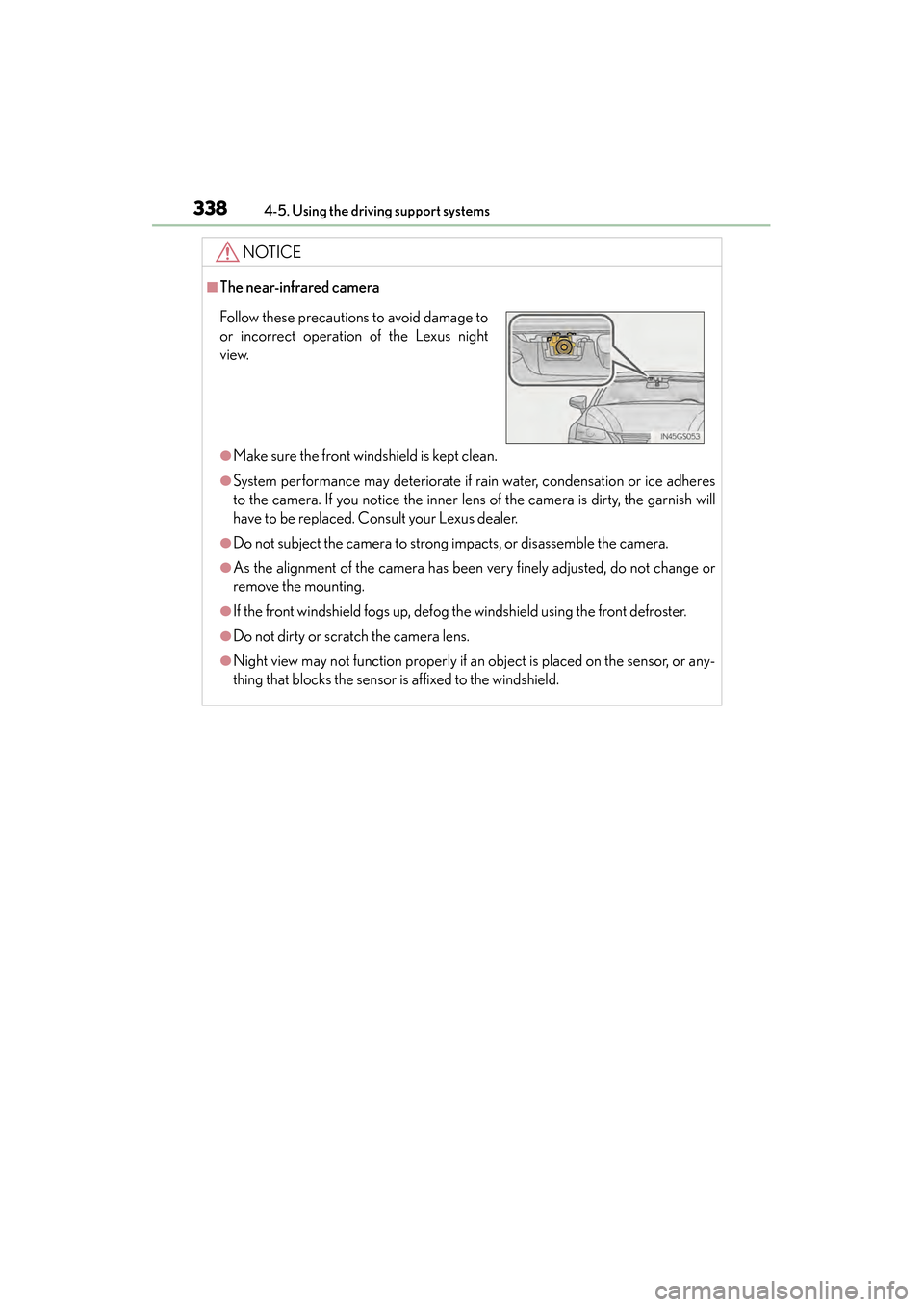
■The near-infrared camera
●Make sure the front windshield is kept clean.
●System performance may deteriorate if rain water, condensation or ice adheres
to the camera. If you notice the inner lens of the camera is dirty, the garnish will
have to be replaced. Consult your Lexus dealer.
●Do not subject the camera to strong impacts, or disassemble the camera.
●As the alignment of the camera has been very finely adjusted, do not change or
remove the mounting.
●If the front windshield fogs up, defog the windshield using the front defroster.
●Do not dirty or scratch the camera lens.
●Night view may not function properly if an object is placed on the sensor, or any-
thing that blocks the sensor is affixed to the windshield.
Follow these precautions to avoid damage to
or incorrect operation of the Lexus night
view.
GS450h_OM_OM30D52U_(U).book Page 338 Monday, July 29, 2013 12:07 PM
Page 344 of 890
GS450h_OM_OM30D52U_(U)
3434-6. Driving tips
4
Driving
Perform the following according to the driving conditions:
●Do not try to forcibly open a window or move a wiper that is frozen.
Pour warm water over the frozen area to melt the ice. Wipe away the
water immediately to prevent it from freezing.
●To ensure proper operation of the climate control system fan, remove
any snow that has accumulated on the air inlet vents in front of the wind-
shield.
●Check for and remove any excess ice or snow that may have accumu-
lated on the exterior lights, vehicle’s roof, chassis, around the tires or on
the brakes.
●Remove any snow or mud from the bottom of your shoes before getting
in the vehicle.
Accelerate the vehicle slowly, keep a safe distance between you and the
vehicle ahead, and drive at a reduced speed suitable to road conditions.
Park the vehicle and move the shift lever to P without setting the parking
brake. The parking brake may freeze up, preventing it from being
released. If necessary, block the wheels to prevent inadvertent sliding or
creeping.
Before driving the vehicle
When driving the vehicle
When parking the vehicle
GS450h_OM_OM30D52U_(U).book Page 343 Monday, July 29, 2013 12:07 PM
Page 350 of 890
349
GS450h_OM_OM30D52U_(U)
5Interior features
5-4. Using the hands-free phone system (for cellular phone)
Hands-free system (for cellular phone) ................ 530
Using a Bluetooth
® phone ....539
Setting the hands-free system (for cellular phone) .................559
Setting the Bluetooth
®........... 584
5-5. Using the interior lights Interior lights list.......................... 597• Interior light ........................... 598
• Personal lights....................... 598
5-6. Using the storage features List of storage features............ 600• Glove box............................... 602
• Console box .......................... 603
• Cup holders........................... 604
• Auxiliary boxes..................... 606
Trunk features .............................. 607 5-7. Other interior features
Sun visors and vanity mirrors ...................609
Clock................................................ 610
Ashtrays ............................................ 611
Power outlets .................................612
Heated steering wheel ..............614
Seat heaters/ seat ventilators ...........................616
Armrest .......................................... 620
Rear sunshade/ rear door sunshades ................621
Coat hooks ................................... 624
Assist grips.................................... 625
Utility hook.................................... 626
Garage door opener.................627
Safety Connect ........................... 634
GS450h_OM_OM30D52U_(U).book Page 349 Monday, July 29, 2013 12:07 PM
Page 399 of 890
398
GS450h_OM_OM30D52U_(U)
5-2. Using the air conditioning system and defogger
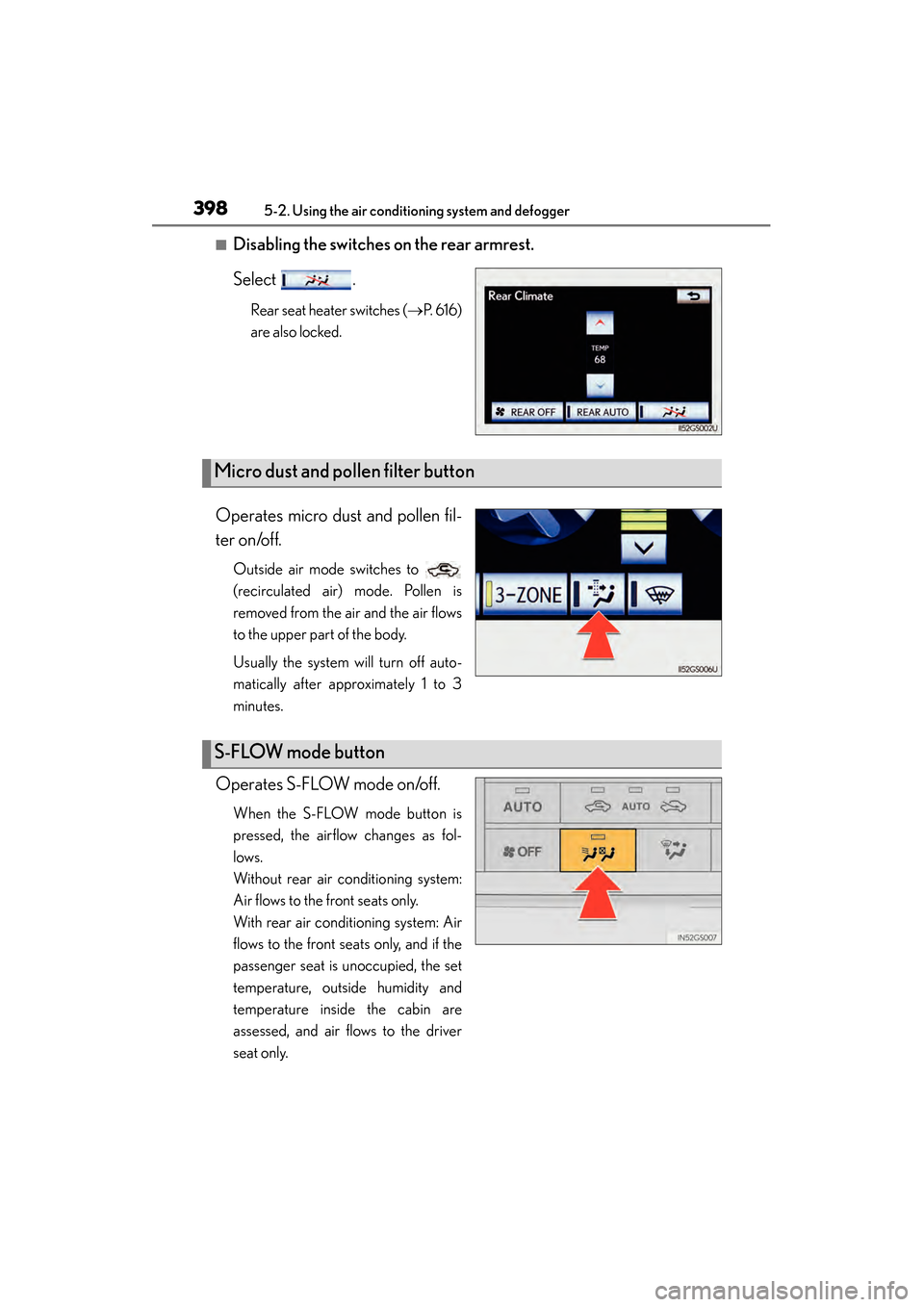
■Disabling the switches on the rear armrest.
Select .
Rear seat heater switches (→P. 6 1 6 )
are also locked.
Operates micro dust and pollen fil-
ter on/off.
Outside air mode switches to
(recirculated air) mode. Pollen is
removed from the air and the air flows
to the upper part of the body.
Usually the system will turn off auto-
matically after approximately 1 to 3
minutes.
Operates S-FLOW mode on/off.
When the S-FLOW mode button is
pressed, the airflow changes as fol-
lows.
Without rear air conditioning system:
Air flows to the front seats only.
With rear air conditioning system: Air
flows to the front seats only, and if the
passenger seat is unoccupied, the set
temperature, outside humidity and
temperature inside the cabin are
assessed, and air flows to the driver
seat only.
Micro dust and pollen filter button
S-FLOW mode button
GS450h_OM_OM30D52U_(U).book Page 398 Monday, July 29, 2013 12:07 PM
Page 401 of 890
400
GS450h_OM_OM30D52U_(U)
5-2. Using the air conditioning system and defogger
■Registering air conditioning settings to electronic keys
●Unlocking the vehicle using an electronic key and turning the power switch to ON
mode will recall that key’s registered air conditioning settings.
●When the power switch is turned off, the current air conditioning settings will auto-
matically be registered to the electronic key that was used to unlock the vehicle.
The system may not operate correctly if more than one electronic key is in the vicinity
or if the smart access system with push-button start is used to unlock a passenger
door.
Settings for the electronic key and the corresponding door can be changed. Contact
your Lexus dealer.
■Using automatic mode
Fan speed is adjusted automatically according to the temperature setting and the
ambient conditions.
Therefore, the fan may stop for a while until warm or cool air is ready to flow immedi-
ately after is pressed.
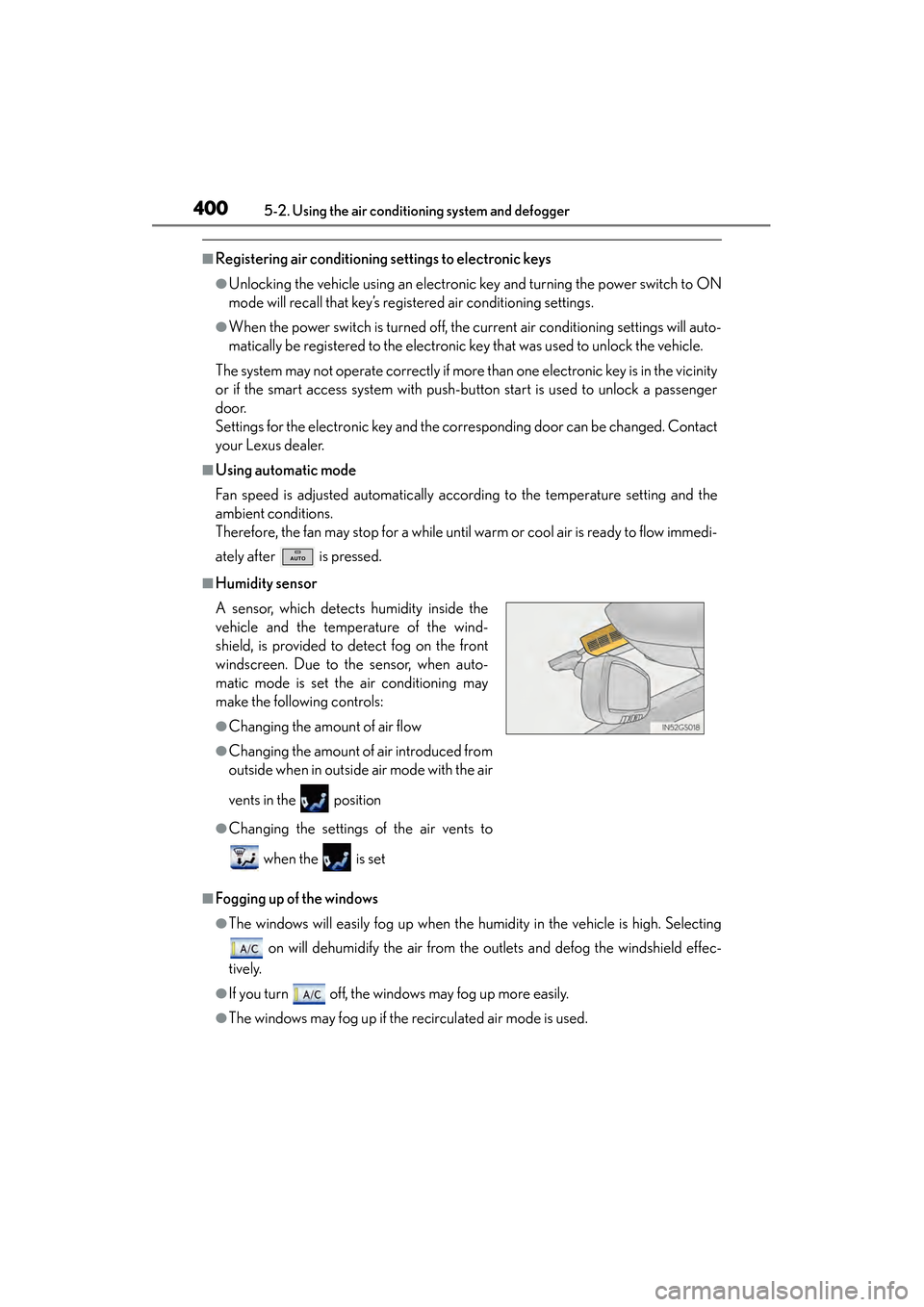
■Humidity sensor
■Fogging up of the windows
●The windows will easily fog up when the humidity in the vehicle is high. Selecting on will dehumidify the air from the outlets and defog the windshield effec-
tively.
●If you turn off, the windows may fog up more easily.
●The windows may fog up if the recirculated air mode is used.
A sensor, which detects humidity inside the
vehicle and the temperature of the wind-
shield, is provided to detect fog on the front
windscreen. Due to the sensor, when auto-
matic mode is set the air conditioning may
make the following controls:
●Changing the amount of air flow
●Changing the amount of air introduced from
outside when in outside air mode with the air
vents in the position
●Changing the settings of the air vents to
when the is set
GS450h_OM_OM30D52U_(U).book Page 400 Monday, July 29, 2013 12:07 PM