charging Lexus GS450h 2014 Owner's Manual
[x] Cancel search | Manufacturer: LEXUS, Model Year: 2014, Model line: GS450h, Model: Lexus GS450h 2014Pages: 890, PDF Size: 40.62 MB
Page 75 of 890
741-2. Hybrid system
GS450h_OM_OM30D52U_(U)
■Regenerative braking
In the following situations, kinetic energy is converted to electric energy and decel-
eration force can be obtained in conjunction with the recharging of the hybrid bat-
tery (traction battery).
●The accelerator pedal is released while driving with the shift position in D or S.
●The brake pedal is depressed while driving with the shift position in D or S.
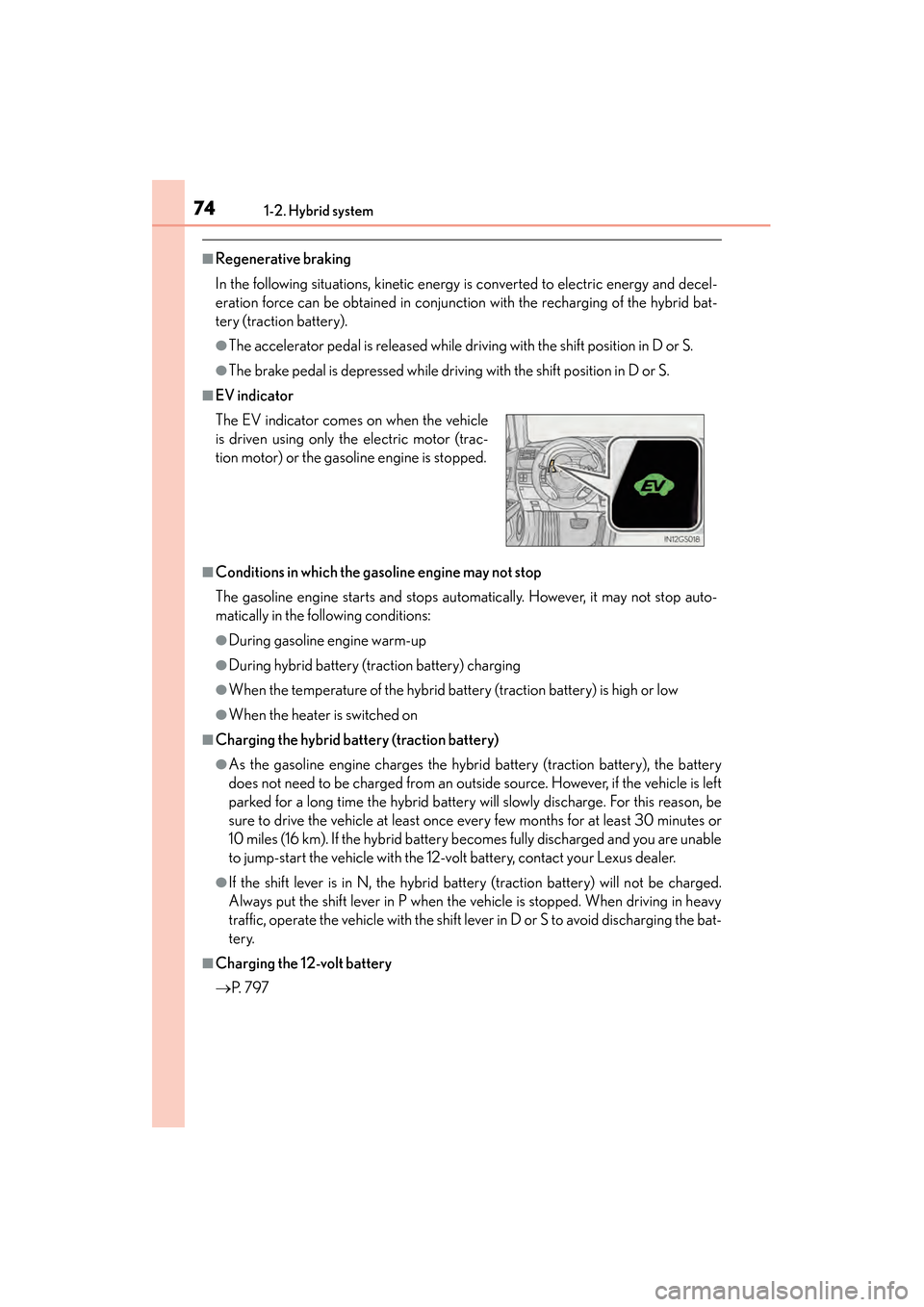
■EV indicator
■Conditions in which the gasoline engine may not stop
The gasoline engine starts and stops automatically. However, it may not stop auto-
matically in the following conditions:
●During gasoline engine warm-up
●During hybrid battery (traction battery) charging
●When the temperature of the hybrid battery (traction battery) is high or low
●When the heater is switched on
■Charging the hybrid battery (traction battery)
●As the gasoline engine charges the hybrid battery (traction battery), the battery
does not need to be charged from an outside source. However, if the vehicle is left
parked for a long time the hybrid battery will slowly discharge. For this reason, be
sure to drive the vehicle at least once every few months for at least 30 minutes or
10 miles (16 km). If the hybrid battery becomes fully discharged and you are unable
to jump-start the vehicle with the 12-volt battery, contact your Lexus dealer.
●If the shift lever is in N, the hybrid battery (traction battery) will not be charged.
Always put the shift lever in P when the vehicle is stopped. When driving in heavy
traffic, operate the vehicle with the shift lever in D or S to avoid discharging the bat-
tery.
■Charging the 12-volt battery
→P. 7 9 7
The EV indicator comes on when the vehicle
is driven using only the electric motor (trac-
tion motor) or the gasoline engine is stopped.
GS450h_OM_OM30D52U_(U).book Page 74 Monday, July 29, 2013 12:07 PM
Page 85 of 890
841-3. Theft deterrent system
GS450h_OM_OM30D52U_(U)
■System maintenance
The vehicle has a maintenance-free type alarm system.
■Items to check before locking the vehicle
To prevent unexpected triggering of the alarm and vehicle theft, make sure of the fol-
lowing:
●Nobody is in the vehicle.
●The windows and moon roof are closed before the alarm is set.
●No valuables or other personal items are left in the vehicle.
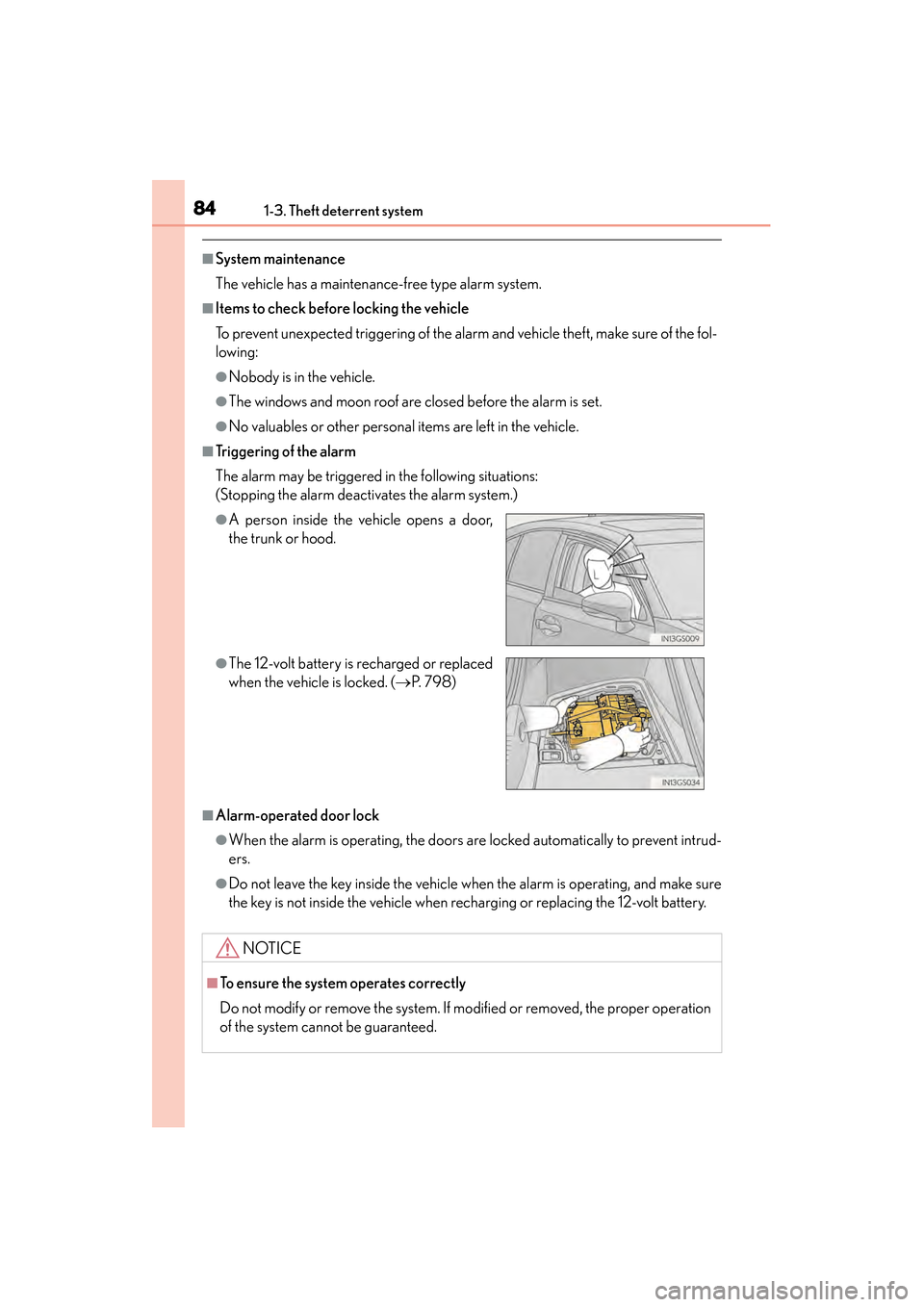
■Triggering of the alarm
The alarm may be triggered in the following situations:
(Stopping the alarm deactivates the alarm system.)
■Alarm-operated door lock
●When the alarm is operating, the doors are locked automatically to prevent intrud-
ers.
●Do not leave the key inside the vehicle when the alarm is operating, and make sure
the key is not inside the vehicle when recharging or replacing the 12-volt battery.
●A person inside the vehicle opens a door,
the trunk or hood.
●The 12-volt battery is recharged or replaced
when the vehicle is locked. (→P. 7 9 8 )
NOTICE
■To ensure the system operates correctly
Do not modify or remove the system. If modified or removed, the proper operation
of the system cannot be guaranteed.
GS450h_OM_OM30D52U_(U).book Page 84 Monday, July 29, 2013 12:07 PM
Page 88 of 890
GS450h_OM_OM30D52U_(U)
872. Instrument cluster
2
Instrument cluster
◆Outside rear view mirrors (vehicles with BSM)
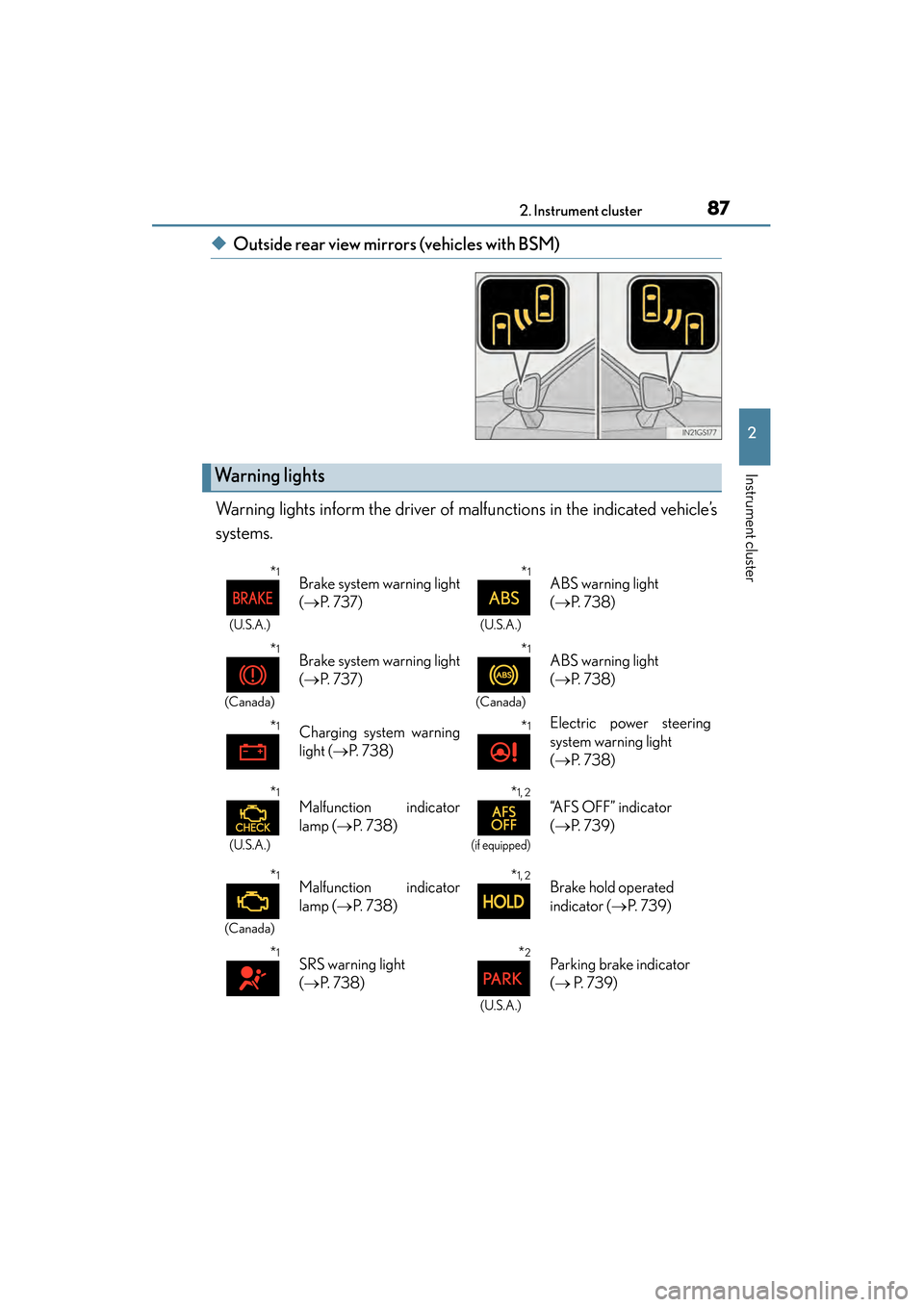
Warning lights inform the driver of malfunctions in the indicated vehicle’s
systems.
Warning lights
*1
(U.S.A.)
Brake system warning light
( → P. 7 3 7 )*1
(U.S.A.)
ABS warning light
(→ P. 7 3 8 )
*1
(Canada)
Brake system warning light
(→ P. 7 3 7 )*1
(Canada)
ABS warning light
(→ P. 7 3 8 )
*1Charging system warning
light ( →P. 7 3 8 )*1Electric power steering
system warning light
(→ P. 7 3 8 )
*1
(U.S.A.)
Malfunction indicator
lamp ( →P. 7 3 8 )*1, 2
(if equipped)
“AFS OFF” indicator
(→ P. 7 3 9 )
*1
(Canada)
Malfunction indicator
lamp ( →P. 7 3 8 )*1, 2Brake hold operated
indicator ( →P. 7 3 9 )
*1SRS warning light
(→ P. 7 3 8 )*2
(U.S.A.)
Parking brake indicator
(→ P. 7 3 9 )
GS450h_OM_OM30D52U_(U).book Page 87 Monday, July 29, 2013 12:07 PM
Page 95 of 890
94
GS450h_OM_OM30D52U_(U)
2. Instrument cluster
■The meters and display illuminate when
The power switch is in ON mode.
■Instrument panel brightness adjustment
The instrument panel brightness levels when the tail lights are on and off can be
adjusted individually. However, when the surroundings are bright (daytime, etc.),
turning on the tail lights will not change the instrument panel brightness. At this time,
any adjustments made to the instrument panel brightness levels will be applied to
both settings at once.
■Limitation of brightness adjustment
The brightness of the instrument panel lights is automatically adjusted based on the
light sensor detecting how bright the surroundings are. However, if the instrument
panel brightness has been manually set to either the brightest or darkest setting, the
automatic adjustment will not be performed.
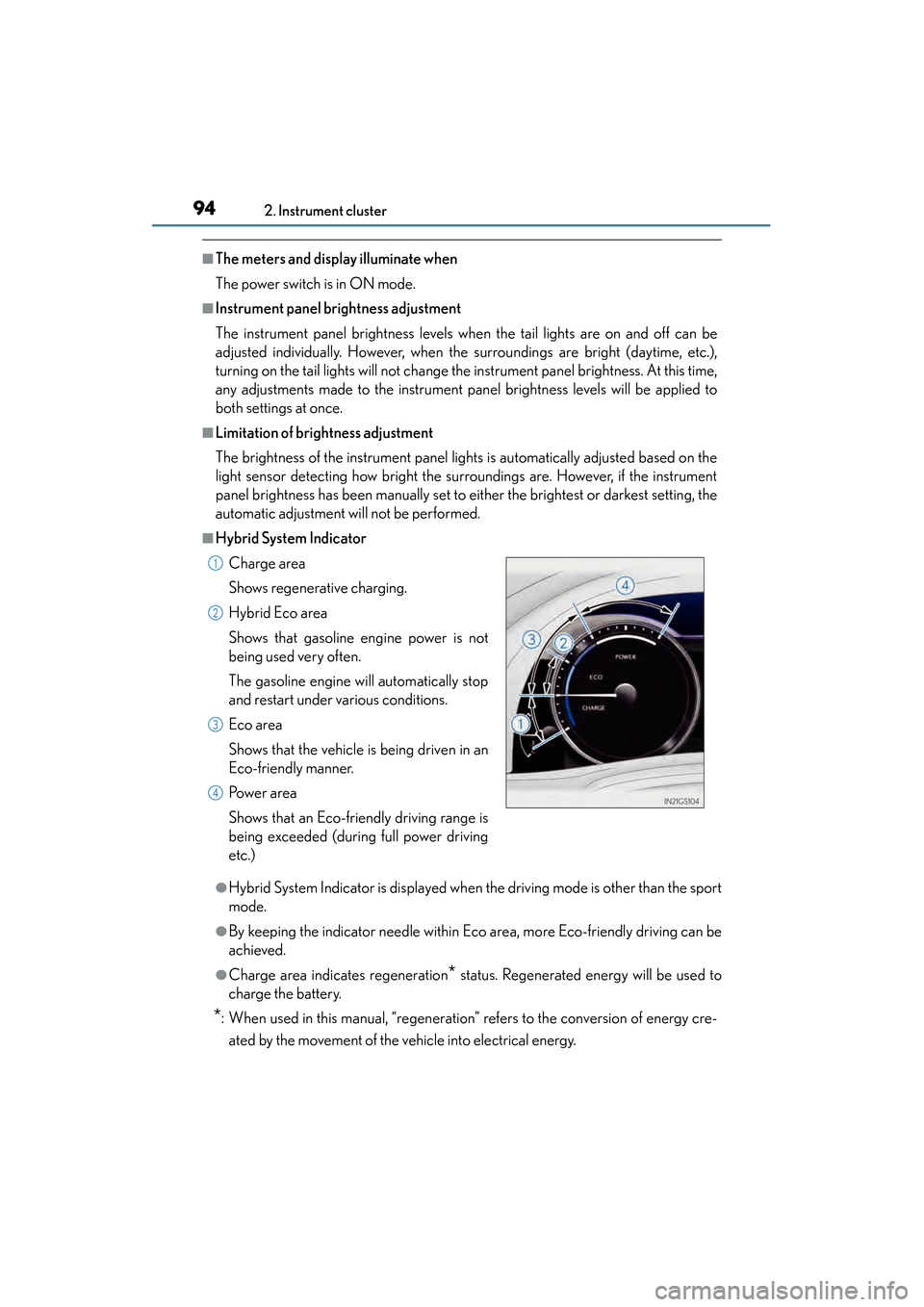
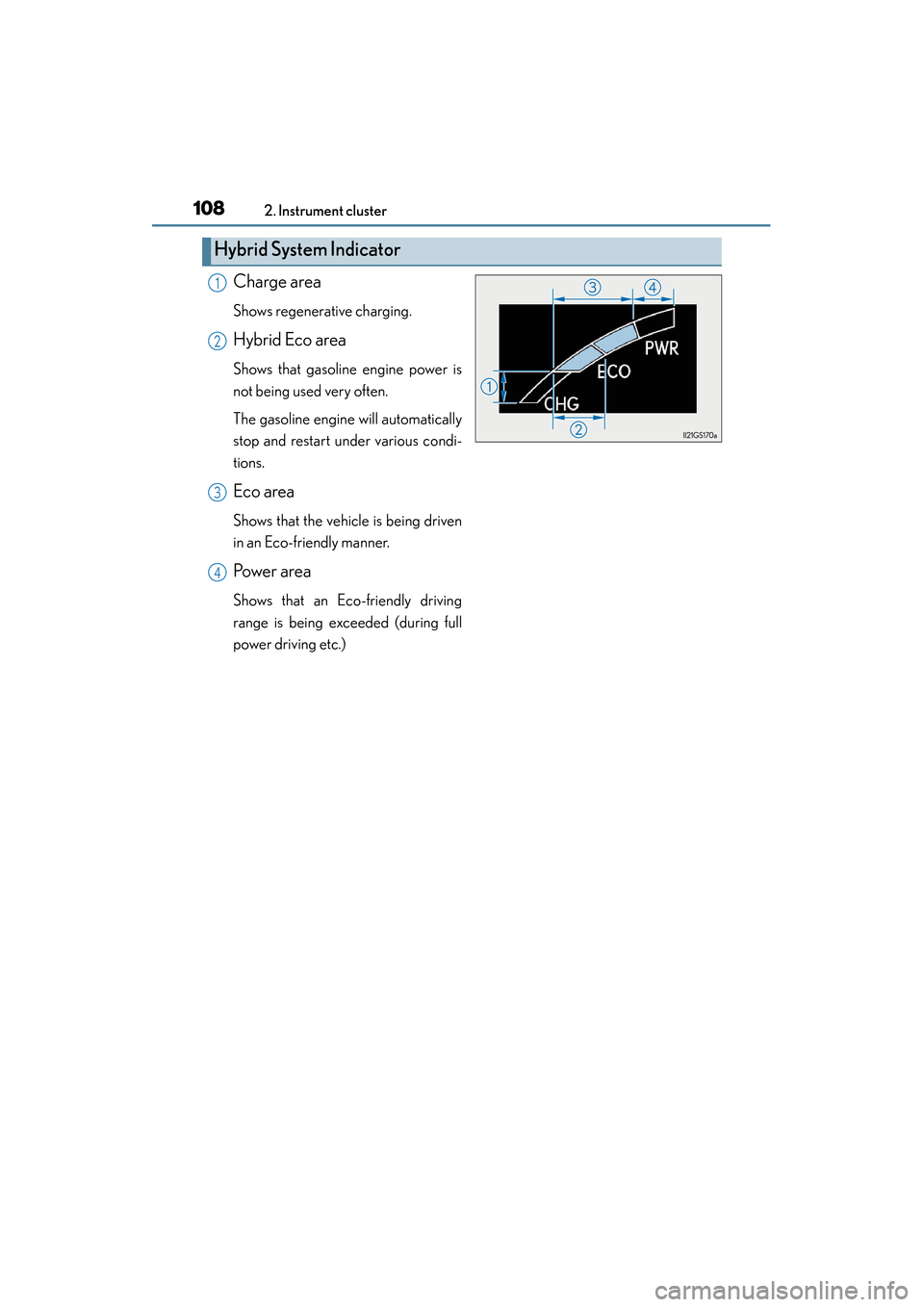
■Hybrid System Indicator
●Hybrid System Indicator is displayed when the driving mode is other than the sport
mode.
●By keeping the indicator needle within Eco area, more Eco-friendly driving can be
achieved.
●Charge area indicates regeneration* status. Regenerated energy will be used to
charge the battery.
*: When used in this manual, “regeneration” refers to the conversion of energy cre-
ated by the movement of the vehicle into electrical energy. Charge area
Shows regenerative charging.
Hybrid Eco area
Shows that gasoline engine power is not
being used very often.
The gasoline engine will automatically stop
and restart under various conditions.
Eco area
Shows that the vehicle is being driven in an
Eco-friendly manner.
Po w e r a r e a
Shows that an Eco-friendly driving range is
being exceeded (during full power driving
etc.)
1
2
3
4
GS450h_OM_OM30D52U_(U).book Page 94 Monday, July 29, 2013 12:07 PM
Page 109 of 890
108
GS450h_OM_OM30D52U_(U)
2. Instrument cluster
Charge area
Shows regenerative charging.
Hybrid Eco area
Shows that gasoline engine power is
not being used very often.
The gasoline engine will automatically
stop and restart under various condi-
tions.
Eco area
Shows that the vehicle is being driven
in an Eco-friendly manner.
Po we r a r e a
Shows that an Eco-friendly driving
range is being exceeded (during full
power driving etc.)
Hybrid System Indicator
1
2
3
4
GS450h_OM_OM30D52U_(U).book Page 108 Monday, July 29, 2013 12:07 PM
Page 135 of 890
134
GS450h_OM_OM30D52U_(U)
3-2. Opening, closing and locking the doors and trunk
■Electronic key battery depletion
●The standard battery life is 1 to 2 years.
●If the battery becomes low, an alarm will sound in the cabin when the hybrid system
stops. (→P. 7 7 2 )
●As the electronic key always receives radio waves, the battery will become
depleted even if the electronic key is not used. The following symptoms indicate
that the electronic key battery may be depleted. Replace the battery when neces-
sary. ( →P. 6 9 4 )
• The smart access system with push-button start or the wireless remote control does not operate.
• The detection area becomes smaller.
• The LED indicator on the key surface does not turn on.
●To avoid serious deterioration, do not leave the electronic key within 3 ft. (1 m) of
the following electrical appliances that produce a magnetic field:
•TVs
• Personal computers
• Cellular phones, cordless phones and battery chargers
• Recharging cellular phones or cordless phones
• Table lamps
• Induction cookers
■When the electronic key battery is fully depleted
→ P. 6 9 4
■Customization
Settings (e. g. smart access system with push-button start) can be changed.
(Customizable features: → P. 8 3 3 )
■If the smart access system with push-button start has been deactivated in a cus-
tomized setting
●Locking and unlocking the doors and opening the trunk:
Use the wireless remote control or mechanical key. ( →P. 1 3 6 , 7 9 3 )
●Starting the hybrid system and changing power switch modes: →P. 7 9 4
●Stopping the hybrid system: →P. 1 9 4
GS450h_OM_OM30D52U_(U).book Page 134 Monday, July 29, 2013 12:07 PM
Page 498 of 890
GS450h_OM_OM30D52U_(U)
4975-3. Using the audio system
5
Interior features
■When using the Bluetooth® audio system
●In the following conditions, the system may not function.
• The portable player is turned off
• The portable player is not connected
• The portable player battery is low
●There may be a delay if phone connection is carried out during Bluetooth® audio
play.
●Depending on the type of portable player that is connected to the system, opera-
tion may differ slightly and certain functions may not be available.
■Bluetooth® antenna
The antenna is built into the instrument panel. If the portable player is behind the seat
or in the glove box or console box, or is touching or covered by metal objects, con-
nection status may deteriorate.
■Battery charge/signal status
This display may not correspond exactly with the portable player, and this system
does not have a charging function.
■About Bluetooth®
■Compatible models
Portable players must correspond to the following specifications:
●Bluetooth® specification
Ver. 1.1 or higher
(Recommended: Ver. 2.1+EDR or higher)
●Profile
• A2DP (Advanced Audio Distribution Profile) Ver. 1.0 or higher
• AVRCP (Audio/Video Remote Control Profile) Ver. 1.0 or higher (Recommended: Ver. 1.4 or higher)
However, please note that some functions may be limited depending on the type of
portable player. Also, the different screen is displayed depending on which portable
player is connecting.
Please go to the website at http://www.lexus.com/MobileLink
to find approved por-
table players for this system. Bluetooth is a registered trademark of
Bluetooth SIG, Inc.
GS450h_OM_OM30D52U_(U).book Page 497 Monday, July 29, 2013 12:07 PM
Page 517 of 890
516
GS450h_OM_OM30D52U_(U)
5-3. Using the audio system
■iPod cover art
●Depending on the iPod and the songs in the iPod, iPod cover art may be displayed.
This function can be changed to “On” or “Off”. (→P. 5 1 2 )
●It may take time to display iPod cover art, and the iPod may not be operated while
the cover art display is in process.
●Only iPod cover art that is saved in JPEG format can be displayed.
■iPod functions
●When the iPod connected to the system includes iPod video, the system can only
output the sound by selecting “Video” on the “iPod” screen.
●Depending on the iPod, the video sound may not be able to be heard.
●When an iPod is connected and the audio source is changed to iPod mode, the
iPod will resume play from the same point in which it was last used.
●Depending on the iPod that is connected to the system, certain functions may not
be available. If a function is unavailable due to a malfunction (as opposed to a sys-
tem specification), disconnecting the device and reconnecting it once again may
resolve the problem.
■When using an iPod
You maybe unable to use the instrument panel power outlet if the iPod is connected
to the USB port at the same time.
■Battery charge
When an iPod is connected using a genuine iPod cable, the iPod starts charging its
battery.
■Error messages for iPod
“iPod Error”:
This indicates a problem in the iPod or its connection.
“No music files found.”:
This indicates that there is no music data in the iPod.
“Please check the iPod firmware version.”:
This indicates that the software version is not compatible. Perform the iPod firmware
updates and try again.
“iPod authorization failed.”:
This indicates that it failed to authorize the iPod. Please check your iPod.
GS450h_OM_OM30D52U_(U).book Page 516 Monday, July 29, 2013 12:07 PM
Page 675 of 890
674
GS450h_OM_OM30D52U_(U)
6-3. Do-it-yourself maintenance
■Before recharging
When recharging, the 12-volt battery produces hydrogen gas which is flammable
and explosive. Therefore, observe the following precautions before recharging:
●If recharging with the 12-volt battery installed on the vehicle, be sure to disconnect
the ground cable.
●Make sure the power switch on the charger is off when connecting and discon-
necting the charger cables to the 12-volt battery.
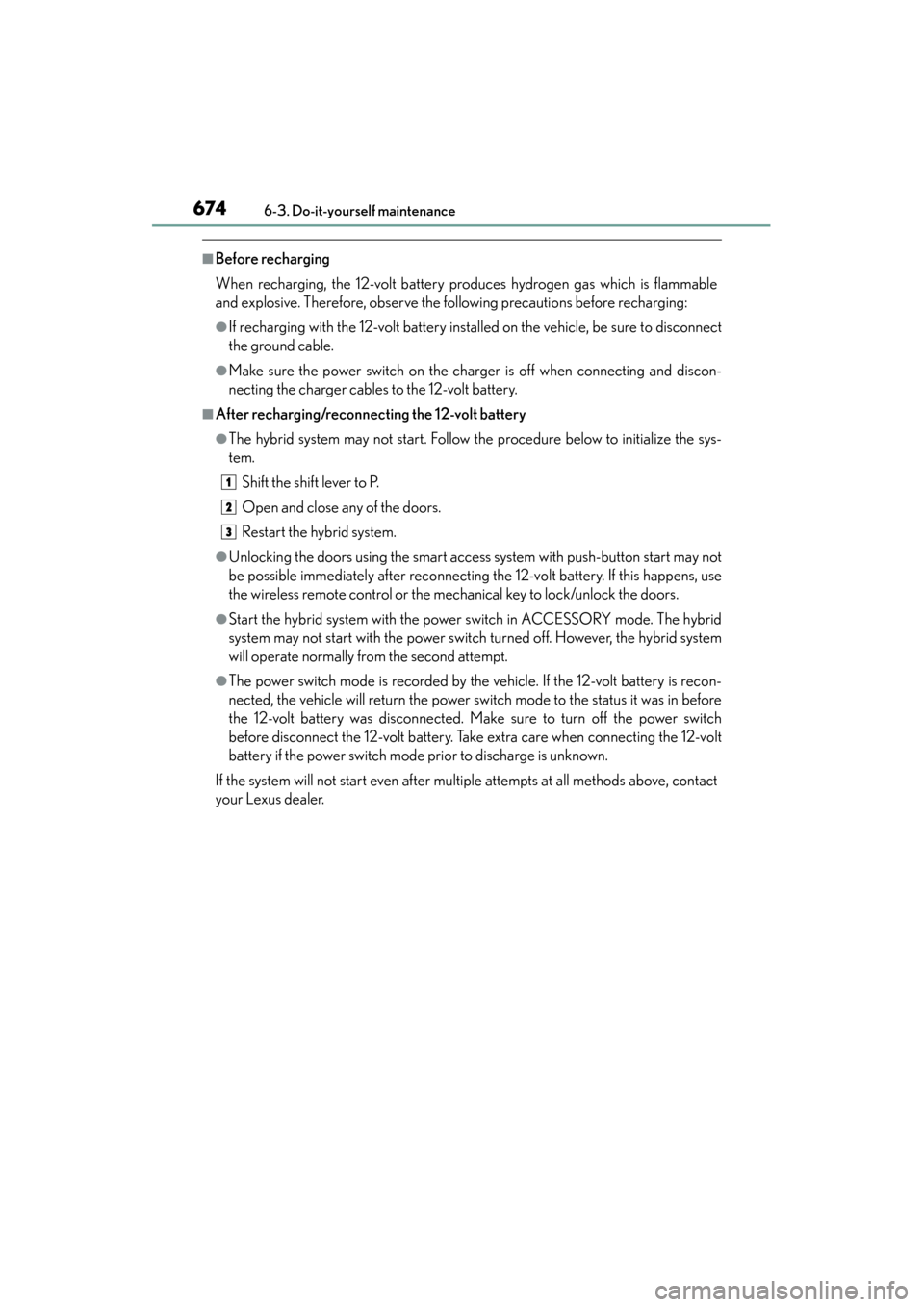
■After recharging/reconnecting the 12-volt battery
●The hybrid system may not start. Follow the procedure below to initialize the sys-
tem.Shift the shift lever to P.
Open and close any of the doors.
Restart the hybrid system.
●Unlocking the doors using the smart access system with push-button start may not
be possible immediately after reconnecting the 12-volt battery. If this happens, use
the wireless remote control or the mechanical key to lock/unlock the doors.
●Start the hybrid system with the power switch in ACCESSORY mode. The hybrid
system may not start with the power switch turned off. However, the hybrid system
will operate normally from the second attempt.
●The power switch mode is recorded by the vehicle. If the 12-volt battery is recon-
nected, the vehicle will return the power switch mode to the status it was in before
the 12-volt battery was disconnected. Make sure to turn off the power switch
before disconnect the 12-volt battery. Take extra care when connecting the 12-volt
battery if the power switch mode prior to discharge is unknown.
If the system will not start even after multiple attempts at all methods above, contact
your Lexus dealer.
1
2
3
GS450h_OM_OM30D52U_(U).book Page 674 Monday, July 29, 2013 12:07 PM
Page 676 of 890
GS450h_OM_OM30D52U_(U)
6756-3. Do-it-yourself maintenance
6
Maintenance and care
CAUTION
■Chemicals in the 12-volt battery
The 12-volt battery contains poisonous and corrosive sulfuric acid and may pro-
duce hydrogen gas which is flammable and explosive. To reduce the risk of death
or serious injury, take the following precautions while working on or near the 12-
volt battery:
●Do not cause sparks by touching the 12-volt battery terminals with tools.
●Do not smoke or light a match near the 12-volt battery.
●Avoid contact with eyes, skin and clothes.
●Never inhale or swallow electrolyte.
●Wear protective safety glasses when working near the 12-volt battery.
●Keep children away from the 12-volt battery.
■Where to safely charge the 12-volt battery
Always charge the 12-volt battery in an open area. Do not charge the 12-volt bat-
tery in a garage or closed room where there is insufficient ventilation.
■How to recharge the 12-volt battery
Recharge at a current of 5 A or less and make sure that the recharging period
does not exceed a total of 12 hours.
GS450h_OM_OM30D52U_(U).book Page 675 Monday, July 29, 2013 12:07 PM