battery Lexus GS450h 2015 Owner's Guide
[x] Cancel search | Manufacturer: LEXUS, Model Year: 2015, Model line: GS450h, Model: Lexus GS450h 2015Pages: 654, PDF Size: 34.84 MB
Page 222 of 654
GS450h_OM_OM30F70U_(U)
2214-3. Operating the lights and wipers
4
Driving
■If the “AFS OFF” indicator flashes
It may indicate a malfunction in the system. Contact your Lexus dealer.
■Customization
Settings (e.g. light sensor sensitivity) can be changed.
(Customizable features: →P. 599)
NOTICE
■To prevent 12-volt battery discharge
Do not leave the lights on longer than necessary when the hybrid system is off.
GS450h_OM_OM30F70U_(U).book Page 221 Monday, January 19, 2015 9:34 AM
Page 288 of 654
GS450h_OM_OM30F70U_(U)
2874-5. Using the driving support systems
4
Driving
■When the message is displayed on the multi-information display showing that
TRAC has been disabled even if the VSC OFF switch has not been pressed
TRAC cannot be operated. Contact your Lexus dealer.
■VGRS is disabled when
VGRS may stop operating in the following situations.
In this event, the steering wheel may move from its straight forward position, but it
will return when the system restarts.
●The steering wheel is operated for an extended period of time while the vehicle is
stopped or is moving very slowly.
●When force is continuously applied for a long time with the steering wheel turned
as far as it will go.
The center position of the steering wheel may change when VGRS is disabled. How-
ever, the position will return to normal after VGRS is reactivated.
■When the battery is disconnected
The steering wheel may move from its straight forward position, but this will be cor-
rected automatically when driving.
■Sounds and vibrations caused by the ABS, brake assist, VSC, TRAC and VGRS sys-
tems
●A sound may be heard from the engine compartment when the brake pedal is
depressed repeatedly, when the hybrid system is started or just after the vehicle
begins to move. This sound does not indicate that a malfunction has occurred in
any of these systems.
●Any of the following conditions may occur when the above systems are operating.
None of these indicates that a malfunction has occurred.
• Vibrations may be felt through the vehicle body and steering.
• A motor sound may be heard after the vehicle comes to a stop.
• The brake pedal may pulsate slightly after the ABS is activated.
• The brake pedal may move down slightly after the ABS is activated.
■EPS, VGRS and DRS operation sound
When the steering wheel is operated, a motor sound (whirring sound) may be heard.
This does not indicate a malfunction.
■Reactivation of the TRAC/VSC systems
Even after the TRAC/VSC systems have been turned off, turning the hybrid system
off and then on again will automatically reactivate the TRAC/VSC systems.
■Reactivation of the TRAC system linked to vehicle speed
When only the TRAC system is turned off, the TRAC system will turn on when vehi-
cle speed increases. However, when both TRAC/VSC systems are turned off, the
systems will not turn on even when vehicle speed increases.
GS450h_OM_OM30F70U_(U).book Page 287 Monday, January 19, 2015 9:34 AM
Page 314 of 654
GS450h_OM_OM30F70U_(U)
3134-5. Using the driving support systems
4
Driving
CAUTION
■Before using the Lexus night view
Never depend on this system only.
Lexus night view is intended as a supplemental aid to help you see pedestrians and
road conditions ahead of the vehicle. As there are limits to the system, do not rely
solely on the system while in use, and drive safely while observing the following
precautions.
■When using the Lexus night view
Observe the following precautions.
Failure to do so may cause an accident resulting in death or serious injury.
●Never drive while looking at the Lexus night view screen only.
●Do not look continuously at the Lexus night view screen while driving. Pedestri-
ans, objects etc. ahead of the vehicle may be overlooked by the system. The sys-
tem should always be used as a supplemental aid only.
●Lexus night view is designed to help you see objects better when driving in dark-
ness on a road with few curves. Do not use the Lexus night view in well-lit areas or
on roads with many curves or slopes. There may be areas that cannot be dis-
played by the system due to the road conditions (curve size, gradient, etc.)
●Lexus night view may be unable to project some features at an appropriate level
of brightness. Some or all parts of certain features may be dark or difficult to see.
Do not rely solely on the Lexus night view, and drive carefully while checking the
surroundings for safety, as you would with a normal vehicle. Also, the following
features and conditions may not be displayed clearly.
Features that are difficult to display:
• Clothing of a pedestrian made of a certain kind of material (ex. leather jackets)
• The characters on signs and billboards
• The information on road signs
Conditions in which display is difficult:
• Unfavorable weather conditions such as rain, fog, snowfall, snow storms etc.
• There are large puddles of water on the road surface following rainfall
• The area of the front windshield in front of the camera is fogged up, dirty or icy
• The areas around the headlights are covered with ice, snow, mud etc.
• The 12-volt battery voltage is remarkably low
• There are bright lights ahead of the vehicle
GS450h_OM_OM30F70U_(U).book Page 313 Monday, January 19, 2015 9:34 AM
Page 319 of 654
318
GS450h_OM_OM30F70U_(U)
4-6. Driving tips
Winter driving tips
●Use fluids that are appropriate to the prevailing outside temperatures.
• Engine oil
• Engine/power control unit coolant
•Washer fluid
●Have a service technician inspect the condition of the 12-volt battery.
●Have the vehicle fitted with four snow tires or purchase a set of tire
chains for the rear tires.
*
Ensure that all tires are the specified size and brand, and that chains match the
size of the tires.
*: Tire chains cannot be mounted on vehicles with front and rear tires of differing
sizes and vehicles with LDH and 19-inch tires.
Carry out the necessary preparatio ns and inspections before driving
the vehicle in winter. Always drive the vehicle in a manner appropriate
to the prevailing weather conditions.
Preparation for winter
GS450h_OM_OM30F70U_(U).book Page 318 Monday, January 19, 2015 9:34 AM
Page 355 of 654
354
GS450h_OM_OM30F70U_(U)
5-2. Using the air conditioning system and defogger
CAUTION
■To prevent the windshield from fogging up
Do not use
during cool air operation in extremely humid weather. The differ-
ence between the temperature of the outside air and that of the windshield can
cause the outer surface of the windshield to fog up, blocking your vision.
NOTICE
■To prevent 12-volt battery discharge
Do not leave the air conditioning system on longer than necessary when the hybrid
system is off.
■Humidity sensor
Follow these points to avoid damaging the sensor:
●Do not disassemble the sensor
●Do not spray the glass cleaner on the sensor or subject it to strong impacts
●Do not stick anything on the sensor
GS450h_OM_OM30F70U_(U).book Page 354 Monday, January 19, 2015 9:34 AM
Page 360 of 654
GS450h_OM_OM30F70U_(U)
3595-2. Using the air conditioning system and defogger
5
Interior features
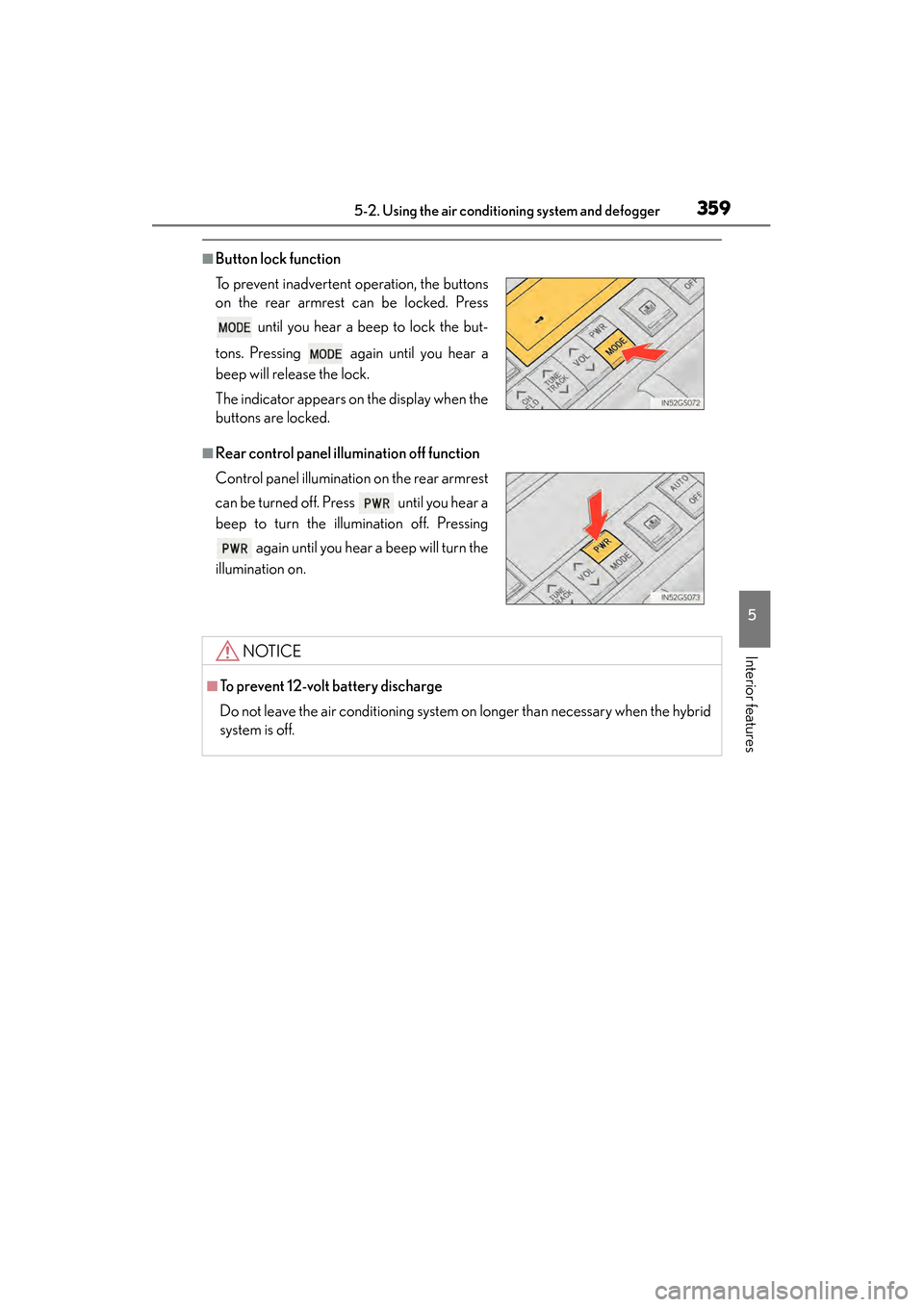
■Button lock function
■Rear control panel illumination off function To prevent inadvertent operation, the buttons
on the rear armrest can be locked. Press until you hear a beep to lock the but-
tons. Pressing again until you hear a
beep will release the lock.
The indicator appears on the display when the
buttons are locked.
Control panel illumination on the rear armrest
can be turned off. Press until you hear a
beep to turn the illumination off. Pressing again until you hear a beep will turn the
illumination on.
NOTICE
■To prevent 12-volt battery discharge
Do not leave the air conditioning system on longer than necessary when the hybrid
system is off.
GS450h_OM_OM30F70U_(U).book Page 359 Monday, January 19, 2015 9:34 AM
Page 361 of 654
360
GS450h_OM_OM30F70U_(U)
5-2. Using the air conditioning system and defogger
Rear window and outside rear view mirror
defoggers
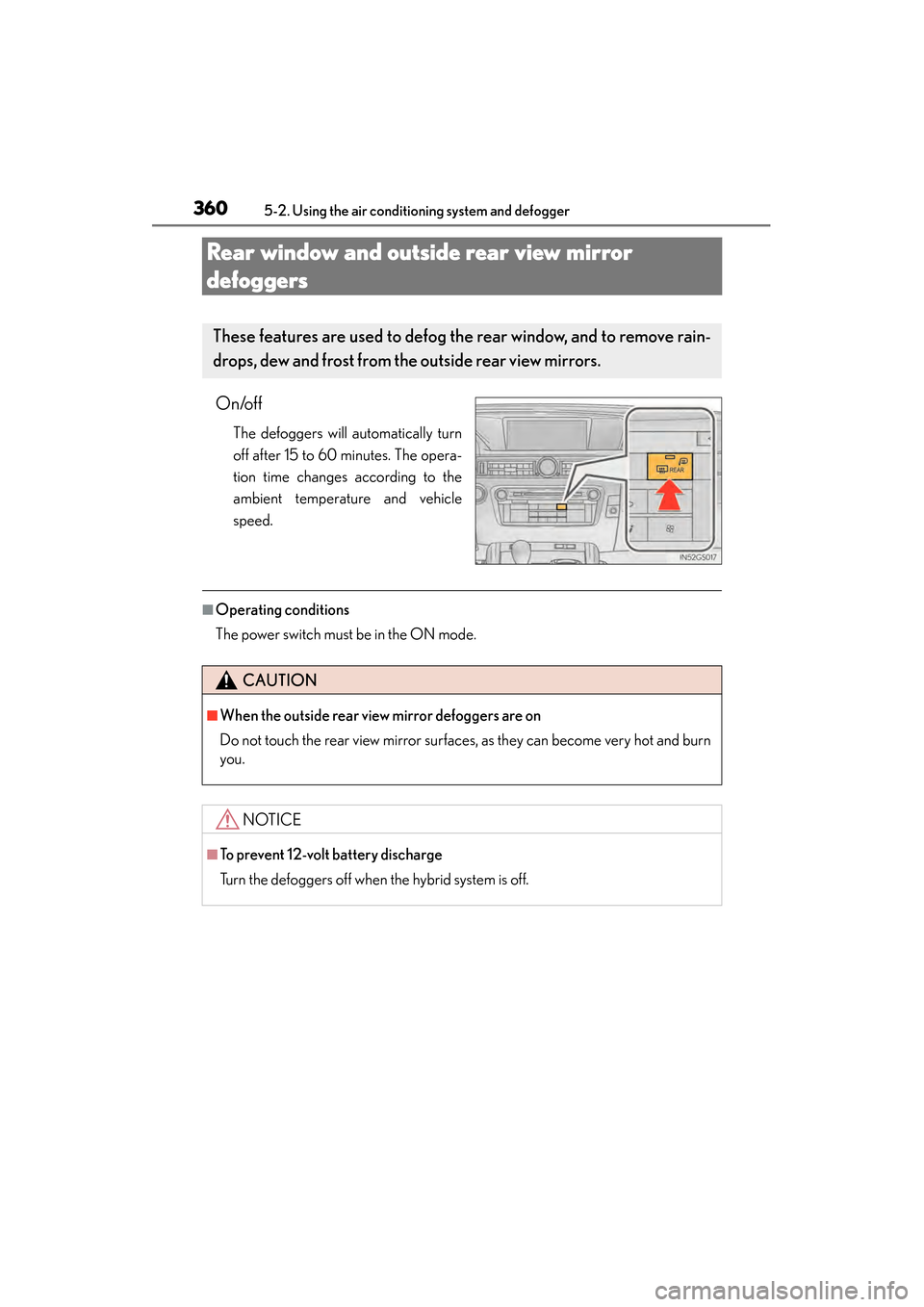
On/off
The defoggers will automatically turn
off after 15 to 60 minutes. The opera-
tion time changes according to the
ambient temperature and vehicle
speed.
■Operating conditions
The power switch must be in the ON mode.
These features are used to defog the rear window, and to remove rain-
drops, dew and frost from the outside rear view mirrors.
CAUTION
■When the outside rear view mirror defoggers are on
Do not touch the rear view mirror surfaces, as they can become very hot and burn
you.
NOTICE
■To prevent 12-volt battery discharge
Turn the defoggers off when the hybrid system is off.
GS450h_OM_OM30F70U_(U).book Page 360 Monday, January 19, 2015 9:34 AM
Page 366 of 654
GS450h_OM_OM30F70U_(U)
3655-3. Using the interior lights
5
Interior features
■Illuminated entry system
The lights automatically turn on/off according to power switch mode, the presence
of the electronic key, whether the doors are locked/unlocked, and whether the doors
are opened/closed.
■To prevent 12-volt battery discharge
If the interior lights remain on when the power switch is turned off, the lights will go
off automatically after 20 minutes.
■Customization
Setting (e.g. the time elapsed before lights turn off) can be changed.
(Customizable features: →P. 599)
NOTICE
■To prevent 12-volt battery discharge
Do not leave the lights on longer than necessary when the hybrid system is off.
GS450h_OM_OM30F70U_(U).book Page 365 Monday, January 19, 2015 9:34 AM
Page 376 of 654
375
GS450h_OM_OM30F70U_(U)5-5. Other interior features
5
Interior features
Sun visors and vanity mirrors
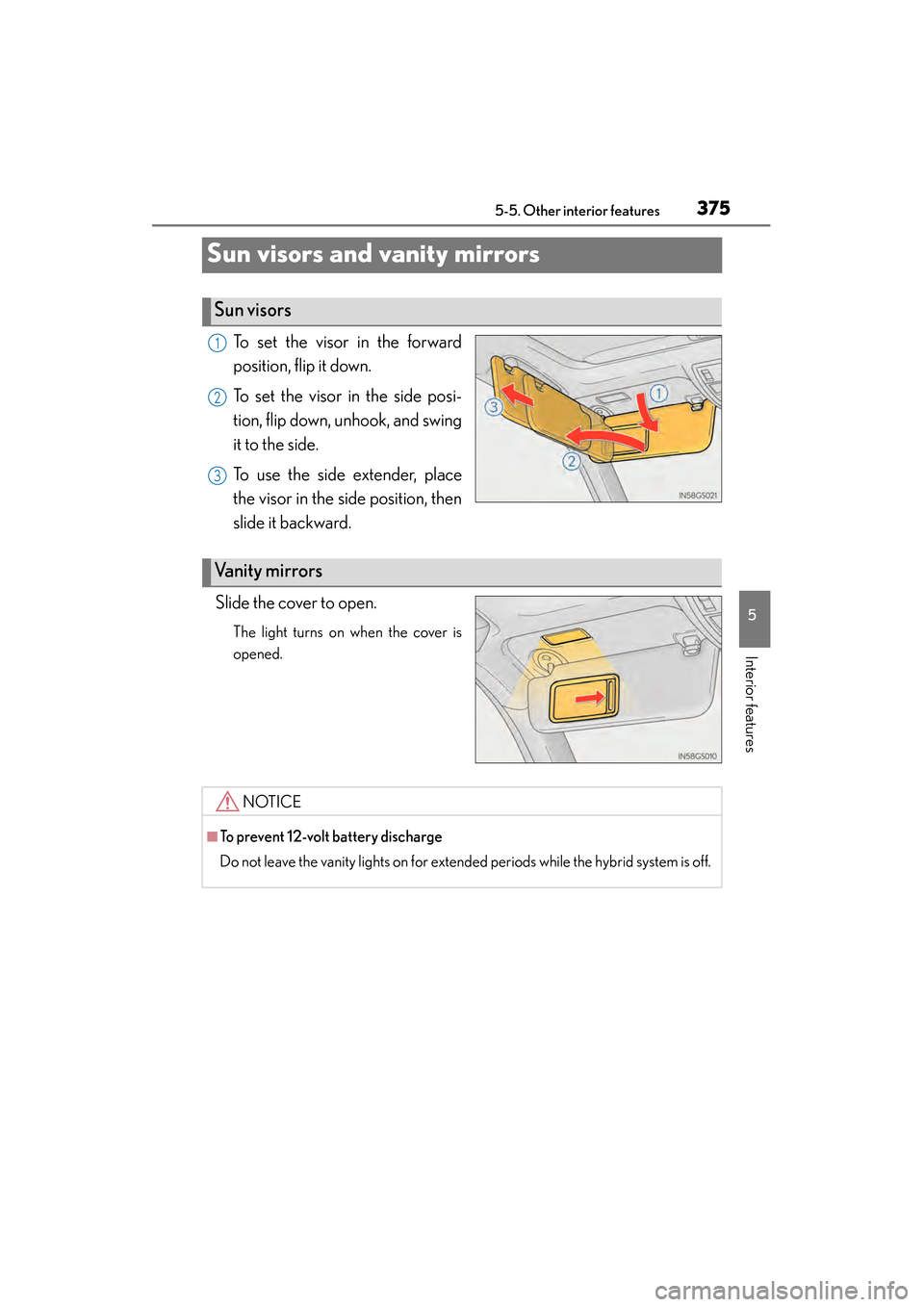
To set the visor in the forward
position, flip it down.
To set the visor in the side posi-
tion, flip down, unhook, and swing
it to the side.
To use the side extender, place
the visor in the side position, then
slide it backward.
Slide the cover to open.
The light turns on when the cover is
opened.
Sun visors
1
2
3
Va n i t y m i r r o r s
NOTICE
■To prevent 12-volt battery discharge
Do not leave the vanity lights on for extended periods while the hybrid system is off.
GS450h_OM_OM30F70U_(U).book Page 375 Monday, January 19, 2015 9:34 AM
Page 380 of 654
GS450h_OM_OM30F70U_(U)
3795-5. Other interior features
5
Interior features
■The power outlets can be used when
12 V: The power switch is in ACCESSORY or ON mode.
120 V AC: The power switch is in ON mode.
NOTICE
■To avoid damaging the power outlets
Close the power outlet lids when the power outlets are not in use.
Foreign objects or liquids that enter the power outlets may cause a short circuit.
■To prevent the fuse from being blown
12 V:
Do not use an accessory that uses more than 12 V 10 A.
120 V AC:
Do not use a 120 V AC appliance that requires more than 100W. If a 120 V AC
appliance that consumes more than 100 W is used, the protection circuit will cut
the power supply.
■To prevent 12-volt battery discharge
Do not use the power outlets longer than necessary when the hybrid system is off.
■Appliances that may not operate properly (120 V AC)
The following 120 V AC appliances may not operate properly even if their power
consumption is under 100 W:
●Appliances with high initial peak wattage
●Measuring devices that process precise data
●Other appliances that require an extremely stable power supply
GS450h_OM_OM30F70U_(U).book Page 379 Monday, January 19, 2015 9:34 AM