sport mode Lexus GS450h 2016 Owner's Manual / LEXUS 2016 GS450H (OM30E99U) User Guide
[x] Cancel search | Manufacturer: LEXUS, Model Year: 2016, Model line: GS450h, Model: Lexus GS450h 2016Pages: 544, PDF Size: 11.6 MB
Page 96 of 544
96
GS450h_OM_OM30E99U_(U)
2. Instrument cluster
■Energy monitor
P. 1 0 7
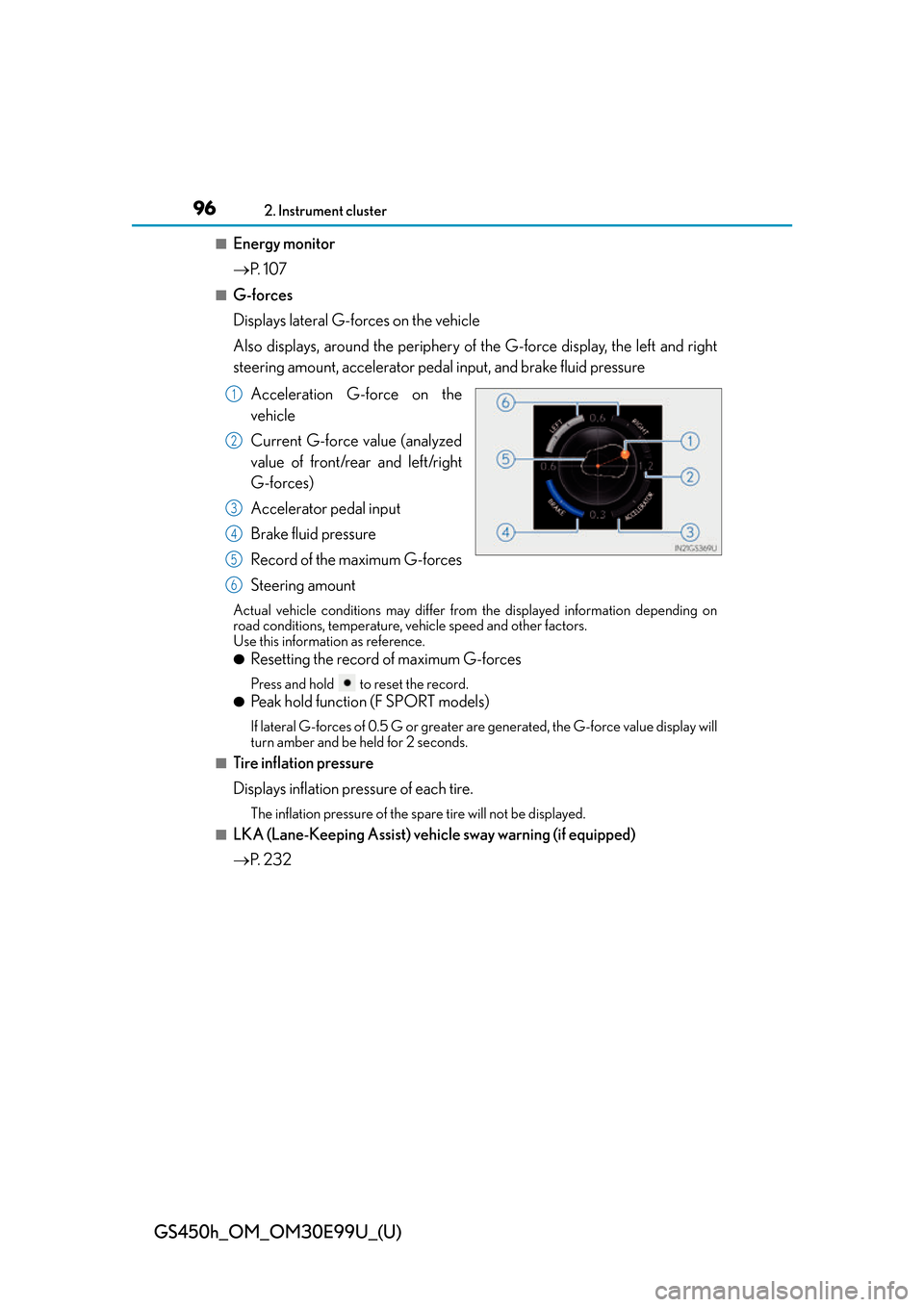
■G-forces
Displays lateral G-forces on the vehicle
Also displays, around the periphery of the G-force display, the left and right
steering amount, accelerator pedal input, and brake fluid pressure
Acceleration G-force on the
vehicle
Current G-force value (analyzed
value of front/rear and left/right
G-forces)
Accelerator pedal input
Brake fluid pressure
Record of the maximum G-forces
Steering amount
Actual vehicle conditions may differ fr om the displayed information depending on
road conditions, temperature, vehicle speed and other factors.
Use this information as reference.
●Resetting the record of maximum G-forces
Press and hold to reset the record.
●Peak hold function (F SPORT models)
If lateral G-forces of 0.5 G or greater are generated, the G-force value display will
turn amber and be held for 2 seconds.
■Tire inflation pressure
Displays inflation pressure of each tire.
The inflation pressure of the sp are tire will not be displayed.
■LKA (Lane-Keeping Assist) vehi cle sway warning (if equipped)
P. 2 3 2
1
2
3
4
5
6
Page 98 of 544
98
GS450h_OM_OM30E99U_(U)
2. Instrument cluster
●EV indicator
Select to activate/deactivate the EV indicator.
● switch
Displays a procedure to register a desired screen to .
You can register 1 screen as a shortcut, which can be displayed by pressing .
●Drive information 1 /2 /3
Select to select up to 2 items that will be displayed on a Drive information screen,
up to 3 Drive information screens can be set.
●Pop-up display
Select to set the following pop-up displa ys, which may appear in some situations,
on/off.
• Route guidance of the navigation system-linked display
• Incoming call display of the hands-free phone system
• Instrument panel brightne ss adjustment display
●Accent color (except F SPORT models)
Select to change the accent colors on the screen, such as the cursor color.
●Needle (F SPORT models)
Select to change the needle color for the tachometer.
●Rev indicator (F SPORT models)
Select to set the rev indicator on/off.
When set to on, proceed to set the engine speed at which the rev indicator will be
displayed.
Selectable engine speed range:
2000 rpm to 6000 rpm
●Rev peak (F SPORT models)
Select to set the rev peak on/off.
●Tachometer
Select to set the tachometer or Hybrid Sy stem Indicator to always be displayed or
be changed to automatically according to the driving mode.
●Default settings
Registered or changed meter settings will be deleted or returned to their default
setting.
Page 170 of 544
170
GS450h_OM_OM30E99U_(U)
4-1. Before driving
WA R N I N G
Observe the following precautions.
Failure to do so may result in death or serious injury.
■When driving on slippery road surfaces
●Sudden braking, acceleration and steering may cause tire slippage and reduce your
ability to control the vehicle.
●Sudden acceleration, engine braking due to shifting, or changes in engine speed
could cause the vehicle to skid, resulting in an accident.
●After driving through a puddle , lightly depress the brake pedal to make sure that the
brakes are functioning properly. Wet brake pads may prevent the brakes from func-
tioning properly. If the brakes on only on e side are wet and not functioning properly,
steering control may be affected.
■When shifting the shift lever
●Do not let the vehicle roll backward while the shift lever is in a driving position, or roll
forward while the shift lever is in R.
Doing so may result in an acci dent or damage to the vehicle.
●Do not shift the shift lever to P while the vehicle is moving.
Doing so can damage the transmission and may result in a loss of vehicle control.
●Do not shift the shift lever to R while the vehicle is moving forward.
Doing so can damage the transmission and may result in a loss of vehicle control.
●Do not shift the shift lever to a driving position while the vehicle is moving backward.
Doing so can damage the transmission and may result in a loss of vehicle control.
●Shifting the shift lever to N while the vehicle is moving will disengage the hybrid sys-
tem. Engine braking is not available with the hybrid system disengaged.
●Be careful not to shift the shift lever with the accelerator pedal depressed. Shifting the
shift lever to any position other than P or N may lead to unexpected rapid accelera-
tion of the vehicle that may cause an accident and result in death or serious injury.
■If you hear a squealing or scraping noise (brake pad wear limit indicators)
Have the brake pads checked and replaced by your Lexus dealer as soon as possible.
Rotor damage may result if the pads are not replaced when needed.
Front brakes of F SPORT models: Moderate levels of brake pad and disc wear allow
enhanced front braking power. As a result, the discs may wear more quickly than con-
ventional brake discs. Therefore, when replacing the brake pads, Lexus recommends
that you also have the thickness of the discs measured.
It is dangerous to drive the vehicle when the wear limits of the brake pads and/or those
of the brake discs are exceeded.
Page 188 of 544
188
GS450h_OM_OM30E99U_(U)
4-2. Driving procedures
■Sport mode/Eco drive mode
P. 2 5 6
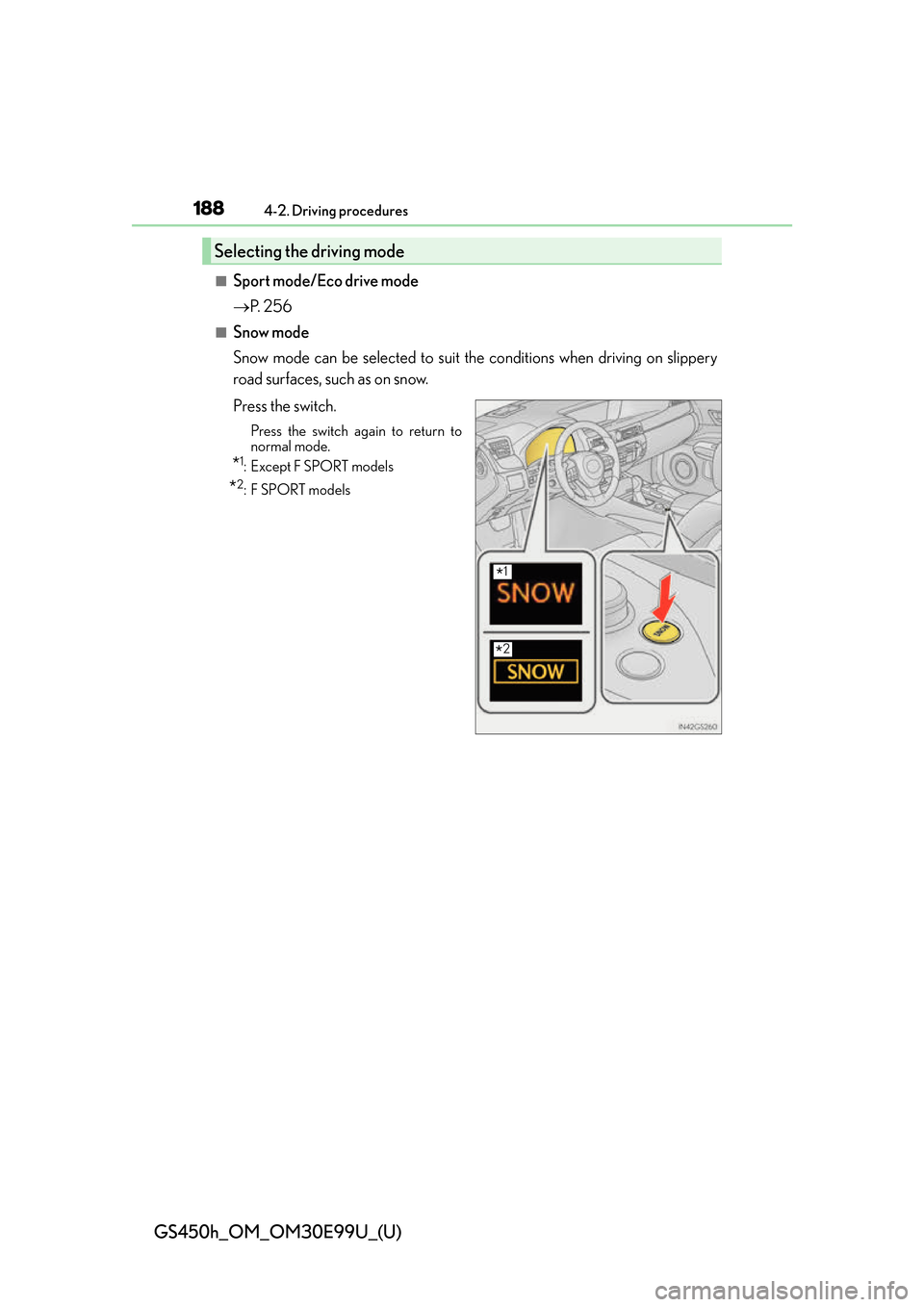
■Snow mode
Snow mode can be selected to suit th e conditions when driving on slippery
road surfaces, such as on snow.
Press the switch.
Press the switch again to return to
normal mode.
*1:Except F SPORT models
*2:F SPORT models
Selecting the driving mode
*1
*2
Page 191 of 544
GS450h_OM_OM30E99U_(U)
1914-2. Driving procedures
4
Driving
■Automatic deactivation of shift range selection in the D position
Shift range selection in the D position will be deactivated in the following situations:
●When the vehicle comes to a stop
●If the accelerator pedal is depressed for more than a certain period of time
●When the shift lever is shifted to other than D
■Downshifting restrictions warning buzzer
To help ensure safety and driving performa nce, downshifting operation may sometimes
be restricted. In some circumstances, downshifting may not be possible even when the
shift lever or paddle shift switch is operated. (A buzzer will sound twice.)
■Snow mode automatic deactivation
Snow mode is automatically deactivated if th e power switch is turned off after driving in
snow mode.
■When driving with cruise control or dynamic radar cruise control with full-speed range
activated
Even when performing the following actions with the intent of enabling engine braking,
engine braking will not activate because cruise control, dynamic radar cruise control or
dynamic radar cruise control with full-speed range will not be canceled.
●While driving in the D position or S mode, downshifting to 7, 6, 5 or 4. ( P. 2 4 1 , 2 5 3 )
●When switching the driving mode to sport mode while driving in D position. ( P. 2 5 6 )
■Restraining sudden start (Drive-Start Control)
●When the following unusual op eration is performed, the hybrid system output may be
restrained.
• When the shift lever is shifted from R to D, D to R, N to R, P to D, or P to R (D
includes S) with the accelerator pedal depressed, a warning message appears on
the multi-information display. ( P. 4 0 6 )
• When the accelerator pedal is depressed to o much while the vehicle is in reverse.
■If the shift lever cannot be shifted from P
P. 448
WA R N I N G
■When driving on slippery road surfaces
Be careful of downshifting and sudden accele ration, as this could result in the vehicle
skidding to the side or spinning.
NOTICE
■Hybrid battery (traction battery) charge
If the shift lever is in N, the hybrid batter y (traction battery) will not be charged even
when the engine is running. Therefore, if the ve hicle is left with the shift lever in N for a
long period of time, the hybrid battery (tr action battery) will discharge, and this may
result in the vehicle not being able to start.
Page 256 of 544
256
GS450h_OM_OM30E99U_(U)
4-5. Using the driving support systems
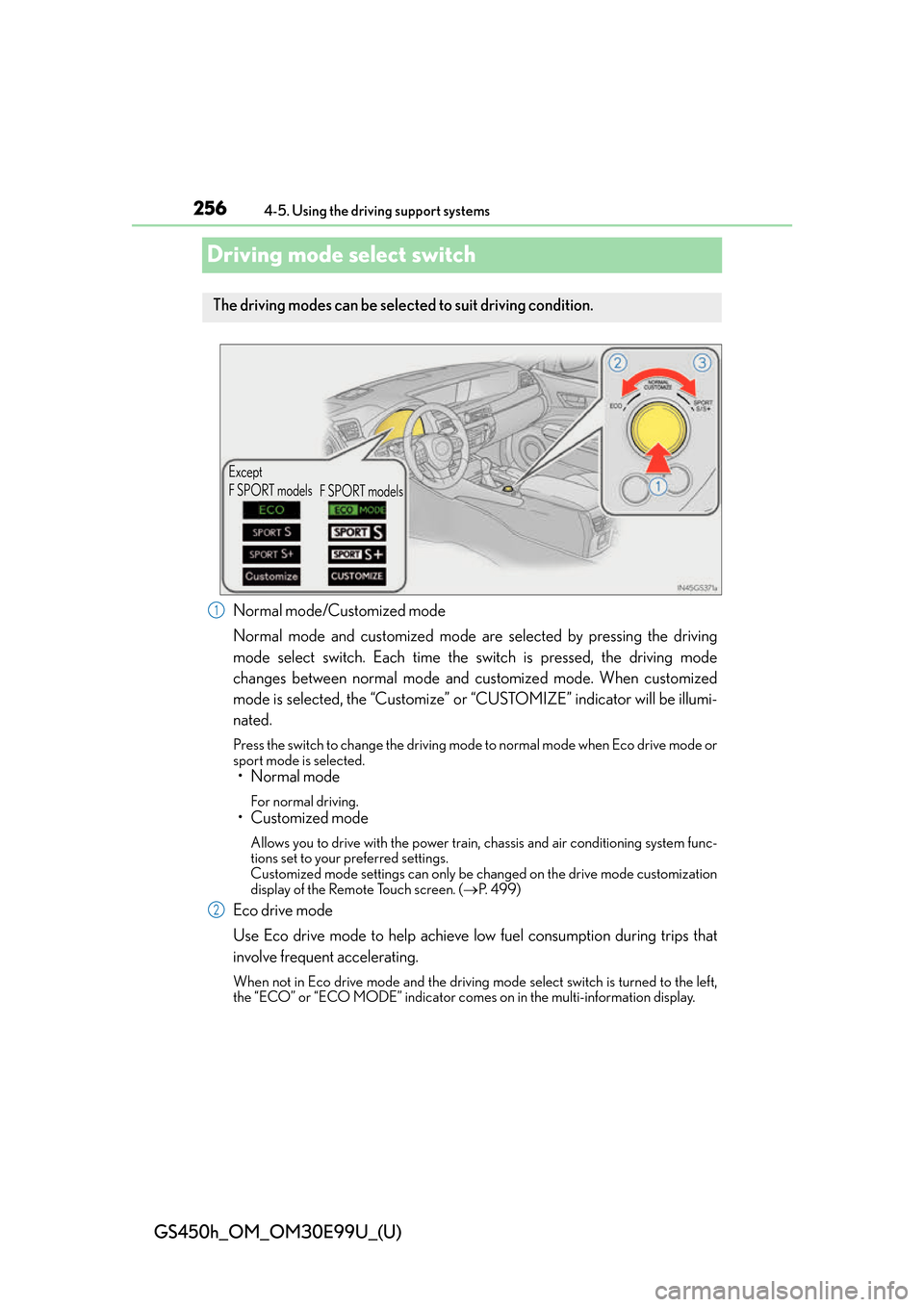
Driving mode select switch
Normal mode/Customized mode
Normal mode and customized mode are selected by pressing the driving
mode select switch. Each time the switch is pressed, the driving mode
changes between normal mode and customized mode. When customized
mode is selected, the “Customize” or “CUSTOMIZE” indicator will be illumi-
nated.
Press the switch to change the driving mode to normal mode when Eco drive mode or
sport mode is selected.
• Normal mode
For normal driving.
• Customized mode
Allows you to drive with the power train, chassis and air conditioning system func-
tions set to your preferred settings.
Customized mode settings can only be changed on the drive mode customization
display of the Remote Touch screen. ( P. 499)
Eco drive mode
Use Eco drive mode to help achieve low fuel consumption during trips that
involve frequent accelerating.
When not in Eco drive mode and the driving mo de select switch is turned to the left,
the “ECO” or “ECO MODE” indicator comes on in the multi- information display.
The driving modes can be selected to suit driving condition.
Except
F SPORT models
F SPORT models
1
2
Page 257 of 544
GS450h_OM_OM30E99U_(U)
2574-5. Using the driving support systems
4
Driving
Sport mode•SPORT S mode
Assists acceleration response by controlling the transmission and engine.
When not in SPORT S mode and the driving mode select switch is turned to the
right, the “SPORT S” indicator comes on in the multi-information display, and the
Hybrid System Indicator changes to the tachometer. ( P. 9 1 )
•SPORT S+ mode
Helps to ensure steering performanc e and driving stability by simulta-
neously controlling the steering and su spension in addition to the hybrid
system. Suitable for sporty driving.
When in SPORT S mode and the driving mode select switch is turned to the right,
the “SPORT S+” indicator comes on in the multi-information display.
■Operation of the air conditioning system in Eco drive mode
Eco drive mode controls the heating/cooling operations and fan speed of the air condi-
tioning system to enhance fuel efficiency. To improve air conditioning performance, per-
form the following operations:
●Turn off eco air conditioning mode ( P. 2 8 7 )
●Adjust the fan speed ( P. 2 8 6 )
●Turn off Eco drive mode
■Automatic operation of the seat heater during Eco drive mode
Eco drive mode controls the he ating operation and fan speed of the air conditioning sys-
tem to enhance fuel efficiency. If the driving mode select switch is switched to Eco drive
mode in cold temperatures, the seat heater wi ll be automatically operated to assist heat-
ing performance.
■Automatic deactivation of sport mode and customized mode
If the power switch is turned off after driv ing in sport mode or customized mode, the
drive mode will be changed to normal mode.
■Driving mode pop-up display (12.3-inch display only)
When the driving mode is changed, the selected driving mode will be temporarily dis-
played on the side display. ( P. 2 8 3 )
3
Page 267 of 544
GS450h_OM_OM30E99U_(U)
2674-5. Using the driving support systems
4
Driving
◆VGRS (Variable Gear Ratio Steering) (if equipped)
Adjusts the front wheel turning angle in accordance with the vehicle speed
and steering wheel movement
◆DRS (Dynamic Rear Steering) (if equipped)
Contributes to the turning characteristics and responsiveness of the vehicle
by slightly adjusting the rear wheel angle of the vehicle in accordance with
steering wheel movement
◆Hill-start assist control
Helps to prevent the vehicle from rolling backward when starting on an
incline.
◆EPS (Electric Power Steering)
Employs an electric motor to reduce the amount of effort needed to turn the
steering wheel
◆AVS (Adaptive Variable Suspension system)
By independently controlling the dampin g force of the shock absorbers for
each of the 4 wheels according to the road and driving conditions, this system
helps riding comfort with superior st eering stability, and helps good vehicle
posture
When SPORT S+ mode is selected by the driving mode select switch, the
damping force is suitable for sporty driving ( P. 2 5 6 )
◆LDH (Lexus Dynamic Handling system) (if equipped)
Provides independent control of th e VGRS, DRS and EPS. Contributes to
turning characteristics at low speeds, responsiveness at medium speeds and
safety at high speeds by controlling the steering angle of the front and rear
wheels in accordance with the steering wheel operation and vehicle speed
◆VDIM (Vehicle Dynamics Integrated Management)
Provides integrated control of the ABS, brake assist, TRAC, VSC, hill-start
assist control, EPS, VGRS (if equi pped) and DRS (if equipped) systems
Helps to maintain vehicle stability when swerving on slippery road surfaces by
controlling the brakes, hybrid system ou tput, steering assist, and steering ratio
Page 333 of 544
GS450h_OM_OM30E99U_(U)
3336-1. Maintenance and care
6
Maintenance and care
■Notes for a smart access system with push-button start
If the door handle becomes wet while the electronic key is within the effective range, the
door may lock and unlock repeatedly. In that case, follow the following correction proce-
dures to wash the vehicle:
●Place the key in a position 6 ft. (2 m) or more separate from the vehicle while the vehi-
cle is being washed. (Take care to ensure that the key is not stolen.)
●Set the electronic key to battery-saving mode to disable the smart access system with
push-button start. (P. 1 3 5 )
■Aluminum wheels
●Remove any dirt immediately by using a neutral detergent. Do not use hard brushes or
abrasive cleaners. Do not use strong or harsh chemical cleaners.
Use the same mild detergent and wax as used on the paint.
●Do not use detergent on the wheels when they are hot, for example after driving for
long distance in the hot weather.
●Wash detergent from the wheels immediately after use.
■Brake caliper coating (vehicles with orange brake calipers for F SPORT models)
●When using detergent, use neutral detergent.
Do not use hard brushes or abrasive cl eaners, as they will damage the coating.
●Do not use detergent on the brake calipers when they are hot.
●Wash detergent off immediately after use.
■Bumpers
Do not scrub with abrasive cleaners.
■Front side windows water-repellent coating (if equipped)
●The following precautions can extend the effectiveness of the water-repellent coating.
• Remove any dirt, etc. from the front side windows regularly.
• Do not allow dirt and dust to accumulate on the windows for a long period.
Clean the windows with a soft, da mp cloth as soon as possible.
• Do not use wax or glass cleaners that co ntain abrasives when cleaning the windows.
• Do not use any metallic objects to remove condensation build up.
●When the water-repellent performance has become insufficient, the coating can be
repaired. Contact your Lexus dealer.
Page 373 of 544
373
GS450h_OM_OM30E99U_(U)6-3. Do-it-yourself maintenance
6
Maintenance and care
Wheels
When replacing wheels, care should be taken to ensure that they are equivalent
to those removed in load capacity , diameter, rim width and inset
*.
Replacement wheels are available at your Lexus dealer.
*: Conventionally referred to as “offset”.
Lexus does not recommend using the following:
●Wheels of different sizes or types
●Used wheels
●Bent wheels that have been straightened
●Steel wheels (F SPORT models only)
●Use only Lexus wheel nuts and wrenches designed for use with your alumi-
num wheels.
●When rotating, repairing or changing your tires, check that the wheel nuts are
still tight after driving 1000 miles (1600 km).
●Be careful not to damage the aluminum wheels when using tire chains.
●Use only Lexus genuine balance weights or equivalent and a plastic or rubber
hammer when balancing your wheels.
■When replacing wheels
The wheels of your vehicle are equipped with tire pressure warning valves and transmit-
ters that allow the tire pressure warning system to provide advance warning in the event
of a loss in tire inflation pressure. Whenever wheels are replaced, tire pressure warning
valves and transmitters must be installed. ( P. 3 6 2 )
If a wheel is bent, cracked or heavily corroded, it should be replaced. Other-
wise, the tire may separate from the wheel or cause a loss of handling control.
Wheel selection
Aluminum wheel precautions