remote control Lexus GS450h 2016 Owner's Manual / LEXUS 2016 GS450H (OM30E99U) Owner's Guide
[x] Cancel search | Manufacturer: LEXUS, Model Year: 2016, Model line: GS450h, Model: Lexus GS450h 2016Pages: 544, PDF Size: 11.6 MB
Page 378 of 544
378
GS450h_OM_OM30E99U_(U)
6-3. Do-it-yourself maintenance
■Use a CR2032 lithium battery
●Batteries can be purchased at your Lexus dealer, local electrical appliance shops or
camera stores.
●Replace only with the same or equivalent type recommended by the manufacturer.
●Dispose of used batteries according to local laws.
■If the electronic key battery is depleted
The following symptoms may occur:
●The smart access system with push-button start and wireless remote control will not
function properly.
●The operational range will be reduced.
WA R N I N G
■Removed battery and other parts
These parts are small and if swallowed by a child, they can cause choking. Keep away
from children. Failure to do so could result in death or serious injury.
NOTICE
■For normal operation afte r replacing the battery
Observe the following precautions to prevent accidents:
●Always work with dry hands.
Moisture may cause the battery to rust.
●Do not touch or move any other component inside the remote control.
●Do not bend either of the battery terminals.
Page 451 of 544
451
GS450h_OM_OM30E99U_(U)
7
When trouble arises
7-2. Steps to take in an emergency
If the electronic key does not operate properly
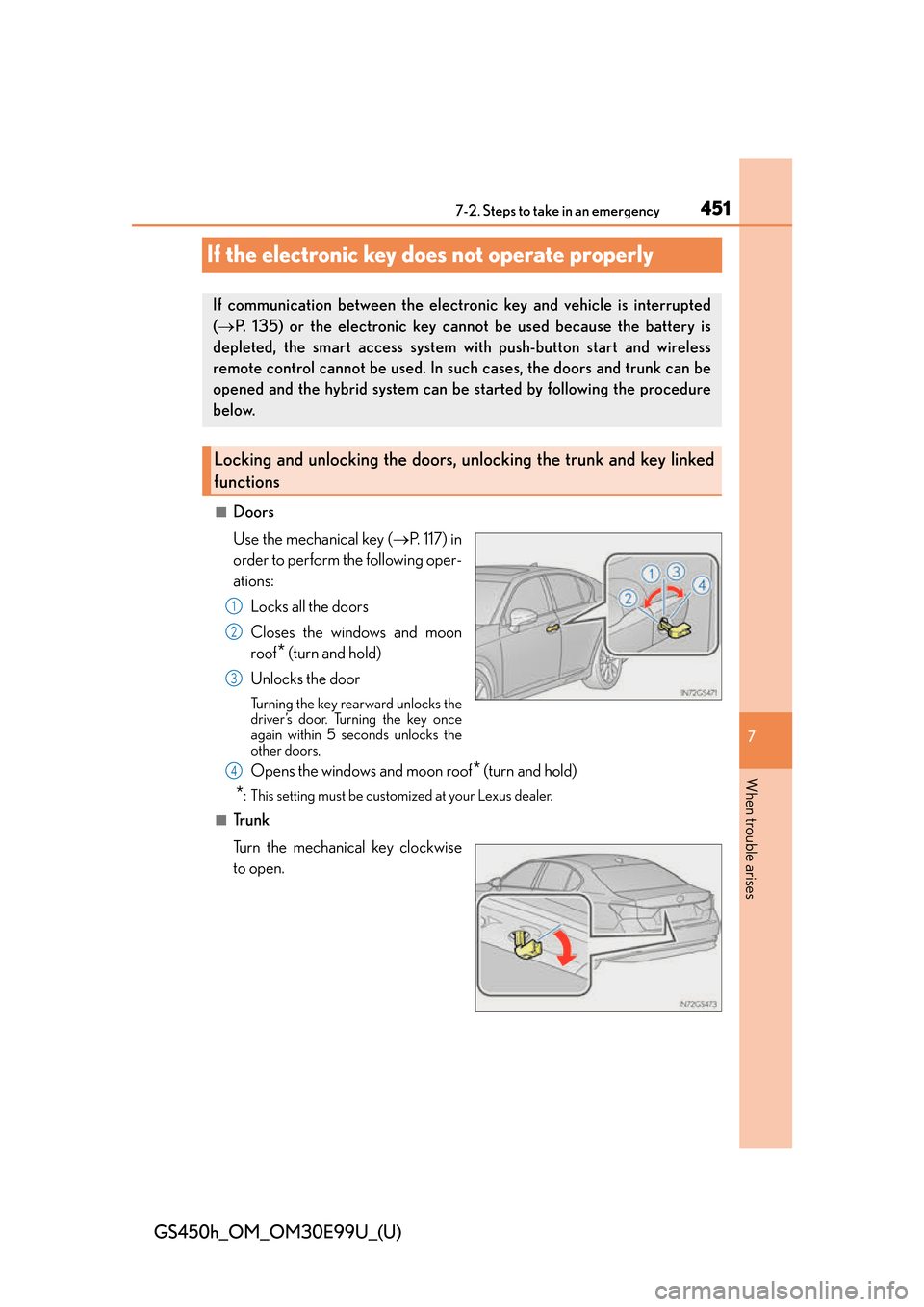
■Doors
Use the mechanical key ( P. 1 1 7 ) i n
order to perform the following oper-
ations:
Locks all the doors
Closes the windows and moon
roof
* (turn and hold)
Unlocks the door
Turning the key rearward unlocks the
driver’s door. Turning the key once
again within 5 seconds unlocks the
other doors.
Opens the windows and moon roof* (turn and hold)
*: This setting must be customized at your Lexus dealer.
■Tr u n k
Turn the mechanical key clockwise
to open.
If communication between the electronic key and vehicle is interrupted
( P. 135) or the electronic key cannot be used because the battery is
depleted, the smart access system with push-button start and wireless
remote control cannot be used. In su ch cases, the doors and trunk can be
opened and the hybrid system can be started by following the procedure
below.
Locking and unlocking the doors, un locking the trunk and key linked
functions
1
2
3
4
Page 455 of 544
4557-2. Steps to take in an emergency
GS450h_OM_OM30E99U_(U)
7
When trouble arises
Start the engine of the second vehicle. Increase the engine speed slightly and
maintain at that level for approximately 5 minutes to recharge the 12-volt bat-
tery of your vehicle.
Open and close any of the doors of your vehicle with the power switch off.
Maintain the engine speed of the second vehicle and start the hybrid system
of your vehicle by turning the power switch to ON mode.
Make sure the “READY” indicator comes on. If the indicator does not come
on, contact your Lexus dealer.
Once the hybrid system has started, remove the jumper cables in the exact
reverse order from which they were connected.
Once the hybrid system starts, have th e vehicle inspected at your Lexus dealer
as soon as possible.
■Starting the hybrid system when the 12-volt battery is discharged
The hybrid system cannot be started by push-starting.
■To prevent 12-volt battery discharge
●Turn off the headlights and the audio system while the hybrid system is off.
●Turn off any unnecessary electrical components when the vehicle is running at a low
speed for an extended period, such as in heavy traffic.
■Charging the 12-volt battery
The electricity stored in the 12-volt battery will discharge gradually even when the vehicle
is not in use, due to natural discharge and th e draining effects of certain electrical appli-
ances. If the vehicle is left for a long time, the 12-volt battery may discharge, and the
hybrid system may be unable to start. (The 12-volt battery recharges automatically while
the hybrid system is operating.)
■When recharging or replacing the 12-volt battery
●In some cases, it may not be possible to unlock the doors using the smart access system
with push-button start when the 12-volt battery is discharged. Use the wireless remote
control or the mechanical key to lock or unlock the doors.
●The hybrid system may not start on the first attempt after the 12-volt battery has
recharged but will start normally after the second attempt. This is not a malfunction.
●The power switch mode is memorized by the vehicle. When the 12-volt battery is
reconnected, the system will return to the mode it was in before the 12-volt battery was
discharged. Before disconnecting the 12-volt battery, turn the power switch off.
If you are unsure what mode the power switch was in before the 12-volt battery dis-
charged, be especially careful when reconnecting the 12-volt battery.
6
7
8
9
10
Page 491 of 544
491
GS450h_OM_OM30E99U_(U)8-2. Customization
8
Vehicle specifications
Customizable features
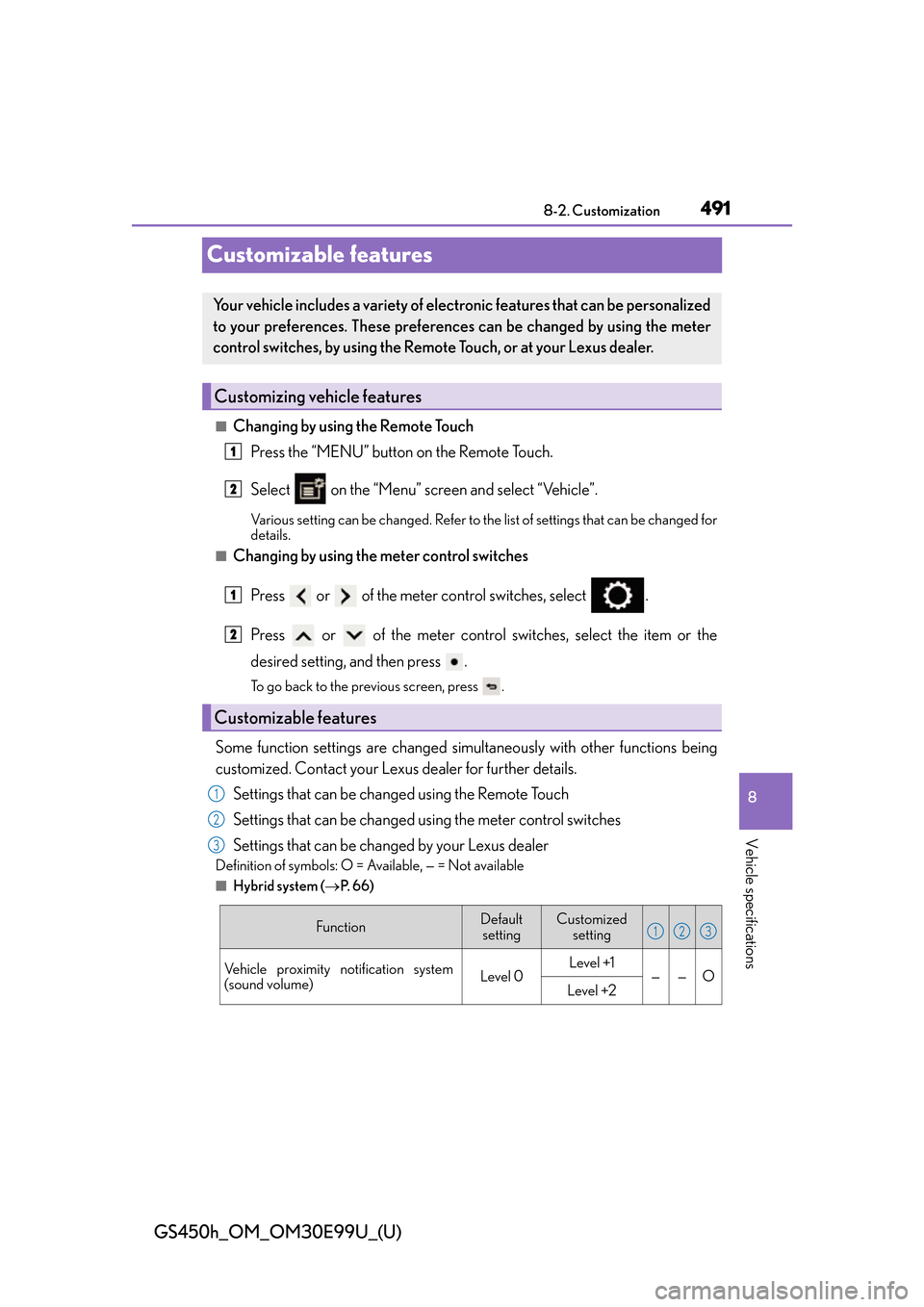
■Changing by using the Remote Touch Press the “MENU” button on the Remote Touch.
Select on the “Menu” screen and select “Vehicle”.
Various setting can be changed. Refer to the list of settings that can be changed for
details.
■Changing by using the meter control switches
Press or of the meter control switches, select .
Press or of the meter control switches, select the item or the
desired setting, and then press .
To go back to the previous screen, press .
Some function settings are changed simultaneously with other functions being
customized. Contact your Lexus dealer for further details.Settings that can be changed using the Remote Touch
Settings that can be changed using the meter control switches
Settings that can be changed by your Lexus dealer
Definition of symbols: O = Available, — = Not available
■Hybrid system ( P. 6 6 )
Your vehicle includes a variety of electronic features that can be personalized
to your preferences. These preferences can be changed by using the meter
control switches, by using the Remote Touch, or at your Lexus dealer.
Customizing vehicle features
Customizable features
1
2
1
2
1
2
3
FunctionDefault
settingCustomized setting
Vehicle proximity notification system
(sound volume)Level 0Level +1——OLevel +2
123
Page 496 of 544
496
GS450h_OM_OM30E99U_(U)
8-2. Customization
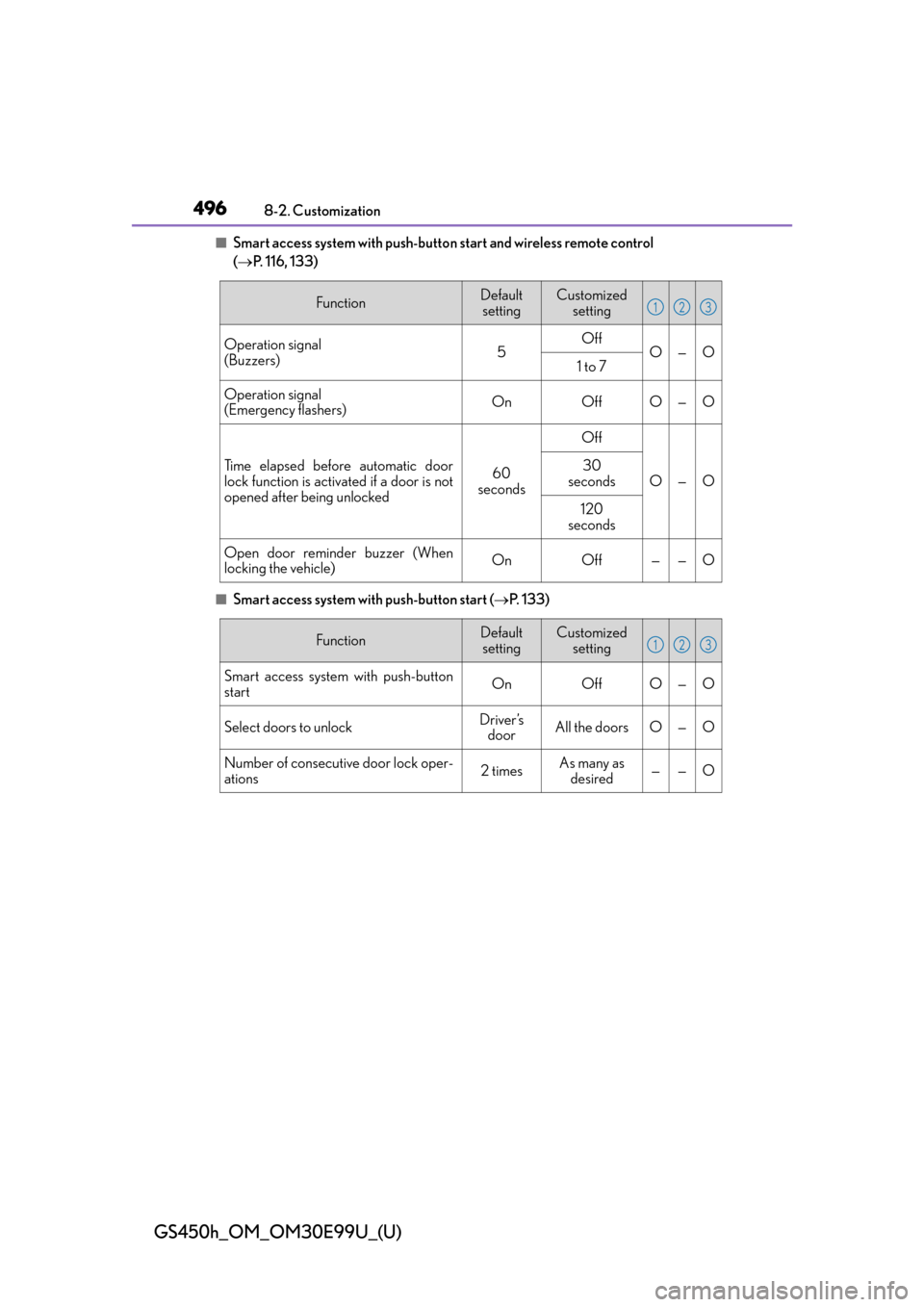
■Smart access system with push-button start and wireless remote control
( P. 116, 133)
■Smart access system with push-button start ( P. 1 3 3 )
FunctionDefault
settingCustomized setting
Operation signal
(Buzzers)5OffO—O1 to 7
Operation signal
(Emergency flashers)OnOffO—O
Time elapsed before automatic door
lock function is activated if a door is not
opened after being unlocked60
seconds
Off
O—O30
seconds
120
seconds
Open door reminder buzzer (When
locking the vehicle)OnOff——O
123
FunctionDefault settingCustomized setting
Smart access system with push-button
startOnOffO—O
Select doors to unlockDriver’s doorAll the doorsO—O
Number of consecutive door lock oper-
ations2 timesAs many as
desired——O
123
Page 497 of 544
GS450h_OM_OM30E99U_(U)
4978-2. Customization
8
Vehicle specifications
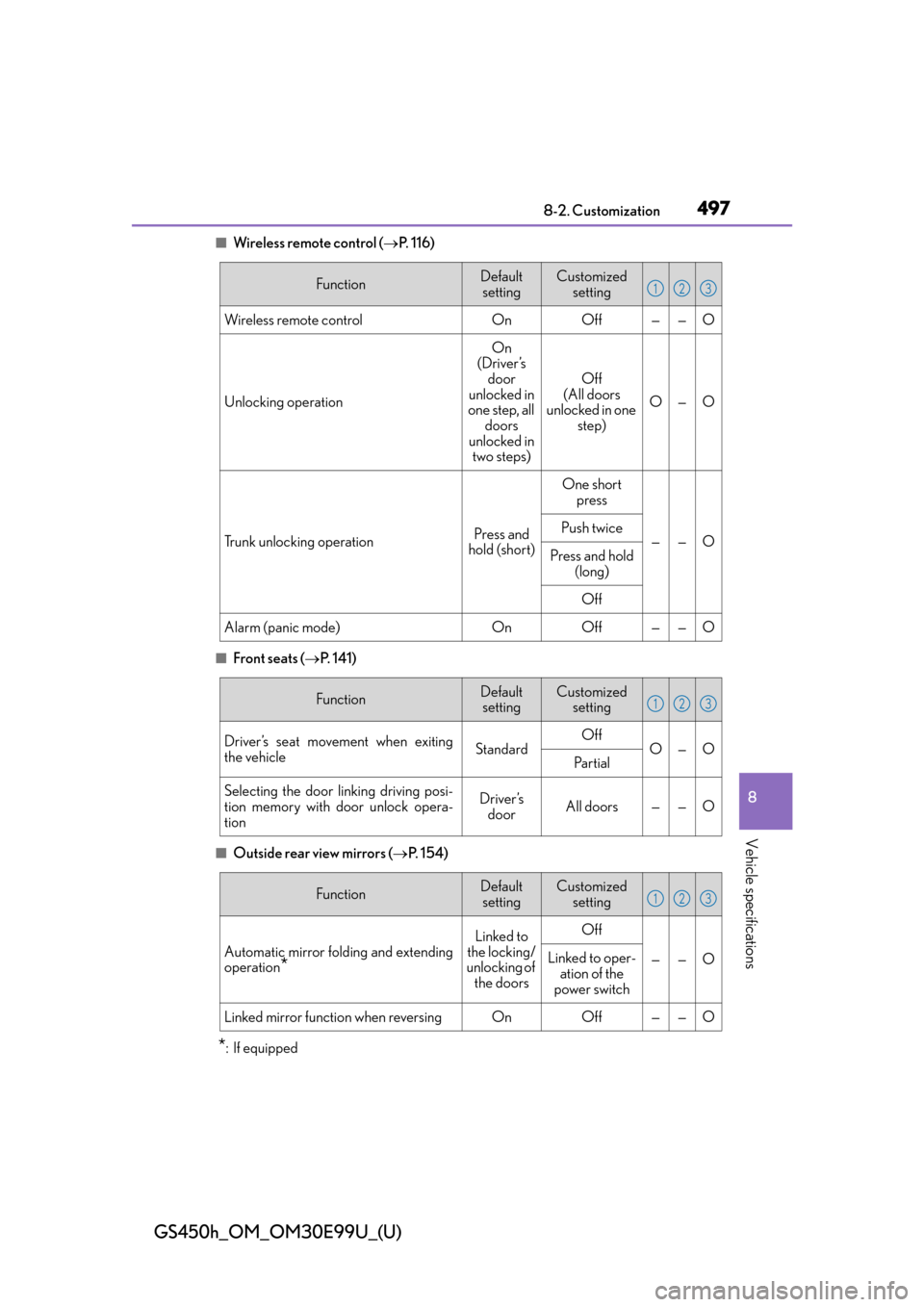
■Wireless remote control (P. 1 1 6 )
■Front seats ( P. 141)
■Outside rear view mirrors ( P. 1 5 4 )
*:If equipped
FunctionDefault
settingCustomized setting
Wireless remote controlOnOff——O
Unlocking operation
On
(Driver’s door
unlocked in
one step, all doors
unlocked in two steps)
Off
(All doors
unlocked in one step)
O—O
Trunk unlocking operationPress and
hold (short)
One short press
——OPush twice
Press and hold
(long)
Off
Alarm (panic mode)OnOff——O
123
FunctionDefaultsettingCustomized setting
Driver’s seat movement when exiting
the vehicleStandardOffO—OPa r t i a l
Selecting the door linking driving posi-
tion memory with door unlock opera-
tionDriver’s doorAll doors——O
123
FunctionDefault
settingCustomized setting
Automatic mirror folding and extending
operation*
Linked to
the locking/
unlocking of
the doorsOff
——OLinked to oper- ation of the
power switch
Linked mirror function when reversingOnOff——O
123
Page 498 of 544
498
GS450h_OM_OM30E99U_(U)
8-2. Customization
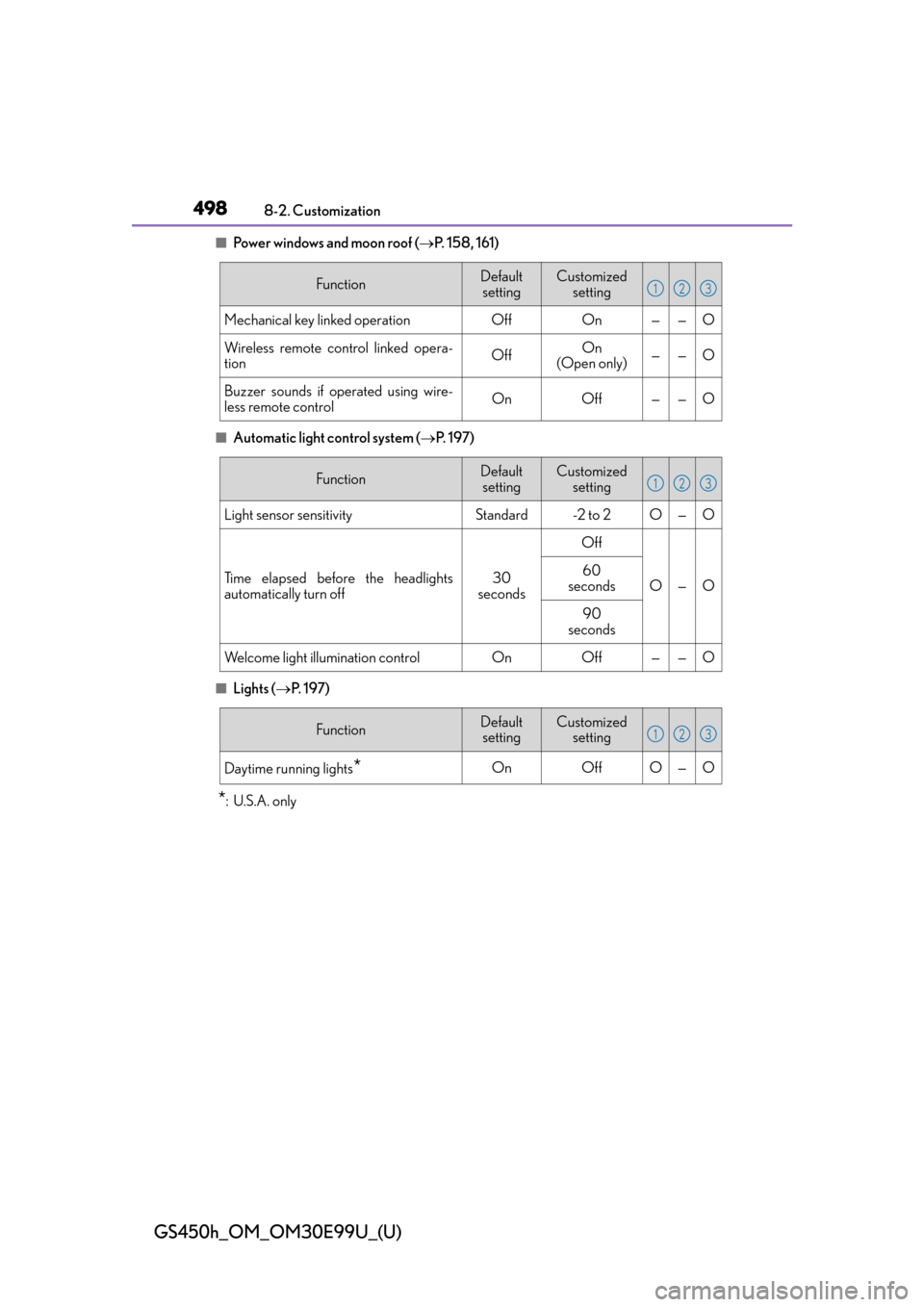
■Power windows and moon roof (P. 158, 161)
■Automatic light control system ( P. 1 9 7 )
■Lights ( P. 1 9 7 )
*: U.S.A. only
FunctionDefault
settingCustomized setting
Mechanical key linked operationOffOn——O
Wireless remote control linked opera-
tionOffOn
(Open only)——O
Buzzer sounds if operated using wire-
less remote controlOnOff——O
123
FunctionDefault settingCustomized setting
Light sensor sensitivityStandard-2 to 2O—O
Time elapsed before the headlights
automatically turn off30
seconds
Off
O—O60
seconds
90
seconds
Welcome light illumination controlOnOff——O
123
FunctionDefault settingCustomized setting
Daytime running lights*OnOffO—O
123
Page 527 of 544
527Alphabetical index
GS450h_OM_OM30E99U_(U)
Daytime running light system ........... 198
DefoggerFront windshield .................................. 291
Outside rear view mirrors .............. 291
Rear window ......................................... 291
Differential ................................................472
Dimensions ............................................. 466
Dinghy towing.......................................... 179
Display 12.3-inch display................................ 283
Drive information ..................................95
Dynamic radar cruise control with full-speed range ......................241
Energy monitor .................................... 107
LKA (Lane-Keeping Assist) .........236
Multi-information display .................. 93
Trip information .....................................86
Warning message ............................ 406
Do-it-yourself maintenance ............. 345
Door courtesy lights Location ................................................. 302
Door lock Doors ........................................................ 120
Smart access system with push-button start ............................. 133
Wireless remote control ................. 120 Doors .......................................................... 120
Automatic door locking and unlocking system .................... 123
Door glasses ......................................... 158
Door lock................................................. 122
Open door warning buzzer .......... 134
Outside rear view mirrors ..............154
Rear door child-p rotector .............. 123
Drive info 1/Drive info 2/ Drive info 3............................................. 98Drive information .................................. 95
Drive-start control .........................167, 191
Driver’s seat position memory.......... 143 Driving position memory................. 144
Memory recall function ....................145
Power easy access system ............. 143
Driving ........................................................ 166 Break-in tips ........................................... 167
Correct driving posture .................... 28
Driving mode select switch .......... 256
Hybrid vehicle driving tips .............272
Procedures .............................................166
Winter drive tips .................................274
DRS (Dynamic Rear Steering) ........ 267 Function .................................................. 267
Warning message.............................406
DVD player
*
Dynamic radar cruise control with full-speed rangeFunction .................................................... 241
Warning message.............................406
Dynamic Rear Steering (DRS) ........ 267 Function .................................................. 267
Warning message.............................406
D
*: Refer to the “NAVIGATION AND MULTIMEDIA SYSTEM OWNER’S MANUAL”.
Page 531 of 544
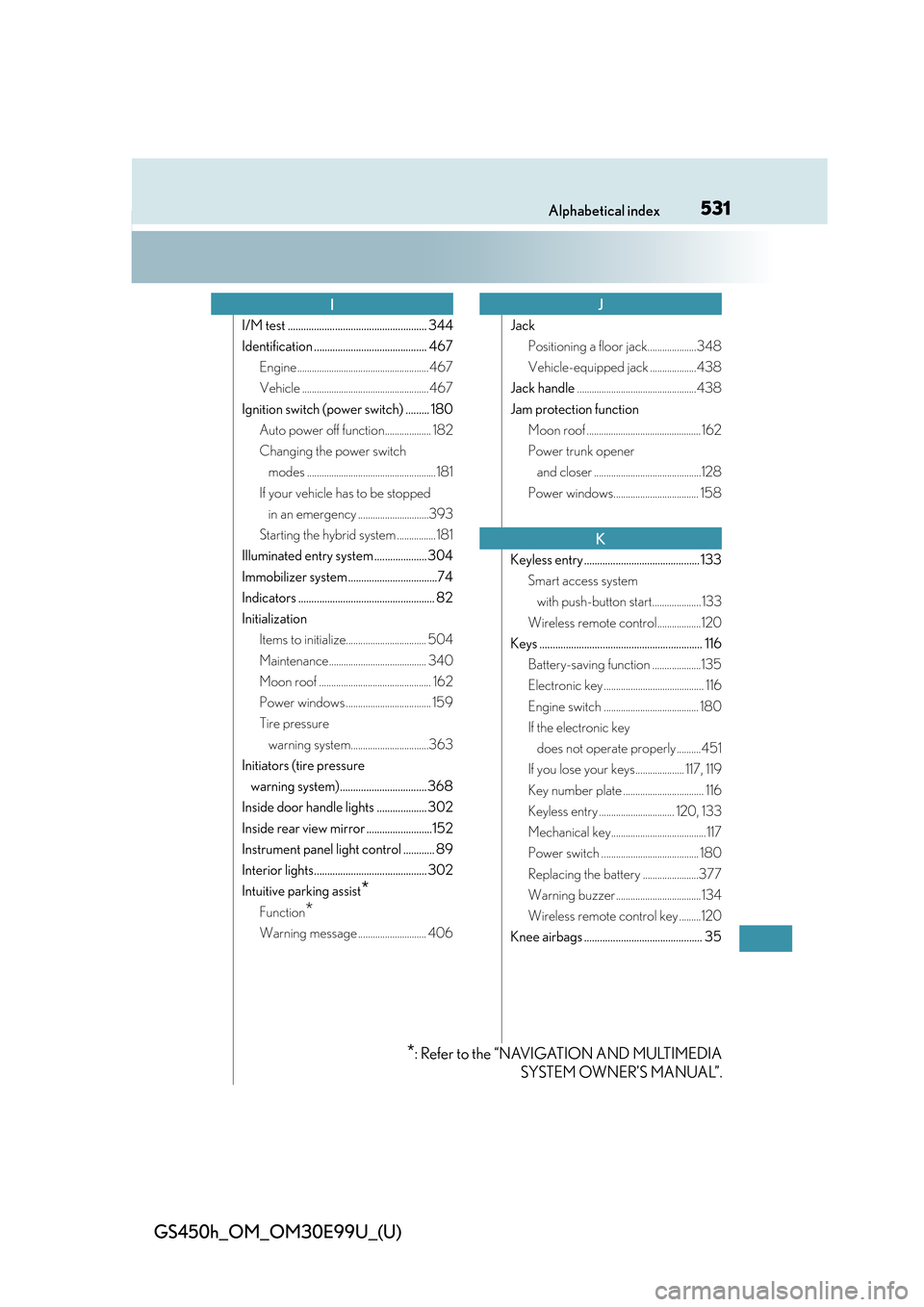
531Alphabetical index
GS450h_OM_OM30E99U_(U)
I/M test ..................................................... 344
Identification ........................................... 467Engine ...................................................... 467
Vehicle .................................................... 467
Ignition switch (power switch) ......... 180 Auto power off function................... 182
Changing the power switch modes ..................................................... 181
If your vehicle has to be stopped in an emergency .............................393
Starting the hybrid system ................ 181
Illuminated entry system .................... 304
Immobilizer system ..................................74
Indicators .................................................... 82
Initialization Items to initialize................................. 504
Maintenance........................................ 340
Moon roof .............................................. 162
Power windows ................................... 159
Tire pressure warning system................................363
Initiators (tire pressure warning system)................................. 368
Inside door handle lights ................... 302
Inside rear view mirror .........................152
Instrument panel light control ............ 89
Interior lights........................................... 302
Intuitive parking assist
*
Function*
Warning message ............................ 406 Jack
Positioning a floor jack....................348
Vehicle-equipped jack ...................438
Jack handle .................................................438
Jam protection function Moon roof ............................................... 162
Power trunk opener and closer ............................................128
Power windows................................... 158
Keyless entry ............................................ 133 Smart access system with push-button start.................... 133
Wireless remote control..................120
Keys .............................................................. 116 Battery-saving function ....................135
Electronic key ......................................... 116
Engine switch ....................................... 180
If the electronic key does not operate properly ..........451
If you lose your keys.................... 117, 119
Key number plate ................................. 116
Keyless entry ............................... 120, 133
Mechanical key....................................... 117
Power switch ........................................ 180
Replacing the battery .......................377
Warning buzzer................................... 134
Wireless remote control key .........120
Knee airbags ............................................. 35
IJ
K
*: Refer to the “NAVIGATION AND MULTIMEDIA SYSTEM OWNER’S MANUAL”.
Page 535 of 544
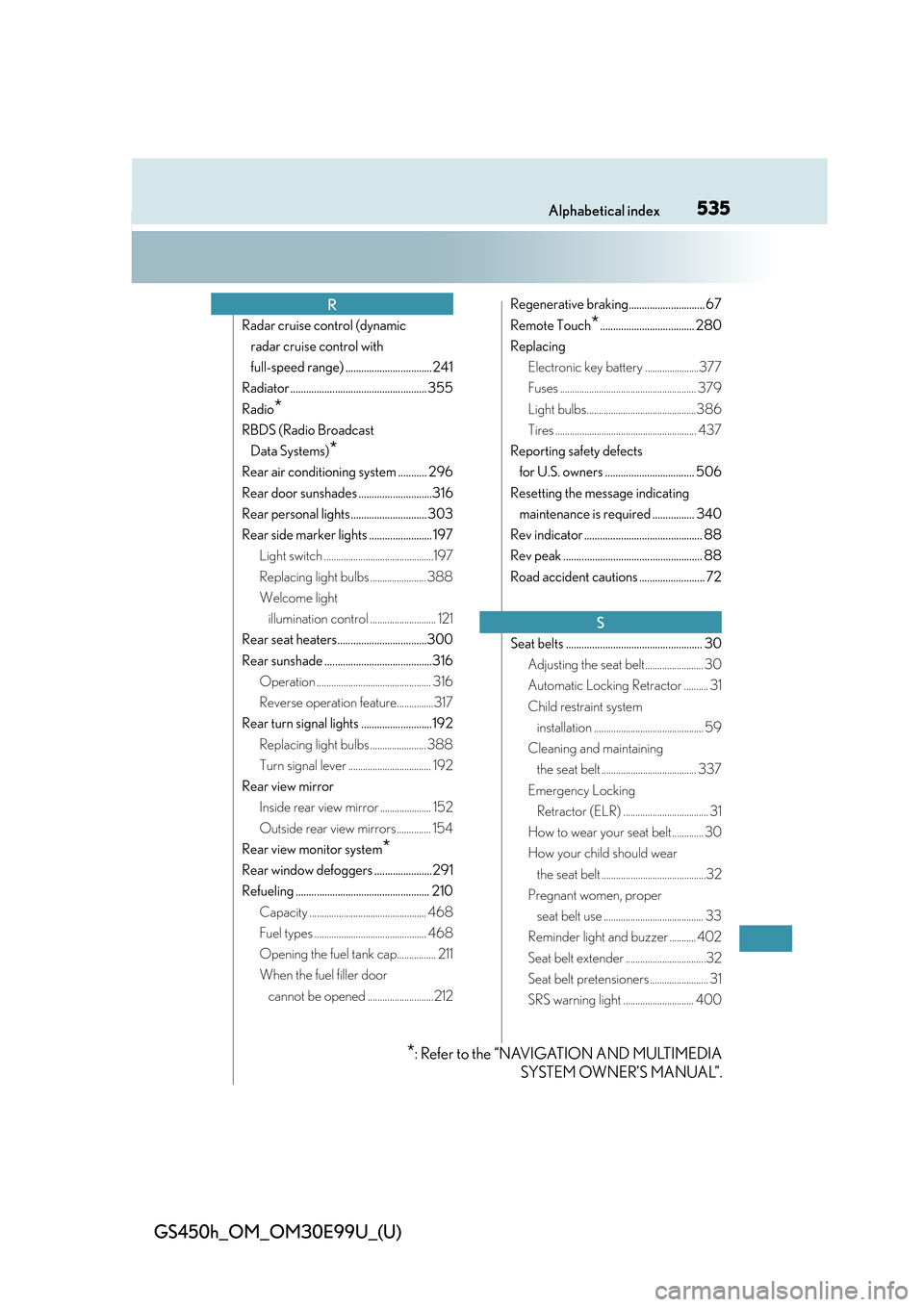
535Alphabetical index
GS450h_OM_OM30E99U_(U)
Radar cruise control (dynamic radar cruise control with
full-speed range) .................................241
Radiator .................................................... 355
Radio
*
RBDS (Radio Broadcast Data Systems)
*
Rear air conditioning system ........... 296
Rear door sunshades ............................316
Rear personal lights............................. 303
Rear side marker lights ........................ 197 Light switch .............................................197
Replacing light bulbs ....................... 388
Welcome light illumination control ........................... 121
Rear seat heaters..................................300
Rear sunshade .........................................316 Operation ............................................... 316
Reverse operation feature...............317
Rear turn signal lights ...........................192 Replacing light bulbs ....................... 388
Turn signal lever .................................. 192
Rear view mirror Inside rear view mirror ..................... 152
Outside rear view mirrors .............. 154
Rear view monitor system
*
Rear window defoggers ......................291
Refueling ................................................... 210 Capacity ................................................ 468
Fuel types .............................................. 468
Opening the fuel tank cap................ 211
When the fuel filler door cannot be opened ........................... 212 Regenerative braking............................. 67
Remote Touch
*.................................... 280
Replacing Electronic key battery ......................377
Fuses ........................................................ 379
Light bulbs.............................................386
Tires .......................................................... 437
Reporting safety defects for U.S. owners .................................. 506
Resetting the message indicating maintenance is required ................ 340
Rev indicator ............................................. 88
Rev peak ..................................................... 88
Road accident cautions ......................... 72
Seat belts .................................................... 30 Adjusting the seat belt........................ 30
Automatic Locking Retractor .......... 31
Child restraint system installation ............................................. 59
Cleaning and maintaining the seat belt ....................................... 337
Emergency Locking Retractor (ELR) ................................... 31
How to wear your seat belt............. 30
How your child should wear the seat belt ...........................................32
Pregnant women, proper seat belt use ......................................... 33
Reminder light and buzzer ........... 402
Seat belt extender .................................32
Seat belt pretensioners ........................ 31
SRS warning light ............................. 400
R
S
*: Refer to the “NAVIGATION AND MULTIMEDIA SYSTEM OWNER’S MANUAL”.