air conditioning Lexus GS450h 2016 Owner's Manual / LEXUS 2016 GS450H OWNERS MANUAL (OM30E99U)
[x] Cancel search | Manufacturer: LEXUS, Model Year: 2016, Model line: GS450h, Model: Lexus GS450h 2016Pages: 544, PDF Size: 11.6 MB
Page 4 of 544
TABLE OF CONTENTS4
GS450h_OM_OM30E99U_(U)
5-1. Remote Touch screenRemote Touch/12.3-inch display.......................................... 280
5-2. Using the air conditioning system and defogger
Front automatic air conditioning system......... 285
Rear air conditioning system .......................................... 296
Heated steering wheel/ seat heaters/seat
ventilators................................... 299
5-3. Using the interior lights Interior lights list ......................... 302• Interior lights .......................... 303
• Personal lights ....................... 303
5-4. Using the storage features List of storage features ............305• Glove box ............................... 306
• Console box .......................... 306
• Cup holders ........................... 307
• Auxiliary boxes ..................... 309
Trunk features ............................... 310 5-5. Using the other interior features
Other interior features ..............312• Sun visors ..................................312
• Vanity mirrors ..........................312
• Clock ..........................................313
• Power outlets ...........................313
• Armrest......................................315
•Rear sunshade/ rear door sunshades.............316
• Coat hooks.............................. 318
• Assist grips .............................. 318
• Garage door opener ...........319
LEXUS Enform Safety Connect...................................... 326
6-1. Maintenance and care Cleaning and protecting the vehicle exterior ................ 332
Cleaning and protecting the vehicle interior.................. 336
6-2. Maintenance Maintenance requirements ... 339
General maintenance................341
Emission inspection and maintenance (I/M)
programs .................................... 344
5Interior features
6Maintenance and care
Page 5 of 544
5
1
8 7
6
5
4
3
2
GS450h_OM_OM30E99U_(U)
9
6-3. Do-it-yourself maintenanceDo-it-yourself service precautions................................ 345
Hood ............................................... 347
Positioning a floor jack.............348
Engine compartment ............... 349
12-volt battery ............................. 358
Tires.................................................... 361
Tire inflation pressure ............... 370
Wheels ............................................373
Air conditioning filter ................375
Electronic key battery...............377
Checking and replacing fuses...............................................379
Headlight aim (vehicles with single-beam head lights) ...... 384
Light bulbs .................................... 386
7-1. Essential information Emergency flashers .................. 392
If your vehicle has to be stopped in an emergency.... 393 7-2. Steps to take in an emergency
If your vehicle needs to be towed................................ 394
If you think something is wrong ................ 399
If a warning light turns on or a warning buzzer sounds.....400
If a warning message is displayed ................................ 406
If you have a flat tire ...................437
If the hybrid system will not start ............................... 446
If the shift lever cannot be shifted from P ..................... 448
If the parking brake cannot be released ................................ 449
If the electronic key does not operate properly ....................... 451
If the 12-volt battery is discharged............................. 453
If your vehicle overheats ..........457
If the vehicle becomes stuck ..............................................462
7When trouble arises
Page 17 of 544
17Pictorial index
GS450h_OM_OM30E99U_(U)
Multi-information display . . . . . . . . . . . . . . . . . . . . . . . . . . . . . . . . . . . . . . . . . . . . .P. 93
Display . . . . . . . . . . . . . . . . . . . . . . . . . . . . . . . . . . . . . . . . . . . . . . . . . . . . . . . . . . . . . . . . . . P. 93
Energy monitor . . . . . . . . . . . . . . . . . . . . . . . . . . . . . . . . . . . . . . . . . . . . . . . . . . . . . . . . . P. 1 0 7
When the warning messages are displayed . . . . . . . . . . . . . . . . . . . . . . . . . . . . P. 406
Parking brake switches . . . . . . . . . . . . . . . . . . . . . . . . . . . . . . . . . . . . . . . . . . . . . . .P. 193
Applying/releasing. . . . . . . . . . . . . . . . . . . . . . . . . . . . . . . . . . . . . . . . . . . . . . . . . . . . . . P . 193
Precautions against winter season . . . . . . . . . . . . . . . . . . . . . . . . . . . . . . . . . . . . . . P. 275
Warning buzzer/message . . . . . . . . . . . . . . . . . . . . . . . . . . . . . . . . . . . . . . . . .P. 400, 402
Turn signal lever. . . . . . . . . . . . . . . . . . . . . . . . . . . . . . . . . . . . . . . . . . . . . . . . . . . . . . .P . 192
Headlight switch . . . . . . . . . . . . . . . . . . . . . . . . . . . . . . . . . . . . . . . . . . . . . . . . . . . . . . . . . . P. 197
Headlights/parking lights/tail lights/daytime running lights . . . . . . . . . . . . . . P. 197
Windshield wiper and washer switch. . . . . . . . . . . . . . . . . . . . . . . . . . . . . . . . P. 204
Usage . . . . . . . . . . . . . . . . . . . . . . . . . . . . . . . . . . . . . . . . . . . . . . . . . . . . . . . . . . . . . . . . . P. 204
Adding washer fluid . . . . . . . . . . . . . . . . . . . . . . . . . . . . . . . . . . . . . . . . . . . . . . . . . . . . P. 3 57
Headlight cleaners
*1 . . . . . . . . . . . . . . . . . . . . . . . . . . . . . . . . . . . . . . . . . . . . . P. 205, 207
Warning messages . . . . . . . . . . . . . . . . . . . . . . . . . . . . . . . . . . . . . . . . . . . . . . . . . . . . . P. 42 6
Emergency flasher switch . . . . . . . . . . . . . . . . . . . . . . . . . . . . . . . . . . . . . . . . . . . P. 392
Trunk opener. . . . . . . . . . . . . . . . . . . . . . . . . . . . . . . . . . . . . . . . . . . . . . . . . . . . . . . . . .P. 1 2 6
Hood lock release lever . . . . . . . . . . . . . . . . . . . . . . . . . . . . . . . . . . . . . . . . . . . . . P. 347
Tilt and telescopic steering contro l switch . . . . . . . . . . . . . . . . . . . . . . . . . . . P. 151
Adjustment . . . . . . . . . . . . . . . . . . . . . . . . . . . . . . . . . . . . . . . . . . . . . . . . . . . . . . . . . . . . . . P. 151
Driving position memory . . . . . . . . . . . . . . . . . . . . . . . . . . . . . . . . . . . . . . . . . . . . . . . P. 143
Air conditioning system . . . . . . . . . . . . . . . . . . . . . . . . . . . . . . . . . . . . . . . . . . . . . P. 285
Usage . . . . . . . . . . . . . . . . . . . . . . . . . . . . . . . . . . . . . . . . . . . . . . . . . . . . . . . . . . . . . . . . . P. 285
Rear window defogger . . . . . . . . . . . . . . . . . . . . . . . . . . . . . . . . . . . . . . . . . . . . . . . . . P. 291
Audio system*2
Trunk opener main switch . . . . . . . . . . . . . . . . . . . . . . . . . . . . . . . . . . . . . . . . . . . P. 128
*1: If equipped
*2: Refer to “NAVIGATION AND MULTIMEDIA SYSTEM OWNER’S MANUAL”.
4
5
6
7
8
9
10
11
12
13
14
Page 70 of 544
701-2. Hybrid system
GS450h_OM_OM30E99U_(U)
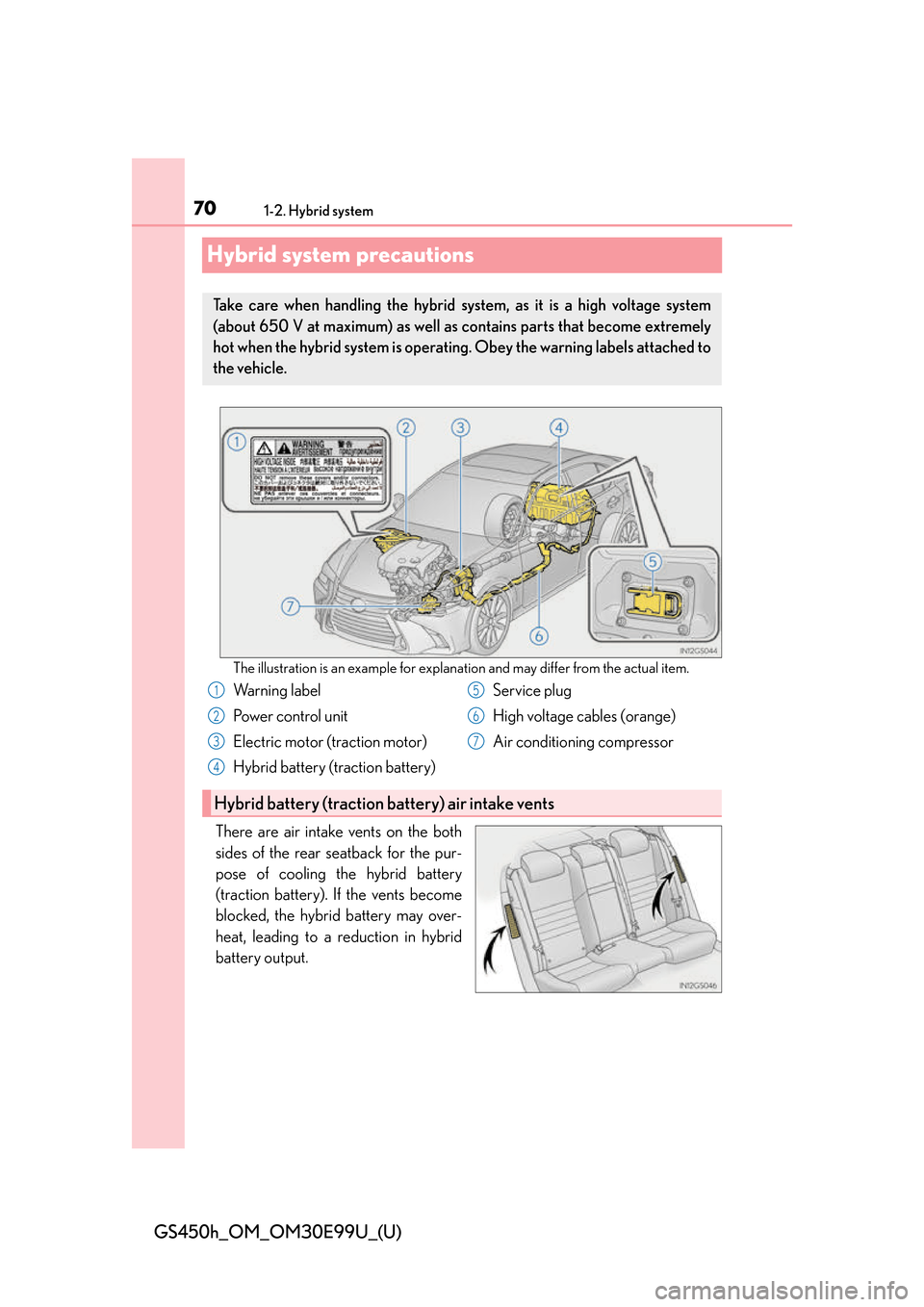
Hybrid system precautions
The illustration is an example for explanation and may differ from the actual item.
There are air intake vents on the both
sides of the rear seatback for the pur-
pose of cooling the hybrid battery
(traction battery). If the vents become
blocked, the hybrid battery may over-
heat, leading to a reduction in hybrid
battery output.
Take care when handling the hybrid system, as it is a high voltage system
(about 650 V at maximum) as well as contains parts that become extremely
hot when the hybrid system is operating. Obey the warning labels attached to
the vehicle.
Warning label
Power control unit
Electric motor (traction motor)
Hybrid battery (traction battery) Service plug
High voltage cables (orange)
Air conditioning compressor
Hybrid battery (traction battery) air intake vents
1
2
3
4
5
6
7
Page 256 of 544
256
GS450h_OM_OM30E99U_(U)
4-5. Using the driving support systems
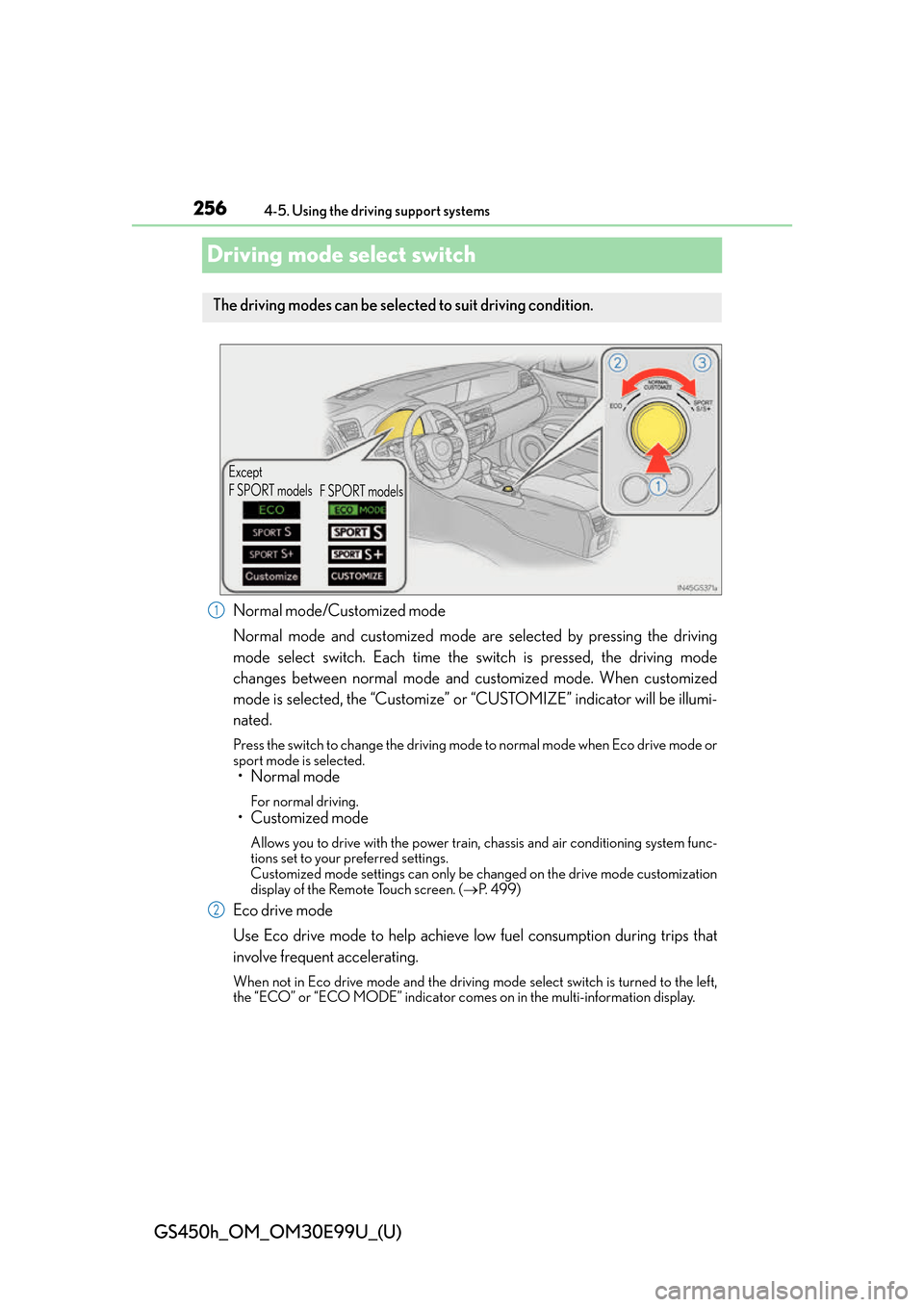
Driving mode select switch
Normal mode/Customized mode
Normal mode and customized mode are selected by pressing the driving
mode select switch. Each time the switch is pressed, the driving mode
changes between normal mode and customized mode. When customized
mode is selected, the “Customize” or “CUSTOMIZE” indicator will be illumi-
nated.
Press the switch to change the driving mode to normal mode when Eco drive mode or
sport mode is selected.
• Normal mode
For normal driving.
• Customized mode
Allows you to drive with the power train, chassis and air conditioning system func-
tions set to your preferred settings.
Customized mode settings can only be changed on the drive mode customization
display of the Remote Touch screen. ( P. 499)
Eco drive mode
Use Eco drive mode to help achieve low fuel consumption during trips that
involve frequent accelerating.
When not in Eco drive mode and the driving mo de select switch is turned to the left,
the “ECO” or “ECO MODE” indicator comes on in the multi- information display.
The driving modes can be selected to suit driving condition.
Except
F SPORT models
F SPORT models
1
2
Page 257 of 544
GS450h_OM_OM30E99U_(U)
2574-5. Using the driving support systems
4
Driving
Sport mode•SPORT S mode
Assists acceleration response by controlling the transmission and engine.
When not in SPORT S mode and the driving mode select switch is turned to the
right, the “SPORT S” indicator comes on in the multi-information display, and the
Hybrid System Indicator changes to the tachometer. ( P. 9 1 )
•SPORT S+ mode
Helps to ensure steering performanc e and driving stability by simulta-
neously controlling the steering and su spension in addition to the hybrid
system. Suitable for sporty driving.
When in SPORT S mode and the driving mode select switch is turned to the right,
the “SPORT S+” indicator comes on in the multi-information display.
■Operation of the air conditioning system in Eco drive mode
Eco drive mode controls the heating/cooling operations and fan speed of the air condi-
tioning system to enhance fuel efficiency. To improve air conditioning performance, per-
form the following operations:
●Turn off eco air conditioning mode ( P. 2 8 7 )
●Adjust the fan speed ( P. 2 8 6 )
●Turn off Eco drive mode
■Automatic operation of the seat heater during Eco drive mode
Eco drive mode controls the he ating operation and fan speed of the air conditioning sys-
tem to enhance fuel efficiency. If the driving mode select switch is switched to Eco drive
mode in cold temperatures, the seat heater wi ll be automatically operated to assist heat-
ing performance.
■Automatic deactivation of sport mode and customized mode
If the power switch is turned off after driv ing in sport mode or customized mode, the
drive mode will be changed to normal mode.
■Driving mode pop-up display (12.3-inch display only)
When the driving mode is changed, the selected driving mode will be temporarily dis-
played on the side display. ( P. 2 8 3 )
3
Page 272 of 544
272
GS450h_OM_OM30E99U_(U)
4-6. Driving tips
Hybrid vehicle driving tips
◆Using Eco drive mode
When using Eco drive mode, the torque corresponding to the accelerator
pedal depression amount can be generate d more smoothly than it is in normal
conditions. In addition, the operation of the air conditioning system (heating/
cooling) will be minimized, improving the fuel economy. ( P. 2 5 6 )
◆Use of Hybrid System Indicator
The Eco-friendly driving is possible by keeping the indicate of Hybrid System
Indicator within Eco area. ( P. 9 0 )
◆Shift lever operation
Shift the shift lever to D when stopped at a traffic light, or driving in heavy traf-
fic etc. Shift the shift lever to P when parking. When using the N, there is no
positive effect on fuel consumption. In the N, the gasoline engine operates but
electricity cannot be generated. Also, wh en using the air conditioning system,
etc., the hybrid battery (traction battery) power is consumed.
◆Accelerator pedal/brake pedal operation
●Drive your vehicle smoothly. Avoid abrupt acceleration and deceleration.
Gradual acceleration and deceleration will make more effective use of the
electric motor (traction motor) withou t having to use gasoline engine power.
●Avoid repeated acceleration. Repeated acceleration consumes hybrid bat-
tery (traction battery) power, resulting in poor fuel consumption. Battery
power can be restored by driving with the accelerator pedal slightly released.
◆When braking
Make sure to operate the brakes gently and in a timely manner. A greater
amount of electrical energy can be regenerated when slowing down.
For economical and ecological driving, pay attention to the following points:
Page 273 of 544
GS450h_OM_OM30E99U_(U)
2734-6. Driving tips
4
Driving
◆Delays
Repeated acceleration and deceleration, as well as long waits at traffic lights,
will lead to bad fuel economy. Check traffic reports before leaving and avoid
delays as much as possible. When driving in a traffic jam, gently release the
brake pedal to allow the vehicle to move forward slightly while avoiding over-
use of the accelerator pedal. Doing so can help control excessive gasoline
consumption.
◆Highway driving
Control and maintain the vehicle at a co nstant speed. Before stopping at a toll
booth or similar, allow plenty of time to release the accelerator and gently
apply the brakes. A greater amount of electrical energy can be regenerated
when slowing down.
◆Air conditioning
Use the air conditioning only when necessary. Doing so can help reduce
excessive gasoline consumption.
In summer: When the ambient temperature is high, use the recirculated air
mode. Doing so will help to reduce th e burden on the air conditioning system
and reduce fuel consumption as well.
In winter: Because the gasoline engine will not automatically cut out until it
and the interior of the vehicle are warm, it will consume fuel. Also, fuel con-
sumption can be improved by avoiding overuse of the heater.
◆Checking tire inflation pressure
Make sure to check the tire inflation pressure frequently. Improper tire infla-
tion pressure can cause poor fuel economy.
Also, as snow tires can cause large amou nts of friction, their use on dry roads
can lead to poor fuel economy. Use ti res that are appropriate for the season.
◆Luggage
Carrying heavy luggage will lead to poor fuel economy. Avoid carrying
unnecessary luggage. Installing a large roof rack will also cause poor fuel
economy.
◆Warming up before driving
Since the gasoline engine starts up and cuts out automatically when cold,
warming up the engine is unnecessary. Moreover, frequently driving short dis-
tances will cause the engine to repeated ly warm up, which can lead to excess
fuel consumption.
Page 279 of 544
279
GS450h_OM_OM30E99U_(U)
5Interior features
5-1. Remote Touch screen Remote Touch/12.3-inch display ......................................... 280
5-2. Using the air conditioning system and defogger
Front automatic air conditio ning system ........ 285
Rear air conditioning system .......................................... 296
Heated steering wheel/ seat heaters/seat
ventilators ...................................299 5-3. Using the interior lights
Interior lights list .........................302• Interior lights ..........................303
• Personal lights .......................303
5-4. Using the storage features List of storage features ............305• Glove box ...............................306
• Console box...........................306
• Cup holders ........................... 307
• Auxiliary boxes .....................309
Trunk features ............................... 310
5-5. Using the other interior features Other interior features ............. 312• Sun visors ................................. 312
• Vanity mirrors ......................... 312
• Clock ......................................... 313
• Power outlets .......................... 313
• Armrest ..................................... 315
•Rear sunshade/ rear door sunshades ............ 316
• Coat hooks .............................. 318
• Assist grips............................... 318
• Garage door opener .......... 319
LEXUS Enform Safety Connect ...................................... 326
Page 282 of 544
2825-1. Remote Touch screen
GS450h_OM_OM30E99U_(U)
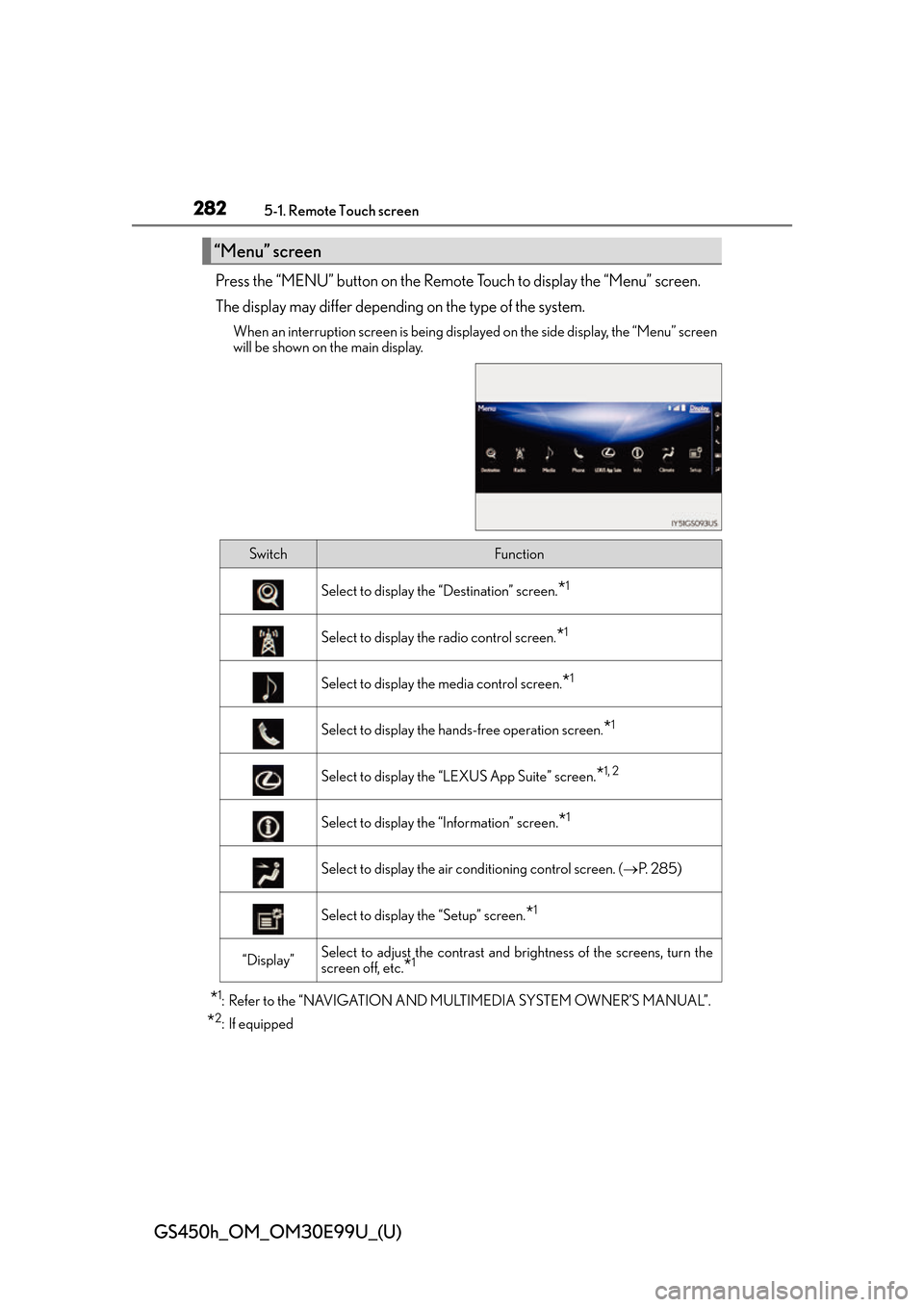
Press the “MENU” button on the Remote Touch to display the “Menu” screen.
The display may differ depending on the type of the system.
When an interruption screen is being displayed on the side display, the “Menu” screen
will be shown on the main display.
*1: Refer to the “NAVIGATION AND MULTIMEDIA SYSTEM OWNER’S MANUAL”.
*2: If equipped
“Menu” screen
SwitchFunction
Select to display the “Destination” screen.*1
Select to display the radio control screen.*1
Select to display the media control screen.*1
Select to display the hands-free operation screen.*1
Select to display the “LEXUS App Suite” screen.*1, 2
Select to display the “Information” screen.*1
Select to display the air conditioning control screen. ( P. 2 8 5 )
Select to display the “Setup” screen.*1
“Display”Select to adjust the contrast and br ightness of the screens, turn the
screen off, etc.
*1