navigation system Lexus GS450h 2016 Owner's Manual / LEXUS 2016 GS450H OWNERS MANUAL (OM30E99U)
[x] Cancel search | Manufacturer: LEXUS, Model Year: 2016, Model line: GS450h, Model: Lexus GS450h 2016Pages: 544, PDF Size: 11.6 MB
Page 6 of 544
TABLE OF CONTENTS6
GS450h_OM_OM30E99U_(U)
8-1. SpecificationsMaintenance data (fuel, oil level, etc.) .................. 466
Fuel information...........................478
Tire information............................ 481
8-2. Customization Customizable features ..............491
8-3. Initialization Items to initialize ......................... 504
Reporting safety defects for U.S. owners..................................... 506
Seat belt instructions for Canadian owners
(in French) .............................................. 507
SRS airbag instructions for Canadian owners
(in French) ..............................................509
Headlight aim instructions for Canadian owners
(in French) (vehicles with
single-beam headlights)..................... 517 What to do if...
(Troubleshooting) ............................... 520
Alphabetical index .................................524
8Vehicle specifications
9For owners
Index
For information regarding the equipment listed below, refer to the “NAVIGA-
TION AND MULTIMEDIA SYSTEM OWNER’S MANUAL”.
• Audio system
• Intuitive parking assist• Navigation system
• Lexus parking assist monitor
Page 17 of 544
17Pictorial index
GS450h_OM_OM30E99U_(U)
Multi-information display . . . . . . . . . . . . . . . . . . . . . . . . . . . . . . . . . . . . . . . . . . . . .P. 93
Display . . . . . . . . . . . . . . . . . . . . . . . . . . . . . . . . . . . . . . . . . . . . . . . . . . . . . . . . . . . . . . . . . . P. 93
Energy monitor . . . . . . . . . . . . . . . . . . . . . . . . . . . . . . . . . . . . . . . . . . . . . . . . . . . . . . . . . P. 1 0 7
When the warning messages are displayed . . . . . . . . . . . . . . . . . . . . . . . . . . . . P. 406
Parking brake switches . . . . . . . . . . . . . . . . . . . . . . . . . . . . . . . . . . . . . . . . . . . . . . .P. 193
Applying/releasing. . . . . . . . . . . . . . . . . . . . . . . . . . . . . . . . . . . . . . . . . . . . . . . . . . . . . . P . 193
Precautions against winter season . . . . . . . . . . . . . . . . . . . . . . . . . . . . . . . . . . . . . . P. 275
Warning buzzer/message . . . . . . . . . . . . . . . . . . . . . . . . . . . . . . . . . . . . . . . . .P. 400, 402
Turn signal lever. . . . . . . . . . . . . . . . . . . . . . . . . . . . . . . . . . . . . . . . . . . . . . . . . . . . . . .P . 192
Headlight switch . . . . . . . . . . . . . . . . . . . . . . . . . . . . . . . . . . . . . . . . . . . . . . . . . . . . . . . . . . P. 197
Headlights/parking lights/tail lights/daytime running lights . . . . . . . . . . . . . . P. 197
Windshield wiper and washer switch. . . . . . . . . . . . . . . . . . . . . . . . . . . . . . . . P. 204
Usage . . . . . . . . . . . . . . . . . . . . . . . . . . . . . . . . . . . . . . . . . . . . . . . . . . . . . . . . . . . . . . . . . P. 204
Adding washer fluid . . . . . . . . . . . . . . . . . . . . . . . . . . . . . . . . . . . . . . . . . . . . . . . . . . . . P. 3 57
Headlight cleaners
*1 . . . . . . . . . . . . . . . . . . . . . . . . . . . . . . . . . . . . . . . . . . . . . P. 205, 207
Warning messages . . . . . . . . . . . . . . . . . . . . . . . . . . . . . . . . . . . . . . . . . . . . . . . . . . . . . P. 42 6
Emergency flasher switch . . . . . . . . . . . . . . . . . . . . . . . . . . . . . . . . . . . . . . . . . . . P. 392
Trunk opener. . . . . . . . . . . . . . . . . . . . . . . . . . . . . . . . . . . . . . . . . . . . . . . . . . . . . . . . . .P. 1 2 6
Hood lock release lever . . . . . . . . . . . . . . . . . . . . . . . . . . . . . . . . . . . . . . . . . . . . . P. 347
Tilt and telescopic steering contro l switch . . . . . . . . . . . . . . . . . . . . . . . . . . . P. 151
Adjustment . . . . . . . . . . . . . . . . . . . . . . . . . . . . . . . . . . . . . . . . . . . . . . . . . . . . . . . . . . . . . . P. 151
Driving position memory . . . . . . . . . . . . . . . . . . . . . . . . . . . . . . . . . . . . . . . . . . . . . . . P. 143
Air conditioning system . . . . . . . . . . . . . . . . . . . . . . . . . . . . . . . . . . . . . . . . . . . . . P. 285
Usage . . . . . . . . . . . . . . . . . . . . . . . . . . . . . . . . . . . . . . . . . . . . . . . . . . . . . . . . . . . . . . . . . P. 285
Rear window defogger . . . . . . . . . . . . . . . . . . . . . . . . . . . . . . . . . . . . . . . . . . . . . . . . . P. 291
Audio system*2
Trunk opener main switch . . . . . . . . . . . . . . . . . . . . . . . . . . . . . . . . . . . . . . . . . . . P. 128
*1: If equipped
*2: Refer to “NAVIGATION AND MULTIMEDIA SYSTEM OWNER’S MANUAL”.
4
5
6
7
8
9
10
11
12
13
14
Page 21 of 544
21Pictorial index
GS450h_OM_OM30E99U_(U)
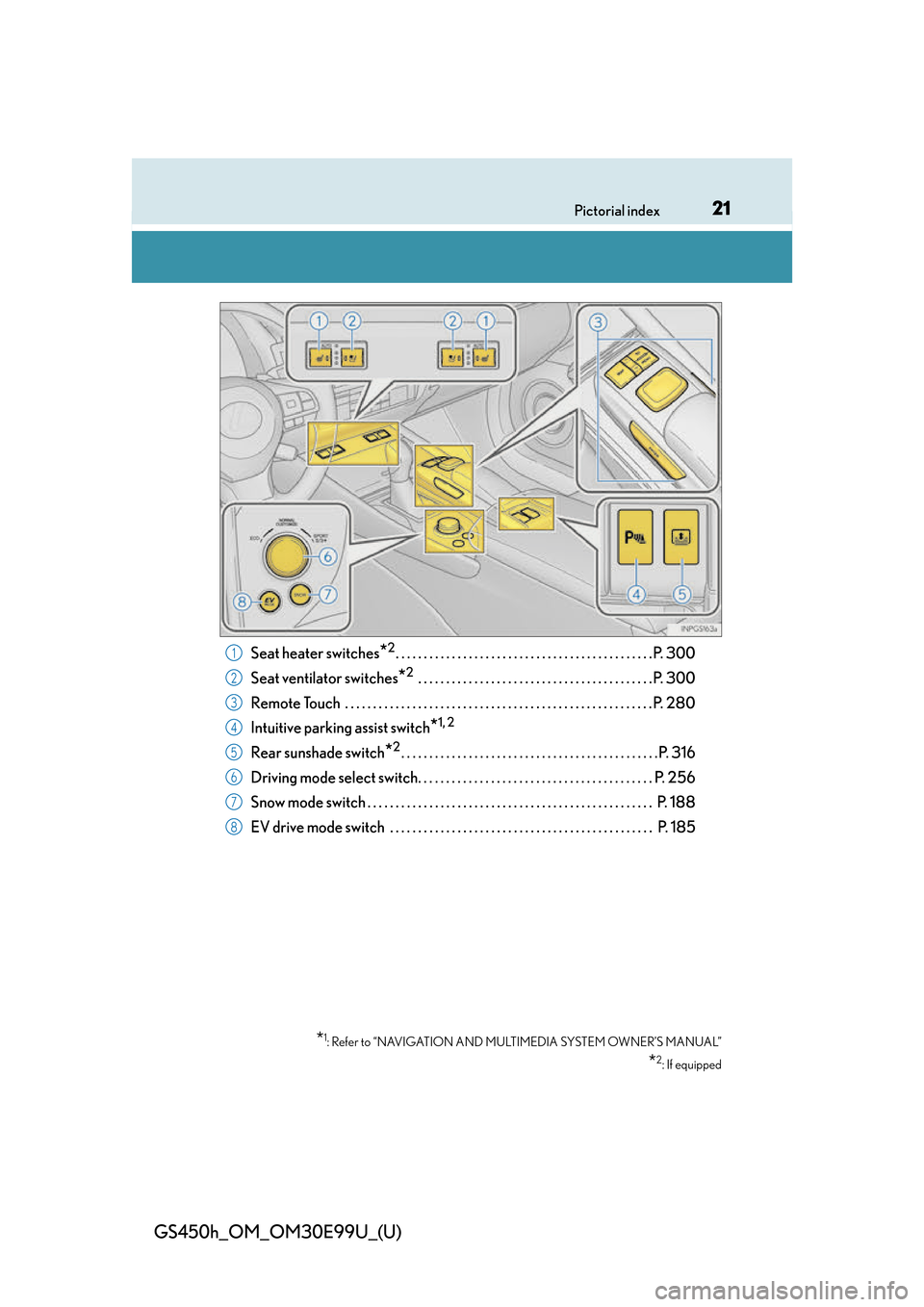
Seat heater switches*2. . . . . . . . . . . . . . . . . . . . . . . . . . . . . . . . . . . . . . . . . . . . . .P. 300
Seat ventilator switches
*2 . . . . . . . . . . . . . . . . . . . . . . . . . . . . . . . . . . . . . . . . . . P. 300
Remote Touch . . . . . . . . . . . . . . . . . . . . . . . . . . . . . . . . . . . . . . . . . . . . . . . . . . . . . . . P. 28 0
Intuitive parking assist switch
*1, 2
Rear sunshade switch*2. . . . . . . . . . . . . . . . . . . . . . . . . . . . . . . . . . . . . . . . . . . . . .P. 316
Driving mode select switch. . . . . . . . . . . . . . . . . . . . . . . . . . . . . . . . . . . . . . . . . . P. 256
Snow mode switch . . . . . . . . . . . . . . . . . . . . . . . . . . . . . . . . . . . . . . . . . . . . . . . . . . . P. 188
EV drive mode switch . . . . . . . . . . . . . . . . . . . . . . . . . . . . . . . . . . . . . . . . . . . . . . . P. 185
*1: Refer to “NAVIGATION AND MULTIMEDIA SYSTEM OWNER’S MANUAL”
*2: If equipped
1
2
3
4
5
6
7
8
Page 84 of 544
84
GS450h_OM_OM30E99U_(U)
2. Instrument cluster
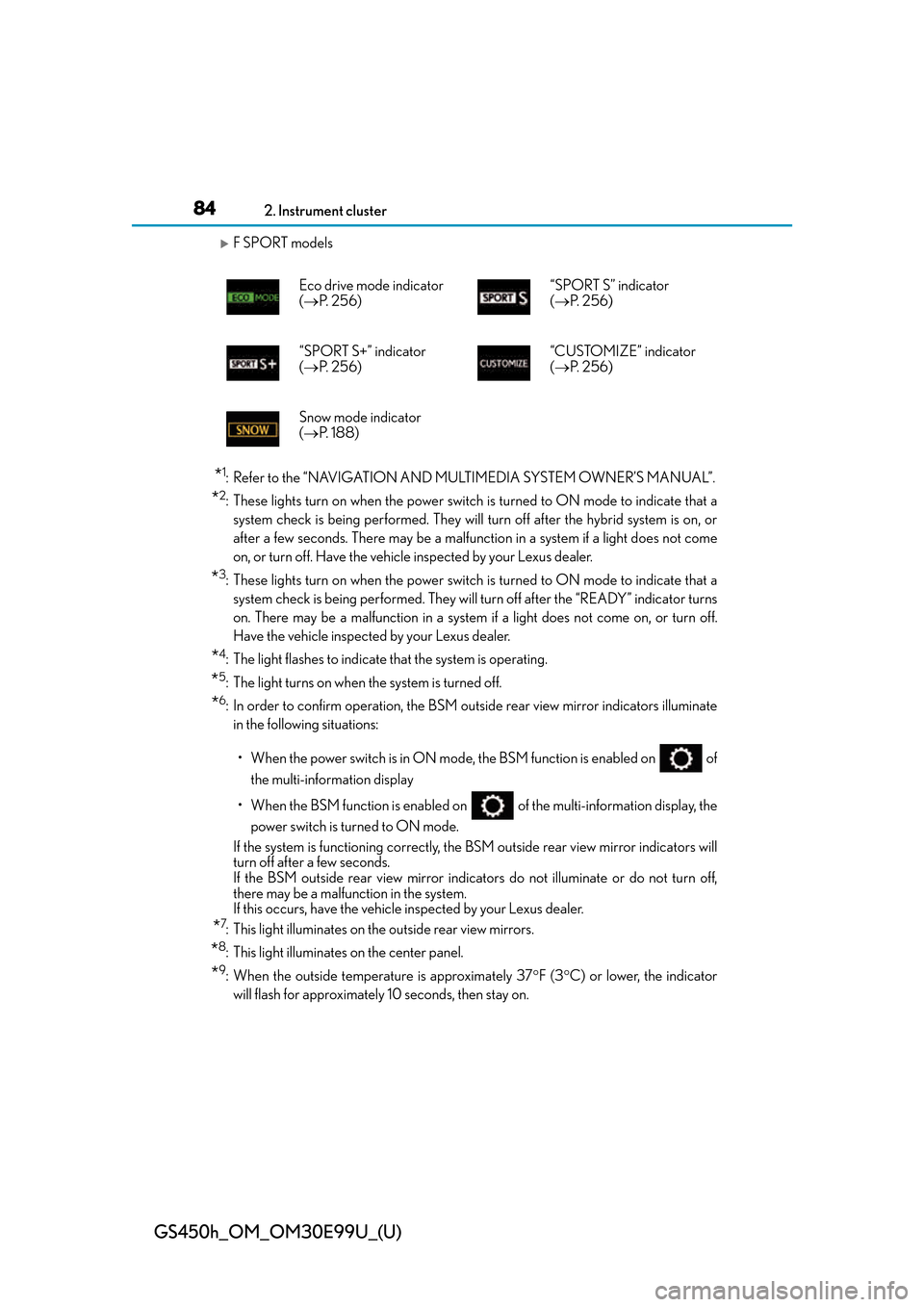
F SPORT models
*1: Refer to the “NAVIGATION AND MULTIMEDIA SYSTEM OWNER’S MANUAL”.
*2: These lights turn on when the power switch is turned to ON mode to indicate that asystem check is being performed. They will turn off after the hybrid system is on, or
after a few seconds. There may be a malfunction in a system if a light does not come
on, or turn off. Have the vehicl e inspected by your Lexus dealer.
*3: These lights turn on when the power switch is turned to ON mode to indicate that a
system check is being performed. They will turn off after the “READY” indicator turns
on. There may be a malfunction in a system if a light does not come on, or turn off.
Have the vehicle inspected by your Lexus dealer.
*4: The light flashes to indicate that the system is operating.
*5: The light turns on when the system is turned off.
*6: In order to confirm operation, the BSM outside rear view mirror indicators illuminate in the following situations:
• When the power switch is in ON mode , the BSM function is enabled on of
the multi-information display
• When the BSM function is enabled on of the multi-information display, the
power switch is turned to ON mode.
If the system is functioning correctly, the BSM outside rear view mirror indicators will
turn off after a few seconds.
If the BSM outside rear view mirror indica tors do not illuminate or do not turn off,
there may be a malfunction in the system.
If this occurs, have the vehicle inspected by your Lexus dealer.
*7: This light illuminates on the outside rear view mirrors.
*8: This light illuminates on the center panel.
*9: When the outside temperature is approximately 37 F (3 C) or lower, the indicator
will flash for approximately 10 seconds, then stay on.
Eco drive mode indicator
(
P. 2 5 6 ) “SPORT S” indicator
(
P. 2 5 6 )
“SPORT S+” indicator
( P. 2 5 6 ) “CUSTOMIZE” indicator
(
P. 2 5 6 )
Snow mode indicator
( P. 1 8 8 )
Page 93 of 544
93
GS450h_OM_OM30E99U_(U)2. Instrument cluster
2
Instrument cluster
Multi-information display
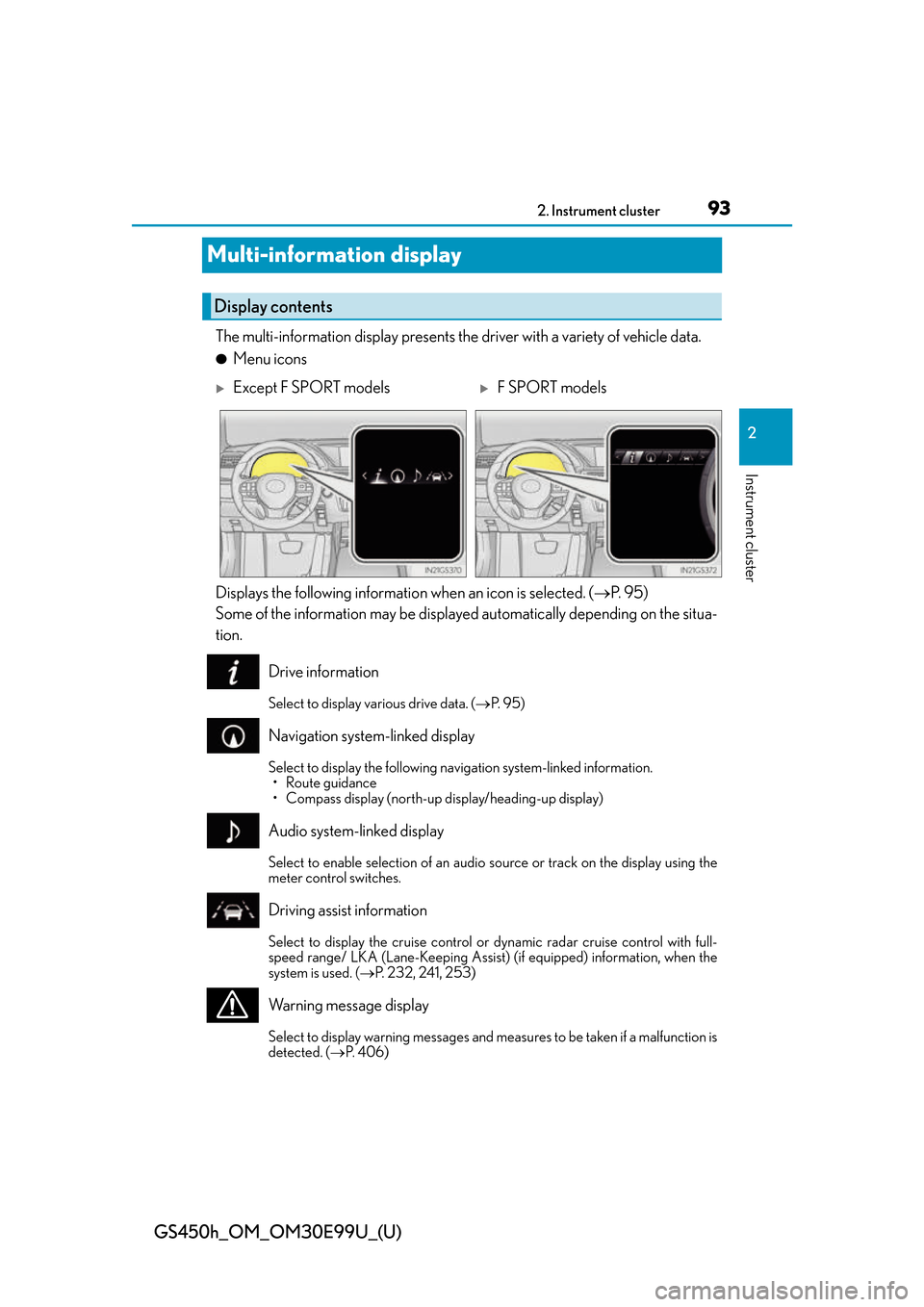
The multi-information display presents the driver with a variety of vehicle data.
●Menu icons
Displays the following informatio n when an icon is selected. (P. 9 5 )
Some of the information may be displayed automatically depending on the situa-
tion.
Drive information
Select to display various drive data. ( P. 9 5 )
Navigation system-linked display
Select to display the following navigation system-linked information.
• Route guidance
• Compass display (north-up display/heading-up display)
Audio system-linked display
Select to enable selection of an audio source or track on the display using the
meter control switches.
Driving assist information
Select to display the cruise control or dynamic radar cruise control with full-
speed range/ LKA (Lane-Keeping Assist) (if equipped) information, when the
system is used. ( P. 232, 241, 253)
Warning message display
Select to display warning messages and me asures to be taken if a malfunction is
detected. ( P. 4 0 6 )
Display contents
Except F SPORT modelsF SPORT models
Page 98 of 544
98
GS450h_OM_OM30E99U_(U)
2. Instrument cluster
●EV indicator
Select to activate/deactivate the EV indicator.
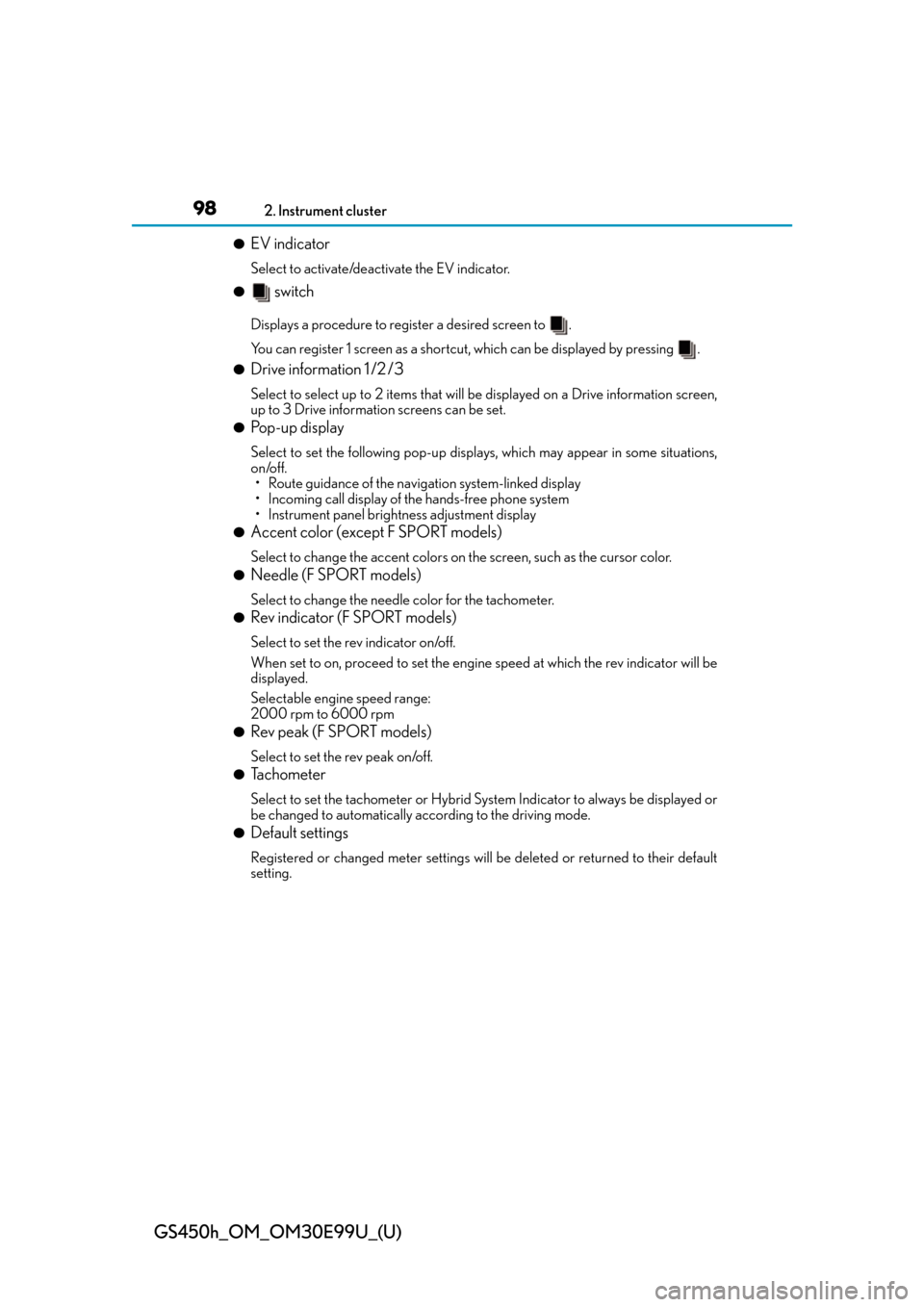
● switch
Displays a procedure to register a desired screen to .
You can register 1 screen as a shortcut, which can be displayed by pressing .
●Drive information 1 /2 /3
Select to select up to 2 items that will be displayed on a Drive information screen,
up to 3 Drive information screens can be set.
●Pop-up display
Select to set the following pop-up displa ys, which may appear in some situations,
on/off.
• Route guidance of the navigation system-linked display
• Incoming call display of the hands-free phone system
• Instrument panel brightne ss adjustment display
●Accent color (except F SPORT models)
Select to change the accent colors on the screen, such as the cursor color.
●Needle (F SPORT models)
Select to change the needle color for the tachometer.
●Rev indicator (F SPORT models)
Select to set the rev indicator on/off.
When set to on, proceed to set the engine speed at which the rev indicator will be
displayed.
Selectable engine speed range:
2000 rpm to 6000 rpm
●Rev peak (F SPORT models)
Select to set the rev peak on/off.
●Tachometer
Select to set the tachometer or Hybrid Sy stem Indicator to always be displayed or
be changed to automatically according to the driving mode.
●Default settings
Registered or changed meter settings will be deleted or returned to their default
setting.
Page 102 of 544
102
GS450h_OM_OM30E99U_(U)
2. Instrument cluster
●Vehicle speed
●Hybrid System Indicator( P. 1 0 4 )
●Tachometer
●Shift position and shift range
Displays the selected shift posi tion or selected shift range ( P. 1 8 7 )
●Audio display*
Displays audio information for approximately 3 seconds when the audio system is
operated
●Route guidance display (P. 1 0 5 )
When approaching an intersec tion while the navigation system is giving route guid-
ance, an arrow will automatically be displayed to indicate the direction of travel.
●Lexus Enform (if equipped)
Displays “LEXUS Enform” for approximat ely 3 seconds when LEXUS App Suite is
operated
●Lane departure warning display (LKA [Lane-Keeping Assist])
(if equipped) ( P. 4 0 7 )
●Approach warning display (dynamic radar cruise control with full-speed
range) (if equipped) ( P. 4 0 7 )
●Pre-collision warning message (PCS [Pre-Collision System])
(if equipped) ( P. 4 0 6 )
●Speed limit display (P. 1 0 5 )
*: The default setting is off
Head-up display contents
Page 280 of 544
280
GS450h_OM_OM30E99U_(U)
5-1. Remote Touch screen
Remote Touch/12.3-inch display
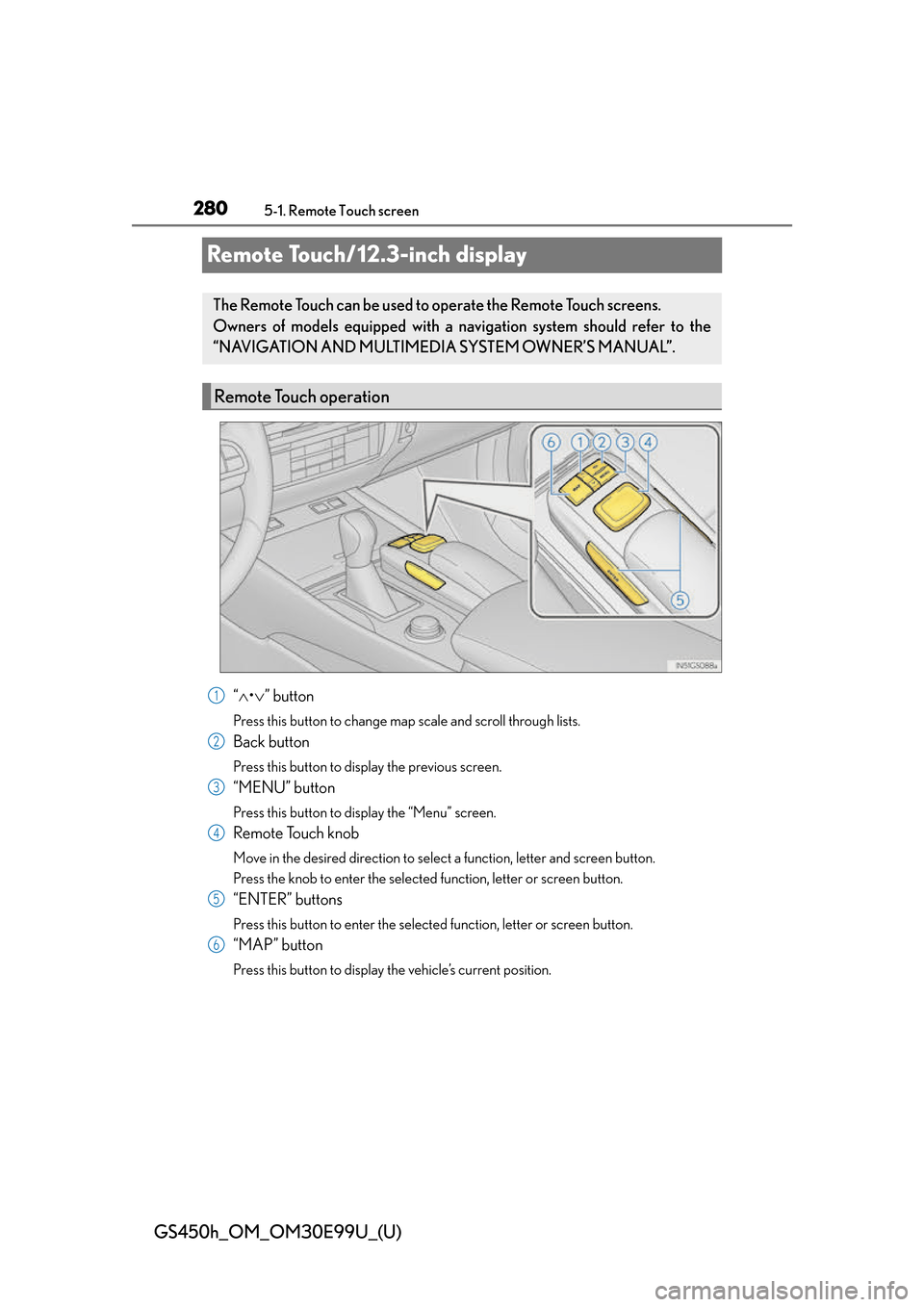
“ • ” button
Press this button to change map scale and scroll through lists.
Back button
Press this button to display the previous screen.
“MENU” button
Press this button to display the “Menu” screen.
Remote Touch knob
Move in the desired direction to select a function, letter and screen button.
Press the knob to enter the selected function, letter or screen button.
“ENTER” buttons
Press this button to enter the selected function, letter or screen button.
“MAP” button
Press this button to display the vehicle’s current position.
The Remote Touch can be used to operate the Remote Touch screens.
Owners of models equipped with a navi gation system should refer to the
“NAVIGATION AND MULTIMEDIA SYSTEM OWNER’S MANUAL”.
Remote Touch operation
1
2
3
4
5
6
Page 282 of 544
2825-1. Remote Touch screen
GS450h_OM_OM30E99U_(U)
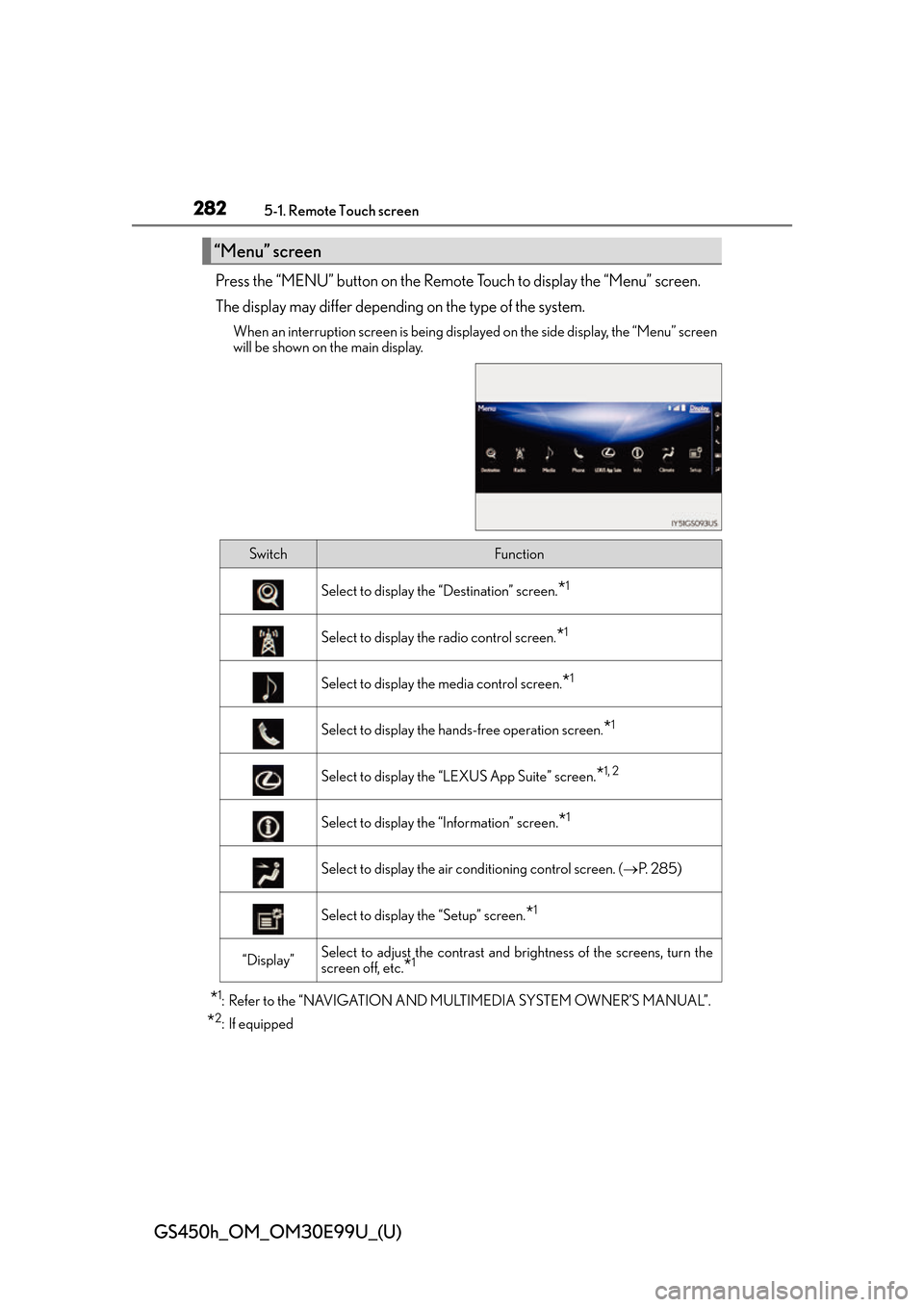
Press the “MENU” button on the Remote Touch to display the “Menu” screen.
The display may differ depending on the type of the system.
When an interruption screen is being displayed on the side display, the “Menu” screen
will be shown on the main display.
*1: Refer to the “NAVIGATION AND MULTIMEDIA SYSTEM OWNER’S MANUAL”.
*2: If equipped
“Menu” screen
SwitchFunction
Select to display the “Destination” screen.*1
Select to display the radio control screen.*1
Select to display the media control screen.*1
Select to display the hands-free operation screen.*1
Select to display the “LEXUS App Suite” screen.*1, 2
Select to display the “Information” screen.*1
Select to display the air conditioning control screen. ( P. 2 8 5 )
Select to display the “Setup” screen.*1
“Display”Select to adjust the contrast and br ightness of the screens, turn the
screen off, etc.
*1
Page 283 of 544
GS450h_OM_OM30E99U_(U)
2835-1. Remote Touch screen
5
Interior features
■Full screen display
The following functions can be displayed full screen:
*: Refer to the “NAVIGATION AND MULTIMEDIA SYSTEM OWNER’S MAN-UAL”.
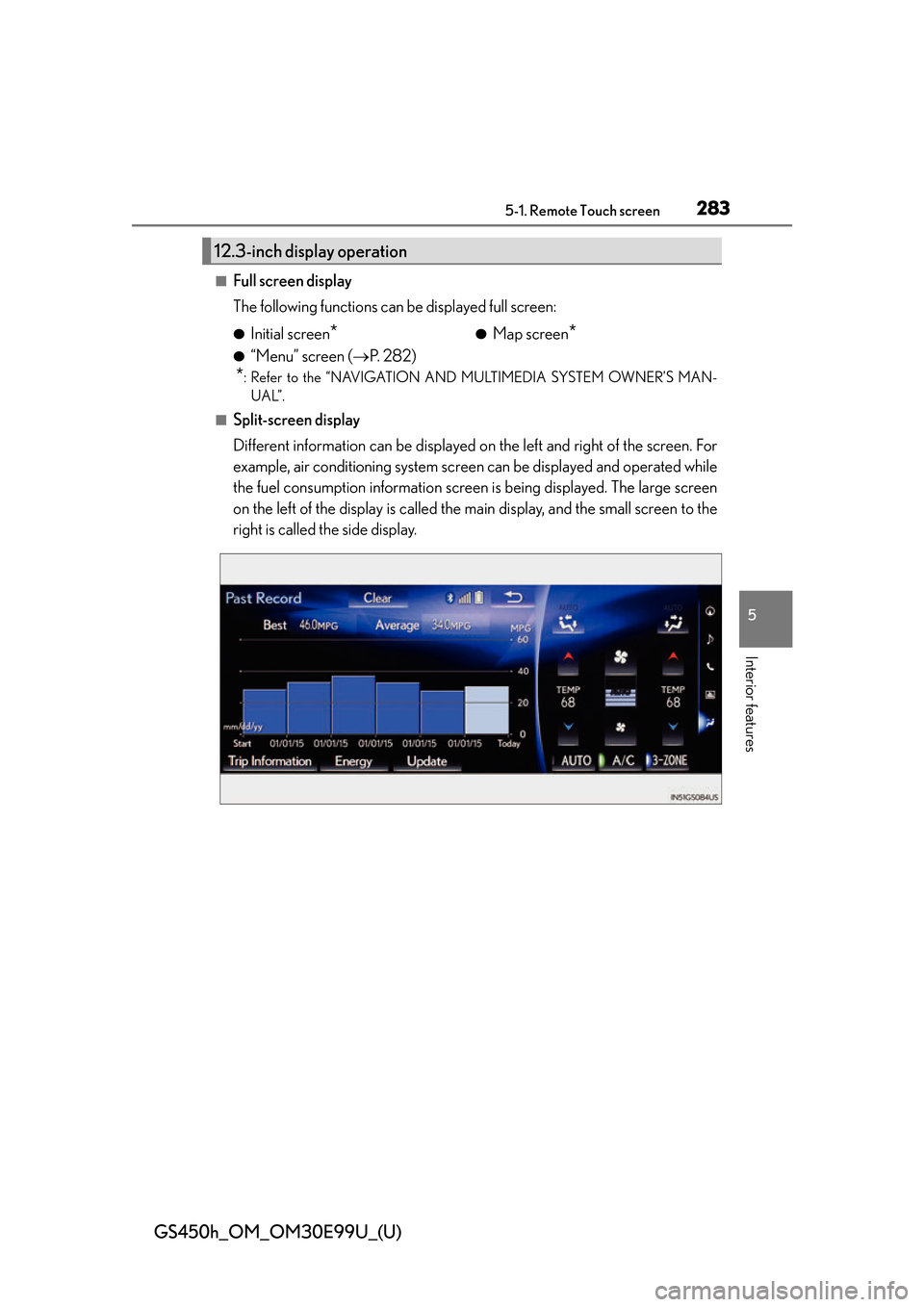
■Split-screen display
Different information can be displayed on the left and right of the screen. For
example, air conditioning system scr een can be displayed and operated while
the fuel consumption information screen is being displayed. The large screen
on the left of the display is called the main display, and the small screen to the
right is called the side display.
12.3-inch display operation
●Initial screen*
●“Menu” screen ( P. 2 8 2 )
●Map screen*