tire pressure Lexus GS450h 2016 Owner's Manual / LEXUS 2016 GS450H OWNERS MANUAL (OM30E99U)
[x] Cancel search | Manufacturer: LEXUS, Model Year: 2016, Model line: GS450h, Model: Lexus GS450h 2016Pages: 544, PDF Size: 11.6 MB
Page 5 of 544
5
1
8 7
6
5
4
3
2
GS450h_OM_OM30E99U_(U)
9
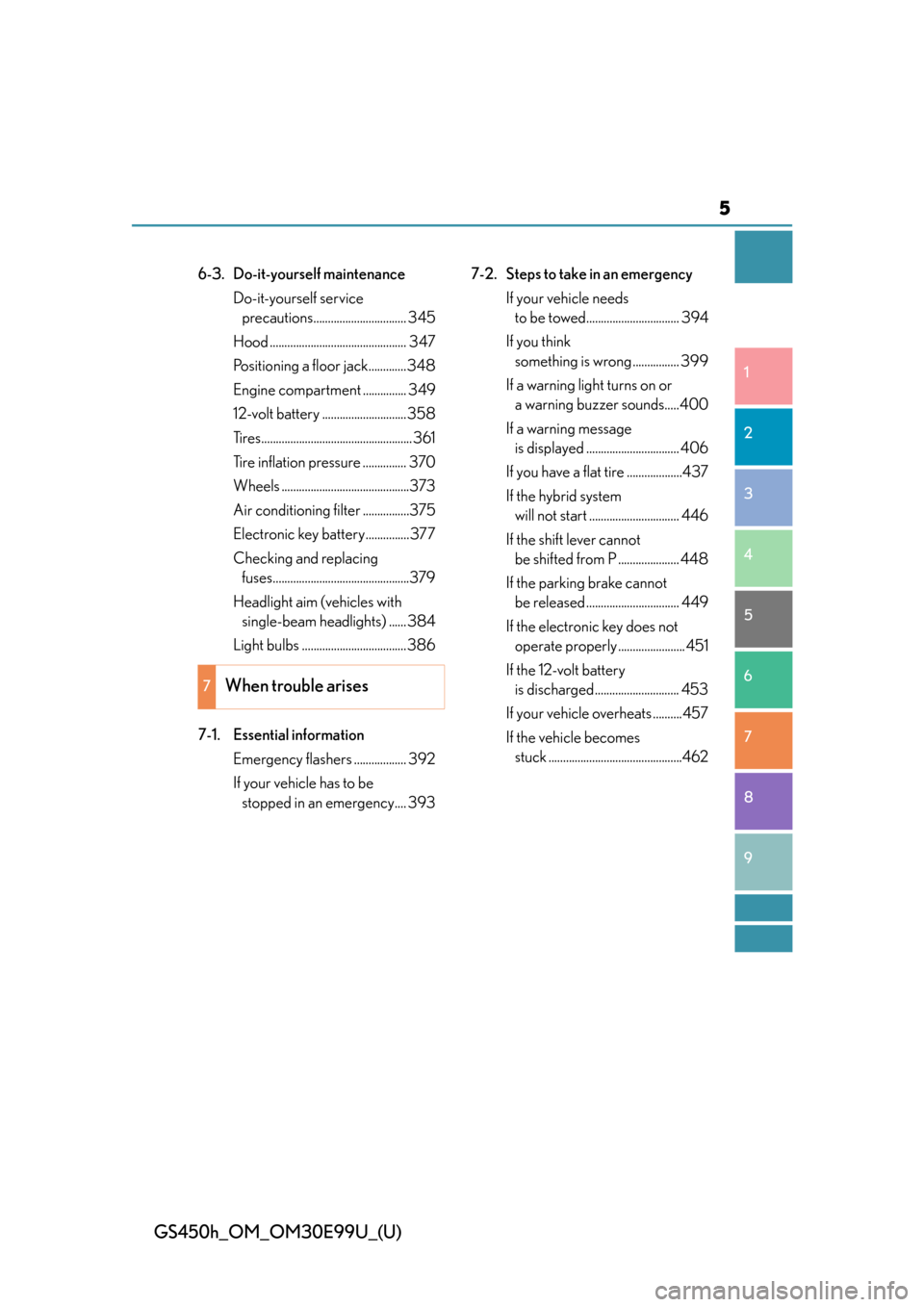
6-3. Do-it-yourself maintenanceDo-it-yourself service precautions................................ 345
Hood ............................................... 347
Positioning a floor jack.............348
Engine compartment ............... 349
12-volt battery ............................. 358
Tires.................................................... 361
Tire inflation pressure ............... 370
Wheels ............................................373
Air conditioning filter ................375
Electronic key battery...............377
Checking and replacing fuses...............................................379
Headlight aim (vehicles with single-beam head lights) ...... 384
Light bulbs .................................... 386
7-1. Essential information Emergency flashers .................. 392
If your vehicle has to be stopped in an emergency.... 393 7-2. Steps to take in an emergency
If your vehicle needs to be towed................................ 394
If you think something is wrong ................ 399
If a warning light turns on or a warning buzzer sounds.....400
If a warning message is displayed ................................ 406
If you have a flat tire ...................437
If the hybrid system will not start ............................... 446
If the shift lever cannot be shifted from P ..................... 448
If the parking brake cannot be released ................................ 449
If the electronic key does not operate properly ....................... 451
If the 12-volt battery is discharged............................. 453
If your vehicle overheats ..........457
If the vehicle becomes stuck ..............................................462
7When trouble arises
Page 15 of 544
15Pictorial index
GS450h_OM_OM30E99U_(U)
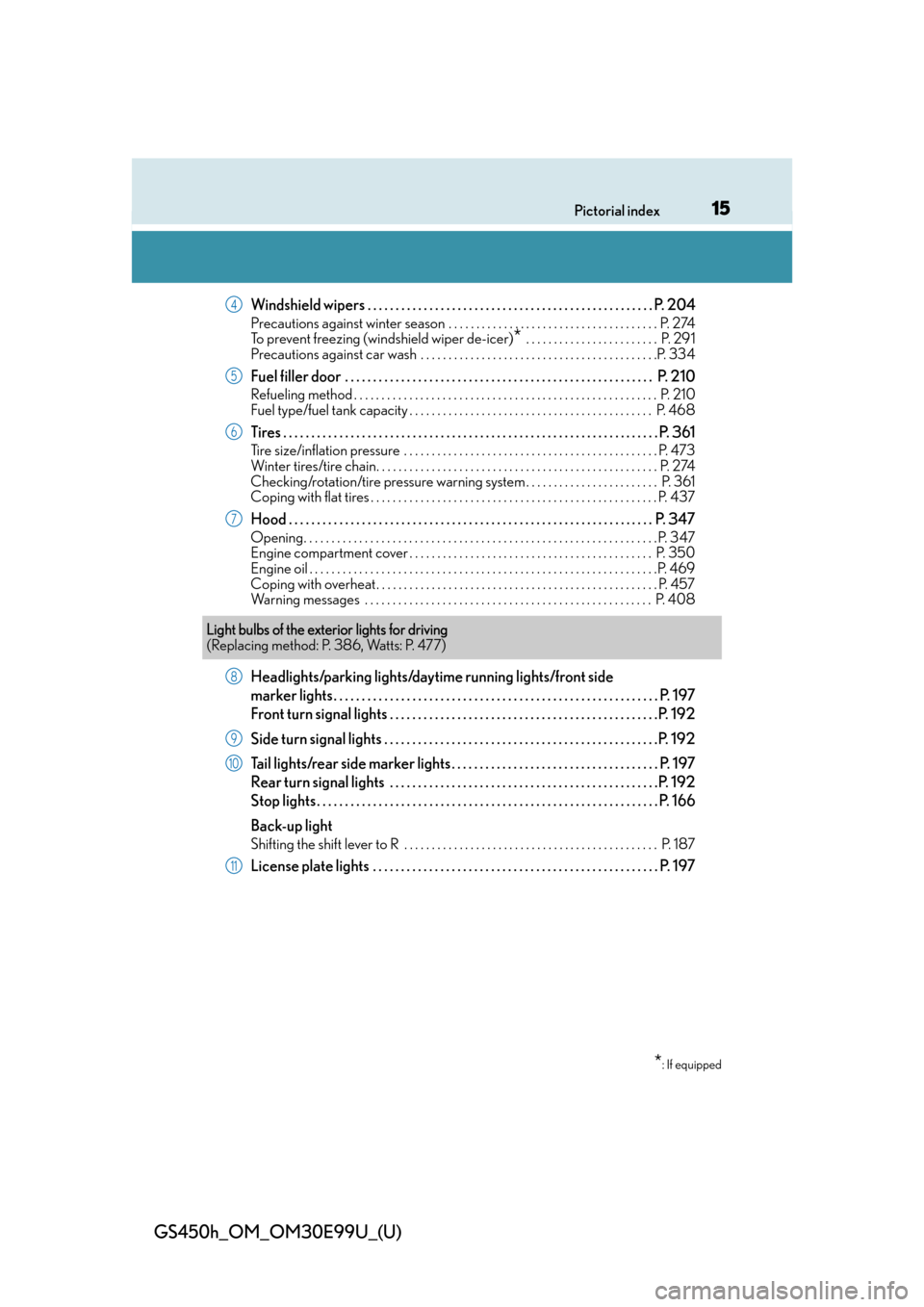
Windshield wipers . . . . . . . . . . . . . . . . . . . . . . . . . . . . . . . . . . . . . . . . . . . . . . . . . . . P. 204
Precautions against winter season . . . . . . . . . . . . . . . . . . . . . . . . . . . . . . . . . . . . . . P. 274
To prevent freezing (windshield wiper de-icer)
* . . . . . . . . . . . . . . . . . . . . . . . . P. 291
Precautions against car wash . . . . . . . . . . . . . . . . . . . . . . . . . . . . . . . . . . . . . . . . . . .P. 334
Fuel filler door . . . . . . . . . . . . . . . . . . . . . . . . . . . . . . . . . . . . . . . . . . . . . . . . . . . . . . . P. 210
Refueling method . . . . . . . . . . . . . . . . . . . . . . . . . . . . . . . . . . . . . . . . . . . . . . . . . . . . . . . P . 210
Fuel type/fuel tank capacity . . . . . . . . . . . . . . . . . . . . . . . . . . . . . . . . . . . . . . . . . . . . P. 468
Tires . . . . . . . . . . . . . . . . . . . . . . . . . . . . . . . . . . . . . . . . . . . . . . . . . . . . . . . . . . . . . . . . . . . P. 361
Tire size/inflation pressure . . . . . . . . . . . . . . . . . . . . . . . . . . . . . . . . . . . . . . . . . . . . . . P. 473
Winter tires/tire chain. . . . . . . . . . . . . . . . . . . . . . . . . . . . . . . . . . . . . . . . . . . . . . . . . . . P. 274
Checking/rotation/tire pressure warning system . . . . . . . . . . . . . . . . . . . . . . . . P. 361
Coping with flat tires . . . . . . . . . . . . . . . . . . . . . . . . . . . . . . . . . . . . . . . . . . . . . . . . . . . . P. 437
Hood . . . . . . . . . . . . . . . . . . . . . . . . . . . . . . . . . . . . . . . . . . . . . . . . . . . . . . . . . . . . . . . . . P. 347
Opening. . . . . . . . . . . . . . . . . . . . . . . . . . . . . . . . . . . . . . . . . . . . . . . . . . . . . . . . . . . . . . . . P. 347
Engine compartment cover . . . . . . . . . . . . . . . . . . . . . . . . . . . . . . . . . . . . . . . . . . . . P. 350
Engine oil . . . . . . . . . . . . . . . . . . . . . . . . . . . . . . . . . . . . . . . . . . . . . . . . . . . . . . . . . . . . . . .P. 469
Coping with overheat . . . . . . . . . . . . . . . . . . . . . . . . . . . . . . . . . . . . . . . . . . . . . . . . . . . P. 457
Warning messages . . . . . . . . . . . . . . . . . . . . . . . . . . . . . . . . . . . . . . . . . . . . . . . . . . . . P. 408
Headlights/parking lights/dayti me running lights/front side
marker lights . . . . . . . . . . . . . . . . . . . . . . . . . . . . . . . . . . . . . . . . . . . . . . . . . . . . . . . . . .P. 197
Front turn signal lights . . . . . . . . . . . . . . . . . . . . . . . . . . . . . . . . . . . . . . . . . . . . . . . .P. 192
Side turn signal lights . . . . . . . . . . . . . . . . . . . . . . . . . . . . . . . . . . . . . . . . . . . . . . . . .P. 192
Tail lights/rear side marker lights . . . . . . . . . . . . . . . . . . . . . . . . . . . . . . . . . . . . . P. 197
Rear turn signal lights . . . . . . . . . . . . . . . . . . . . . . . . . . . . . . . . . . . . . . . . . . . . . . . .P. 192
Stop lights . . . . . . . . . . . . . . . . . . . . . . . . . . . . . . . . . . . . . . . . . . . . . . . . . . . . . . . . . . . . . P. 166
Back-up light
Shifting the shift lever to R . . . . . . . . . . . . . . . . . . . . . . . . . . . . . . . . . . . . . . . . . . . . . . P. 18 7
License plate lights . . . . . . . . . . . . . . . . . . . . . . . . . . . . . . . . . . . . . . . . . . . . . . . . . . . P. 197
4
5
6
7
Light bulbs of the exterior lights for driving
(Replacing method: P. 386, Watts: P. 477)
*: If equipped
8
9
10
11
Page 81 of 544
GS450h_OM_OM30E99U_(U)
812. Instrument cluster
2
Instrument cluster
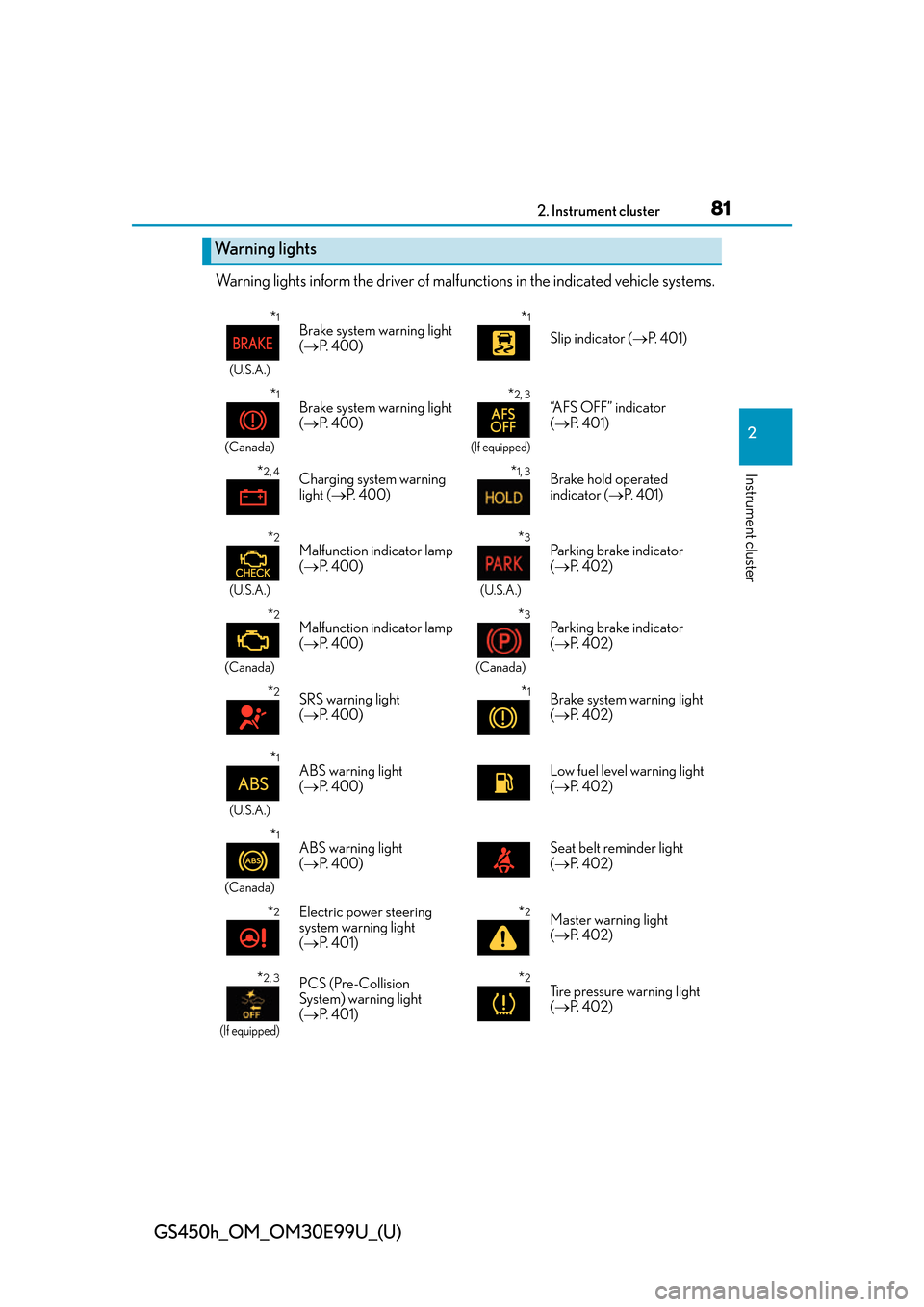
Warning lights inform the driver of malfunctions in the indicated vehicle systems.
Warning lights
*1
(U.S.A.)
Brake system warning light
( P. 400)*1
Slip indicator ( P. 4 0 1 )
*1
(Canada)
Brake system warning light
( P. 400)*2, 3
(If equipped)
“AFS OFF” indicator
( P. 4 0 1 )
*2, 4Charging system warning
light ( P. 400)*1, 3Brake hold operated
indicator ( P. 4 0 1 )
*2
(U.S.A.)
Malfunction indicator lamp
( P. 400)*3
(U.S.A.)
Parking brake indicator
( P. 4 0 2 )
*2
(Canada)
Malfunction indicator lamp
( P. 400)*3
(Canada)
Parking brake indicator
( P. 4 0 2 )
*2SRS warning light
( P. 400)*1Brake system warning light
( P. 4 0 2 )
*1
(U.S.A.)
ABS warning light
( P. 400)Low fuel level warning light
( P. 4 0 2 )
*1
(Canada)
ABS warning light
( P. 400)Seat belt reminder light
( P. 4 0 2 )
*2Electric power steering
system warning light
( P. 4 0 1 )*2Master warning light
( P. 4 0 2 )
*2, 3
(If equipped)
PCS (Pre-Collision
System) warning light
( P. 4 0 1 )*2Tire pressure warning light
( P. 4 0 2 )
Page 96 of 544
96
GS450h_OM_OM30E99U_(U)
2. Instrument cluster
■Energy monitor
P. 1 0 7
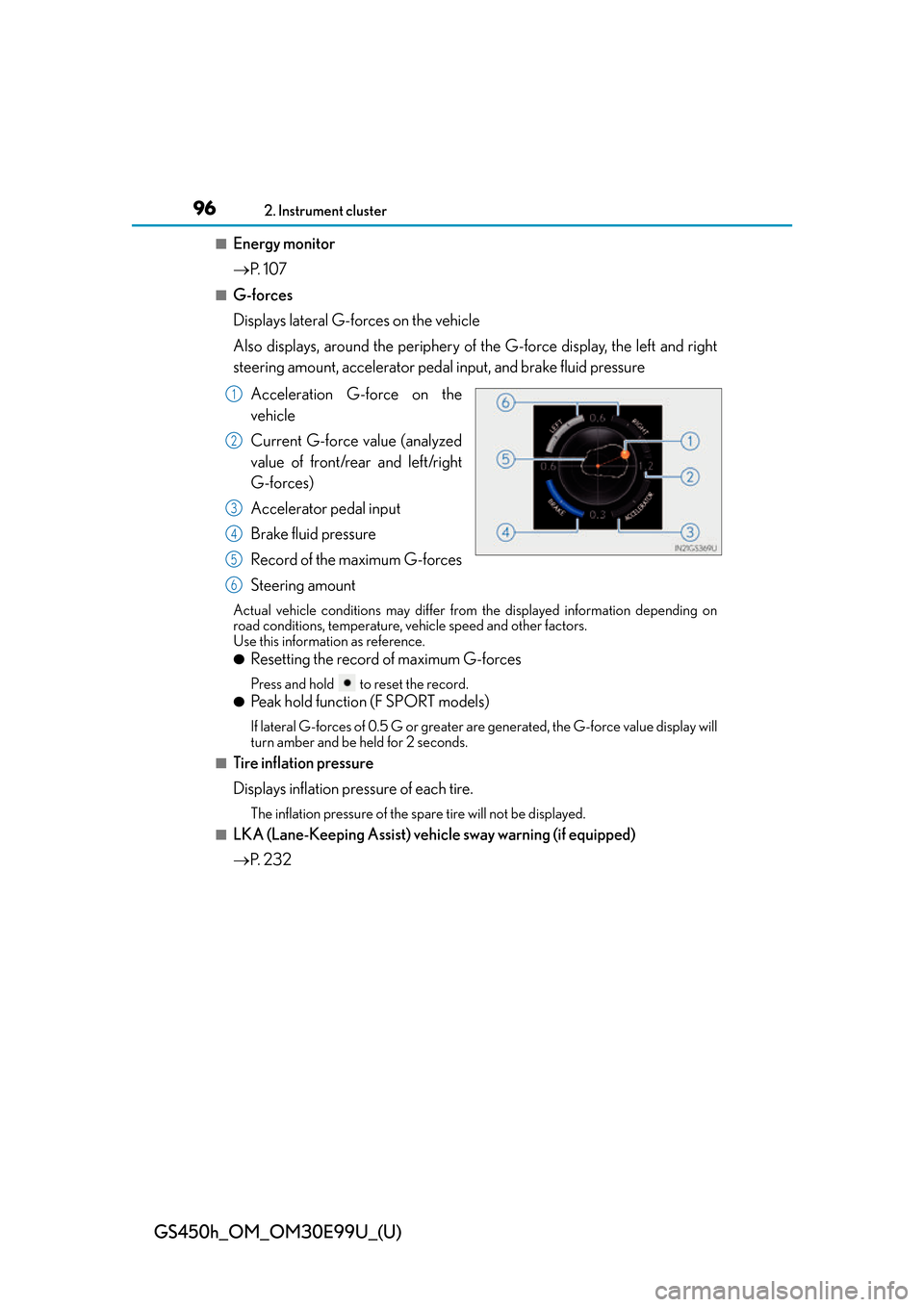
■G-forces
Displays lateral G-forces on the vehicle
Also displays, around the periphery of the G-force display, the left and right
steering amount, accelerator pedal input, and brake fluid pressure
Acceleration G-force on the
vehicle
Current G-force value (analyzed
value of front/rear and left/right
G-forces)
Accelerator pedal input
Brake fluid pressure
Record of the maximum G-forces
Steering amount
Actual vehicle conditions may differ fr om the displayed information depending on
road conditions, temperature, vehicle speed and other factors.
Use this information as reference.
●Resetting the record of maximum G-forces
Press and hold to reset the record.
●Peak hold function (F SPORT models)
If lateral G-forces of 0.5 G or greater are generated, the G-force value display will
turn amber and be held for 2 seconds.
■Tire inflation pressure
Displays inflation pressure of each tire.
The inflation pressure of the sp are tire will not be displayed.
■LKA (Lane-Keeping Assist) vehi cle sway warning (if equipped)
P. 2 3 2
1
2
3
4
5
6
Page 97 of 544
GS450h_OM_OM30E99U_(U)
972. Instrument cluster
2
Instrument cluster
■Display off
A blank screen is displayed
*1: Displayed when the item is set in “Drive Info 1”, “Drive Info 2” or “Drive Info 3”.
( P. 4 9 2 )
*2: The function can be reset by pressing th e of the meter control switches for longer
than 1 second when the item to reset is displayed.
If there is more than one item that can be reset, the item selection screen will appear.
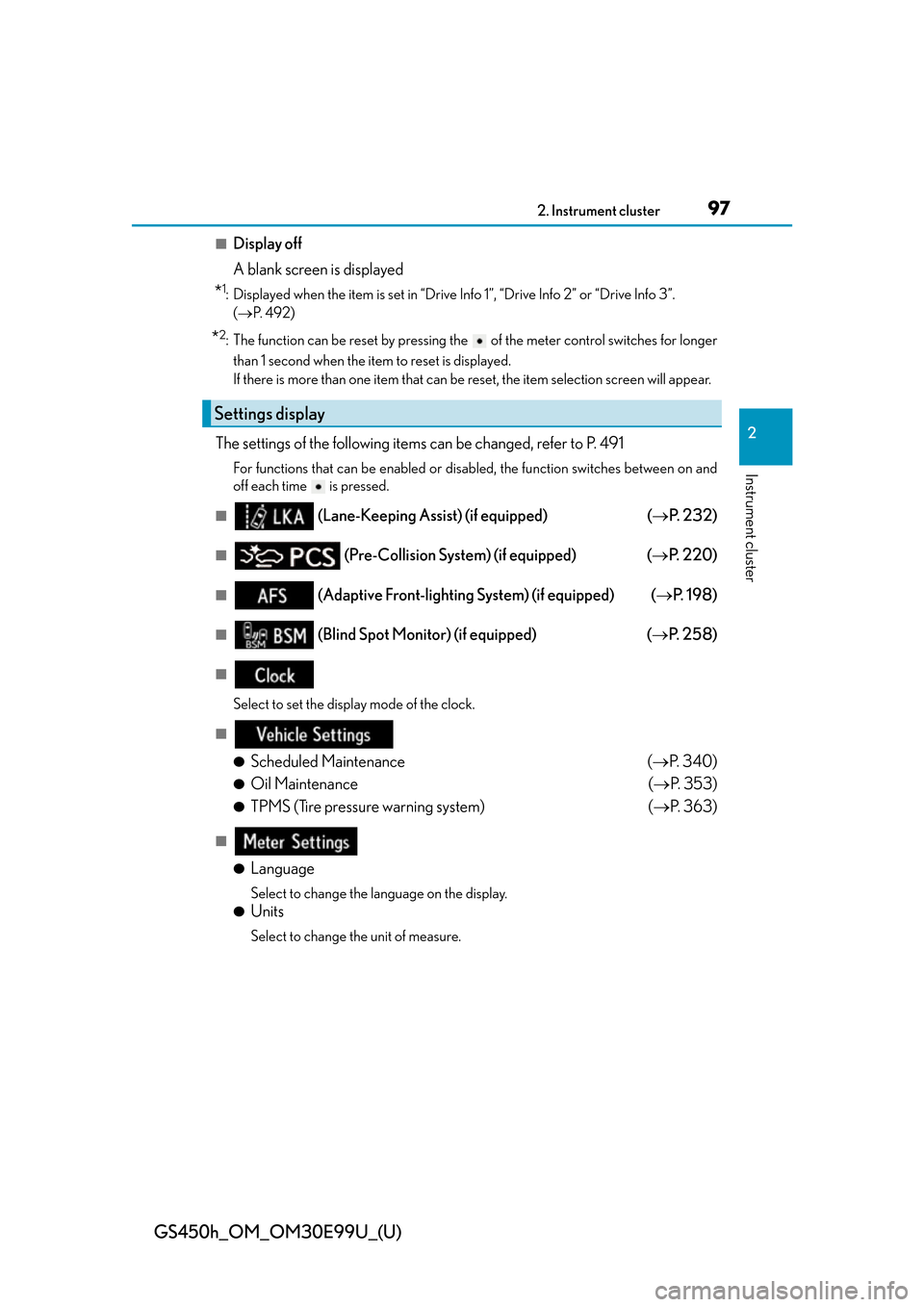
The settings of the following items can be changed, refer to P. 491
For functions that can be enabled or disabled, the function switches between on and
off each time is pressed.
■ (Lane-Keeping Assist) (if equipped) ( P. 232)
■ (Pre-Collision System) (if equipped) ( P. 220)
■ (Adaptive Front-lighting System) (if equipped) ( P. 1 9 8 )
■ (Blind Spot Monitor) (if equipped) ( P. 2 5 8 )
■
Select to set the display mode of the clock.
■
●
Scheduled Maintenance ( P. 3 4 0 )
●Oil Maintenance ( P. 3 5 3 )
●TPMS (Tire pressure warning system) ( P. 363)
■
●
Language
Select to change the la nguage on the display.
●Units
Select to change the unit of measure.
Settings display
Page 99 of 544
GS450h_OM_OM30E99U_(U)
992. Instrument cluster
2
Instrument cluster
■G-force display
●The G-force values may not be zero even when the vehicle is parked, such as when it is
parked on an incline.
●Depending on the vehicle usage conditions, the brake fluid pressure display may not
reach its maximum reading even though the brake pedal is fully depressed.
●If a 12-volt battery terminal is disconnected and reconnected, the steering amount dis-
play may be disabled temporarily. After driv ing the vehicle for a while, the display will
be enabled.
●Depending on the condition of the vehicle, the brake fluid pressure display may change
even when the brake pedal is not depressed.
■System check display
After turning the power switch to ON mode, opening image is displayed while system
operation is checked. When the system check is complete, the normal screen will return.
■Suspension of the settings display
In the following situations, th e settings display using the meter control switches will be
suspended.
●When a warning message appears on the multi-information display
●When the vehicle begins to move
■Tire inflation pressure
●It may take a few minutes to display the tire inflation pressure after the power switch is
turned to ON mode. It may also take a few minutes to display the tire inflation pressure
after inflation pressure has been adjusted.
●“---” may be displayed if the tire information cannot be determined due to unfavorable
radio wave conditions.
●Tire inflation pressure changes with temperat ure. The displayed values may also be dif-
ferent from the values measured using a tire pressure gauge.
■When disconnecting and reconnec ting 12-volt battery terminals
The drive information will be reset.
■Liquid crystal display
P. 9 1
Page 230 of 544
230
GS450h_OM_OM30E99U_(U)
4-5. Using the driving support systems
• After the hybrid system has started the vehicle has not been driven for a certain amount of time
• While making a left/right turn and for a few seconds after making a left/right turn
• While driving on a curve and for a few seconds after driving on a curve
• If your vehicle is skidding
• If the front of the vehicle is raised or lowered
• If the wheels are misaligned
• If a wiper blade is blocking the camera sensor
• The vehicle is wobbling.
• The vehicle is being driven at extremely high speeds.
• When driving on a hill
• If the radar sensor or camera sensor is misaligned
●In some situations such as the following, su fficient braking force may not be obtained,
preventing the system from performing properly:
• If the braking functions cannot operate to their full extent, such as when the brake
parts are extremely cold, extremely hot, or wet
• If the vehicle is not properly maintained (brakes or tires are excessively worn,
improper tire inflation pressure, etc.)
• When the vehicle is being driven on a gravel road or other slippery surface
●Some pedestrians such as the following may not be detected by the radar sensor and
camera sensor, preventing the system from operating properly
*4:
• Pedestrians shorter than approximately 3. 2 ft. (1 m) or taller than approximately
6.5 ft. (2 m)
• Pedestrians wearing oversized clothing (a rain coat, long skirt, etc.), making their sil- houette obscure
• Pedestrians who are carrying large baggage, holding an umbrella, etc., hiding part of their body
• Pedestrians who are bending forward or squatting
• Pedestrians who are pushing a stroller, wheelchair, bicycle or other vehicle
• Groups of pedestrians which are close together
• Pedestrians who are wearing white and look extremely bright
• Pedestrians in the dark, such as at night or while in a tunnel
• Pedestrians whose clothing appears to be nearly the same color or brightness as
their surroundings
• Pedestrians near walls, fences, guardrails, or large objects
• Pedestrians who are on a metal object (man hole cover, steel plate, etc.) on the road
• Pedestrians who are walking fast
• Pedestrians who are changing speed abruptly
• Pedestrians running out from behind a vehicle or a large object
• Pedestrians who are extremely close to the side of the vehicle (outside rear view mirror, etc.)
*4: Depending on the region in which the ve hicle was sold, the pedestrian detection
function may not be available.
Page 235 of 544
GS450h_OM_OM30E99U_(U)
2354-5. Using the driving support systems
4
Driving
WA R N I N G
■To avoid operating LKA by mistake
When not using the LKA system, use the LKA switch to turn the system off.
■Situations unsuitable for LKA
Do not use the LKA system in the following situations.
The system may not operate properly and lead to an accident, resulting in death or
serious injury.
●A spare tire, tire chains, etc., are equipped.
●When the tires have been excessively worn, or when the tire inflation pressure is low.
●Tires which differ by structure, manufa cturer, brand or tread pattern are used.
●Objects or patterns that could be mistaken for white (yellow) lines are present on the
side of the road (guardrails, curbs, reflective poles, etc.).
●Vehicle is driven on a snow-covered road.
●White (yellow) lines are difficult to see due to rain, snow, fog, dust, etc.
●Asphalt repair marks, white (yellow) line marks, etc., are present due to road repair.
●Vehicle is driven in a temporary lane or restricted lane due to construction work.
●Vehicle is driven on a road surface which is slippery due to rainy weather, fallen snow,
freezing, etc.
●Vehicle is driven in traffic lanes other than on highways and freeways.
●Vehicle is driven in a construction zone.
●Vehicle is towing a trailer or another vehicle.
■Preventing LKA system malfunctions and operations performed by mistake
●Do not modify the headlights or place stickers, etc., on the surface of the lights.
●Do not modify the suspension etc. If the suspension etc. needs to be replaced, con-
tact your Lexus dealer.
●Do not install or place anything on the hood or grille. Also, do not install a grille guard
(bull bars, kangaroo bar, etc.).
●If your windshield needs repairs, contact your Lexus dealer.
Page 239 of 544
GS450h_OM_OM30E99U_(U)
2394-5. Using the driving support systems
4
Driving
■Hands off steering wheel alert
When the system determines that the driver has removed their hands from the steering
wheel while the lane departure control function or lane centering function is operating, a
warning message is displayed on the multi- information display and the buzzer sounds.
■White (yellow) lines are only on one side of road
The LKA system will not operate for the side on which white (yellow) lines could not be
recognized.
■Conditions in which functions may not operate properly
In the following situations, the camera sensor may not detect white (yellow) lines and var-
ious functions may not operate normally.
●There are shadows on the road that run paralle l with, or cover, the white (yellow) lines.
●The vehicle is driven in an area without white (yellow) lines, such as in front of a tollgate
or checkpoint, or at an intersection, etc.
●The white (yellow) lines are cracked, “Botts’ dots”, “Raised pavement marker” or stones
are present.
●The white (yellow) lines cannot be seen or are difficult to see due to sand, etc.
●The vehicle is driven on a road surface that is wet due to rain, puddles, etc.
●The traffic lines are yellow (which may be more difficult to recognize than lines that are
white).
●The white (yellow) lines cross over a curb, etc.
●The vehicle is driven on a brig ht surface, such as concrete.
●The vehicle is driven on a surface that is bright due to reflected light, etc.
●The vehicle is driven in an area where the brightness changes suddenly, such as at the
entrances and exits of tunnels, etc.
●Light from the headlights of an oncoming vehicle, the sun, etc., enters the camera.
●The vehicle is driven where the road diverges, merges, etc.
●The vehicle is driven on a slope.
●The vehicle is driven on a road which tilts left or right, or a winding road.
●The vehicle is driven on an unpaved or rough road.
●The vehicle is driven around a sharp curve.
●The traffic lane is excessively narrow or wide.
●The vehicle is extremely tilted due to carry ing heavy luggage or having improper tire
pressure.
●The distance to the preceding vehicle is extremely short.
●The vehicle is moving up and down a large am ount due to road conditions during driv-
ing (poor roads or road seams).
Page 271 of 544
GS450h_OM_OM30E99U_(U)
2714-5. Using the driving support systems
4
Driving
WA R N I N G
■The ABS does not operate effectively when
●The limits of tire gripping performance have been exceeded. (such as excessively
worn tires on a snow covered road).
●The vehicle hydroplanes while driving at high speed on wet or slick roads.
■Stopping distance when the ABS is operating may exceed that of normal conditions
The ABS is not designed to shorten the vehicle’s stopping distance. Always maintain a
safe distance from the vehicle in front of you, especially in the following situations:
●When driving on dirt, gravel or snow-covered roads
●When driving with tire chains
●When driving over bumps in the road
●When driving over roads with potholes or uneven surfaces
■TRAC may not operate effectively when
Directional control and power may not be achievable while drivin g on slippery road
surfaces, even if the TRAC system is operating.
Drive the vehicle carefully in conditions where stability and power may be lost.
■Hill-start assist control does not operate effectively when
●Do not overly rely on the hill-start assist control. The hill-start assist control may not
operate effectively on steep inclines and roads covered with ice.
●Unlike the parking brake, hill-start assist control is not intended to hold the vehicle
stationary for an extended period of time. Do not attempt to use hill-start assist con-
trol to hold the vehicle on an incline, as doing so may lead to an accident.
■When the VSC is activated
The slip indicator light flashes. Always drive carefully. Reckless driving may cause an
accident. Exercise particular care when the indicator light flashes.
■When the TRAC/VSC systems are turned off
Be especially careful and drive at a speed ap propriate to the road conditions. As these
are the systems to help ensure vehicle st ability and driving force, do not turn the
TRAC/VSC systems off unless necessary.
■Replacing tires
Make sure that all tires are of the specified size, brand, tread pattern and total load
capacity. In addition, make sure that the tires are inflated to the recommended tire infla-
tion pressure level.
The ABS, TRAC and VSC systems will not function correctly if different tires are
installed on the vehicle.
Contact your Lexus dealer for further information when replacing tires or wheels.
■Handling of tires and the suspension
Using tires with any kind of problem or modi fying the suspension will affect the driving
assist systems, and may caus e a system to malfunction.