change time Lexus GS450h 2017 User Guide
[x] Cancel search | Manufacturer: LEXUS, Model Year: 2017, Model line: GS450h, Model: Lexus GS450h 2017Pages: 600, PDF Size: 149.98 MB
Page 218 of 600
2184-2. Driving procedures
GS450h_300h_OM_OM30F92E_(EE)
Stop the vehicle completely.
Set the parking brake ( P. 232), and shift the shift lever to P.
Press the power switch.
Release the brake pedal and check that “POWER ON” on the multi-informa-
tion display is off.
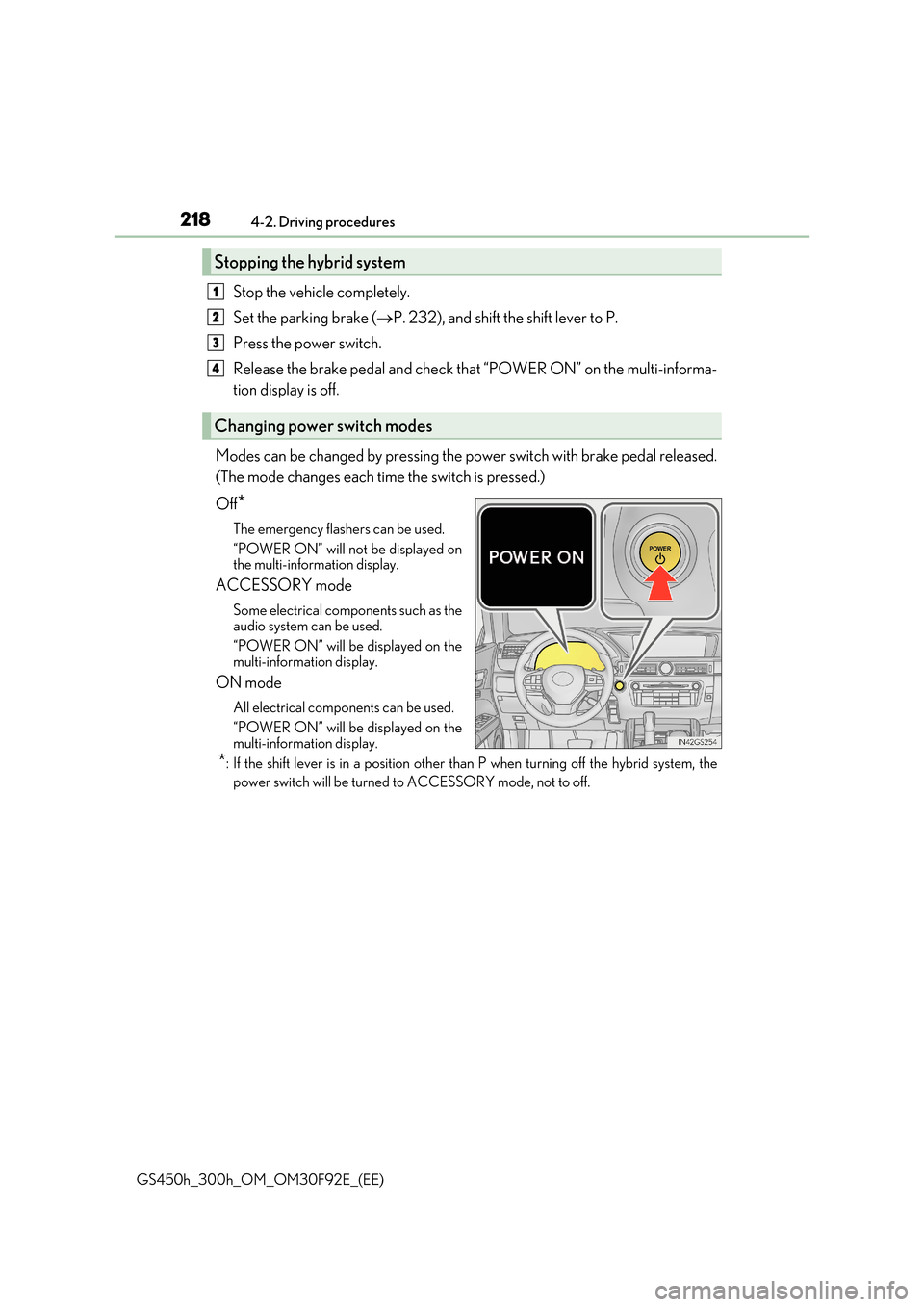
Modes can be changed by pressing the power switch with brake pedal released.
(The mode changes each time the switch is pressed.)
Off*
The emergency flashers can be used.
“POWER ON” will not be displayed on the multi-information display.
ACCESSORY mode
Some electrical components such as the
audio system can be used.
“POWER ON” will be displayed on the multi-information display.
ON mode
All electrical components can be used.
“POWER ON” will be displayed on the multi-information display.
*: If the shift lever is in a position other than P when turning off the hybrid system, the
power switch will be turned to ACCESSORY mode, not to off.
Stopping the hybrid system
Changing power switch modes
1
2
3
4
Page 220 of 600
2204-2. Driving procedures
GS450h_300h_OM_OM30F92E_(EE)
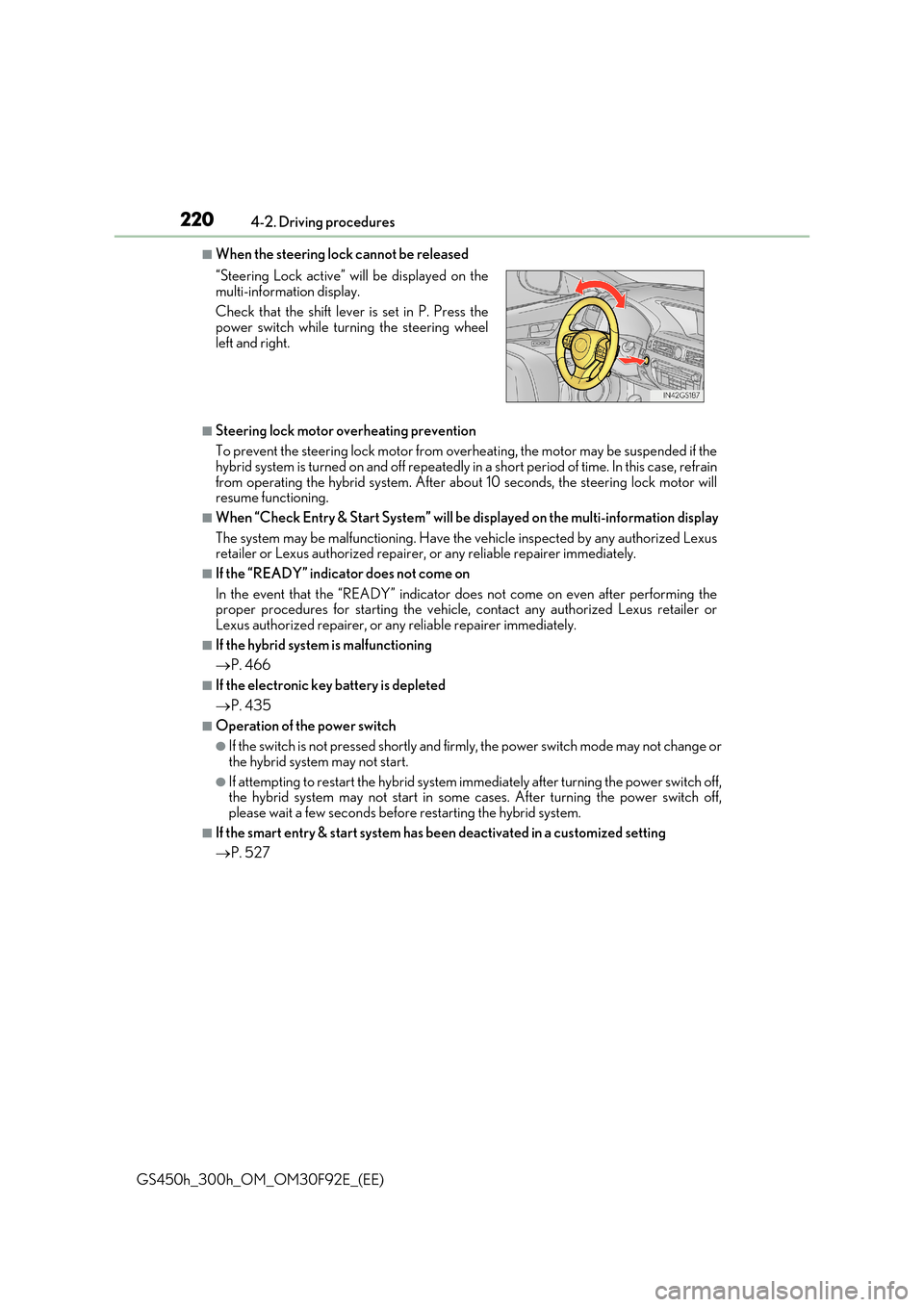
■When the steering lock cannot be released
■Steering lock motor overheating prevention
To prevent the steering lock motor from overheating, the motor may be suspended if the hybrid system is turned on and off repeatedly in a short period of time. In this case, refrain
from operating the hybrid system. After abou t 10 seconds, the steering lock motor will resume functioning.
■When “Check Entry & Start System” will be displayed on the multi-information display
The system may be malfunctioning. Have the vehicle inspected by any authorized Lexus retailer or Lexus authorized repairer, or any reliable repairer immediately.
■If the “READY” indicator does not come on
In the event that the “READY” indicator does not come on even after performing the proper procedures for starting the vehicle, contact any authorized Lexus retailer orLexus authorized repairer, or any reliable repairer immediately.
■If the hybrid system is malfunctioning
P. 466
■If the electronic key battery is depleted
P. 435
■Operation of the power switch
●If the switch is not pressed shortly and firmly, the power switch mode may not change or
the hybrid system may not start.
●If attempting to restart the hybrid system immediately after turning the power switch off, the hybrid system may not start in some cases. After turning the power switch off,
please wait a few seconds before restarting the hybrid system.
■If the smart entry & start system has been deactivated in a customized setting
P. 527
“Steering Lock active” will be displayed on the
multi-information display.
Check that the shift lever is set in P. Press the power switch while turning the steering wheel
left and right.
Page 231 of 600
231
4
4-2. Driving procedures
Driving
GS450h_300h_OM_OM30F92E_(EE)
Turn signal lever
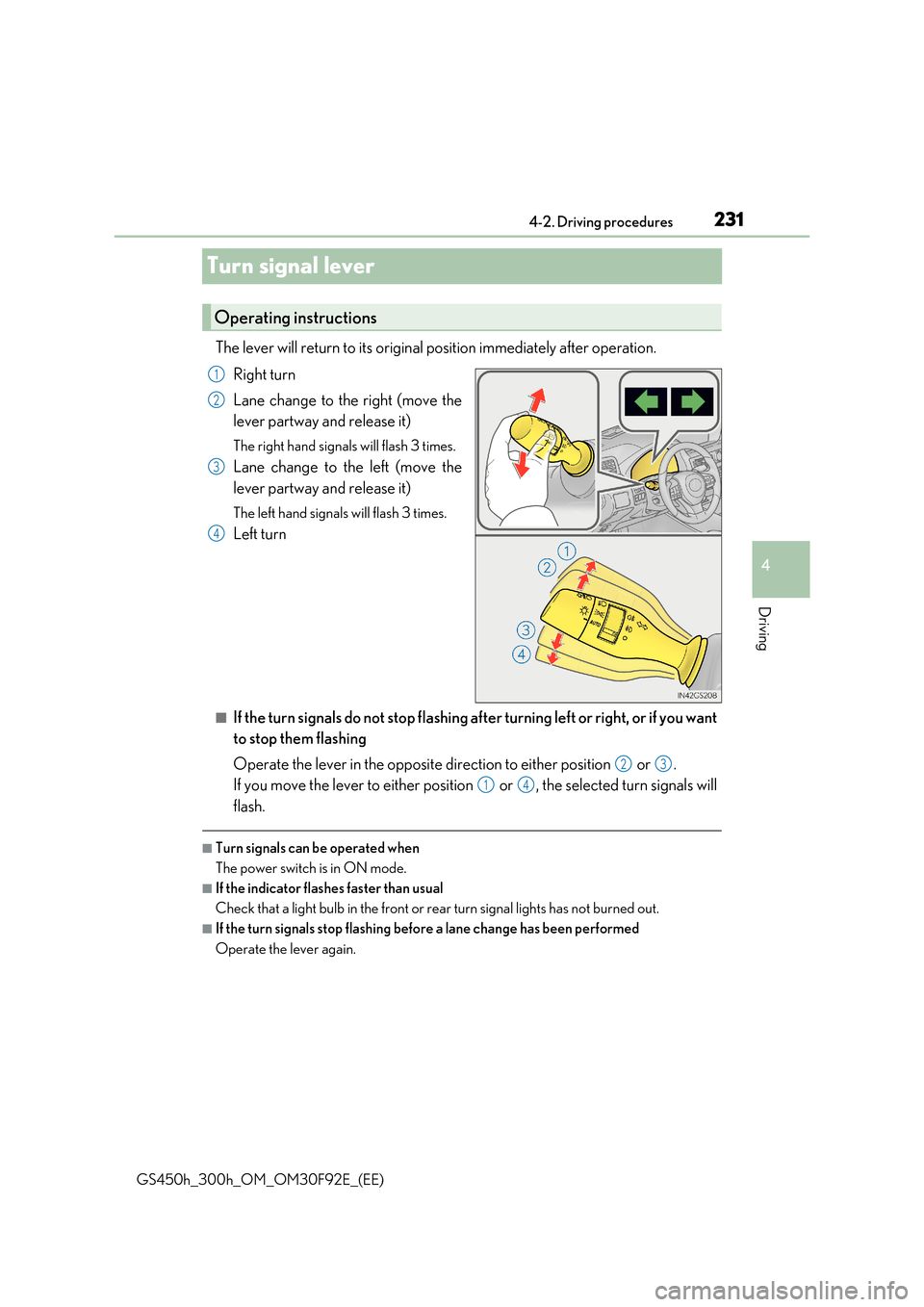
The lever will return to its original position immediately after operation.
Right turn
Lane change to the right (move the
lever partway and release it)
The right hand signals will flash 3 times.
Lane change to the left (move the
lever partway and release it)
The left hand signals will flash 3 times.
Left turn
■If the turn signals do not stop flashing af ter turning left or right, or if you want
to stop them flashing
Operate the lever in the opposite direction to either position or .
If you move the lever to either position or , the selected turn signals will
flash.
■Turn signals can be operated when
The power switch is in ON mode.
■If the indicator flashes faster than usual
Check that a light bulb in the front or rear turn signal lights has not burned out.
■If the turn signals stop flashing before a lane change has been performed
Operate the lever again.
Operating instructions
1
2
3
4
23
14
Page 240 of 600
2404-3. Operating the lights and wipers
GS450h_300h_OM_OM30F92E_(EE)
■Daytime running light system
To make your vehicle more visible to other drivers during daytime driving, the daytime running lights turn on automatically whenever the hybrid system is started and the park- ing brake is released with the headlight sw itch is in the “AUTO” position. (Illuminate
brighter than the front position lights.) Daytime running lights are not designed for use at night.
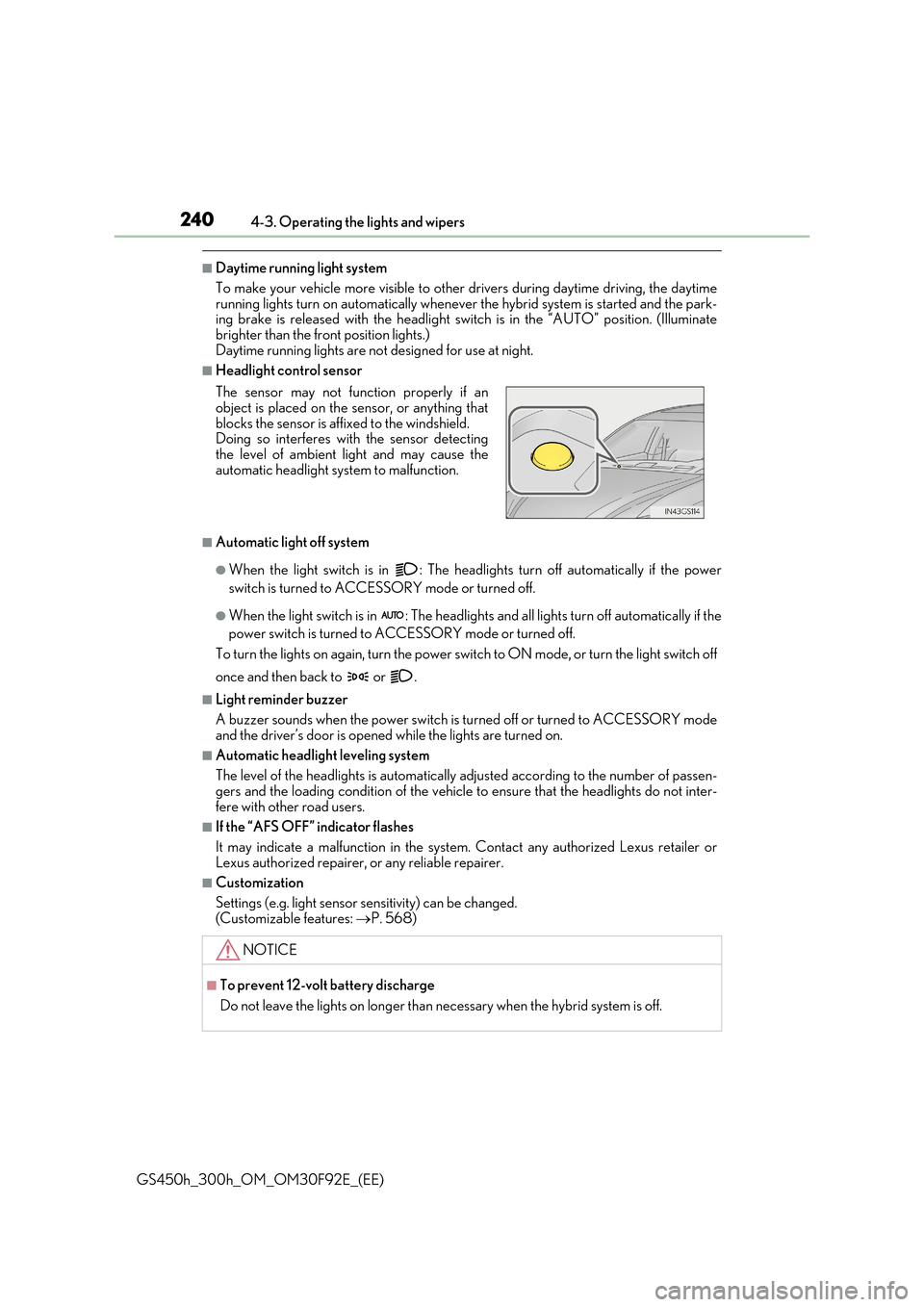
■Headlight control sensor
■Automatic light off system
●When the light switch is in : The headlig hts turn off automatically if the power
switch is turned to ACCESSORY mode or turned off.
●When the light switch is in : The headlights and all lights turn off automatically if the
power switch is turned to ACCESSORY mode or turned off.
To turn the lights on again, turn the power switch to ON mode, or turn the light switch off
once and then back to or .
■Light reminder buzzer
A buzzer sounds when the power switch is turned off or turned to ACCESSORY mode and the driver’s door is opened while the lights are turned on.
■Automatic headlight leveling system
The level of the headlights is automatically adjusted according to the number of passen- gers and the loading condition of the vehicle to ensure that the headlights do not inter-
fere with other road users.
■If the “AFS OFF” indicator flashes
It may indicate a malfunction in the system. Contact any authorized Lexus retailer or
Lexus authorized repairer, or any reliable repairer.
■Customization
Settings (e.g. light sensor se nsitivity) can be changed.
(Customizable features: P. 568)
The sensor may not function properly if an object is placed on the sensor, or anything that
blocks the sensor is affixed to the windshield. Doing so interferes with the sensor detectingthe level of ambient light and may cause the
automatic headlight system to malfunction.
NOTICE
■To prevent 12-volt battery discharge
Do not leave the lights on longer than ne cessary when the hybrid system is off.
Page 244 of 600
2444-3. Operating the lights and wipers
GS450h_300h_OM_OM30F92E_(EE)
■Conditions in which the light distribution control of the headlights changes automati-
cally
●When all of the following conditions are met, the high beams will be turned on automat- ically and the system will operate:
• The vehicle speed is approximately 60 km/h (37 mph) or more.*
*: The area in the direction that the vehicl e is turning will be illuminated more brightly
than other areas while driving on a curve.
●When all of the following conditions are met, the variable high beams will turn on and the distance that the low be ams are projected will be adjusted automatically, depending
on the location of vehicles ahead:
• The vehicle speed is approximately 60 km/h (37 mph) or more. • The area ahead of the vehicle is dark.
• There are vehicles ahead with headlights or tail lights turned on.
●If any of the following conditions is met, the high beams or variable high beams will be
changed to the low beams automatically:
• The vehicle speed is below approximately 60 km/h (37 mph). • The area ahead of the vehicle is not dark.
• There are many vehicles ahead. • Vehicles ahead are moving quickly and the high beams may blind the drivers of theother vehicles.
■Camera sensor detection information
●The high beams may not be automatically changed to the variable high beams in thefollowing situations:
• When vehicles ahead suddenly appear from a curve • When the vehicle is cut in front of by another vehicle• When vehicles ahead are hidden from sight due to repeated curves, road dividers or
roadside trees • When vehicles ahead appear from the faraway lane on wide road• When vehicles ahead have no lights
●The high beams may be changed to the variable high beams if a vehicle ahead that isusing fog lights without its headlights turned on is detected.
●House lights, street lights, traffic signals, and illuminated billboards or signs may cause the high beams to change to the variable high beams, cause the high beams not tochange to the variable high beams, or change the area that is not illuminated.
●The following factors may affect the amount of time taken to turn the high beam on or off, or the speed by which the areas not illuminated change:
• The brightness of headlights, fog light s, and tail lights of vehicles ahead
• The movement and direction of vehicles ahead • When a vehicle ahead only has operational lights on one side
• When a vehicle ahead is a two-wheeled vehicle • The condition of the road (gradient, curve, condition of the road surface etc.)• The number of passengers and amount of luggage
●The light distribution control of the headlights may change unexpectedly.
●Bicycles or similar objects may not be detected.
Page 255 of 600
2554-3. Operating the lights and wipers
4
Driving
GS450h_300h_OM_OM30F92E_(EE)
■The windshield wiper and washer can be operated when
The power switch is in ON mode.
■Dripping prevention wiper sweep
After washing and wiping operation several times, the wipers operate one more time
after a short delay to prevent dripping.
However, the last sweep will not happen while the vehicle is moving.
■Effects of vehicle speed on wiper operation
●Intermittent windshield wipers interval changes when the vehicle is stopped.
●With low speed operation selected, wiper operation will be switched from low speed to intermittent operation only when the vehicle is stationary.
■Raindrop sensor (vehicles with rain-sensing windshield wipers)
●If AUTO mode is selected while the power sw itch is in ON mode, the wipers will oper- ate once to show that AUTO mode is activated.
●If the temperature of the raindrop sensor is 85°C (185°F) or higher, or -30°C (-22°F) or lower, automatic operation may not occur. In this case, operate the wip-ers in any mode other than AUTO mode.
■When the windshield wipers are in temporary operation
AUTO mode cannot be activated even if is pressed.
■If no windshield washer fluid sprays
Check that the washer nozzles are not blocked if there is washer fluid in the windshield washer fluid reservoir.
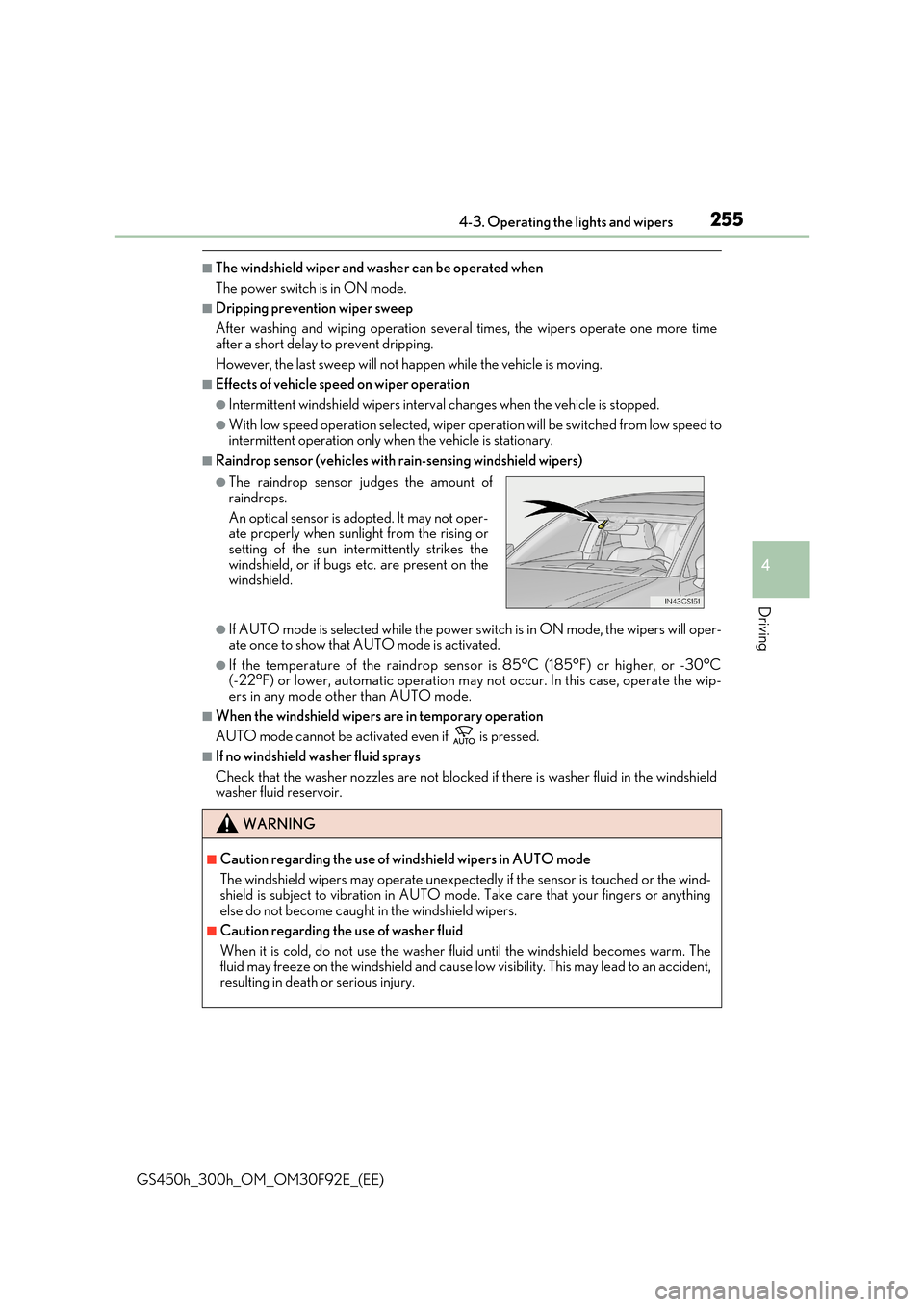
●The raindrop sensor judges the amount of
raindrops.
An optical sensor is adopted. It may not oper- ate properly when sunlight from the rising or
setting of the sun intermittently strikes the windshield, or if bugs etc. are present on thewindshield.
WARNING
■Caution regarding the use of windshield wipers in AUTO mode
The windshield wipers may operate unexpectedly if the sensor is touched or the wind- shield is subject to vibration in AUTO mode. Take care that your fingers or anything
else do not become caught in the windshield wipers.
■Caution regarding the use of washer fluid
When it is cold, do not use the washer fluid until the windshield becomes warm. The
fluid may freeze on the windshield and cause low visibility. This may lead to an accident, resulting in death or serious injury.
Page 273 of 600
2734-5. Using the driving support systems
4
Driving
GS450h_300h_OM_OM30F92E_(EE)
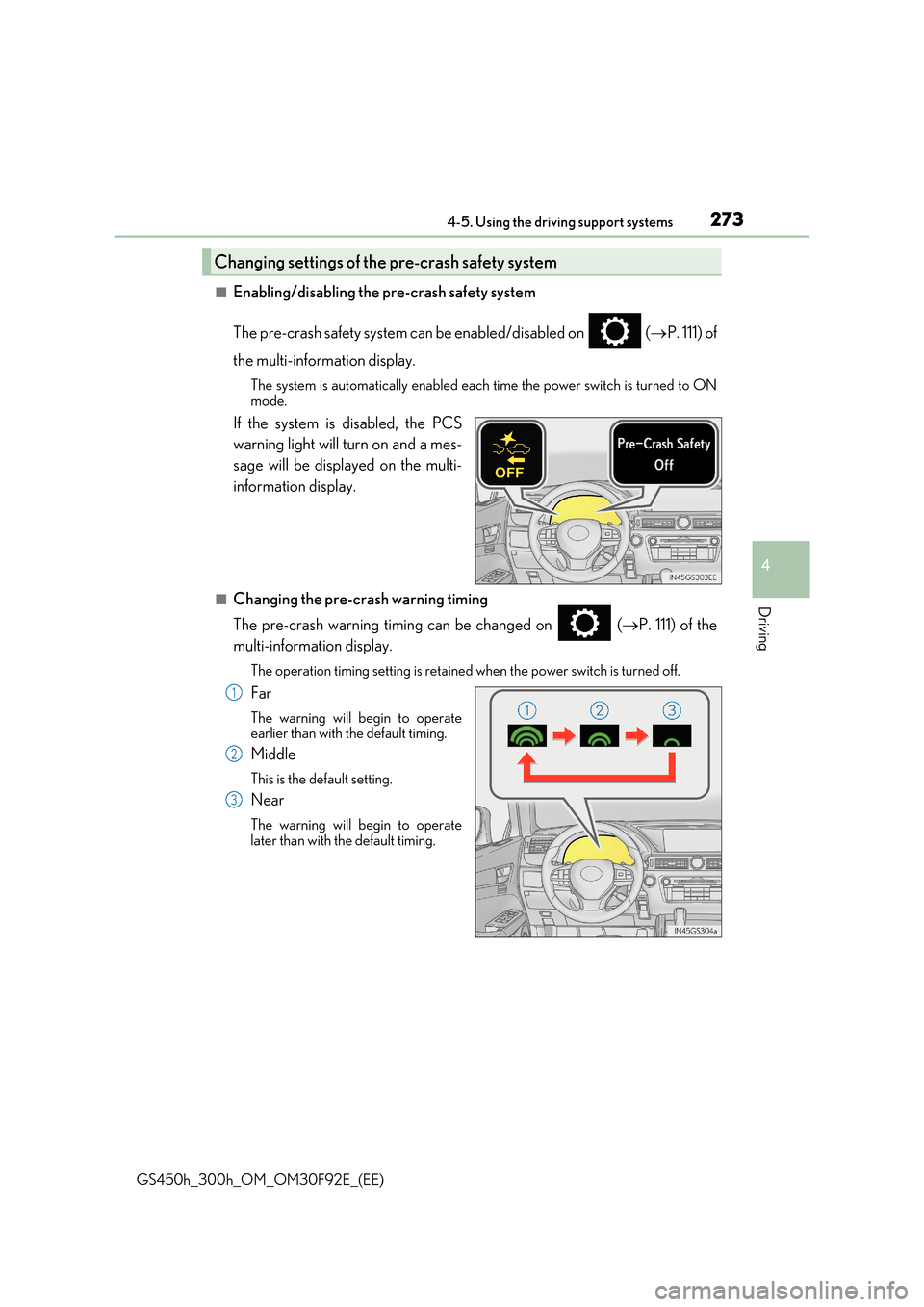
■Enabling/disabling the pre-crash safety system
The pre-crash safety system can be enabled/disabled on ( P. 111) of
the multi-information display.
The system is automatically enabled each time the power switch is turned to ON mode.
If the system is disabled, the PCS
warning light will turn on and a mes-
sage will be displayed on the multi-
information display.
■Changing the pre-crash warning timing
The pre-crash warning timing can be changed on ( P. 111) of the
multi-information display.
The operation timing setting is retained when the power switch is turned off.
Far
The warning will begin to operate earlier than with the default timing.
Middle
This is the default setting.
Near
The warning will begin to operatelater than with the default timing.
Changing settings of the pre-crash safety system
1
2
3
Page 294 of 600
2944-5. Using the driving support systems
GS450h_300h_OM_OM30F92E_(EE)
*1: If the turn signal indicator is not operated when changing lanes, the mark does not dis-
play.
*2:On some models
In the following situations, the RSA system alerts the driver using a warning dis-
play.
●When the vehicle speed exceeds the speed warning threshold applied to the
speed limit of the sign displayed on the multi-information display, the sign
color becomes inverted.
●If it is detected that your vehicle is overtaking when a no overtaking sign is dis-
played on the multi-information display, the sign flashes.
●On some models: When the RSA system recognizes a no-entry sign and
detects that the vehicle has entered a no-entry area based on the map infor-
mation of the navigation system, the no-entry sign flashes.
Depending on the situation, traffic environment (traffic direction, speed, unit)
may be detected incorrectly and a warning display may not operate properly.
■Automatic turn-off of RSA sign display
One or more signs automatically turn off in the following situations.
●A new sign is not recognized for a certain distance.
●The road changes due to a left or right turn, etc.
■Conditions in which the function may not operate or detect correctly
In the following situations, RSA does not op erate normally and may not recognize signs,
display the incorrect sign, etc. However, this does not indicate a malfunction.
●The camera sensor is misaligned due to a strong impact being applied to the sensor, etc.
●Dirt, snow, stickers, etc. are on the windshield near the camera sensor.
●In inclement weather such as heavy rain, fog, snow or sand storms
●Light from an oncoming vehicle, the sun, etc. enters the camera sensor.
●The sign is dirty, faded, tilted or bent, and if an electronic sign, the contrast is poor.
●All or part of the sign is hidden by the leaves of a tree, a pole, etc.
●The sign is only visible to the camera sensor for a short amount of time.
●The driving scene (turning, lane change, etc.) is judged incorrectly.
●Even if it is a sign not appropriate for the currently traveled lane, such a sign exists
directly after a freeway branches, or in an adjacent lane just before merging.
●Stickers are attached to the rear of the preceding vehicle.
●A sign resembling a system comp atible sign is recognized.
●The vehicle is driven in a country with a different direction of traffic.
Warning display
Page 299 of 600
2994-5. Using the driving support systems
4
Driving
GS450h_300h_OM_OM30F92E_(EE)
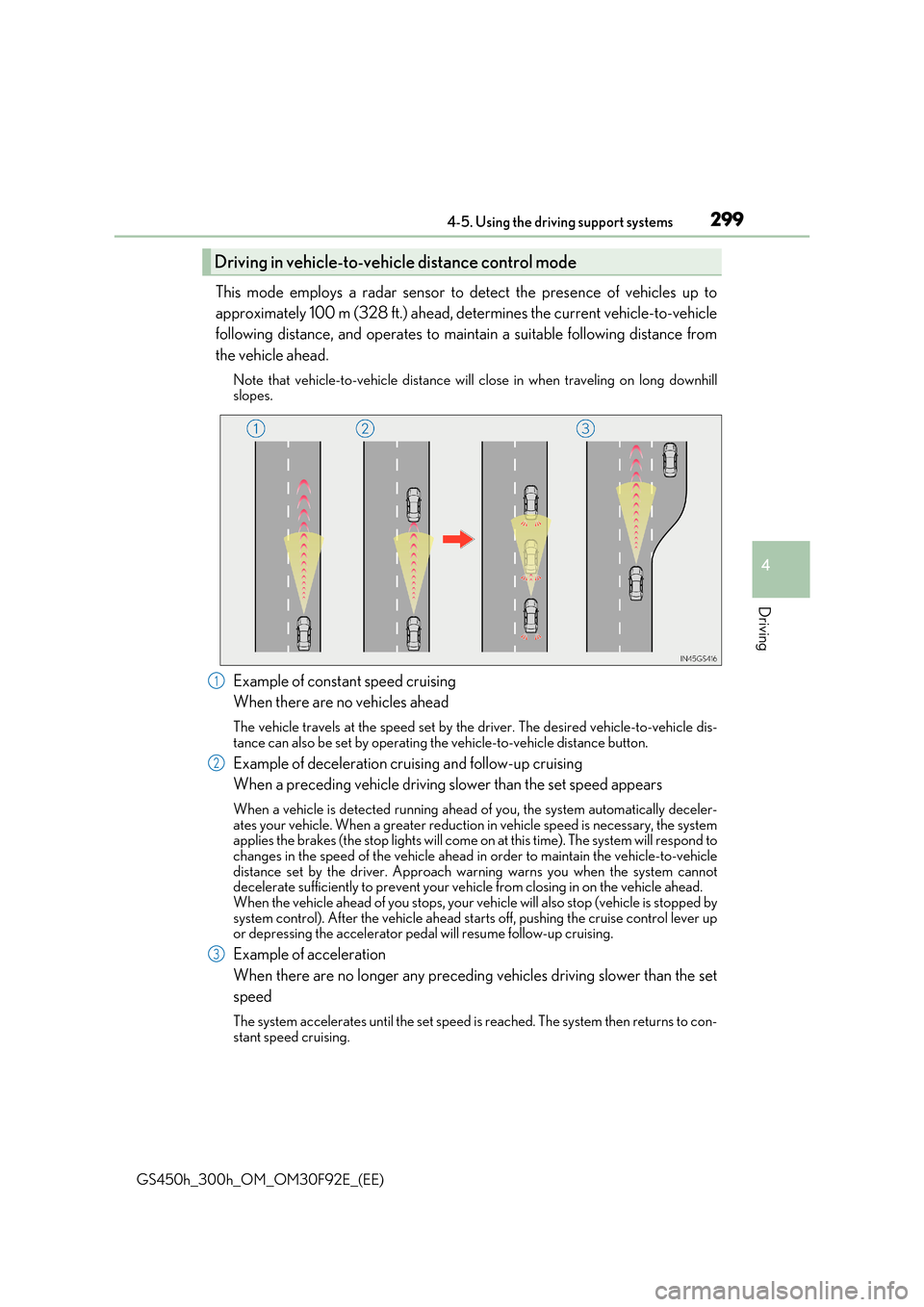
This mode employs a radar sensor to detect the presence of vehicles up to
approximately 100 m (328 ft.) ahead, determines the current vehicle-to-vehicle
following distance, and operates to maintain a suitable following distance from
the vehicle ahead.
Note that vehicle-to-vehicle distance will close in when traveling on long downhill slopes.
Example of constant speed cruising
When there are no vehicles ahead
The vehicle travels at the speed set by the driver. The desired vehicle-to-vehicle dis- tance can also be set by operating the vehicle-to-vehicle distance button.
Example of deceleration cruising and follow-up cruising
When a preceding vehicle driving slower than the set speed appears
When a vehicle is detected running ahead of you, the system automatically deceler- ates your vehicle. When a greater reduction in vehicle speed is necessary, the systemapplies the brakes (the stop lights will come on at this time). The system will respond to
changes in the speed of the vehicle ahead in order to maintain the vehicle-to-vehicle distance set by the driver. Approach wa rning warns you when the system cannot decelerate sufficiently to prevent your vehicle from closing in on the vehicle ahead.
When the vehicle ahead of you stops, your ve hicle will also stop (vehicle is stopped by system control). After the vehicle ahead starts off, pushing the cruise control lever upor depressing the accelerator pedal will resume follow-up cruising.
Example of acceleration
When there are no longer any preceding vehicles driving slower than the set
speed
The system accelerates until the set speed is reached. The system then returns to con-
stant speed cruising.
Driving in vehicl e-to-vehicle distance control mode
1
2
3
Page 301 of 600
3014-5. Using the driving support systems
4
Driving
GS450h_300h_OM_OM30F92E_(EE)
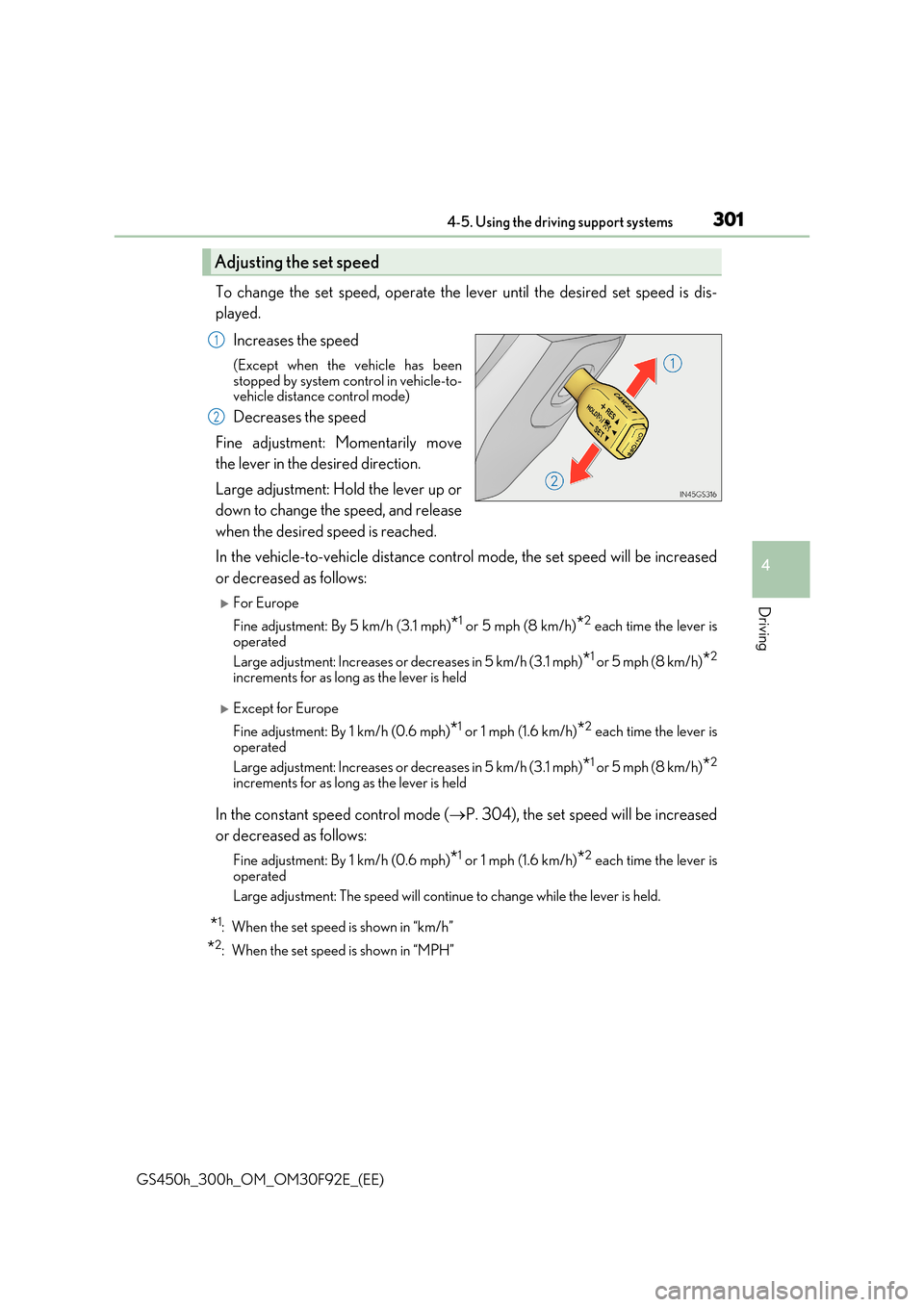
To change the set speed, operate the lever until the desired set speed is dis-
played.
Increases the speed
(Except when the vehicle has been stopped by system control in vehicle-to-vehicle distance control mode)
Decreases the speed
Fine adjustment: Momentarily move
the lever in the desired direction.
Large adjustment: Hold the lever up or
down to change the speed, and release
when the desired speed is reached.
In the vehicle-to-vehicle distance control mode, the set speed will be increased
or decreased as follows:
For Europe
Fine adjustment: By 5 km/h (3.1 mph)*1 or 5 mph (8 km/h)*2 each time the lever is operated
Large adjustment: Increases or decreases in 5 km/h (3.1 mph)*1 or 5 mph (8 km/h)*2
increments for as long as the lever is held
Except for Europe
Fine adjustment: By 1 km/h (0.6 mph)*1 or 1 mph (1.6 km/h)*2 each time the lever is
operated
Large adjustment: Increases or decreases in 5 km/h (3.1 mph)*1 or 5 mph (8 km/h)*2
increments for as long as the lever is held
In the constant speed control mode ( P. 304), the set speed will be increased
or decreased as follows:
Fine adjustment: By 1 km/h (0.6 mph)*1 or 1 mph (1.6 km/h)*2 each time the lever is operated
Large adjustment: The speed will continue to change while the lever is held.
*1: When the set speed is shown in “km/h”
*2: When the set speed is shown in “MPH”
Adjusting the set speed
1
2