alarm Lexus GS450h 2017 Owner's Manual
[x] Cancel search | Manufacturer: LEXUS, Model Year: 2017, Model line: GS450h, Model: Lexus GS450h 2017Pages: 600, PDF Size: 149.98 MB
Page 2 of 600
TABLE OF CONTENTS2
GS450h_300h_OM_OM30F92E_(EE)
For your information ...................................8
Reading this manual .................................. 12
How to search ............................................. 13
Pictorial index .............................................. 14
1-1. For safe use
Before driving ................................. 34
For safety drive............................... 36
Seat belts ..........................................38
SRS airbags ..................................... 43
Airbag manual on-off
system ............................................. 54
Safety information
for children....................................56
Child restraint systems ............... 57
Installing child restraints ............. 66
Exhaust gas precautions ............ 75
1-2. Hybrid system
Hybrid system features............... 76
Hybrid system precautions ...... 80
1-3. Theft deterrent system
Immobilizer system ..................... 85
Double locking system ...............90
Alarm .................................................. 91
2. Instrument cluster
Warning lights
and indicators ..............................98
Gauges and meters ................... 104
Multi-information display............ 111
Head-up display ............................119
Energy monitor/
consumption screen ............... 126
3-1. Key information
Keys .................................................. 134
3-2. Opening, closing and locking
the doors and trunk
Doors ............................................... 139
Trunk ................................................ 146
Smart entry & start system ...... 153
3-3. Adjusting the seats
Front seats...................................... 175
Driving position memory ......... 178
Head restraints............................. 183
3-4. Adjusting the steering
wheel and mirrors
Steering wheel ............................. 186
Inside rear view mirror..............188
Outside rear view mirrors ....... 190
1For safety and security
2Instrument cluster
3Operation of
each component
Page 33 of 600
33
1For safety and security
GS450h_300h_OM_OM30F92E_(EE)
1-1. For safe use
Before driving................................. 34
For safety drive .............................. 36
Seat belts .......................................... 38
SRS airbags ..................................... 43
Airbag manual on-off
system ............................................. 54
Safety information
for children ................................... 56
Child restraint systems ............... 57
Installing child restraints............. 66
Exhaust gas precautions ............ 75
1-2. Hybrid system
Hybrid system features .............. 76
Hybrid system precautions.......80
1-3. Theft deterrent system
Immobilizer system ......................85
Double locking system ............... 90
Alarm ...................................................91
Page 91 of 600
91
1
1-3. Theft deterrent system
GS450h_300h_OM_OM30F92E_(EE)
For safety and security
Alarm
The alarm uses light and sound to give an alert when an intrusion is detected.
The alarm is triggered in the following situations when the alarm is set:
●A locked door is unlocked or opened in any way other than using the entry
function or wireless remote control. (The door will lock again automatically.)
●A trunk is opened in any way other than using the entry function, wireless
remote control or mechanical key.
●The hood is opened.
●The tilt sensor detects a change of vehicle inclination. (if equipped)
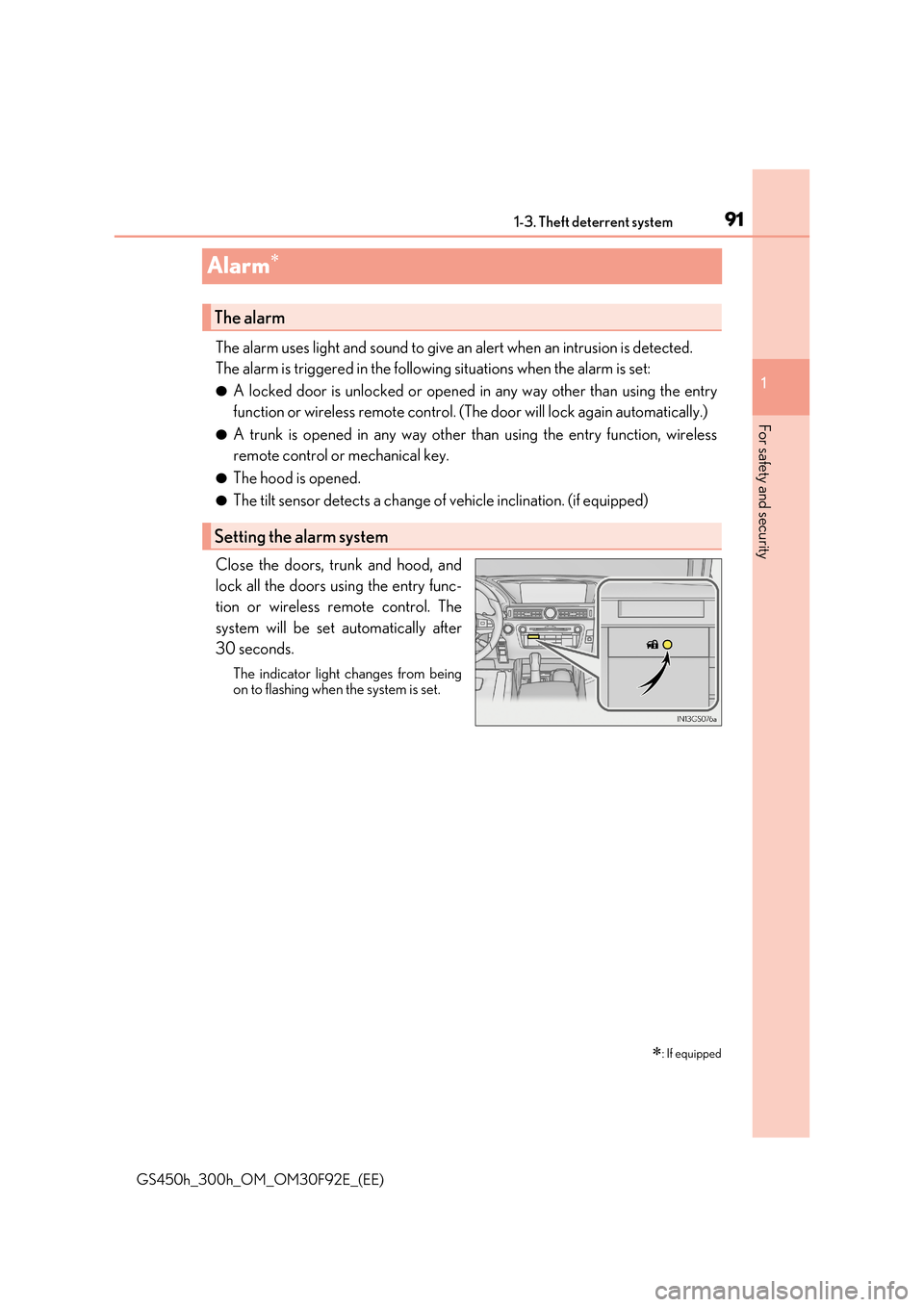
Close the doors, trunk and hood, and
lock all the doors using the entry func-
tion or wireless remote control. The
system will be set automatically after
30 seconds.
The indicator light changes from being
on to flashing when the system is set.
: If equipped
The alarm
Setting the alarm system
Page 92 of 600
921-3. Theft deterrent system
GS450h_300h_OM_OM30F92E_(EE)
Do one of the following to deactivate or stop the alarm:
●Unlock the doors or open the trunk using the entry function or wireless
remote control.
●Turn the power switch to ACCESSORY or ON mode, or start the hybrid sys-
tem. (The alarm will be deactivated or stopped after a few seconds.)
■System maintenance
The vehicle has a maintenance-free type alarm system.
■Items to check before locking the vehicle
To prevent unexpected triggering of the alarm and vehicle theft, make sure of the follow-
ing:
●Nobody is in the vehicle.
●The windows and moon roof (if equipped) are closed before the alarm is set.
●No valuables or other personal items are left in the vehicle.
Deactivating or st opping the alarm
Page 93 of 600
931-3. Theft deterrent system
1
GS450h_300h_OM_OM30F92E_(EE)
For safety and security
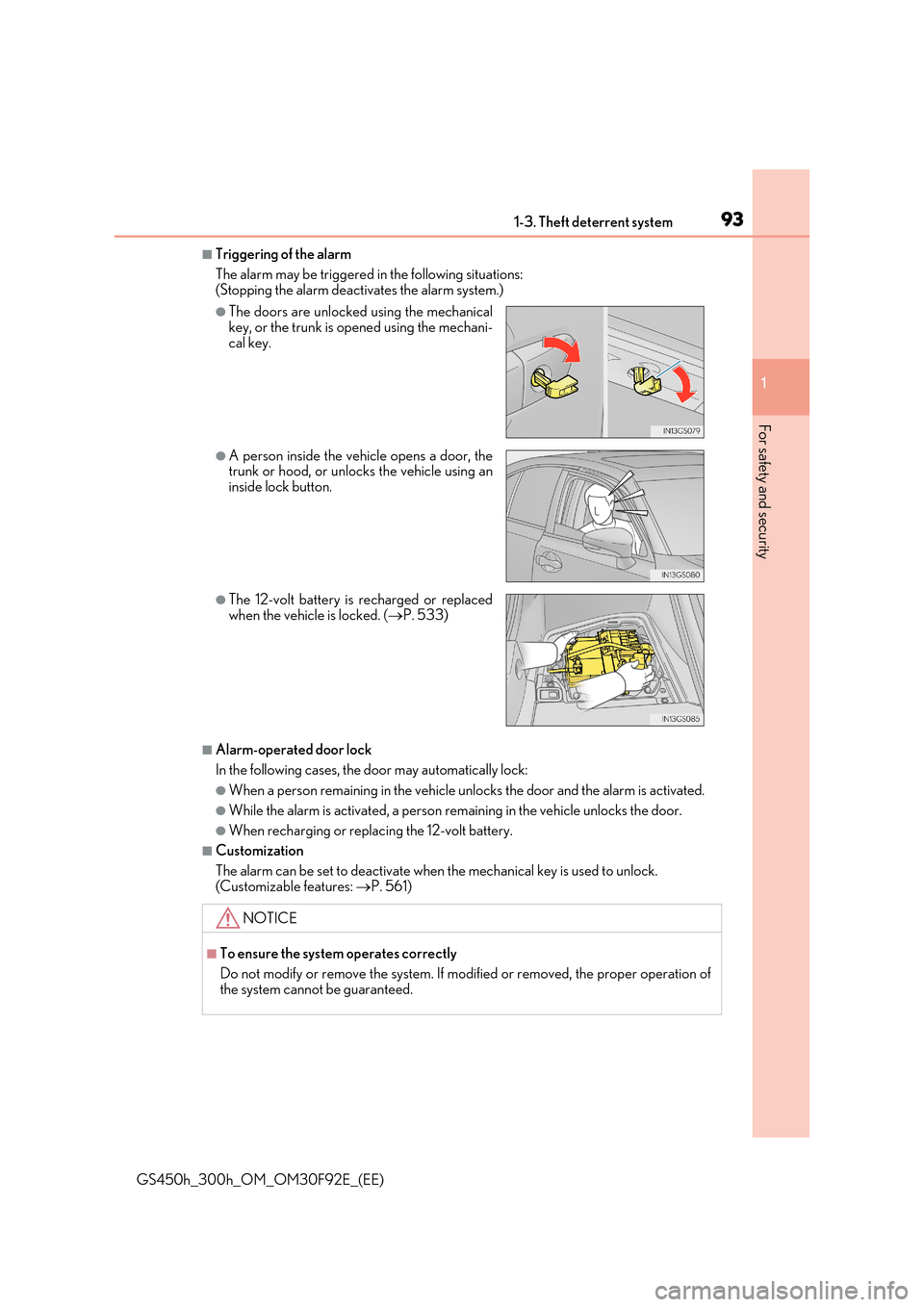
■Triggering of the alarm
The alarm may be triggered in the following situations: (Stopping the alarm deactivates the alarm system.)
■Alarm-operated door lock
In the following cases, the door may automatically lock:
●When a person remain ing in the vehicle unlocks the door and the alarm is activated.
●While the alarm is activated, a person remaining in the vehicle unlocks the door.
●When recharging or replacing the 12-volt battery.
■Customization
The alarm can be set to deactivate when the mechanical key is used to unlock. (Customizable features: P. 561)
●The doors are unlocked using the mechanical key, or the trunk is opened using the mechani-
cal key.
●A person inside the vehicle opens a door, the trunk or hood, or unlocks the vehicle using an
inside lock button.
●The 12-volt battery is recharged or replaced when the vehicle is locked. ( P. 533)
NOTICE
■To ensure the system operates correctly
Do not modify or remove the system. If mo dified or removed, the proper operation of
the system cannot be guaranteed.
Page 94 of 600
941-3. Theft deterrent system
GS450h_300h_OM_OM30F92E_(EE)
●The intrusion sensor detects intruders or movement in the vehicle.
●The tilt sensor detects changes in vehicle inclination, such as when the vehicle
is towed away.
This system is designed to deter and pr event vehicle theft but does not guarantee
absolute security against all intrusions.
■Setting the intrusion sensor and tilt sensor
The intrusion sensor and tilt sensor will be set automatically when the alarm is
set. ( P. 91)
■Canceling the intrusion sensor and tilt sensor
If you are leaving pets or other moving things inside the vehicle, make sure to
stop the intrusion sensor and tilt sensor before setting the alarm, as they will
respond to movement inside the vehicle.
Turn the power switch off.
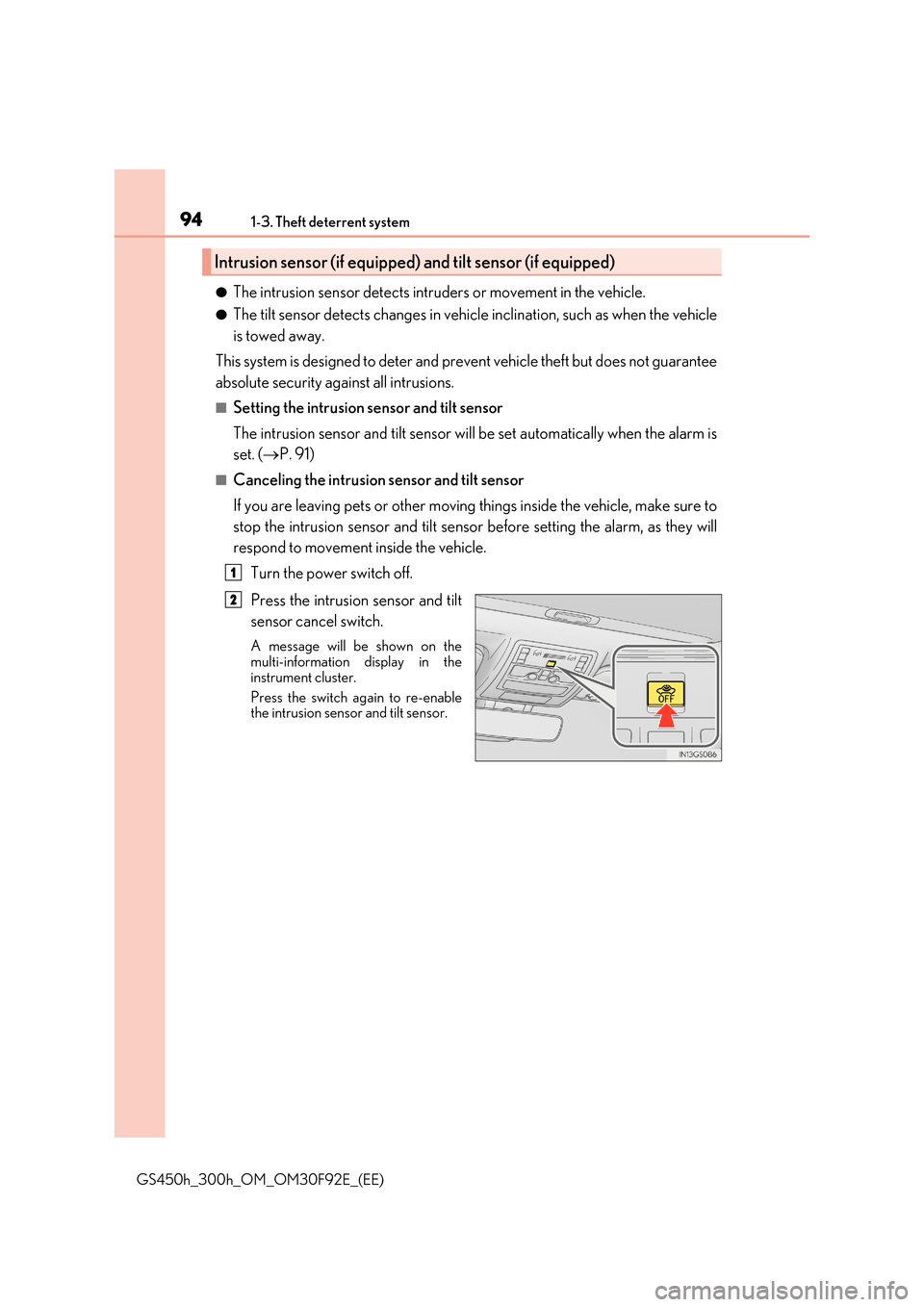
Press the intrusion sensor and tilt
sensor cancel switch.
A message will be shown on the multi-information display in the
instrument cluster.
Press the switch again to re-enable the intrusion sensor and tilt sensor.
Intrusion sensor (if equipped) and tilt sensor (if equipped)
1
2
Page 95 of 600
951-3. Theft deterrent system
1
GS450h_300h_OM_OM30F92E_(EE)
For safety and security
■Canceling and automatic re-enabling of the intrusion sensor and tilt sensor
●The alarm will still be set even when the intrusion sensor and tilt sensor are canceled.
●After the intrusion sensor and tilt sensor are canceled, pressing the power switch or unlocking the doors using the entry function, wireless remote control or mechanical
key will re-enable the intrusio n sensor and tilt sensor.
●The intrusion sensor and tilt sensor will automatically be re-enabled when the alarm system is deactivated.
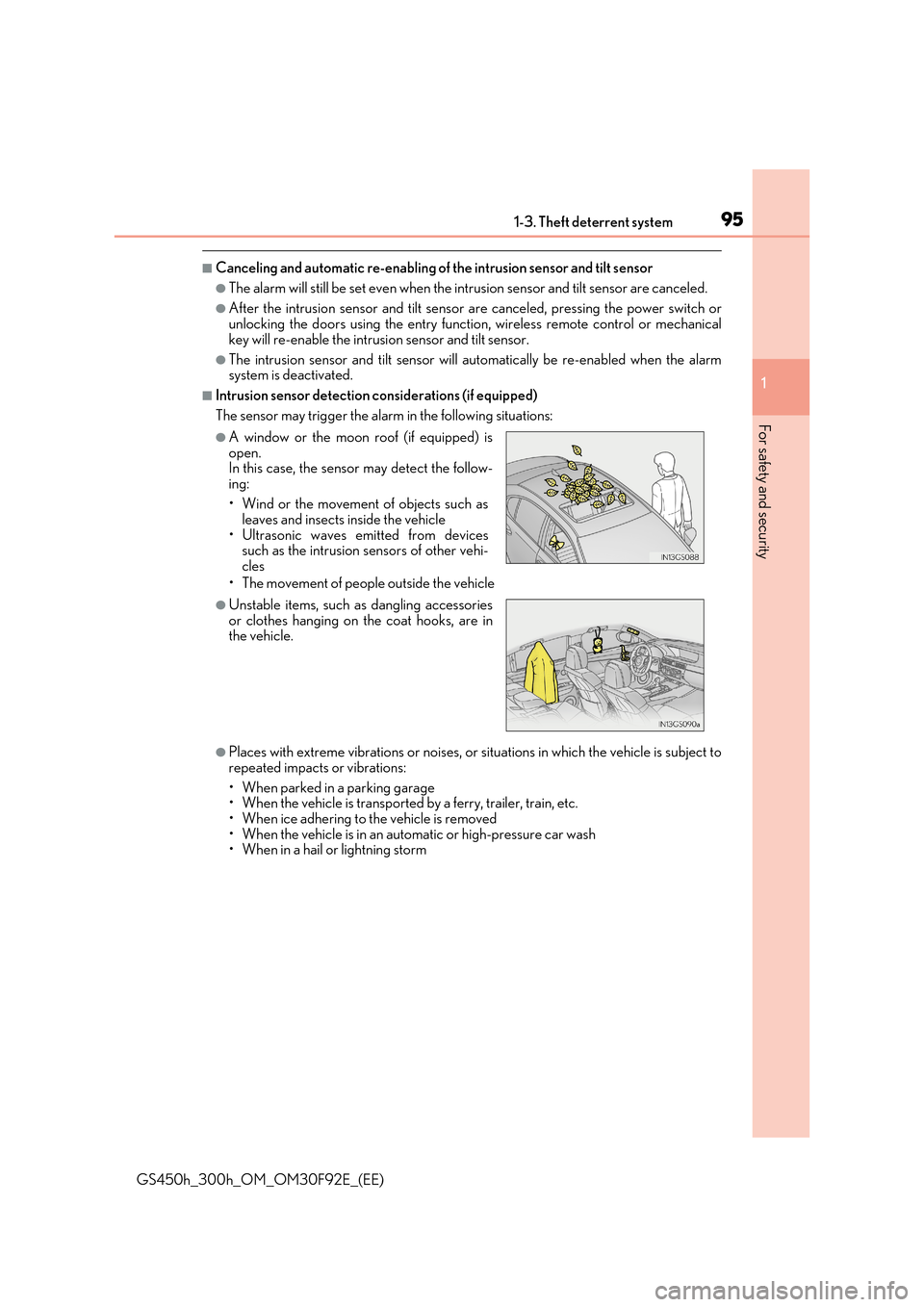
■Intrusion sensor detection considerations (if equipped)
The sensor may trigger the alarm in the following situations:
• The movement of people outside the vehicle
●Places with extreme vibrations or noises, or situations in which the vehicle is subject to
repeated impacts or vibrations:
• When parked in a parking garage • When the vehicle is transported by a ferry, trailer, train, etc.
• When ice adhering to the vehicle is removed • When the vehicle is in an automatic or high-pressure car wash• When in a hail or lightning storm
●A window or the moon roof (if equipped) isopen. In this case, the sensor may detect the follow-
ing:
• Wind or the movement of objects such as leaves and insects inside the vehicle
• Ultrasonic waves emitted from devices such as the intrusion sensors of other vehi-cles
●Unstable items, such as dangling accessoriesor clothes hanging on the coat hooks, are inthe vehicle.
Page 96 of 600
961-3. Theft deterrent system
GS450h_300h_OM_OM30F92E_(EE)
■Tilt sensor detection considerations (if equipped)
The sensor may trigger the alarm in the following situations:
●The vehicle is transported by a ferry, trailer, train, etc.
●The vehicle is parked in a parking garage.
●The vehicle is inside a car wash that moves the vehicle.
●Any of the tires loses air pressure.
●The vehicle is jacked up.
●An earthquake occurs or the road caves in.
NOTICE
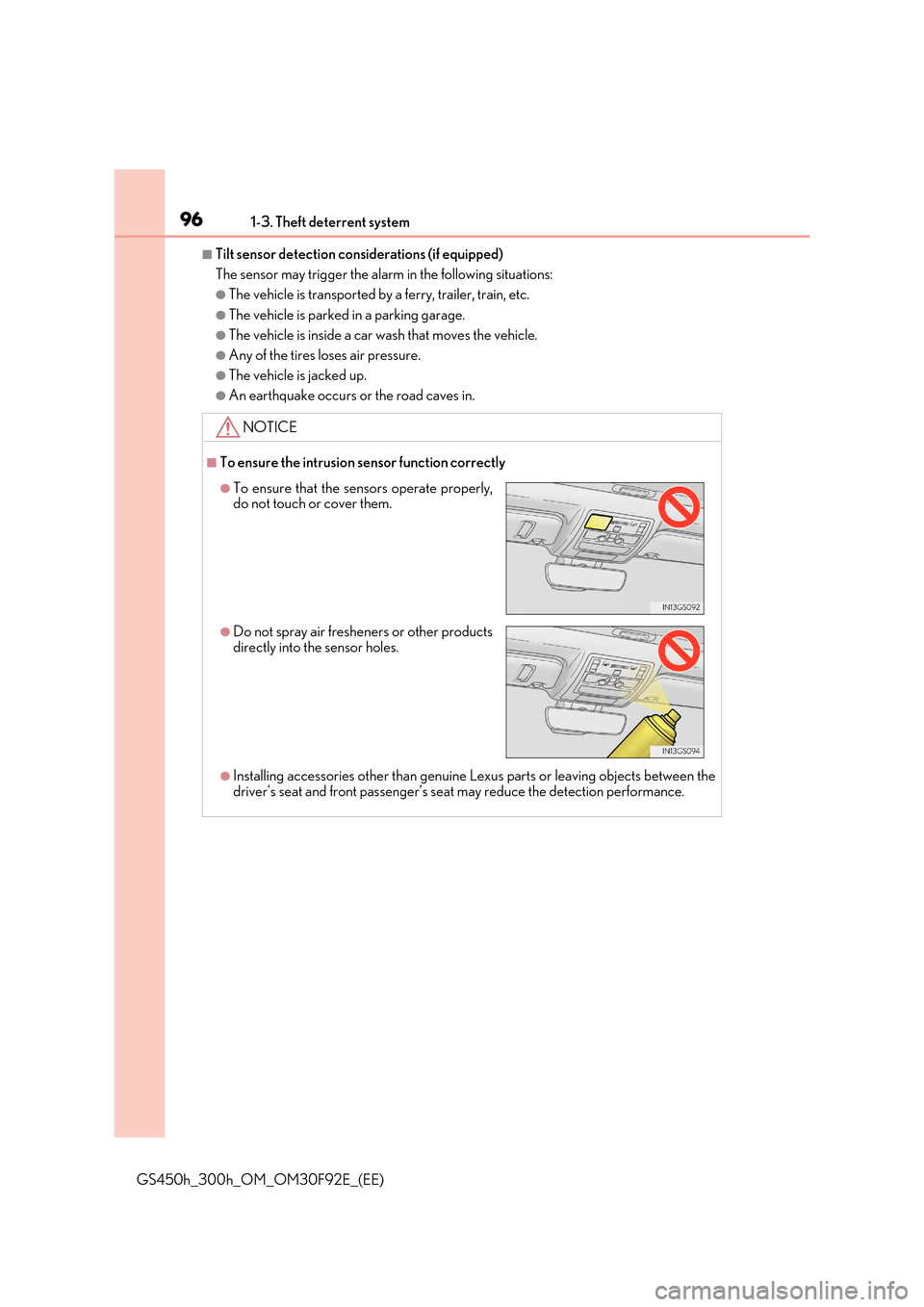
■To ensure the intrusion sensor function correctly
●Installing accessories other than genuine Lexus parts or leaving objects between the
driver’s seat and front passenger’s seat may reduce the detection performance.
●To ensure that the sensors operate properly, do not touch or cover them.
●Do not spray air freshe ners or other products directly into the sensor holes.
Page 136 of 600
1363-1. Key information
GS450h_300h_OM_OM30F92E_(EE)
■When required to leave the vehicle’s key with a parking attendant
Turn the trunk opener main switch off and lock the glove box as circumstances demand. ( P. 148, 370)
Remove the mechanical key for your own use and provide the attendant with the elec- tronic key only.
■If you lose your mechanical keys
New genuine mechanical keys can be made by any authorized Lexus retailer or Lexus authorized repairer, or any reliable repairer using the other mechanical key and the keynumber stamped on your key number plate. K eep the plate in a safe place such as your
wallet, not in the vehicle.
■When riding in an aircraft
When bringing an electronic key onto an aircraft, make sure you do not press any but-
tons on the electronic key while inside the ai rcraft cabin. If you are carrying an electronic key in your bag etc., ensure that the buttons are not likely to be pressed accidentally.Pressing a button may cause the electronic key to emit radio waves that could interfere
with the operation of the aircraft.
■Electronic key battery depletion
●The standard battery life is 1 to 2 years. (The card key battery life is about a year and a
half.)
●If the battery becomes low, an alarm will sound in the cabin when the hybrid system stops. ( P. 496)
●As the electronic key always receives radio waves, the battery will become depleted even if the electronic key is not used. The following symptoms indicate that the elec-tronic key battery may be depleted. Replace the battery when necessary. ( P. 435)
• The smart entry & start system or the wireless remote control does not operate. • The detection area becomes smaller.
• The LED indicator on the key surface does not turn on.
●To avoid serious deterioration, do not leave the electronic key within 1 m (3 ft.) of the
following electrical appliances that produce a magnetic field:
•TVs •Personal computers
• Cellular phones, cordless phones and battery chargers • Recharging cellular phones or cordless phones• Table lamps
• Induction cookers
■Replacing the battery
P. 435
■Confirmation of the registered key number
The number of keys already registered to the vehicle can be confirmed. Ask any autho- rized Lexus retailer or Lexus authorized repa irer, or any reliable repairer for details.
■If a wrong key is used
The key cylinder rotates freely to isolate inside mechanism.
Page 140 of 600
1403-2. Opening, closing and locking the doors and trunk
GS450h_300h_OM_OM30F92E_(EE)
■Operation signals
The emergency flashers flash to indicate that the doors have been locked/unlocked. (Locked: once; Unlocked: twice)
■Security feature
If a door is not opened within approximately 30 seconds after the vehicle is unlocked, the security feature automatically locks the vehicle again.
■Welcome light illumination control
The front position, tail and license plate lights automatically turn on at night when the doors are unlocked using the entry function or wireless remote control if the light switch is in the “AUTO” position.
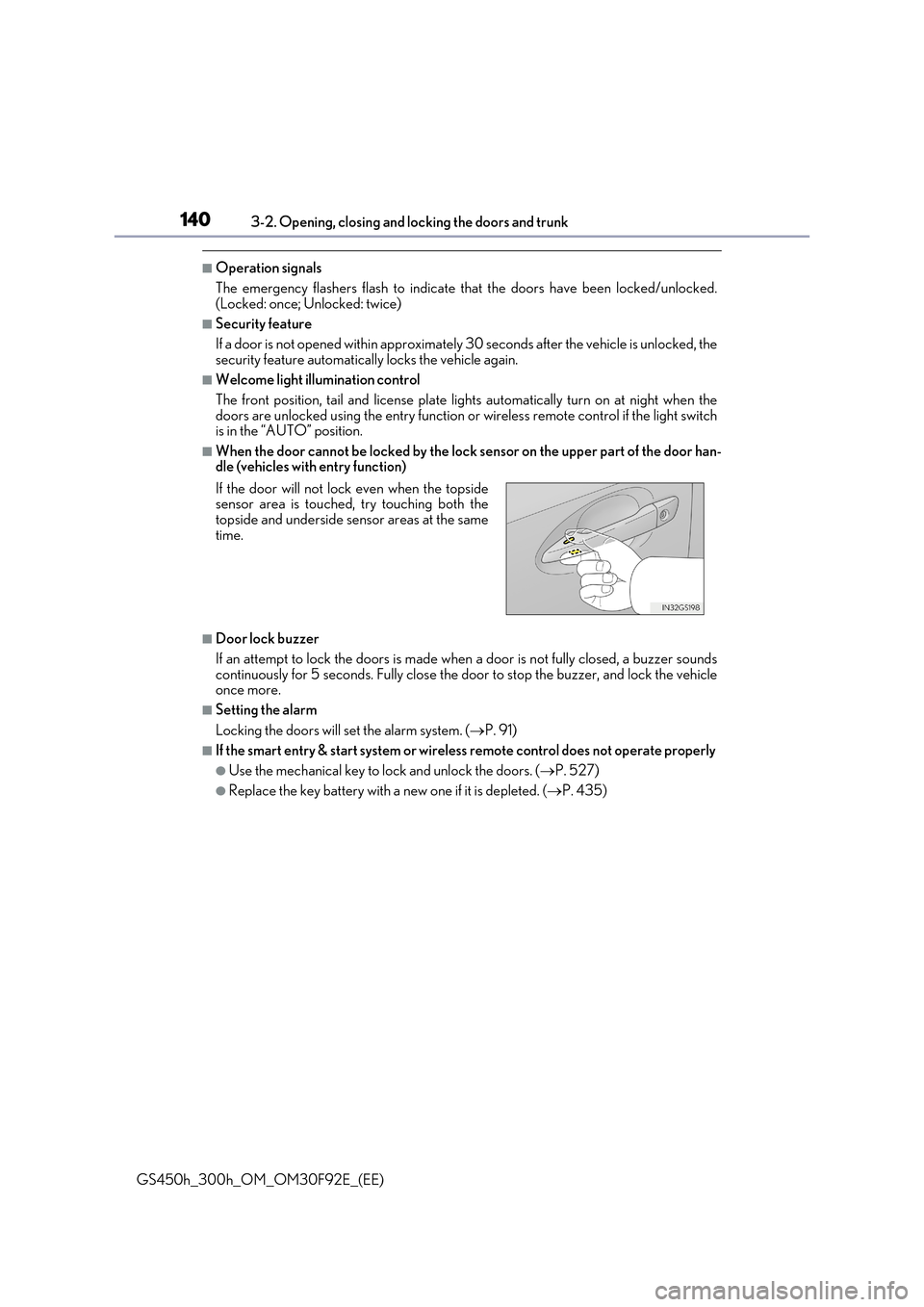
■When the door cannot be locked by the lock sensor on the upper part of the door han-dle (vehicles with entry function)
■Door lock buzzer
If an attempt to lock the doors is made when a door is not fully closed, a buzzer sounds
continuously for 5 seconds. Fully close the door to stop the buzzer, and lock the vehicle once more.
■Setting the alarm
Locking the doors will set the alarm system. ( P. 91)
■If the smart entry & start system or wireless remote control does not operate properly
●Use the mechanical key to lock and unlock the doors. (P. 527)
●Replace the key battery with a new one if it is depleted. (P. 435)
If the door will not lock even when the topside sensor area is touched, try touching both thetopside and underside sensor areas at the same
time.