warning Lexus GX460 2010 Owner's Guide
[x] Cancel search | Manufacturer: LEXUS, Model Year: 2010, Model line: GX460, Model: Lexus GX460 2010Pages: 830, PDF Size: 17.01 MB
Page 210 of 830
209
2-2. Instrument cluster
2
When driving
GX460_CANADA (OM60F29U)
■Electronic features control can be turned on/off when
“ENGINE START STOP” switch is in IGNITION ON mode.
■System check display
After turning the “ENGINE START STOP” switch to IGNITION ON mode,
“CHECKING” is displayed while system operation is checked. When the system
check is complete, the normal screen will return.
■Conditions for ending electronic features control
In the following situations, the electronic features control will end automatically:
●The menu switch is pressed
●Intuitive parking assist display starts operating
●The Crawl Control is operated
●The dynamic radar cruise control is operated
●LDA (Lane Departure Alert) is operated
●A warning message appears after the electronic features control screen is dis-
played
GX460_CANADA.book Page 209 Thursday, February 4, 2010 11:54 AM
Page 252 of 830
251
2-4. Using other driving systems
2
When driving
GX460_CANADA (OM60F29U)Example of constant speed cruising
When there are no vehicles ahead
The vehicle travels at the speed set by the driver. The desired vehicle-to-vehi-
cle distance can also be set by operating the vehicle-to-vehicle distance con-
trol.
Example of deceleration cruising
When the vehicle ahead is driving slower than the set speed
When a vehicle is detected running ahead of you in the same lane, the system
automatically decelerates your vehicle. When a greater reduction in vehicle
speed is necessary, the system applies the brakes. A warning tone warns you
when the system cannot decelerate sufficiently to prevent your vehicle from
closing in on the vehicle ahead.
Example of follow-up cruising
When following a vehicle driving slower than the set speed
The system continues follow-up cruising while adjusting for changes in the
speed of the vehicle ahead in order to maintain the vehicle-to-vehicle dis-
tance set by the driver.
Example of acceleration
When there are no longer vehicles driving slower than the set speed in
the lane ahead
When the vehicle ahead of you executes a lane change, the system slowly
accelerates until the set speed is reached. The system then returns to con-
stant speed cruising.
Approach warning
When your vehicle is too close to a vehicle ahead, and sufficient auto-
matic deceleration via the cruise control is not possible, the display will
flash and the buzzer will sound to alert the driver. An example of this
would be if another driver cuts in front of you while you are following a
vehicle. Apply the brakes to ensure an appropriate vehicle-to-vehicle dis-
tance.
GX460_CANADA.book Page 251 Thursday, February 4, 2010 11:54 AM
Page 254 of 830
253
2-4. Using other driving systems
2
When driving
GX460_CANADA (OM60F29U)
■Automatic cancelation of constant speed control
The cruise control will stop maintaining the vehicle speed in the following situations:
●Actual vehicle speed is more than approximately 10 mph (16 km/h) below the
set vehicle speed.
At this time, the memorized set speed is not retained.
●Actual vehicle speed falls below approximately 25 mph (40 km/h).
●VSC is activated.
●The center differential lock/unlock is not completed within 5 seconds while the
dynamic radar cruise control system is on.
■Vehicle-to-vehicle distance settings
Select a distance from the table below. Note that the distances shown correspond
to a vehicle speed of 50 mph (80 km/h). Vehicle-to-vehicle distance increases/
decreases in accordance with vehicle speed.
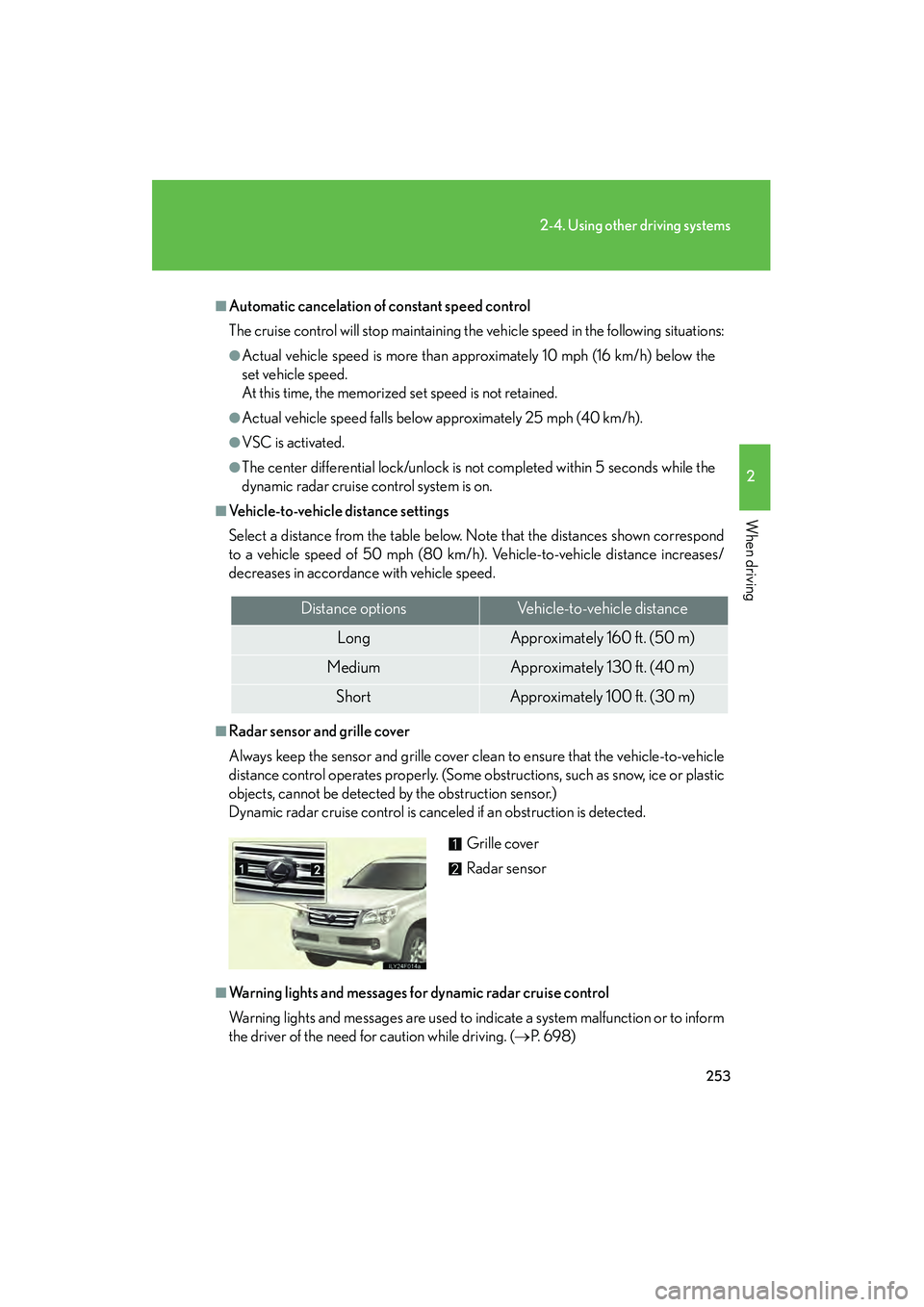
■Radar sensor and grille cover
Always keep the sensor and grille cover clean to ensure that the vehicle-to-vehicle
distance control operates properly. (Some obstructions, such as snow, ice or plastic
objects, cannot be detected by the obstruction sensor.)
Dynamic radar cruise control is canceled if an obstruction is detected.
■Warning lights and messages for dynamic radar cruise control
Warning lights and messages are used to indicate a system malfunction or to inform
the driver of the need for caution while driving. (→P. 6 9 8 )
Distance optionsVehicle-to-vehicle distance
LongApproximately 160 ft. (50 m)
MediumApproximately 130 ft. (40 m)
ShortApproximately 100 ft. (30 m)
Grille cover
Radar sensor
GX460_CANADA.book Page 253 Thursday, February 4, 2010 11:54 AM
Page 255 of 830
254
2-4. Using other driving systems
GX460_CANADA (OM60F29U)
■Approach warning
In the following instances, there is a possibility that the warnings will not occur:
●When the speed of the vehicle ahead matches or exceeds your vehicle speed
●When the vehicle ahead is traveling at an extremely slow speed
●Immediately after the cruise control speed was set
●When the accelerator pedal is depressed, and immediately after it is released
■Certification
For vehicles sold in the U.S.A.
FCC ID: HYQDNMWR004
This device complies with Part 15 of the FCC Rules. Operation is subject to the fol-
lowing two conditions: (1) this device may not cause harmful interference, and (2)
this device must accept any interference received, including interference that may
cause undesired operation.
FCC WARNING
Changes or modifications not expressly approved by the party responsible for
compliance could void the user’s authority to operate the equipment.
Radio frequency radiation exposure Information:
This equipment complies with FCC radiation exposure limits set forth for an uncon-
trolled environment.
This equipment should be installed and operated with minimum distance of 20 cm
between the radiator (antenna) and your body.
This transmitter must not be co-located or operating in conjunction with any other
antenna or transmitter.
For vehicles sold in Canada
Operation is subject to the following two conditions: (1) this device may not cause
interference, and (2) this device must accept any interference, including interfer-
ence that may cause undesired operation of the device.
GX460_CANADA.book Page 254 Thursday, February 4, 2010 11:54 AM
Page 258 of 830
257
2-4. Using other driving systems
2
When driving
GX460_CANADA (OM60F29U)
CAUTION
■When the sensor may not be correctly detecting the vehicle ahead
Apply the brakes as necessary when any of the following types of vehicles are in
front of you.
As the sensor may not be able to correctly detect these types of vehicles, the
approach warning ( →P. 254) will not be activated, and a fatal or serious accident
may result.
●Vehicles that cut in suddenly
●Vehicles traveling at low speeds
●Vehicles that are not moving
●Vehicles with small rear ends (trailers with no load on board etc.)
●Motorcycles traveling in the same lane
■Conditions under which the vehicle-to-vehicle distance control may not function
correctly
Apply the brakes as necessary in the following conditions as the radar sensor may
not be able to correctly detect vehicles ahead, and a fatal or serious accident may
result:
●When water or snow thrown up by the surrounding vehicles hinders the function-
ing of the sensor
●When your vehicle is pointing upwards (caused by a heavy load in the luggage
compartment etc.)
●When the road curves or when the lanes are narrow
●When steering wheel operation or your position in the lane is unstable
●When the vehicle ahead of you decelerates suddenly
●Excessive exhaust gas (black smoke) is coming from the vehicle ahead or other
vehicles around you, obscuring your front view
●The rear section of the vehicle ahead is extremely dirty
●The vehicle ahead has higher ground clearance
GX460_CANADA.book Page 257 Thursday, February 4, 2010 11:54 AM
Page 271 of 830
270
2-4. Using other driving systems
GX460_CANADA (OM60F29U)
■When the vehicle has been parked in the sun
The LDA system may not be available for a while after driving has started. In such
cases, turn the LDA system off and turn it on again after normal temperature
returns. When the temperature in the cabin decreases and the temperature around
the camera sensor becomes suitable for its operation, the functions will begin to
operate.
■Warning lights and messages for LDA
Warning lights and messages are used to indicate a system malfunction or to inform
the driver of the need for caution while driving. (→P. 6 9 8 )
CAUTION
■Before using the LDA system
This system provides information to the dr iver in accordance with the road geome-
try and the driving conditions. Be aware of your surroundings at all times, correct
the driving path while driving appropriately and be responsible for your own safety.
This system operates by using the camera to identify lane markers when the LDA
switch is on and the vehicle is being driven at the system operating speed.
Operation may be temporarily suspended if the camera cannot recognize the lane
markers or if the system cannot operate due to the road environment or driving
conditions. Also, since an alarm may sound unnecessarily if the lane markers cannot
be correctly identified, make sure to drive responsibly even while the system is
operating.
If a malfunction occurs in the system, the driver will be alerted by a buzzer and a dis-
play, and LDA operation will be temporarily suspended. However, this does not
present a problem to normal driving.
If the alert is displayed even after restarting the engine, have your vehicle inspected
by your Lexus dealer.
GX460_CANADA.book Page 270 Thursday, February 4, 2010 11:54 AM
Page 315 of 830
314
2-4. Using other driving systems
GX460_CANADA (OM60F29U)
■When lowering the vehicle
In order to prevent the vehicle height from rising as occupants leave the vehicle,
lowering control will occur for a short while after the engine has been stopped.
■The rear height control air suspension failure warning
●If a malfunction occurs in the rear height control air suspension, N mode is auto-
matically selected. However, the system may not switch to N mode depending
on the location of the malfunction.
●The warning message is displayed on the multi-information display, and the rear
height control air suspension cannot be activated until the malfunction is cor-
rected.
Stop the engine and start it again. If the warning message turns off, the system is
operating correctly. If the warning message continues to be displayed, have
your vehicle inspected by your Lexus dealer as soon as possible.
CAUTION
■The rear height control air suspension must be turned off when
In the following situations, the automatic leveling function may cause vehicle height
to change, resulting in an unexpected accident:
●When jacking up the vehicle, installing tire chains or tying the vehicle with chains/
wires for transportation via flat bed truck (Turn off the rear height control air sus-
pension and stop the engine.)
●When the vehicle must be towed or disconnecting a trailer (Put the vehicle height
in N mode and turn off the rear height control air suspension.)
●When the vehicle is stuck (Turn off the rear height control air suspension.)
GX460_CANADA.book Page 314 Thursday, February 4, 2010 11:54 AM
Page 327 of 830

326
2-4. Using other driving systems
GX460_CANADA (OM60F29U)
■If the automatic transmission system overheats
The system will cease operation, a buzzer will sound and a warning message will be
displayed to alert the driver. Stop the vehicle in a safe place until the warning mes-
sage turns off. (→P. 6 9 8 )
■Sounds and vibrations caused by the Crawl Control system
●A sound may be heard from the engine compartment when the engine is
started or just after the vehicle begins to move. This sound does not indicate that
a malfunction has occurred in Crawl Control system.
●Either of the following conditions may occur when the Crawl Control system is
operating. None of these are indicators that a malfunction has occurred.
• Vibrations may be felt through the vehicle body and steering.
• A motor sound may be heard after the vehicle comes to a stop.
■If the slip indicator comes on...
It may indicate a malfunction in the system. Consult your Lexus dealer.
CAUTION
■When using Crawl Control
Do not rely solely on the Crawl Control. This function does not extend the vehicle’s
performance limitations. Always thoroughly check the road conditions, and drive
safely.
■These conditions may cause the system not to operate properly
When driving on the following surfaces, the system may not be able to maintain a
fixed low speed, which may result in an accident:
●Extremely steep inclines.
●Extremely uneven surfaces.
●Snow-covered roads, or other slippery surfaces.
GX460_CANADA.book Page 326 Thursday, February 4, 2010 11:54 AM
Page 337 of 830
336
2-4. Using other driving systems
GX460_CANADA (OM60F29U)
CAUTION
■TRAC/Active TRAC may not operate effectively when
Directional control and power may not be achievable while driving on slippery road
surfaces, even if the TRAC/Active TRAC is operating.
Do not drive the vehicle in conditions where stability and power may be lost.
■Hill- start assist control does not operate effectively when
Do not overly rely on the hill-start assist control. The hill-start assist control may not
operate effectively on steep inclines and roads covered with ice.
■When the VSC is activated
The slip indicator light flashes and a warning buzzer sounds. Always drive carefully.
Reckless driving may cause an accident. Exercise particular care when the indica-
tor light flashes and a buzzer sounds.
■When the TRAC or Active TRAC/VSC systems are turned off
Be especially careful and drive at a speed appropriate to the road conditions. As
these are the systems to ensure vehicle stability and driving force, do not turn the
TRAC or Active TRAC/VSC systems off unless necessary.
■Replacing tires
Make sure that all tires are of the same size, brand, tread pattern and total load
capacity. In addition, make sure that the tires are inflated to the recommended tire
inflation pressure level.
The ABS/Multi Terrain ABS and VSC systems will not function correctly if different
tires are installed on the vehicle.
Contact your Lexus dealer for further information when replacing tires or wheels.
GX460_CANADA.book Page 336 Thursday, February 4, 2010 11:54 AM
Page 339 of 830
338
2-4. Using other driving systems
GX460_CANADA (OM60F29U)
PCS (Pre-Collision System)∗
∗: If equipped
When the system detects the possibility of a frontal collision, the systems
such as the brakes and seat belts are automatically engaged to lessen
impact and injuries to occupants as well as vehicle damage.
■ Pre-collision seat belts (front seat belts only)
If the system detects that a collision is unavoidable, the system will
retract the seat belt before the collision occurs.
The same will happen if the driver makes an emergency braking or
loses control of the vehicle. ( →P. 88)
However, when the VSC system is disabled, the system will not
operate in the event of skidding.
■ Pre-collision brake assist
When there is a high possibility of a frontal collision, the system
applies greater braking force in relation to how strongly the brake
pedal is depressed.
■ Pre-collision braking
When there is a high possibility of a frontal collision, the system
warns the driver using a warning light, warning display and buzzer. If
the system determines that a collision is unavoidable, the brakes are
automatically applied to reduce the collision speed. Pre-collision
braking can be disabled using the pre-collision braking off switch.
GX460_CANADA.book Page 338 Thursday, February 4, 2010 11:54 AM