back up Lexus GX460 2013 Repair Manual
[x] Cancel search | Manufacturer: LEXUS, Model Year: 2013, Model line: GX460, Model: Lexus GX460 2013Pages: 846, PDF Size: 19.76 MB
Page 341 of 846
340
2-4. Using other driving systems
GX460_OM_OM60J63U_(U)
■TRAC (Traction Control) for H4 mode
Helps to maintain drive power and prevent the drive wheels from spinning
when starting the vehicle or accelerating on slippery roads
■Active TRAC (Traction Control) for L4 mode*
Helps to maintain drive power and prevent the 4 wheels from spinning
when starting the vehicle or accelerating on slippery roads, or in off-road
conditions
■Hill-start assist control
Helps to prevent the vehicle from rolling backward when starting on an
incline or slippery slope
■KDSS (Kinetic Dynamic Suspension System)
KDSS helps to enhance ride comfort and handling response by using a
hydraulic control system to control the suspension stabilizer bars in
response to road surface and driving conditions during cornering or off-
road driving
■ PCS (Pre-Collision System) (if equipped)
→ P. 3 4 7
*: The function only works in vehicles with Multi-terrain Select when Multi-
terrain Select is switched on
GX460_OM_OM60J63U_(U).book Page 340 Thursday, March 29, 2012 9:10 AM
Page 342 of 846
341
2-4. Using other driving systems
2
When driving
GX460_OM_OM60J63U_(U)
When the VSC/TRAC or Active TRAC/hill-start assist control systems
are operating
If the vehicle is in danger of slip-
ping or rolling backward when
starting on an incline, or if any of
the drive wheels spins, the slip indi-
cator light flashes to indicate that
the VSC/TRAC or Active TRAC/
hill-start assist control systems are
operating.
A buzzer (intermittent) sounds to
indicate that VSC is operating.
The stop lights and high mounted
stoplight turn on when the hill-start
assist control system is operating.
GX460_OM_OM60J63U_(U).book Page 341 Thursday, March 29, 2012 9:10 AM
Page 343 of 846
342
2-4. Using other driving systems
GX460_OM_OM60J63U_(U)
Disabling the TRAC or Active TRAC/VSC systems
If the vehicle gets stuck in fresh snow or mud, the TRAC or Active TRAC/
VSC systems may reduce power from the engine to the wheels. You may
need to turn the system off to enable you to rock the vehicle in order to
free it.
■ Turning off TRAC or Active TRAC system only
To turn the TRAC or Active TRAC
system off, quickly press and
release the button.
The TRAC OFF will be shown on
the multi-information display.
Press the button again to turn the
system back on.
■Turning off both TRAC or Active TRAC and VSC systems
To turn the TRAC or Active TRAC
and VSC systems off, press and
hold the button for 3 seconds and
more while the vehicle is stopped.
The VSC OFF indicator light will
come on and the TRAC OFF will
be shown on the multi- information
display.
Press the button again to turn the
system back on.
GX460_OM_OM60J63U_(U).book Page 342 Thursday, March 29, 2012 9:10 AM
Page 352 of 846
351
2-4. Using other driving systems
2
When driving
GX460_OM_OM60J63U_(U)
●Pre-collision alert braking (vehicle with driver monitor system):
• The pre-collision braking off switch is not pressed.
• The system determines that the driver is not facing forward.
• Vehicle speed is greater than about 10 mph (15 km/h).
• The speed at which your vehicle is approaching the vehicle running ahead ofyou is greater than about 25 mph (40 km/h).
■Conditions that may trigger the system even if there is no possibility of a collision
●When there is an object by the roadside at the entrance to a curve
●When passing an oncoming vehicle on a curve
●When driving over a narrow iron bridge
●When there is a metal object on the road surface
●When driving on an uneven road surface
●When passing an oncoming vehicle on a left-turn
●When your vehicle rapidly closes on the vehicle in front
●When a grade separation/interchange, sign, billboard, or other structure
appears to be directly in the vehicle’s line of travel
●When a billboard or other metallic structure appears to be in the direct line of
travel due to driving on a hill.
●When there are excessive changes in the vehicle height (when it tilts forwards
or backwards)
●When there is an abnormality in the radar sensor
●When passing through certain toll gates
●When driving on a bridge
When the system is activated in the situations described above, there is also a possi-
bility that the seat belts will retract quickly and the brakes will be applied with a force
greater than normal. When the seat belt is locked in the restricted position, stop the
vehicle in a safe place, release the seat belt and refasten it.
GX460_OM_OM60J63U_(U).book Page 351 Thursday, March 29, 2012 9:10 AM
Page 360 of 846
359
2-5. Driving information
2
When driving
GX460_OM_OM60J63U_(U)
CAUTION
■Off-road vehicle precautions
Always observe the following precautions to minimize the risk of death, serious
injury or damage to your vehicle:
●In a rollover crash, an unbelted person is significantly more likely to die than a
person wearing a seat belt. Therefore, the driver and all passengers should fasten
their seat belts whenever the vehicle is moving.
●Avoid sharp turns or abrupt maneuvers, if at all possible.
Failure to operate this vehicle correctly may result in loss of control or vehicle roll-
over causing death or serious injury.
●Loading cargo on the roof luggage carrier will make the center of the vehicle
gravity higher. Avoid high speeds, sudden starts, sharp turns, sudden braking or
abrupt maneuvers, otherwise it may result in loss of control or vehicle rollover
due to failure to operate this vehicle correctly.
●Always slow down in gusty crosswinds. Because of its profile and higher center of
gravity, your vehicle is more sensitive to side winds than an ordinary passenger
car. Slowing down will allow you to have better control.
●Do not drive horizontally across steep slopes. Driving straight up or straight down
is preferred. Your vehicle (or any similar off-road vehicle) can tip over sideways
much more easily than forward or backward.
GX460_OM_OM60J63U_(U).book Page 359 Thursday, March 29, 2012 9:10 AM
Page 368 of 846
367
2-5. Driving information
2
When driving
GX460_OM_OM60J63U_(U)
CAUTION
■Storage precautions
Observe the following precautions.
Failure to do so may result in death or serious injury.
●Stow cargo and luggage in the luggage compartment whenever possible.
●Do not stack cargo and luggage in the luggage compartment higher than the
seatbacks.
Such items may be thrown about and possibly injure people in the vehicle in the
event of a sudden braking, sudden swerving or an accident.
●Do not place cargo or luggage in or on the following locations as the item may
get under the brake or accelerator pedal and prevent the pedals from being
depressed properly, block the driver’s vision, or hit the driver or passengers,
causing an accident:
• At the feet of the driver
• On the front passenger or rear seats (when stacking items)
• On the luggage cover
• On the instrument panel
• On the dashboard
●Secure all items in the occupant compartment, as they may shift and injure some-
one in the event of a sudden braking, sudden swerving or an accident.
●When you fold down the rear seats, long items should not be place directly
behind the front seats.
●Never allow anyone to ride in the luggage compartment. It is not designed for
passengers. They should ride in their seats with their seat belts properly fastened.
Otherwise, they are much more likely to suffer death or serious bodily injury, in
the event of sudden braking or an accident.
■Roof luggage carrier precautions
To use the roof rails as a roof luggage carrier, you must fit the roof rails with two or
more genuine Lexus cross rails or their equivalent.
Follow the manufacturer’s instructions and precautions when installing the cross
rails or their equivalent.
GX460_OM_OM60J63U_(U).book Page 367 Thursday, March 29, 2012 9:10 AM
Page 389 of 846
388
2-5. Driving information
GX460_OM_OM60J63U_(U)●
Always place wheel blocks under both the vehicle’s and the trailer’s
wheels when parking. Apply the parking brake firmly, and put the
transmission in P. Avoid parking on a slope, but if unavoidable, do so
only after performing the following:
Apply the brakes and keep them applied.
Have someone place wheel blocks under both the vehicle’s and
trailer’s wheels.
When the wheel blocks are in place, release the brakes slowly
until the blocks absorb the load.
Apply the parking brake firmly.
Shift into P and turn off the engine.
● When restarting after parking on a slope:
With the transmission in P, start the engine. Be sure to keep the
brake pedal pressed.
Shift into 3, 2, L, or R (if reversing).
Release the parking brake and brake pedal, and slowly pull or
back away from the wheel blocks. Stop and apply the brakes.
Have someone retrieve the blocks.
STEP1
STEP2
STEP3
STEP4
STEP5
STEP1
STEP2
STEP3
STEP4
GX460_OM_OM60J63U_(U).book Page 388 Thursday, March 29, 2012 9:10 AM
Page 417 of 846
416
3-1. Using the air conditioning system and defogger
GX460_OM_OM60J63U_(U)
Adjusting the position and opening and closing the air outlets
Roof side outlets Direct air flow to the left or right,
up or down.
Turn the knob fully to the back of
the vehicle to close the vent.
■Air conditioning system settings
When the “ENGINE START STOP” switch is turned on, the air conditioning system
settings will be set to those that were in use the last time the “ENGINE START
STOP” switch was turned off.
Air conditioning system settings are memorized individually on each electronic key,
so the settings reproduced will be specific to the key that is used.
NOTICE
■To prevent battery discharge
Do not leave the air conditioning system on longer than necessary when the engine
is stopped.
GX460_OM_OM60J63U_(U).book Page 416 Thursday, March 29, 2012 9:10 AM
Page 430 of 846
429
3-2. Using the audio system
3
Interior features
GX460_OM_OM60J63U_(U)
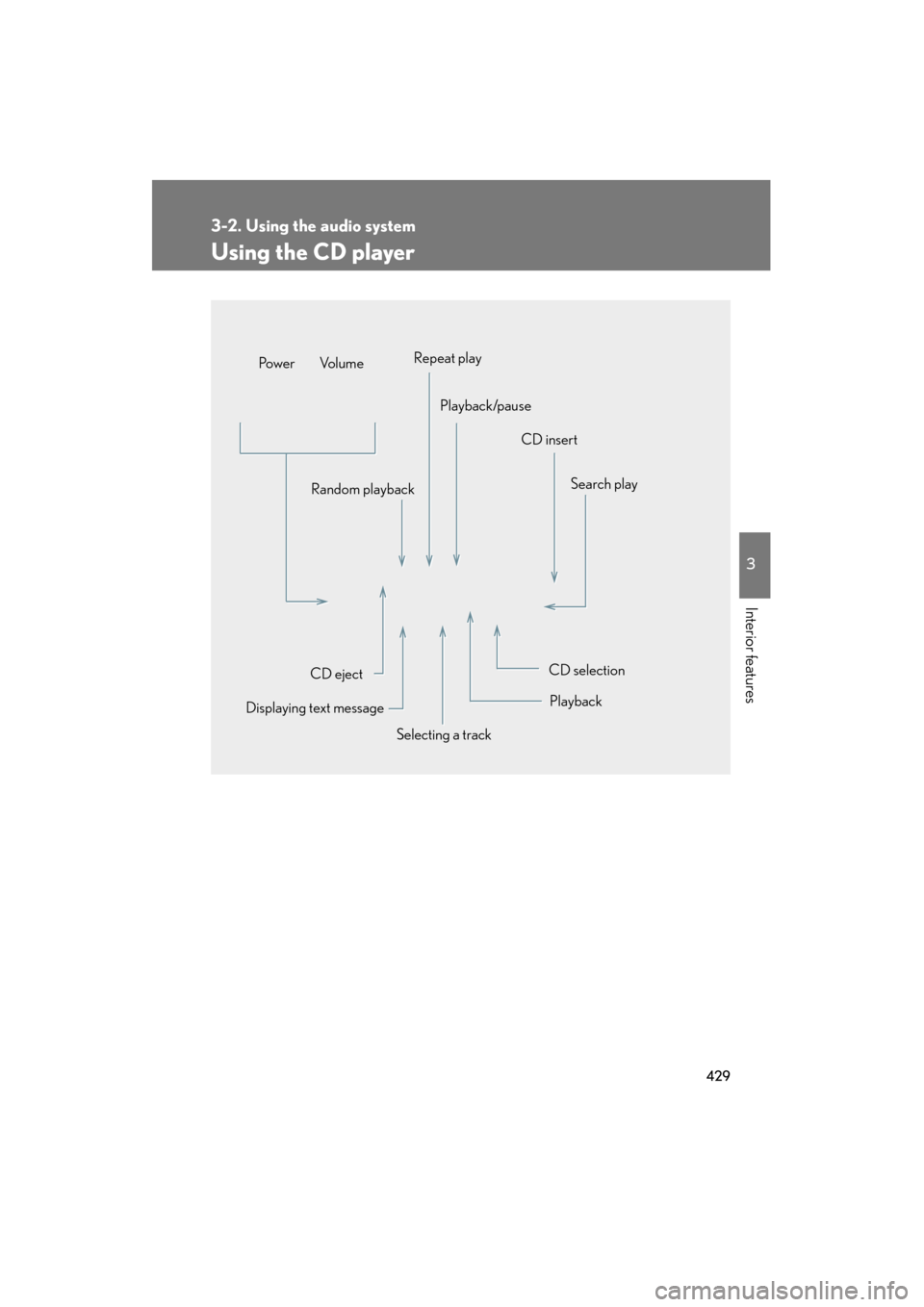
Using the CD player
Selecting a trackSearch play
CD eject
Displaying text message Random playback
CD selection
CD insert
Repeat play
Playback/pause
Po w e r Vo l u m e
Playback
GX460_OM_OM60J63U_(U).book Page 429 Thursday, March 29, 2012 9:10 AM
Page 433 of 846
432
3-2. Using the audio system
GX460_OM_OM60J63U_(U)
Selecting a CD■ Selecting a CD to play
To select the desired CD, press “ ∧” or “ ∨” on the “TYPE•DISC” button.
■ Scanning loaded CDs
Press and hold the “SCAN” button until you hear a beep.
The first ten seconds of the first track on each CD will be played.
To cancel, press the “SCAN” button again.
Press the button again when the desired CD is reached.
Playing and pausing tracks
To play or pause a track, press the 3 ( ) button.
Random playback■ Current CD
Press the 1 (RAND) button.
Songs are played in random order.
To cancel, press the 1 (RAND) button again.
■All CDs
Press and hold the 1 (RAND) button until you hear a beep.
Tracks on all loaded CDs are played in random order.
To cancel, press the 1 (RAND) button again.
STEP1
STEP2
GX460_OM_OM60J63U_(U).book Page 432 Thursday, March 29, 2012 9:10 AM