lights Lexus GX460 2013 Specifications /
[x] Cancel search | Manufacturer: LEXUS, Model Year: 2013, Model line: GX460, Model: Lexus GX460 2013Pages: 844, PDF Size: 10.42 MB
Page 144 of 844

144
1-7. Safety information
GX460_OM_OM60J63U_(U)
Condition and operation in the front passenger occupant classification system
■Adult*1
Indicator/
warning light “AIR BAG ON” and “AIR BAG OFF”
indicator lights “A I R B A G
ON”
SRS warning light Off
Front passenger’s seat belt reminder light Flashing
*2
DevicesFront passenger airbag
Activated
Side airbag on the front passenger seat
Curtain shield airbag
in the front passenger side
Front passenger knee airbag
Front passenger’s seat belt pretensioner
Page 145 of 844

145
1-7. Safety information
1
Before driving
GX460_OM_OM60J63U_(U)■
Child
*3 or child restraint system*4
Indicator/
warning light “AIR BAG ON” and “AIR BAG OFF”
indicator lights “A I R B A G
OFF”*5
SRS warning light Off
Front passenger’s seat belt reminder light Flashing
*2
DevicesFront passenger airbag Deactivated
Side airbag on the front passenger seat Activated
Curtain shield airbag
in the front passenger side
Front passenger knee airbag Deactivated
Front passenger’s seat belt pretensioner Activated
Page 146 of 844

146
1-7. Safety information
GX460_OM_OM60J63U_(U)■
Unoccupied
■ There is a malfunction in the system
Indicator/
warning light “AIR BAG ON” and “AIR BAG OFF”
indicator lights Not
illuminated
SRS warning light Off
Front passenger’s seat belt reminder light
Devices Front passenger airbag Deactivated
Side airbag on the front passenger seat Activated
Curtain shield airbag
in the front passenger side
Front passenger knee airbag Deactivated
Front passenger’s seat belt pretensioner
Indicator/
warning light “AIR BAG ON” and “AIR BAG OFF”
indicator lights “A I R B A G
OFF”
SRS warning light On
Front passenger’s seat belt reminder light Off
Devices Front passenger airbag Deactivated
Side airbag on the front passenger seat Activated
Curtain shield airbag
in the front passenger side
Front passenger knee airbag Deactivated
Front passenger’s seat belt pretensioner Activated
Page 170 of 844

170
GX460_OM_OM60J63U_(U)
2-1. Driving proceduresDriving the vehicle .................. 172
Engine (ignition) switch ........ 183
Automatic transmission ........ 190
Turn signal lever....................... 196
Parking brake............................ 197
Horn............................................ 198
2-2. Instrument cluster Gauges and meters................ 199
Indicators and warning lights ........................................ 202
Multi-information display (Optitron meters) ............... 208
Multi-information display (Accessory meters) ............. 216
2-3. Operating the lights and windshield wipers
Headlight switch .................... 223
Automatic High Beam ......... 230
Fog light switch ....................... 237
Windshield wipers and washer .................................... 240
Rear window wiper and washer .................................... 246
Headlight cleaner switch .... 249
When driving2
Page 196 of 844
196
2-1. Driving procedures
GX460_OM_OM60J63U_(U)
Turn signal lever
■Turn signals can be operated when
The “ENGINE START STOP” switch is in IGNITION ON mode.
■If the indicators flash faster than usual
Check that a light bulb in the front or rear turn signal lights has not burned out.
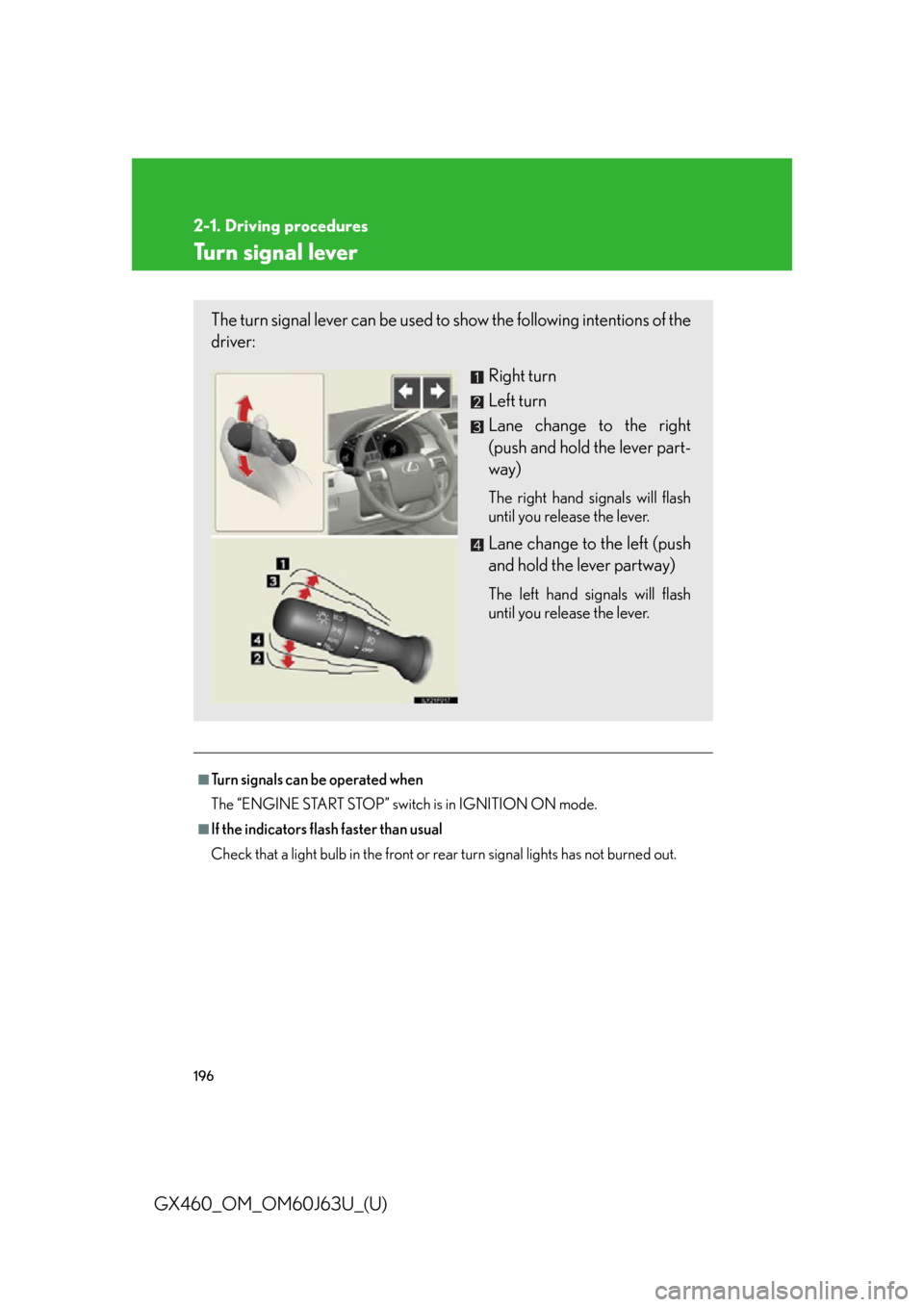
The turn signal lever can be used to show the following intentions of the
driver:
Right turn
Left turn
Lane change to the right
(push and hold the lever part-
way)
The right hand signals will flash
until you release the lever.
Lane change to the left (push
and hold the lever partway)
The left hand signals will flash
until you release the lever.
Page 200 of 844

200
2-2. Instrument cluster
GX460_OM_OM60J63U_(U)
Changing the displaySwitches between odometer and
trip meter displays. When the trip
meter is displayed, pressing and
holding the button will reset the
trip meter.
Instrument cluster light control switchThe brightness of the instrument cluster lights can be adjusted.
Brighter
Darker
Odometer and trip meter display
Odometer: Displays the total distance the vehicle has been driven.
Trip meter: Displays the distance the vehicle has been driven since the meter was last reset. Trip meters A and B can be used to
record and display different distances independently.
Page 201 of 844
201
2-2. Instrument cluster
2
When driving
GX460_OM_OM60J63U_(U)
■The meters and display illuminate when
The “ENGINE START STOP” switch is in IGNITION ON mode.
■Instrument cluster brightness adjustment
The instrument cluster brightness levels when the tail lights are on and off can be
adjusted.
■The brightness of the instrument cluster lights
When the tail lights are on, the brightness will change. However, when the sur-
roundings are bright (daytime, etc.) turning on the tail lights will not change the
instrument cluster brightness.
In addition, the brightness of the instrument cluster lights is automatically adjusted
based on the light sensor detecting how bright the surroundings are.
■When disconnecting and reconnecting battery terminals
The trip meter data will be reset.
If the trip meter was displayed last, the ODO screen will be displayed after reset-
ting.
■Customization
Setting of sensitivity of the ambient ligh t sensor used for dimming the meter lights
can be changed. (Customizable features P. 7 8 8 )
NOTICE
■To prevent damage to the engine and its components
●Do not let the indicator needle of the tachometer enter the red zone, which indi-
cates the maximum engine speed.
●The engine may be overheating if the engine coolant temperature gauge is in the
red zone (H). In this case, immediately stop the vehicle in a safe place, and check
the engine after it has cooled completely. ( P. 74 9 )
Page 202 of 844

202
2-2. Instrument cluster
GX460_OM_OM60J63U_(U)
Indicators and warning lights
The indicators and warning lights on the instrument cluster and center
panel inform the driver of the status of the vehicle’s various systems.
Instrument cluster
Center panel (vehicles without a navigation system)
Page 205 of 844
205
2-2. Instrument cluster
2
When driving
GX460_OM_OM60J63U_(U)
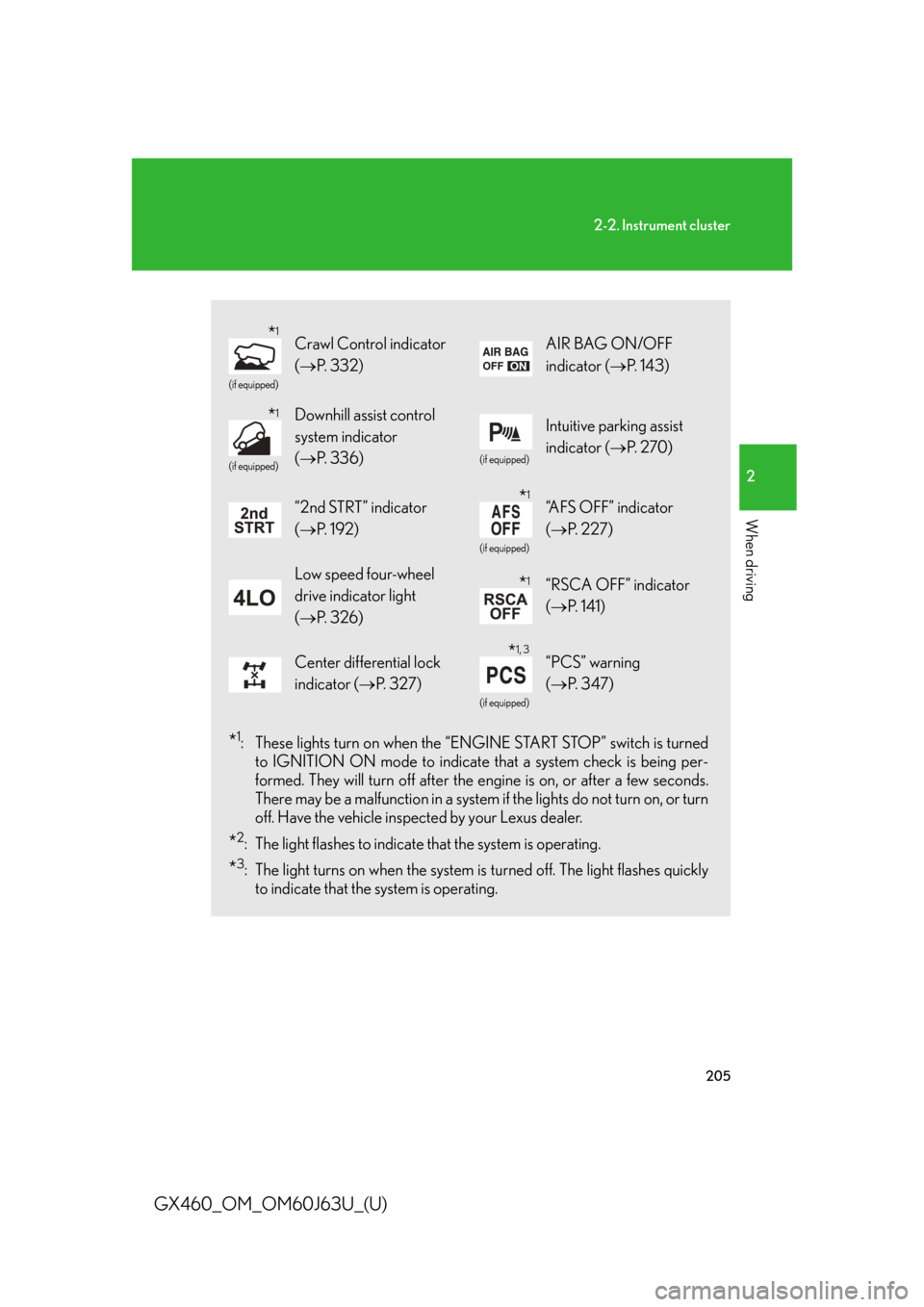
*1: These lights turn on when the “ENGINE START STOP” switch is turnedto IGNITION ON mode to indicate that a system check is being per-
formed. They will turn off after the en gine is on, or after a few seconds.
There may be a malfunction in a system if the lights do not turn on, or turn
off. Have the vehicle inspected by your Lexus dealer.
*2: The light flashes to indicate that the system is operating.
*3: The light turns on when the system is turned off. The light flashes quickly
to indicate that the system is operating.
(if equipped)
Crawl Control indicator
( P. 3 3 2 )AIR BAG ON/OFF
indicator ( P. 1 4 3 )
(if equipped)
Downhill assist control
system indicator
( P. 3 3 6 )
(if equipped)
Intuitive parking assist
indicator ( P. 2 7 0 )
“2nd STRT” indicator
( P. 1 9 2 )
(if equipped)
“AFS OFF” indicator
(P. 2 2 7 )
Low speed four-wheel
drive indicator light
(P. 3 2 6 )“RSCA OFF” indicator
(P. 1 4 1 )
Center differential lock
indicator ( P. 3 2 7 )
(if equipped)
“PCS” warning
( P. 3 4 7 )
*1
*1
*1
*1
*1, 3
Page 206 of 844

206
2-2. Instrument cluster
GX460_OM_OM60J63U_(U)
■Warning lights
Warning lights inform the driver of malfunctions in the indicated
vehicle’s systems. ( P. 693, 705)
*1: These lights turn on when the “ENGINE START STOP” switch is turned
to IGNITION ON mode to indicate that a system check is being per-
formed. They will turn off after the en gine is on, or after a few seconds.
There may be a malfunction in a system if a light does not turn on, or if the
lights do not turn off. Have the vehicle inspected by your Lexus dealer.
*2: The light flashes to indicate a malfunction.
(U.S.A.)(Canada)(U.S.A.)(Canada)
(U.S.A.)(Canada)(for driver)(for front
passenger)(if equipped)
(if equipped)(if equipped)(if equipped)(if equipped)
(if equipped)
*1*1*1*1*1*1
*1*1*1*1*1, 2*1
*1*2*2*2*1, 2*2*2*2
*2