air condition Lexus GX460 2013 Specifications /
[x] Cancel search | Manufacturer: LEXUS, Model Year: 2013, Model line: GX460, Model: Lexus GX460 2013Pages: 844, PDF Size: 10.42 MB
Page 396 of 844
396
GX460_OM_OM60J63U_(U)
3-1. Using the air conditioning system and defogger
Front automatic air conditioning system........... 398
Rear automatic air conditioning system............. 413
Rear window defogger switch ....................................... 417
Windshield wiper de-icer ..................................... 418
3-2. Using the audio system Audio system ............................ 419
Using the radio......................... 421
Using the CD player ............. 429
Playing MP3 and WMA discs............................ 437
Operating an iPod ................. 446
Operating a USB memory .................................. 454
Optimal use of the audio system ..................................... 463
Using the AUX port .............. 465
Using the steering wheel audio switches ...................... 466 3-3. Using the Bluetooth®
audio system
Bluetooth
® audio system .... 470
Using the Bluetooth
®
audio system .......................... 474
Operating a Bluetooth
®
enabled portable
player ...................................... 480
Setting up a Bluetooth
®
enabled portable
player ...................................... 483
Bluetooth
® audio system
setup ....................................... 490
3-4. Using the hands-free system (for cellular phone)
Hands-free system for cellular phones ..................... 491
Using the hands-free system (for cellular phones) ........... 495
Making a phone call.............. 503
Setting a cellular phone ....... 508
Security and system setup ........................................ 513
Using the phone book ............ 517
Interior features3
Page 398 of 844

398
GX460_OM_OM60J63U_(U)
3-1. Using the air conditioning system and defogger
Front automatic air conditioning system
Air outlets and fan speed are automati cally adjusted according to the tem-
perature setting.
Vehicles with a navigation system
Refer to the “Navigation System Owner’s Manual”.
Vehicles without a navigation system
Control panel (vehicles without a rear automatic air conditioning
system)
Automatic mode button
Off button
Cooling and dehumidificatio n function on/off button
Air outlet selector button
Micro dust and pollen filter
mode button
Passenger’s side temperature
control button
Dual mode button
Outside/recirculated air mode button
Windshield defogger button
Driver’s side
temperature control button
Fan speed control button
Page 399 of 844

399
3-1. Using the air conditioning system and defogger
3
Interior features
GX460_OM_OM60J63U_(U)
Control panel (vehicles with a re ar automatic air conditioning sys-
tem)
Automatic mode button
Off button
Cooling and dehumidificatio
n function on/off button
Air outlet selector button
Micro dust and pollen filter mode button
Front passenger’s side temperature control button3 zone mode button
Outside/recirculated air mode button Windshield defogger button
Driver’s side temperature
control button
Fan speed control button
Rear automatic air
conditioning on/off button
Rear passenger’s side
temperature control
button
Page 400 of 844
400
3-1. Using the air conditioning system and defogger
GX460_OM_OM60J63U_(U)
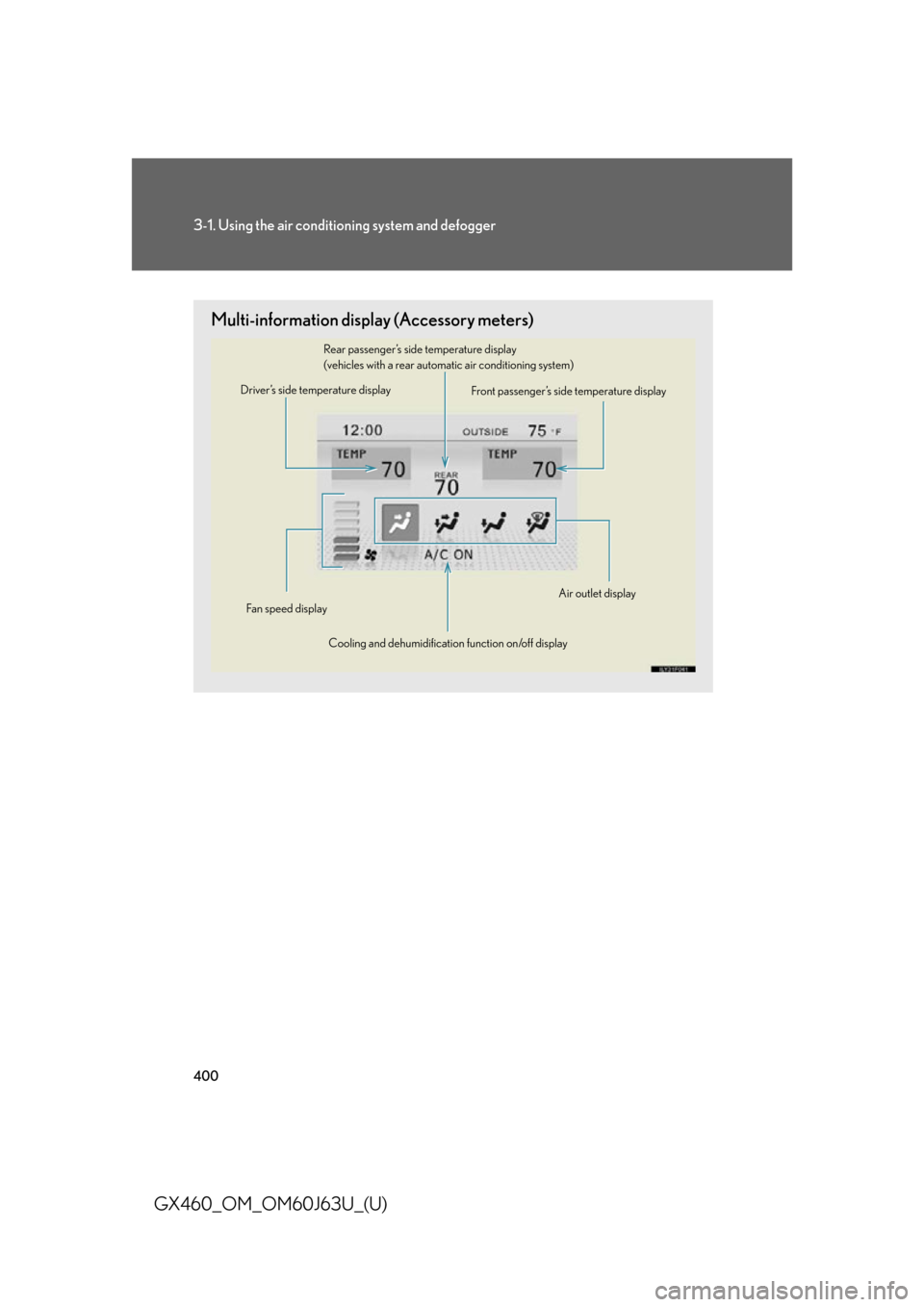
Multi-information display (Accessory meters)
Driver’s side temperature displayFront passenger’s side temperature display
Rear passenger’s side temperature display
(vehicles with a rear automatic air conditioning system)
Cooling and dehumidification function on/off display
Fan speed displayAir outlet display
Page 401 of 844

401
3-1. Using the air conditioning system and defogger
3
Interior features
GX460_OM_OM60J63U_(U)
Using the automatic air conditioning system
Vehicles without a rear automatic air conditioning system Press the “AUTO” button.
The air conditioning system begins to operate. Air outlets and fan
speed are automatically adjusted according to the temperature
setting.
Press “ ” on the temperature control button on the driver’s side
to increase the temperature and “ ” to decrease the tempera-
ture.
When the “DUAL” button is pressed (the indicator on the “DUAL” but-
ton is on) or the passenger’s side temperature control button is pressed,
the temperature for the driver and passenger seats can be adjusted
separately.
Vehicles with a rear automatic air conditioning system
Press the “AUTO” button.
The air conditioning system begins to operate. Air outlets and fan
speed are automatically adjusted according to the temperature
setting.
Press to switch to automatic air intake mode.
The air conditioning system automa tically switches between out-
side air and recirculated air modes.
Press “ ” on the temperature control button on the driver’s side
to increase the temperature and “ ” to decrease the tempera-
ture.
When the “3ZONE” button is pressed (the indicator on the “3ZONE”
button is on), the front passenger’s side temperature control button is
pressed or “REAR/TEMP” button is pressed, the temperature for the
driver’s, front passenger’s and rear seats ( P. 413) can be adjusted
separately.
STEP1
STEP2
STEP1
STEP2
STEP3
Page 402 of 844

402
3-1. Using the air conditioning system and defogger
GX460_OM_OM60J63U_(U)
Adjusting the settings manually
■ Basic setting
Vehicles without a rear automatic air conditioning system To turn on the air conditioning system and adjust the fan speed,
press “ ” on to increase the fan speed and “” to
decrease the fan speed.
Press to turn the fan off.
To adjust the temperature setting, press “ ” on the temperature
control button on the driver’s si de to increase the temperature
and “ ” to decrease the temperature.
The air conditioning system switch es between individual and simulta-
neous modes each time the “DUAL” button is pressed.
When the “DUAL” button is pressed (the indicator on the “DUAL” but-
ton is on) or the passenger’s side temperature control button is pressed,
the temperature for the driver and passenger seats can be adjusted
separately.
To change the air outlets, press “ ” or “ ” on .
The air outlets used are switched each time either side of the button is
pressed. The air flow shown on the display indicates the following:
STEP1
STEP2
STEP3
Page 403 of 844

403
3-1. Using the air conditioning system and defogger
3
Interior features
GX460_OM_OM60J63U_(U)Vehicles with a rear automatic air conditioning system
To turn on the air conditioning system and adjust the fan speed,
press “ ” on to increase the fan speed and “” to
decrease the fan speed.
Press to turn the fan off.
To adjust the temperature setting, press “ ” on the temperature
control button on the driver’s si de to increase the temperature
and “ ” to decrease the temperature.
The air conditioning system switch es between individual and simulta-
neous modes each time the “3ZONE” button is pressed.
When the “3ZONE” button is pressed (the indicator on the “3ZONE”
button is on), the front passenger’s side temperature control button is
pressed or the “REAR/TEMP” button is pressed, the temperature for
the driver’s, front passenger’s and rear seats ( P. 413) can be adjusted
separately.
To change the air outlets, press “ ” or “ ” on .
The air outlets used are switched each time either side of the button is
pressed. The air flow shown on the display indicates the following:
STEP1
STEP2
STEP3
Page 404 of 844

404
3-1. Using the air conditioning system and defogger
GX460_OM_OM60J63U_(U) Air flows to the upper body.
*1: Only the in automatic mode (Air may not always flow.)
*2: Vehicles without a rear automatic air conditioning system
Air flows to the upper body and
feet.
*: Vehicles without a rear automatic air conditioning system
Page 405 of 844
405
3-1. Using the air conditioning system and defogger
3
Interior features
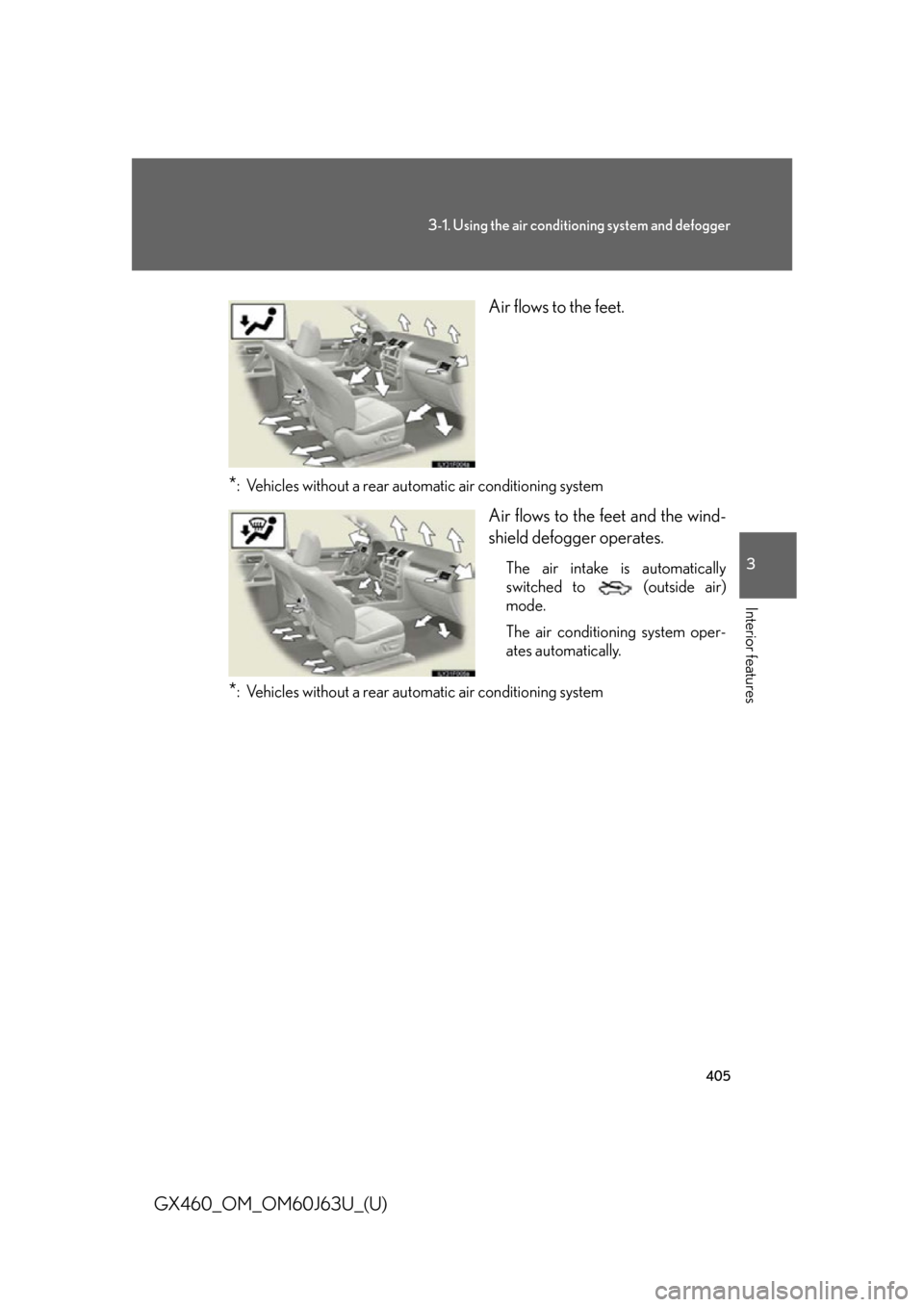
GX460_OM_OM60J63U_(U) Air flows to the feet.
*: Vehicles without a rear automatic air conditioning system
Air flows to the feet and the wind-
shield defogger operates.
The air intake is automatically
switched to (outside air)
mode.
The air conditioning system oper-
ates automatically.
*: Vehicles without a rear automatic air conditioning system
Page 406 of 844

406
3-1. Using the air conditioning system and defogger
GX460_OM_OM60J63U_(U)■
Switching between outside air and recirculated air modes
Vehicles without a rear automatic air conditioning system
Press .
The mode switches between (recirculated air mode) and (out-
side air mode) modes each time the button is pressed.
Vehicles with a rear automatic air conditioning systemPress .
The mode switches among (recirculated air mode), automatic and (outside air mode) modes each time the button is pressed.
When the system is switched to automatic mode, the air conditioning sys-
tem operates automatically.
Changing the rear seat settings (veh icles with a rear automatic air con-
ditioning system)
■ Adjusting the temperature setting
Press “ ” on the “REAR/TEMP” button to increase the temperature
and “ ” to decrease the temperature.
The air conditioning system switch es between individual and simulta-
neous modes each time the “3ZONE” button is pressed.