manual Lexus GX460 2013 Specifications /
[x] Cancel search | Manufacturer: LEXUS, Model Year: 2013, Model line: GX460, Model: Lexus GX460 2013Pages: 844, PDF Size: 10.42 MB
Page 470 of 844
470
GX460_OM_OM60J63U_(U)
3-3. Using the Bluetooth® audio system
Bluetooth® audio system
The Bluetooth® audio system enables you to enjoy music played on a por-
table digital audio player (portable pl ayer) from the vehicle speakers via
wireless communication.
This audio system supports Bluetooth
®, a wireless data system capable of
playing portable audio music without ca bles. If your portable player does
not support Bluetooth
®, the Bluetooth® audio system will not function.
Vehicles with a navigation system
Refer to the “Navigation System Owner’s Manual”.
Vehicles without a navigation system
Ti t l ePa g e
Using the Bluetooth® audio systemP. 4 74
Operating a Bluetooth® enabled portable playerP. 4 8 0
Setting up a Bluetooth® enabled portable playerP. 4 8 3
Bluetooth® audio system setupP. 4 9 0
Page 477 of 844

477
3-3. Using the Bluetooth® audio system
3
Interior features
GX460_OM_OM60J63U_(U)Select “Confirm” using a voice command or the “TUNE/SEL”
knob.
A passkey is displayed and heard, an d a voice guidance instruction for
inputting the passkey into the portable player is heard.
Input the passkey into the portable player.
Refer to the manual that comes with the portable player for the opera-
tion of the portable player.
Guidance for registration completion is heard.
If the portable pl ayer has a Bluetooth
® phone, the phone can be regis-
tered at the same time. A voice guidance instruction to register a
Bluetooth
®phone is heard.
Select “Yes” or “No” using a voice command or the “TUNE/SEL”
knob. (Bluetooth
® phone P. 493)
STEP5
STEP6
STEP7
Page 491 of 844

491
3
Interior features
GX460_OM_OM60J63U_(U)
3-4. Using the hands-free system (for cellular phone)
Hands-free system for cellular phones
The hands-free system is a function that allows you to use your cellular
phone without touching it.
This system supports Bluetooth
® cellular phones. Bluetooth® is a wireless
data system that allows the cellular phone to wirelessly connect to the
hands-free system and make/receive calls.
Vehicles with a navigation system
Refer to the “Navigation System Owner’s Manual”.
Vehicles without a navigation system
Ti t l ePa g e
Using the hands-free systemP. 4 9 5
Making a phone callP. 5 0 3
Setting a cellular phoneP. 5 0 8
Security and system setupP. 5 1 3
Using the phone bookP. 5 1 7
Page 498 of 844

498
3-4. Using the hands-free system (for cellular phone)
GX460_OM_OM60J63U_(U)Select “Pair Phone” using a voice command or the “TUNE/SEL”
knob.
Register a phone name by either of the following methods:
a. Select “Record Name” using the “TUNE/SEL” knob, and say
the name to be registered.
b. Press the talk switch and say the name to be registered.
A voice guidance instruction to confirm the input is heard.
Select “Confirm” using a voic e command or the “TUNE/SEL”
knob.
A passkey is displayed and heard, an d a voice guidance instruction for
inputting the passkey into the cellular phone is heard.
Input the passkey into the cellular phone.
Refer to the manual that comes with the cellular phone for the opera-
tion of the phone.
Guidance for registration completion is heard.
If the cellular phone has a Bluetooth
® audio player, the audio player can
be registered at the same time. A vo ice guidance instruction to register a
Bluetooth
® audio player is heard.
Select “Yes” or “No” using a voice command or the “TUNE/SEL”
knob. (Bluetooth
® audio player P. 4 7 1 )
STEP2
STEP3
STEP4
STEP5
STEP6
Page 505 of 844

505
3-4. Using the hands-free system (for cellular phone)
3
Interior features
GX460_OM_OM60J63U_(U)
Speed dialingPress the off-hook switch.
Press the preset button in which the desired number is registered.
Press the off-hook switch.
When receiving a phone call■ Answering the phone
Press the off-hook switch.
■ Refusing the call
Press the on-hook switch.
Transferring a call
A call can be transferred between the cellular phone and system while
dialing, receiving a call, or during a call. Use one of the following meth-
ods:
a. Operate the cellular phone.
Refer to the manual that comes with the cellular phone for the opera-
tion of the phone.
b. Press the off-hook switch*1.
c. Press the talk switch and say “Call Transfer”
*2.
*1: This operation can be performed only when transferring a call
from the cellular phone to the system during a call.
*2: While the vehicle is in motion, calls cannot be transferred from
the system to the cellular phone.
STEP1
STEP2
STEP3
Page 519 of 844

519
3-4. Using the hands-free system (for cellular phone)
3
Interior features
GX460_OM_OM60J63U_(U)Transferring data from the cellular phone:
STEP2-1 Select “By Phone” and then “Confirm” using a voice
command or the “TUNE/SEL” knob.
STEP2-2 Transfer the data from the cellular phone.
Refer to the manual that comes with the cellular phone for
the details of transferring data.
STEP2-3 Select the data to be registered by either of the follow- ing methods:
a. Say “Previous” or “Next” until the desired data is dis-played, and select “Co nfirm” using a voice com-
mand.
b. Select the desired data using the “TUNE/SEL” knob.
Inputting a phone number using the “TUNE/SEL” knob: STEP2-1 Select “Manual Input” using the “TUNE/SEL” knob.
STEP2-2 Input a phone number using the “TUNE/SEL” knob, and press the “TUNE/SEL” knob again.
Input the phone number 1 digit at a time.
Page 542 of 844
542
3-7. Other interior features
GX460_OM_OM60J63U_(U)
■Items unsuitable for the cool box
●Drinks in unsealed containers
●Fragile items, perishables or anything with strong odor
●Owner’s manual, electronic devices, CDs, etc.
■When the indicator light flashes
The cool box is not operated when an y of the following conditions occurs.
●When the air conditioning system is off
Turn the air conditioning system on also turns on the cool box.
●When outside air temperature is about 32 F (0 C) or below.
●When the “A/C ON” in the multi-information display (accessory meter)
( P. 398) also flashes
Press the “A/C” button to turn off the cooling and dehumidification function and
turn it on again.
If the indicator light continues to flash, there may be a malfunction in the system.
Turn the air conditioning system off and have it inspected by your Lexus dealer.
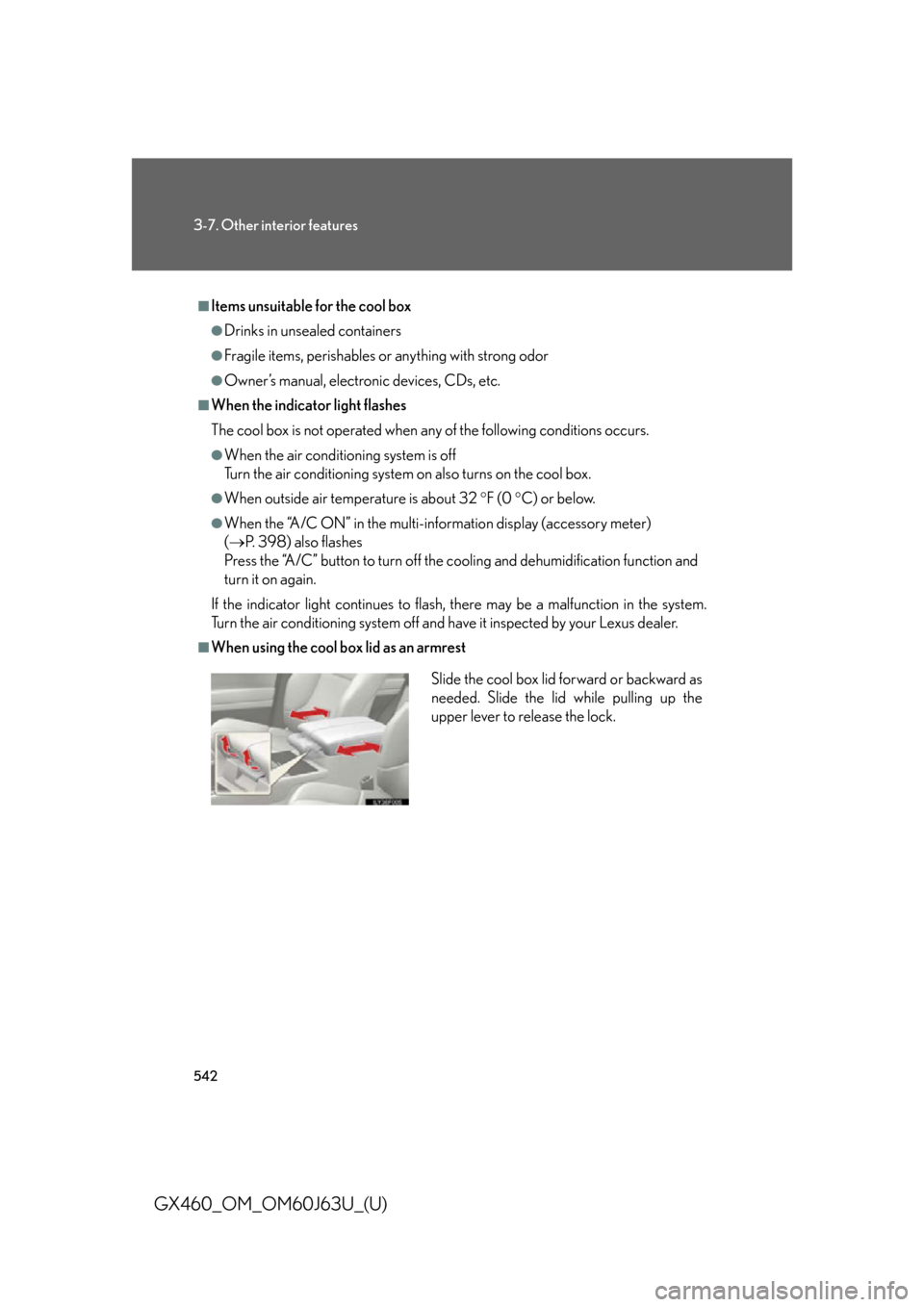
■When using the cool box lid as an armrest
Slide the cool box lid forward or backward as
needed. Slide the lid while pulling up the
upper lever to release the lock.
Page 546 of 844

546
3-7. Other interior features
GX460_OM_OM60J63U_(U)
Clock
■The clock is displayed when
The “ENGINE START STOP” switch is in IGNITION ON mode.
■When disconnecting and reconnecting battery terminals
The clock data will be reset.
Vehicles with a navigation system
Refer to the “Navigation System Owner’s Manual”.
Vehicles without a navigation systemAdjusts the hours
Adjusts the minutes
Page 552 of 844
552
3-7. Other interior features
GX460_OM_OM60J63U_(U)
CAUTION
■Using a power outlet
Observe the following precautions to reduce the risk of injury.
●Use of the power outlet when it is wet with water or snow may result in electrical
shocks and is extremely dangerous. The power outlet must be thoroughly dried
before use.
●Do not allow children to use or play with the power outlet.
●Be careful not to get any part of your body caught in the power outlet lid.
●When using electrical appliances, strictly follow any cautions and notices written
on their labels and in the manufacturers’ instruction manuals.
●Do not modify, disassemble or repair the power outlet or its inverter in any way.
Doing so may result in unexpected malfun ctions or accidents, which could cause
serious damage or injuries. Contact your Lexus dealer for any necessary repairs.
■To prevent injuries and accidents, secure all electric appliances before use and
do not use any appliances that may do any of the following:
●Distract the driver while driving, or hamper safe driving.
●Result in a fire or burn injuries due to the appliance rolling, falling or overheating
while driving.
●Emit steam while the windows of the cabin are closed.
Page 577 of 844
577
3-7. Other interior features
3
Interior features
GX460_OM_OM60J63U_(U)■
Programming a rolling code system (for U.S. owners)
If your device is rolling code eq uipped, follow the steps under the
heading “Programming HomeLink
®” before proceeding with the
steps listed below.
Locate the learn button on th e ceiling mounted garage door
opener motor. The exact location and color of the button may
vary by brand of garage door opener.
Refer to the operation manual supplied with the garage door opener
for the location of the learn button.
Press the learn button.
Following this step, you have 30 se conds in which to initiate step 3
below.
Press and release the vehicle’s programmed HomeLink® button
for 2 seconds and release it. Repeat this step once again. The
garage door may open.
If the garage door opens, the programming process is complete. If the
door does not open, press and release the button a third time. This third
press and release will complete the programming process by opening
the garage door.
The ceiling mounted garage door op ener motor should now recognize
the HomeLink
® signal and operate the garage door.
Repeat the steps above to prog ram another rolling code system
for any of the remaining HomeLink® buttons.
STEP1
STEP2
STEP3
STEP4