door lock Lexus GX460 2013 Specifications /
[x] Cancel search | Manufacturer: LEXUS, Model Year: 2013, Model line: GX460, Model: Lexus GX460 2013Pages: 844, PDF Size: 10.42 MB
Page 123 of 844

123
1-6. Theft deterrent system
1
Before driving
GX460_OM_OM60J63U_(U)
■Tr i g g e r i n g o f t h e a l a r m
The alarm may be triggered in the following situations:
(Stopping the alarm deactivates the alarm system.)
■Alarm-operated door lock
●When the alarm is operating, the door s are locked automatically to prevent
intruders.
●Do not leave the key inside the vehicle when the alarm is operating, and make
sure the key is not inside the vehicle when recharging or replacing the battery.
■Alarm memory function
After the alarm is activated, when you unlock any door using a entry function, wire-
less remote control or mechanical key, the tail lights turn on for about 2 seconds to
inform you that the system was activated.
NOTICE
■To ensure the system operates correctly
Do not modify or remove the system. If mo dified or removed, the proper operation
of the system cannot be guaranteed.
●A person inside the vehicle opens a door
or hood.
●The battery is recharged or replaced
when the vehicle is locked.
Page 172 of 844

172
GX460_OM_OM60J63U_(U)
2-1. Driving procedures
Driving the vehicle
The following procedures should be observed to ensure safe driving:
■Starting the engine
P. 1 8 3
■ Driving
With the brake pedal depressed, shift the shift lever to D.
(P. 190)
Release the parking brake. ( P. 1 9 7 )
Gradually release the brake pedal and gently depress the
accelerator pedal to accelerate the vehicle.
■ Stopping
With the shift lever in D, depress the brake pedal.
If necessary, set the parking brake.
If the vehicle is to be stopped for an extended period of time, shift the
shift lever to P or N. ( P. 1 9 0 )
■Parking the vehicle
With the shift lever in D, depress the brake pedal.
Set the parking brake. ( P. 1 9 7 )
Shift the shift lever to P. ( P. 190)
If parking on a hill, block the wheels as needed.
Press the “ENGINE START STOP” switch to stop the engine.
Lock the door, making sure that you have the key on your per-
son.
STEP1
STEP2
STEP3
STEP1
STEP2
STEP1
STEP2
STEP3
STEP4
STEP5
Page 179 of 844

179
2-1. Driving procedures
2
When driving
GX460_OM_OM60J63U_(U)
CAUTION
■When the vehicle is parked
●Do not leave glasses, cigarette lighters, spray cans, or soft drink cans in the vehi-
cle when it is in the sun.
Doing so may result in the following:
• Gas may leak from a cigarette lighter or spray can, and may lead to a fire.
• The temperature inside the vehicle may cause the plastic lenses and plastic material of eye glasses to deform or crack.
• Soft drink cans may fracture, causing the contents to spray over the interior of the vehicle, and may also cause a short circuit in the vehicle’s electrical com-
ponents.
●Do not leave cigarette lighters in the vehicle. If a cigarette lighter is in a place such
as the glove box or on the floor, it may be lit accidentally when luggage is loaded
or the seat is adjusted, causing a fire.
●Do not attach adhesive discs to the wind shield or windows. Do not place contain-
ers such as air fresheners on the instru ment panel or dashboard. Adhesive discs
or containers may act as lenses, causing a fire in the vehicle.
●Do not leave a door or window open if the curved glass is coated with a metal-
lized film such as a silver-colored one. Reflected sunlight may cause the glass to
act as a lens, causing a fire.
●Always apply the parking brake, shift the shift lever to P, stop the engine and lock
the vehicle.
Do not leave the vehicle unattend ed while the engine is running.
●Do not touch the exhaust pipes while the engine is running or immediately after
turning the engine off.
Doing so may cause burns.
●Do not leave the engine running in an area with snow build-up, or where it is
snowing. If snowbanks build up around the vehicle while the engine is running,
exhaust gases may collect and enter the vehi cle. This may lead to death or a seri-
ous health hazard.
Page 187 of 844

187
2-1. Driving procedures
2
When driving
GX460_OM_OM60J63U_(U)
■Electronic key battery depletion
P. 4 6
■Conditions affecting operation
P. 4 1
■Notes for the entry function
P. 4 3
■If the engine does not start
The engine immobilizer system may not have been deactivated. ( P. 1 1 9 )
■Steering lock
After turning the “ENGINE START STOP” switch off and opening and closing the
doors, the steering wheel will be locked due to the steering lock function. Operat-
ing the “ENGINE START STOP” switch again automatically cancels the steering
lock.
■When the steering lock cannot be released
The green indicator light on the “ENGINE
START STOP” switch will flash and a mes-
sage will be shown on the multi-information
display. Press the “ENGINE START STOP”
switch again while turning the steering wheel
left and right.
Page 188 of 844

188
2-1. Driving procedures
GX460_OM_OM60J63U_(U)
■Steering lock motor overheating prevention
To prevent the steering lock motor from overheating, the motor may be suspended
if the engine is turned on and off repeatedly in a short period of time. In this case,
refrain from operating the engine. After about 10 seconds, the steering lock motor
will resume functioning.
■When the “ENGINE START STOP” switch indicator flashes in amber
The system may be malfunctioning. Have the vehicle inspected by your Lexus
dealer immediately.
■If the electronic key battery is depleted
P. 6 5 2
CAUTION
■When starting the engine
Always start the engine while sitting in th e driver’s seat. Do not depress the acceler-
ator pedal while starting the engine under any circumstances.
Doing so may cause an accident resu lting in death or serious injury.
■Caution while driving
If the vehicle begins to slide due to engine failure or other circumstances, do not
lock or open the doors until the vehicle reaches a safe and complete stop. Activa-
tion of the steering lock in this circumstance may lead to an accident, resulting in
death or serious injury.
■Stopping the engine in an emergency
If you want to stop the engine in an em ergency while driving the vehicle, press and
hold the “ENGINE START STOP” switch fo r more than 2 seconds, or press it
briefly 3 times or more in succession. However, do not touch the “ENGINE START
STOP” switch while driving except in an emergency. Turning the engine off while
driving will not cause loss of steering or braking control, but the power assist to
these systems will be lost. This will make it more difficult to steer and brake, so you
should pull over and stop the vehicle as soon as it is safe to do so.
Page 228 of 844

228
2-3. Operating the lights and windshield wipers
GX460_OM_OM60J63U_(U)
■Daytime running light system
●To make your vehicle more visible to other drivers, the headlights turn on auto-
matically (at a reduced intensity) whenever the engine is started and the parking
brake is released. Daytime running lights are not designed for use at night.
For the U.S.A.: Daytime running lights can be turned off by operating the switch.
●Compared to the headlights, the daytime running light system offers greater
durability and consumes less electricity, so it can help fuel economy.
■Headlight control sensor
■Automatic light off system
●When only the tail lights come on: The parking/front side marker, tail, license
plate and fog lights turn off if the “ENGINE START STOP” switch is turned to
ACCESSORY mode or turned off an d the driver’s door is opened.
●When the headlights come on: The headlights, parking/front side marker, tail,
license plate and fog lights turn off 30 seconds after a door or the glass hatch is
opened and closed. (The lights turn off immediately if on the key is
pressed after all the doors are locked.)
To turn the lights on again, turn the “ENGINE START STOP” switch to IGNITION
ON mode, or turn the light switch off once and then back to
or .
The sensor may not function properly if an
object is placed on the sensor, or anything
that blocks the sensor is affixed to the wind-
shield.
Doing so interferes with the sensor detecting
the level of ambient light and may cause the
automatic headlight system to malfunction.
Page 397 of 844

Interior features3
397
GX460_OM_OM60J63U_(U)
3-5. Using the interior lightsInterior lights list ..................... 525
• Personal/interior light main switch ............................... 526
• Personal/interior lights ........ 527
3-6. Using the storage features List of storage features ......... 529
• Glove box .................................. 531
• Console box ............................. 532
• Coin holder............................... 534
• Bottle holders/door pockets ...................................... 535
• Cup holders.............................. 536
• Auxiliary boxes....................... 539 3-7. Other interior features
Cool box .................................... 541
Sun visors ................................. 544
Vanity mirror ........................... 545
Clock ......................................... 546
Conversation mirror............. 547
Power outlet (12 V DC)........ 548
Power outlet (120 V AC) ..... 550
Heated steering wheel ........ 555
Seat heaters and ventilators ............................. 557
Armrest .................................... 560
Coat hooks ................................ 561
Assist grips ............................... 562
Floor mat .................................. 563
Luggage compartment features .................................. 565
Garage door opener ............. 574
Compass .................................. 582
Safety Connect ...................... 587
Page 528 of 844

528
3-5. Using the interior lights
GX460_OM_OM60J63U_(U)
■Illuminated entry system
The lights automatically turn on/off according to “ENGINE START STOP” switch
mode, the presence of the electronic key, whether the doors are locked/unlocked,
and whether the doors are open/closed.
■To prevent battery discharge
If the following lights remain on when the door is not fully closed and the personal/
interior light main switch is in the door position, the lights will go off automatically
after 20 minutes:
●Personal/interior light
●Inside door handle lights
●Footwell lights
●Running board lights
■Customization
Settings (e.g. adjust the time elapsed befo re the interior lights automatically turn
off) can be changed. (Customizable features P. 7 8 8 )
Page 574 of 844
574
3-7. Other interior features
GX460_OM_OM60J63U_(U)
Garage door opener
The garage door opener (HomeLink® Universal Transceiver) is manufactured
under license from HomeLink®.
Programming HomeLink® (for U.S. owners)
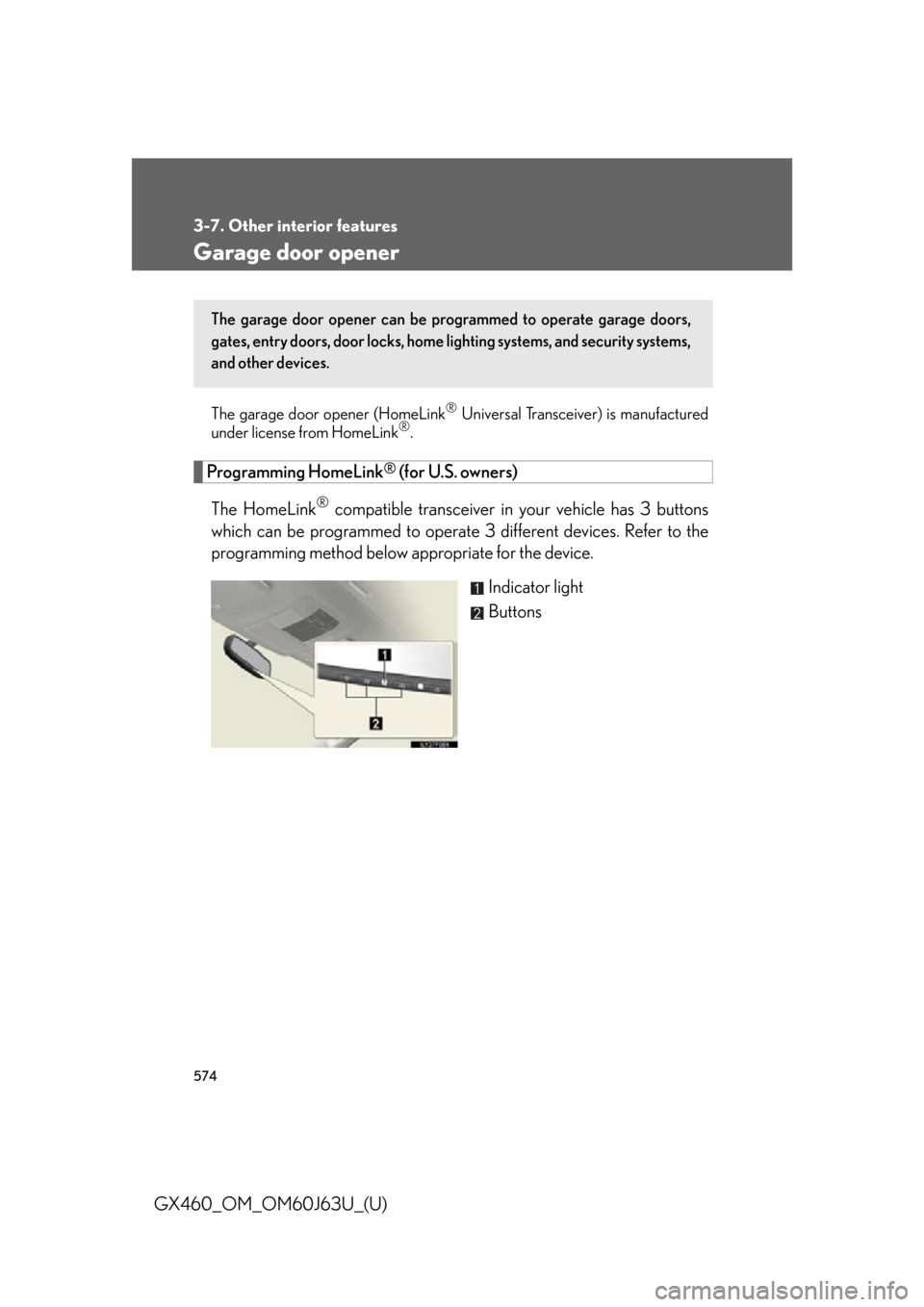
The HomeLink
® compatible transceiver in your vehicle has 3 buttons
which can be programmed to operate 3 different devices. Refer to the
programming method below appropriate for the device.
Indicator light
Buttons
The garage door opener can be programmed to operate garage doors,
gates, entry doors, door locks, home lighting systems, and security systems,
and other devices.
Page 578 of 844

578
3-7. Other interior features
GX460_OM_OM60J63U_(U)■
Programming an entry gate (for U.S. owners)/Programming a
device in the Canadian market
Place the remote control transmitter 1 in. (25 mm) away from the
HomeLink
® buttons.
Keep the HomeLink® indicator light in view while programming.
Press and hold the selected HomeLink® button.
Repeatedly press and release (cycle) the remote control trans-
mitter for 2 seconds each until step 4 is completed.
When the HomeLink
® indicator light star ts to flash rapidly,
release the buttons.
Test the HomeLink
® operation by pressing the newly pro-
grammed button. Check to see if the gate/device operates cor-
rectly.
Repeat the steps above to program another device for each of
the remaining HomeLink
® buttons.
■ Programming other devices
To program other devices such as home security systems, home door
locks or lighting, contact your Lexus dealer for assistance.
■ Reprogramming a button
The individual HomeLink
® buttons cannot be erased but can be
reprogrammed. To reprogram a button, follow the “Reprogramming a
HomeLink
® button” instructions.
STEP1
STEP2
STEP3
STEP4
STEP5
STEP6