display Lexus GX460 2014 Navigation Manual
[x] Cancel search | Manufacturer: LEXUS, Model Year: 2014, Model line: GX460, Model: Lexus GX460 2014Pages: 395, PDF Size: 18.34 MB
Page 120 of 395
119
3. ROUTE GUIDANCE
GX_EMVN_OM60K84U_(U)13.07.02 11:50
3
NAVIGATION SYSTEM
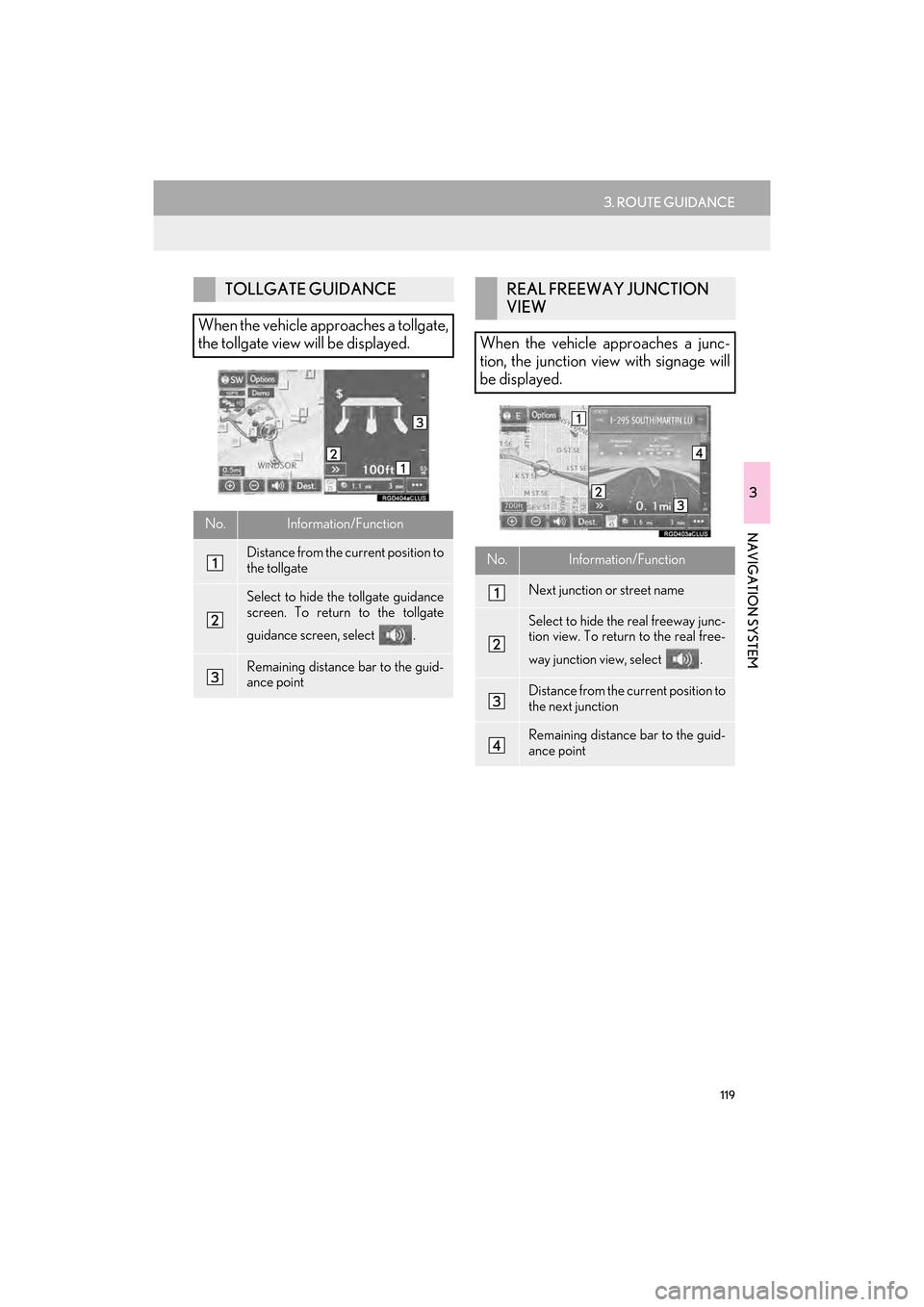
TOLLGATE GUIDANCE
When the vehicle approaches a tollgate,
the tollgate view will be displayed.
No.Information/Function
Distance from the current position to
the tollgate
Select to hide the tollgate guidance
screen. To return to the tollgate
guidance screen, select .
Remaining distance bar to the guid-
ance point
REAL FREEWAY JUNCTION
VIEW
When the vehicle approaches a junc-
tion, the junction view with signage will
be displayed.
No.Information/Function
Next junction or street name
Select to hide th e real freeway junc-
tion view. To return to the real free-
way junction view, select .
Distance from the current position to
the next junction
Remaining distance bar to the guid-
ance point
GX_EMVN_OM60K84U_(U).book Page 119 Tuesday, July 2, 2013 11:51 AM
Page 121 of 395
120
3. ROUTE GUIDANCE
GX_EMVN_OM60K84U_(U)13.07.02 11:50
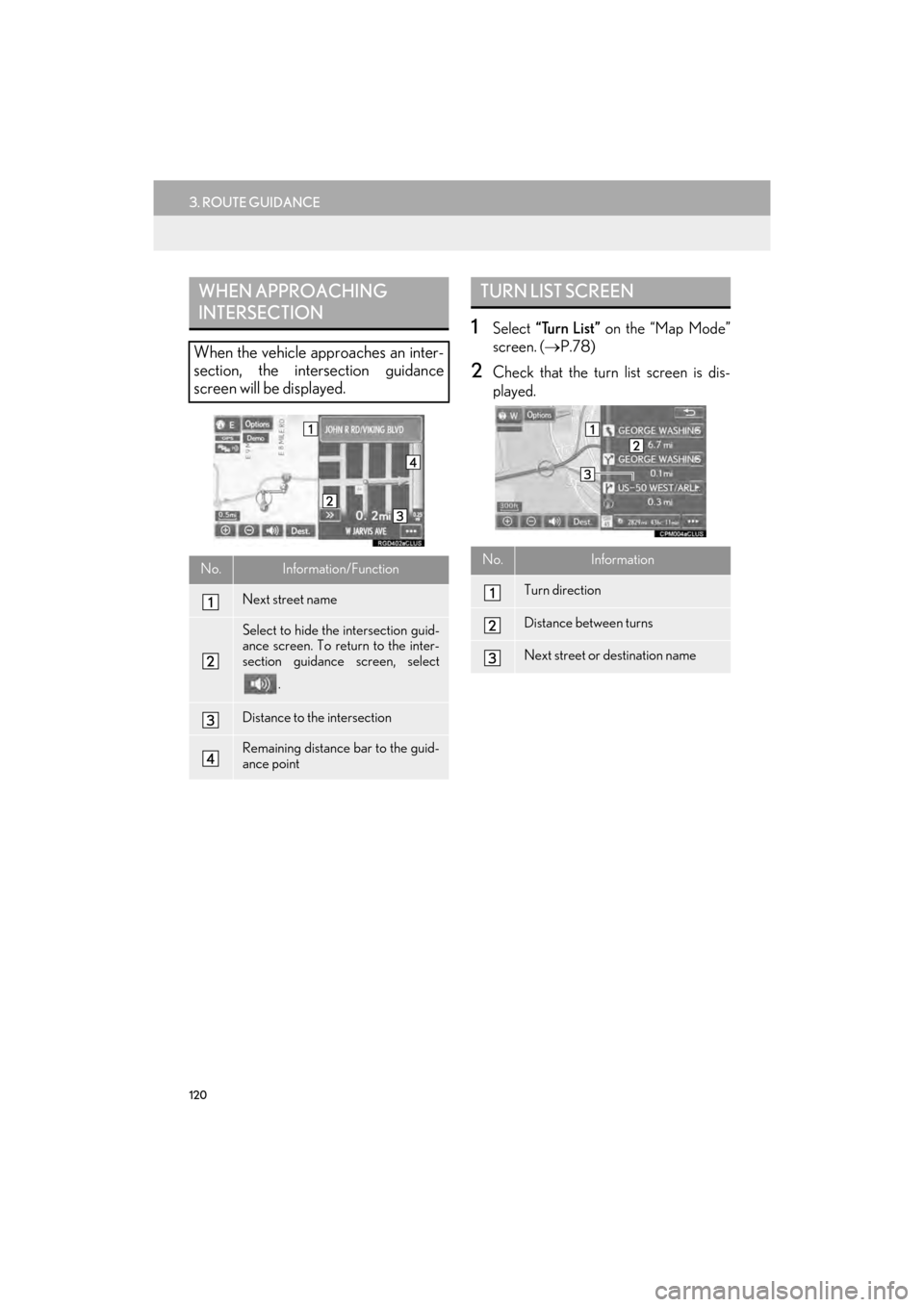
1Select “Turn List” on the “Map Mode”
screen. ( →P.78)
2Check that the turn list screen is dis-
played.
WHEN APPROACHING
INTERSECTION
When the vehicle approaches an inter-
section, the intersection guidance
screen will be displayed.
No.Information/Function
Next street name
Select to hide the intersection guid-
ance screen. To return to the inter-
section guidance screen, select
.
Distance to the intersection
Remaining distance bar to the guid-
ance point
TURN LIST SCREEN
No.Information
Turn direction
Distance between turns
Next street or destination name
GX_EMVN_OM60K84U_(U).book Page 120 Tuesday, July 2, 2013 11:51 AM
Page 122 of 395
121
3. ROUTE GUIDANCE
GX_EMVN_OM60K84U_(U)13.07.02 11:50
3
NAVIGATION SYSTEM
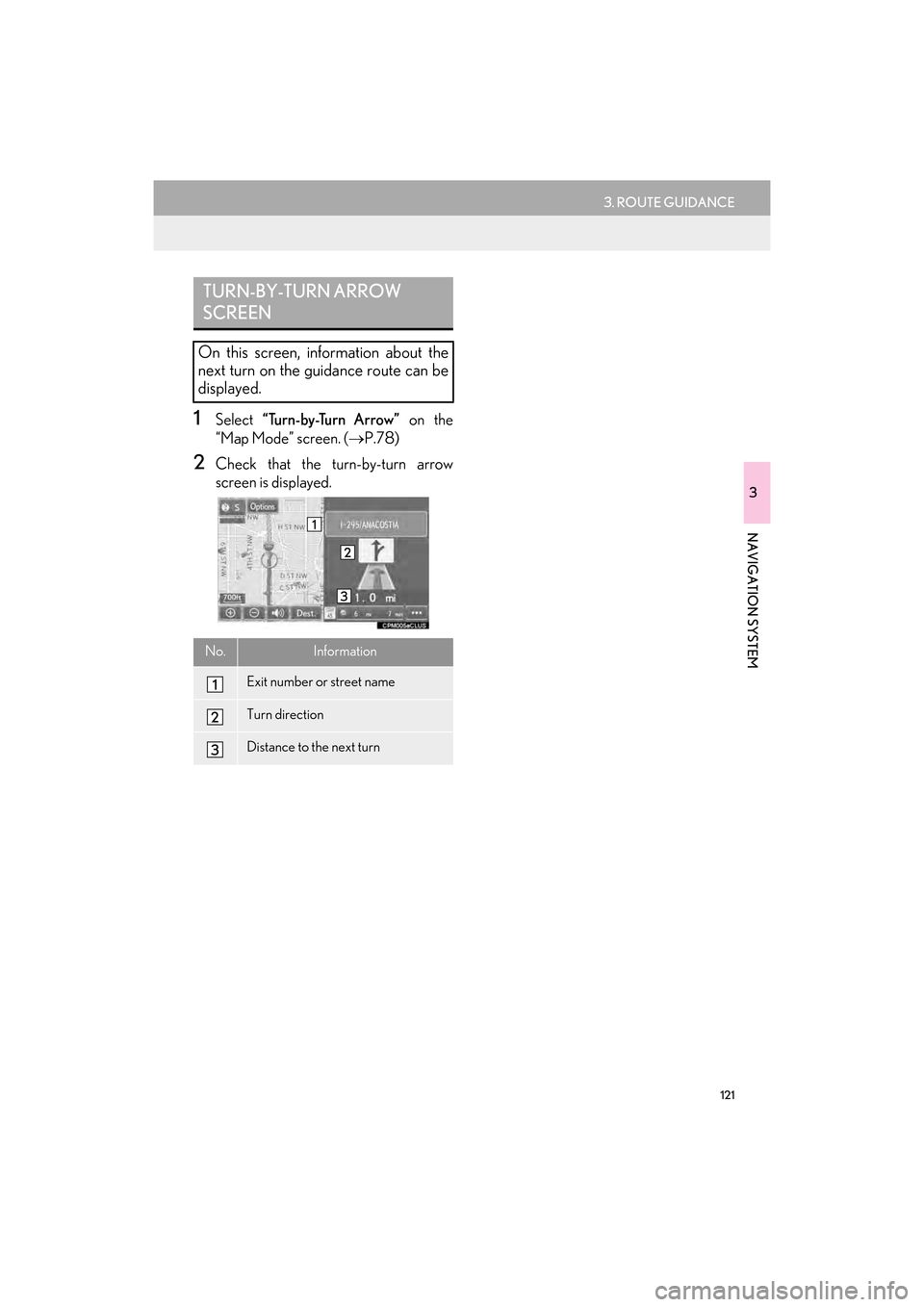
1Select “Turn-by-Turn Arrow” on the
“Map Mode” screen. ( →P.78)
2Check that the turn-by-turn arrow
screen is displayed.
TURN-BY-TURN ARROW
SCREEN
On this screen, information about the
next turn on the guidance route can be
displayed.
No.Information
Exit number or street name
Turn direction
Distance to the next turn
GX_EMVN_OM60K84U_(U).book Page 121 Tuesday, July 2, 2013 11:51 AM
Page 125 of 395
124
3. ROUTE GUIDANCE
GX_EMVN_OM60K84U_(U)13.07.02 11:50
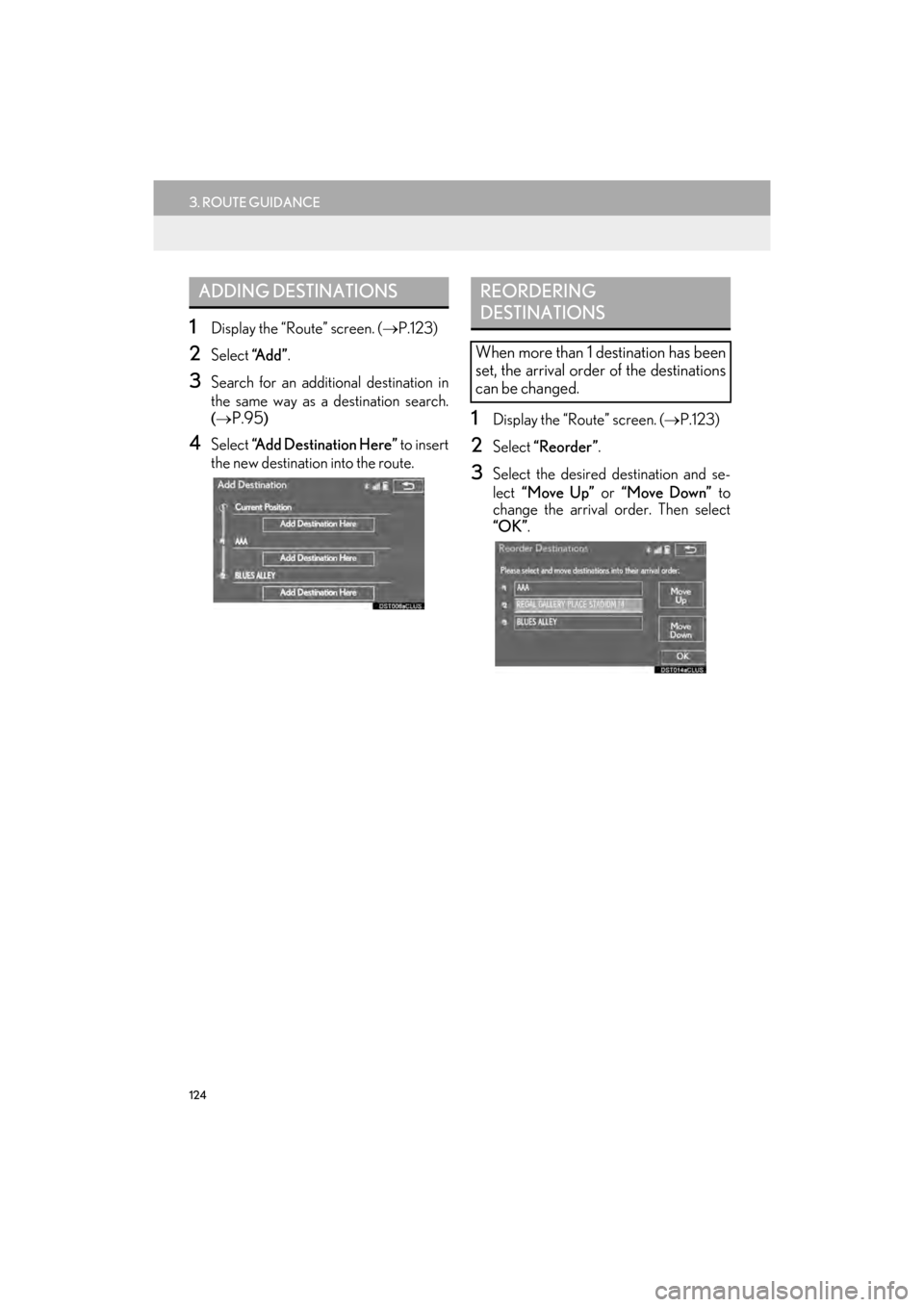
1Display the “Route” screen. (→P.123)
2Select “A d d ”.
3Search for an additional destination in
the same way as a destination search.
(→
P.95)
4Select “Add Destination Here” to insert
the new destination into the route.
1Display the “Route” screen. ( →P.123)
2Select “Reorder” .
3Select the desired destination and se-
lect “Move Up” or “Move Down” to
change the arrival order. Then select
“OK” .
ADDING DESTINATIONSREORDERING
DESTINATIONS
When more than 1 destination has been
set, the arrival order of the destinations
can be changed.
GX_EMVN_OM60K84U_(U).book Page 124 Tuesday, July 2, 2013 11:51 AM
Page 126 of 395
125
3. ROUTE GUIDANCE
GX_EMVN_OM60K84U_(U)13.07.02 11:50
3
NAVIGATION SYSTEM
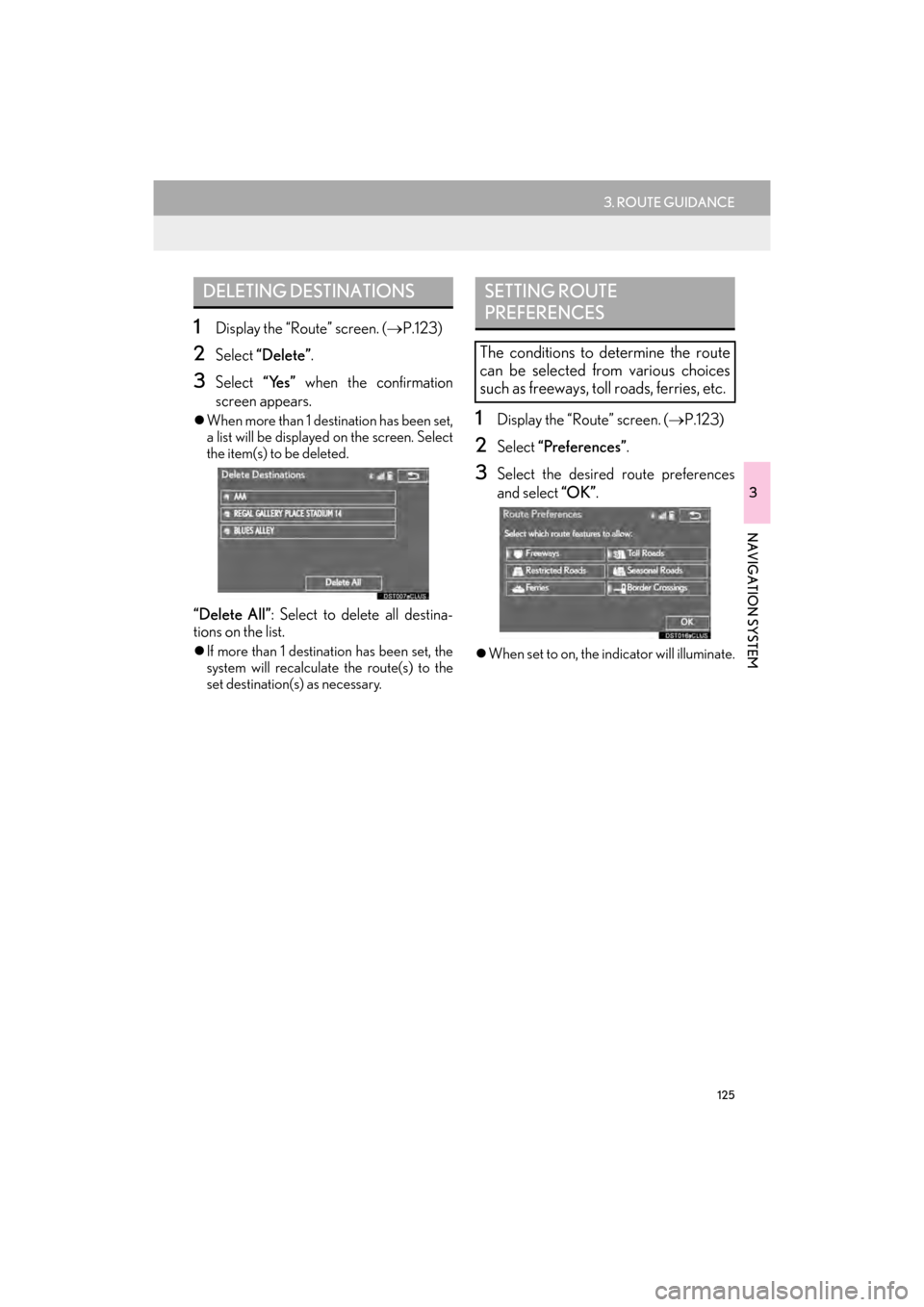
1Display the “Route” screen. (→P.123)
2Select “Delete” .
3Select “Yes” when the confirmation
screen appears.
z When more than 1 destination has been set,
a list will be displayed on the screen. Select
the item(s) to be deleted.
“Delete All” : Select to delete all destina-
tions on the list.
z If more than 1 destinat ion has been set, the
system will recalculate the route(s) to the
set destination(s) as necessary.
1Display the “Route” screen. ( →P.123)
2Select “Preferences”.
3Select the desired route preferences
and select “OK”.
zWhen set to on, the indicator will illuminate.
DELETING DESTINATIONSSETTING ROUTE
PREFERENCES
The conditions to determine the route
can be selected from various choices
such as freeways, toll roads, ferries, etc.
GX_EMVN_OM60K84U_(U).book Page 125 Tuesday, July 2, 2013 11:51 AM
Page 127 of 395
126
3. ROUTE GUIDANCE
GX_EMVN_OM60K84U_(U)13.07.02 11:50
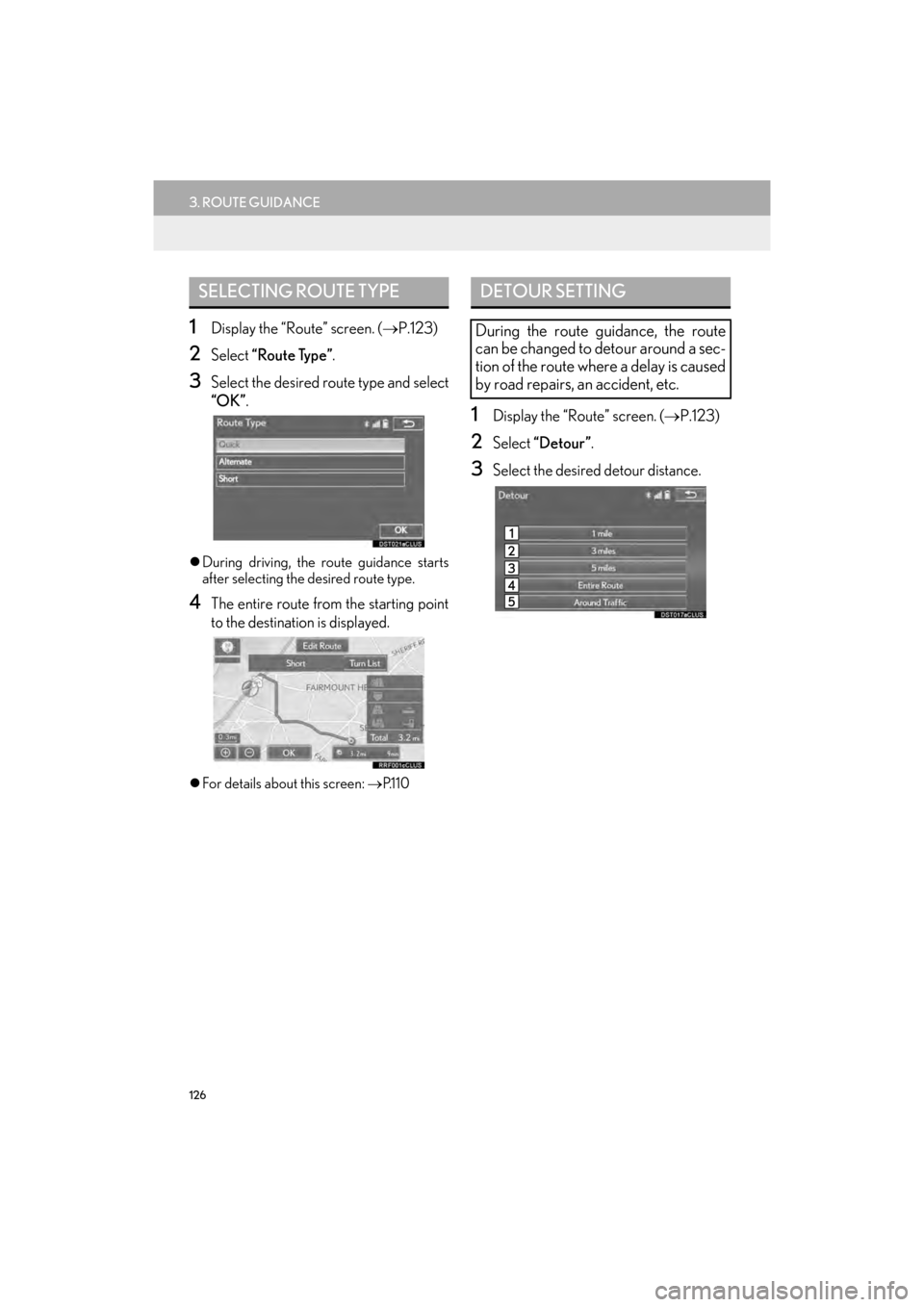
1Display the “Route” screen. (→P.123)
2Select “Route Type” .
3Select the desired route type and select
“OK”.
zDuring driving, the route guidance starts
after selecting the desired route type.
4The entire route from the starting point
to the destination is displayed.
zFor details about this screen: → P.1 1 0
1Display the “Route” screen. (→P.123)
2Select “Detour” .
3Select the desired detour distance.
SELECTING ROUTE TYPEDETOUR SETTING
During the route guidance, the route
can be changed to detour around a sec-
tion of the route where a delay is caused
by road repairs, an accident, etc.
GX_EMVN_OM60K84U_(U).book Page 126 Tuesday, July 2, 2013 11:51 AM
Page 129 of 395
128
3. ROUTE GUIDANCE
GX_EMVN_OM60K84U_(U)13.07.02 11:50
1Display the “Route” screen. (→P.123)
2Select “Start from Adjacent Road” .
STARTING FROM ADJACENT
ROAD
When a freeway and a surface road run
in parallel, the system may show the
guidance route going on the freeway
while driving on the surface road, or vice
versa.
If this happens, you can instantly choose
the adjacent road for the route guid-
ance.
INFORMATION
●
When there is no adjacent road, this
screen button will not be displayed.
GX_EMVN_OM60K84U_(U).book Page 128 Tuesday, July 2, 2013 11:51 AM
Page 131 of 395
130
4. MEMORY POINTS
GX_EMVN_OM60K84U_(U)13.07.02 11:50
1Display the “Navigation Settings”
screen. (→P.129)
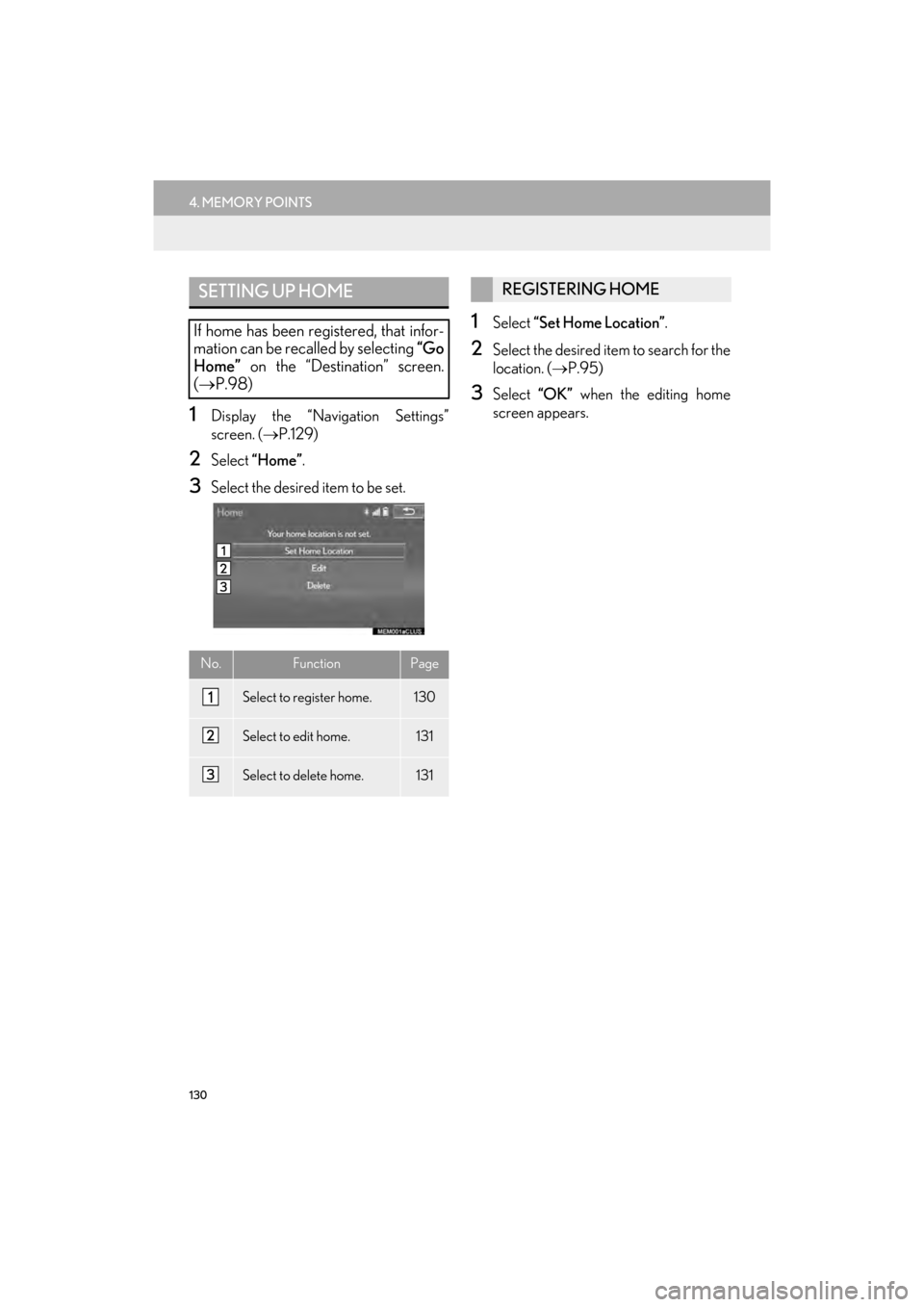
2Select “Home” .
3Select the desired item to be set.
1Select “Set Home Location”.
2Select the desired item to search for the
location. ( →P.95)
3Select “OK” when the editing home
screen appears.
SETTING UP HOME
If home has been re gistered, that infor-
mation can be recalled by selecting “Go
Home” on the “Destination” screen.
(→ P.98)
No.FunctionPage
Select to register home.130
Select to edit home.131
Select to delete home.131
REGISTERING HOME
GX_EMVN_OM60K84U_(U).book Page 130 Tuesday, July 2, 2013 11:51 AM
Page 132 of 395

131
4. MEMORY POINTS
GX_EMVN_OM60K84U_(U)13.07.02 11:50
3
NAVIGATION SYSTEM
1Select “Edit”.
2Select the desired item to be edited.
3Select “OK”.
1Select “Delete”.
2Select “Yes” when the confirmation
screen appears.
EDITING HOME
No.FunctionPage
Select to edit the home
name.136
Select to set display of the
home name on/off.
Select to edit location infor-
mation.136
Select to edit the phone
number.136
Select to change the icon to
be displayed on the map
screen.135
DELETING HOME
GX_EMVN_OM60K84U_(U).book Page 131 Tuesday, July 2, 2013 11:51 AM
Page 133 of 395
132
4. MEMORY POINTS
GX_EMVN_OM60K84U_(U)13.07.02 11:50
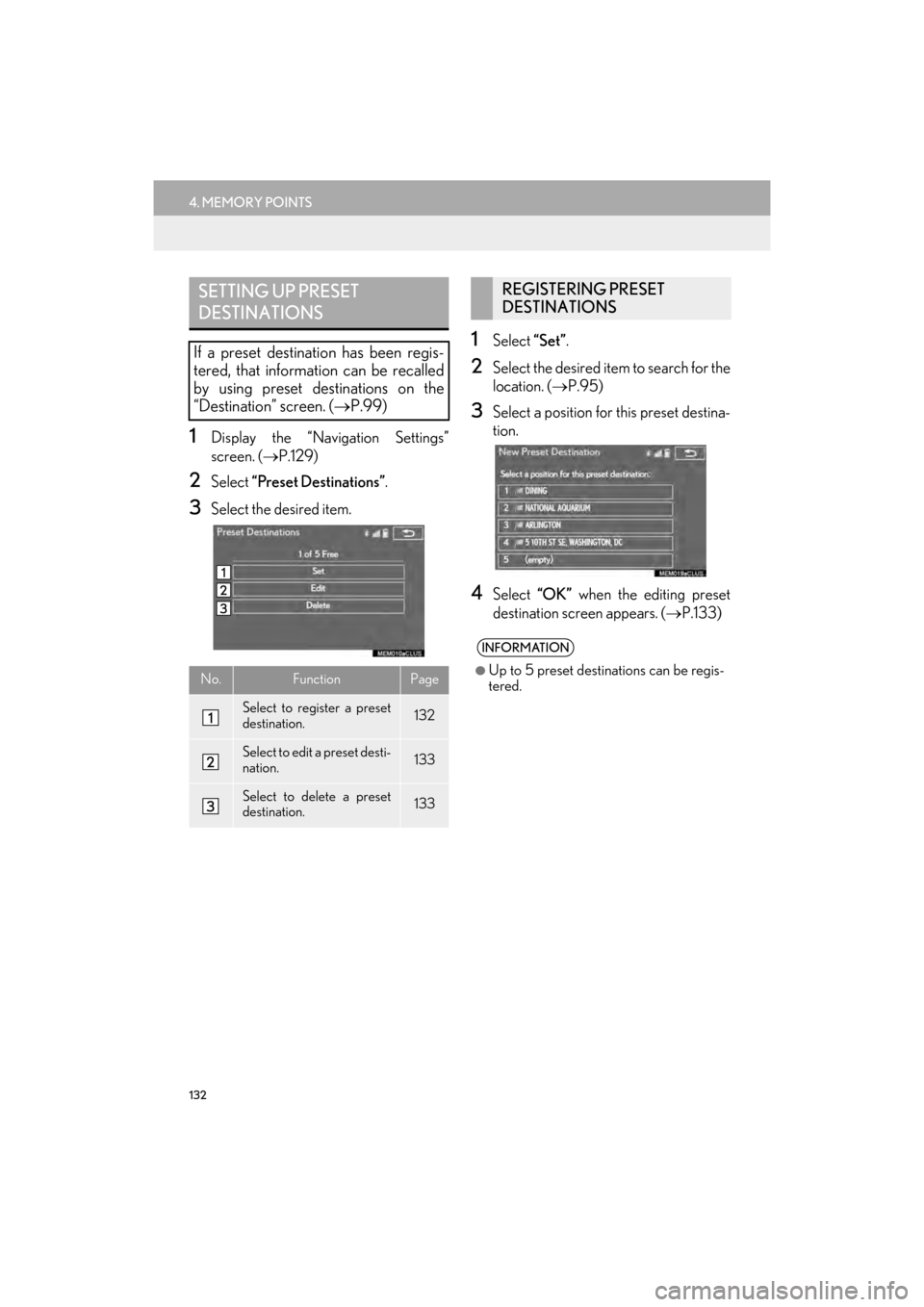
1Display the “Navigation Settings”
screen. (→P.129)
2Select “Preset Destinations”.
3Select the desired item.
1Select “Set”.
2Select the desired item to search for the
location. ( →P.95)
3Select a position for this preset destina-
tion.
4Select “OK” when the editing preset
destination screen appears. ( →P.133)
SETTING UP PRESET
DESTINATIONS
If a preset destination has been regis-
tered, that information can be recalled
by using preset destinations on the
“Destination” screen. ( →P.99)
No.FunctionPage
Select to register a preset
destination.132
Select to edit a preset desti-
nation.133
Select to delete a preset
destination.133
REGISTERING PRESET
DESTINATIONS
INFORMATION
●
Up to 5 preset destinations can be regis-
tered.
GX_EMVN_OM60K84U_(U).book Page 132 Tuesday, July 2, 2013 11:51 AM