ECO Lexus GX460 2014 REAR SEAT ENTERTAINMENT SYSTEM OPERATION / LEXUS 2014 GX460 QUICK GUIDE OWNERS MANUAL (OM60K88U)
[x] Cancel search | Manufacturer: LEXUS, Model Year: 2014, Model line: GX460, Model: Lexus GX460 2014Pages: 102, PDF Size: 10.03 MB
Page 1 of 102
1
GX460_QG_OM60K88U_(U)
The Quick Guide is not intended as a substitute for your Owner’s
Manual. We strongly encourage you to review the Owner’s
Manual and supplementary manuals so you will have a better
understanding of your vehicle’s capabilities and limitations.
Audio System (with multimedia system)*
Audio control screen.................................................................................................................... 69
Remote control (steering wheel switches).......................................................................... 69
Basic operation ............................................................................................................................... 70
Radio .....................................................................................................................................................71
CD player.......................................................................................................................................... 72
Operating an iPod ......................................................................................................................... 73
Audio System (with navigation system)
*
Audio control screen....................................................................................................................59
Remote control (steering wheel switches)..........................................................................59
Basic operation ...............................................................................................................................60
Radio .....................................................................................................................................................61
DVD player ........................................................................................................................................61
Operating an iPod .........................................................................................................................63
Automatic High Beam ......................................................................................................................39
BSM (Blind Spot Monitor)...............................................................................................................35
Crawl Control.......................................................................................................................................34
Cruise Control ...................................................................................................................................... 21
Door Locks ............................................................................................................................................ 92
Dynamic Radar Cruise Control ....................................................................................................23
Eco Driving Indicator Light .............................................................................................................. 19
Engine (Ignition) Switch..................................................................................................................... 16
Floor mat installation .............................................................................................................................11
Four-wheel Drive System ................................................................................................................. 33
Front Air Conditioning System
Control panel ........................................................................................................................................... 78Control screen ................................................................................................................................ 78
Using the automatic mode......................................................................................................... 79
Adjusting the temperature for driver and passenger seats separately
(“DUAL” mode)/driver, passenger and rear seats separately
(“3-ZONE” mode)........................................................................................................................ 79
Fuel Tank Cap .......................................................................................................................................95
*: These features may be operated by Voice Command (See P. 82)
Page 13 of 102
13
GX460_QG_OM60K88U_(U)
Smart Access System with Push-button Start
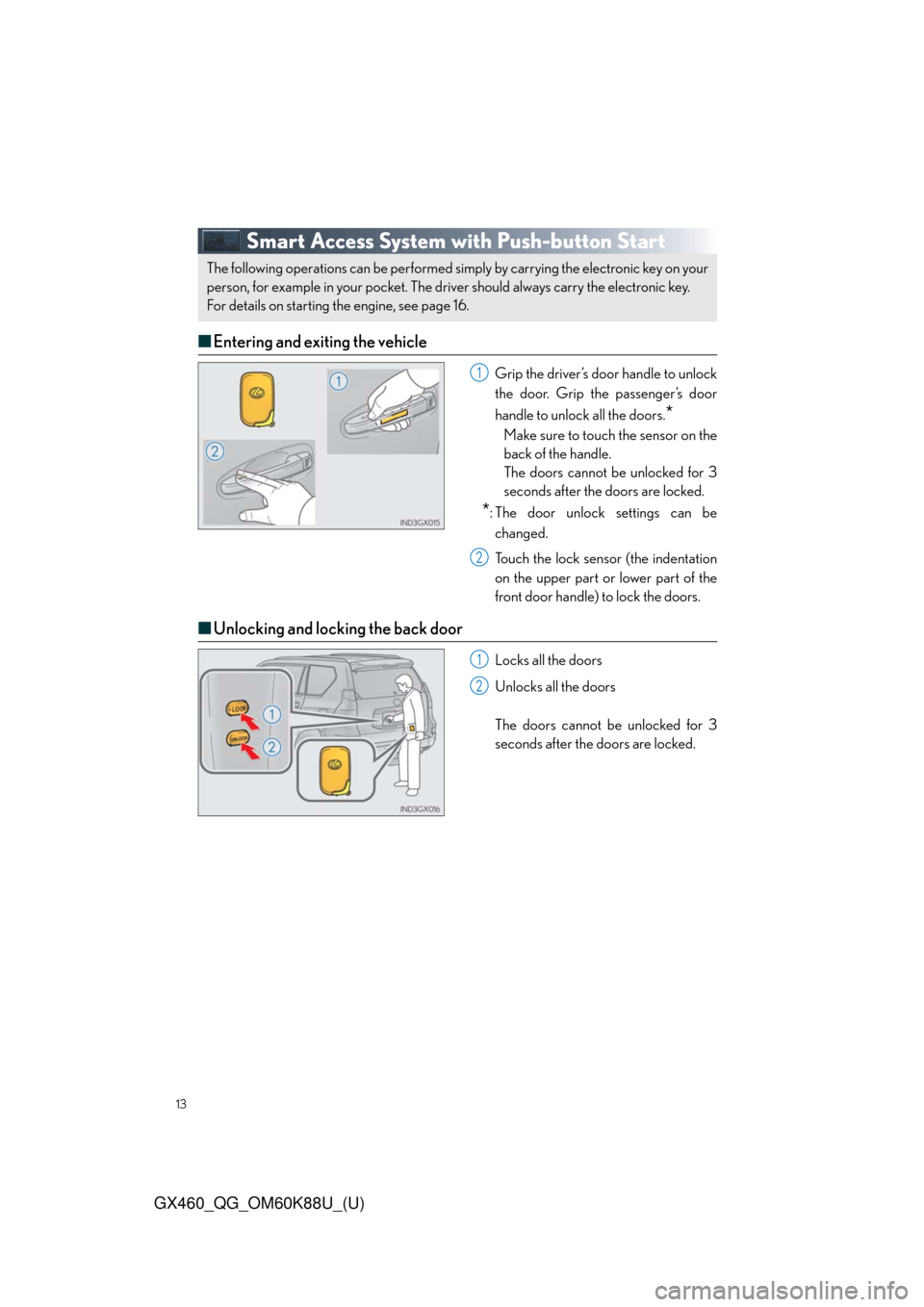
■Entering and exiting the vehicle
Grip the driver’s door handle to unlock
the door. Grip the passenger’s door
handle to unlock all the doors.
*
Make sure to touch the sensor on the
back of the handle.
The doors cannot be unlocked for 3
seconds after the doors are locked.
*: The door unlock settings can be
changed.
Touch the lock sensor (the indentation
on the upper part or lower part of the
front door handle) to lock the doors.
■Unlocking and locking the back door
Locks all the doors
Unlocks all the doors
The doors cannot be unlocked for 3
seconds after the doors are locked.
The following operations can be performed simply by carrying the electronic key on your
person, for example in your pocket. The driver should always carry the electronic key.
For details on starting the engine, see page 16.
1
2
1
2
Page 15 of 102
15
GX460_QG_OM60K88U_(U)
Theft Deterrent System
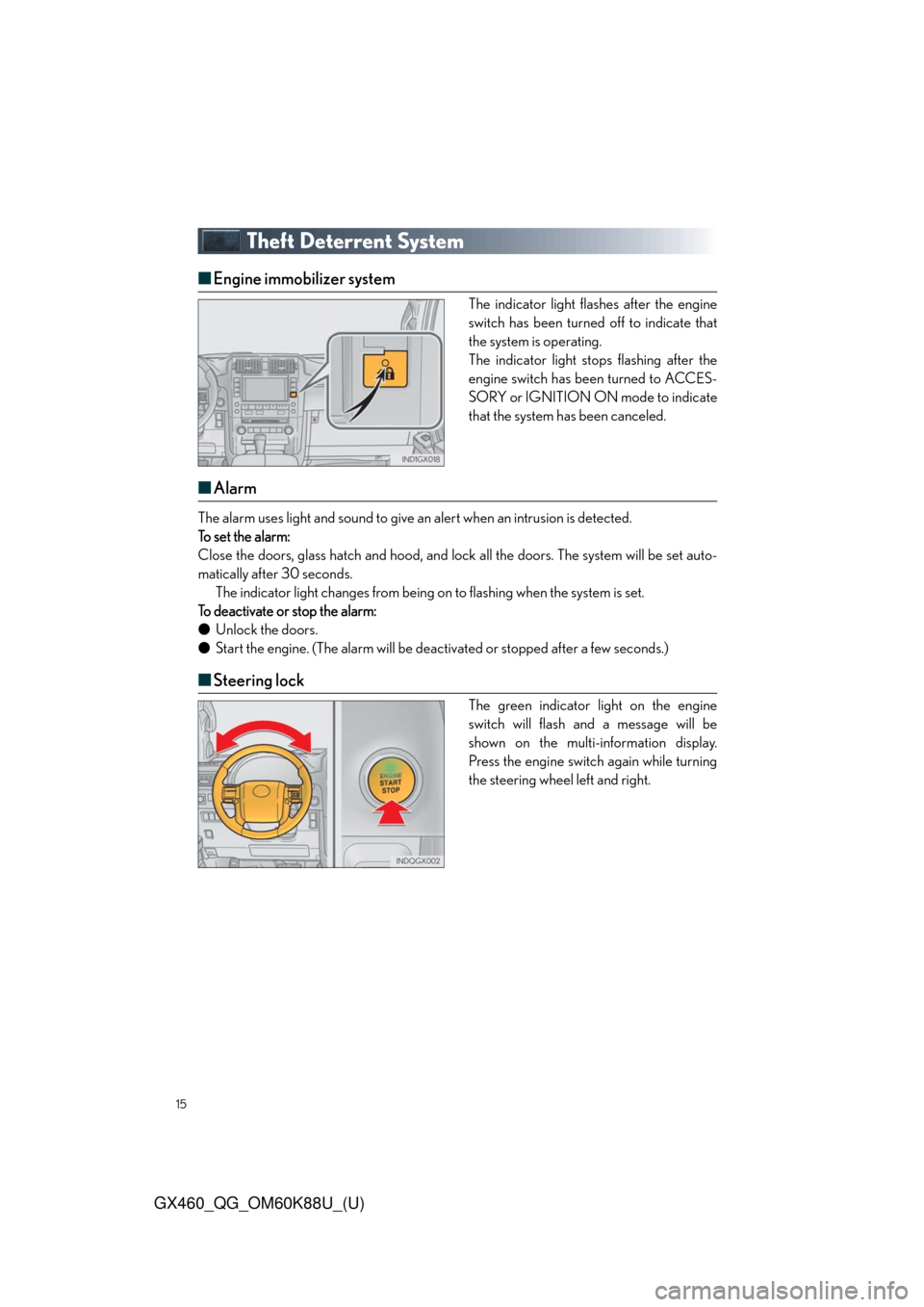
■Engine immobilizer system
The indicator light flashes after the engine
switch has been turned off to indicate that
the system is operating.
The indicator light stops flashing after the
engine switch has been turned to ACCES-
SORY or IGNITION ON mode to indicate
that the system has been canceled.
■Alarm
The alarm uses light and sound to give an alert when an intrusion is detected.
To set the alarm:
Close the doors, glass hatch and hood, and lock all the doors. The system will be set auto-
matically after 30 seconds.
The indicator light changes from being on to flashing when the system is set.
To deactivate or stop the alarm:
●Unlock the doors.
●Start the engine. (The alarm will be deactivated or stopped after a few seconds.)
■Steering lock
The green indicator light on the engine
switch will flash and a message will be
shown on the multi-information display.
Press the engine switch again while turning
the steering wheel left and right.
Page 16 of 102
16
GX460_QG_OM60K88U_(U)
Engine (Ignition) Switch
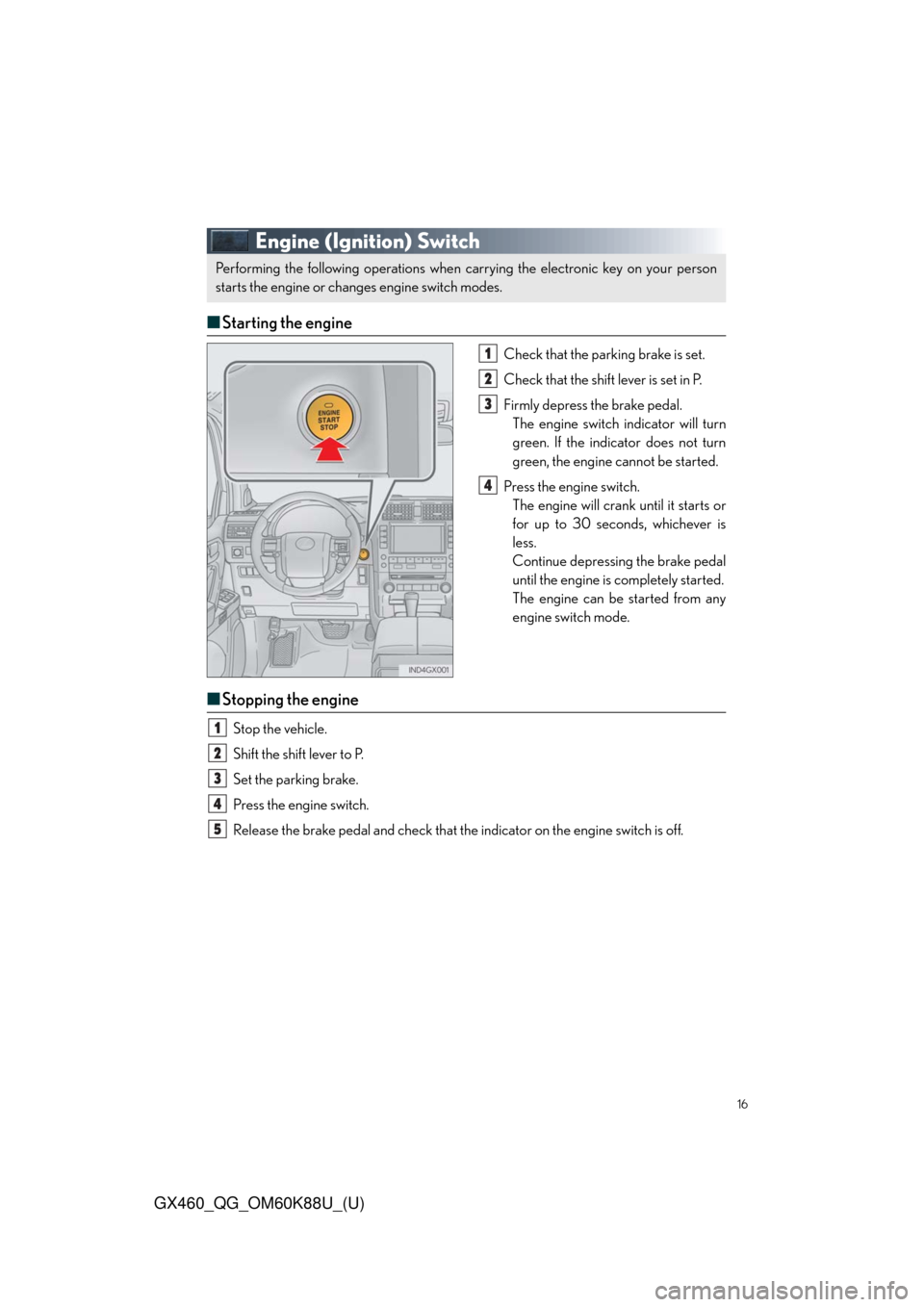
■Starting the engine
Check that the parking brake is set.
Check that the shift lever is set in P.
Firmly depress the brake pedal.
The engine switch indicator will turn
green. If the indicator does not turn
green, the engine cannot be started.
Press the engine switch.
The engine will crank until it starts or
for up to 30 seconds, whichever is
less.
Continue depressing the brake pedal
until the engine is completely started.
The engine can be started from any
engine switch mode.
■Stopping the engine
Stop the vehicle.
Shift the shift lever to P.
Set the parking brake.
Press the engine switch.
Release the brake pedal and check that the indicator on the engine switch is off.
Performing the following operations when carrying the electronic key on your person
starts the engine or changes engine switch modes.
1
2
3
4
1
2
3
4
5
Page 19 of 102
19
GX460_QG_OM60K88U_(U)
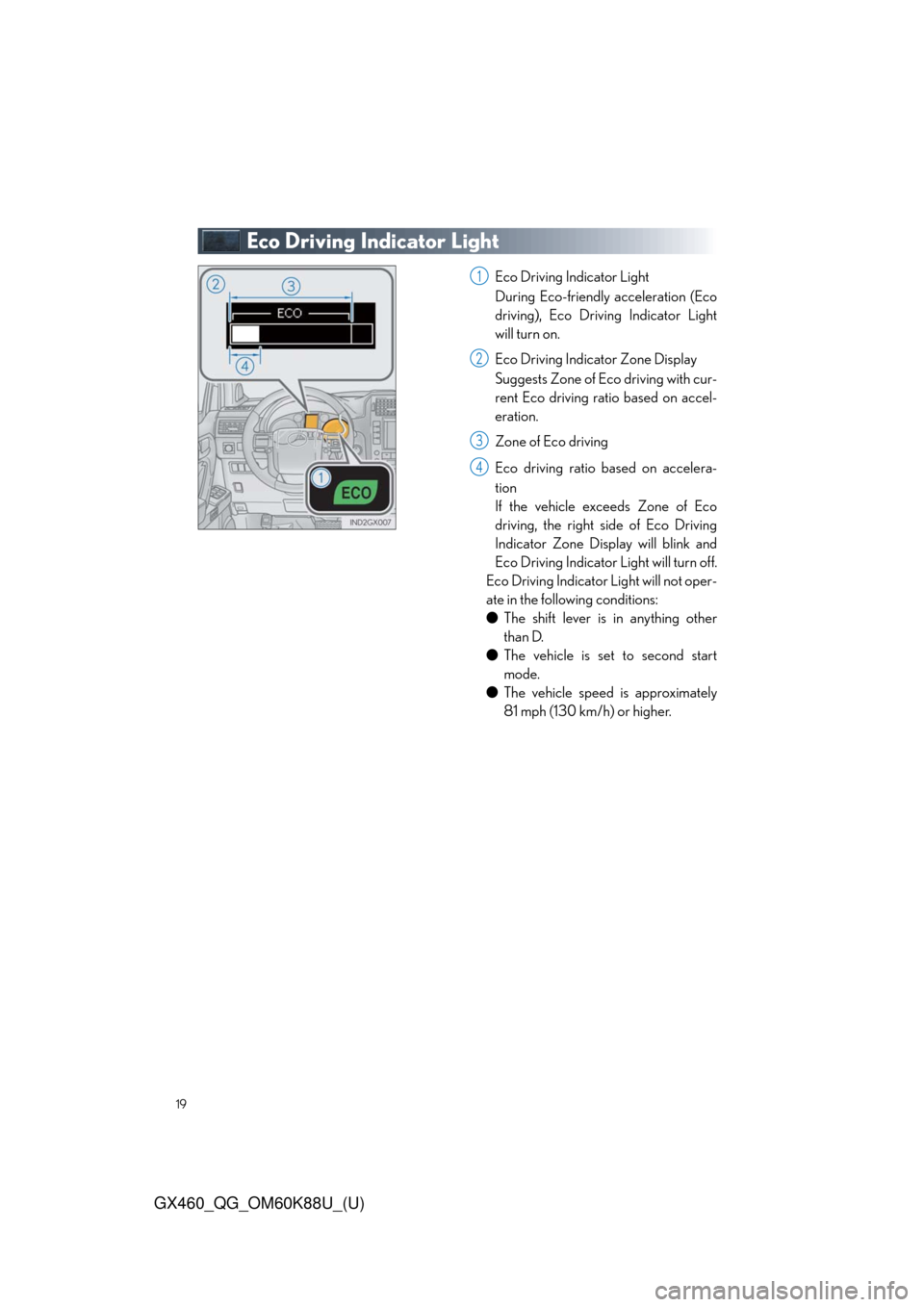
Eco Driving Indicator Light
Eco Driving Indicator Light
During Eco-friendly acceleration (Eco
driving), Eco Driving Indicator Light
will turn on.
Eco Driving Indicator Zone Display
Suggests Zone of Eco driving with cur-
rent Eco driving ratio based on accel-
eration.
Zone of Eco driving
Eco driving ratio based on accelera-
tion
If the vehicle exceeds Zone of Eco
driving, the right side of Eco Driving
Indicator Zone Display will blink and
Eco Driving Indicator Light will turn off.
Eco Driving Indicator Light will not oper-
ate in the following conditions:
●The shift lever is in anything other
than D.
●The vehicle is set to second start
mode.
●The vehicle speed is approximately
81 mph (130 km/h) or higher.1
2
3
4
Page 21 of 102
21
GX460_QG_OM60K88U_(U)
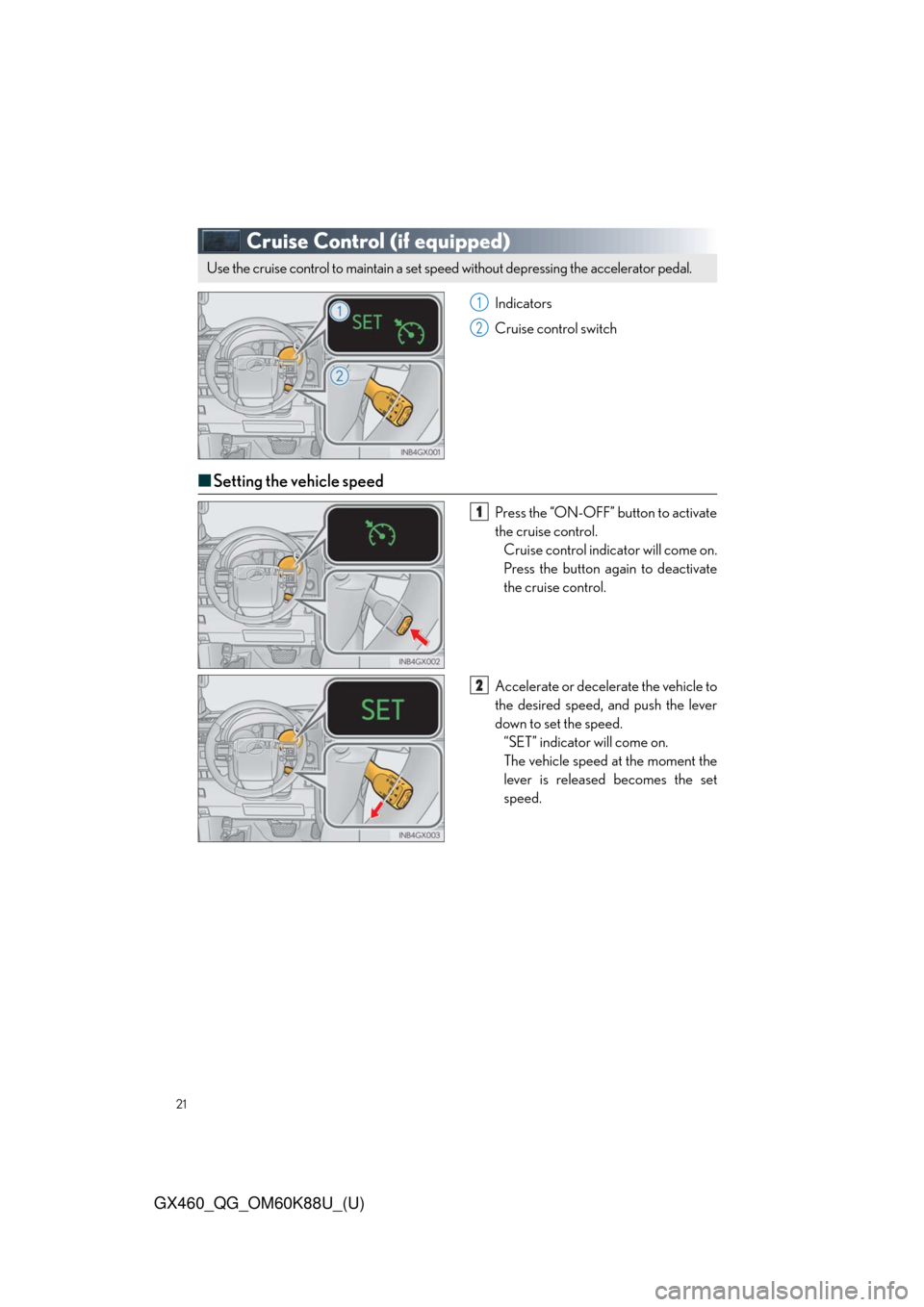
Cruise Control (if equipped)
Indicators
Cruise control switch
■Setting the vehicle speed
Press the “ON-OFF” button to activate
the cruise control.
Cruise control indicator will come on.
Press the button again to deactivate
the cruise control.
Accelerate or decelerate the vehicle to
the desired speed, and push the lever
down to set the speed.
“SET” indicator will come on.
The vehicle speed at the moment the
lever is released becomes the set
speed.
Use the cruise control to maintain a set speed without depressing the accelerator pedal.
1
2
1
2
Page 23 of 102
23
GX460_QG_OM60K88U_(U)
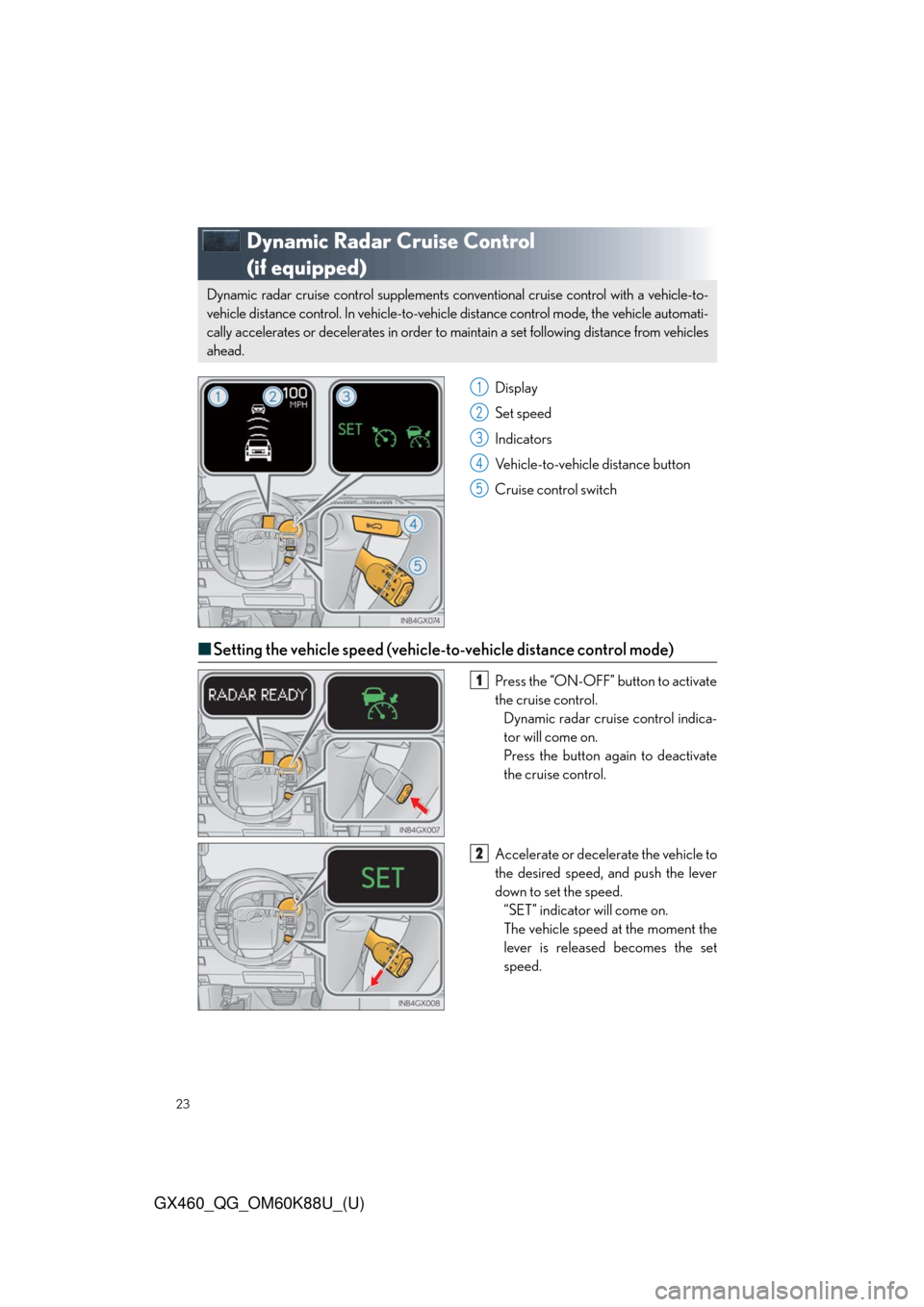
Dynamic Radar Cruise Control
(if equipped)
Display
Set speed
Indicators
Vehicle-to-vehicle distance button
Cruise control switch
■Setting the vehicle speed (vehicle-to-vehicle distance control mode)
Press the “ON-OFF” button to activate
the cruise control.
Dynamic radar cruise control indica-
tor will come on.
Press the button again to deactivate
the cruise control.
Accelerate or decelerate the vehicle to
the desired speed, and push the lever
down to set the speed.
“SET” indicator will come on.
The vehicle speed at the moment the
lever is released becomes the set
speed.
Dynamic radar cruise control supplements conventional cruise control with a vehicle-to-
vehicle distance control. In vehicle-to-vehicle distance control mode, the vehicle automati-
cally accelerates or decelerates in order to maintain a set following distance from vehicles
ahead.
1
2
3
4
5
1
2
Page 24 of 102
24
GX460_QG_OM60K88U_(U)
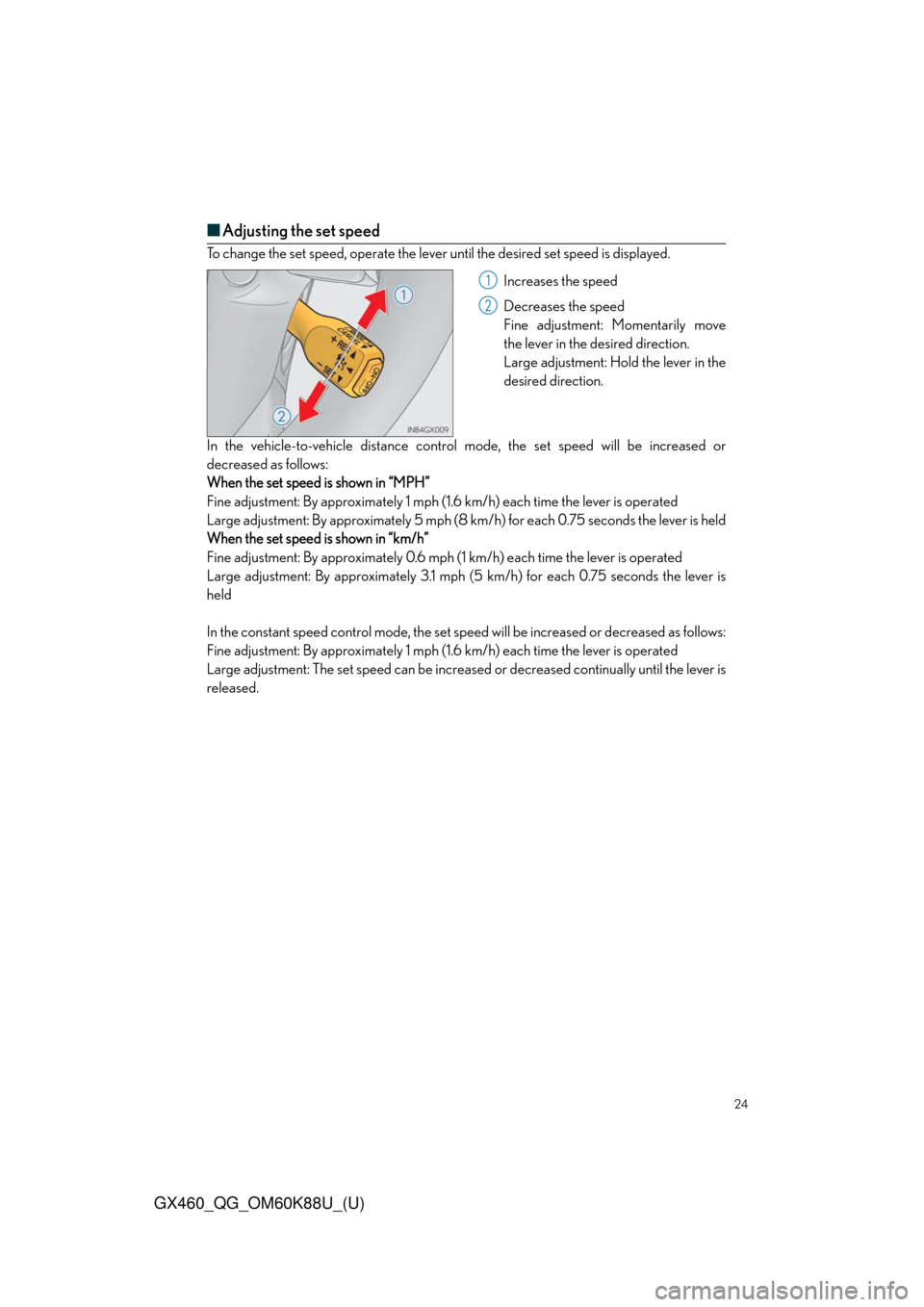
■Adjusting the set speed
To change the set speed, operate the lever until the desired set speed is displayed.
Increases the speed
Decreases the speed
Fine adjustment: Momentarily move
the lever in the desired direction.
Large adjustment: Hold the lever in the
desired direction.
In the vehicle-to-vehicle distance control mode, the set speed will be increased or
decreased as follows:
When the set speed is shown in “MPH”
Fine adjustment: By approximately 1 mph (1.6 km/h) each time the lever is operated
Large adjustment: By approximately 5 mph (8 km/h) for each 0.75 seconds the lever is held
When the set speed is shown in “km/h”
Fine adjustment: By approximately 0.6 mph (1 km/h) each time the lever is operated
Large adjustment: By approximately 3.1 mph (5 km/h) for each 0.75 seconds the lever is
held
In the constant speed control mode, the set speed will be increased or decreased as follows:
Fine adjustment: By approximately 1 mph (1.6 km/h) each time the lever is operated
Large adjustment: The set speed can be increased or decreased continually until the lever is
released.
1
2
Page 27 of 102
27
GX460_QG_OM60K88U_(U)
LDA (Lane Departure Alert)(if equipped)
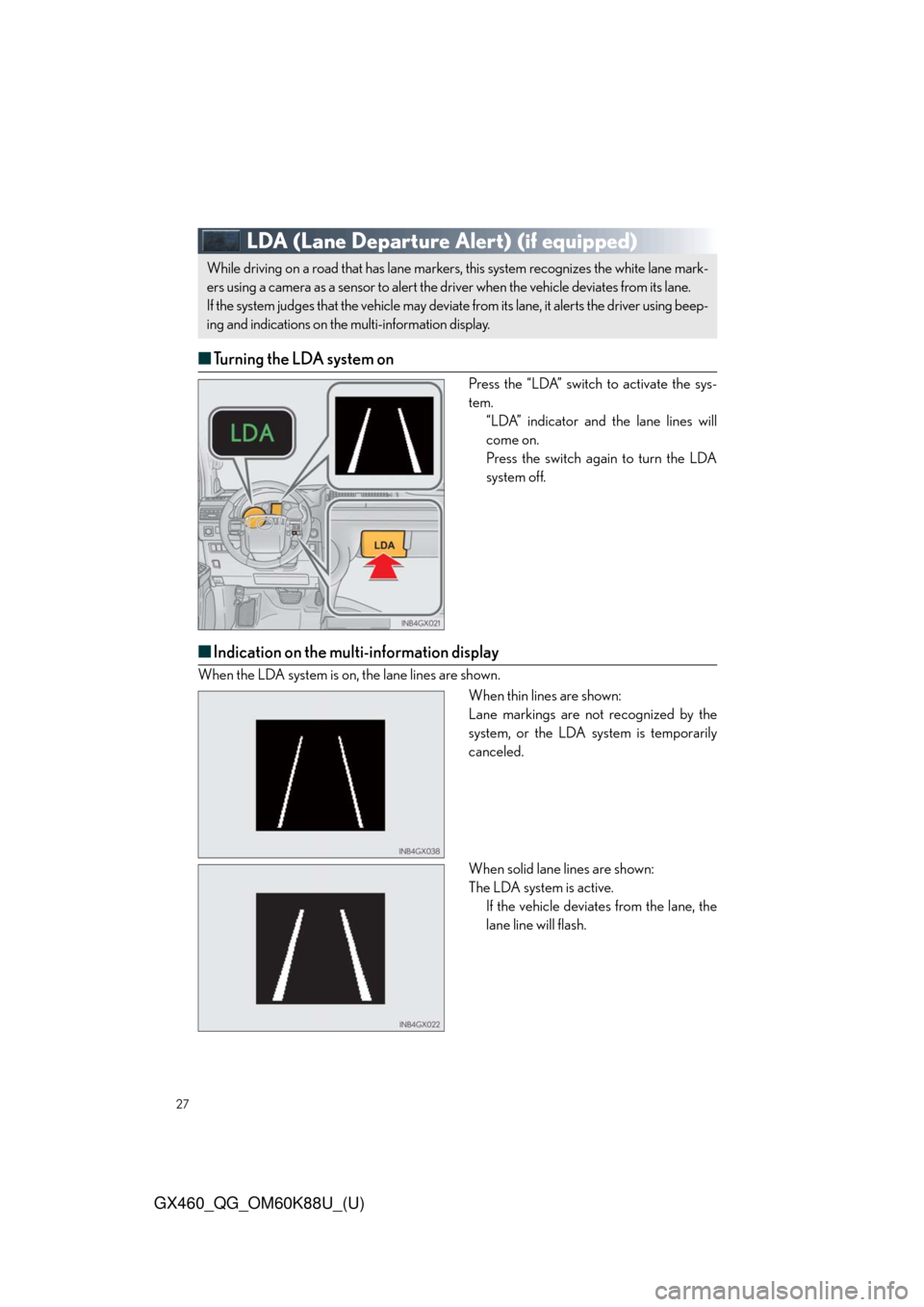
■Turning the LDA system on
Press the “LDA” switch to activate the sys-
tem.
“LDA” indicator and the lane lines will
come on.
Press the switch again to turn the LDA
system off.
■Indication on the multi-information display
When the LDA system is on, the lane lines are shown.
When thin lines are shown:
Lane markings are not recognized by the
system, or the LDA system is temporarily
canceled.
When solid lane lines are shown:
The LDA system is active.
If the vehicle deviates from the lane, the
lane line will flash.
While driving on a road that has lane markers, this system recognizes the white lane mark-
ers using a camera as a sensor to alert the driver when the vehicle deviates from its lane.
If the system judges that the vehicle may deviate from its lane, it alerts the driver using beep-
ing and indications on the multi-information display.
Page 39 of 102
39
GX460_QG_OM60K88U_(U)
Automatic High Beam (if equipped)
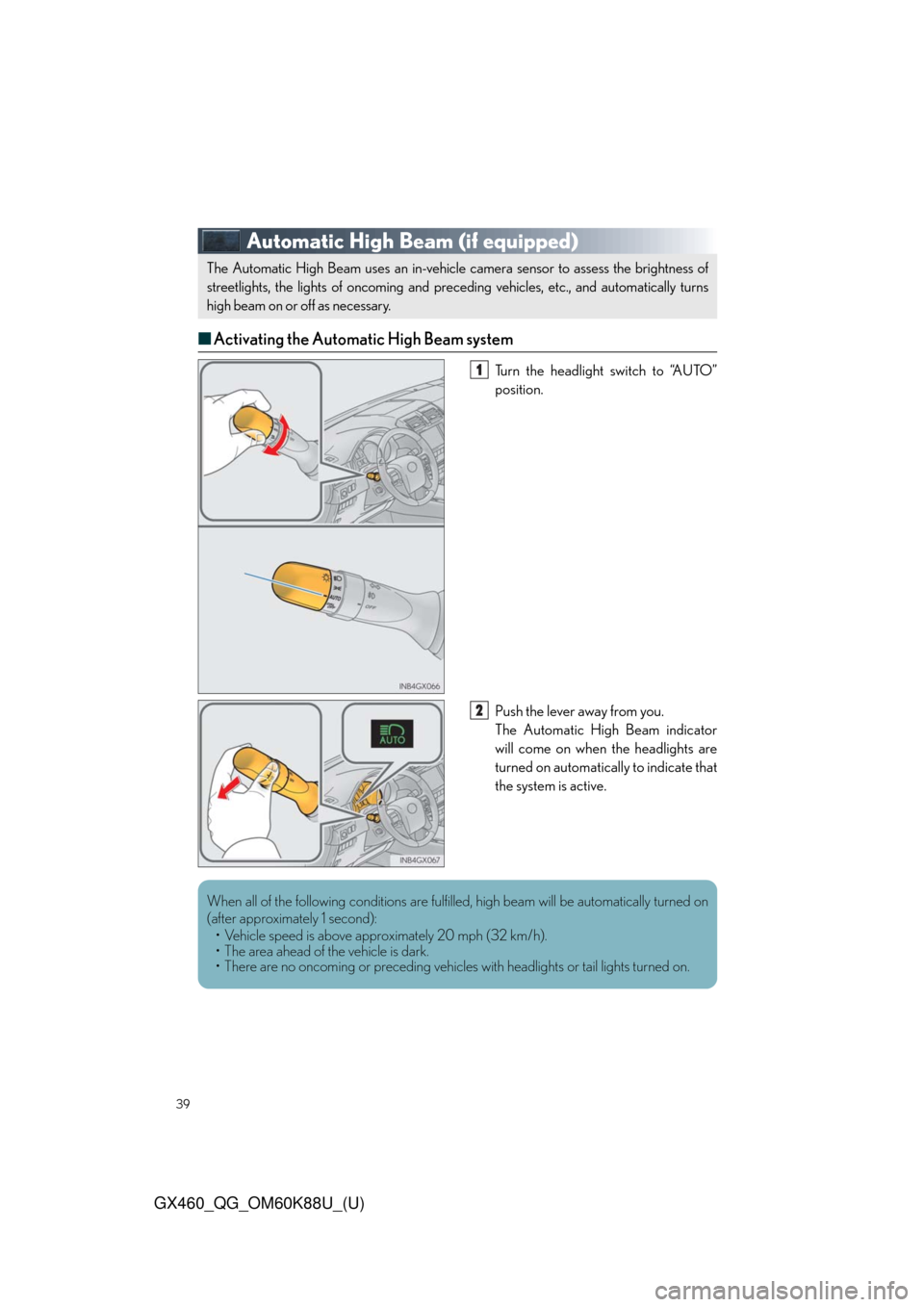
■Activating the Automatic High Beam system
Turn the headlight switch to “AUTO”
position.
Push the lever away from you.
The Automatic High Beam indicator
will come on when the headlights are
turned on automatically to indicate that
the system is active.
The Automatic High Beam uses an in-vehicle camera sensor to assess the brightness of
streetlights, the lights of oncoming and preceding vehicles, etc., and automatically turns
high beam on or off as necessary.
1
2
When all of the following conditions are fulfilled, high beam will be automatically turned on
(after approximately 1 second):
• Vehicle speed is above approximately 20 mph (32 km/h).
• The area ahead of the vehicle is dark.
• There are no oncoming or preceding vehicles with headlights or tail lights turned on.