seats Lexus GX460 2015 Alphabetical index /
[x] Cancel search | Manufacturer: LEXUS, Model Year: 2015, Model line: GX460, Model: Lexus GX460 2015Pages: 632, PDF Size: 8.83 MB
Page 382 of 632

3825-1. Using the air conditioning system and defogger
GX460_OM_OM60L72U_(U)
Press to operate the speech
command system. (Refer to the
“NAVIGATION SYSTEM OWNER’S
MANUAL”.)
■Using the automatic mode Press the “AUTO” button.
Press to switch to automatic air intake mode. (if equipped)
The air conditioning system automatically switches between outside air and recir-
culated air modes.
Adjust the temperature setting.
To stop the operation, press the “OFF” button.
■Automatic mode indicator
If the fan speed setting or air flow modes are operated, the automatic mode
indicator goes off. However, automati c mode for functions other than that
operated are maintained.
■Adjusting the temperature for driver and passenger seats separately
(“DUAL” mode)/driver, passenger and rear seats separately (“3-ZONE”
mode)
To turn on the “DUAL”/“3-ZONE” mode, perform any of the following proce-
dures:
●Press the “DUAL”/“3-ZONE” button.
●Select “DUAL”/“3-ZONE” on the option control screen.
●Adjust the passenger’s side temperature setting.
The indicator comes on when the “DUAL”/“3-ZONE” mode is on.
While in “DUAL” mode, the temperature of the rear air outlets is set at the
passenger’s side temperature setting.
Using the speech command system
Air conditioning controls
1
2
3
4
Page 383 of 632

GX460_OM_OM60L72U_(U)
3835-1. Using the air conditioning system and defogger
5
Interior features
Touch to display the rear air conditioning control screen.
■Control screen
Adjust the fan speed setting
Adjust the rear seats temperature setting
Display the rear seats temperature setting
Tu r n t h e f a n o f f
Select to set automatic mode
Disable the switches on the rear controller
■Using the automatic modeTo u c h “ R E A R A U T O ” .
Touch to increase the temperature and to decrease the temper-
ature.
To stop the operatio n, touch “REAR OFF”.
■If the system is operated manually in automatic mode
If the fan speed setting is operated, the automatic mode indicator goes off.
However, automatic mode for functions other than that operated are main-
tained.
Changing the rear seat settings (veh icles with rear air conditioning sys-
tem)
Without a navigation systemWith a navigation system
1
2
3
4
5
6
1
2
3
Page 393 of 632

393
GX460_OM_OM60L72U_(U)5-1. Using the air conditio
ning system and defogger
5
Interior features
Heated steering wheel/seat heaters/seat
ventilators
Turns the heated steering wheel on/off
The indicator light comes on when the
heated steering wheel is operating.
: If equipped
Heated steering wheel and seat heater s heat the side grips of the steering
wheel and seats. Seat ventilators maintain good airflow by blowing air from
the seats.
CAUTION
●Care should be taken to prevent injury if anyone in the following categories comes in
contact with the steering wheel an d seats when the heater is on:
• Babies, small children, the elderly, the sick and the physically challenged
• Persons with sensitive skin
• Persons who are fatigued
• Persons who have taken alcohol or drugs that induce sleep (s leeping drugs, cold
remedies, etc.)
●Observe the following precautions to prevent the minor burns or overheating:
• Do not cover the seat with a blanket or cushion when using the seat heater.
• Do not use seat heater more than necessary.
NOTICE
●Do not put heavy objects that have an uneven surface on the seat and do not stick
sharp objects (needles, nails, etc.) into the seat.
●To prevent battery discharge, do not use the functions when the engine is off.
Heated steering wheel (if equipped)
Page 402 of 632

402
GX460_OM_OM60L72U_(U)5-3. Using the storage features
The coin holder is located in the console box.
■Cup holders
Coin holder (if equipped)
Cup holders/bottle holders/door pockets
Front seatsSecond seats
Press down and release the cup
holder lid. Pull the armrest down, and then press
in and release the button.
Third seats (if equipped)
Page 403 of 632

GX460_OM_OM60L72U_(U)
4035-3. Using the storage features
5
Interior features
■Bottle holders/door pockets
■Cup holder lights (front seats)
●The cup holder lights turn on when the tail lights are on.
●The brightness of the cup holder lights change in conjunction with the instrument clus-
ter light. ( P. 8 0 )
■When using the holder as a bottle holder
●Close the cap.
●The bottle may not be stored depending on its size or shape.
FrontRear
CAUTION
●Do not place anything other than cups or beverage cans in the cup holders.
Other items may be thrown out of the holders in the event of sudden braking, sudden
swerving or an accident, cause injury. If possible, cover hot drinks to prevent burns.
●Do not place anything other than bottles in the bottle holders.
In the event of an accident or sudden bra king, other items may be thrown out of the
holders and cause injury.
NOTICE
●To prevent damage, stow the rear cup holders before stowing the armrest. (second
seats)
●Do not place open bottles or glass and paper cups containing liquid in the bottle hold-
ers. The contents may spill and glasses may break.
Page 408 of 632

408
GX460_OM_OM60L72U_(U)5-3. Using the storage features
■Installing the luggage cover
Attach the hooks to the head
restraints.
When using the luggage cover, the
third seats must be fold down.
( P. 1 2 6 )
Pull out the luggage cover and
hook it on the anchors.
■Removing the luggage cover
Retract the cover and release both
ends, then lift it out.
Luggage cover (if equipped)
1
2
Page 411 of 632
GX460_OM_OM60L72U_(U)
4115-3. Using the storage features
5
Interior features
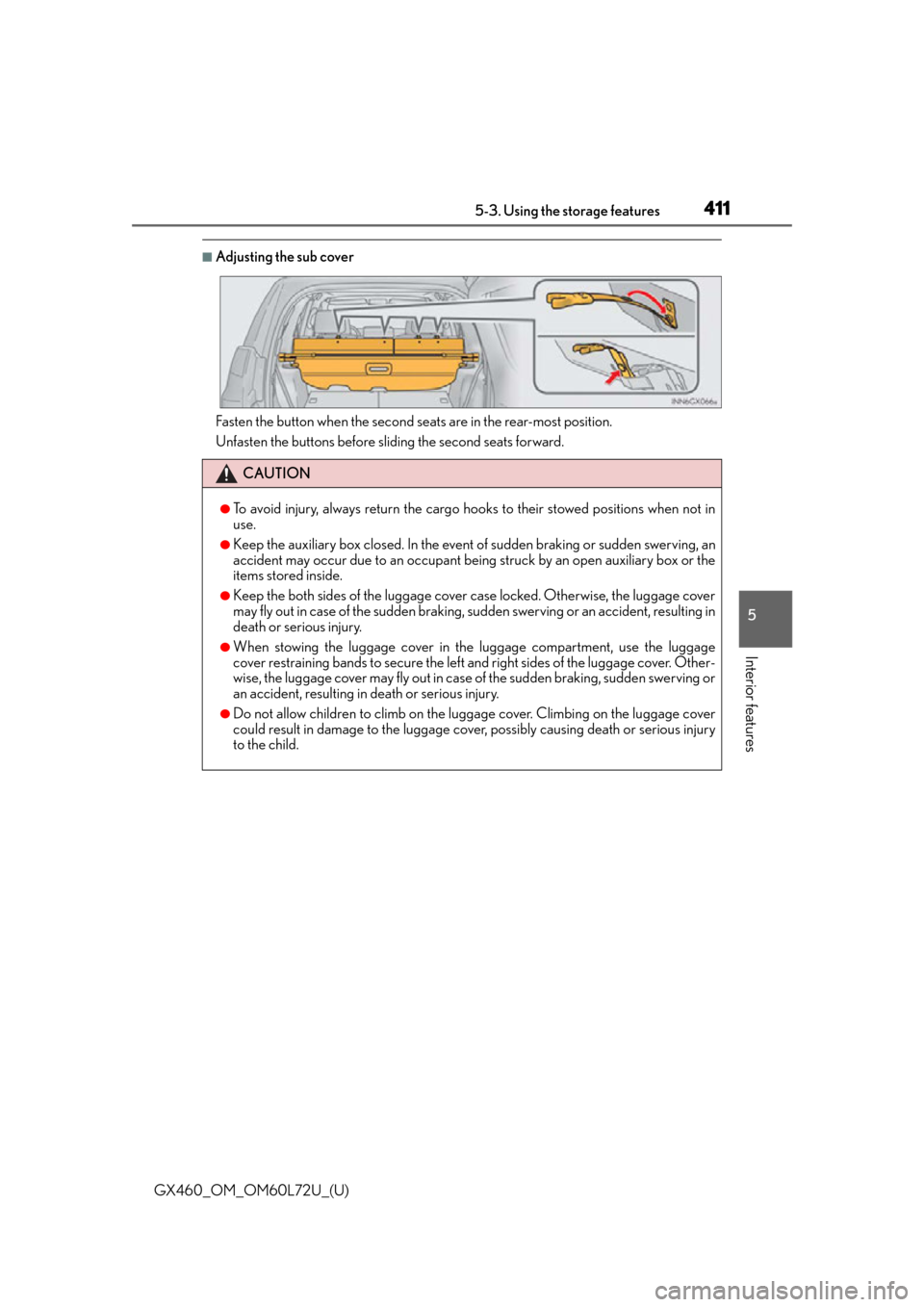
■Adjusting the sub cover
Fasten the button when the second seats are in the rear-most position.
Unfasten the buttons before sliding the second seats forward.
CAUTION
●To avoid injury, always return the cargo hooks to their stowed positions when not in
use.
●Keep the auxiliary box closed. In the event of sudden braking or sudden swerving, an
accident may occur due to an occupant being struck by an open auxiliary box or the
items stored inside.
●Keep the both sides of the luggage cover case locked. Otherwise, the luggage cover
may fly out in case of the sudden braking, su dden swerving or an accident, resulting in
death or serious injury.
●When stowing the luggage cover in the luggage compartment, use the luggage
cover restraining bands to secure the left and right sides of the luggage cover. Other-
wise, the luggage cover may fly out in case of the sudden braking, sudden swerving or
an accident, resulting in death or serious injury.
●Do not allow children to climb on the lugg age cover. Climbing on the luggage cover
could result in damage to the luggage cover, possibly causing death or serious injury
to the child.
Page 420 of 632

420
GX460_OM_OM60L72U_(U)5-4. Using the other interior features
NOTICE
■To prevent the fuse from being blown
12 V DC: Do not use an accessory that uses more than 12 V 10 A.
120 V AC: Do not use a 120 V AC appliance that requires more than 100 W.
If a 120 V AC appliance that consumes more than 100 W is used, the protection circuit
will cut the power supply.
■Appliances that may not operate properly (120 V AC)
The following 120 V AC appliances may not operate even if their power consumption
is under 100 W.
●Appliances with high initial peak wattage
●Measuring devices that process precise data.
●Other appliances that require an extremely stable power supply
■To prevent battery discharge
12 V DC: Do not use the power outlet longer than necessary when the engine is not
running.
120 V AC: Turn off all the vehicle’s electronic equipment and accessories, such as the
headlights and air conditioning
, when electrical appliances that consume in excess of
100 W are used continuously for long periods of time.
■To prevent any damage caused by heat (120 V AC)
●Do not use any electrical appliances that give off intense heat, such as toasters, in any
locations including the internal or external trim, seats and deck.
●Do not use any electrical appliances that are easily affected by vibration or heat inside
the vehicle. Vibration while driving, or the heat of the sun while parking, may result in
damage to those electrical appliances.
■If any electrical appliances are to be used while driving (120 V AC)
Securely fasten both the appliances and their cables to prevent them from falling or
getting caught in any of the power train components.
■If the power outlet is loose when an elec trical appliance plug is connected (120 V
AC)
Replace the outlet. Contact your Lexus dealer for any necessary replacements.
■If the power outlet gets dirty (120 V AC)
Turn the main switch off and use a soft, clean cloth to wipe it gently. Do not use any
cleansing materials, such as organic solvents, wax, or compound cleaners, as these
may damage the power outlet or cause it to malfunction.
Page 442 of 632

442
GX460_OM_OM60L72U_(U)6-1. Maintenance and care
■Caring for leather areas
Lexus recommends cleaning the interior of th
e vehicle at least twice a year to maintain
the quality of the vehicle’s interior.
■Shampooing the carpets
There are several commercial foaming-type cleaners available. Use a sponge or brush to
apply the foam. Rub in overlapping circles. Do not use water. The excellent results are
obtained when keeping the carpet as dry as possible.
■Seat belts
Clean with mild soap and lukewarm water using a cloth or sponge. Also check the belts
periodically for excessive wear, fraying or cuts.
CAUTION
■Wa t e r i n t h e v e h i c l e
●Do not splash or spill liquid in the vehicle.
Doing so may cause electrical components etc. to malfunction or catch fire.
●Do not get any of the SRS components or wiring in the vehicle interior wet. ( P. 3 6 )
An electrical malfunction may cause the airbags to deploy or not function properly,
resulting in death or serious injury.
■Cleaning the interior (especially instrument panel)
Do not use polish wax or polish cleaner. The instrument panel may reflect off the wind-
shield, obstructing the driver’s view and leading to an accident, resulting in death or
serious injury.
NOTICE
■Cleaning detergents
●Do not use the following types of detergent, as they may discolor the vehicle interior
or cause streaks or damage to painted surfaces:
• Non-seat portions: Organic substances su ch as benzene or gasoline, alkaline or
acidic solutions, dye, and bleach
• Seats: Alkaline or acidic solutions, such as thinner, benzene, and alcohol
●Do not use polish wax or polish cleaner. The instrument panel’s or other interior part’s
painted surface may be damaged.
Page 448 of 632

448
GX460_OM_OM60L72U_(U)6-2. Maintenance
Vehicle interior
ItemsCheck points
Accelerator pedal• The accelerator pedal should move smoothly
(without uneven pedal effort or catching).
Automatic transmission
“Park” mechanism• When parked on a slope and the shift lever is in P, isthe vehicle securely stopped?
Brake pedal
• Does the brake pedal move smoothly?
• Does the brake pedal have appropriate clearance
from the floor? ( P. 5 6 9 )
• Does the brake pedal have the correct amount of
free play? ( P. 5 6 9 )
Brakes
• The vehicle should not pull to one side when the
brakes are applied.
• The brakes should work effectively.
• The brake pedal should not feel spongy.
• The brake pedal should not get too close to the floor when the brakes are applied.
Head restraints• Do the head restraints move smoothly and lock
securely?
Indicators/buzzers• Do the indicators and buzzers function properly?
Lights• Do all the lights come on?
• Are the headlights aimed correctly? ( P. 488)
Parking brake• Does the parking brake pedal move smoothly?
• When parked on a slope and the parking brake is on,
is the vehicle securely stopped?
Seat belts•Do the seat belt s operate smoothly?
• The seat belts should not be damaged.
Seats• Do the seat controls operate properly?
Steering wheel
• Does the steering wheel rotate smoothly?
• Does the steering wheel have the correct amount of free play?
• There should not be an y strange sounds coming
from the steering wheel.