turn off eco Lexus GX460 2016 Owner's Manual / LEXUS 2016 GX460 (OM60M73U) Service Manual
[x] Cancel search | Manufacturer: LEXUS, Model Year: 2016, Model line: GX460, Model: Lexus GX460 2016Pages: 632, PDF Size: 8.93 MB
Page 508 of 632
5087-2. Steps to take in an emergency
GX460_OM_OM60M73U_(U)
CAUTION
Observe the following precautions.
Failure to do so may result in death or serious injury.
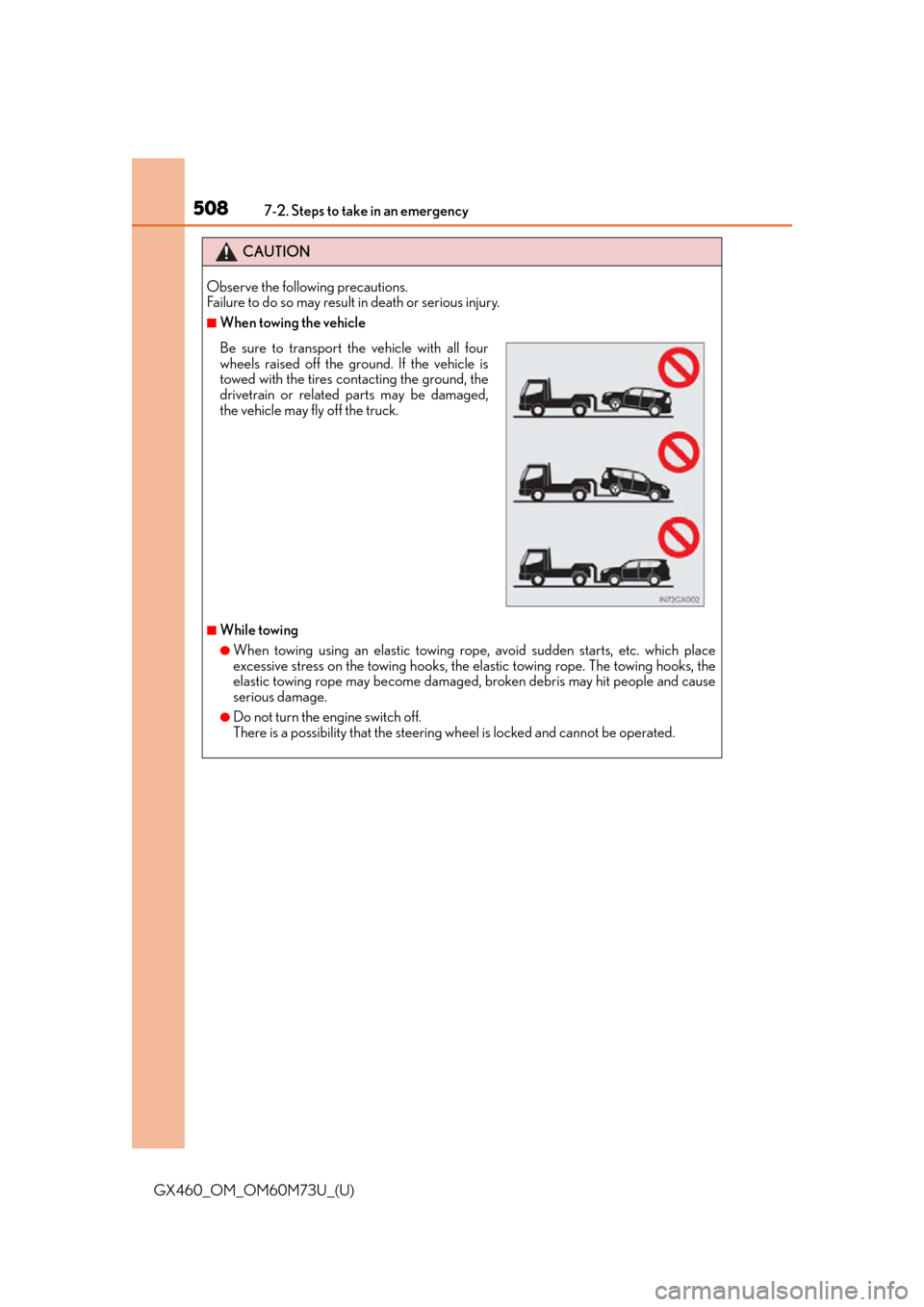
■When towing the vehicle
■While towing
●When towing using an elastic towing rope, avoid sudden starts, etc. which place
excessive stress on the towing hooks, the elastic towing rope. The towing hooks, the
elastic towing rope may become damaged, broken debris may hit people and cause
serious damage.
●Do not turn the engine switch off.
There is a possibility that the steering wheel is locked and cannot be operated.
Be sure to transport the vehicle with all four
wheels raised off the ground. If the vehicle is
towed with the tires contacting the ground, the
drivetrain or related parts may be damaged,
the vehicle may fly off the truck.
Page 515 of 632
5157-2. Steps to take in an emergency
GX460_OM_OM60M73U_(U)
7
When trouble arises
*1: Open door warning buzzer: P. 5 2 2
*2: Seat belt reminders:
The driver’s seat belt buzzer sounds to alert the driver that his or her seat belt is not
fastened. Once the engine switch is turned to IGNITION ON mode, the buzzer
sounds for 6 seconds. If the vehicle reaches a speed of 12 mph (20 km/h), the buzzer
sounds once. If the seat belt is still unfastened after 30 seconds, the buzzer will sound
intermittently for 10 seconds. Then, if the seat belt is still unfastened, the buzzer will
sound in a different tone for 20 more seconds.
The front passenger’s seat belt buzzer sounds to alert the front passenger that his or
her seat belt is not fastened. The buzzer sounds once if the vehicle reaches a speed of
12 mph (20 km/h). If the seat belt is still unfastened after 30 seconds, the buzzer will
sound intermittently for 10 seconds. Then, if the seat belt is still unfastened, the buzzer
will sound in a different tone for 20 more seconds.
■SRS warning light
This warning light system monitors the airbag sensor assembly, front airbag sensors, side
and curtain shield airbag sensor s, rear side and curtain shield airbag sensors, floor sen-
sor, driver’s seat belt buckle switch, front passenger occupant classification system (ECU
and sensors), “AIR BAG ON” indicator light, “AIR BAG OFF” indicator light, front pas-
senger’s seat belt buckle sw itch, seat belt pretensioner assemblies, airbags, intercon-
necting wiring and power sources. ( P. 3 4 )
■Front passenger detection sensor, seat belt reminder and warning buzzer
●If luggage is placed on the front passenger seat, the front passenger detection sensor
may cause the warning light to flash and the warning buzzer to sound even if a passen-
ger is not sittin g in the seat.
●If a cushion is placed on th e seat, the sensor may not detect a passenger, and the warn-
ing light may not operate properly.
■If the malfunction indicator lamp comes on while driving
First check the following:
●Is the fuel tank empty?
If it is, fill the fuel tank immediately.
●Is the fuel tank cap loose?
If it is, tighten it securely.
The light will go off after several driving trips.
If the light does not go off even after severa l trips, contact your Lexus dealer as soon as
possible.
Page 527 of 632
5277-2. Steps to take in an emergency
GX460_OM_OM60M73U_(U)
7
When trouble arises
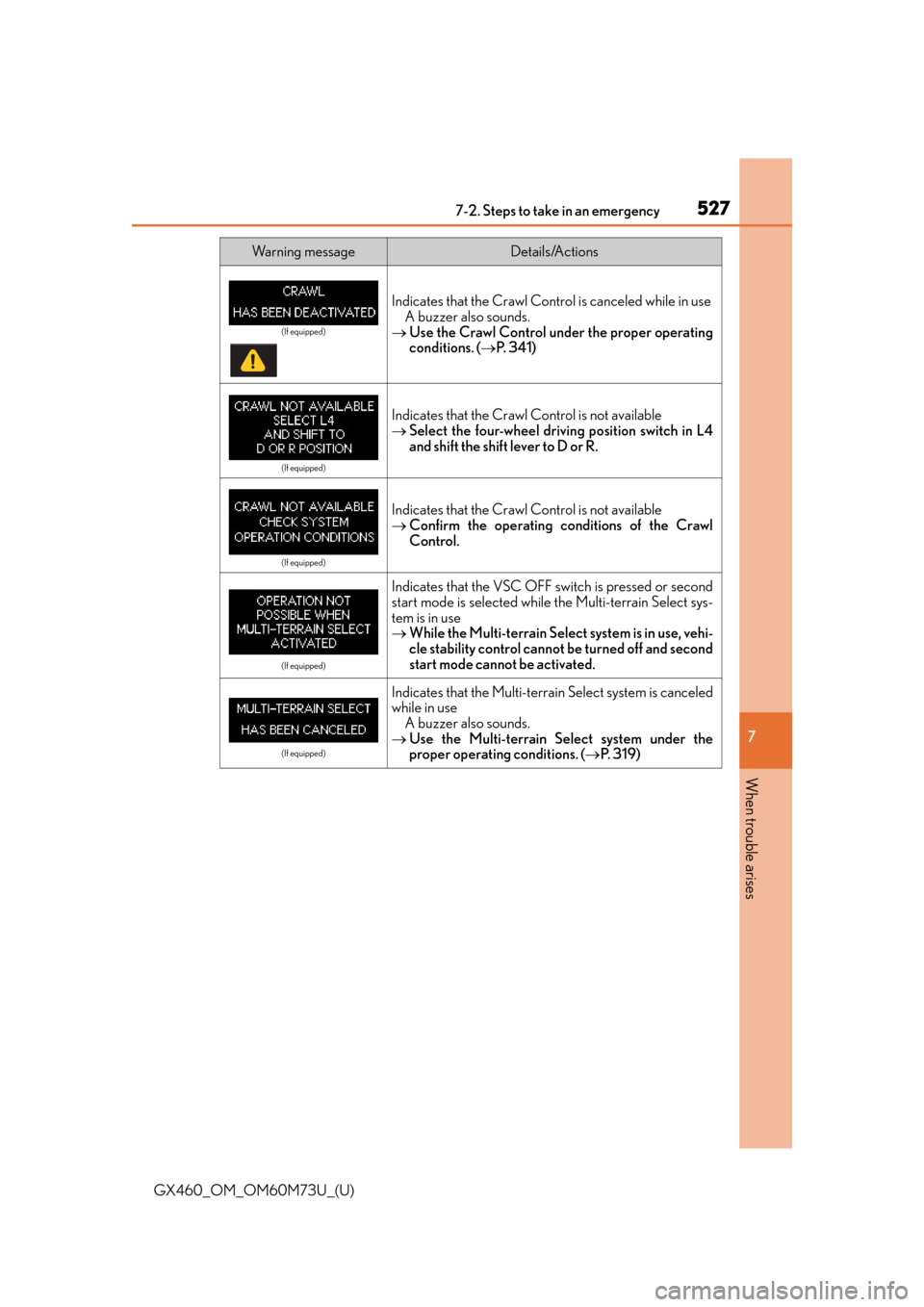
Wa r n i n g m e s s a g eDetails/Actions
Indicates that the Crawl Contro l is canceled while in use
A buzzer also sounds.
Use the Crawl Control under the proper operating
conditions. ( P. 3 4 1 )
(If equipped)
Indicates that the Crawl Control is not available
Select the four-wheel driv ing position switch in L4
and shift the shift lever to D or R.
(If equipped)
Indicates that the Crawl Control is not available
Confirm the operating conditions of the Crawl
Control.
(If equipped)
Indicates that the VSC OFF switch is pressed or second
start mode is selected while the Multi-terrain Select sys-
tem is in use
While the Multi-terrain Select system is in use, vehi-
cle stability control cannot be turned off and second
start mode cannot be activated.
(If equipped)
Indicates that the Multi-terrain Select system is canceled
while in use
A buzzer also sounds.
Use the Multi-terrain Se lect system under the
proper operating conditions. ( P. 3 1 9 )
(If equipped)
Page 529 of 632
5297-2. Steps to take in an emergency
GX460_OM_OM60M73U_(U)
7
When trouble arises
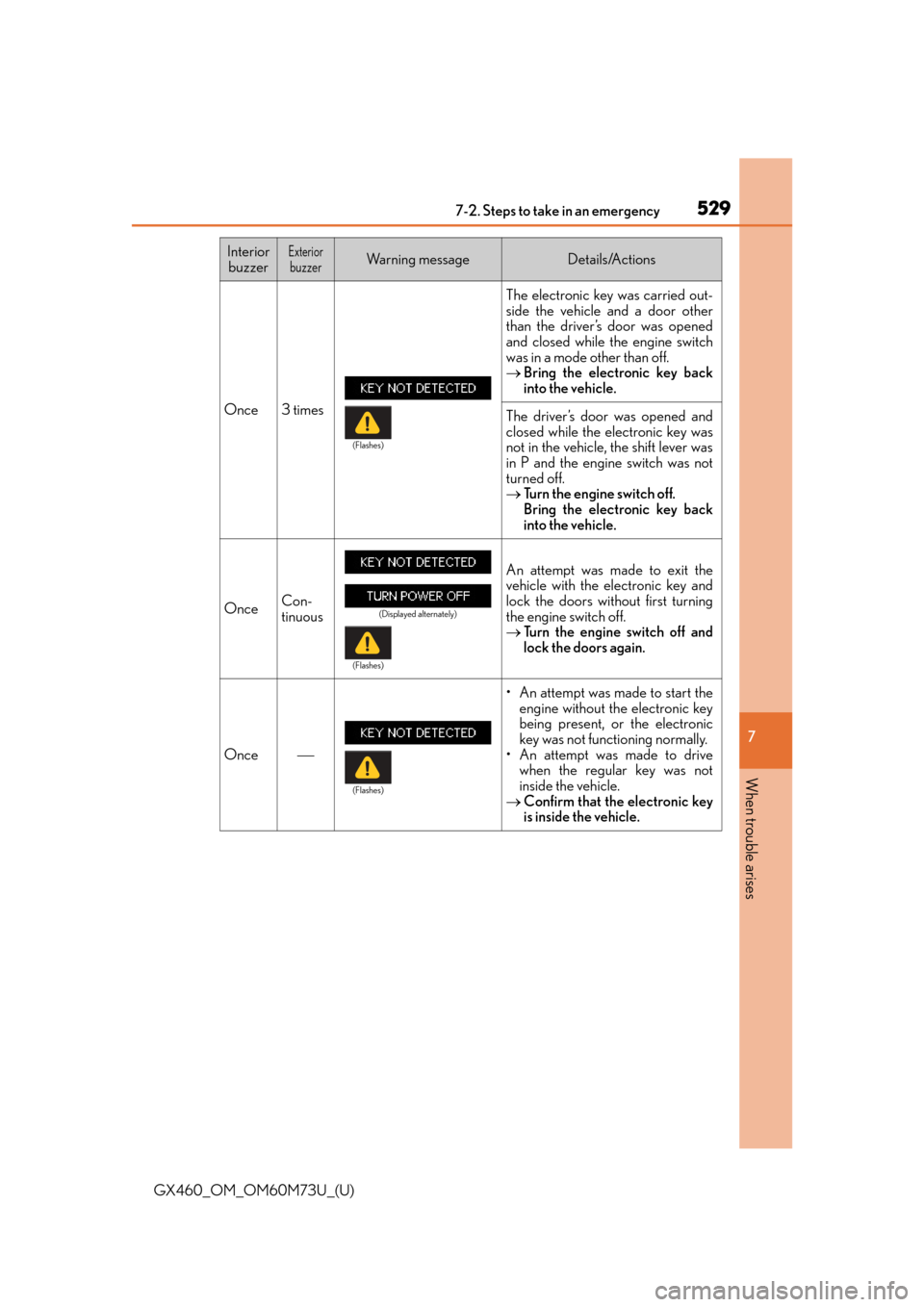
Interior buzzerExteriorbuzzerWa r n i n g m e s s a g eDetails/Actions
Once 3 times The electronic key was carried out-
side the vehicle and a door other
than the driver’s door was opened
and closed while the engine switch
was in a mode other than off.
Bring the electronic key back
into the vehicle.
The driver’s door was opened and
closed while the electronic key was
not in the vehicle, the shift lever was
in P and the engine switch was not
turned off.
Turn the engine switch off.
Bring the electronic key back
into the vehicle.
OnceCon-
tinuous
An attempt was made to exit the
vehicle with the electronic key and
lock the doors without first turning
the engine switch off.
Tu r n t h e e n g i n e s w i t c h o f f a n d
lock the doors again.
Once
• An attempt was made to start the
engine without the electronic key
being present, or the electronic
key was not functioning normally.
• An attempt was made to drive when the regular key was not
inside the vehicle.
Confirm that the electronic key
is inside the vehicle.
(Flashes)
(Displayed alternately)
(Flashes)
(Flashes)
Page 530 of 632
5307-2. Steps to take in an emergency
GX460_OM_OM60M73U_(U)
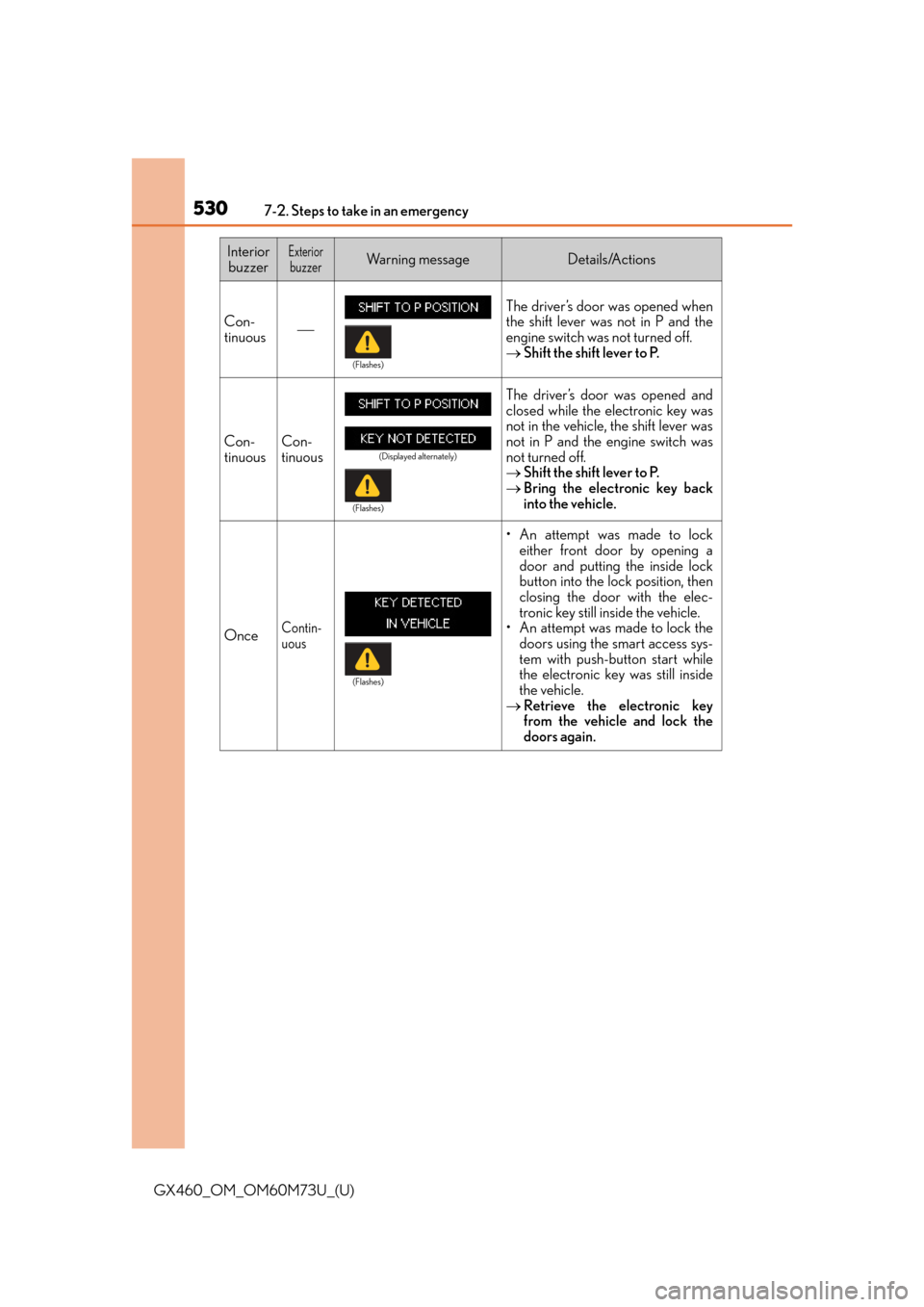
Con-
tinuous
The driver’s door was opened when
the shift lever was not in P and the
engine switch was not turned off.
Shift the shift lever to P.
Con-
tinuousCon-
tinuous
The driver’s door was opened and
closed while the electronic key was
not in the vehicle, the shift lever was
not in P and the engine switch was
not turned off.
Shift the shift lever to P.
Bring the electronic key back
into the vehicle.
OnceContin-
uous
• An attempt was made to lock
either front door by opening a
door and putting the inside lock
button into the lock position, then
closing the door with the elec-
tronic key still inside the vehicle.
• An attempt was made to lock the doors using the smart access sys-
tem with push-button start while
the electronic key was still inside
the vehicle.
Retrieve the electronic key
from the vehicle and lock the
doors again.
Interior
buzzerExteriorbuzzerWa r n i n g m e s s a g eDetails/Actions
(Flashes)
(Displayed alternately)
(Flashes)
(Flashes)
Page 532 of 632
5327-2. Steps to take in an emergency
GX460_OM_OM60M73U_(U)
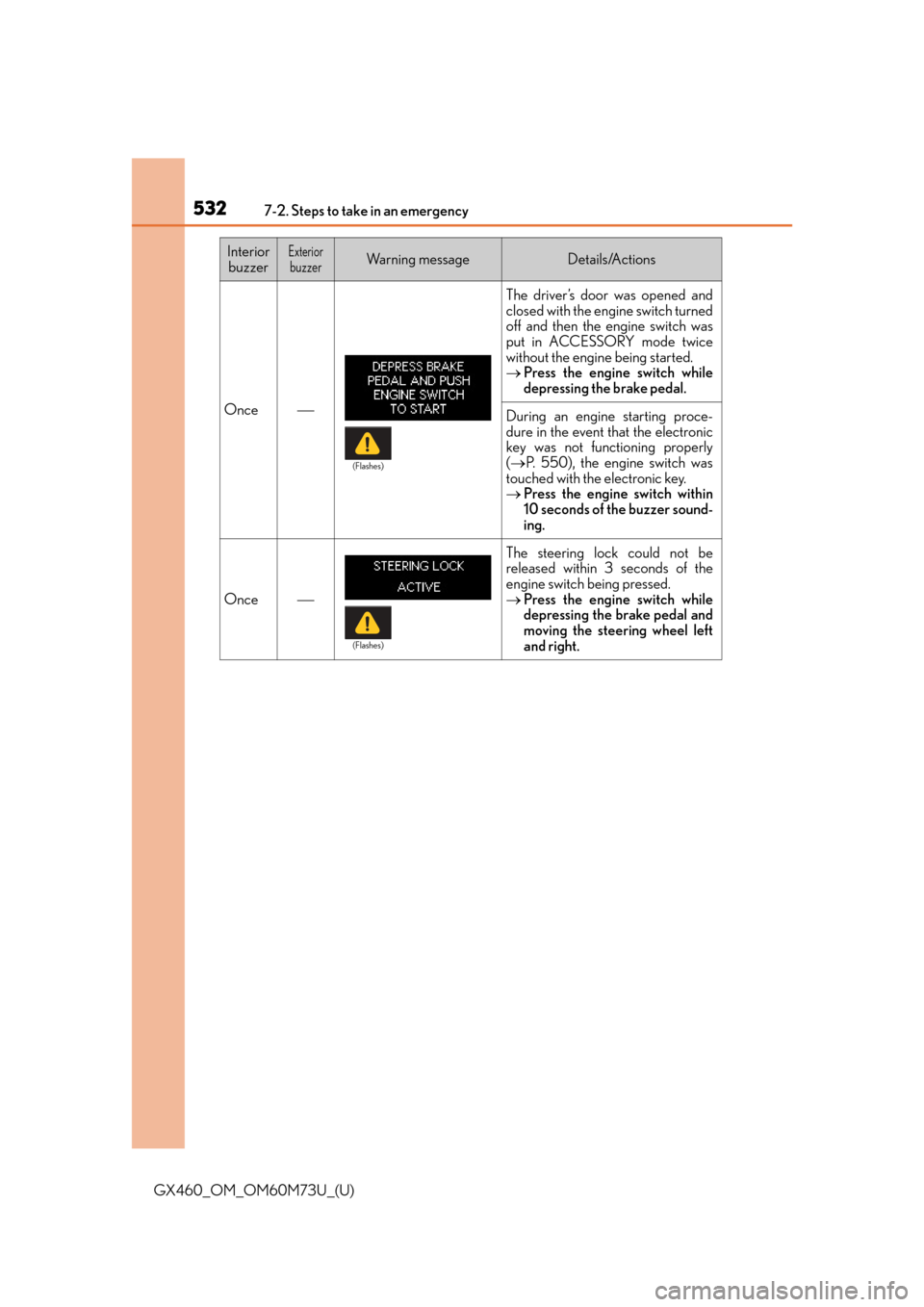
Once
The driver’s door was opened and
closed with the engine switch turned
off and then the engine switch was
put in ACCESSORY mode twice
without the engine being started.
Press the engine switch while
depressing the brake pedal.
During an engine starting proce-
dure in the event that the electronic
key was not functioning properly
( P. 550), the engine switch was
touched with the electronic key.
Press the engine switch within
10 seconds of the buzzer sound-
ing.
Once
The steering lock could not be
released within 3 seconds of the
engine switch being pressed.
Press the engine switch while
depressing the brake pedal and
moving the steering wheel left
and right.
Interior
buzzerExteriorbuzzerWa r n i n g m e s s a g eDetails/Actions
(Flashes)
(Flashes)
Page 551 of 632
5517-2. Steps to take in an emergency
GX460_OM_OM60M73U_(U)
7
When trouble arises
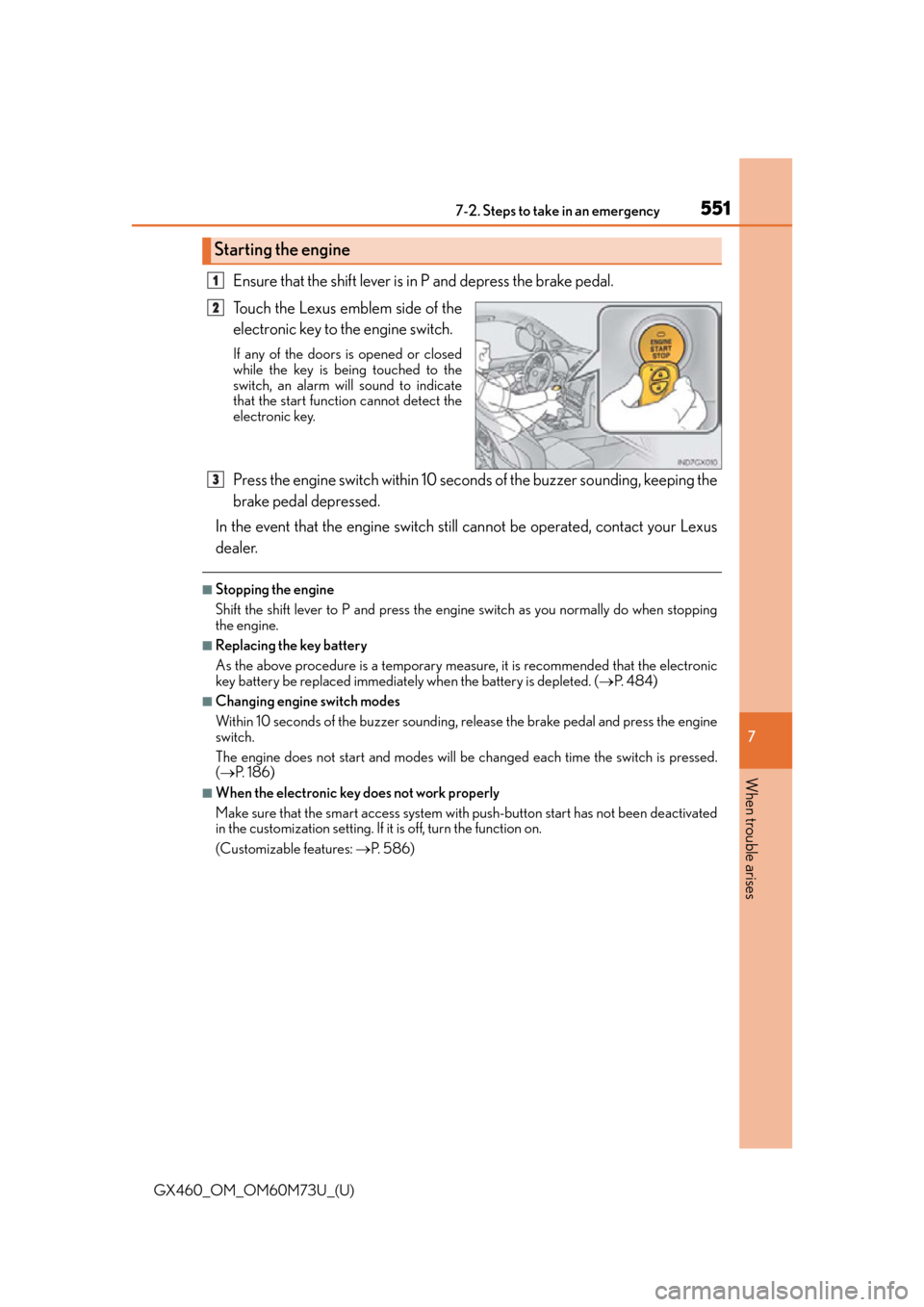
Ensure that the shift lever is in P and depress the brake pedal.
Touch the Lexus emblem side of the
electronic key to the engine switch.
If any of the doors is opened or closed
while the key is being touched to the
switch, an alarm will sound to indicate
that the start function cannot detect the
electronic key.
Press the engine switch within 10 seco nds of the buzzer sounding, keeping the
brake pedal depressed.
In the event that the engine switch st ill cannot be operated, contact your Lexus
dealer.
■Stopping the engine
Shift the shift lever to P and press the engine switch as you normally do when stopping
the engine.
■Replacing the key battery
As the above procedure is a temporary measure, it is recommended that the electronic
key battery be replaced immediately when the battery is depleted. ( P. 4 8 4 )
■Changing engine switch modes
Within 10 seconds of the buzzer sounding, release the brake pedal and press the engine
switch.
The engine does not start and modes will be changed each time the switch is pressed.
( P. 1 8 6 )
■When the electronic key does not work properly
Make sure that the smart access system with push-button start has not been deactivated
in the customization setting. If it is off, turn the function on.
(Customizable features: P. 5 8 6 )
Starting the engine
1
2
3
Page 554 of 632
5547-2. Steps to take in an emergency
GX460_OM_OM60M73U_(U)
Start the engine of the second vehicle. Increase the engine speed slightly and
maintain at that level for approximately 5 minutes to recharge the battery of
your vehicle.
Open and close any of the doors of your vehicle with the engine switch off.
Maintain the engine speed of the second vehicle and start the engine of your
vehicle by turning the engine switch to IGNITION ON mode.
Once your vehicle’s engine has started, remove the jumper cables in the exact
reverse order in which they were connected.
Once the engine starts, have the vehicle checked at your Lexus dealer as soon
as possible.
■Starting the engine when the battery is discharged
The engine cannot be started by push-starting.
■To prevent battery discharge
●Turn off the headlights and the audio system while the engine is off.
●Turn off any unnecessary electrical components when the vehicle is running at a low
speed for an extended period, such as in heavy traffic.
■Charging the battery
The electricity stored in the battery will discharge gradually even when the vehicle is not
in use, due to natural discharg e and the draining effects of certain electrical appliances. If
the vehicle is left for a long time, the battery may discharge, and the engine may be
unable to start. (The battery recharges automatically during driving.)
■When recharging or replacing the battery
●In some cases, it may not be possible to unlock the doors using the smart access system
with push-button start when the battery is discharged. Use the wireless remote control
or the mechanical key to lock or unlock the doors.
●The engine may not start on the first attempt after the battery has recharged but will
start normally after the second attempt. This is not a malfunction.
●The engine switch mode is memorized by the vehicle. When the battery is recon-
nected, the system will return to the mode it was in before the battery was discharged.
Before disconnecting the battery, turn the engine switch off. If you are unsure what
mode the engine switch was in before the battery discharged, be especially careful
when reconnecting the battery.
4
5
6
7
Page 559 of 632
559
GX460_OM_OM60M73U_(U)
7
When trouble arises
7-2. Steps to take in an emergency
If the vehicle becomes stuck
Stop the engine. Set the parking brake and shift the shift lever to P.
Remove the mud, snow or sand from around the stuck tire.
Place wood, stones or some other material under the tires to help provide
traction.
Restart the engine.
Lock the center differential. (P. 3 3 7 )
Shift the shift lever to the D or R position and release the parking brake. Then,
while exercising caution, depress the accelerator pedal.
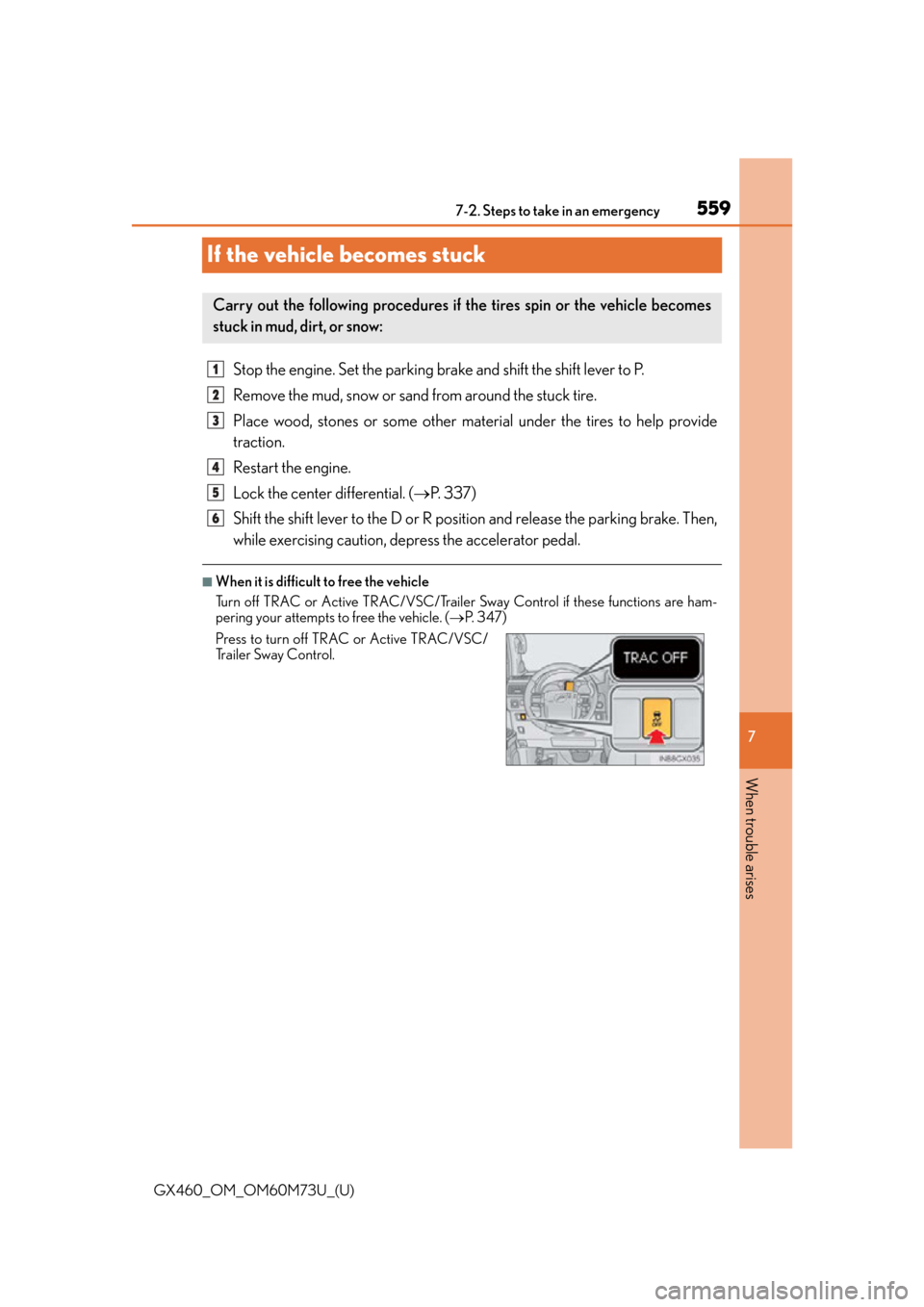
■When it is difficult to free the vehicle
Turn off TRAC or Active TRAC/VSC/Trailer Sway Control if these functions are ham-
pering your attempts to free the vehicle. ( P. 3 4 7 )
Carry out the following procedures if the tires spin or the vehicle becomes
stuck in mud, dirt, or snow:
Press to turn off TRAC or Active TRAC/VSC/
Trailer Sway Control.
1
2
3
4
5
6
Page 591 of 632
GX460_OM_OM60M73U_(U)
5918-2. Customization
8
Vehicle specifications
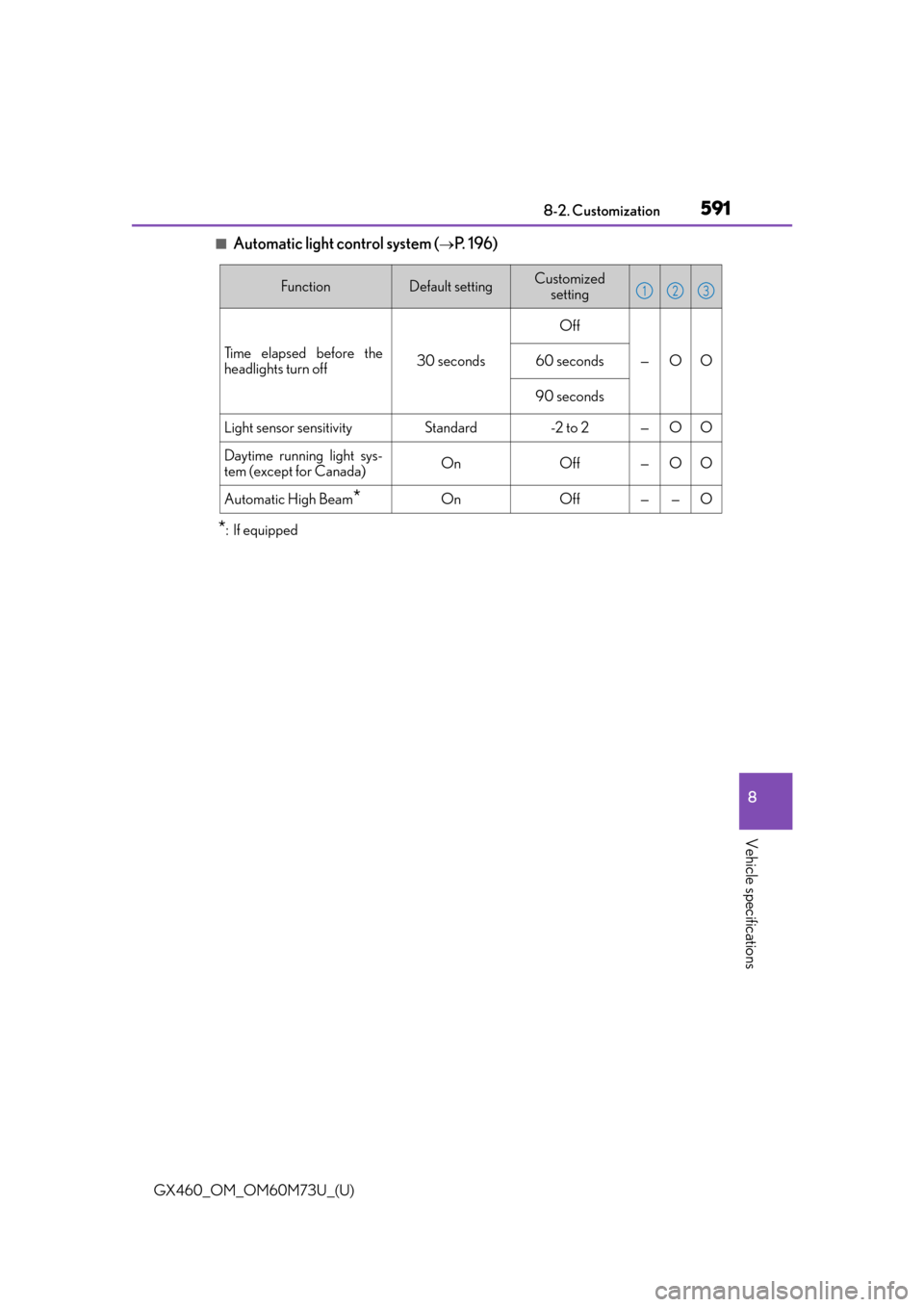
■Automatic light control system (P. 1 9 6 )
*:If equipped
FunctionDefault settingCustomized setting
Time elapsed before the
headlights turn off30 seconds
Off
—OO60 seconds
90 seconds
Light sensor sensitivityStandard-2 to 2—OO
Daytime running light sys-
tem (except for Canada)OnOff—OO
Automatic High Beam*OnOff——O
123