vehicle Lexus GX460 2017 Owner's Manual
[x] Cancel search | Manufacturer: LEXUS, Model Year: 2017, Model line: GX460, Model: Lexus GX460 2017Pages: 644, PDF Size: 20.93 MB
Page 365 of 644
GX 460 _O M_ OM6 0F 6 8U _(U )
3634-5. Using the driving support systems
4
Driving
■The Blind Spot Monitor function is operational when
●The Blind Spot Monitor system turned on.
●Vehicle speed is greater than approximately 10 mph (16 km/h).
■The Blind Spot Monitor function will detect a vehicle when
●A vehicle in an adjacent lane overtakes your vehicle.
●Another vehicle enters the detection area when it changes lanes.
■Conditions under which the Blind Spot Monitor function will not detect a vehicle
The Blind Spot Monitor function is not designed to detect the following types of vehicles
and/or objects:
●Small motorcycles, bicycles, pedestrians etc.*
●Vehicles traveling in the opposite direction
●Guardrails, walls, signs, parked vehicles and similar stationary objects*
●Following vehicles that are in the same lane*
●Vehicles driving 2 lanes across from your vehicle*
*
: Depending on conditions, detection of a vehicle and/or object may occur.
GX460_OM_OM60F68U_(U).book Page 363 Wednesday, June 8, 2016 6:37 PM
Page 366 of 644
364
GX 460 _O M_ OM6 0F 6 8U _(U )4-5. Using the driving support systems
■Conditions under which the Blind Spot Monitor function may not function correctly
●The Blind Spot Monitor function may not detect vehicles correctly in the following con-
ditions:
• During bad weather such as heavy rain, fog, snow etc.
• When ice or mud etc. is attached to the rear bumper
• When driving on a road surface that is wet due to rain, standing water etc.
• When there is a significant difference in speed between your vehicle and the vehicle
that enters the detection area
• When a vehicle is in the detection area from a stop and remains in the detection
area as your vehicle accelerates
• When driving up or down consecutive steep inclines, such as hills, a dip in the road
etc.
• When multiple vehicles approach with only a small gap between each vehicle
• When vehicle lanes are wide, and the vehicle in the next lane is too far away from your vehicle
• When the vehicle that enters the detection area is traveling at about the same speed as your vehicle
• When there is a significant difference in height between your vehicle and the vehicle
that enters the detection area
• Directly after the Blind Spot Monitor system turned on
• When your vehicle is towing a trailer
• When items such as a bicycle carrier are installed on the rear of the vehicle
●Instances of the Blind Spot Monitor function unnecessarily detecting a vehicle and/or
object may increase under the following conditions:
• When there is only a short distance between your vehicle and a guardrail, wall etc.
• When there is only a short distance between your vehicle and a following vehicle
• When vehicle lanes are narrow and a vehicle driving 2 lanes across from your vehi- cle enters the detection area
• When items such as a bicycle carrier are installed on the rear of the vehicle
GX460_OM_OM60F68U_(U).book Page 364 Wednesday, June 8, 2016 6:37 PM
Page 367 of 644
GX 460 _O M_ OM6 0F 6 8U _(U )
3654-5. Using the driving support systems
4
Driving
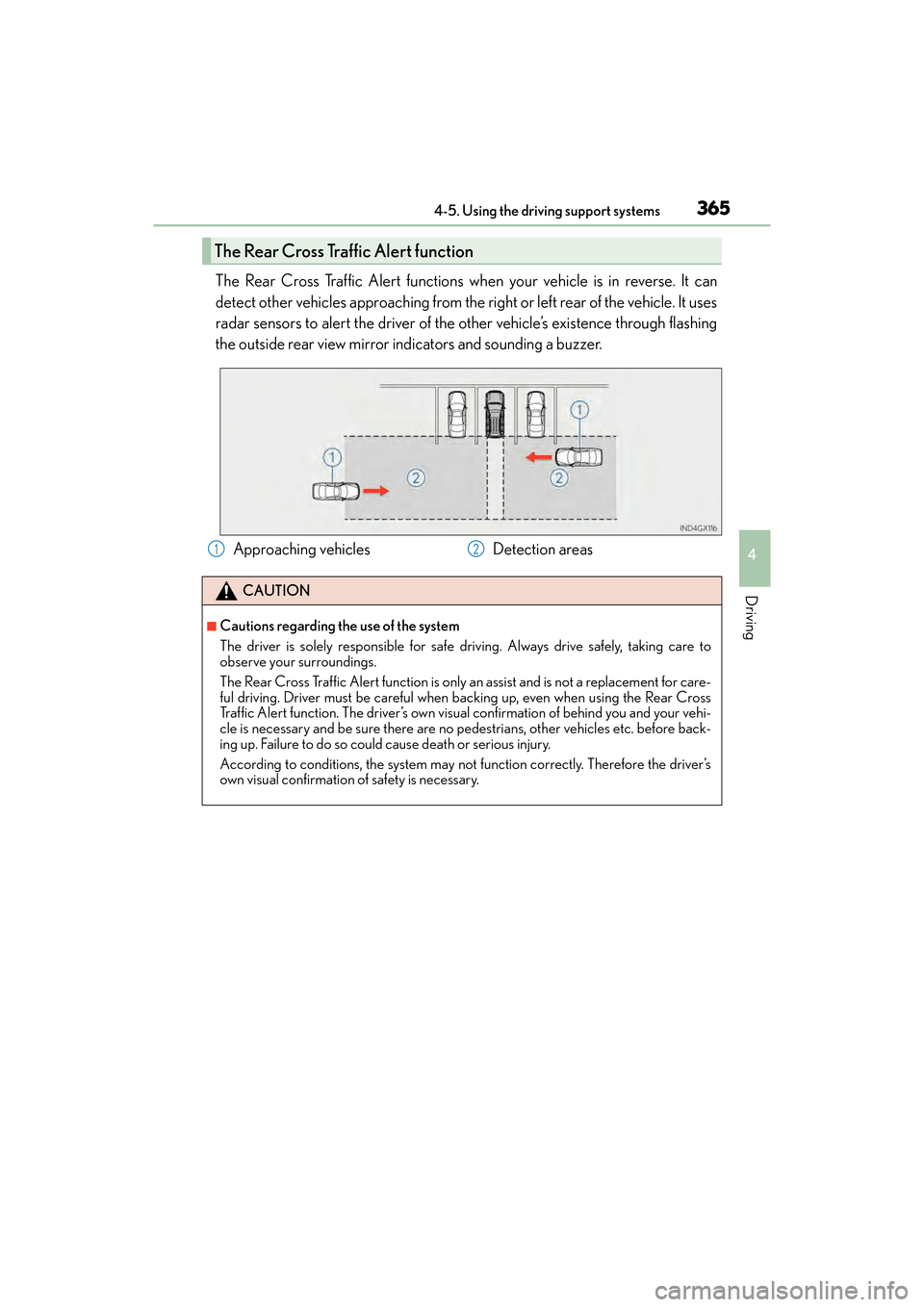
The Rear Cross Traffic Alert functions when your vehicle is in reverse. It can
detect other vehicles approaching from the right or left rear of the vehicle. It uses
radar sensors to alert the driver of the other vehicle’s existence through flashing
the outside rear view mirror indicators and sounding a buzzer.
The Rear Cross Traffic Alert function
Approaching vehiclesDetection areas
CAUTION
■Cautions regarding the use of the system
The driver is solely responsible for safe driving. Always drive safely, taking care to
observe your surroundings.
The Rear Cross Traffic Alert function is only an assist and is not a replacement for care-
ful driving. Driver must be careful when backing up, even when using the Rear Cross
Traffic Alert function. The driver’s own visual confirmation of behind you and your vehi-
cle is necessary and be sure there are no pedestrians, other vehicles etc. before back-
ing up. Failure to do so could cause death or serious injury.
According to conditions, the system may not function correctly. Therefore the driver’s
own visual confirmation of safety is necessary.
12
GX460_OM_OM60F68U_(U).book Page 365 Wednesday, June 8, 2016 6:37 PM
Page 368 of 644
366
GX 460 _O M_ OM6 0F 6 8U _(U )4-5. Using the driving support systems
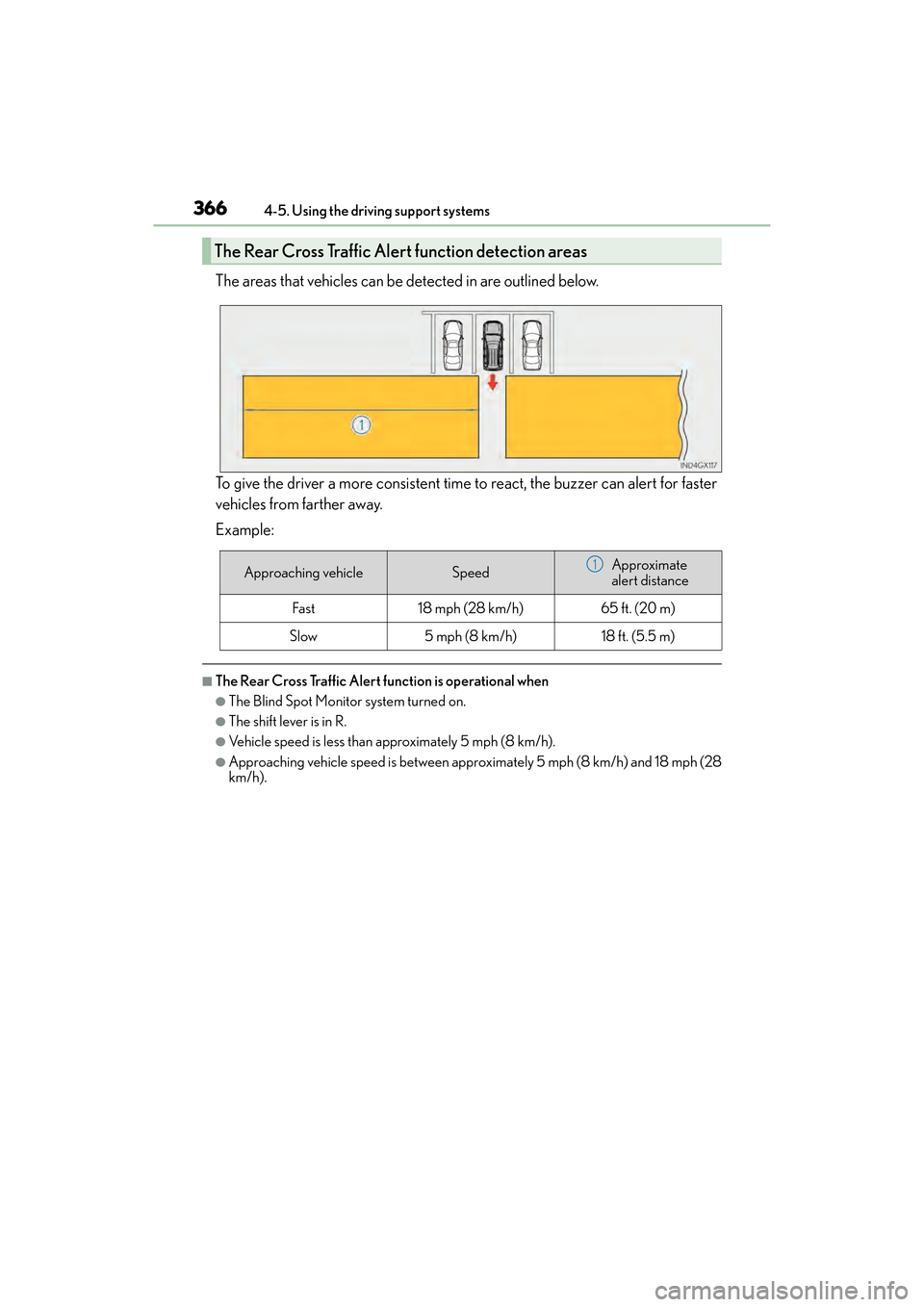
The areas that vehicles can be detected in are outlined below.
To give the driver a more consistent time to react, the buzzer can alert for faster
vehicles from farther away.
Example:
■The Rear Cross Traffic Alert function is operational when
●The Blind Spot Monitor system turned on.
●The shift lever is in R.
●Vehicle speed is less than approximately 5 mph (8 km/h).
●Approaching vehicle speed is between approximately 5 mph (8 km/h) and 18 mph (28
km/h).
The Rear Cross Traffic Alert function detection areas
Approaching vehicleSpeedApproximate
alert distance
Fast18 mph (28 km/h)65 ft. (20 m)
Slow5 mph (8 km/h)18 ft. (5.5 m)
1
GX460_OM_OM60F68U_(U).book Page 366 Wednesday, June 8, 2016 6:37 PM
Page 369 of 644

GX 460 _O M_ OM6 0F 6 8U _(U )
3674-5. Using the driving support systems
4
Driving
■Conditions under which the Rear Cross Traffic Alert function will not detect a vehicle
The Rear Cross Traffic Alert function is not designed to detect the following types of
vehicles and/or objects.
●Small motorcycles, bicycles, pedestrians etc.*
●Vehicles approaching from directly behind
●Guardrails, walls, signs, parked vehicles and similar stationary objects*
●Vehicles moving away from your vehicle
●Vehicles approaching from the parking spaces next to your vehicle*
●Vehicles backing up in the parking space next to your vehicle*
*
: Depending on conditions, detection of a vehicle and/or object may occur.
■Conditions under which the Rear Cross Traffic Alert function may not function cor-
rectly
The Rear Cross Traffic Alert function may not detect vehicles correctly in the following
conditions:
●During bad weather such as heavy rain, fog, snow etc.
●When ice or mud etc. is attached to the rear bumper
●When multiple vehicles approach continuously
●Shallow angle parking
●When a vehicle is approaching at high speed
●When parking on a steep incline, such as hills, a dip in the road etc.
●Directly after the Blind Spot Monitor system turned on
●When your vehicle is towing a trailer
●When items such as a bicycle carrier are installed on the rear of the vehicle
●Directly after the engine is started with the BSM main switch on
●When the sensors cannot detect vehicles
because of obstacles
GX460_OM_OM60F68U_(U).book Page 367 Wednesday, June 8, 2016 6:37 PM
Page 370 of 644
368
GX 460 _O M_ OM6 0F 6 8U _(U )4-5. Using the driving support systems
PCS (Pre-Collision system)∗
◆Pre-collision seat belts (front seat belts only)
If the system detects that a collision is unavoidable, the system will retract the
seat belt before the collision occurs.
The same will happen if the driver makes an emergency braking or loses con-
trol of the vehicle. (
→P. 3 1 )
However, when the VSC system is disabled, the system will not operate in the
event of skidding.
◆Pre-collision brake assist
When there is a high possibility of a frontal collision, the system applies
greater braking force in relation to how strongly the brake pedal is depressed.
◆Pre-collision braking
When there is a high possibility of a frontal collision, the system warns the
driver using a warning light, warning display and buzzer. If the system deter-
mines that a collision is unavoidable, the brakes are automatically applied to
reduce the collision speed. Pre-collision braking can be disabled using the
pre-collision braking off switch.
◆AVS (Adaptive Variable Suspension System) control (if equipped)
When the system determines that there is a high possibility of a frontal colli-
sion, the AVS optimizes the damping effect ( →P. 3 4 1 )
∗: If equipped
When the radar sensor detects possibility of a frontal collision, the pre-colli-
sion system such as the brakes and seat belts are automatically engaged to
lessen impact as well as vehicle damage.
GX460_OM_OM60F68U_(U).book Page 368 Wednesday, June 8, 2016 6:37 PM
Page 371 of 644
GX 460 _O M_ OM6 0F 6 8U _(U )
3694-5. Using the driving support systems
4
Driving
◆Driver monitor system (if equipped)
When the system determines that there is a possibility of a collision with the
vehicle in front, and the driver is not facing forward, PCS warnings are given in
advance to warn the driver. If the driver continues to not be facing forward,
and a high possibility of a collision with the vehicle in front is detected, PCS
informs the driver of high possibility of a collision with the vehicle in front by
performing slight braking to provide a physical warning (pre-collision alert
braking).
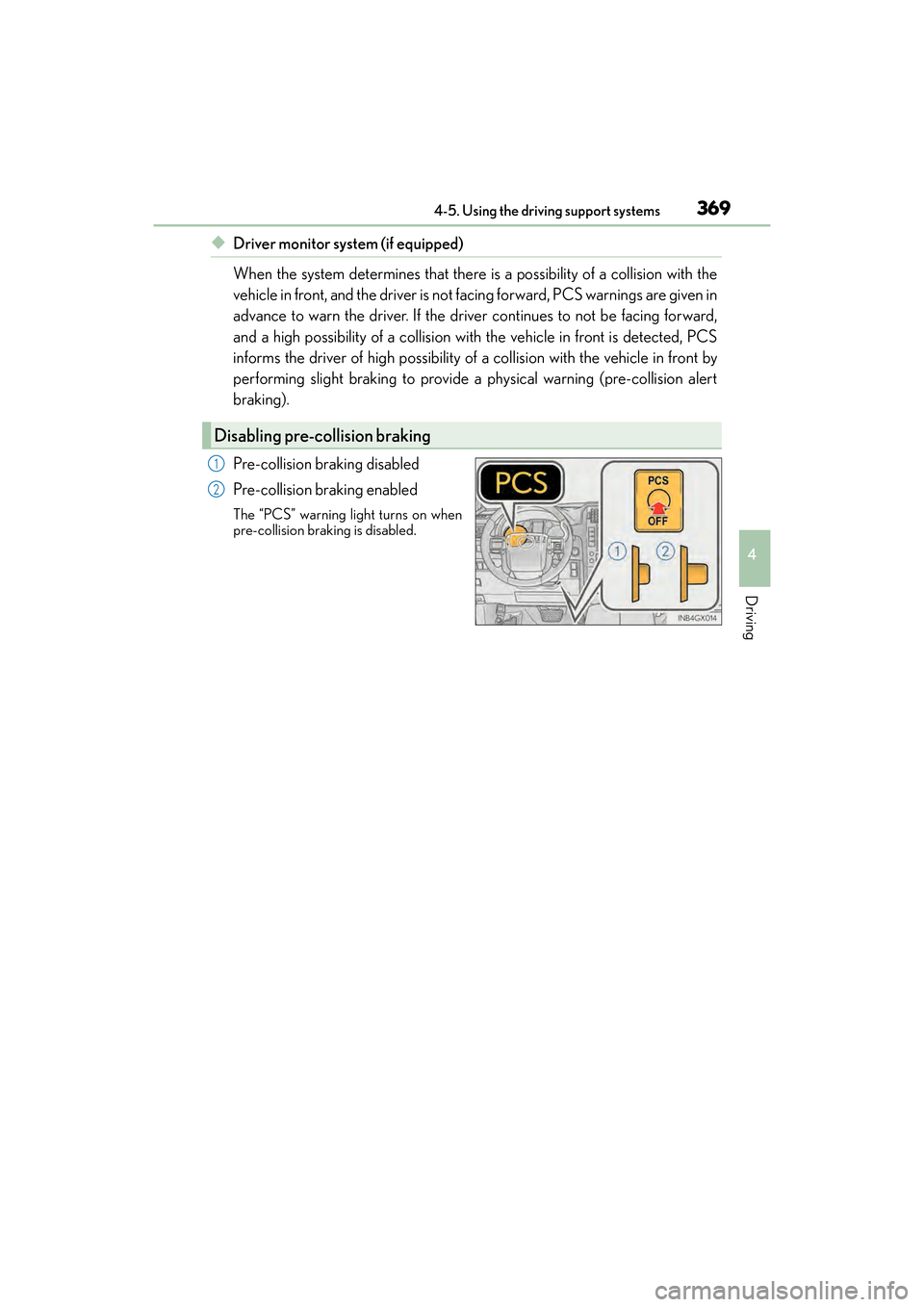
Pre-collision braking disabled
Pre-collision braking enabled
The “PCS” warning light turns on when
pre-collision braking is disabled.
Disabling pre-collision braking
1
2
GX460_OM_OM60F68U_(U).book Page 369 Wednesday, June 8, 2016 6:37 PM
Page 372 of 644
370
GX 460 _O M_ OM6 0F 6 8U _(U )4-5. Using the driving support systems
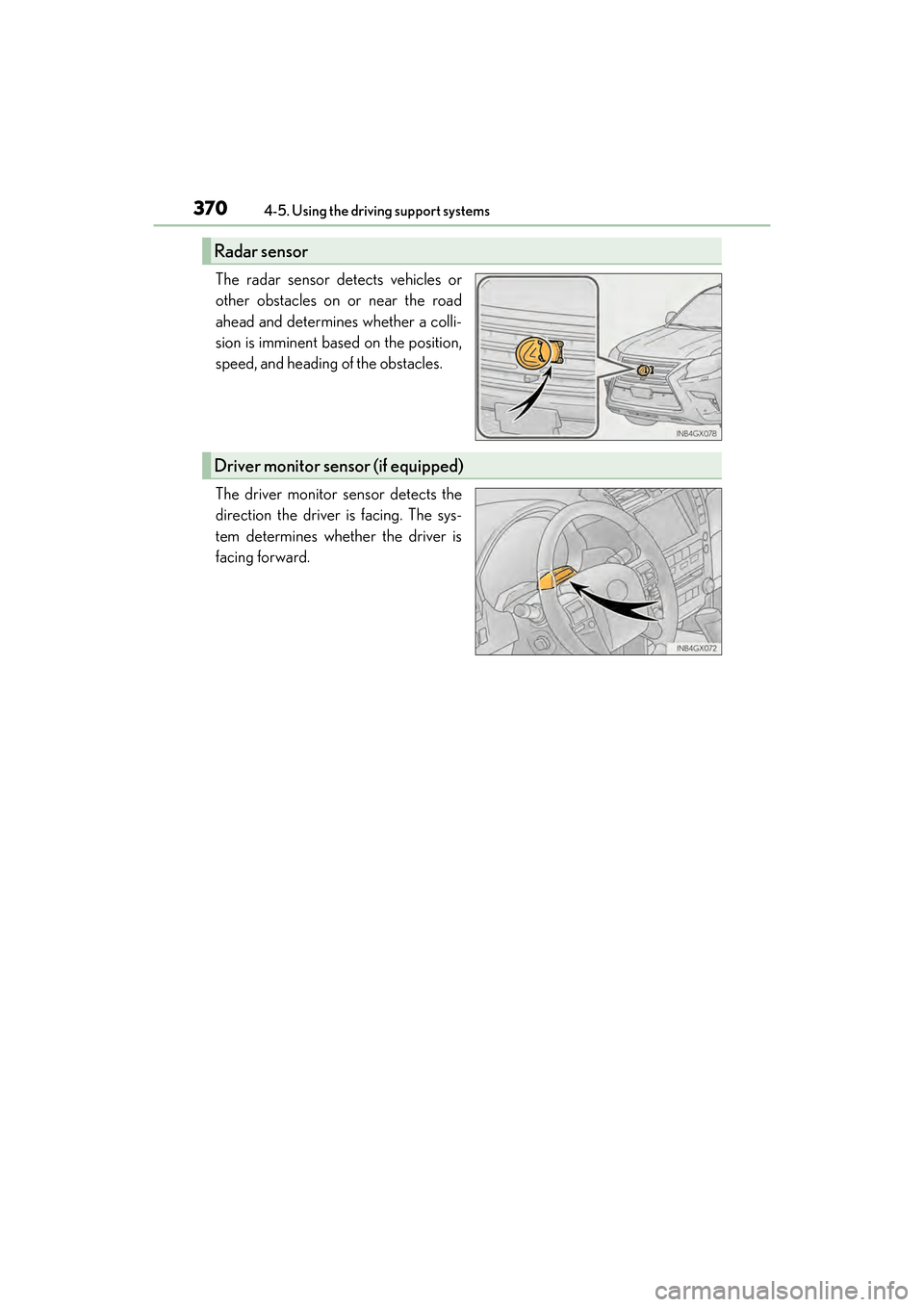
The radar sensor detects vehicles or
other obstacles on or near the road
ahead and determines whether a colli-
sion is imminent based on the position,
speed, and heading of the obstacles.
The driver monitor sensor detects the
direction the driver is facing. The sys-
tem determines whether the driver is
facing forward.
Radar sensor
Driver monitor sensor (if equipped)
GX460_OM_OM60F68U_(U).book Page 370 Wednesday, June 8, 2016 6:37 PM
Page 373 of 644
GX 460 _O M_ OM6 0F 6 8U _(U )
3714-5. Using the driving support systems
4
Driving
■The pre-collision system is operational when
●Pre-collision seat belts (situation 1):
• Vehicle speed is greater than about 4 mph (5 km/h).
• The speed at which your vehicle is approaching the obstacle or the vehicle running
ahead of you is greater than about 19 mph (30 km/h).
• The front occupants are wearing a seat belt.
●Pre-collision seat belts (situation 2):
• Vehicle speed is greater than about 19 mph (30 km/h).
• The system detects sudden braking or skidding.
• The front occupants are wearing a seat belt.
●Pre-collision brake assist:
• Vehicle speed is greater than about 19 mph (30 km/h).
• The speed at which your vehicle is approaching the obstacle or the vehicle running ahead of you is greater than about 19 mph (30 km/h).
• The brake pedal is depressed.
●Pre-collision braking:
• The pre-collision braking off switch is not pressed.
• Vehicle speed is greater than about 10 mph (15 km/h).
• The speed at which your vehicle is approaching the obstacle or the vehicle running ahead of you is greater than about 10 mph (15 km/h).
●AVS (Adaptive Variable Suspension System) control (if equipped):
• Vehicle speed is greater than about 4 mph (5 km/h).
• The speed at which your vehicle is approaching the obstacle or the vehicle runningahead of you is greater than about 19 mph (30 km/h).
●Pre-collision alert braking (vehicles with driver monitor system):
• The system determines that the driver is not facing forward.
• The speed at which your vehicle is approaching the vehicle running ahead of you isgreater than about 25 mph (40 km/h).
• Vehicle speed is greater than about 25 mph (40 km/h).
• The pre-collision braking off switch is not pressed.
• The steering is not being turned.
■Situations in which the pre-collision system does not function properly
The system may not function effectively in situations such as the following:
●On roads with sharp bends or uneven surfaces
●If a vehicle suddenly moves in front of your vehicle, such as at an intersection
●If a vehicle suddenly cuts in front of your vehicle, such as when overtaking
●In inclement weather such as heavy rain, fog, snow or sand storms
●When your vehicle is skidding with the VSC system off
●When an extreme change in vehicle height occurs
●When the axis of the radar is out of adjustment
GX460_OM_OM60F68U_(U).book Page 371 Wednesday, June 8, 2016 6:37 PM
Page 374 of 644
372
GX 460 _O M_ OM6 0F 6 8U _(U )4-5. Using the driving support systems
■Automatic cancelation of pre-collision system
When a malfunction occurs due to sensor contaminations, etc. that results in the sensors
being unable to detect obstacles, the pre-collis
ion system will be automatically disabled.
In this case, the system will not activat e even if there is a collision possibility.
■Obstacles not detected
The system cannot detect plastic obstacles such as pylons. There may also be occasions
when the system cannot detect pedestrians, animals, bicycles, motorcycles, trees, or
snowdrifts.
■Conditions that may trigger the system even if there is no possibility of a collision
In any of the following situations where the fr ontal area of the radar sensor is interrupted,
the radar sensor may detect possibility of a frontal collision and the system may be acti-
vated.
●When passing by an oncoming vehicle in a curve or a turn to the right or the left
●When rapidly approaching an obstacle ahead (e.g. preceding vehicle, toll gate barrier,
etc.)
●When there is a structural object (billboard , low ceiling, fluorescent light, etc.) above
the uphill road ahead
●When driving on a narrow road or through under a low overhead structure (bridge,
tunnel, fly-under, etc.)
●When driving on an uneven road surface
●When there is a metal object, bump, or protrusion on the road surface
●When vehicle’s front part is raised or lowered depending on loading conditions
●When the direction of radar sensor is misaligned by strong impact applied on an area
around the radar sensor, etc.
●When there is an obstacle (guard rail, etc.) by the roadside at the entrance to a curve
●When the front of your vehicle is pointing upwards (caused by towing a trailer, during
emergency towing or putting a heavy load in the luggage compartment etc.)
When the system is activated in the situations described above, there is also a possibility
that the seat belts will retract quickly and th e brakes may be applied with a force greater
than normal. When the seat belt is locked in the restricted position, stop the vehicle in a
safe place, release the seat belt and refasten it.
■When there is a malfunction in the system, or if the system is temporarily unusable
Warning lights will turn on or flash, an d warning messages will be displayed.
( → P. 5 2 1 , 5 3 2 )
GX460_OM_OM60F68U_(U).book Page 372 Wednesday, June 8, 2016 6:37 PM