Lock Lexus GX460 2017 Owner's Guide
[x] Cancel search | Manufacturer: LEXUS, Model Year: 2017, Model line: GX460, Model: Lexus GX460 2017Pages: 644, PDF Size: 20.93 MB
Page 76 of 644
741-2. Theft deterrent system
GX 460 _O M_ OM6 0F 6 8U _(U )
Alarm
The alarm uses light and sound to give an alert when an intrusion is detected.
The alarm is triggered in the following situations when the alarm is set:
●A locked door or glass hatch is unlo cked or opened in any way other than
using the entry function, wireless remote control or mechanical key. (The
doors will lock again automatically.)
●The hood is opened.
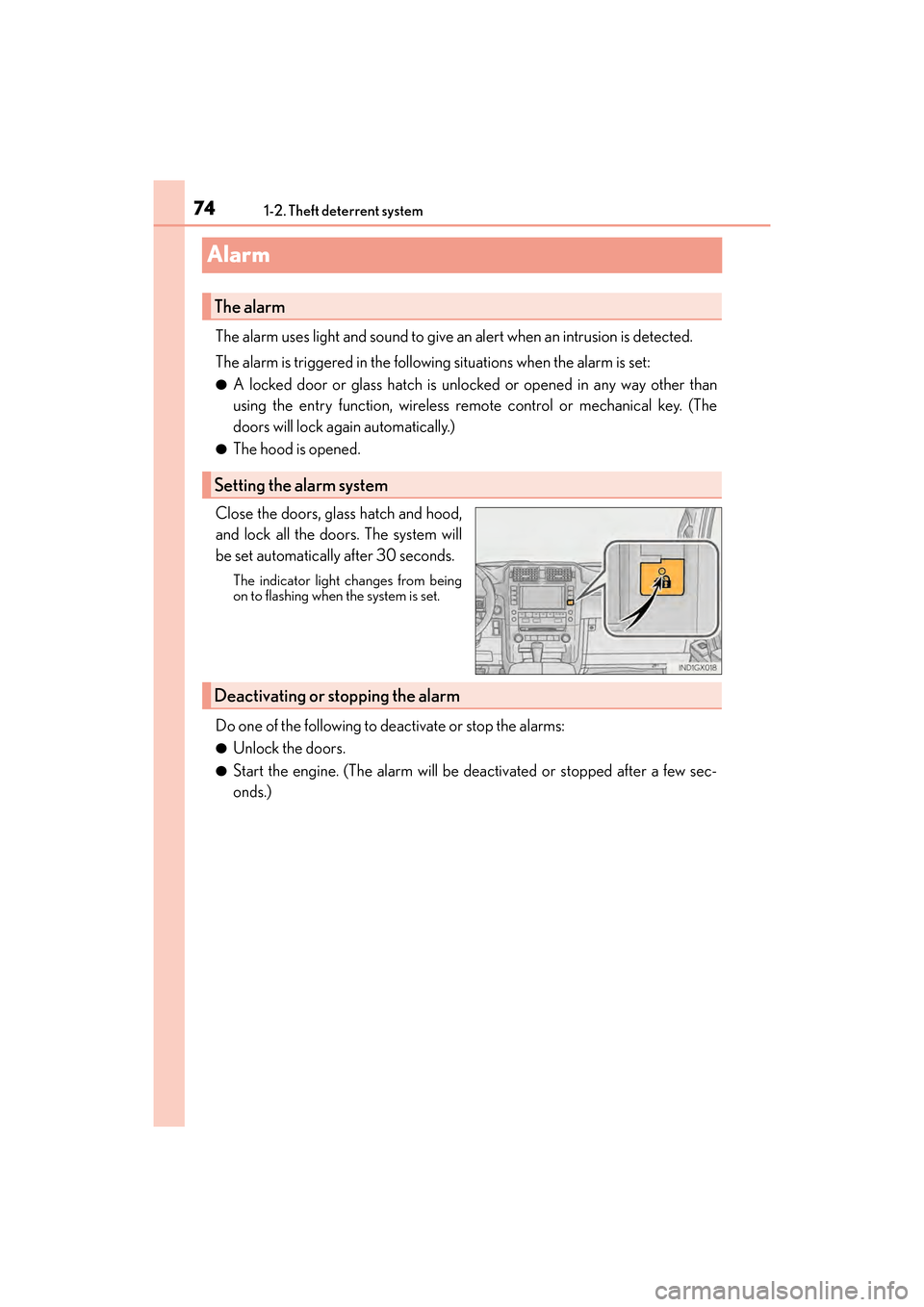
Close the doors, glass hatch and hood,
and lock all the doors. The system will
be set automatically after 30 seconds.
The indicator light changes from being
on to flashing when the system is set.
Do one of the following to deactivate or stop the alarms:
●Unlock the doors.
●Start the engine. (The alarm will be deactivated or stopped after a few sec-
onds.)
The alarm
Setting the alarm system
Deactivating or stopping the alarm
GX460_OM_OM60F68U_(U).book Page 74 Wednesday, June 8, 2016 6:37 PM
Page 77 of 644
751-2. Theft deterrent system
GX 460 _O M_ OM6 0F 6 8U _(U )
1
For safety and security
■System maintenance
The vehicle has a maintenance-free type alarm system.
■Items to check before locking the vehicle
To prevent unexpected triggering of the alarm and vehicle theft, make sure of the follow-
ing.
●Nobody is in the vehicle.
●The windows and moon roof are closed before the alarm is set.
●No valuables or other personal items are left in the vehicle.
■Triggering of the alarm
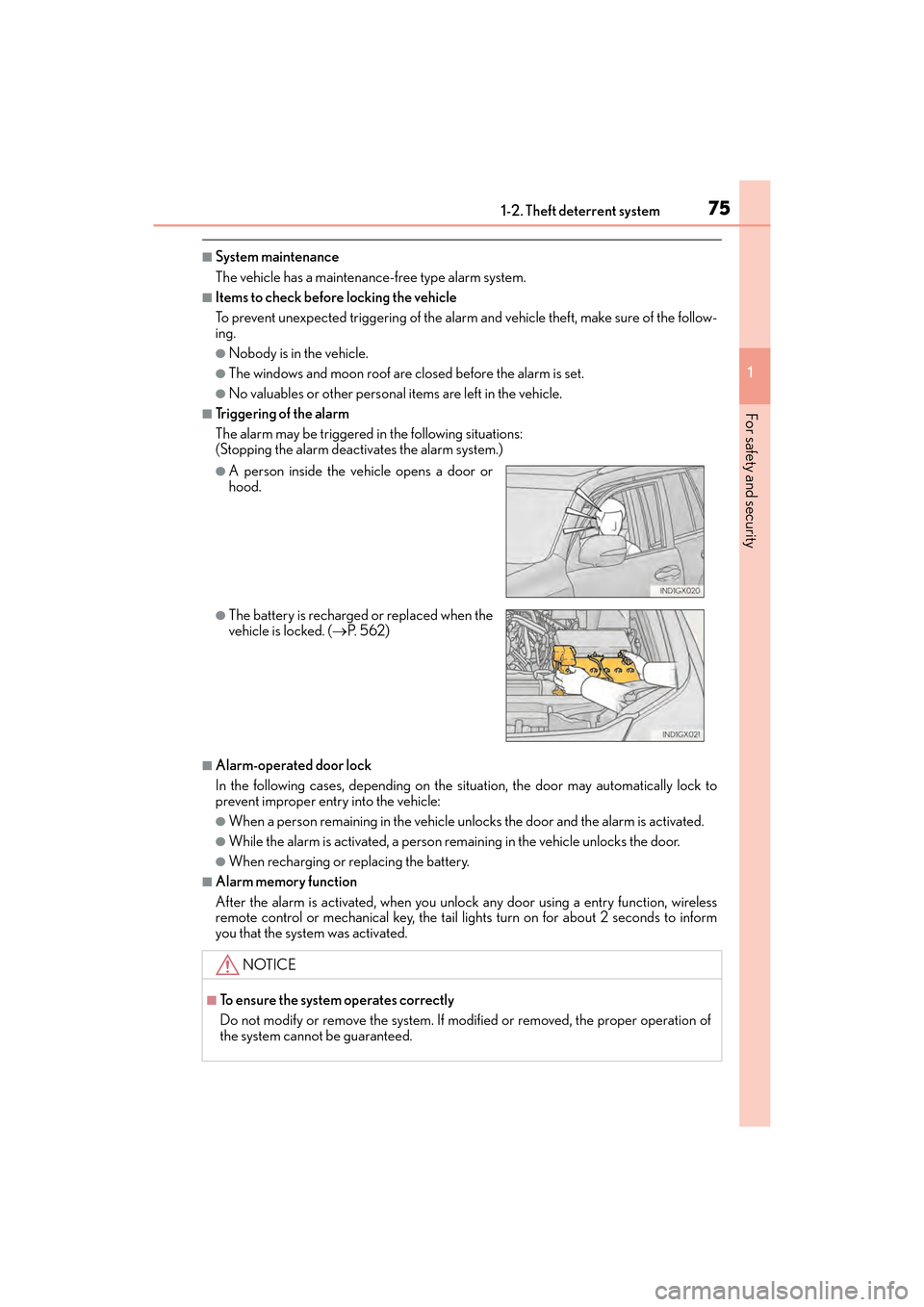
The alarm may be triggered in the following situations:
(Stopping the alarm deactivates the alarm system.)
■Alarm-operated door lock
In the following cases, depending on the situation, the door may automatically lock to
prevent improper entry into the vehicle:
●When a person remaining in the vehicle unlocks the door and the alarm is activated.
●While the alarm is activated, a person remaining in the vehicle unlocks the door.
●When recharging or replacing the battery.
■Alarm memory function
After the alarm is activated, when you unlock any door using a entry function, wireless
remote control or mechanical key, the tail lights turn on for about 2 seconds to inform
you that the system was activated.
●A person inside the vehicle opens a door or
hood.
●The battery is recharged or replaced when the
vehicle is locked. (→P. 5 6 2 )
NOTICE
■To ensure the system operates correctly
Do not modify or remove the system. If modified or removed, the proper operation of
the system cannot be guaranteed.
GX460_OM_OM60F68U_(U).book Page 75 Wednesday, June 8, 2016 6:37 PM
Page 81 of 644
GX 460 _O M_ OM6 0F 6 8U _(U )
792. Instrument cluster
2
Instrument cluster
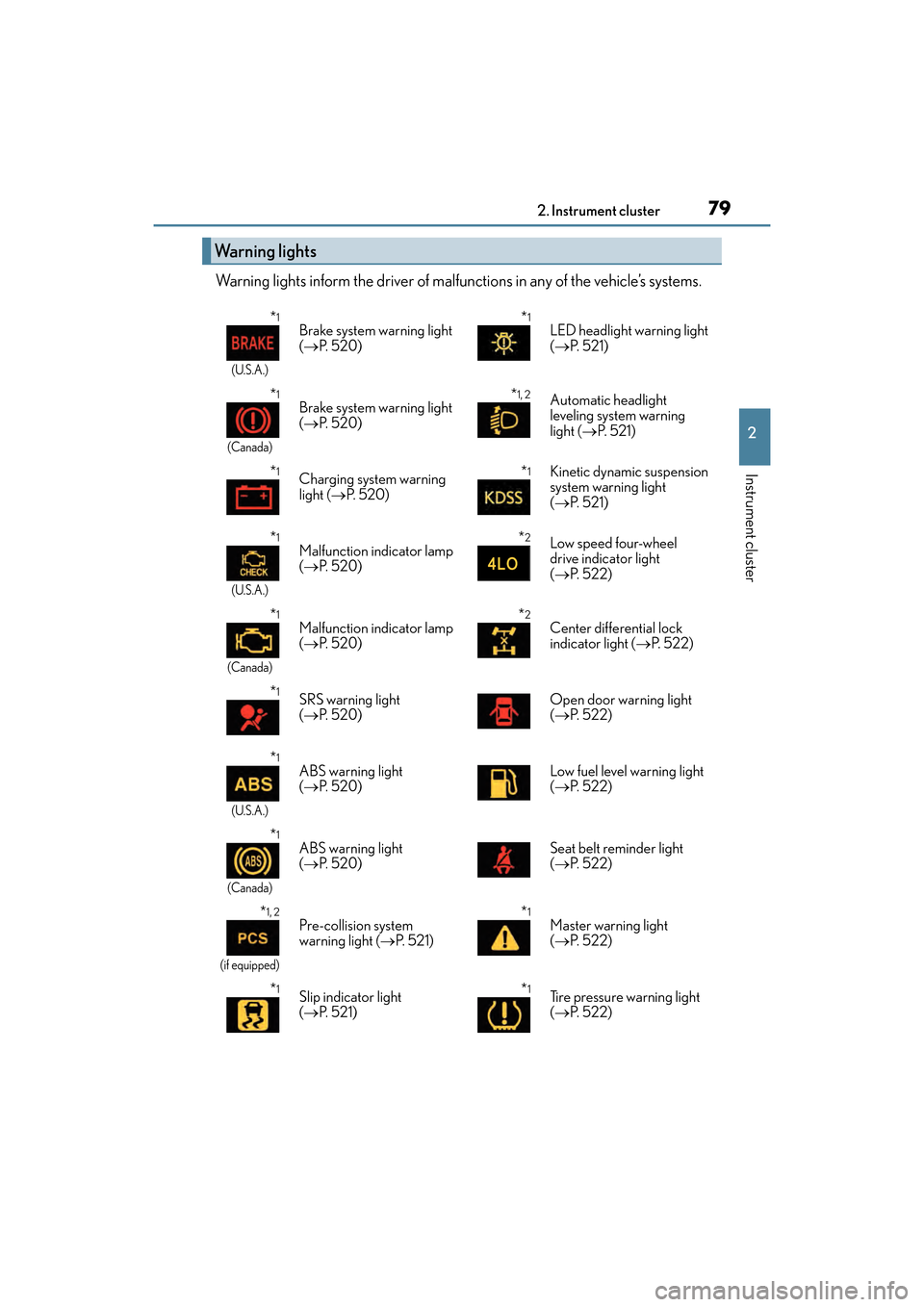
Warning lights inform the driver of malfunctions in any of the vehicle’s systems.
Warning lights
*1
(U.S.A.)
Brake system warning light
(→ P. 5 2 0 )*1LED headlight warning light
(→ P. 5 2 1 )
*1
(Canada)
Brake system warning light
(→ P. 5 2 0 )*1, 2Automatic headlight
leveling system warning
light ( →P. 5 2 1 )
*1Charging system warning
light ( →P. 5 2 0 )*1Kinetic dynamic suspension
system warning light
(→ P. 5 2 1 )
*1
(U.S.A.)
Malfunction indicator lamp
(→ P. 5 2 0 )*2Low speed four-wheel
drive indicator light
(→ P. 5 2 2 )
*1
(Canada)
Malfunction indicator lamp
(→ P. 5 2 0 )*2Center differential lock
indicator light ( →P. 5 2 2 )
*1SRS warning light
(→ P. 5 2 0 ) Open door warning light
(
→ P. 5 2 2 )
*1
(U.S.A.)
ABS warning light
(→ P. 5 2 0 ) Low fuel level warning light
(
→ P. 5 2 2 )
*1
(Canada)
ABS warning light
(→ P. 5 2 0 ) Seat belt reminder light
(
→ P. 5 2 2 )
*1, 2
(if equipped)
Pre-collision system
warning light ( →P. 5 2 1 )*1Master warning light
(→ P. 5 2 2 )
*1Slip indicator light
(→ P. 5 2 1 )*1Tire pressure warning light
(→ P. 5 2 2 )
GX460_OM_OM60F68U_(U).book Page 79 Wednesday, June 8, 2016 6:37 PM
Page 83 of 644
GX 460 _O M_ OM6 0F 6 8U _(U )
812. Instrument cluster
2
Instrument cluster
*1: These lights turn on when the engine switch is turned to IGNITION ON mode toindicate that a system check is being performed. They will turn off after the engine is
on, or after a few seconds. There may be a malfunction in a system if the lights do not
turn on, or turn off. Have the vehicle inspected by your Lexus dealer.
*2: The light flashes to indicate that the system is operating.
*3: The light turns on when the system is turn ed off. The light flashes quickly to indicate
that the system is operating.
*4: In order to confirm operation, the BSM outside rear view mirror indicators illumi- nate in the following situations:
• When the engine switch is turned to IGNITION ON mode while the system is set to on.
• When the system is set to on while the engine switch is in IGNITION ON mode.
If the system is functioning correctly, the BSM outside rear view mirror indicators
will turn off after a few seconds.
If the BSM outside rear view mirror indicators do not illuminate or do not turn off,
there may be a malfunction with the system.
If this occurs, have the vehicle inspected by your Lexus dealer.
*5: This light illuminates on the outside rear view mirrors.
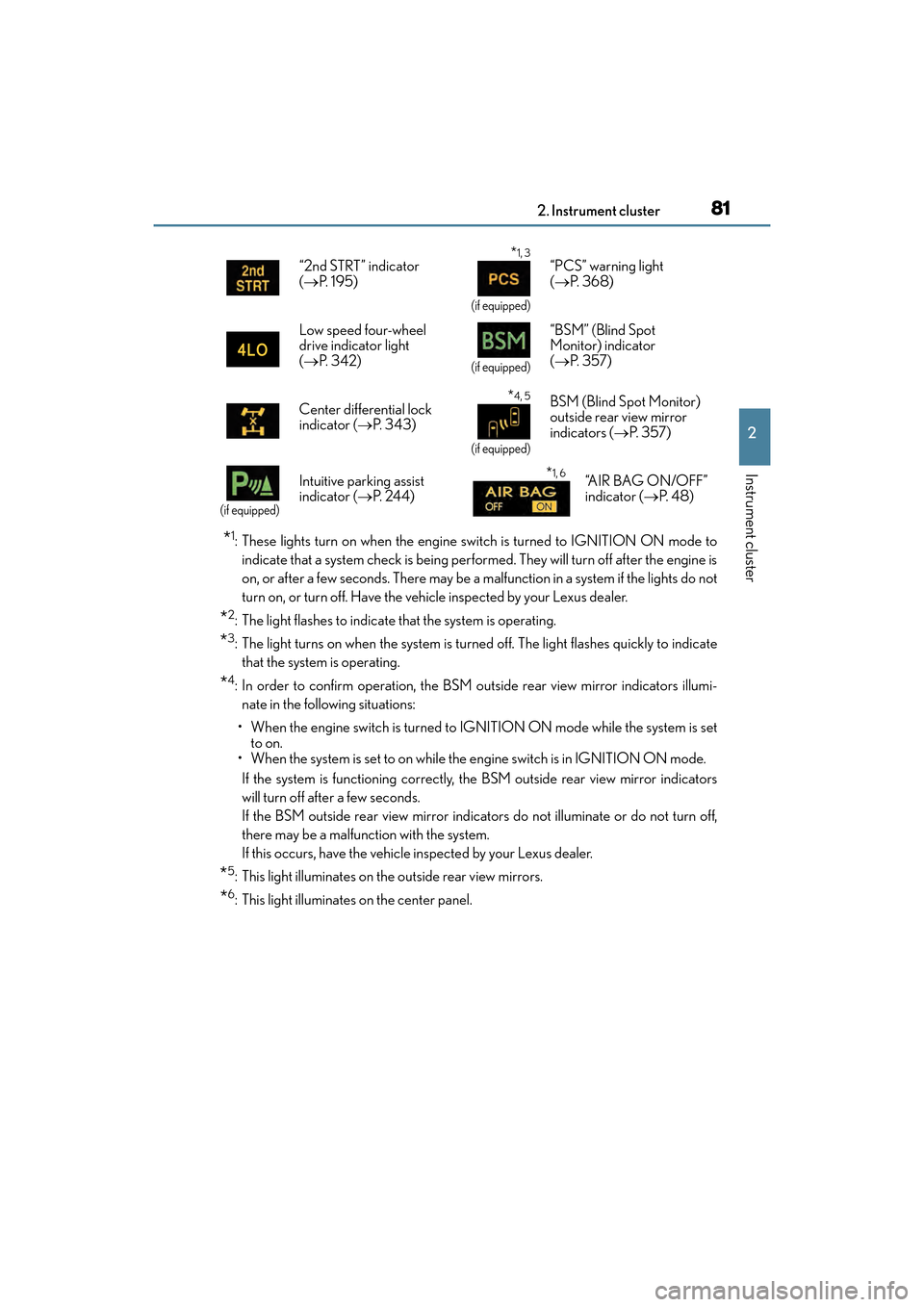
*6: This light illuminates on the center panel. “2nd STRT” indicator
(
→ P. 1 9 5 )
*1, 3
(if equipped)
“PCS” warning light
(→ P. 3 6 8 )
Low speed four-wheel
drive indicator light
( → P. 3 4 2 )
(if equipped)
“BSM” (Blind Spot
Monitor) indicator
(→ P. 3 5 7 )
Center differential lock
indicator ( →P. 3 4 3 )
*4, 5
(if equipped)
BSM (Blind Spot Monitor)
outside rear view mirror
indicators ( →P. 3 5 7 )
(if equipped)
Intuitive parking assist
indicator ( →P. 2 4 4 )*1, 6“A I R B A G O N / O F F ”
indicator ( →P. 4 8 )
GX460_OM_OM60F68U_(U).book Page 81 Wednesday, June 8, 2016 6:37 PM
Page 95 of 644

93
GX 460 _O M_ OM6 0F 6 8U _(U )
3
Operation of
each component
3-1. Key information
Keys .................................................... 94
3-2. Opening, closing and locking the doors
Side doors ........................................ 98
Back door....................................... 105
Glass hatch ......................................110
Smart access system with push-button start........................115
3-3. Adjusting the seats Front seats.......................................122
Rear seats........................................124
Driving position memory ......... 135
Head restraints ............................ 140
3-4. Adjusting the steering wheel and mirrors
Steering wheel ............................. 143
Inside rear view mirror...............145
Outside rear view mirrors ........ 147
3-5. Opening, closing the windows and moon roof
Power windows ............................ 150
Moon roof ...................................... 153
GX460_OM_OM60F68U_(U).book Page 93 Wednesday, June 8, 2016 6:37 PM
Page 96 of 644

94
GX 460 _O M_ OM6 0F 6 8U _(U )3-1. Key information
Keys
The following keys are provided with the vehicle.
Electronic keys
• Operating the smart access systemwith push-button start ( →P. 115)
• Operating the wireless remote con- trol function
Mechanical keys
Key number plate
Locks the doors ( →P. 9 8 )
Unlocks the doors ( →P. 9 8 )
Opens the windows and moon roof
*
( → P. 9 8 )
Opens the glass hatch ( →P. 1 1 0 )
Sounds the alarm ( →P. 9 5 )
*: These settings must be customized at your Lexus dealer.
The keys
1
2
3
Wireless remote control
1
2
3
4
5
GX460_OM_OM60F68U_(U).book Page 94 Wednesday, June 8, 2016 6:37 PM
Page 97 of 644
GX 460 _O M_ OM6 0F 6 8U _(U )
953-1. Key information
3
Operation of each component
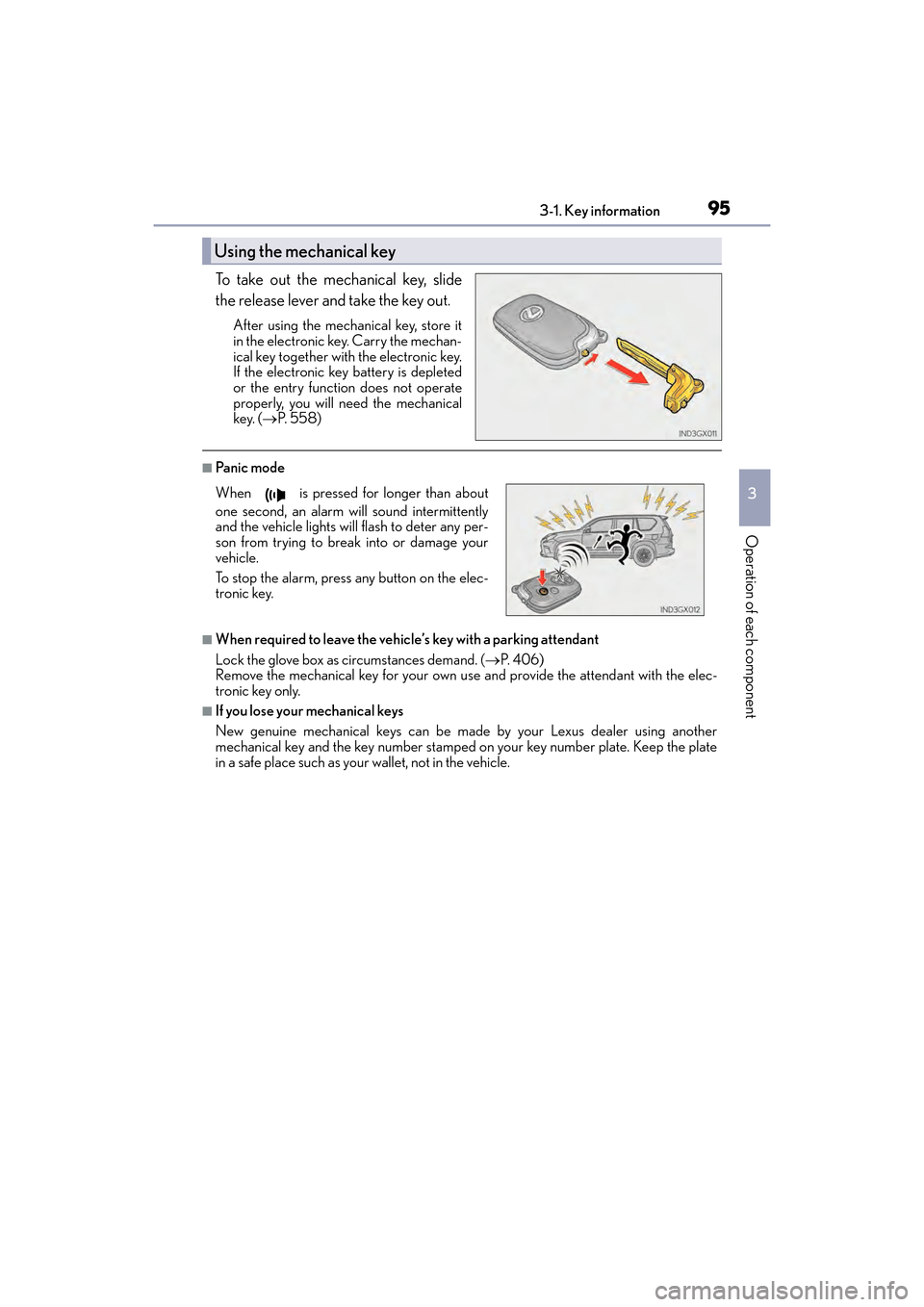
To take out the mechanical key, slide
the release lever and take the key out.
After using the mechanical key, store it
in the electronic key. Carry the mechan-
ical key together with the electronic key.
If the electronic key battery is depleted
or the entry function does not operate
properly, you will need the mechanical
key. (→P. 5 5 8 )
■Pa ni c m o d e
■When required to leave the vehicle’s key with a parking attendant
Lock the glove box as circumstances demand. ( →P. 4 0 6 )
Remove the mechanical key for your own use and provide the attendant with the elec-
tronic key only.
■If you lose your mechanical keys
New genuine mechanical keys can be made by your Lexus dealer using another
mechanical key and the key number stamped on your key number plate. Keep the plate
in a safe place such as your wallet, not in the vehicle.
Using the mechanical key
When is pressed for longer than about
one second, an alarm will sound intermittently
and the vehicle lights will flash to deter any per-
son from trying to break into or damage your
vehicle.
To stop the alarm, press any button on the elec-
tronic key.
GX460_OM_OM60F68U_(U).book Page 95 Wednesday, June 8, 2016 6:37 PM
Page 100 of 644

98
GX 460 _O M_ OM6 0F 6 8U _(U )3-2. Opening, closing and locking the doors
Side doors
◆Smart access system with push-button start
Carry the electronic key to enable this function.
Grip the driver’s door handle to
unlock the door. Grip the passen-
ger’s door handle to unlock all the
doors.
*
Make sure to touch the sensor on the
back of the handle.
The doors cannot be unlocked for
3 seconds after the doors are locked.
*: The door unlock settings can bechanged. ( →P. 1 0 3 )
Touch the lock sensor (the indentation on the upper part or lower part of
the front door handle) to lock the doors.
Check that the door is securely locked.
◆Wireless remote control
Locks all the doors
Check that the door is securely
locked.
Unlocks all the doors
Pressing the button unlocks the
driver’s door. Pressing the button
again within 3 seconds unlocks the
other doors.
Press and hold to open the windows
and moon roof.
*
*
: These settings must be customized at your Lexus dealer.
The vehicle can be locked and unlock ed using the entry function, wireless
remote control, key or door lock switch.
Locking and unlocking the doors from the outside
1
2
1
2
GX460_OM_OM60F68U_(U).book Page 98 Wednesday, June 8, 2016 6:37 PM
Page 101 of 644
GX 460 _O M_ OM6 0F 6 8U _(U )
993-2. Opening, closing and locking the doors
3
Operation of each component
■Operation signals
Doors: A buzzer sounds and the emergency flashers flash to indicate that the doors have
been locked/unlocked. (Locked: once; Unlocked: twice)
Windows and moon roof: A buzzer sounds to indicate that the windows and moon roof
are operating.
■Security feature
If a door or the glass hatch is not opened within approximately 60 seconds after the vehi-
cle is unlocked, the security feature automatically locks the vehicle again.
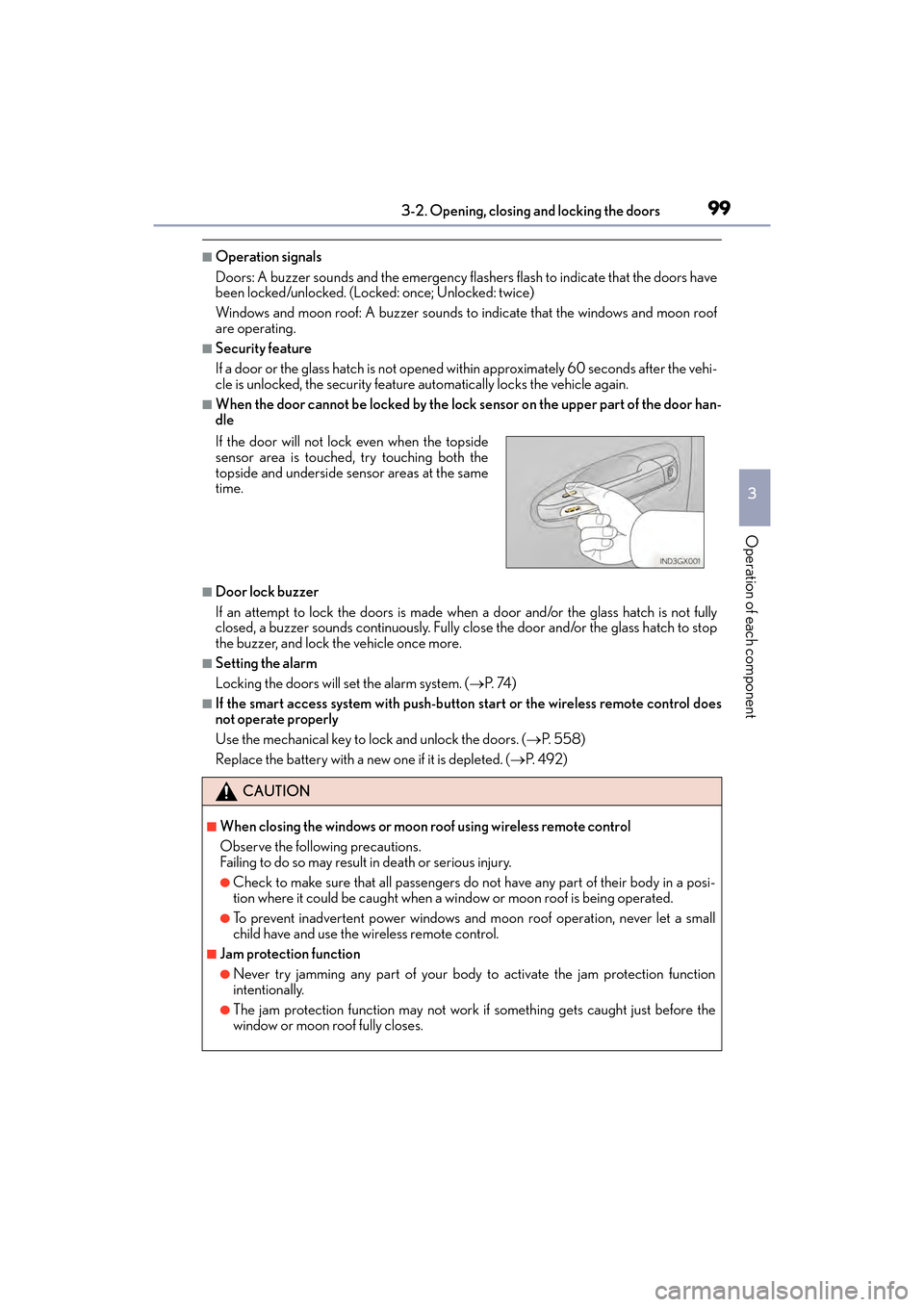
■When the door cannot be locked by the lock sensor on the upper part of the door han-
dle
■Door lock buzzer
If an attempt to lock the doors is made when a door and/or the glass hatch is not fully
closed, a buzzer sounds continuously. Fully close the door and/or the glass hatch to stop
the buzzer, and lock the vehicle once more.
■Setting the alarm
Locking the doors will set the alarm system. ( →P. 74 )
■If the smart access system with push-button start or the wireless remote control does
not operate properly
Use the mechanical key to lock and unlock the doors. ( →P. 5 5 8 )
Replace the battery with a new one if it is depleted. ( →P. 4 9 2 )
If the door will not lock even when the topside
sensor area is touched, try touching both the
topside and underside sensor areas at the same
time.
CAUTION
■When closing the windows or moon roof using wireless remote control
Observe the following precautions.
Failing to do so may result in death or serious injury.
●Check to make sure that all passengers do not have any part of their body in a posi-
tion where it could be caught when a wi
ndow or moon roof is being operated.
●To prevent inadvertent power windows and moon roof operation, never let a small
child have and use the wireless remote control.
■Jam protection function
●Never try jamming any part of your body to activate the jam protection function
intentionally.
●The jam protection function may not work if something gets caught just before the
window or moon roof fully closes.
GX460_OM_OM60F68U_(U).book Page 99 Wednesday, June 8, 2016 6:37 PM
Page 102 of 644
100
GX 460 _O M_ OM6 0F 6 8U _(U )3-2. Opening, closing and locking the doors
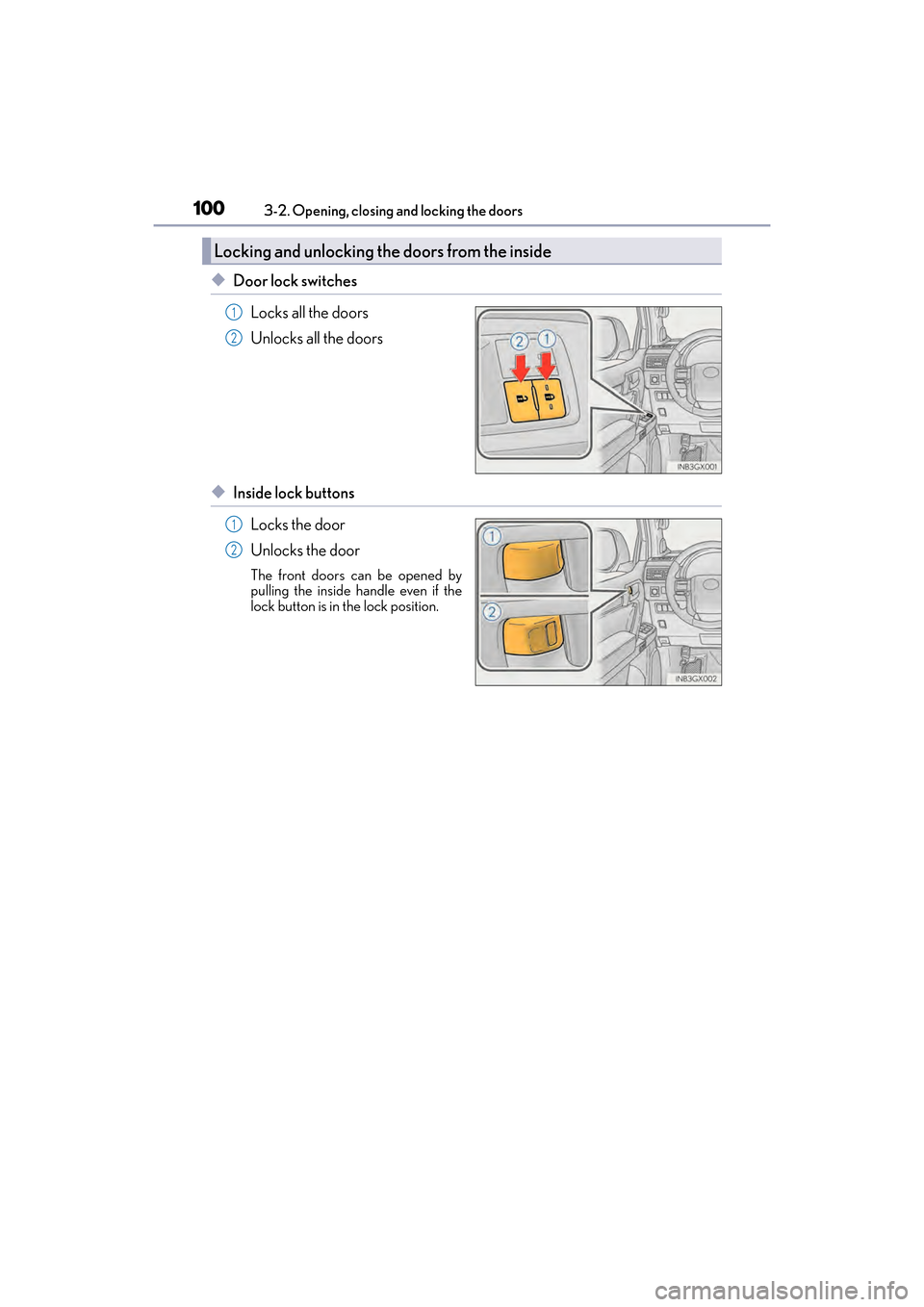
◆Door lock switches
Locks all the doors
Unlocks all the doors
◆Inside lock buttonsLocks the door
Unlocks the door
The front doors can be opened by
pulling the inside handle even if the
lock button is in the lock position.
Locking and unlocking th e doors from the inside
1
2
1
2
GX460_OM_OM60F68U_(U).book Page 100 Wednesday, June 8, 2016 6:37 PM