indicator Lexus GX460 2017 Owner's Guide
[x] Cancel search | Manufacturer: LEXUS, Model Year: 2017, Model line: GX460, Model: Lexus GX460 2017Pages: 644, PDF Size: 20.93 MB
Page 90 of 644

88
GX 460 _O M_ OM6 0F 6 8U _(U )2. Instrument cluster
■Average fuel consumption and Eco
Driving Indicator Zone Display
(→ P. 9 0 )
Displays the average fuel consumption since the function was reset
• The function can be reset by pressing th e “ENTER” switch for longer than 1 second
when the average fuel consumption is displayed.
• Use the displayed average fuel consumption as a reference.
■Average vehicle speed
Displays the average vehicle speed since the engine was started or the func-
tion was reset
The function can be reset by pressing the “ENTER” switch for longer than 1 second
when the average vehicle speed is displayed.
■Elapsed time
Displays the elapsed time since the function was last reset
The function can be reset by pressing the “ENTER” switch for longer than 1 second
when the elapsed time is displayed.
■Display off
A blank screen is displayed
■Multi-terrain Select (if equipped) ( →P. 3 0 8 )
■Intuitive parking assist (if equipped) ( →P. 2 4 4 )
■BSM (Blind Spot Monitor) (if equipped) ( →P. 3 5 7 )
■Second start mode ( →P. 1 9 5 )
Electronic features control contents
GX460_OM_OM60F68U_(U).book Page 88 Wednesday, June 8, 2016 6:37 PM
Page 92 of 644
90
GX 460 _O M_ OM6 0F 6 8U _(U )2. Instrument cluster
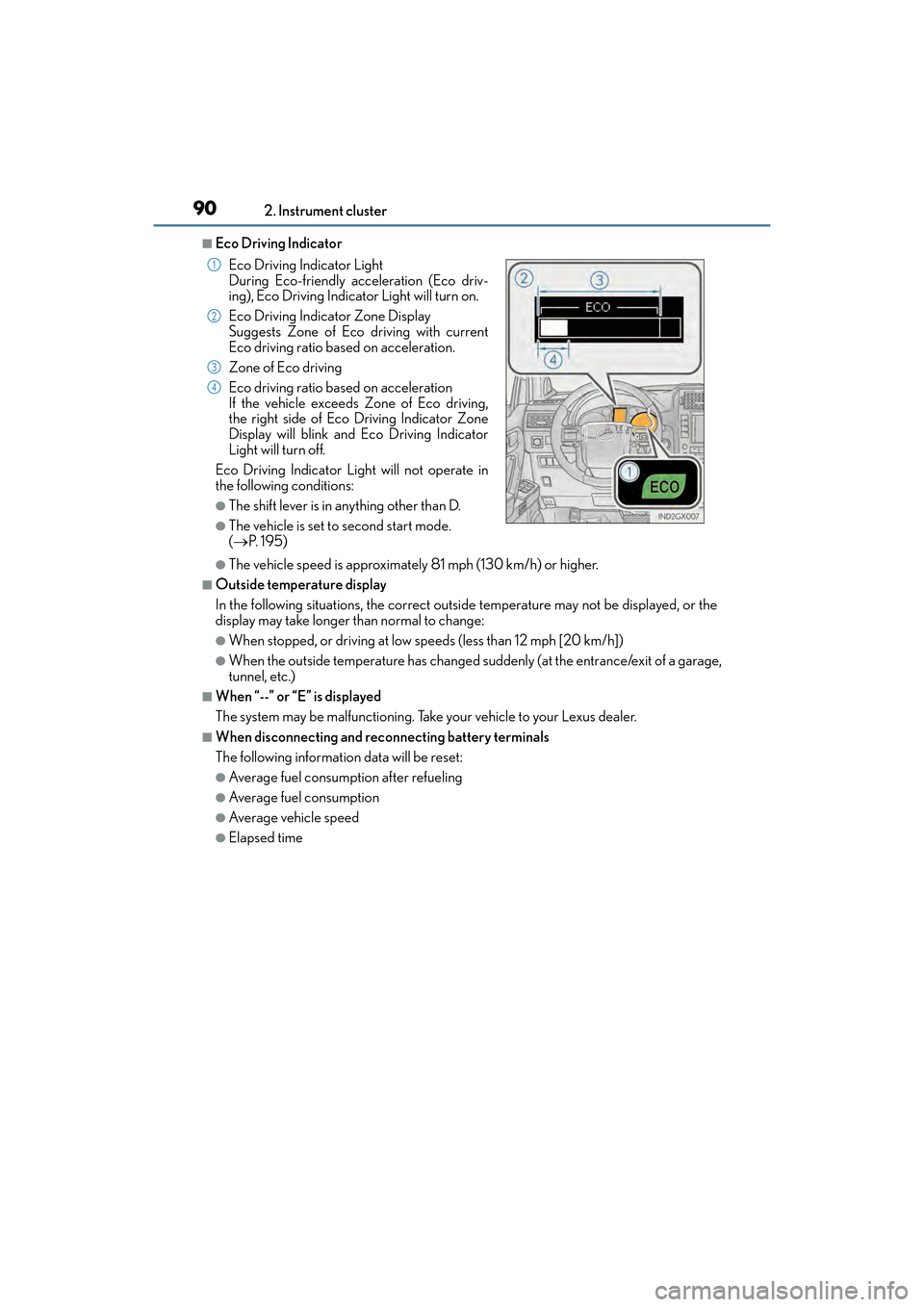
■Eco Driving Indicator
●The vehicle speed is approximately 81 mph (130 km/h) or higher.
■Outside temperature display
In the following situations, the correct outside temperature may not be displayed, or the
display may take longer than normal to change:
●When stopped, or driving at low speeds (less than 12 mph [20 km/h])
●When the outside temperature has changed suddenly (at the entrance/exit of a garage,
tunnel, etc.)
■When “--” or “E” is displayed
The system may be malfunctioning. Take your vehicle to your Lexus dealer.
■When disconnecting and reconnecting battery terminals
The following information data will be reset:
●Average fuel consumption after refueling
●Average fuel consumption
●Average vehicle speed
●Elapsed time Eco Driving Indicator Light
During Eco-friendly acceleration (Eco driv-
ing), Eco Driving Indicator
Light will turn on.
Eco Driving Indicator Zone Display
Suggests Zone of Eco driving with current
Eco driving ratio based on acceleration.
Zone of Eco driving
Eco driving ratio based on acceleration
If the vehicle exceeds Zone of Eco driving,
the right side of Eco Driving Indicator Zone
Display will blink and Eco Driving Indicator
Light will turn off.
Eco Driving Indicator Light will not operate in
the following conditions:
●The shift lever is in anything other than D.
●The vehicle is set to second start mode.
( → P. 1 9 5 )
1
2
3
4
GX460_OM_OM60F68U_(U).book Page 90 Wednesday, June 8, 2016 6:37 PM
Page 98 of 644
96
GX 460 _O M_ OM6 0F 6 8U _(U )3-1. Key information
■When riding in an aircraft
When bringing an electronic key onto an aircraft, make sure you do not press any but-
tons on the electronic key while inside the aircraft cabin. If you are carrying an electronic
key in your bag etc., ensure that the buttons are not likely to be pressed accidentally.
Pressing a button may cause the electronic key to emit radio waves that could interfere
with the operation of the aircraft.
■Electronic key battery depletion
●The standard battery life is 1 to 2 years.
●If the battery becomes low, an alarm will sound in the cabin when the engine is stopped.
(
→ P. 5 3 9 )
●As the electronic key always receives radio waves, the battery will become depleted
even if the electronic key is not used. The following symptoms indicate that the elec-
tronic key battery may be depleted. Replace the battery when necessary. ( →P. 4 9 2 )
• The smart access system with push-button start or the wireless remote control does not operate.
• The detection area becomes smaller.
• The LED indicator on the key surface does not turn on.
●To avoid serious deterioration, do not leave the electronic key within 3 ft. (1 m) of the
following electrical appliances that produce a magnetic field:
•TVs
• Personal computers
• Cellular phones, cordless phones and battery chargers
• Recharging cellular phones or cordless phones
• Table lamps
• Induction cookers
■Replacing the battery
→ P. 4 9 2
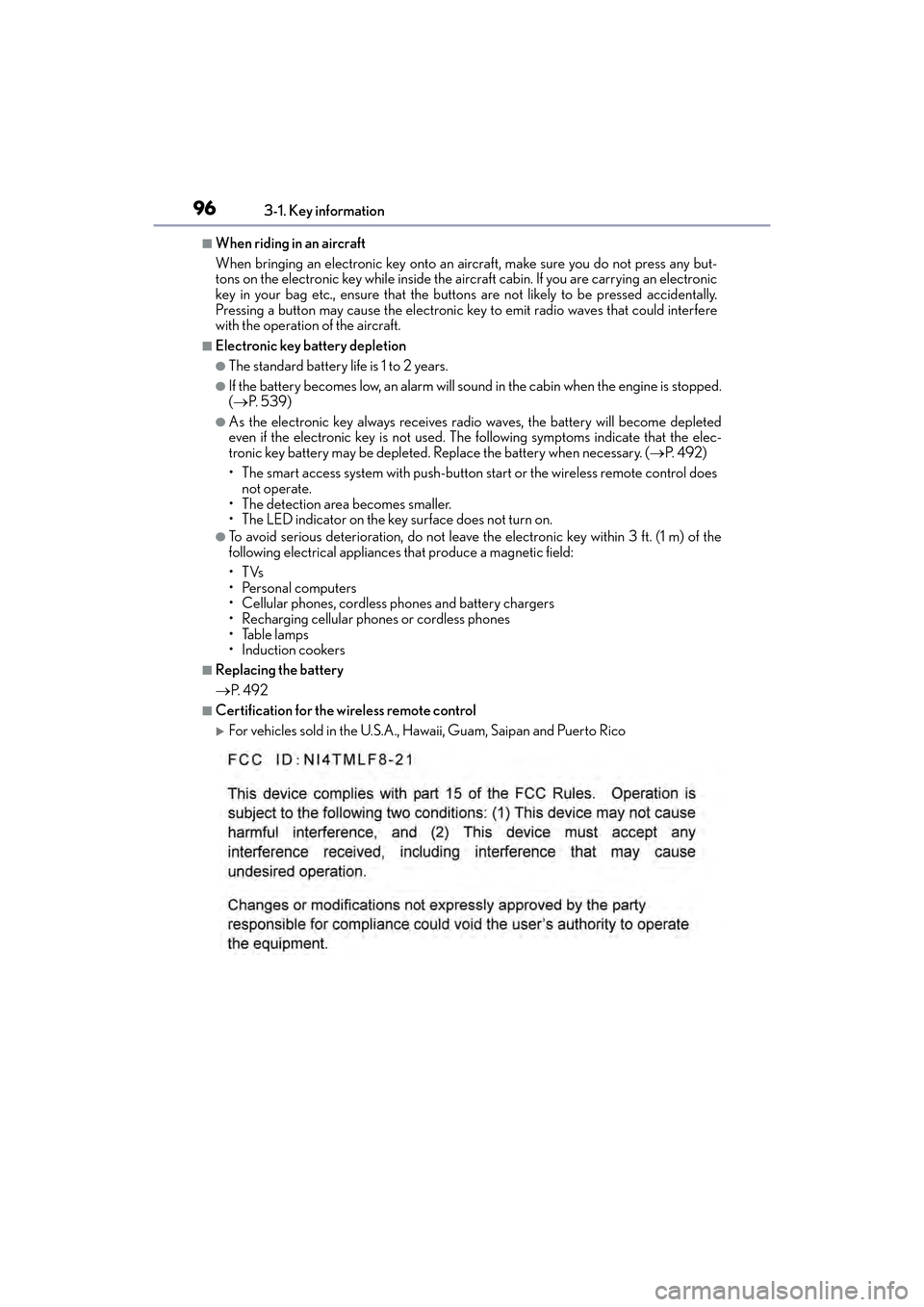
■Certification for the wireless remote control
XFor vehicles sold in the U.S.A., Hawaii, Guam, Saipan and Puerto Rico
GX460_OM_OM60F68U_(U).book Page 96 Wednesday, June 8, 2016 6:37 PM
Page 105 of 644
GX 460 _O M_ OM6 0F 6 8U _(U )
1033-2. Opening, closing and locking the doors
3
Operation of each component
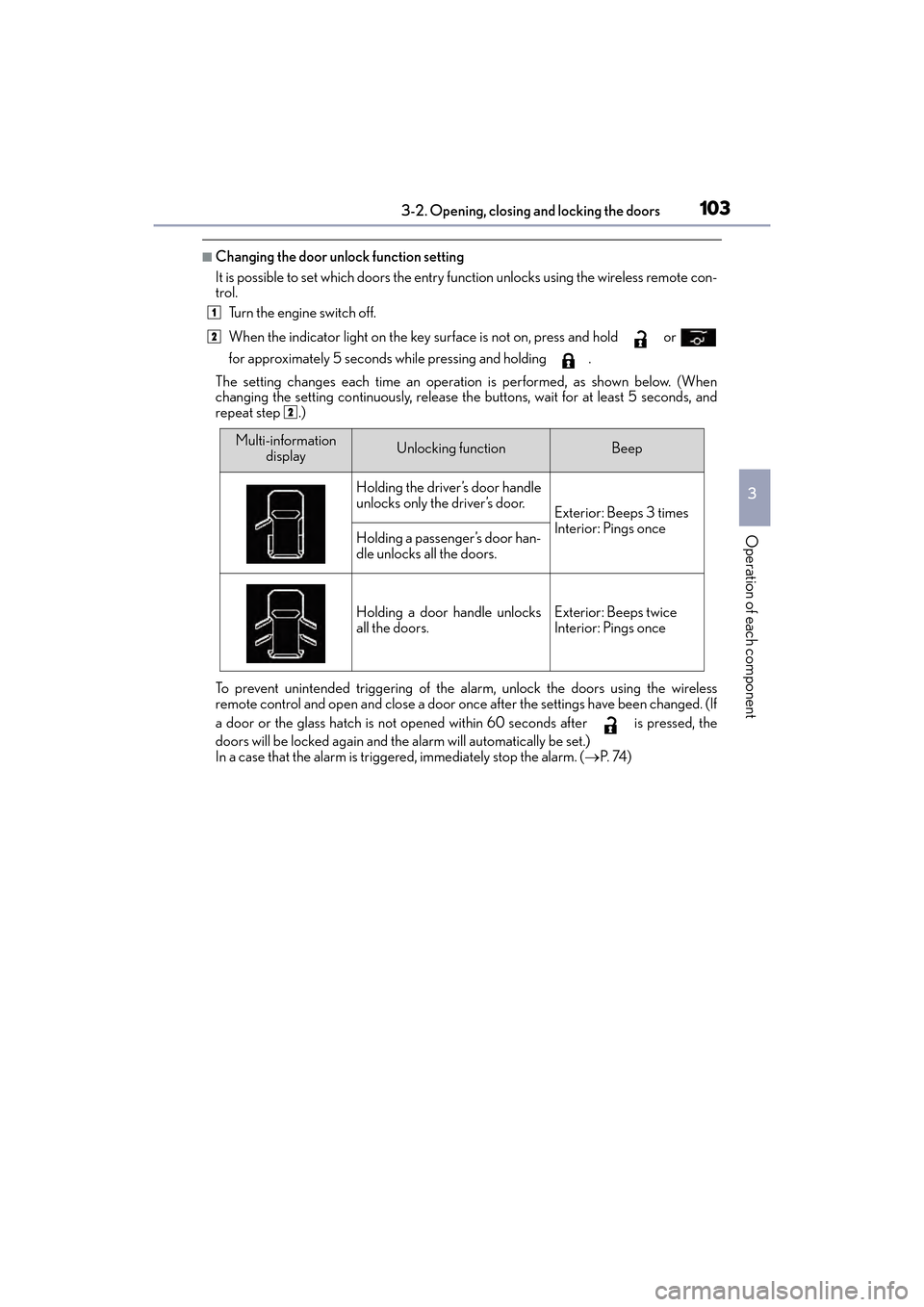
■Changing the door unlock function setting
It is possible to set which doors the entry function unlocks using the wireless remote con-
trol. Turn the engine switch off.
When the indicator light on the key su rface is not on, press and hold or
for approximately 5 seconds while pressing and holding .
The setting changes each time an operation is performed, as shown below. (When
changing the setting continuously, release th e buttons, wait for at least 5 seconds, and
repeat step .)
To prevent unintended triggering of the alarm, unlock the doors using the wireless
remote control and open and close a door once after the settings have been changed. (If
a door or the glass hatch is not opened within 60 seconds after is pressed, the
doors will be locked again and the alarm will automatically be set.)
In a case that the alarm is triggered, immediately stop the alarm. ( →P. 74 )
1
2
2
Multi-information
displayUnlocking functionBeep
Holding the driver’s door handle
unlocks only the driver’s door.
Exterior: Beeps 3 times
Interior: Pings once
Holding a passenger’s door han-
dle unlocks all the doors.
Holding a door handle unlocks
all the doors.Exterior: Beeps twice
Interior: Pings once
GX460_OM_OM60F68U_(U).book Page 103 Wednesday, June 8, 2016 6:37 PM
Page 118 of 644
116
GX 460 _O M_ OM6 0F 6 8U _(U )3-2. Opening, closing and locking the doors
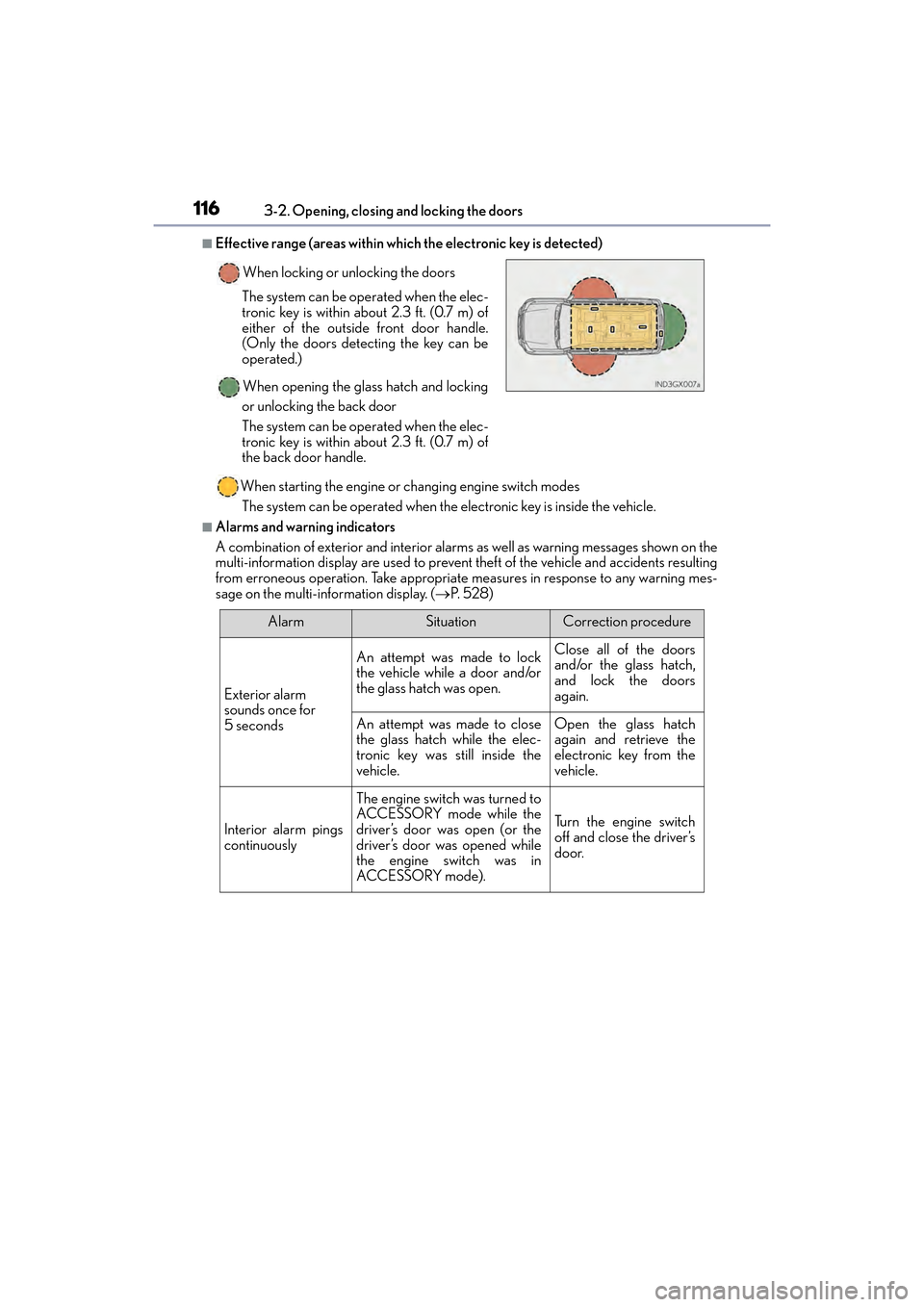
■Effective range (areas within which the electronic key is detected)
When starting the engine or changing engine switch modesThe system can be operated when the electronic key is inside the vehicle.
■Alarms and warning indicators
A combination of exterior and interior alarms as well as warning messages shown on the
multi-information display are used to prevent theft of the vehicle and accidents resulting
from erroneous operation. Take appropriate measures in response to any warning mes-
sage on the multi-information display. ( →P. 5 2 8 )
When locking or unlocking the doors
The system can be operated when the elec-
tronic key is within about 2.3 ft. (0.7 m) of
either of the outside front door handle.
(Only the doors detecting the key can be
operated.)
When opening the glass hatch and locking
or unlocking the back door
The system can be operated when the elec-
tronic key is within about 2.3 ft. (0.7 m) of
the back door handle.
AlarmSituationCorrection procedure
Exterior alarm
sounds once for
5 seconds
An attempt was made to lock
the vehicle while a door and/or
the glass hatch was open.Close all of the doors
and/or the glass hatch,
and lock the doors
again.
An attempt was made to close
the glass hatch while the elec-
tronic key was still inside the
vehicle.Open the glass hatch
again and retrieve the
electronic key from the
vehicle.
Interior alarm pings
continuously
The engine switch was turned to
ACCESSORY mode while the
driver’s door was open (or the
driver’s door was opened while
the engine switch was in
ACCESSORY mode).
Tu r n t h e e n g i n e s w i t c h
off and close the driver’s
door.
GX460_OM_OM60F68U_(U).book Page 116 Wednesday, June 8, 2016 6:37 PM
Page 147 of 644

1453-4. Adjusting the steering wheel and mirrors
3
Operation of each component
GX 460 _O M_ OM6 0F 6 8U _(U )
Inside rear view mirror
The height of the rear view mirror can be adjusted to suit your driving posture.
Adjust the height of the rear view mir-
ror by moving it up and down.
Responding to the level of brightness of the headlights of vehicles behind, the
reflected light is automatically reduced.
XWithout compass
Turns automatic mode on
Turns automatic mode off
The indicator comes on when automatic
mode is turned on.
The mirror reverts to automatic mode
each time the engine switch is turned to
IGNITION ON mode.
The rear view mirror’s position can be adjusted to enable sufficient confirma-
tion of the rear view.
Adjusting the height of rear view mirror
Anti-glare function
Indicator
1
2
GX460_OM_OM60F68U_(U).book Page 145 Wednesday, June 8, 2016 6:37 PM
Page 148 of 644

1463-4. Adjusting the steering wheel and mirrors
GX 460 _O M_ OM6 0F 6 8U _(U )
XWi th compa ss
Changing automatic anti-glare func-
tion mode On/off
When the automatic anti-glare function
is in ON mode, the indicator illuminates.
The function will set to ON mode each
time the engine switch is turned to
IGNITION ON mode.
Pressing the button turns the function to
OFF mode. (The indicator also turns
off.)
■To prevent sensor error
Indicator
To ensure that the sensors operate properly, do
not touch or cover them.
CAUTION
Do not adjust the position of the mirror while driving.
Doing so may lead to mishandling of the vehicle and an accident, resulting in death or
serious injury.
GX460_OM_OM60F68U_(U).book Page 146 Wednesday, June 8, 2016 6:37 PM
Page 152 of 644
150
GX 460 _O M_ OM6 0F 6 8U _(U )3-5. Opening, closing the windows and moon roof
Power windows
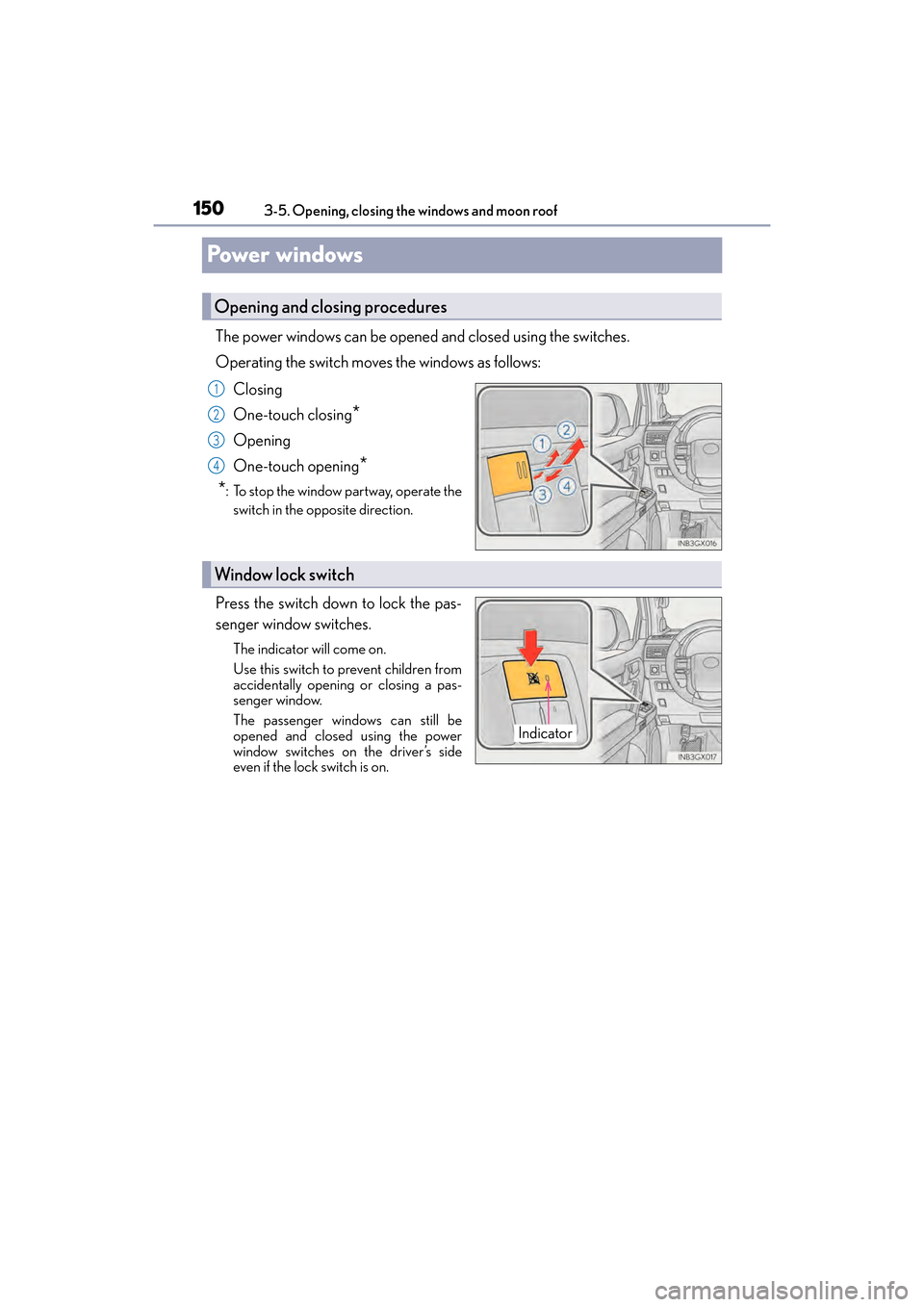
The power windows can be opened
and closed using the switches.
Operating the switch moves the windows as follows:
Closing
One-touch closing
*
Opening
One-touch opening
*
*
: To stop the window partway, operate the switch in the opposite direction.
Press the switch down to lock the pas-
senger window switches.
The indicator will come on.
Use this switch to prevent children from
accidentally opening or closing a pas-
senger window.
The passenger windows can still be
opened and closed using the power
window switches on the driver’s side
even if the lock switch is on.
Opening and closing procedures
1
2
3
4
Window lock switch
Indicator
GX460_OM_OM60F68U_(U).book Page 150 Wednesday, June 8, 2016 6:37 PM
Page 163 of 644

GX 460 _O M_ OM6 0F 6 8U _(U )
1614-1. Before driving
4
Driving
CAUTION
Observe the following precautions.
Failure to do so may result in death or serious injury.
■When driving on slippery road surfaces
●Sudden braking, acceleration and steering may cause tire slippage and reduce your
ability to control the vehicle.
●Sudden acceleration, engine braking due to shifting, or changes in engine speed
could cause the vehicle to skid.
●After driving through a puddle, lightly depress the brake pedal to make sure that the
brakes are functioning properly. Wet brake pads may prevent the brakes from func-
tioning properly. If the brakes on only one side are wet and not functioning properly,
steering control may be affected.
■When shifting the shift lever
●Do not let the vehicle roll backwards while the shift lever is in a driving position, or roll
forward while the shift lever is in R.
Doing so may cause the engine to stall or lead to poor brake and steering perfor-
mance, resulting in an accident or damage to the vehicle.
●Do not shift the shift lever to P while the vehicle is moving.
Doing so can damage the transmission and may result in a loss of vehicle control.
●Do not shift the shift lever to R while the vehicle is moving forward.
Doing so can damage the transmission and may result in a loss of vehicle control.
●Do not shift the shift lever to a driving position while the vehicle is moving backward.
Doing so can damage the transmission and may result in a loss of vehicle control.
●Moving the shift lever to N while the vehicle is moving will disengage the engine from
the transmission. Engine braking is not available when N is selected.
●Be careful not to shift the shift lever with the accelerator pedal depressed. Shifting the
shift lever to a gear other than P or N may lead to unexpected rapid acceleration of
the vehicle that may cause an accident.
■If you hear a squealing or scraping noise (brake pad wear limit indicators)
Have the brake pads checked and replaced by your Lexus dealer as soon as possible.
Rotor damage may result if the pads are not replaced when needed.
It is dangerous to drive the vehicle when the wear limits of the brake pads and/or those
of the brake discs are exceeded.
GX460_OM_OM60F68U_(U).book Page 161 Wednesday, June 8, 2016 6:37 PM
Page 191 of 644

189
GX 460 _O M_ OM6 0F 6 8U _(U )4-2. Driving procedures
4
Driving
Engine (ignition) switch
Check that the parking brake is set.
Check that the shift lever is set in P.
Firmly depress the brake pedal.
The engine switch indicator will turn green.
If the indicator does not turn green, the engine cannot be started.
Press the engine switch shortly and
firmly.
When operating the engine switch, one
short, firm press is enough.
It is not necessary to press and hold the
switch.
The engine will crank until it starts or for
up to 30 seconds, whichever is less.
Continue depressing the brake pedal
until the engine is completely started.
The engine can be started from any
engine switch mode.
Performing the following operations when
carrying the electronic key on your
person starts the engine or changes engine switch modes.
Starting the engine
1
2
3
4
GX460_OM_OM60F68U_(U).book Page 189 Wednesday, June 8, 2016 6:37 PM