towing Lexus GX460 2017 Owner's Guide
[x] Cancel search | Manufacturer: LEXUS, Model Year: 2017, Model line: GX460, Model: Lexus GX460 2017Pages: 644, PDF Size: 20.93 MB
Page 228 of 644
226
GX 460 _O M_ OM6 0F 6 8U _(U )4-5. Using the driving support systems
■Automatic cruise control cancelation
Cruise control will stop maintaining the vehicle speed in any of the following situations:
●Actual vehicle speed falls more than approximately 10 mph (16 km/h) below the preset
vehicle speed.
At this time, the memorized set speed is not retained.
●Actual vehicle speed is below approximately 25 mph (40 km/h).
●VSC is activated.
●The center differential lock/unlock is not completed within 5 seconds while the cruise
control system is on.
■If the warning message for the cruise contro
l is shown on the multi-information display
Press the “ON-OFF” button once to deactivate the system, and then press the button
again to reactivate the system.
If the cruise control speed cannot be set or if the cruise control cancels immediately after
being activated, there may be a malfunction in the cruise control system. Have the vehi-
cle inspected by your Lexus dealer.
CAUTION
■To avoid operating the cruise control by mistake
Switch the cruise control off using the “ON-OFF” button when not in use.
■Situations unsuitable for cruise control
Do not use cruise control in any of the following situations.
Doing so may result in loss of control and could cause an accident resulting in death or
serious injury.
●In heavy traffic
●On roads with sharp bends
●On winding roads
●On slippery roads, such as those covered with rain, ice or snow
●On steep hills
Vehicle speed may exceed the set speed when driving down a steep hill.
●When your vehicle is towing a trailer (with towing hitch) or during emergency towing
GX460_OM_OM60F68U_(U).book Page 226 Wednesday, June 8, 2016 6:37 PM
Page 238 of 644
236
GX 460 _O M_ OM6 0F 6 8U _(U )4-5. Using the driving support systems
CAUTION
■To avoid inadvertent cruise control activation
Switch the cruise control off using the “ON-OFF” button when not in use.
■Situations unsuitable for dynamic radar cruise control
Do not use dynamic radar cruise control in any of the following situations.
Doing so may result in inappropriate speed control and could cause an accident result-
ing in death or serious injury.
●In heavy traffic
●On roads with sharp bends
●On winding roads
●On slippery roads, such as those covered with rain, ice or snow
●On steep downhills, or where there are su
dden changes between sharp up and down
gradients
Vehicle speed may exceed the set speed when driving down a steep hill.
●At entrances to expressways
●When weather conditions are bad enough that they may prevent the sensors from
functioning correctly (fog, snow, sandstorm, heavy rain, etc.)
●When an approach warning buzzer is heard often
●When your vehicle is towing a trailer (with towing hitch) or during emergency towing
■When the sensor may not be correctly detecting the vehicle ahead
Apply the brakes as necessary when any of the following types of vehicles are in front of
you.
As the sensor may not be able to correctly detect these types of vehicles, the approach
warning ( →P. 231) will not be activated, and a fatal or serious accident may result.
●Vehicles that cut in suddenly
●Vehicles traveling at low speeds
●Vehicles that are not moving
●Vehicles with small rear ends (trailers with no load on board etc.)
●Motorcycles traveling in the same lane
GX460_OM_OM60F68U_(U).book Page 236 Wednesday, June 8, 2016 6:37 PM
Page 366 of 644
364
GX 460 _O M_ OM6 0F 6 8U _(U )4-5. Using the driving support systems
■Conditions under which the Blind Spot Monitor function may not function correctly
●The Blind Spot Monitor function may not detect vehicles correctly in the following con-
ditions:
• During bad weather such as heavy rain, fog, snow etc.
• When ice or mud etc. is attached to the rear bumper
• When driving on a road surface that is wet due to rain, standing water etc.
• When there is a significant difference in speed between your vehicle and the vehicle
that enters the detection area
• When a vehicle is in the detection area from a stop and remains in the detection
area as your vehicle accelerates
• When driving up or down consecutive steep inclines, such as hills, a dip in the road
etc.
• When multiple vehicles approach with only a small gap between each vehicle
• When vehicle lanes are wide, and the vehicle in the next lane is too far away from your vehicle
• When the vehicle that enters the detection area is traveling at about the same speed as your vehicle
• When there is a significant difference in height between your vehicle and the vehicle
that enters the detection area
• Directly after the Blind Spot Monitor system turned on
• When your vehicle is towing a trailer
• When items such as a bicycle carrier are installed on the rear of the vehicle
●Instances of the Blind Spot Monitor function unnecessarily detecting a vehicle and/or
object may increase under the following conditions:
• When there is only a short distance between your vehicle and a guardrail, wall etc.
• When there is only a short distance between your vehicle and a following vehicle
• When vehicle lanes are narrow and a vehicle driving 2 lanes across from your vehi- cle enters the detection area
• When items such as a bicycle carrier are installed on the rear of the vehicle
GX460_OM_OM60F68U_(U).book Page 364 Wednesday, June 8, 2016 6:37 PM
Page 369 of 644

GX 460 _O M_ OM6 0F 6 8U _(U )
3674-5. Using the driving support systems
4
Driving
■Conditions under which the Rear Cross Traffic Alert function will not detect a vehicle
The Rear Cross Traffic Alert function is not designed to detect the following types of
vehicles and/or objects.
●Small motorcycles, bicycles, pedestrians etc.*
●Vehicles approaching from directly behind
●Guardrails, walls, signs, parked vehicles and similar stationary objects*
●Vehicles moving away from your vehicle
●Vehicles approaching from the parking spaces next to your vehicle*
●Vehicles backing up in the parking space next to your vehicle*
*
: Depending on conditions, detection of a vehicle and/or object may occur.
■Conditions under which the Rear Cross Traffic Alert function may not function cor-
rectly
The Rear Cross Traffic Alert function may not detect vehicles correctly in the following
conditions:
●During bad weather such as heavy rain, fog, snow etc.
●When ice or mud etc. is attached to the rear bumper
●When multiple vehicles approach continuously
●Shallow angle parking
●When a vehicle is approaching at high speed
●When parking on a steep incline, such as hills, a dip in the road etc.
●Directly after the Blind Spot Monitor system turned on
●When your vehicle is towing a trailer
●When items such as a bicycle carrier are installed on the rear of the vehicle
●Directly after the engine is started with the BSM main switch on
●When the sensors cannot detect vehicles
because of obstacles
GX460_OM_OM60F68U_(U).book Page 367 Wednesday, June 8, 2016 6:37 PM
Page 374 of 644
372
GX 460 _O M_ OM6 0F 6 8U _(U )4-5. Using the driving support systems
■Automatic cancelation of pre-collision system
When a malfunction occurs due to sensor contaminations, etc. that results in the sensors
being unable to detect obstacles, the pre-collis
ion system will be automatically disabled.
In this case, the system will not activat e even if there is a collision possibility.
■Obstacles not detected
The system cannot detect plastic obstacles such as pylons. There may also be occasions
when the system cannot detect pedestrians, animals, bicycles, motorcycles, trees, or
snowdrifts.
■Conditions that may trigger the system even if there is no possibility of a collision
In any of the following situations where the fr ontal area of the radar sensor is interrupted,
the radar sensor may detect possibility of a frontal collision and the system may be acti-
vated.
●When passing by an oncoming vehicle in a curve or a turn to the right or the left
●When rapidly approaching an obstacle ahead (e.g. preceding vehicle, toll gate barrier,
etc.)
●When there is a structural object (billboard , low ceiling, fluorescent light, etc.) above
the uphill road ahead
●When driving on a narrow road or through under a low overhead structure (bridge,
tunnel, fly-under, etc.)
●When driving on an uneven road surface
●When there is a metal object, bump, or protrusion on the road surface
●When vehicle’s front part is raised or lowered depending on loading conditions
●When the direction of radar sensor is misaligned by strong impact applied on an area
around the radar sensor, etc.
●When there is an obstacle (guard rail, etc.) by the roadside at the entrance to a curve
●When the front of your vehicle is pointing upwards (caused by towing a trailer, during
emergency towing or putting a heavy load in the luggage compartment etc.)
When the system is activated in the situations described above, there is also a possibility
that the seat belts will retract quickly and th e brakes may be applied with a force greater
than normal. When the seat belt is locked in the restricted position, stop the vehicle in a
safe place, release the seat belt and refasten it.
■When there is a malfunction in the system, or if the system is temporarily unusable
Warning lights will turn on or flash, an d warning messages will be displayed.
( → P. 5 2 1 , 5 3 2 )
GX460_OM_OM60F68U_(U).book Page 372 Wednesday, June 8, 2016 6:37 PM
Page 412 of 644
410
GX 460 _O M_ OM6 0F 6 8U _(U )5-3. Using the storage features
NOTICE
●To prevent damage, stow the rear cup holders before stowing the armrest. (second
seats for 7-passenger models)
●To prevent damage, do not fold down the second seatbacks when using a cup holder
on the second seats. (6-passenger models)
●To prevent damage, do not rest your hands on the cup holders or kick them.
●Do not place open bottles or glass and pape
r cups containing liquid in the bottle hold-
ers. The contents may spill and glasses may break.
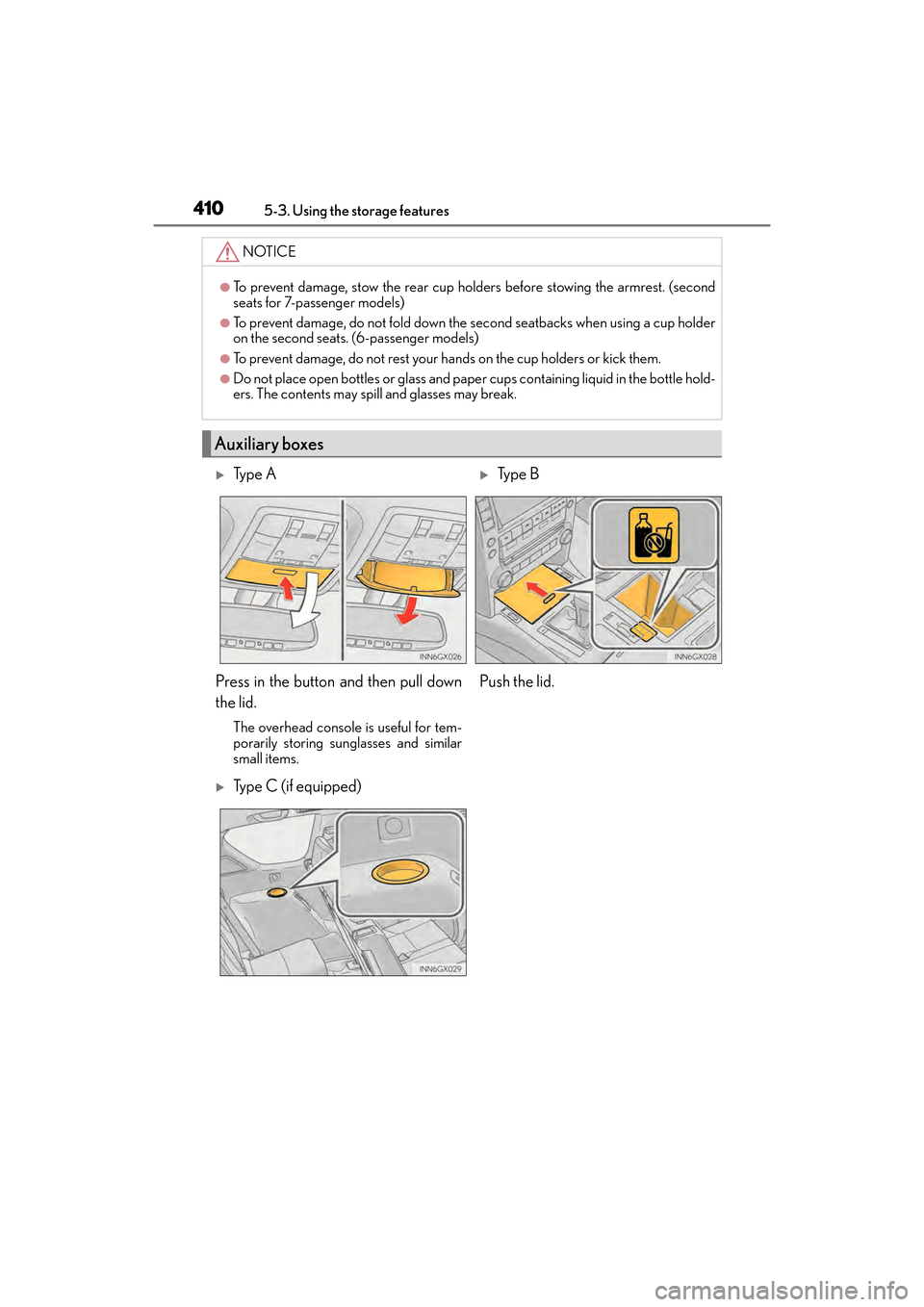
Auxiliary boxes
XTy p e AXTy p e B
Press in the button and then pull down
the lid.
The overhead console is useful for tem-
porarily storing sunglasses and similar
small items.
Push the lid.
XType C (if equipped)
GX460_OM_OM60F68U_(U).book Page 410 Wednesday, June 8, 2016 6:37 PM
Page 417 of 644

GX 460 _O M_ OM6 0F 6 8U _(U )
4155-3. Using the storage features
5
Interior features
■Stowing the luggage cover
Push the case while pressing the
lock release button.
Vehicles without a rear automatic air
conditioning system: Shorten one
side only.
Vehicles with a rear automatic air
conditioning system: Shorten both
sides.
Push the case until it locks.
Check that the lock release button
can be seen.
Vehicles without a rear automatic air
conditioning system: Shorten one
side only.
Vehicles with a rear automatic air
conditioning system: Shorten both
sides.
Secure the luggage cover with
luggage cover restraining bands.
Check that luggage cover and lug-
gage cover restraining bands are
secured.
Fold over the cover and the sub
cover.
Lock release button
1
Lock releasebutton
2
3
4
GX460_OM_OM60F68U_(U).book Page 415 Wednesday, June 8, 2016 6:37 PM
Page 419 of 644

GX 460 _O M_ OM6 0F 6 8U _(U )
4175-3. Using the storage features
5
Interior features
■Adjusting the sub cover
Fasten the button when the second seats are in the rear-most position.
Unfasten the buttons before sliding the second seats forward.
CAUTION
●To avoid injury, always return the cargo hooks to their stowed positions when not in
use.
●Keep the auxiliary box closed. In the event of sudden braking or sudden swerving, an
accident may occur due to an occupant being struck by an open auxiliary box or the
items stored inside.
●Keep the both sides of the luggage cover case locked. Otherwise, the luggage cover
may fly out in case of the sudden braking, sudden swerving or an accident, resulting in
death or serious injury.
●When stowing the luggage cover in the luggage compartment, use the luggage
cover restraining bands to secure the left and right sides of the luggage cover. Other-
wise, the luggage cover may fly out in case of the sudden braking, sudden swerving or
an accident, resulting in death or serious injury.
●Do not allow children to climb on the luggage cover. Climbing on the luggage cover
could result in damage to the luggage cove r, possibly causing death or serious injury
to the child.
GX460_OM_OM60F68U_(U).book Page 417 Wednesday, June 8, 2016 6:37 PM
Page 420 of 644

418
GX 460 _O M_ OM6 0F 6 8U _(U )5-3. Using the storage features
NOTICE
■To prevent damage to the luggage cover
When stowing the luggage cover, do not put luggage on the luggage cover.
●Do not use the luggage cover restraining bands for anything other than securing the
luggage cover.
●Do not insert coins etc. into the area shown in
the illustration.
GX460_OM_OM60F68U_(U).book Page 418 Wednesday, June 8, 2016 6:37 PM
Page 444 of 644
442
GX 460 _O M_ OM6 0F 6 8U _(U )5-4. Using the other interior features
■Stolen Vehicle Location
If your vehicle is stolen, Safety Connect can work with local authorities to
assist them in locating and recovering the vehicle. After filing a police report,
call the Safety Connect response center at 1-800-25-LEXUS (1-800-255-
3987) and follow the prompts for Safety Connect to initiate this service.
In addition to assisting law enforcement with recovery of a stolen vehicle,
Safety-Connect-equipped vehicle location data may, under certain circum-
stances, be shared with third parties to locate your vehicle. Further informa-
tion is available at Lexus.com.
■Emergency Assistance Button (“SOS”)
In the event of an emergency on the road, push the “SOS” button to reach the
Safety Connect response center. The answering agent will determine your
vehicle’s location, assess the emergency, and dispatch the necessary assis-
tance required.
If you accidentally press the “SOS” button, tell the response-center agent that you
are not experiencing an emergency.
■Enhanced Roadside Assistance
Enhanced Roadside Assistance adds GPS data to the already included war-
ranty-based Lexus roadside service.
Subscribers can press the “SOS” button to reach a Safety Connect response-
center agent, who can help with a wide range of needs, such as: towing, flat
tire, fuel delivery, etc. For a description of the Roadside Assistance services
and their limitations, please see the Safety Connect Terms and Conditions,
which are available at Lexus.com.
GX460_OM_OM60F68U_(U).book Page 442 Wednesday, June 8, 2016 6:37 PM