steering Lexus GX460 2017 Owner's Guide
[x] Cancel search | Manufacturer: LEXUS, Model Year: 2017, Model line: GX460, Model: Lexus GX460 2017Pages: 644, PDF Size: 20.93 MB
Page 183 of 644
GX 460 _O M_ OM6 0F 6 8U _(U )
1814-1. Before driving
4
Driving
●Avoid jerky starts or sudden acceleration.
●Avoid jerky steering and sharp turns, and slow down before making a turn.
●Note that when making a turn, the trailer wheels will be closer than the vehicle
wheels to the inside of the turn. Compensate by making a wider than normal
turning radius.
●Slow down before making a turn, in crosswinds, on wet or slippery surfaces,
etc.
Increasing vehicle speed can destabilize the trailer.
●Take care when passing other vehicles. Passing requires considerable dis-
tance. After passing a vehicle, do not forget the length of your trailer, and be
sure you have plenty of room before changing lanes.
●To maintain engine braking efficien cy and charging system performance
when using engine braking, do not put the transmission in D.
If in the S mode, the transmission shift range position must be in 5 or lower.
●Instability happens more frequently when descending steep or long downhill
grades. Before descending, slow down and downshift. Do not make sudden
downshifts while descending steep or long downhill grades.
●Avoid holding the brake pedal down too long or applying the brakes too fre-
quently. This could cause the brakes to overheat and result in reduced braking
efficiency.
●Due to the added load of the trailer, your vehicle’s engine may overheat on hot
days (at temperatures over 85°F [30°C]) when driving up a long or steep
grade. If the engine coolant temperature gauge indicates overheating, imme-
diately turn off the air conditioning (if in use), pull your vehicle off the road and
stop in a safe spot. (→ P. 5 6 4 )
GX460_OM_OM60F68U_(U).book Page 181 Wednesday, June 8, 2016 6:37 PM
Page 186 of 644
184
GX 460 _O M_ OM6 0F 6 8U _(U )4-1. Before driving
■AVS (adaptive variable suspension system)
The suspension can be switched fo
r improvement in driveability. (→P. 3 4 1 )
■Break-in schedule
If your vehicle is new or equipped with any new power train components (such as an
engine, transmission, differential or wheel bearing), Lexus recommends that you do not
tow a trailer until the vehicle has been driven for over 500 miles (800 km).
After the vehicle has been driven for over 500 miles (800 km), you can start towing.
However, for the next 500 miles (800 km), drive the vehicle at a speed of less than
50 mph (80 km/h) when towing a trailer, and avoid full throttle acceleration.
■Maintenance
●If you tow a trailer, your vehicle will require more frequent maintenance due to the addi-
tional load. (See “Owner’s Guide”, “Warranty and Services Guide”, “Owner’s Manual
Supplement” or “Warranty Booklet”.)
●Retighten the fixing bolts of the towing ball and bracket after approximately 600 miles
(1000 km) of trailer towing.
■If trailer sway occurs
One or more factors (crosswinds, passing vehicles, rough roads, etc.) can adversely
affect handling of your vehicle and trailer, causing instability.
●If trailer swaying occurs:
• Firmly grip the steering wheel. Steer straight ahead.
Do not try to control trailer swaying by turning the steering wheel.
• Begin releasing the accelerator pedal immediately but very gradually to reduce speed.
Do not increase speed. Do not apply vehicle brakes.
If you make no extreme correction with the steering or brakes, your vehicle and trailer
should stabilize.
GX460_OM_OM60F68U_(U).book Page 184 Wednesday, June 8, 2016 6:37 PM
Page 193 of 644
GX 460 _O M_ OM6 0F 6 8U _(U )
1914-2. Driving procedures
4
Driving
If the engine is stopped with the shift lever in a position other than P, the engine
switch will not be turned off but instead be turned to ACCESSORY mode. Per-
form the following procedure to turn the switch off:
Check that the parking brake is set.
Shift the shift lever to P.
Check that the indicator on the engine switch is illuminated in amber and then
press the engine switch once.
Check that the indicator on the engine switch is off.
■Auto power off function
When the shift lever is in P, if the vehicl e is left in ACCESSORY or IGNITION ON mode
with the engine not running for more than 20 minutes (ACCESSORY mode) or one
hour (IGNITION ON mode), the engine switch will automatically turn off. However, this
function cannot entirely prevent battery discharge. Do not leave the vehicle with the
engine switch in ACCESSORY or IGNITION ON mode for long periods of time when
the engine is not running.
■Electronic key battery depletion
→ P. 9 6
■Conditions affecting operation
→P. 117
■Note for the entry function
→P. 118
■If the engine does not start
The engine immobilizer system may not have been deactivated. ( →P. 7 2 )
Contact your Lexus dealer.
■Steering lock
After turning the engine switch off and opening and closing the doors, the steering wheel
will be locked due to the steering lock func tion. Operating the engine switch again auto-
matically cancels the steering lock.
When stopping the engine with the sh ift lever in a position other than P
1
2
3
4
GX460_OM_OM60F68U_(U).book Page 191 Wednesday, June 8, 2016 6:37 PM
Page 194 of 644
192
GX 460 _O M_ OM6 0F 6 8U _(U )4-2. Driving procedures
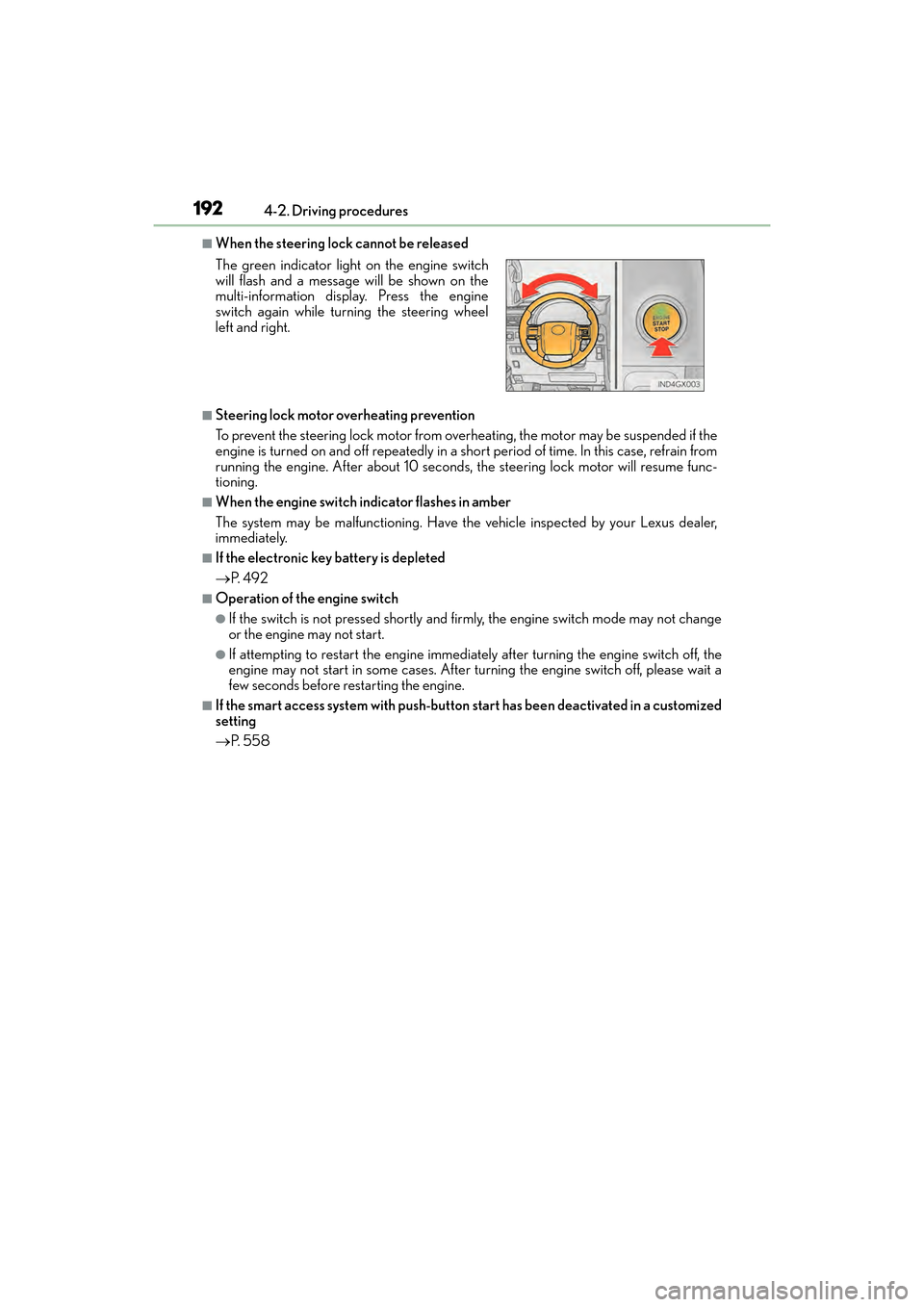
■When the steering lock cannot be released
■Steering lock motor overheating prevention
To prevent the steering lock motor from overheating, the motor may be suspended if the
engine is turned on and off repeatedly in a short period of time. In this case, refrain from
running the engine. After about 10 seconds, the steering lock motor will resume func-
tioning.
■When the engine switch indicator flashes in amber
The system may be malfunctioning. Have the vehicle inspected by your Lexus dealer,
immediately.
■If the electronic key battery is depleted
→
P. 4 9 2
■Operation of the engine switch
●If the switch is not pressed shortly and firmly, the engine switch mode may not change
or the engine may not start.
●If attempting to restart the engine immediately after turning the engine switch off, the
engine may not start in some cases. After turning the engine switch off, please wait a
few seconds before restarting the engine.
■If the smart access system with push-button start has been deactivated in a customized
setting
→ P. 5 5 8
The green indicator light
on the engine switch
will flash and a message will be shown on the
multi-information display. Press the engine
switch again while turning the steering wheel
left and right.
GX460_OM_OM60F68U_(U).book Page 192 Wednesday, June 8, 2016 6:37 PM
Page 195 of 644

GX 460 _O M_ OM6 0F 6 8U _(U )
1934-2. Driving procedures
4
Driving
CAUTION
■When starting the engine
Always start the engine while sitting in the driver’s seat. Do not depress the accelerator
pedal while starting the engine under any circumstances.
Doing so may cause an accident resulting in death or serious injury.
■Caution while driving
If engine failure occurs while the vehicle is moving, do not lock or open the doors until
the vehicle reaches a safe and complete stop. Activation of the steering lock in this cir-
cumstance may lead to an accident, resulting in death or serious injury.
■Stopping the engine in an emergency
If you want to stop the engine in an emergency while driving the vehicle, press and hold
the engine switch for more than 2 seconds, or press it briefly 3 times or more in succes-
sion. ( →P. 511)
However, do not touch the engine switch while driving except in an emergency. Turning
the engine off while driving will not cause loss of steering or braking control, but the
power assist to these systems will be lost. Th is will make it more difficult to steer and
brake, so you should pull over and stop the vehicle as soon as it is safe to do so.
NOTICE
■To prevent battery discharge
●Do not leave the engine switch in ACCESSORY or IGNITION ON mode for long
periods of time without the engine running.
●If the indicator on the engine switch is illuminated, the engine switch is not off. When
exiting the vehicle, always check that the engine switch is off.
●Do not stop the engine when the shift lever is in a position other than P. If the engine is
stopped in another shift lever position, the engine switch will not be turned off but
instead be turned to ACCESSORY mode. If the vehicle is left in ACCESSORY
mode, battery discharge may occur.
■When starting the engine
●Do not race a cold engine.
●If the engine becomes difficult to start or stalls frequently, have your vehicle checked
by your Lexus dealer immediately.
■Symptoms indicating a malfunction with the engine switch
If the engine switch seems to be operating somewhat differently than usual, such as the
switch sticking slightly, there may be a malf unction. Contact your Lexus dealer immedi-
ately.
GX460_OM_OM60F68U_(U).book Page 193 Wednesday, June 8, 2016 6:37 PM
Page 239 of 644

GX 460 _O M_ OM6 0F 6 8U _(U )
2374-5. Using the driving support systems
4
Driving
CAUTION
■Conditions under which the vehicle-to-vehicle distance control may not function cor-
rectly
Apply the brakes as necessary in the following conditions as the radar sensor may not
be able to correctly detect vehicles ahead, and a fatal or serious accident may result:
●When water or snow thrown up by the surrounding vehicles hinders the functioning
of the sensor
●When your vehicle is pointing upwards (caused by a heavy load in the luggage com-
partment etc.)
●When the road curves or when the lanes are narrow
●When steering wheel operation or your position in the lane is unstable
●When the vehicle ahead of you decelerates suddenly
■To ensure the sensor functions correctly
Do not do the following to the sensor or grille as doing so may cause the sensor not to
function correctly and could result in an accident:
●Sticking or attaching anything to them
●Leaving them dirty
●Disassembling or subjecting them to strong shocks
●Modifying or painting them
●Replacing them with non-genuine parts
■Handling the radar sensor
Observe the following to ensure the cruise control system can function effectively.
Otherwise, the system may not function correctly and could result in an accident.
●Keep the sensor and grille cover clean at all times.
Clean the sensor and grille cover with a soft cloth so you do not mark or damage
them.
●Do not subject the sensor or surrounding area to a strong impact.
If the sensor moves even slightly off positi on, the system may malfunction. If the sen-
sor or surrounding area is subject to a strong impact, always have the area inspected
and adjusted by your Lexus dealer.
●Do not disassemble the sensor.
●Do not attach accessories or stickers to th e sensor, grille cover or surrounding area.
●Do not modify or paint the sensor and grille cover.
●If the sensor needs to be replaced, contact your Lexus dealer.
GX460_OM_OM60F68U_(U).book Page 237 Wednesday, June 8, 2016 6:37 PM
Page 244 of 644
242
GX 460 _O M_ OM6 0F 6 8U _(U )4-5. Using the driving support systems
CAUTION
■Before using the LDA system
Do not rely solely on the LDA system. The LDA system does not drive the vehicle auto-
matically, nor does it reduce the amount of care you need to take. As such, the driver
must always assume full responsibility fo
r understanding his/her surroundings, for
operating the steering wheel to correct th e driving line, and for driving safely.
Inappropriate or negligent driving could lead to an accident.
■To avoid operating the LDA by mistake
Switch the LDA system off using the “LDA” switch when not in use.
■Situations unsuitable for LDA system
Do not use LDA system in any of the following situations.
Otherwise, the system may not function correctly and could result in an accident.
●When driving with tire chains, a spare tire, or similar equipment
●When driving with non-standard parts or aftermarket equipment installed (including
modified tires and suspensions, etc.).
●When there are objects or structures along the roadside that might be misinterpreted
as lane markers (such as guardrails, curb, reflector posts, etc.)
●When driving on snowy roads
●When pavement lane markers are difficult to see due to rain, snow, fog, sand, dirt, etc.
●When there are visible lines on the pavement from road repairs, or if the remains of
old lane markers are still visible on the road
●When driving in a lane other than the driving or passing lanes on a freeway or high-
way.
●When driving on a road with lane closures due to maintenance, or when driving in a
temporary lane
GX460_OM_OM60F68U_(U).book Page 242 Wednesday, June 8, 2016 6:37 PM
Page 263 of 644

GX 460 _O M_ OM6 0F 6 8U _(U )
2614-5. Using the driving support systems
4
Driving
CAUTION
■When using the rear view monitor system
The rear view monitor system is a supplemental device intended to assist the driver
when backing up. When backing up, be sure to check visually behind and all around
the vehicle before proceeding.
Observe the following precautions to avoid an accident that could result in death or
serious injuries.
●Never depend on the rear view monitor system entirely when backing up. The image
and the position of the guide lines displayed on the screen may differ from the actual
state.
Use caution, just as you would when backing up any vehicle.
●Be sure to back up slowly, depressing the brake pedal to control vehicle speed.
●The instructions given are only guide lines.
When and how much to turn the steering wh eel will vary according to traffic condi-
tions, road surface conditions, vehicle condit ion, etc. when parking. It is necessary to
be fully aware of this before using the rear view monitor system.
●When parking, be sure to check that the parking space will accommodate your vehi-
cle before maneuvering into it.
●Do not use the rear view monitor system in the following cases:
• On icy or slick road surfaces, or in snow
•When using tire chains
• When the back door is not closed completely
• On roads that are not flat or straight, such as curves or slopes.
●In low temperatures, the screen may darken or the image may become faint. The
image could distort when the vehicle is moving, or you may become unable to see the
image on the screen. Be sure to check direct visually and with the mirrors all around
the vehicle before proceeding.
●If the tire sizes are changed, the position of the fixed guide lines displayed on the
screen may change.
●The camera uses a special lens. The distances between objects and pedestrians that
appear in the image displayed on the scre en will differ from the actual distances.
( → P. 2 5 6 )
GX460_OM_OM60F68U_(U).book Page 261 Wednesday, June 8, 2016 6:37 PM
Page 268 of 644
266
GX 460 _O M_ OM6 0F 6 8U _(U )4-5. Using the driving support systems
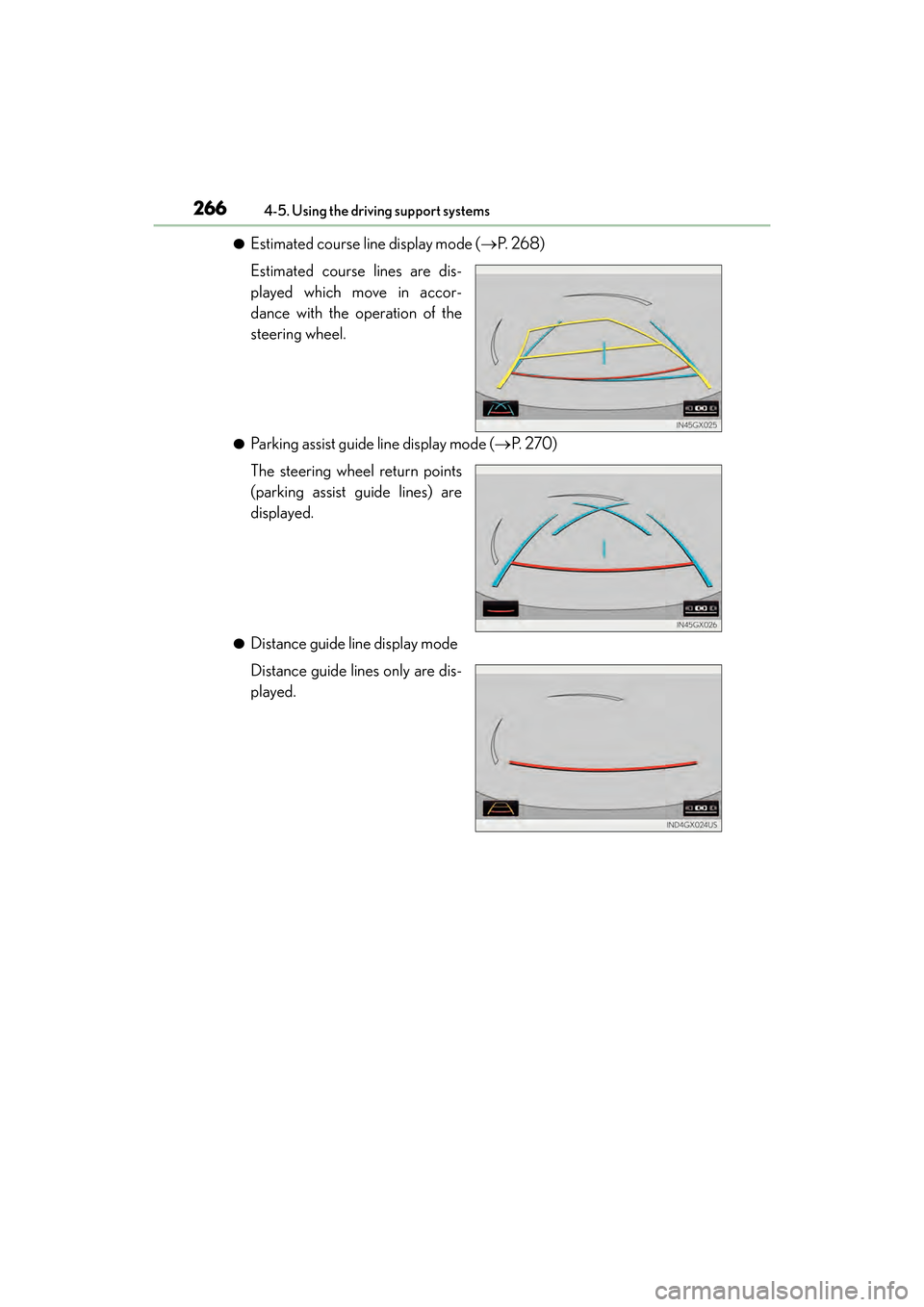
●Estimated course line display mode (
→P. 2 6 8 )
Estimated course lines are dis-
played which move in accor-
dance with the operation of the
steering wheel.
●Parking assist guide line display mode ( →P. 2 7 0 )
The steering wheel return points
(parking assist guide lines) are
displayed.
●Distance guide line display mode
Distance guide lines only are dis-
played.
GX460_OM_OM60F68U_(U).book Page 266 Wednesday, June 8, 2016 6:37 PM
Page 269 of 644
GX 460 _O M_ OM6 0F 6 8U _(U )
2674-5. Using the driving support systems
4
Driving
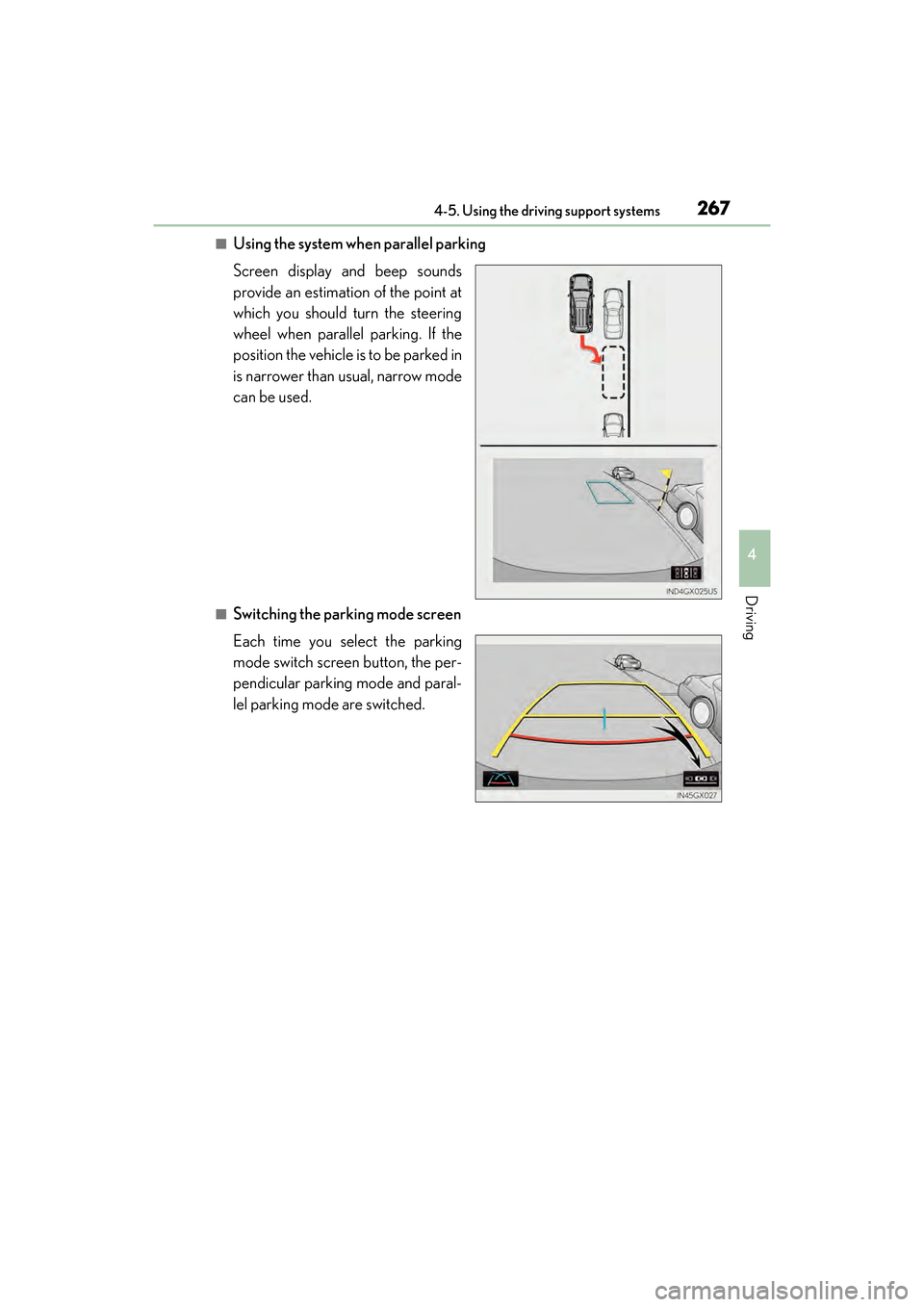
■Using the system when parallel parking
Screen display and beep sounds
provide an estimation of the point at
which you should turn the steering
wheel when parallel parking. If the
position the vehicle is to be parked in
is narrower than usual, narrow mode
can be used.
■Switching the parking mode screen
Each time you select the parking
mode switch screen button, the per-
pendicular parking mode and paral-
lel parking mode are switched.
GX460_OM_OM60F68U_(U).book Page 267 Wednesday, June 8, 2016 6:37 PM