fuel Lexus GX460 2019 / LEXUS 2019 GX460 (OM60Q84U) User Guide
[x] Cancel search | Manufacturer: LEXUS, Model Year: 2019, Model line: GX460, Model: Lexus GX460 2019Pages: 636, PDF Size: 11.11 MB
Page 87 of 636
87
GX460_OM_OM60Q84U_(U)2. Instrument cluster
2
Instrument cluster
Gauges and meters
The units used on the speedometer may di
ffer depending on the target region.
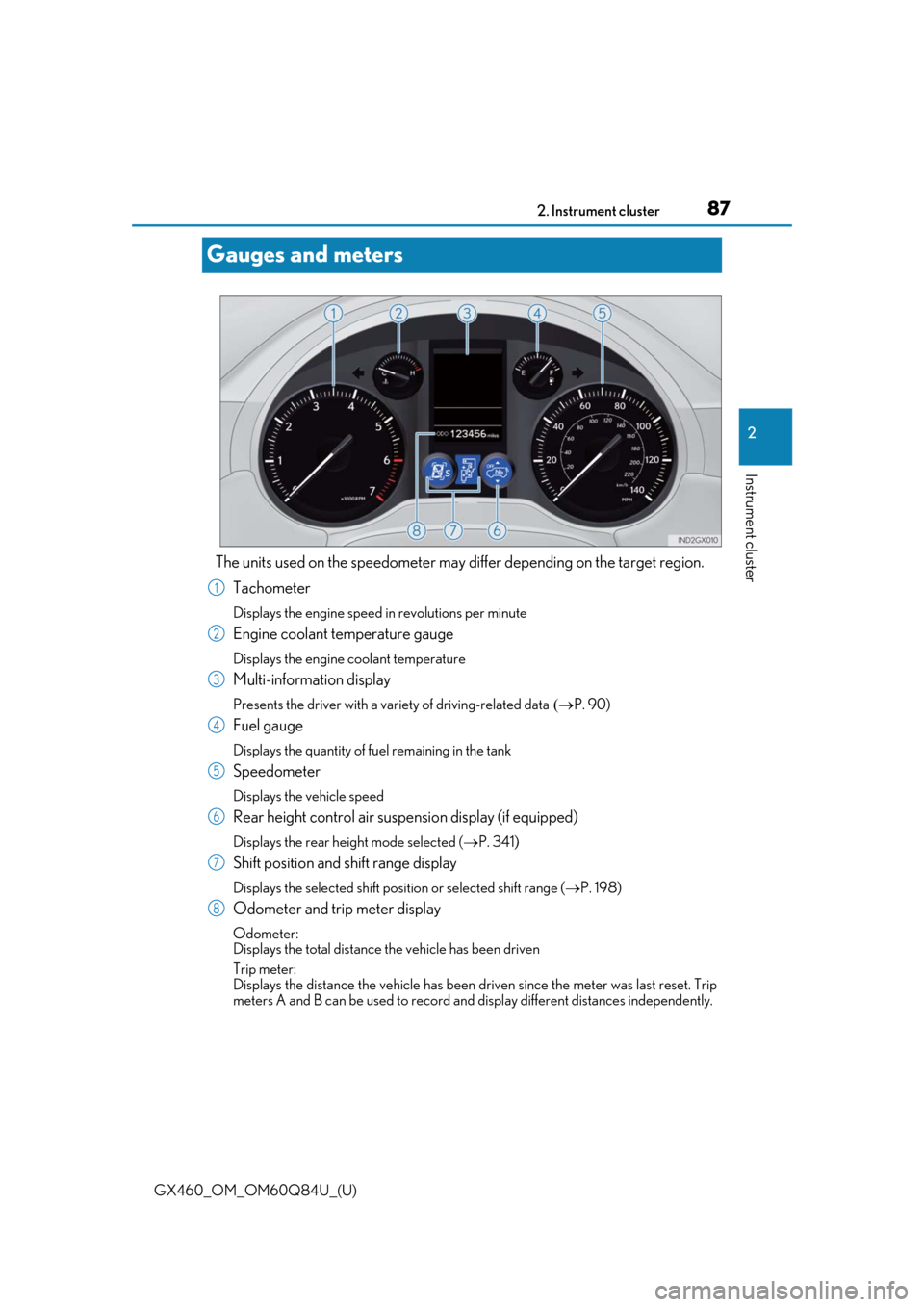
Tachometer
Displays the engine speed in revolutions per minute
Engine coolant temperature gauge
Displays the engine coolant temperature
Multi-information display
Presents the driver with a variety of driving-related data P. 90)
Fuel gauge
Displays the quantity of fuel remaining in the tank
Speedometer
Displays the vehicle speed
Rear height control air suspension display (if equipped)
Displays the rear height mode selected ( P. 341)
Shift position and shift range display
Displays the selected shift posi tion or selected shift range (P. 198)
Odometer and trip meter display
Odometer:
Displays the total distance the vehicle has been driven
Trip meter:
Displays the distance the vehi cle has been driven since the meter was last reset. Trip
meters A and B can be used to record an d display different distances independently.
1
2
3
4
5
6
7
8
Page 90 of 636
90
GX460_OM_OM60Q84U_(U)2. Instrument cluster
Multi-information display
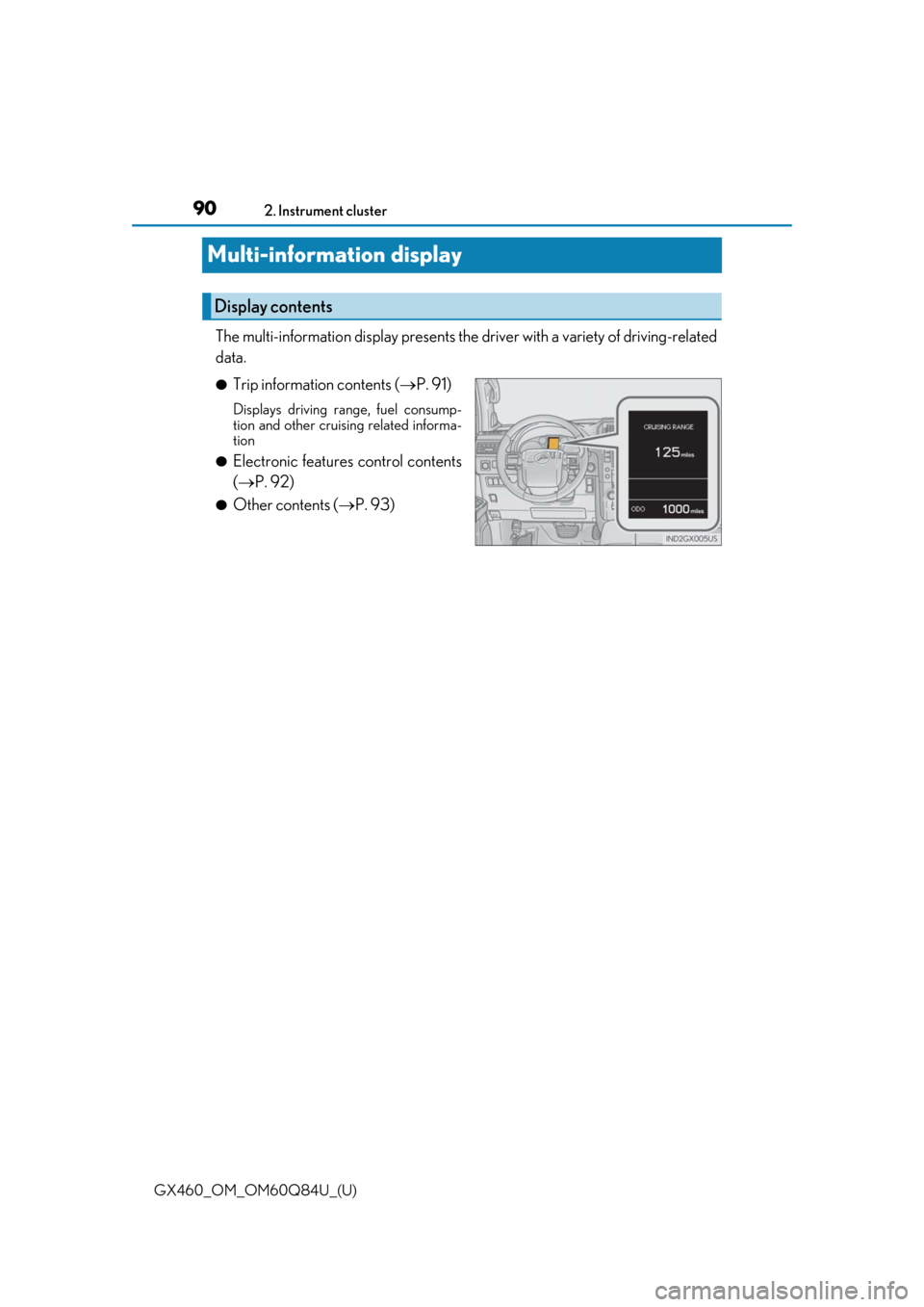
The multi-information display
presents the driver with a variety of driving-related
data.
●Trip information contents ( P. 91)
Displays driving range, fuel consump-
tion and other cruising related informa-
tion
●Electronic features control contents
(P. 92)
●Other contents ( P. 93)
Display contents
Page 91 of 636
GX460_OM_OM60Q84U_(U)
912. Instrument cluster
2
Instrument cluster
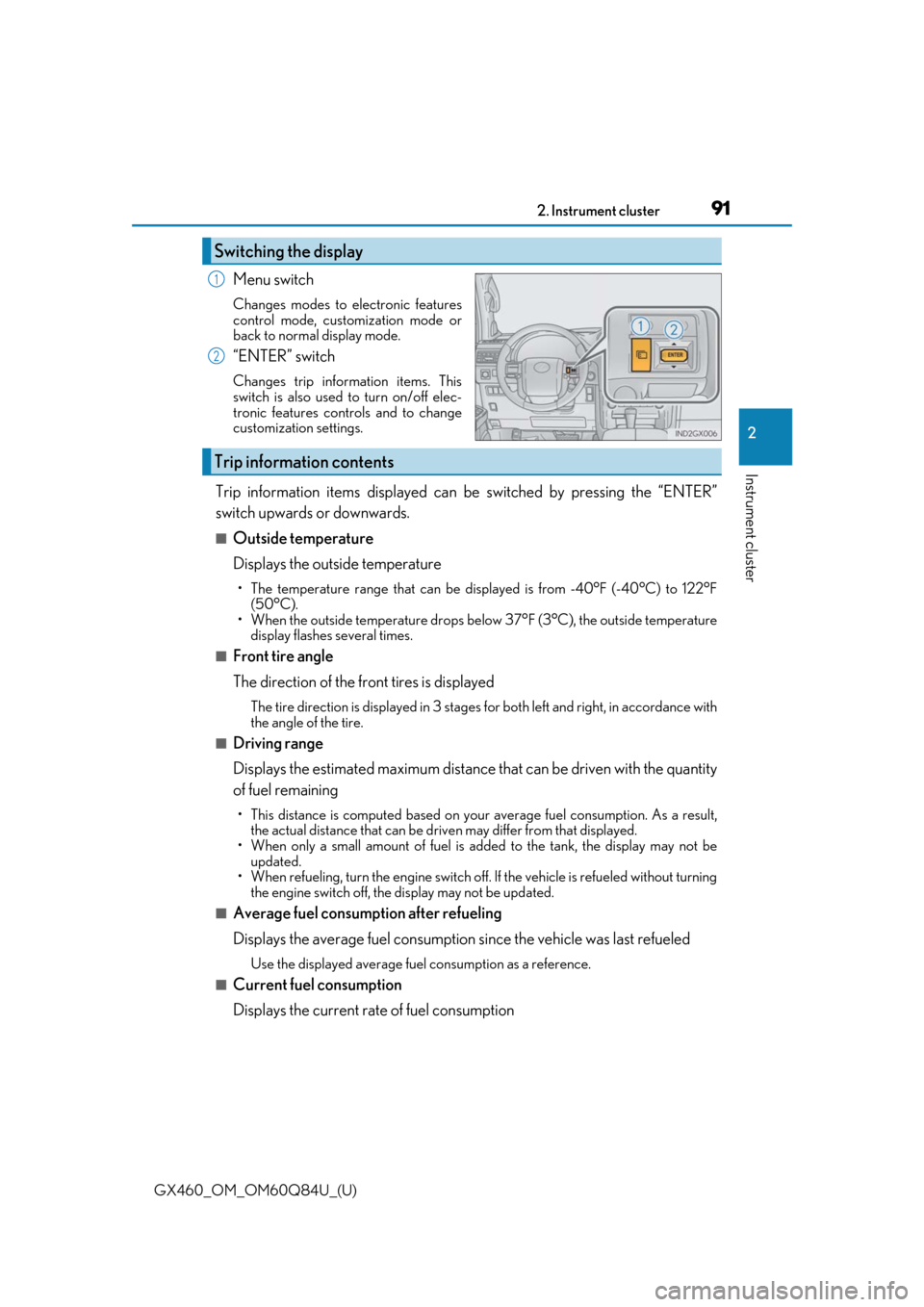
Menu switch
Changes modes to electronic features
control mode, customization mode or
back to normal display mode.
“ENTER” switch
Changes trip information items. This
switch is also used to turn on/off elec-
tronic features controls and to change
customization settings.
Trip information items displayed can be switched by pressing the “ENTER”
switch upwards or downwards.
■Outside temperature
Displays the outside temperature
• The temperature range that can be displayed is from -40°F (-40°C) to 122°F (50°C).
• When the outside temperature drops below 37°F (3°C), the outside temperature
display flashes several times.
■Front tire angle
The direction of the front tires is displayed
The tire direction is displaye d in 3 stages for both left and right, in accordance with
the angle of the tire.
■Driving range
Displays the estimated maximum distance that can be driven with the quantity
of fuel remaining
• This distance is computed based on your average fuel consumption. As a result, the actual distance that can be driv en may differ from that displayed.
• When only a small amount of fuel is added to the tank, the display may not be
updated.
• When refueling, turn the engi ne switch off. If the vehicle is refueled without turning
the engine switch off, the display may not be updated.
■Average fuel consumption after refueling
Displays the average fuel consumption since the vehicle was last refueled
Use the displayed average fuel consumption as a reference.
■Current fuel consumption
Displays the current rate of fuel consumption
Switching the display
1
2
Trip information contents
Page 92 of 636
92
GX460_OM_OM60Q84U_(U)2. Instrument cluster
■Average fuel consumption and Eco Driving Indicator Zone Display
(
P. 94)
Displays the average fuel consumption since the function was reset
• The function can be reset by pressing th e “ENTER” switch for longer than 1 second
when the average fuel consumption is displayed.
• Use the displayed average fuel consumption as a reference.
■Average vehicle speed
Displays the average vehicle speed sinc e the engine was started or the func-
tion was reset
The function can be reset by pressing th e “ENTER” switch for longer than 1 second
when the average vehicle speed is displayed.
■Elapsed time
Displays the elapsed time since the function was last reset
The function can be reset by pressing th e “ENTER” switch for longer than 1 second
when the elapsed time is displayed.
■Display off
A blank screen is displayed
■Multi-terrain Select (if equipped) ( P. 312)
■Intuitive parking assi st (if equipped) (P. 249)
■BSM (Blind Spot Monitor) (if equipped) ( P. 361)
■Second start mode ( P. 199)
Electronic features control contents
Page 94 of 636
94
GX460_OM_OM60Q84U_(U)2. Instrument cluster
■Eco Driving Indicator
●The vehicle speed is approximately 81 mph (130 km/h) or higher.
■Outside temperature display
In the following situations, the correct outside temperature may not be displayed, or the
display may take longer than normal to change:
●When stopped, or driving at low
speeds (less than 12 mph [20 km/h])
●When the outside temperature has changed suddenly (at the entrance/exit of a garage,
tunnel, etc.)
■When “--” or “E” is displayed
The system may be malfunctioning. Take your vehicle to your Lexus dealer.
■When disconnecting and reconnecting battery terminals
The following information data will be reset:
●Average fuel consumption after refueling
●Average fuel consumption
●Average vehicle speed
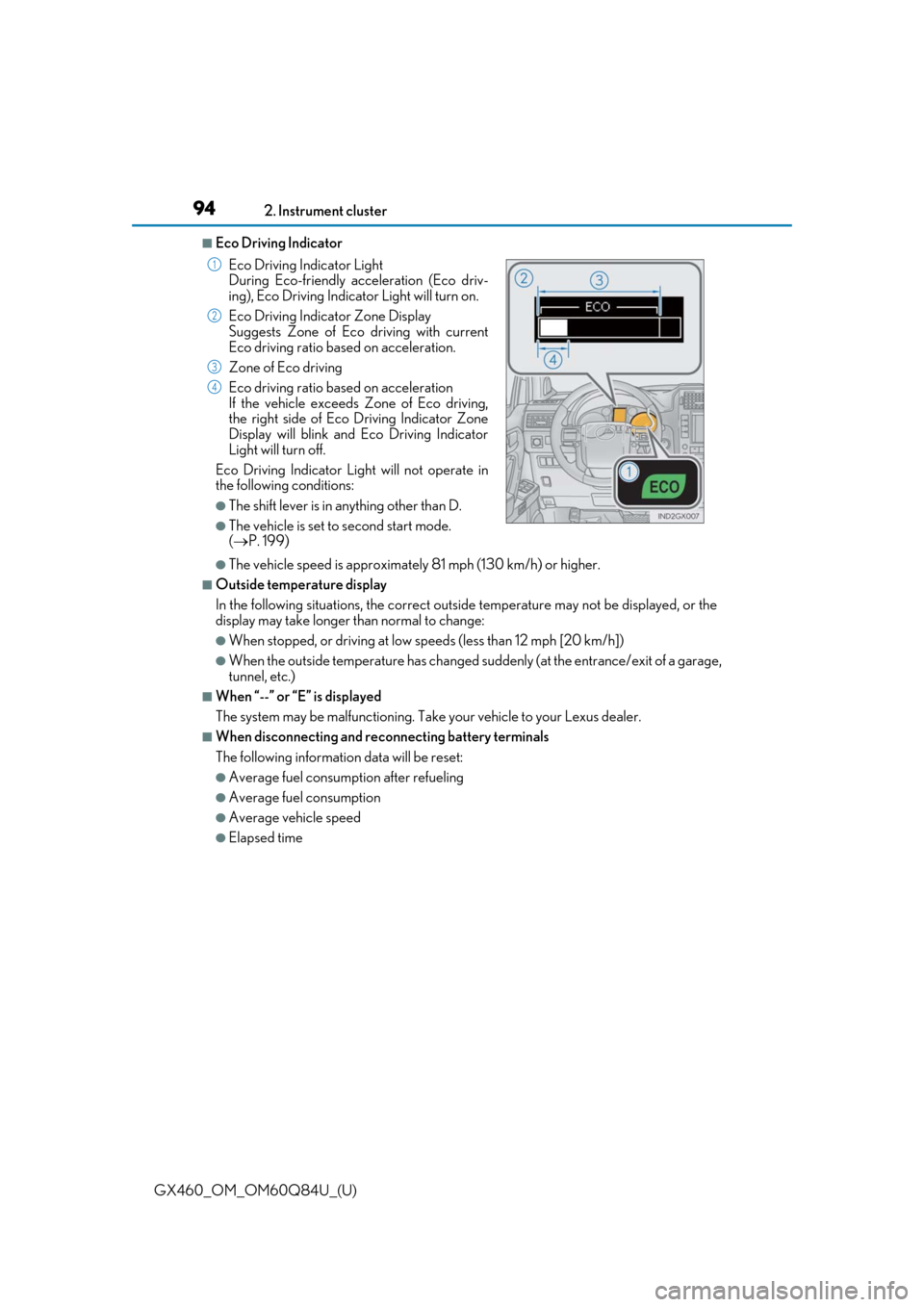
●Elapsed time Eco Driving Indicator Light
During Eco-friendly acceleration (Eco driv-
ing), Eco Driving Indicator Light will turn on.
Eco Driving Indicator Zone Display
Suggests Zone of Eco driving with current
Eco driving ratio based on acceleration.
Zone of Eco driving
Eco driving ratio based on acceleration
If the vehicle exceeds Zone of Eco driving,
the right side of Eco Driving Indicator Zone
Display will blink and Eco Driving Indicator
Light will turn off.
Eco Driving Indicator Light will not operate in
the following conditions:
●The shift lever is in anything other than D.
●The vehicle is set to second start mode.
( P. 199)
1
2
3
4
Page 96 of 636
96
GX460_OM_OM60Q84U_(U)2. Instrument cluster
Fuel consumption information
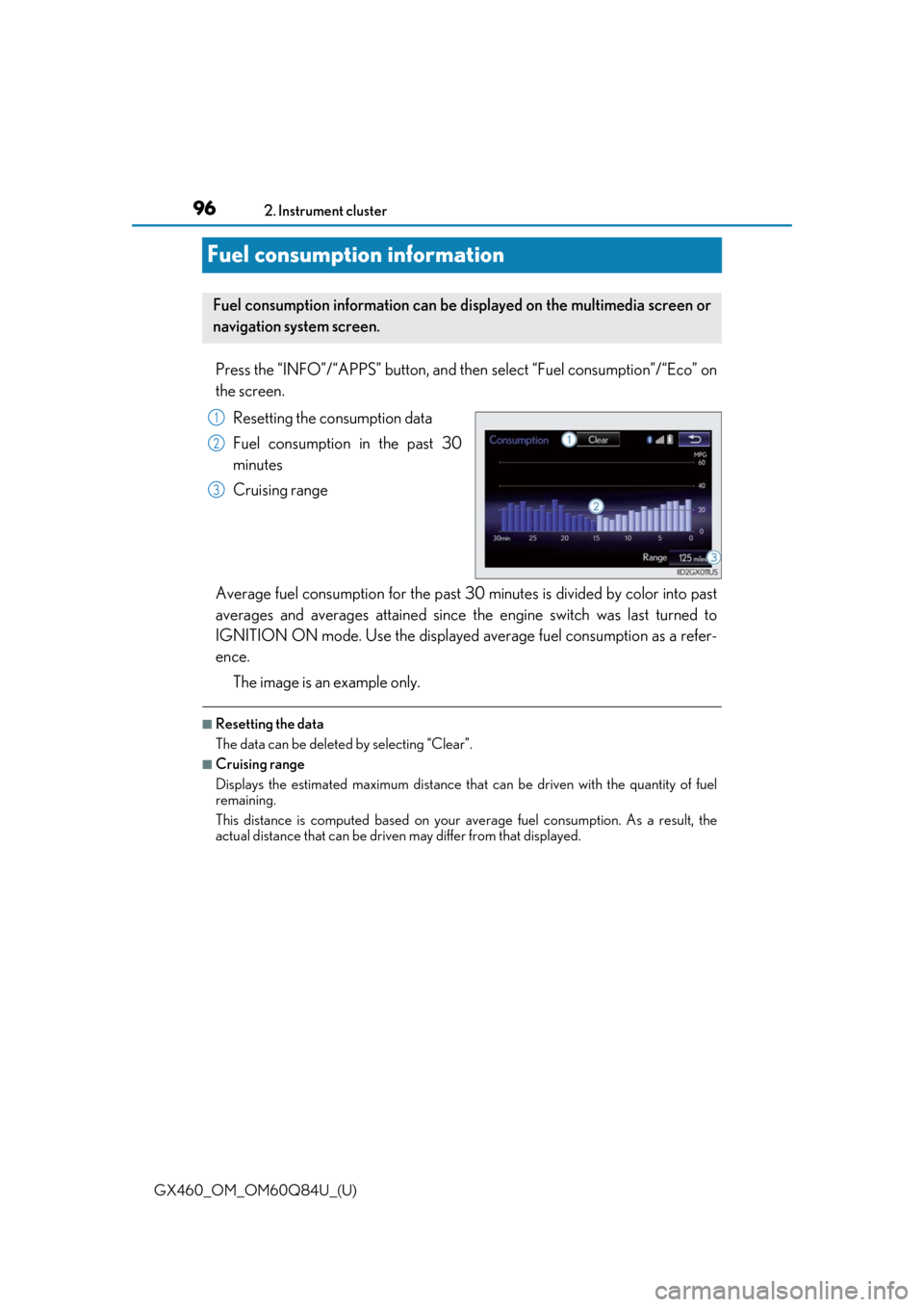
Press the “INFO”/“APPS” button, and then
select “Fuel consumption”/“Eco” on
the screen.
Resetting the consumption data
Fuel consumption in the past 30
minutes
Cruising range
Average fuel consumption for the past 30 minutes is divided by color into past
averages and averages attained since the engine switch was last turned to
IGNITION ON mode. Use the displayed average fuel consumption as a refer-
ence.
The image is an example only.
■Resetting the data
The data can be deleted by selecting “Clear”.
■Cruising range
Displays the estimated maximum distance that can be driven with the quantity of fuel
remaining.
This distance is computed based on your average fuel consumption. As a result, the
actual distance that can be driven may differ from that displayed.
Fuel consumption information can be di splayed on the multimedia screen or
navigation system screen.
1
2
3
Page 161 of 636

161
GX460_OM_OM60Q84U_(U)
4Driving
4-1. Before drivingDriving the vehicle ...................... 162
Cargo and luggage .................... 169
Vehicle load limits ....................... 173
Trailer towing (with towing hitch) ................... 174
Dinghy towing .............................. 192
4-2. Driving procedures Engine (ignition) switch ............ 193
Automatic transmission............ 198
Turn signal lever..........................204
Parking brake ............................. 205
4-3. Operating the lights and wipers
Headlight switch ........................ 206
Automatic High Beam .............. 210
Fog light switch ............................ 215
Windshield wipers and washer........................................... 217
Rear window wiper and washer.......................................... 222
Headlight cleaner switch ........ 224
4-4. Refueling Opening the fuel tank cap......225 4-5. Using the driving support
systems
Cruise control ............................. 229
Dynamic radar cruise control ......................................... 232
LDA (Lane Departure Alert) ........ 243
Intuitive parking assist .............. 249
Rear view monitor system ......258
Lexus parking assist monitor ........................................ 268
Wide view front & side monitor ........................................ 294
Multi-terrain Select .................... 312
Multi-terrain Monitor .................317
Rear height control air suspension .................................. 341
AVS (Adaptive Variable Suspension System)............... 345
Four-wheel drive system ........ 346
Crawl Control .............................350
Downhill assist control system ..........................................353
Driving assist systems ..............355
BSM (Blind Spot Monitor) ...... 361 • The Blind Spot Monitor function .................................... 366
• The Rear Cross Traffic Alert function ......................... 369
PCS (Pre-Collision system) .......... 372
4-6. Driving tips Winter driving tips ...................... 381
Off-road precautions ...............384
Page 163 of 636

GX460_OM_OM60Q84U_(U)
1634-1. Before driving
4
Driving
■When starting off on a uphill (vehicles with hill-start assist control system)
The hill-start assist control is available. ( P. 356)
■Driving in the rain
●Drive carefully when it is raining, because visibility will be reduced, the windows may
become fogged-up, and the road will be slippery.
●Drive carefully when it starts to rain, beca use the road surface will be especially slip-
pery.
●Refrain from high speeds when driving on an expressway in the rain, because there may
be a layer of water between the tires and th e road surface, preventing the steering and
brakes from operating properly.
■Engine speed while driving
In the following conditions, th e engine speed may become high while driving. This is due
to automatic up-shifting control or down-shi fting implementation to meet driving condi-
tions. It does not indica te sudden acceleration.
●The vehicle is judged to be driving uphill or downhill
●When the accelerator pedal is released
■Breaking in your new Lexus
To extend the life of the vehicle, observin g the following precautions is recommended:
●For the first 200 miles (300 km):
Avoid sudden stops.
●For the first 500 miles (800 km):
Do not tow a trailer.
●For the first 600 miles (1000 km):
• Do not drive at extremely high speeds.
• Avoid sudden acceleration.
• Do not drive continuously in the low gears.
• Do not drive at a constant speed for extended periods.
■Drum-in-disc type parking brake system
Your vehicle has a drum-in-disc type parking brake system.
This type of brake system needs bedding-down of the brake shoes periodically or when-
ever the parking brake shoes and/or drum are replaced.
Have your Lexus dealer, perform the bedding-down operation.
■Operating your vehicle in a foreign country
Comply with the relevant vehicle registration laws and confirm the availability of the cor-
rect fuel. ( P. 570)
■When turning off the engine
Emission system operating sounds may cont inue for a short time after the engine is
turned off. This is not a malfunction, and helps to ensure optimal performance of the
emission system.
Page 174 of 636
174
GX460_OM_OM60Q84U_(U)4-1. Before driving
Trailer towing (with towing hitch)
Contact your Lexus dealer for further in
formation about additional requirements
such as towing kits, etc.
Your vehicle is designed primarily as a passenger-and-load-carrying vehicle.
Towing a trailer can have an adverse im pact on handling, performance, brak-
ing, durability, and fuel consumption. Fo r your safety and the safety of others,
you must not overload your vehicle or trailer. You must also ensure that you
are using appropriate towing equipment, that the towing equipment has been
installed correctly and used properly, and that you employ the requisite driv-
ing habits.
Vehicle-trailer stability and braking pe rformance are affected by trailer sta-
bility, brake performance and setting, tr ailer brakes, the hitch and hitch sys-
tems (if equipped).
To tow a trailer safely, use extreme ca re and drive the vehicle in accordance
with your trailer’s characteri stics and operating conditions.
Lexus warranties do not apply to damage or malfunction caused by towing a
trailer for commercial purposes.
Page 208 of 636
208
GX460_OM_OM60Q84U_(U)4-3. Operating the lights and wipers
■Daytime running light system
●The daytime running lights illuminate using th
e same lights as the parking lights and illu-
minate brighter than the parking lights.
●To make your vehicle more visible to other drivers during daytime driving, the daytime
running lights turn on automatically when a ll of the following conditions are met. (The
daytime running lights are not designed for use at night.)
• The engine is running
• The parking brake is released
• The headlight switch is in the (type B only), or “AUTO”* position
*: When the surroundings are bright
The daytime running lights rema in on after they illuminate even if the parking brake is
set again.
●For the U.S.A.: Daytime running lights can be turned off by operating the switch.
●Compared to turning on the headlights, the daytime running light system offers greater
durability and consumes less electricity, so it can help improve fuel economy.
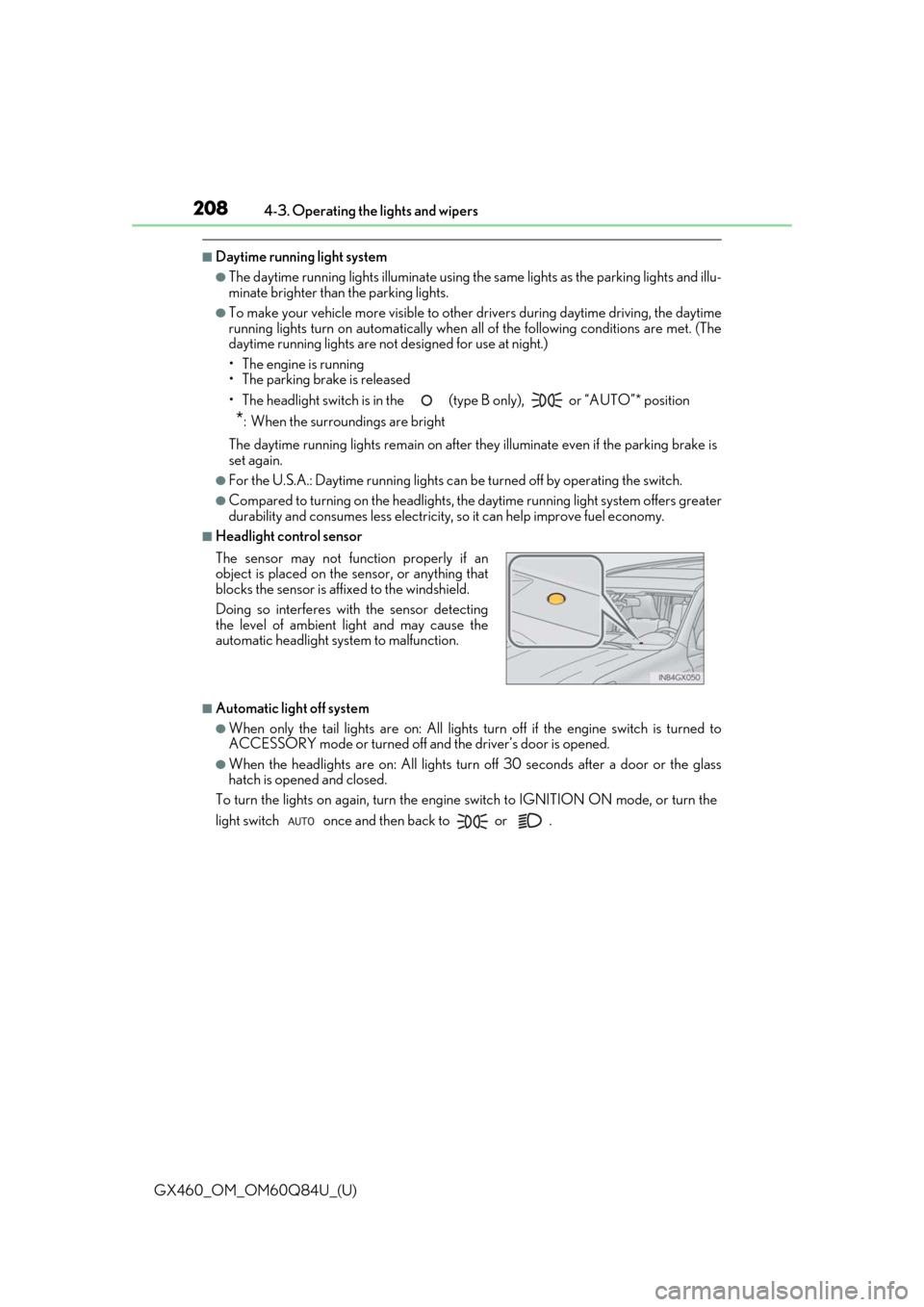
■Headlight control sensor
■Automatic light off system
●When only the tail lights are on: All lights turn off if the engine switch is turned to
ACCESSORY mode or turned off and the driver’s door is opened.
●When the headlights are on: A ll lights turn off 30 seconds after a door or the glass
hatch is opened and closed.
To turn the lights on again, turn the engine switch to IGNITION ON mode, or turn the
light switch once and then back to or . The sensor may not function properly if an
object is placed on the sensor, or anything that
blocks the sensor is affixed to the windshield.
Doing so interferes with the sensor detecting
the level of ambient light and may cause the
automatic headlight system to malfunction.